
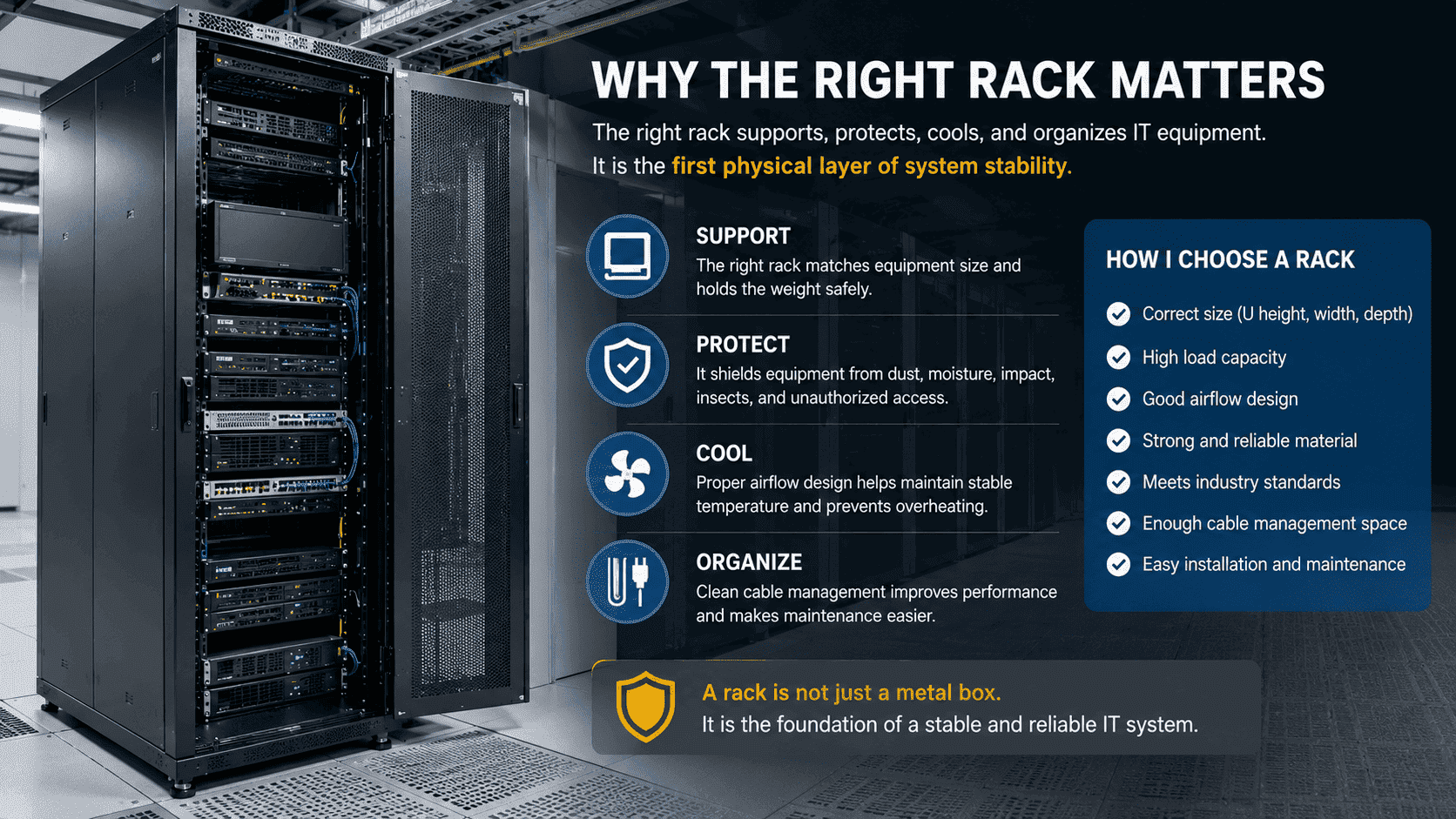
Why Does the Right Rack Matter?

I have seen good equipment fail because the rack was wrong. The problem starts small. It can become heat, loose parts, downtime, or safety risk.
-
How Can Rack Size Affect Equipment Installation?
I have seen installers force equipment into a rack. The device could fit, but it did not fit correctly. That small mistake can damage the system.
The right rack size lets 19-inch equipment install straight, fixed, and safe. I check height in U, depth, width, mounting hole position, and door clearance before installation. If the rack is too small or not standard, equipment may loosen, bend, overheat, or block the door.
What I check before I produce or supply a rack
I do not only ask if the equipment can be placed inside the cabinet. I ask if the equipment can be installed in a standard way. This is a big difference. A server may enter the rack body, but the rear cable may hit the back door. A switch may sit on a shelf, but it may not align with the mounting posts. A deep server may block airflow if the rack depth is too short.1
I use the 19-inch rack standard2 as the basic rule. The internal mounting width must match 19-inch rack equipment. The U height must be clear.3 The mounting hole spacing must be correct. The front and rear mounting posts must be placed with enough tolerance control.
| Size point | What I check | Why I check it |
|---|---|---|
| Width | 600mm or 800mm body width | I need space for equipment and cables |
| Depth | 600mm, 800mm, 1000mm, 1200mm | I need space for servers, cable bend, and airflow |
| Height | U number, like 22U, 32U, 42U | I need enough device positions |
| Mounting width | 19-inch standard | I need standard rack equipment to install correctly |
| Door clearance | Front and rear space | I need doors to close without pressing cables |
When the rack size is wrong, the installer may use force. The device may hang unevenly. The mounting ears may carry stress. The door may not close. The rear cables may bend too much. These problems may not stop the system on day one. They may appear after vibration, heat, daily maintenance, or cable movement. I prefer to solve the size problem before production, not after delivery.
Why Do Rack Material and Load Capacity Matter?
I have seen racks look similar from outside. I have also seen them behave very differently when heavy servers are installed.
Good material and strong structure protect equipment from bending, shaking, and long-term stress.4 I prefer thick cold-rolled steel, strong frame design, stable welding, and tested load capacity. A rack must carry real equipment weight, not only look neat in a room.
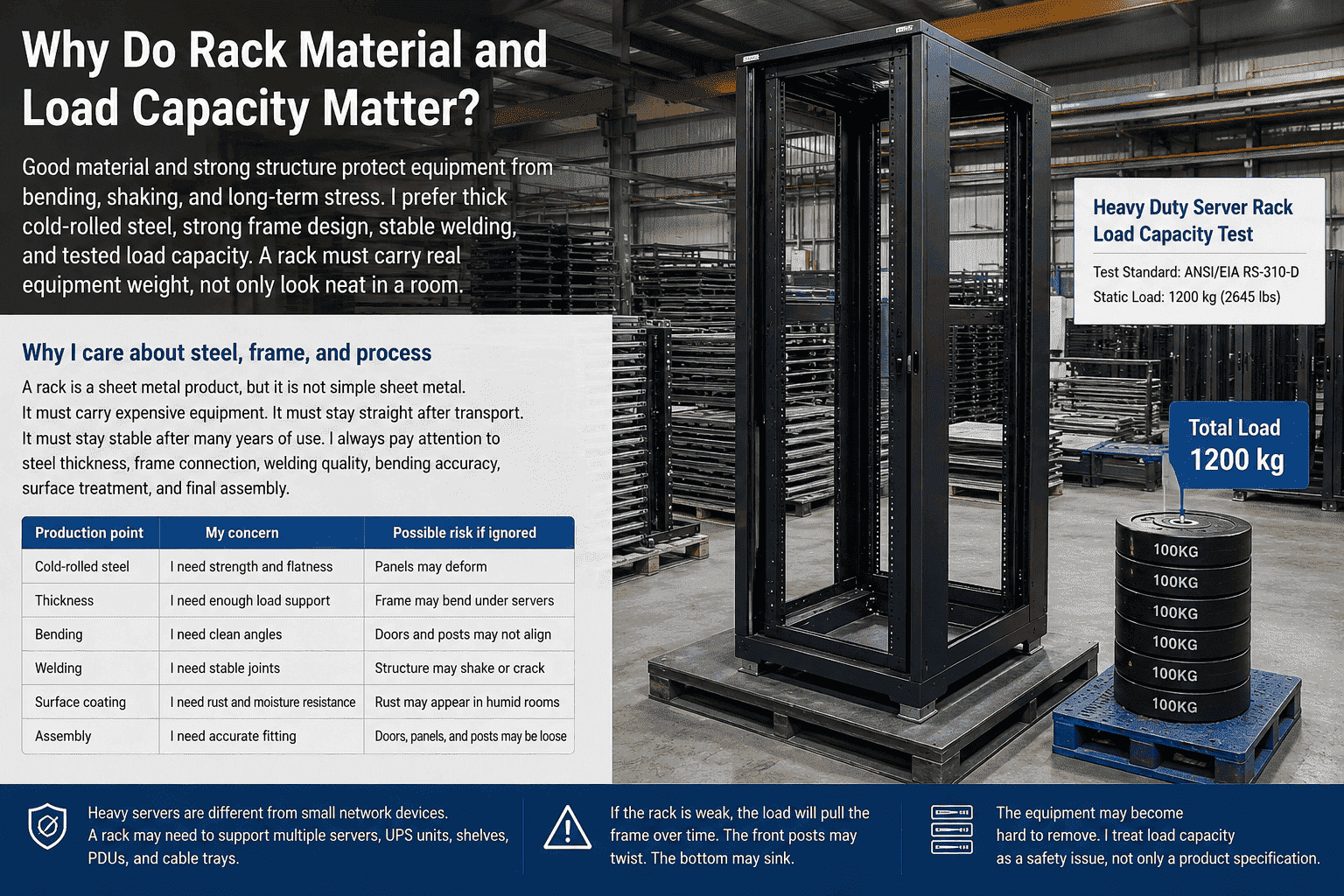
Why I care about steel, frame, and process
A rack is a sheet metal product, but it is not simple sheet metal. It must carry expensive equipment. It must stay straight after transport. It must stay stable after many years of use. I always pay attention to steel thickness, frame connection, welding quality, bending accuracy, surface treatment, and final assembly.
In my factory work, I see how each process affects the final rack. Raw material selection matters. Laser cutting accuracy matters. Bending angle matters. Welding strength matters. Polishing and pickling matter. Powder coating matters. Assembly accuracy matters. If one step is weak, the rack may still look acceptable, but the structure may not be safe enough.
| Production point | My concern | Possible risk if ignored |
|---|---|---|
| Cold-rolled steel | I need strength and flatness | Panels may deform |
| Thickness | I need enough load support | Frame may bend under servers |
| Bending | I need clean angles | Doors and posts may not align |
| Welding | I need stable joints | Structure may shake or crack |
| Surface coating | I need rust and moisture resistance | Rust may appear in humid rooms |
| Assembly | I need accurate fitting | Doors, panels, and posts may be loose |
Heavy servers are different from small network devices. A rack may need to support multiple servers, UPS units, shelves, PDUs, and cable trays. If the rack is weak, the load will pull the frame over time. The front posts may twist. The bottom may sink. The equipment may become hard to remove. I treat load capacity as a safety issue, not only a product specification.5
How Does Rack Ventilation Protect System Stability?
I have seen rooms where the air conditioner was working, but the equipment was still hot. The rack airflow was the hidden problem.
A good rack helps hot air leave and cool air enter.6 I check perforated front and rear doors, top and bottom cable openings, fan options, and clean internal space. Good airflow lowers heat stress and helps equipment run longer.
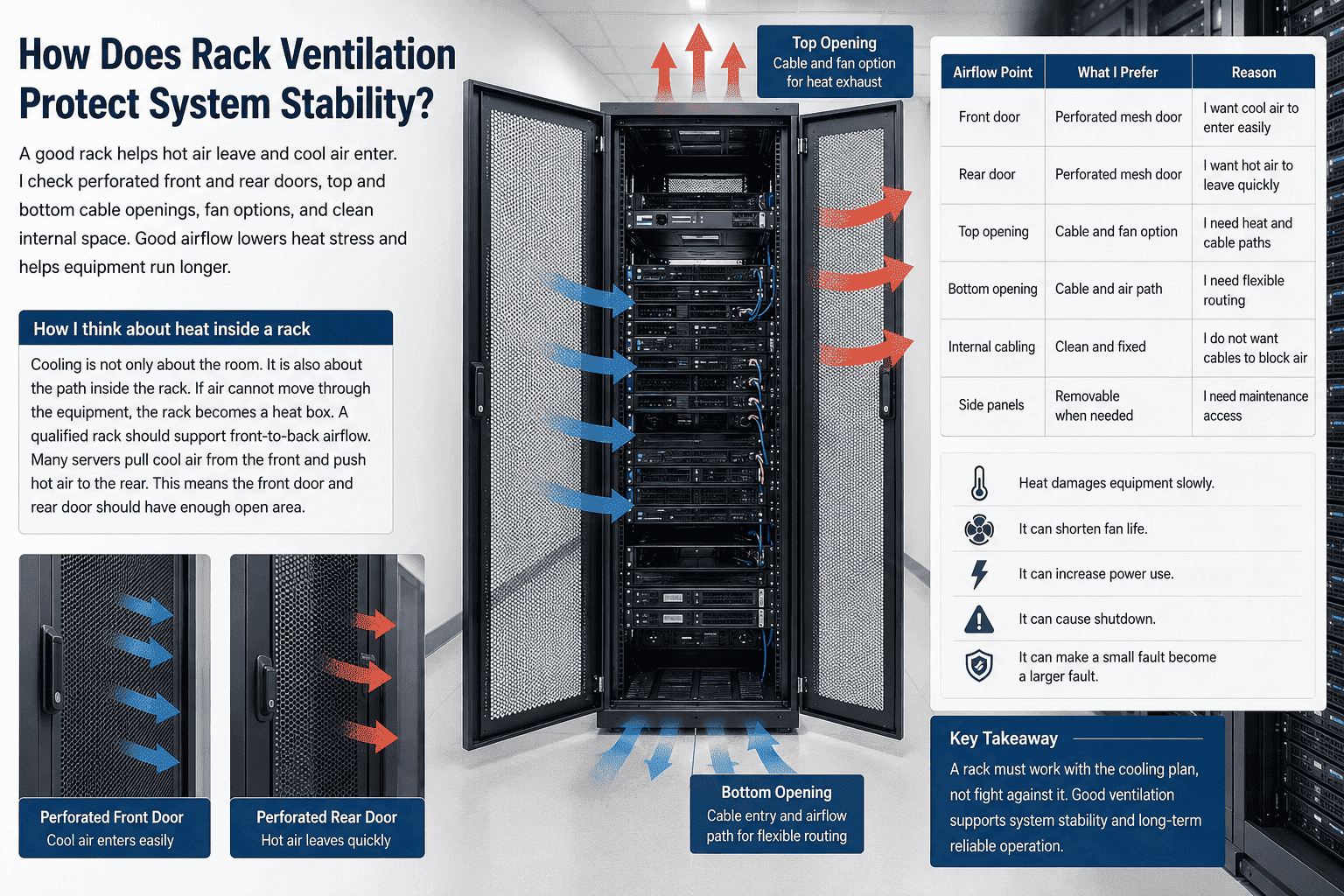
How I think about heat inside a rack
Cooling is not only about the room. It is also about the path inside the rack. If air cannot move through the equipment, the rack becomes a heat box. I have seen racks with poor door openings, blocked rear space, messy cables, and no top exhaust plan. The room temperature looked acceptable, but the device temperature was high.
A qualified rack should support front-to-back airflow. Many servers pull cool air from the front and push hot air to the rear.7 This means the front door and rear door should have enough open area. Mesh doors are important for many data center and server room projects. Cable openings should not block airflow. Fans can help in some smaller rooms or enclosed spaces, but the rack structure must first allow air to pass.
| Airflow point | What I prefer | Reason |
|---|---|---|
| Front door | Perforated mesh door | I want cool air to enter easily |
| Rear door | Perforated mesh door | I want hot air to leave quickly |
| Top opening | Cable and fan option | I need heat and cable paths |
| Bottom opening | Cable and air path | I need flexible routing |
| Internal cabling | Clean and fixed | I do not want cables to block air |
| Side panels | Removable when needed | I need maintenance access |
Heat damages equipment slowly.8 It can shorten fan life.9 It can increase power use. It can cause shutdown. It can make a small fault become a larger fault. I do not treat ventilation as an optional feature. I treat it as part of the rack design. A rack must work with the cooling plan, not fight against it.
What Standards and Accessories Should I Check Before Buying?
I have seen low-cost racks become expensive after installation. The missing parts, wrong holes, and poor cable plan created extra work.
I check international size standards, 19-inch mounting, U marking, posts, shelves, screws, PDU mounting, cable managers, fan trays, grounding, and door locks. These details make installation faster, safer, and easier to maintain.
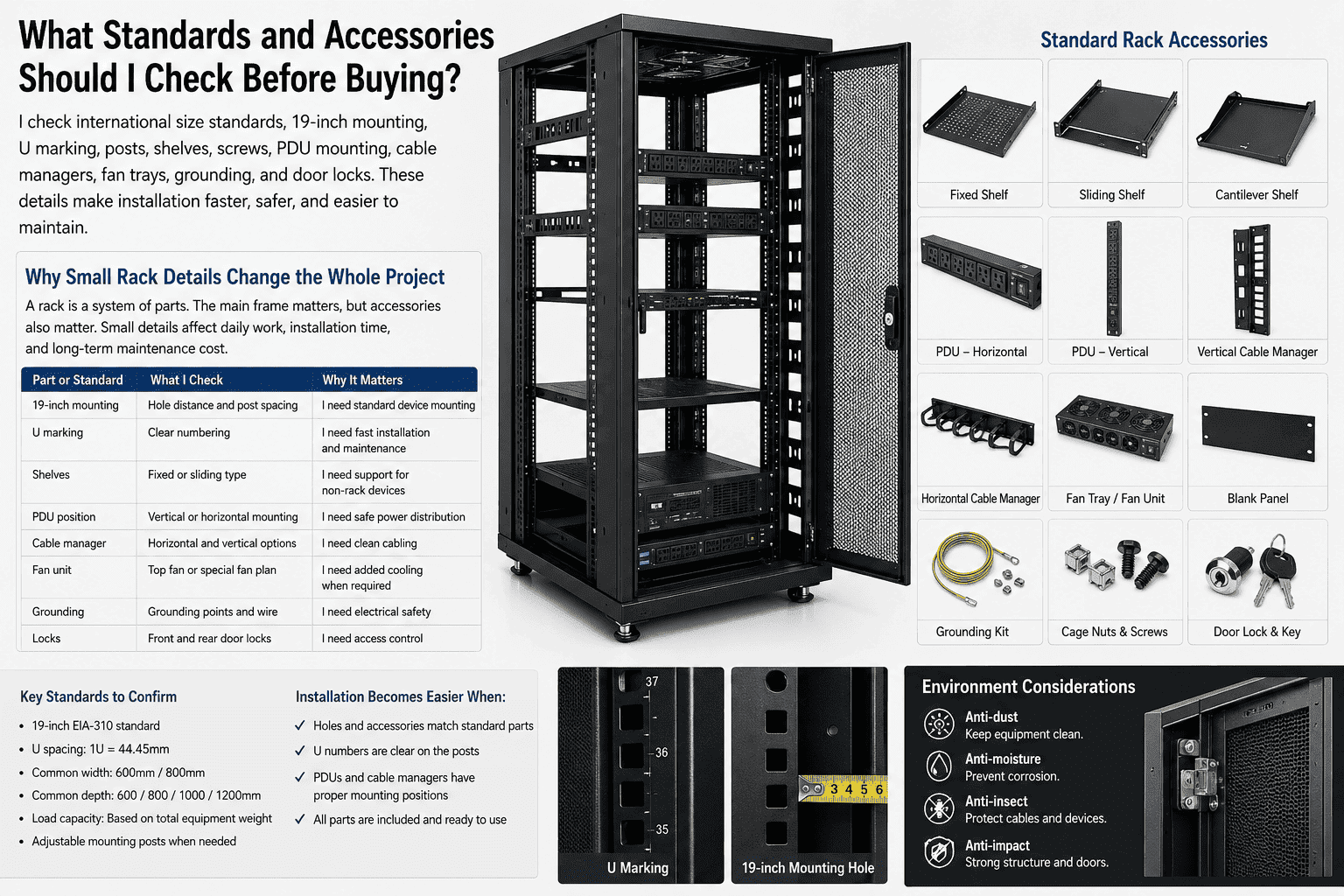
Why small rack details change the whole project
A rack is a system of parts. The main frame matters, but accessories also matter. I have seen projects delayed because the rack did not include correct cage nuts. I have seen cables hang across equipment because there were no vertical cable managers. I have seen PDUs installed in bad positions because the rack had no proper mounting holes. These are small details, but they affect daily work.
A standard rack should follow common international sizes. The outside width often uses 600mm or 800mm. The depth can be 600mm, 800mm, 1000mm, or 1200mm, based on equipment depth. The inside mounting should follow the 19-inch standard.10 The U scale should be clear. The posts should be adjustable when needed. The rack should support common parts.
| Part or standard | What I check | Why it matters |
|---|---|---|
| 19-inch mounting | Hole distance and post spacing | I need standard device mounting |
| U marking | Clear numbering | I need fast installation and maintenance |
| Shelves | Fixed or sliding type | I need support for non-rack devices |
| PDU position | Vertical or horizontal mounting | I need safe power distribution |
| Cable manager | Horizontal and vertical options | I need clean cabling |
| Fan unit | Top fan or special fan plan | I need added cooling when required |
| Grounding | Grounding points and wire11 | I need electrical safety |
| Locks | Front and rear door locks | I need access control |
I also check anti-dust, anti-moisture, anti-insect, and anti-impact needs. Some rooms are clean and stable. Some rooms are rough. Some projects need special mesh doors. Some need non-standard depth. Some need custom mounting holes. I prefer to understand the full site use before I confirm a rack. A rack with good accessories reduces installation stress and later maintenance cost.
How Should I Choose the Right Rack for a Real Project?
I have learned not to choose a rack by photo. I choose it by equipment list, site limits, load, airflow, cable plan, and future growth.
I choose the right rack by matching equipment size, quantity, depth, heat load, cable direction, installation method, safety needs, and maintenance space. I also leave room for growth. A rack should serve the system today and still support changes tomorrow.
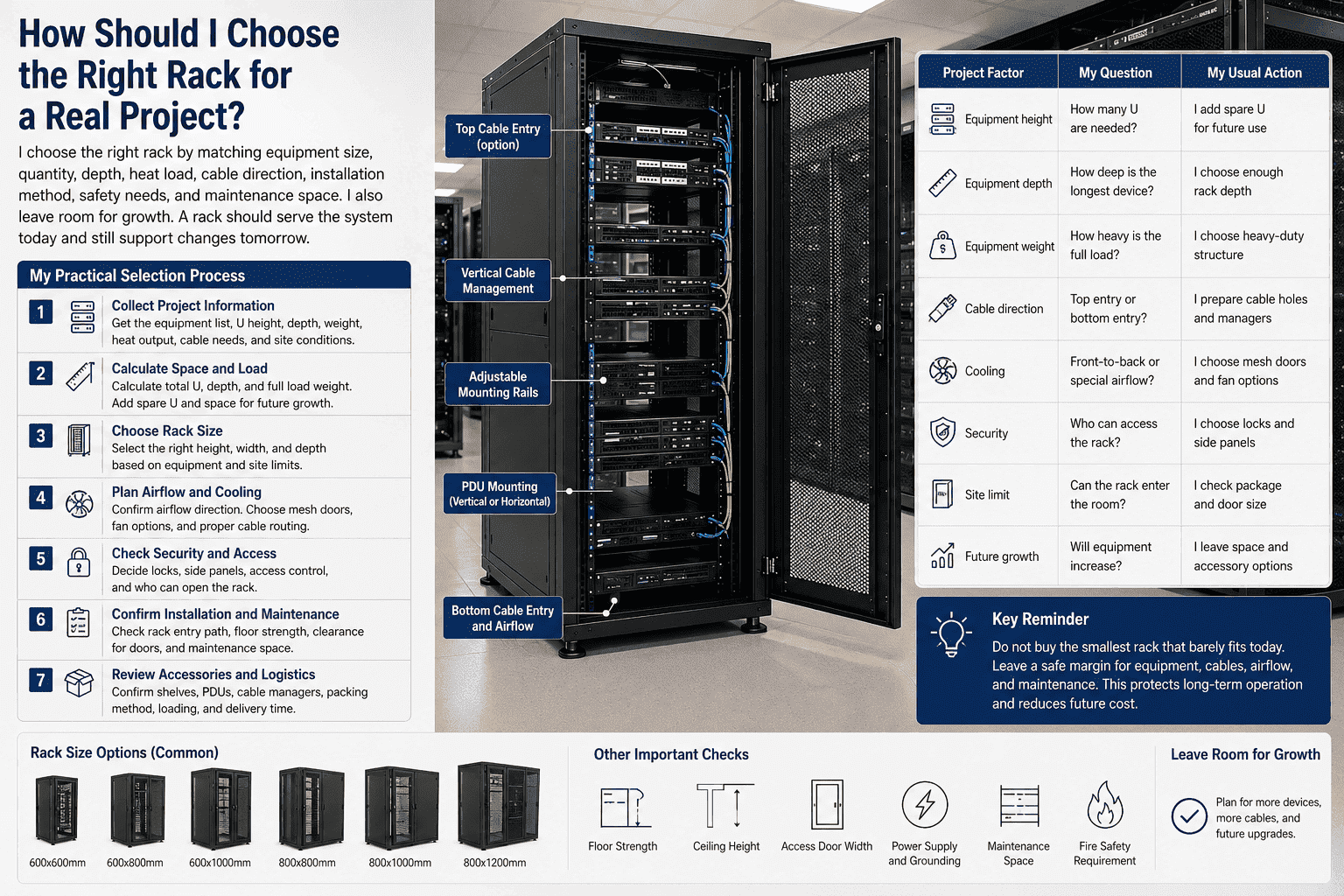
My practical selection process
When I help a customer choose a rack, I start with the equipment list. I ask for device quantity, height in U, depth, weight, front and rear cable needs, and heat output if known. I also ask about the room. I need to know the ceiling height, floor strength, access door width, cable direction, cooling method, and maintenance space. A rack is not chosen alone. It must match the site.
I then decide the rack height, width, and depth. If the project uses many cables, I often consider 800mm width because the side space helps cable routing. If the project uses deep servers, I consider 1000mm or 1200mm depth. If the project has heavy equipment, I check the frame and bottom structure carefully. If the customer needs batch overseas orders, I confirm packing, loading, standard parts, and repeatable production quality.
| Project factor | My question | My usual action |
|---|---|---|
| Equipment height | How many U are needed? | I add spare U for future use |
| Equipment depth | How deep is the longest device? | I choose enough rack depth |
| Equipment weight | How heavy is the full load? | I choose heavy-duty structure |
| Cable direction | Top entry or bottom entry? | I prepare cable holes and managers |
| Cooling | Front-to-back or special airflow? | I choose mesh doors and fan options |
| Security | Who can access the rack? | I choose locks and side panels |
| Site limit | Can the rack enter the room? | I check package and door size |
| Future growth | Will equipment increase? | I leave space and accessory options |
I do not recommend buying the smallest rack that can barely hold current equipment. That choice may look cheaper, but it can create problems later. The system may need one more switch. The cable count may increase. A deeper server may be added. Maintenance may need more hand space. I prefer a rack that fits the current plan and leaves a safe margin. This is not waste. It is a way to protect long-term operation.
Why Is a Rack More Than a Metal Cabinet?
I have heard people call a rack a simple iron cabinet. I understand why they say it. I still think that view is risky.
A rack is a safety cabin, cooling path, cable organizer, access control point, and compliance base for IT equipment. I treat it as infrastructure. It protects the devices inside and helps the whole network or data system stay stable.
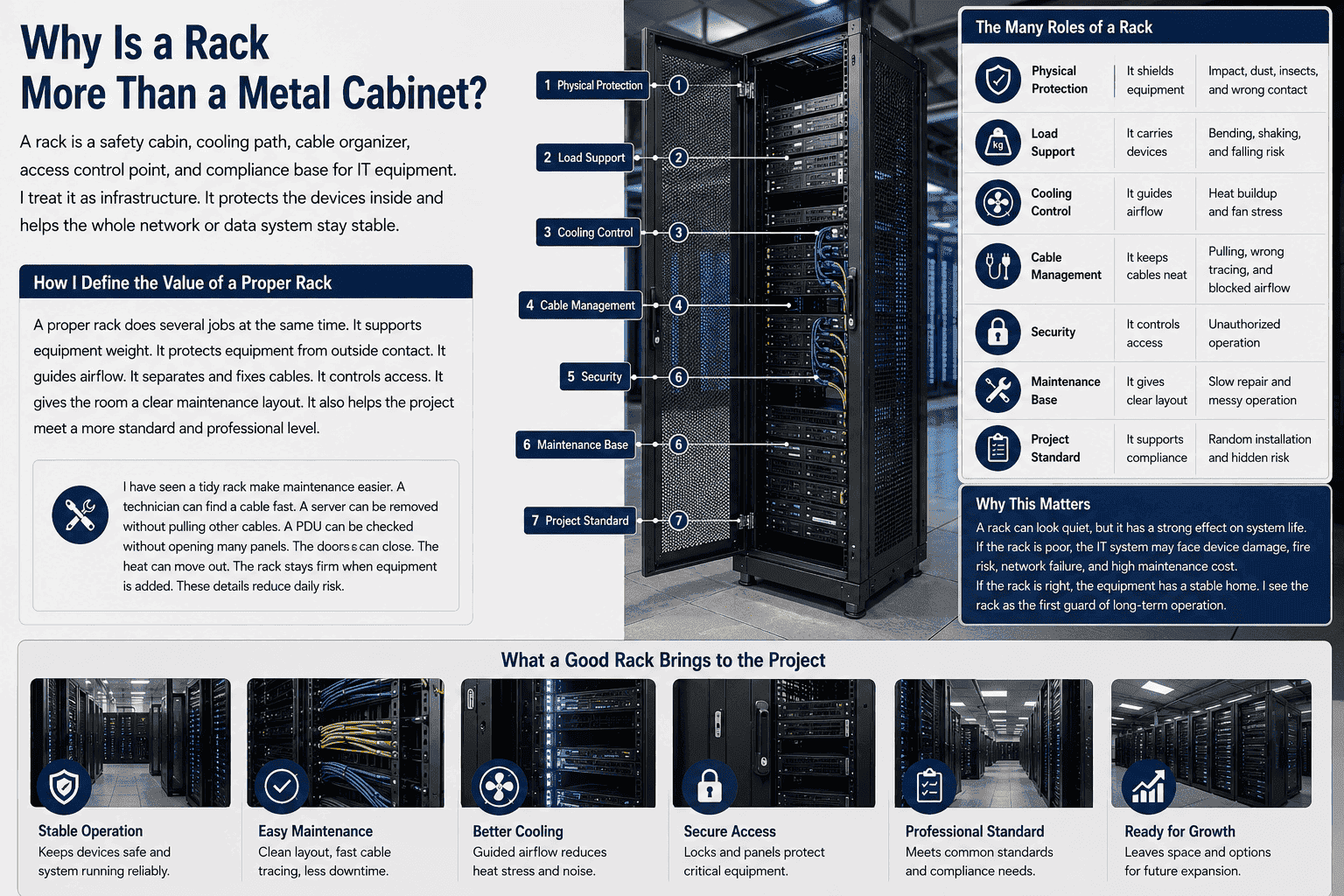
How I define the value of a proper rack
A proper rack does several jobs at the same time. It supports equipment weight. It protects equipment from outside contact. It guides airflow. It separates and fixes cables. It controls access. It gives the room a clear maintenance layout. It also helps the project meet a more standard and professional level.
I have seen a tidy rack make maintenance easier. A technician can find a cable fast. A server can be removed without pulling other cables. A PDU can be checked without opening many panels. The doors can close. The heat can move out. The rack stays firm when equipment is added. These details reduce daily risk.
| Rack role | What it does | What I want to avoid |
|---|---|---|
| Physical protection | It shields equipment | Impact, dust, insects, and wrong contact |
| Load support | It carries devices | Bending, shaking, and falling risk |
| Cooling control | It guides airflow | Heat buildup and fan stress |
| Cable management | It keeps cables neat | Pulling, wrong tracing, and blocked airflow |
| Security | It controls access | Unauthorized operation |
| Maintenance base | It gives clear layout | Slow repair and messy operation |
| Project standard | It supports compliance | Random installation and hidden risk |
A rack can look quiet, but it has a strong effect on system life. If the rack is poor, the IT system may face device damage, fire risk, network failure, and high maintenance cost. If the rack is right, the equipment has a stable home. I see the rack as the first guard of long-term operation.
Conclusion
I choose the right rack because stable equipment needs stable support. A good rack protects size fit, load, cooling, cables, safety, and future operation.
"ASHRAE TC9.9 Data Center Networking Equipment - Academia.edu", https://www.academia.edu/40756897/ASHRAE_TC9_9_Data_Center_Networking_Equipment_Issues_and_Best_Practices. Thermal-management guidance for data centers notes that adequate rack clearance and unobstructed cable paths are important for maintaining intended airflow through IT equipment. Evidence role: mechanism; source type: institution. Supports: The source should explain that rear clearance and cable management affect airflow through and around rack-mounted servers.. Scope note: This is contextual support for the airflow mechanism; it does not quantify the effect for every server model or rack depth. ↩
"19-inch rack - Wikipedia", https://en.wikipedia.org/wiki/19-inch_rack. The 19-inch rack format is a standardized equipment-mounting system defined by industry standards such as EIA-310 and IEC 60297. Evidence role: definition; source type: encyclopedia. Supports: The source should define the 19-inch rack format and identify recognized standards such as EIA-310 or IEC 60297.. Scope note: An encyclopedia source is suitable for the definition and standard names, while detailed engineering tolerances should be checked against the standards themselves. ↩
"Rack unit - Wikipedia", https://en.wikipedia.org/wiki/Rack_unit. A rack unit, commonly abbreviated U, is the standard vertical increment used to specify rack-mounted equipment height, with 1U equal to 44.45 mm. Evidence role: definition; source type: encyclopedia. Supports: The source should define the rack unit and show that rack height is commonly specified in U increments.. Scope note: This supports the measurement convention, not the suitability of any particular rack height for a given project. ↩
"Cabinet-Racks-Frames-Enclosures-(27-11-16)-1108.pdf", https://it.unm.edu/communications/design-guidelines/Cabinet-Racks-Frames-Enclosures-(27-11-16)-1108.pdf. Rack and enclosure standards address mechanical construction, loading, and stability because cabinets must safely support installed equipment under expected service conditions. Evidence role: general_support; source type: institution. Supports: The source should show that rack and cabinet standards include mechanical construction, loading, or stability requirements.. Scope note: This supports the need for structural adequacy generally, not the performance of a specific material thickness or manufacturing process. ↩
"1926.250 - General requirements for storage. - OSHA", http://www.osha.gov/laws-regs/regulations/standardnumber/1926/1926.250. Workplace safety guidance treats unstable or overloaded equipment and storage structures as hazards, supporting the view that rack load capacity is a safety consideration. Evidence role: general_support; source type: government. Supports: The source should support the general safety principle that heavy equipment and storage systems must be stable and used within rated limits.. Scope note: General workplace guidance may not be specific to server racks, so it should be used only to support the safety principle. ↩
"Move to a Hot Aisle/Cold Aisle Layout | ENERGY STAR", https://www.energystar.gov/products/data_center_equipment/16-more-ways-cut-energy-waste-data-center/move-hot-aislecold-aisle-layout. Data center thermal guidelines emphasize that rack-level airflow management helps deliver cool supply air to equipment intakes and remove hot exhaust air from the rack area. Evidence role: mechanism; source type: institution. Supports: The source should explain that rack layout and enclosure design affect the movement of cool supply air and hot exhaust air.. Scope note: This supports the airflow-management mechanism, not a measured performance gain for a particular rack design. ↩
"[PDF] Best Practices Guide for Energy-Efficient Data Center Design", https://www.energy.gov/sites/default/files/2024-07/best-practice-guide-data-center-design.pdf. ASHRAE data center thermal guidance describes the common arrangement in which rack-mounted IT equipment draws cooling air from the front and exhausts heated air toward the rear. Evidence role: mechanism; source type: institution. Supports: The source should support that many rack-mounted servers are designed with front air intakes and rear exhaust.. Scope note: The statement is a general design pattern and may not apply to equipment with side-to-side or other specialized airflow paths. ↩
"[PDF] Predicting the Reliability of - Electronic Equipment", https://www.waru.edu/sites/default/files/Migrated/CopDocuments/Pecht%20Nash%20IEEE%20Paper.pdf. Reliability research on electronic components shows that elevated operating temperatures can accelerate degradation mechanisms and increase the likelihood of failure over time. Evidence role: mechanism; source type: paper. Supports: The source should explain that higher operating temperatures can accelerate degradation mechanisms in electronic components.. Scope note: Temperature sensitivity varies by component, workload, and design margin, so the source would support the mechanism rather than a universal failure rate. ↩
"Health Assessment of Cooling Fan Bearings Using Wavelet ...", https://pmc.ncbi.nlm.nih.gov/articles/PMC3574677/. Studies of electronics cooling reliability report that higher operating temperatures can reduce fan service life by accelerating bearing, lubricant, or motor-related degradation. Evidence role: mechanism; source type: paper. Supports: The source should support that higher temperature can shorten fan life through bearing, lubricant, or motor-related degradation.. Scope note: The effect depends on fan design, bearing type, operating speed, and maintenance conditions. ↩
"19-inch rack - Wikipedia", https://en.wikipedia.org/wiki/19-inch_rack. The 19-inch rack standard specifies mounting dimensions intended to make compliant equipment and cabinets mechanically compatible. Evidence role: definition; source type: institution. Supports: The source should identify standardized 19-inch rack mounting dimensions used to ensure equipment compatibility.. Scope note: A standards citation supports dimensional compatibility, but equipment depth, airflow, and cable clearance still require separate project checks. ↩
"270526i.docx", https://www.cfm.va.gov/TIL/spec/270526i.docx. Telecommunications bonding and grounding standards specify bonding practices for racks and cabinets as part of electrical safety and equipment protection. Evidence role: expert_consensus; source type: institution. Supports: The source should support that telecommunications or IT racks are commonly bonded and grounded for electrical safety and system protection.. Scope note: Exact grounding requirements vary by jurisdiction, facility design, and applicable electrical code. ↩
