
What purpose does a patch panel serve?

Network cables can turn into a mess fast. I have seen small server rooms become hard to manage. One unclear cable can stop work.
A patch panel serves as a central wiring point.1 I connect office network cables to its ports, then link them to switches with short patch cords. It makes cabling clear, network changes faster, signal paths stable, and daily maintenance easier.
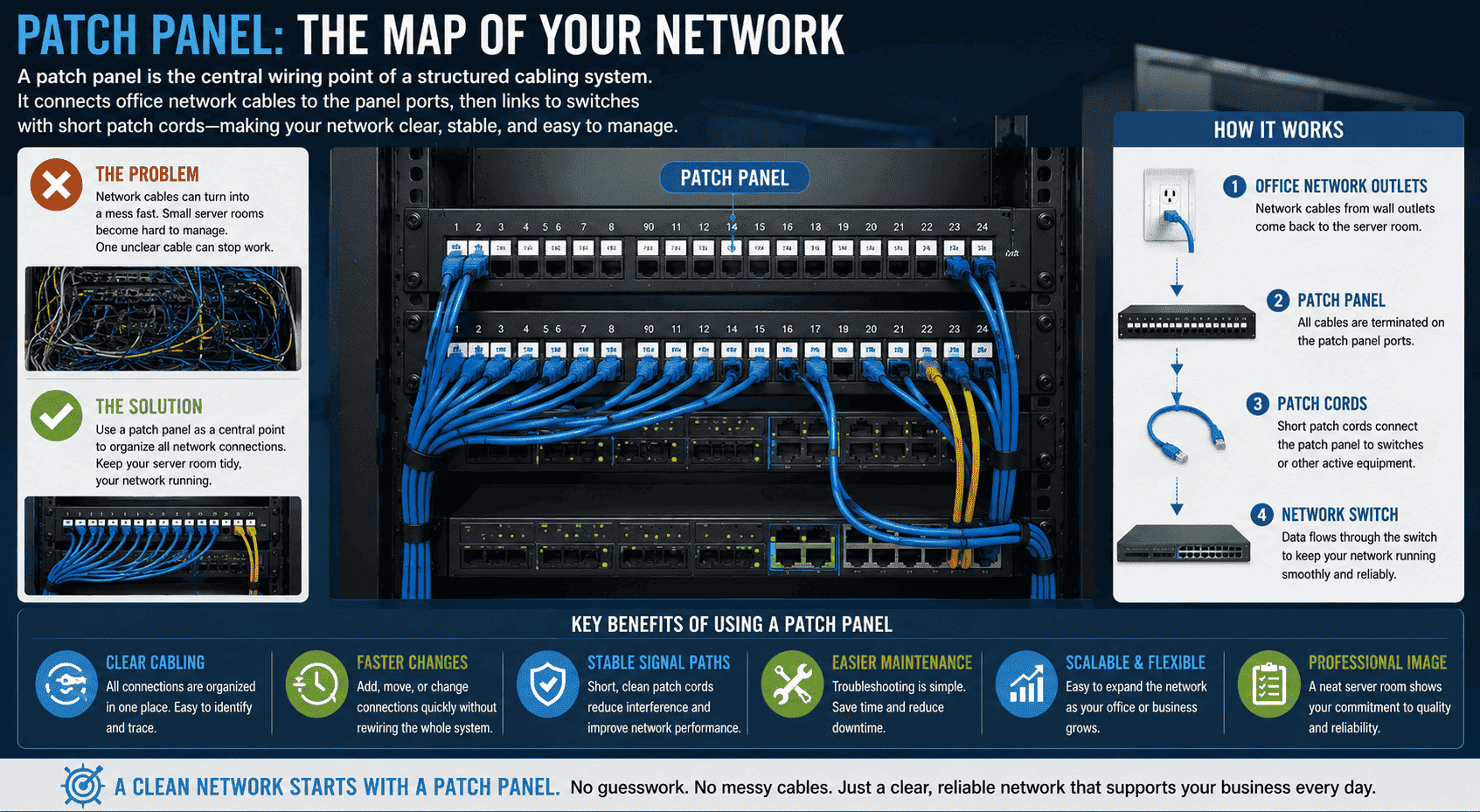
I do not treat a patch panel as a simple metal accessory. I treat it as the map of the whole office network.2 When many network points come back to one cabinet, I need one clear place to manage them. A patch panel gives me that place. It helps me avoid guesswork, messy wiring, and repeated cable pulling. If I want a cleaner server room, I start from the patch panel.
Why do I use a patch panel in an office server room?
Office cabling becomes painful when every cable looks the same. I have seen teams lose time because one port had no clear home.
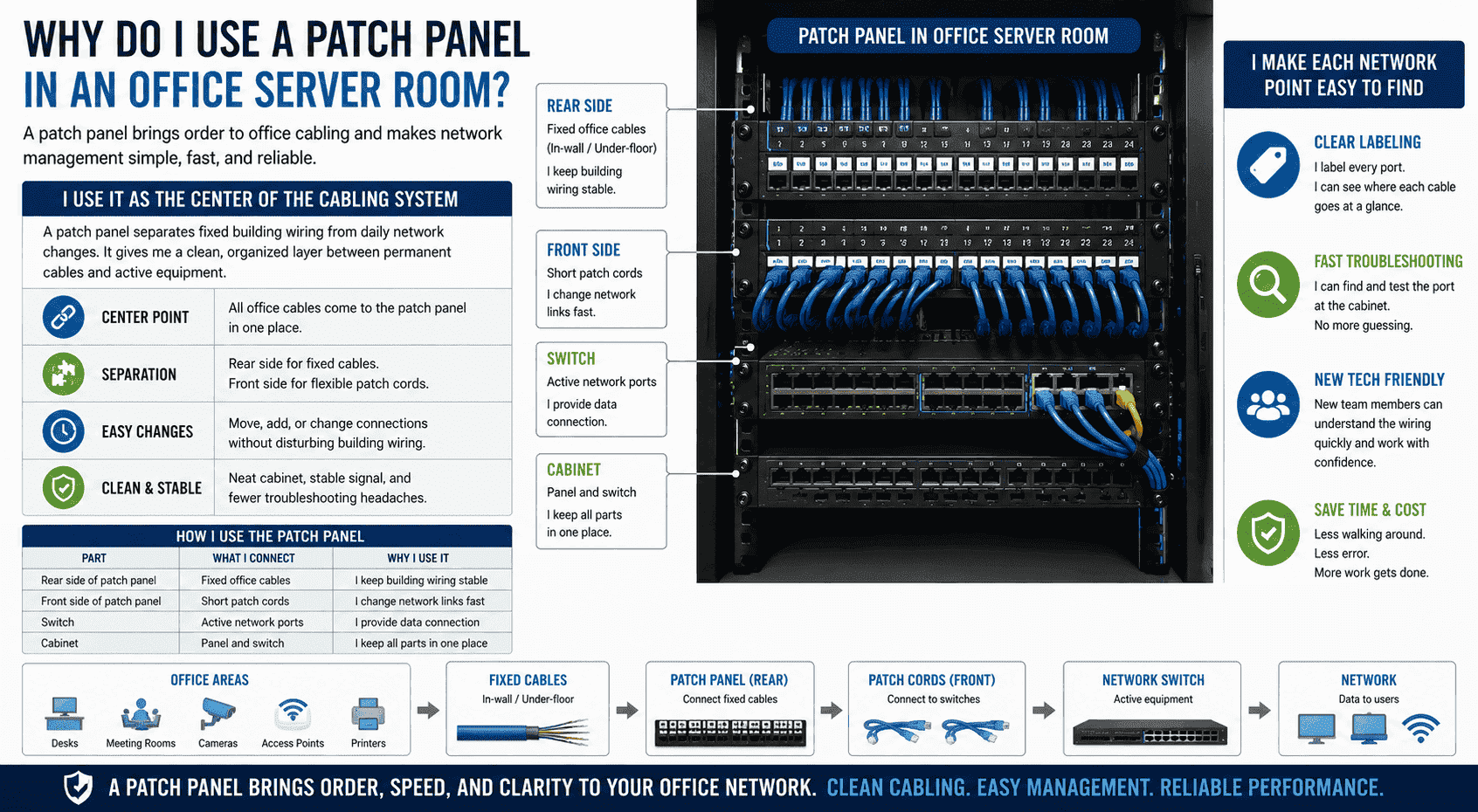
A patch panel lets me gather many office network cables into one clear point. Each workstation cable connects to one panel port.3 I can label ports, trace lines, and manage the network from the cabinet.
I use it as the center of the cabling system
In an office, I may have dozens or even hundreds of network points. Each desk, meeting room, camera, access point, and printer may need one cable. If these cables go straight into a switch, the cabinet becomes hard to read. If one person moves to another desk, I may need to change many things. A patch panel helps me separate fixed building wiring from daily network changes.4
I usually connect the long in-wall or under-floor cables to the rear side of the patch panel. I then use short patch cords on the front side to connect panel ports to switches. This structure gives me a clean layer between permanent cabling and active network equipment.
| Part | What I connect | Why I use it |
|---|---|---|
| Rear side of patch panel | Fixed office cables | I keep building wiring stable |
| Front side of patch panel | Short patch cords | I change network links fast |
| Switch | Active network ports | I provide data connection |
| Cabinet | Panel and switch | I keep all parts in one place |
I make each network point easy to find
I label every patch panel port. I can write “Room 101 Desk 01” or “Camera 03” on the label. When a port fails, I do not need to walk around the whole office first. I can check the cabinet, test the port, and follow the label. This saves time for maintenance.5 It also helps new technicians understand the wiring faster. I see this as the basic value of structured cabling.
How does a patch panel make moves and network changes easier?
Office layouts change. People move desks. New devices appear. Without a patch panel, I may need to pull cables again and again.
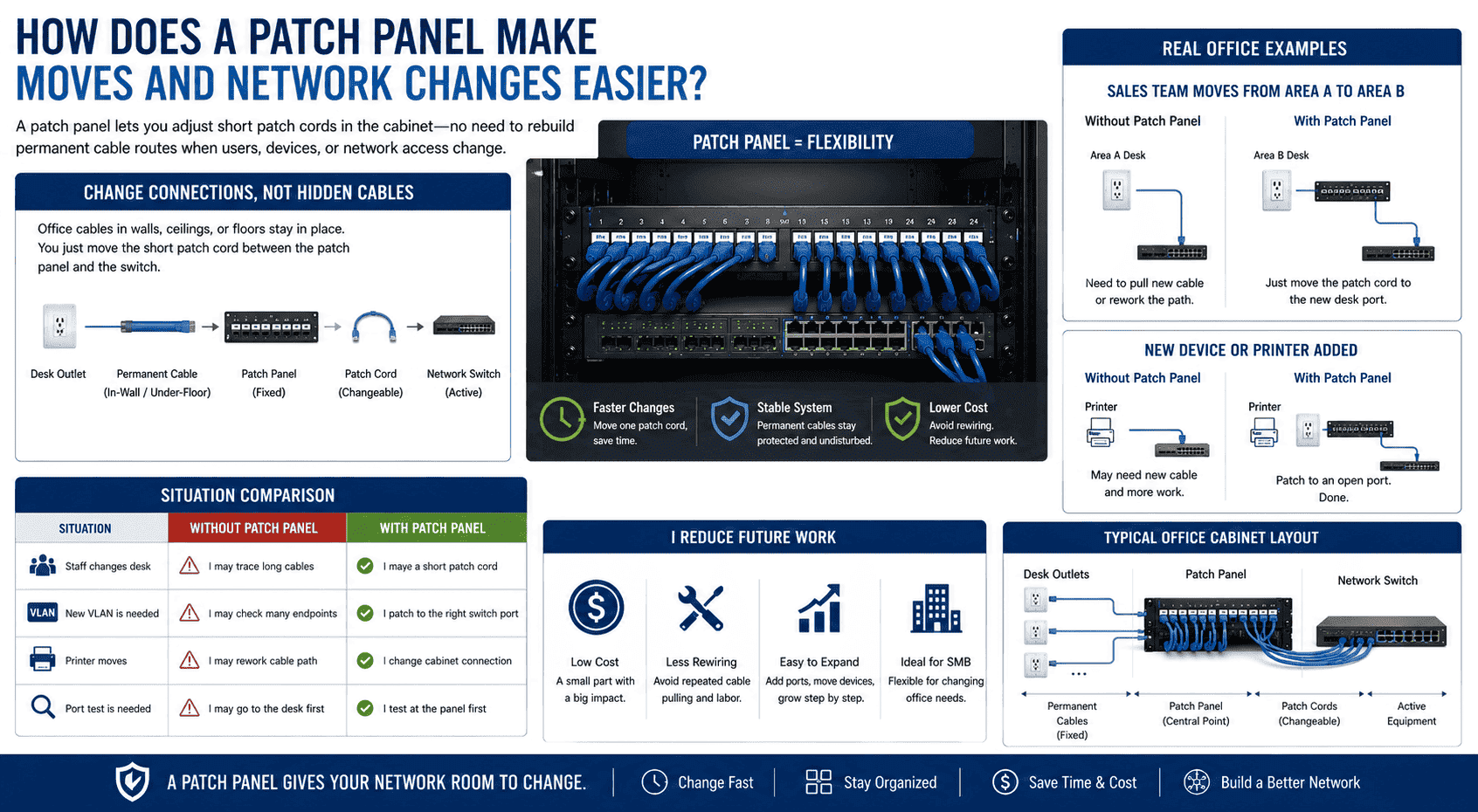
A patch panel makes moves and changes easier because I only adjust short patch cords in the cabinet.6 I do not need to rebuild the permanent cable route when a user changes location or network access.
I change connections without changing hidden cables
I like patch panels because they make office changes simple. In many offices, the cable from a desk to the server room is already hidden in walls, ceilings, or floors. I do not want to touch that cable unless I must. If I connect all hidden cables to a patch panel, I can keep them fixed. When I need to change a user's network, I only move one short patch cord between the patch panel and the switch.
For example, a sales team may move from Area A to Area B. I do not need to open floors or pull new cables at once. I can find the new desk port on the patch panel. I can connect that port to the correct switch. The work is faster, cleaner, and safer.
| Situation | Without patch panel | With patch panel |
|---|---|---|
| Staff changes desk | I may trace long cables | I move a short patch cord |
| New VLAN is needed | I may check many endpoints | I patch to the right switch port |
| Printer moves | I may rework cable path | I change cabinet connection |
| Port test is needed | I may go to the desk first | I test at the panel first |
I reduce future work
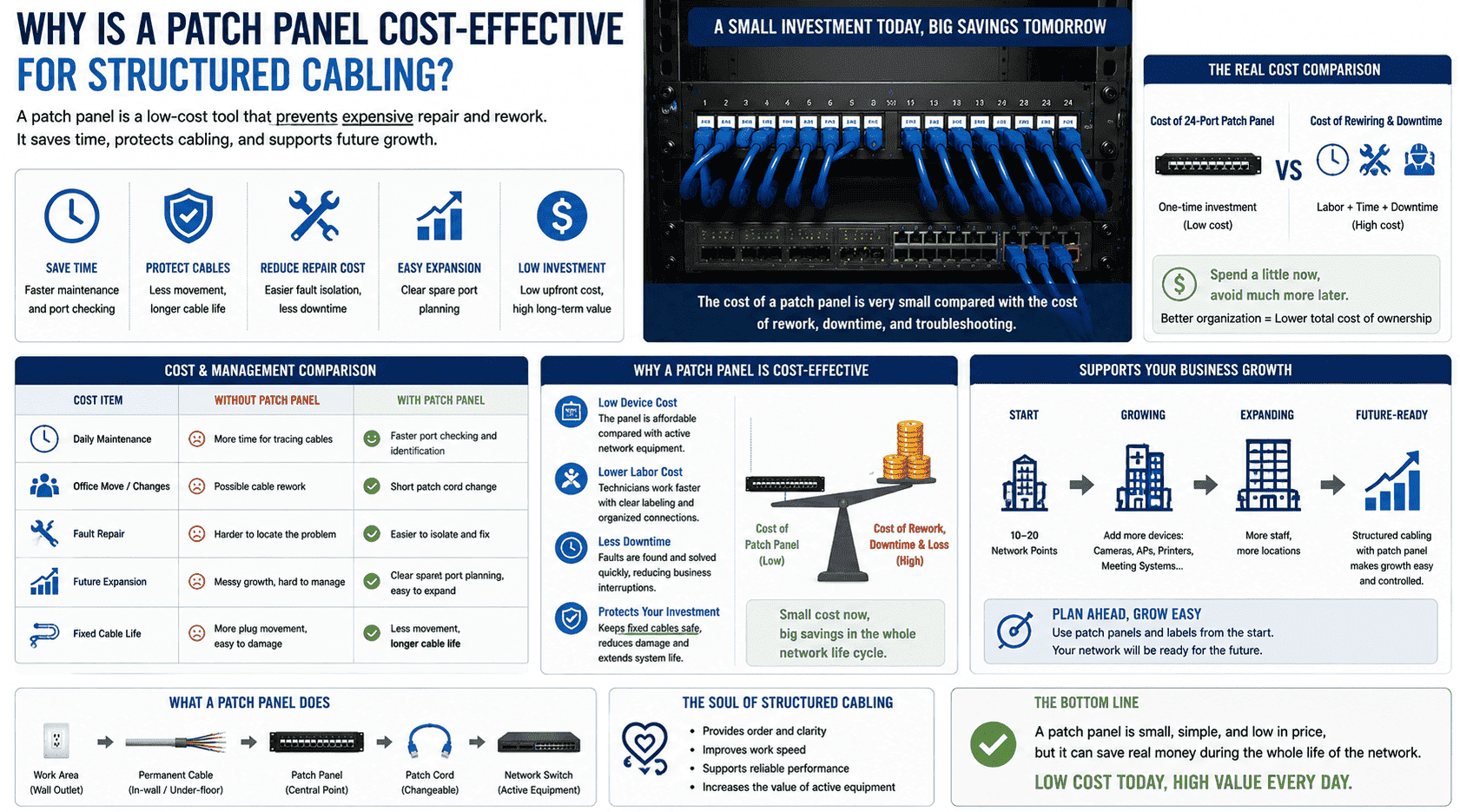
A patch panel costs much less than many active devices. It also costs much less than repeated rewiring. I often say it is a small part that prevents big later costs. If I plan a network cabinet well at the start, I avoid many problems later. The panel gives the whole system room to change. This is very important for small and medium companies, because their office needs may change often. I support small orders and custom cabinet solutions, so I often meet customers who want flexible growth. A clear patch panel layout helps them add ports, move devices, and expand step by step.
How does a patch panel help keep network signals stable?
Bad cabling can cause slow speeds and random disconnection. I have seen many network issues come from untidy cable work.
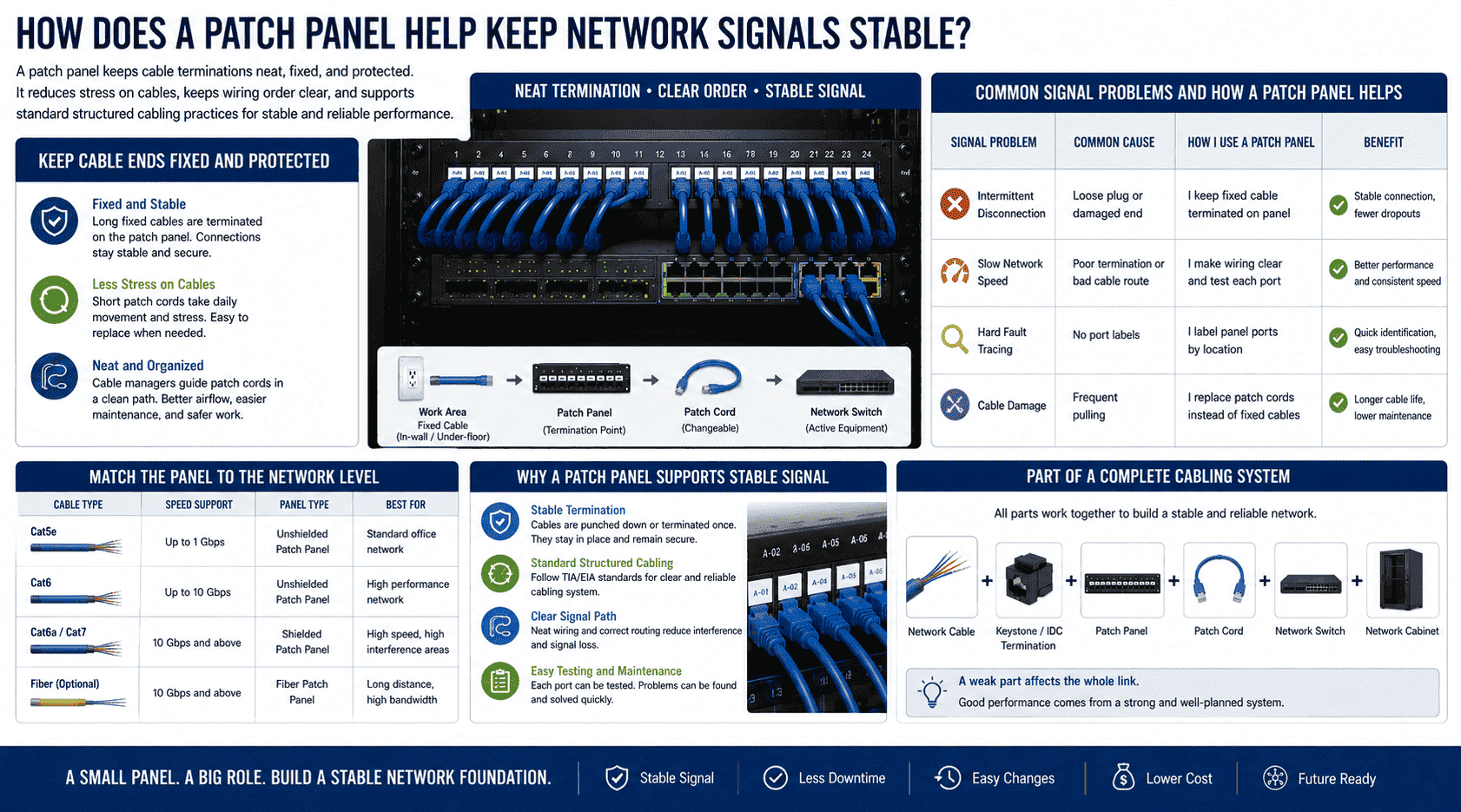
A patch panel helps signal stability by keeping cable termination neat, fixed, and protected.7 It reduces stress on cables, keeps wiring order clear, and supports standard structured cabling practices.
I keep cable ends fixed and protected
Network cables need stable contact. If I plug long fixed cables straight into switches, people may pull them, bend them, or move them often. This can damage connectors. It can also create loose contact. A patch panel holds the fixed cable ends in a stable position. The short patch cords take most daily movement. If a short patch cord wears out, I can replace it easily.
I also use the patch panel to keep cable bending more controlled. A network cabinet has limited space. If cables hang in random directions, they may block airflow, press on ports, or make maintenance unsafe.8 When I install a patch panel with cable managers, I guide each patch cord in a neat path.
| Signal problem | Common cause | How I use a patch panel |
|---|---|---|
| Intermittent disconnection | Loose plug or damaged end | I keep fixed cable terminated on panel |
| Slow network speed | Poor termination or bad cable route | I make wiring clear and test each port |
| Hard fault tracing | No port labels | I label panel ports by location |
| Cable damage | Frequent pulling | I replace patch cords instead of fixed cables |
I match the panel to the network level
I choose the patch panel based on cable type and network speed. For many office networks, Cat5e supports gigabit use.9 For higher performance, I may choose Cat6.10 If the project needs stronger protection against interference, I may choose a shielded patch panel.11 If the environment is normal, I may choose an unshielded one. I do not choose only by price. I choose by the real project need.
A patch panel is part of a complete cabling system. I need the cable, keystone or IDC termination, patch cord, switch, and cabinet to work together. If one part is weak, the whole link may suffer. This is why I see the patch panel as a key device in weak current engineering. It looks simple, but it supports the stable path between users and network equipment.
What types of patch panels should I consider?
Choosing a patch panel can feel confusing. I have seen buyers only count ports and forget speed, shielding, and cabinet fit.
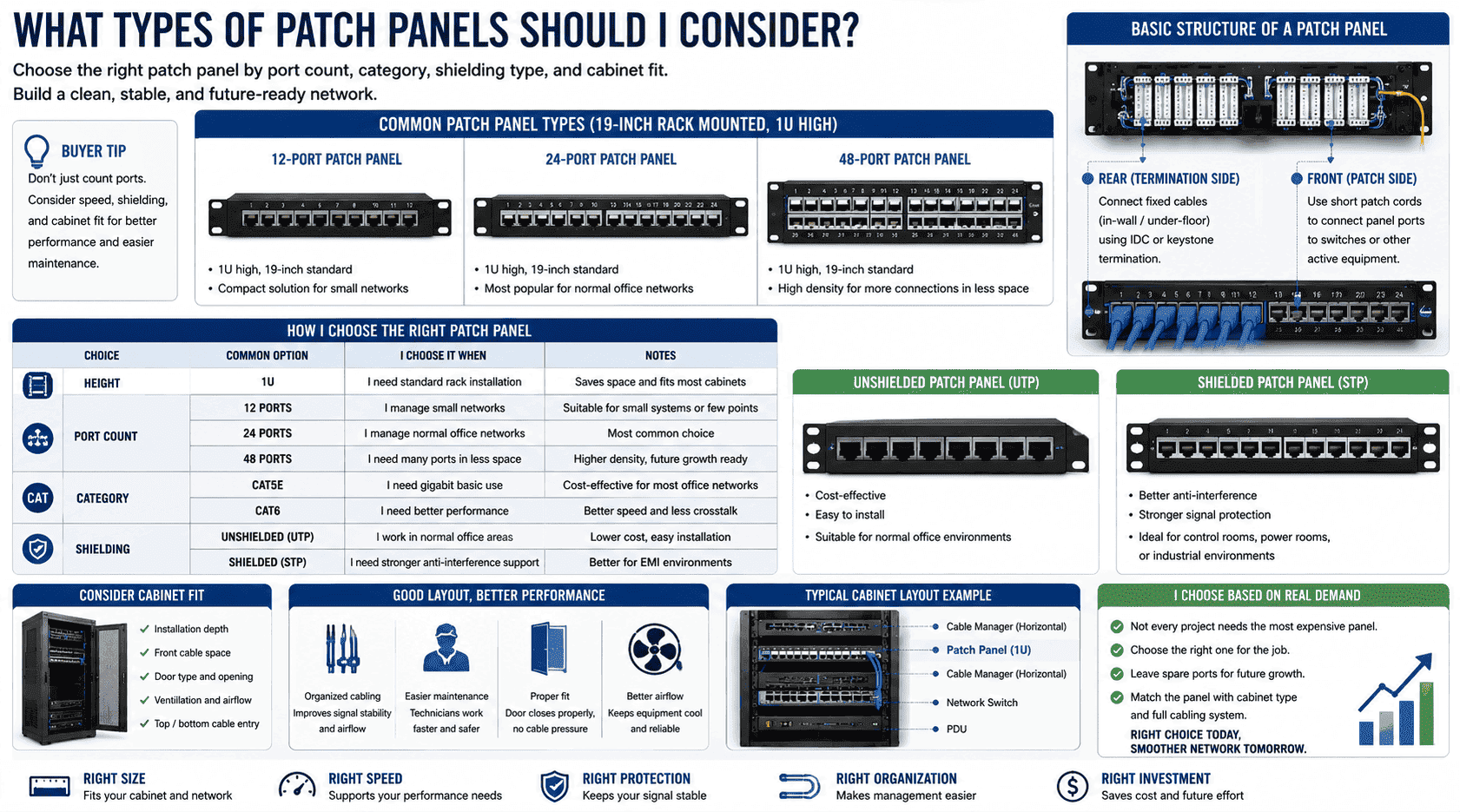
I usually consider port count, category, shielding type, and cabinet size. Common patch panels are 1U high, 19-inch rack mounted, with 12, 24, or 48 ports.
I start with the 19-inch cabinet standard
Most enterprise patch panels are made for 19-inch standard cabinets.12 This matters because the patch panel needs to fit the same rack as the switch, cable manager, PDU, and other network equipment. In many projects, I use a 1U patch panel. It saves cabinet space and keeps the layout simple. A 24-port 1U patch panel is very common. A 48-port panel is useful when I need higher port density. A 12-port panel can work for smaller systems.
As a cabinet manufacturer, I also think about how the patch panel fits inside the full cabinet. I care about installation depth, front cable space, door type, ventilation, and cable entry. A patch panel works better when the cabinet layout supports it.
| Choice | Common option | I choose it when |
|---|---|---|
| Height | 1U | I need standard rack installation |
| Port count | 12 ports | I manage small networks |
| Port count | 24 ports | I manage normal office networks |
| Port count | 48 ports | I need many ports in less space |
| Category | Cat5e | I need gigabit basic use |
| Category | Cat6 | I need better performance |
| Shielding | Unshielded | I work in normal office areas |
| Shielding | Shielded | I need stronger anti-interference support |
I choose based on real cabling demand
I do not think every project needs the most expensive patch panel. I think every project needs the correct one. If a customer builds a small office network, a 24-port Cat6 unshielded panel may be enough. If a customer builds a control room, power room, or industrial site, I may suggest shielded products and better grounding. If the customer plans later growth, I may leave spare ports.
I also check the cabinet type. A wall-mounted cabinet may have less depth. A floor-standing server cabinet may provide more room for cable management. If the patch panel, switch, and cable manager are arranged in a good order, the front cabling looks clean. The technician can work faster. The cabinet door can close properly. The airflow can stay better. These small details affect daily use.
-
How should I install a patch panel inside a cabinet?
A good patch panel can still fail if I install it badly. Poor labels, tight bends, and messy cords create new problems.
I install a patch panel in a 19-inch cabinet with clear labels, proper cable management, enough bending space, and matching switches. I also test each port after termination.
I plan the cabinet layout before I fix the panel
I do not install the patch panel randomly. I first look at the number of network points, switch ports, cabinet size, cable entry direction, and future expansion needs. I often place a cable manager near the patch panel. This keeps patch cords neat. I may put the switch below or above the patch panel, based on the project habit and cabinet space.
I also make sure the cabinet has enough depth and enough front space. Some network cabinets have glass doors, mesh doors, or steel doors. Each door type affects cable space and ventilation. If patch cords press against the door, the installation is wrong. If cables block fans or air paths, the system may heat up.
| Step | What I do | Why I do it |
|---|---|---|
| Plan port count | I count current and future points | I avoid running out of ports |
| Fix panel position | I use standard rack screws | I keep the panel stable |
| Manage rear cables | I tie and support cables gently | I reduce stress on terminations |
| Label ports | I match labels to rooms and desks | I make maintenance faster |
| Test links | I test every cable after work | I confirm signal and wiring order |
I connect cabinet design with cabling quality
As a manufacturer of network cabinets and server cabinets, I know the cabinet and patch panel should work as one system. A good cabinet gives strong structure, correct rack space, clean cable entry, and safe equipment support. A good patch panel gives clear port control. When both parts match, the server room becomes easier to use.
For non-standard projects, I may need custom cabinet sizes, special punching, reinforced load-bearing structure, outdoor waterproof design, anti-rust treatment, or different door options. These needs often appear in data centers, security monitoring rooms, power facilities, industrial automation sites, and communication projects. The patch panel still plays the same role. It keeps network points in order. It makes the wiring easy to read. It helps the technician solve problems from one central place. This is why I always ask about cable quantity, equipment type, and maintenance habits when I design a cabinet solution.
Conclusion
I use a patch panel to make network cabling clear, stable, flexible, and easier to maintain inside a standard cabinet.
"Patch panel - Wikipedia", https://en.wikipedia.org/wiki/Patch_panel. A neutral technical definition of patch panels supports the statement that they serve as centralized termination and interconnection points for structured network cabling. Evidence role: definition; source type: encyclopedia. Supports: A patch panel is used as a centralized termination and connection point for network cabling.. ↩
"NIST SP 800-172 (pdf)", https://nvlpubs.nist.gov/nistpubs/SpecialPublications/NIST.SP.800-172.pdf. Cabling administration guidance supports the use of labeled termination hardware and records to identify and manage physical network connections. Evidence role: general_support; source type: institution. Supports: Cabling administration standards emphasize labeling, records, and identifiers for managing physical network infrastructure.. Scope note: The source may support the administrative principle rather than the article's metaphor that the panel is a complete 'map' of the network. ↩
"[PDF] 27 15 00 - Communications Horizontal Cabling", https://docs.gato.txst.edu/141319/27_15_00-Communications-Horizontal-Cabling.pdf. Structured cabling standards describe horizontal cabling as running from work-area outlets to telecommunications-room connecting hardware, which supports the article's description of workstation cables terminating on panel ports. Evidence role: definition; source type: institution. Supports: Structured cabling practice connects work-area outlets through horizontal cabling to connecting hardware such as patch panels.. Scope note: The source may describe accepted topology rather than requiring every workstation cable in every installation to use a patch panel. ↩
"ISO/IEC 11801 - Wikipedia", https://en.wikipedia.org/wiki/ISO/IEC_11801. Structured cabling standards distinguish permanent links from patch cords and connecting hardware, supporting the claim that patch panels help keep fixed building cabling separate from reconfigurable network connections. Evidence role: mechanism; source type: institution. Supports: Structured cabling distinguishes permanent cabling links from patch cords and connecting hardware used for cross-connections.. ↩
"The Importance of Proper Network Cable Labeling", https://wisecomponents.com/wiseupblog/?p=192. Cabling administration guidance supports the claim that documented and labeled cable terminations improve identification and troubleshooting during maintenance. Evidence role: expert_consensus; source type: institution. Supports: Cabling administration and labeling practices are intended to make identification, troubleshooting, and maintenance more efficient.. Scope note: The source may establish the maintenance rationale but may not quantify the exact time saved. ↩
"What's the point of a patch panel? : r/networking", https://www.reddit.com/r/networking/comments/16m7i6q/whats_the_point_of_a_patch_panel/. Structured cabling references describe patch panels and cross-connects as points where services can be reassigned using patch cords, supporting the claim that many changes can be made without modifying hidden cabling. Evidence role: mechanism; source type: institution. Supports: Patch panels and cross-connects allow service changes by re-patching cords at the telecommunications cabinet or room.. Scope note: The source supports typical structured cabling practice; some changes may still require new cable installation depending on capacity and location. ↩
"Common Installation Mistakes and How to Avoid Signal Loss - 3C3", https://3c3.com/common-installation-mistakes-and-how-to-avoid-signal-loss/. Cabling installation standards and guidance connect reliable data transmission with proper termination, cable handling, and mechanical protection, supporting the claim that organized patch-panel termination can contribute to stable links. Evidence role: mechanism; source type: institution. Supports: Cabling performance depends on proper termination, handling, and adherence to installation requirements such as bend radius and strain relief.. Scope note: The source would support the underlying mechanism, not prove that a patch panel alone guarantees signal stability. ↩
"[PDF] Best Practices Guide for Energy-Efficient Data Center Design", https://www.energy.gov/sites/default/files/2024-07/best-practice-guide-data-center-design.pdf. Data-center and rack-management guidance supports the claim that poorly routed cables can impede airflow and complicate equipment access and maintenance. Evidence role: mechanism; source type: institution. Supports: Cable management guidance notes that unmanaged cables can obstruct airflow and maintenance access in racks or cabinets.. Scope note: The source may address rack and data-center practice broadly rather than patch-panel installations specifically. ↩
"Gigabit Ethernet - Wikipedia", https://en.wikipedia.org/wiki/Gigabit_Ethernet. The IEEE 1000BASE-T Ethernet specification supports Gigabit Ethernet over suitable balanced twisted-pair cabling, which supports the article's statement that Cat5e can be used for gigabit links. Evidence role: definition; source type: institution. Supports: 1000BASE-T Gigabit Ethernet is specified for operation over Category 5 or better balanced twisted-pair cabling, with Cat5e commonly used.. Scope note: Performance depends on correct installation, link length, and component quality. ↩
"Category 6 cable - Wikipedia", https://en.wikipedia.org/wiki/Category_6_cable. Cabling category specifications describe Category 6 as having higher transmission performance than Category 5e, supporting the article's statement that Cat6 may be selected for higher-performance networks. Evidence role: definition; source type: institution. Supports: Category 6 cabling has higher specified transmission performance, including higher frequency bandwidth, than Category 5e.. Scope note: The practical benefit depends on the full channel, installed quality, and network equipment capabilities. ↩
"Twisted pair - Wikipedia", https://en.wikipedia.org/wiki/Twisted_pair. Technical cabling guidance supports the use of shielded twisted-pair components for environments with greater electromagnetic interference exposure, provided the shield system is properly bonded and grounded. Evidence role: mechanism; source type: institution. Supports: Shielded twisted-pair systems can reduce susceptibility to electromagnetic interference when shielding and grounding are correctly implemented.. Scope note: Shielding is not inherently beneficial if grounding and installation practices are poor. ↩
"19-inch rack", https://en.wikipedia.org/wiki/19-inch_rack. The 19-inch rack standard establishes a common mounting format for telecommunications and computing equipment, supporting the article's statement that enterprise patch panels are commonly designed for standard 19-inch cabinets. Evidence role: definition; source type: institution. Supports: The 19-inch rack is a standardized mounting format widely used for telecommunications, networking, and computing equipment.. Scope note: The source supports the rack format generally and may not quantify the share of enterprise patch panels using it. ↩
