
What Are the Types of Racks in a Data Center?

A wrong rack looks simple at first. Then heat, weak loading, and messy cables hurt uptime. I choose rack types by equipment, airflow, and load.
The main types of racks in a data center are server cabinets, network cabinets, open frame racks, wall-mounted racks, and custom sheet metal cabinets.1 I select them by U height, width, depth, load capacity, cooling design, cable route, and door type.
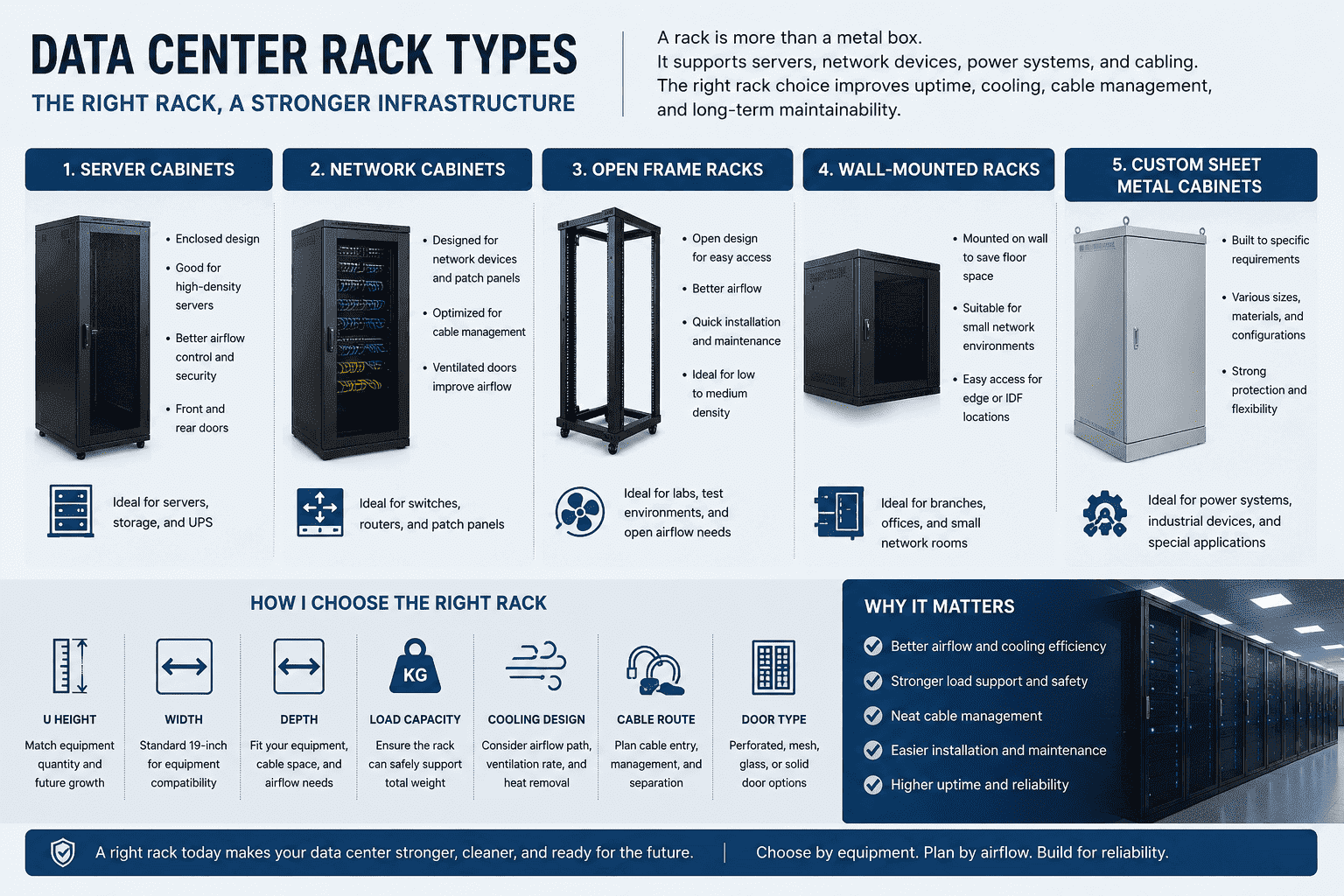
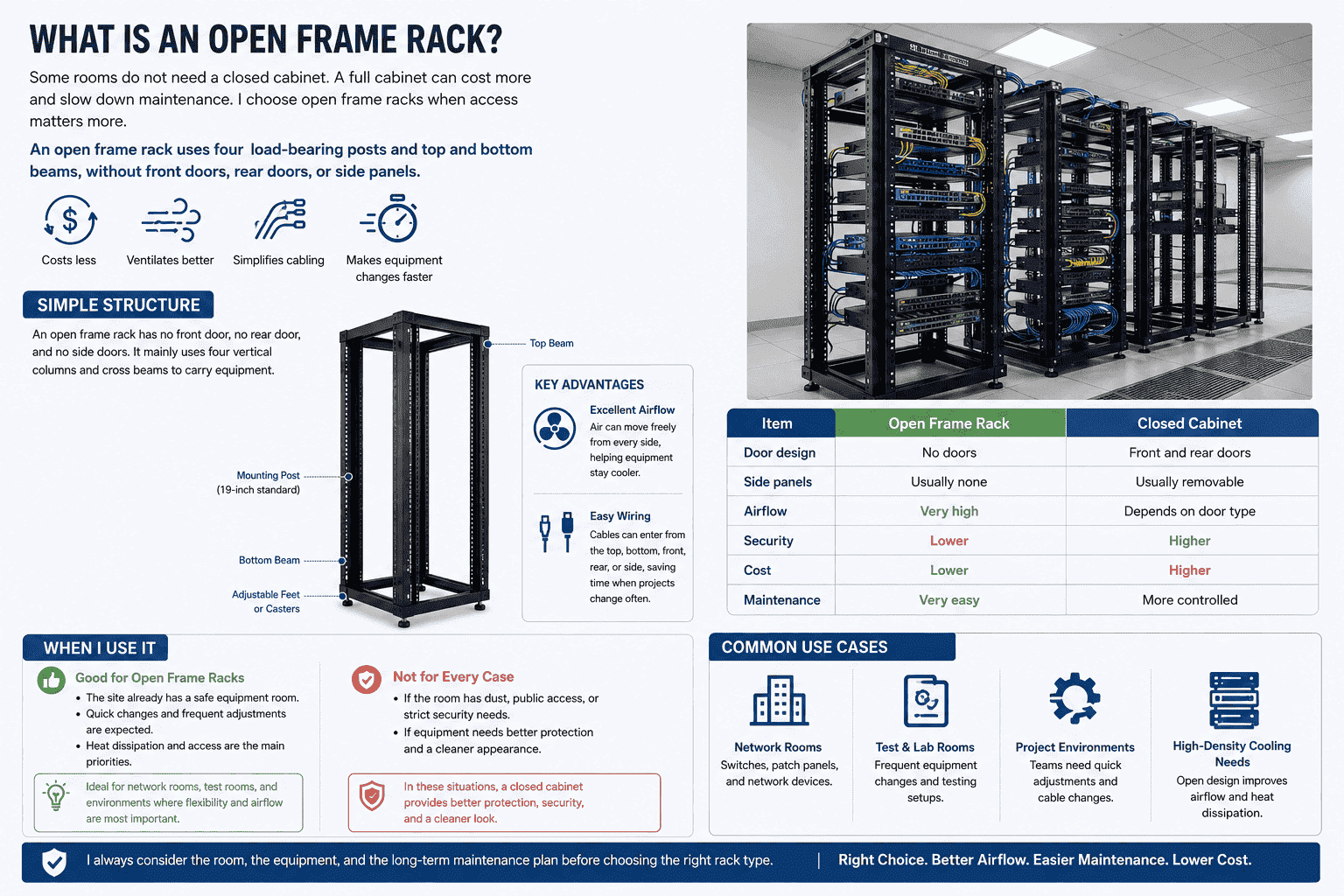
I have seen many buyers treat a rack as a metal box. I understand that view, because the rack does not run software and it does not process data. But I also know that the rack holds the whole physical system together. It carries servers, switches, UPS power units, fiber distribution frames, and many network devices. If the rack is weak, too small, or badly ventilated, the whole room becomes harder to manage. I look at rack type first, because one right choice can make installation, cooling, cabling, and later maintenance much easier.
-
What Is a Server Rack With Mesh Doors?
Heat can damage a good server room slowly. The room may look clean, but hot air can stay around equipment. I use mesh doors for high-power servers.
A server rack with front and rear mesh doors is built for airflow. The mesh door ventilation rate can reach over 75%.2 It supports cold aisle and hot aisle layouts3, and it helps high-power servers get stable cooling.
Cooling and Door Design
I use server racks with front and rear mesh doors when the equipment has high heat output. The front door allows cold air to enter. The rear door allows hot air to leave. This design works well with cold aisle and hot aisle plans in the data center.
Some rooms also use top-mounted high-power fans. These fans help pull hot air upward and out of the cabinet area. I do not see fans as a replacement for a good air path. I see them as support. The main airflow path still needs clear front-to-back movement.4
| Feature | Mesh Door Server Rack | Reason I Use It |
|---|---|---|
| Front door | Perforated mesh | Cold air enters easily |
| Rear door | Perforated mesh | Hot air leaves quickly |
| Ventilation rate | 75% or higher | It supports dense servers |
| Cooling layout | Cold aisle and hot aisle | It controls air direction |
| Top fan option | High-power exhaust fan | It helps remove hot air |
Equipment Layout
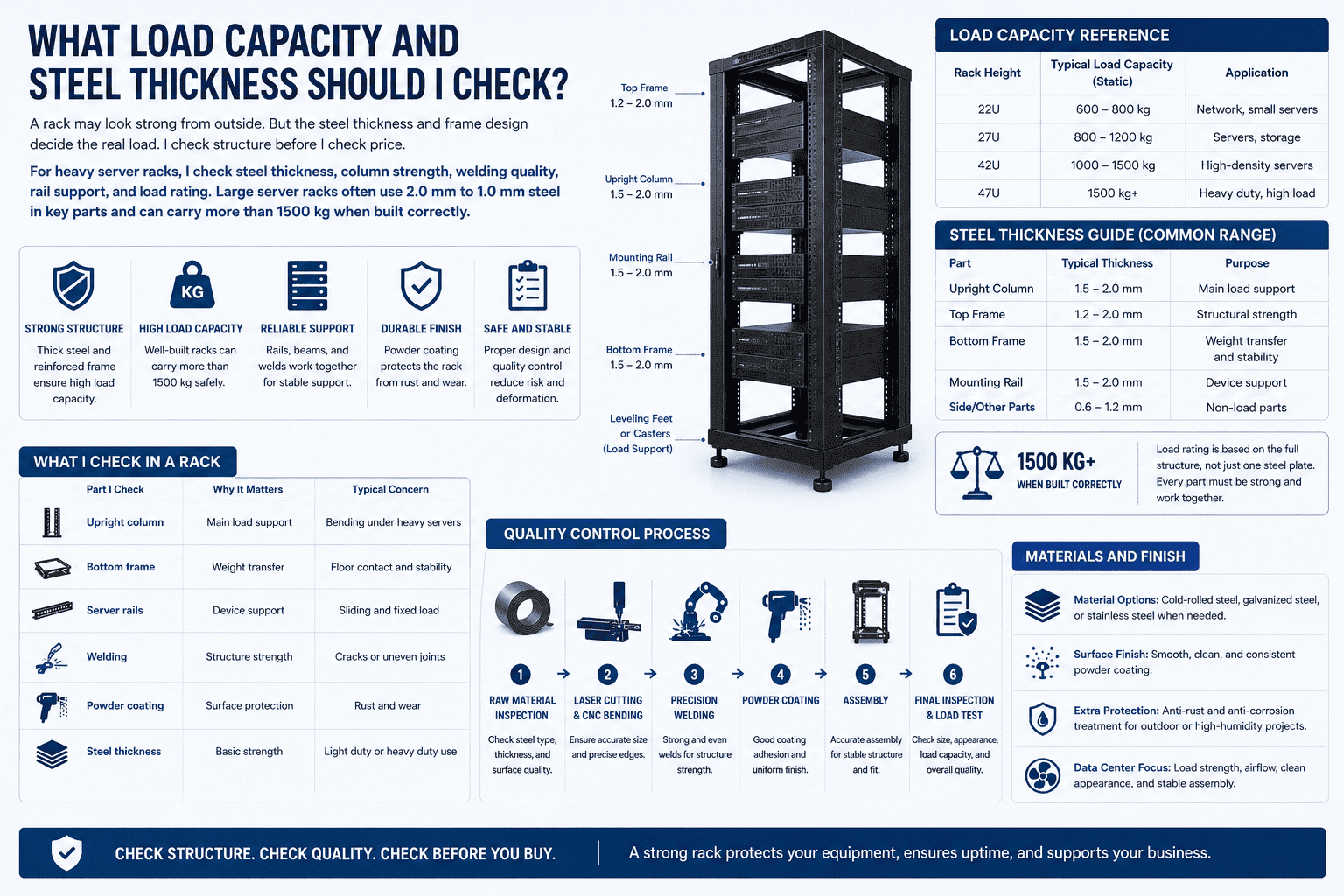
Inside the rack, I use rails and angle supports to install servers. I use the front vertical mounting posts for optical fiber distribution frames, ODF frames, switches, and other network equipment when the design needs it. The structure must be strong, because the rack may carry heavy devices for many years.
I also care about the coating and steel quality. A clean surface and stable powder coating help the rack resist wear. Good sheet metal work makes doors close better and makes columns line up correctly. These small details affect daily use.
-
How Do I Choose Rack Size and U Height?
A rack that is too small creates stress later. Devices may fit today, but no space remains tomorrow. I leave room for growth and airflow.
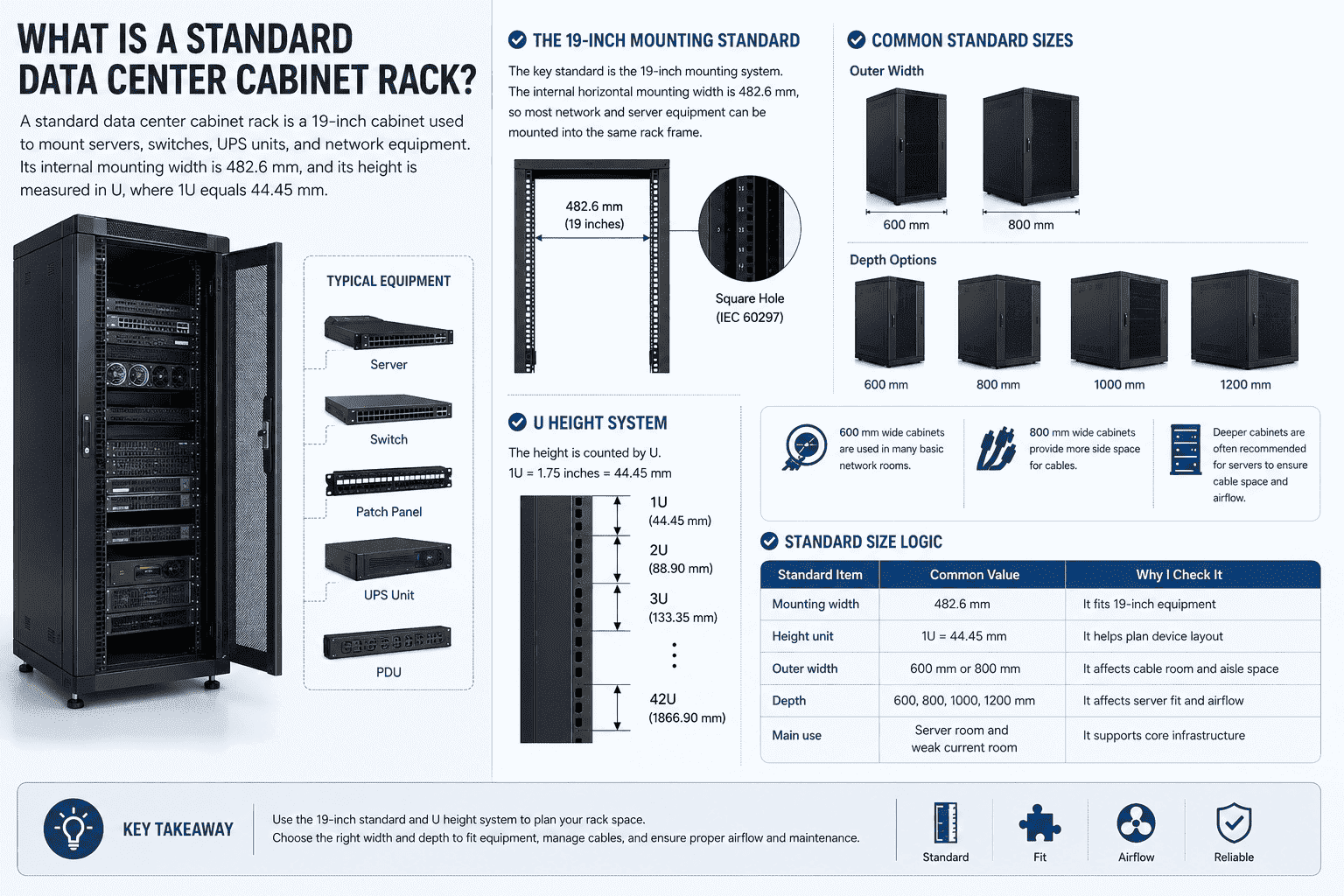
I choose rack size by equipment depth, cable space, U height, aisle space, and future expansion. Common cabinet widths are 600 mm and 800 mm, common depths are 600 mm to 1200 mm, and height is measured by U.5
U Height Planning
I start with the equipment list. I count every server, switch, UPS, PDU, patch panel, and blank panel. Then I add space for airflow and future equipment. I do not fill every U if heat is high. A rack may have enough physical space but not enough cooling capacity.6
I also check the server depth. Some servers need deep cabinets, such as 1000 mm or 1200 mm. A shallow 600 mm cabinet may work for small network devices, but it may not fit enterprise servers well. Rear cable bending space is also important. If the rear door presses the cable, the installation will not be safe.7
| Rack Size Point | Common Option | My Practical View |
|---|---|---|
| Width | 600 mm | Good for standard equipment |
| Width | 800 mm | Better for side cabling |
| Depth | 600 mm | Good for switches and small devices |
| Depth | 800 mm | Good for mixed network equipment |
| Depth | 1000 mm | Good for many servers |
| Depth | 1200 mm | Better for deep servers and cable space |
Space Around the Rack
I also check the room layout. A deep cabinet needs enough aisle space. If the door cannot open fully, installation becomes difficult. If the rear side is too close to the wall, maintenance becomes slow.
I often remind buyers that rack selection is not only a product choice. It is also a room design choice. The rack must match the power plan, cooling plan, floor load, cable route, and maintenance habit. A correct size saves cost later because the team does not need to rebuild the room soon.
-
How Should Cabling and Cooling Be Planned Inside the Rack?
Messy cables block airflow and slow every repair.8 A good rack may still fail if cables are badly placed. I plan cable paths early.
I plan rack cabling with top cable entry, bottom hidden cable entry, side cable management, and clear front-to-rear airflow. Good cabling keeps the rack clean, improves heat control, and makes later maintenance faster.
Top and Bottom Cable Routes
I often use top cable routing when the room has overhead trays. This keeps network and fiber cables clear and easy to trace. I use bottom hidden cable routing when the room has raised floors or when the customer wants a cleaner front view. Both methods can work well. The right one depends on the room.
Cable planning should not block air movement. I do not let large cable bundles sit directly in front of server fans. I also do not leave random loose cables near rear exhaust areas. Cables should be grouped, tied, labeled, and separated by function when needed.9
| Cable Method | Where I Use It | Main Benefit |
|---|---|---|
| Top entry | Overhead cable tray rooms | Easy routing and clear management |
| Bottom entry | Raised floor rooms | Hidden cable path and clean look |
| Side management | 800 mm wide cabinets | More room for cable bundles |
| Rear management | Server cabinets | Easy power and data separation |
| Labeling | All racks | Faster maintenance |
Cooling and Maintenance
I treat cooling and cabling as one plan. If the cabling is bad, the cooling path becomes bad. If the cooling is bad, the equipment life becomes shorter.10 I use mesh doors, proper depth, and clear cable paths to help the room breathe better.
I also think about later work. A data center is not finished after the first installation. The customer may add a switch, replace a server, or move a patch panel. If the rack has enough side space, strong rails, clean cable entry, and removable panels, this later work becomes easier.
A good visual layout also matters. I know appearance is not the only goal, but a clean rack helps engineers find problems faster. It also gives the project a more professional result. This is why I care about both structure and layout.
When Should I Choose a Custom Data Center Rack?
A standard rack cannot solve every project. Special rooms, heavy devices, and outdoor use can create new problems. I choose custom racks when standards are not enough.
I choose a custom data center rack when the project needs special size, special punching, reinforced load capacity, waterproof design, anti-rust treatment, different doors, or a non-standard internal layout for servers and network devices.
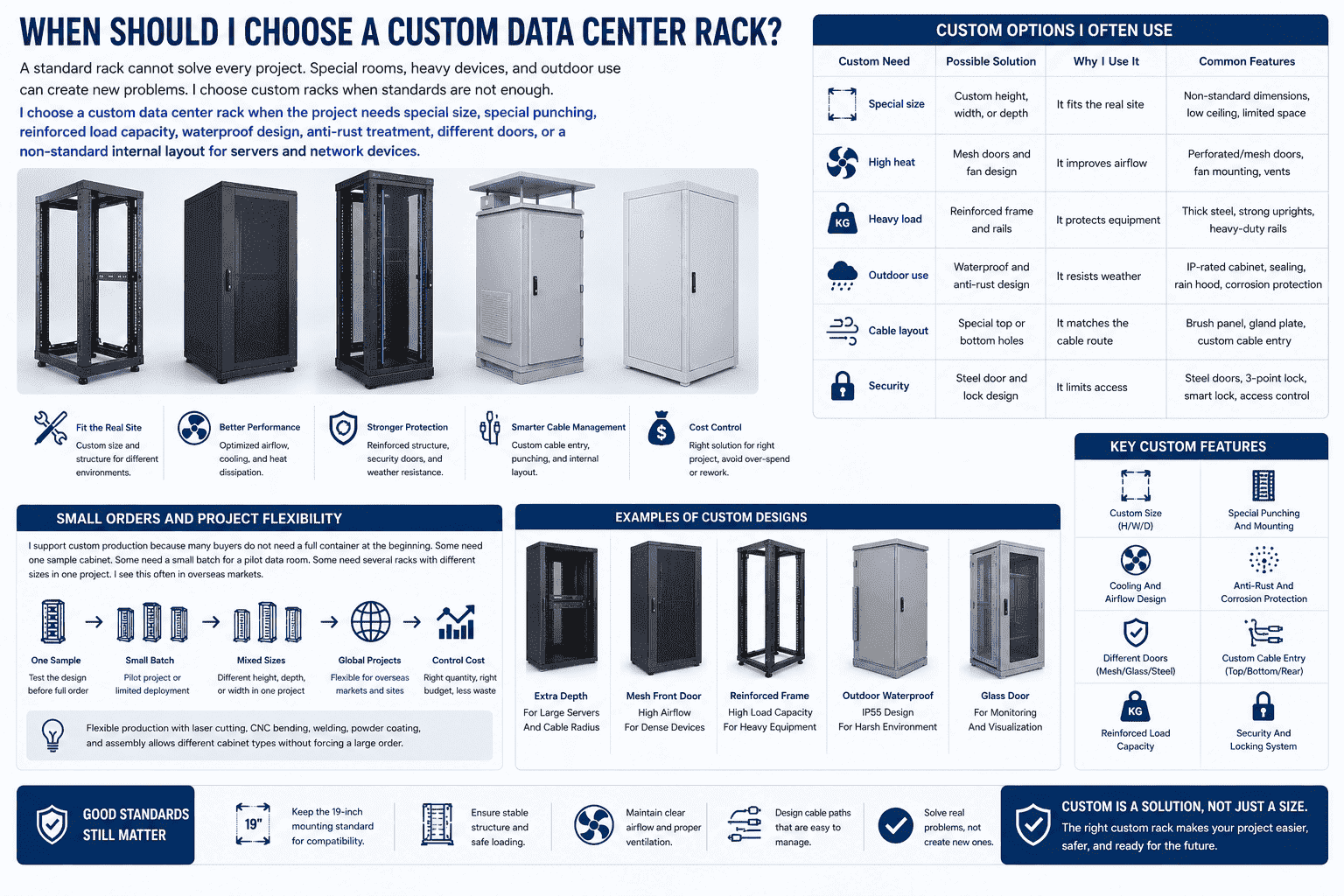
Custom Options I Often Use
I work with many projects that need more than a standard cabinet. Some customers need a special height because the room ceiling is low. Some need a special depth because the server and cable bend radius are large. Some need glass doors for monitoring rooms. Some need steel doors for security. Some need mesh doors for heat. Some need outdoor waterproof cabinets for power or communication sites.
| Custom Need | Possible Solution | Why I Use It |
|---|---|---|
| Special size | Custom height, width, or depth | It fits the real site |
| High heat | Mesh doors and fan design | It improves airflow |
| Heavy load | Reinforced frame and rails | It protects equipment |
| Outdoor use | Waterproof and anti-rust design | It resists weather |
| Cable layout | Special top or bottom holes | It matches the cable route |
| Security | Steel door and lock design | It limits access |
Small Orders and Project Flexibility
I support custom production because many buyers do not need a full container at the beginning. Some need one sample cabinet. Some need a small batch for a pilot data room. Some need several racks with different sizes in one project. I see this often in overseas markets.
For this reason, I value flexible production. Laser cutting, CNC bending, welding, powder coating, and assembly allow me to make different cabinet types without forcing a large order. This helps customers test the design first. It also helps them control project cost.
Custom racks should still follow good standards. I do not change the 19-inch mounting rule unless the customer has a clear reason.11 I keep the structure stable, the airflow clear, and the cable path easy to use. Customization should solve real problems, not create new ones.
Conclusion
I choose data center racks by equipment, size, airflow, load, cabling, and site needs, because the right rack makes the whole room work better.
"19-inch rack", https://en.wikipedia.org/wiki/19-inch_rack. A general reference on 19-inch racks describes standardized rack structures used for servers, networking equipment, and telecommunications hardware, including enclosed cabinets and open-frame forms; this supports the article’s classification as an industry-context taxonomy rather than an exhaustive standard list. Evidence role: definition; source type: encyclopedia. Supports: A neutral reference should define 19-inch racks and describe common enclosed, open-frame, and wall-mounted rack formats used for electronic and server equipment.. Scope note: The source may not name every category in the article exactly, so it provides contextual support for the classification. ↩
"[PDF] 2024 United States Data Center Energy Usage Report", https://eta-publications.lbl.gov/sites/default/files/2024-12/lbnl-2024-united-states-data-center-energy-usage-report.pdf?utm_source=substack&utm_medium=email. Technical guidance on data-center air management reports that perforated rack doors are used to reduce airflow impedance and may be specified with high open-area percentages; this supports the feasibility of a ventilation rate above 75%, though the exact value depends on the particular door design and measurement method. Evidence role: statistic; source type: research. Supports: A technical source should document typical open-area percentages for perforated or mesh rack doors and their role in airflow.. Scope note: Contextual support only unless the source directly states a 75% or higher open-area figure. ↩
"Cooling & Air Management", https://datacenters.lbl.gov/cooling-air-management. ASHRAE and data-center air-management guidance describe hot-aisle/cold-aisle layouts as a method for separating cold supply air from hot exhaust air, with rack airflow normally moving from the cold aisle through the equipment toward the hot aisle; this supports the stated role of mesh-door racks in such layouts. Evidence role: mechanism; source type: institution. Supports: A data-center thermal-management source should explain that racks with front-to-rear airflow and perforated doors are compatible with hot-aisle/cold-aisle arrangements.. Scope note: The source supports the airflow principle, not the performance of a specific cabinet model. ↩
"Best Practices Guide for Energy-Efficient Data Center Design", https://www.energy.gov/sites/default/files/2024-07/best-practice-guide-data-center-design.pdf. ASHRAE thermal guidance for data-processing environments identifies controlled equipment inlet and exhaust airflow as central to reliable cooling, and common rack-mounted servers are designed around front-to-rear air movement; this supports the need for an unobstructed front-to-back airflow path. Evidence role: mechanism; source type: institution. Supports: A thermal guideline should explain that most rack-mounted IT equipment uses front-to-rear airflow and that obstructions disrupt cooling.. Scope note: The source gives general thermal-design guidance rather than evaluating the specific rack described in the article. ↩
"19-inch rack", https://en.wikipedia.org/wiki/19-inch_rack. A rack unit, commonly abbreviated U, is defined as the standard vertical unit for 19-inch rack equipment, equal to 1.75 inches or 44.45 mm; this directly supports the statement that rack height is measured by U. Evidence role: definition; source type: encyclopedia. Supports: A reference should define the rack unit as the conventional unit used to measure rack-mounted equipment height.. ↩
"[PDF] Best Practices Guide for Energy-Efficient Data Center Design", https://www.energy.gov/sites/default/files/2024-07/best-practice-guide-data-center-design.pdf. ASHRAE guidance for data centers treats IT load, heat rejection, and equipment inlet conditions as limiting factors in rack deployment, supporting the statement that empty rack units alone do not establish adequate cooling capacity. Evidence role: expert_consensus; source type: institution. Supports: A data-center thermal guideline should support the idea that rack planning must consider heat load and cooling capacity, not only available U space.. Scope note: The source supports the planning principle rather than quantifying the specific rack capacity in this article. ↩
"Fiber Optic Cable Bend Radius or Diameter", https://www.thefoa.org/tech/ref/install/bend_radius.html. Telecommunications cabling standards and fiber-installation guidance specify minimum bend-radius and strain limits because excessive bending or compression can degrade signal performance or damage the cable; this supports the article’s warning about rear-door pressure on cables. Evidence role: mechanism; source type: institution. Supports: A cabling standard or technical body should explain that excessive bending, compression, or strain can impair copper or fiber cable performance.. Scope note: The source supports the cable-handling mechanism, not a site-specific safety assessment. ↩
"[PDF] Data Center Airflow Management Retrofit", https://datacenters.lbl.gov/sites/default/files/airflow-doe-femp.pdf. Data-center air-management guidance identifies obstructions in rack and underfloor or overhead cable paths as contributors to airflow inefficiency, and structured cable management is commonly cited as improving access for maintenance; this supports the article’s statement about messy cabling. Evidence role: general_support; source type: research. Supports: A data-center operations or air-management source should show that unmanaged cable bundles can obstruct airflow and complicate service access.. Scope note: The source may support the two effects separately rather than measuring repair time directly. ↩
"[DOC] 270553i.docx", https://www.cfm.va.gov/TIL/spec/270553i.docx. ANSI/TIA cabling-administration standards establish systematic identification and labeling practices for telecommunications infrastructure, and structured-cabling guidance supports organized routing and separation of cable functions; this supports the article’s cabling-management instruction. Evidence role: expert_consensus; source type: institution. Supports: A cabling standard should support labeling and administration practices for structured cabling, and related guidance should support organized routing and separation.. Scope note: The citation supports standardized administration and organization, while exact grouping and tying methods vary by cable type and local standard. ↩
"[PDF] Temperature Management in Data Centers: Why Some (Might) Like ...", https://users.ece.cmu.edu/~gamvrosi/assets/tr_sigmetrics12.pdf. Research on electronics reliability and data-center thermal management links elevated operating temperatures to increased component stress and potential failure-rate changes, supporting the article’s statement that inadequate cooling can shorten equipment life. Evidence role: mechanism; source type: paper. Supports: A research paper or thermal guideline should explain that higher operating temperatures can affect electronic component reliability and failure rates.. Scope note: The temperature-reliability relationship depends on component design, workload, humidity, and operating range, so the source supports the general mechanism rather than a fixed lifespan reduction. ↩
"19-inch rack", https://en.wikipedia.org/wiki/19-inch_rack. The EIA-310 and IEC 60297 rack standards define the 19-inch mounting system used for many electronic, server, and telecommunications devices, directly supporting the article’s preference for preserving the 19-inch mounting rule. Evidence role: definition; source type: institution. Supports: A standards source should identify the 19-inch rack as a standardized mounting system for electronic and telecommunications equipment.. ↩
