
42U Server Rack Cabinet?

I often see server rooms become messy because the rack choice looks simple at first, then cable space, heat, and load problems appear.
A 42U server rack cabinet is a standard 19-inch cabinet with 42U usable mounting height, about 1867 mm inside.1 I use it for data centers, server rooms, AI rooms, weak-current projects, and network systems because it gives strong capacity, stable structure, and wide equipment compatibility.
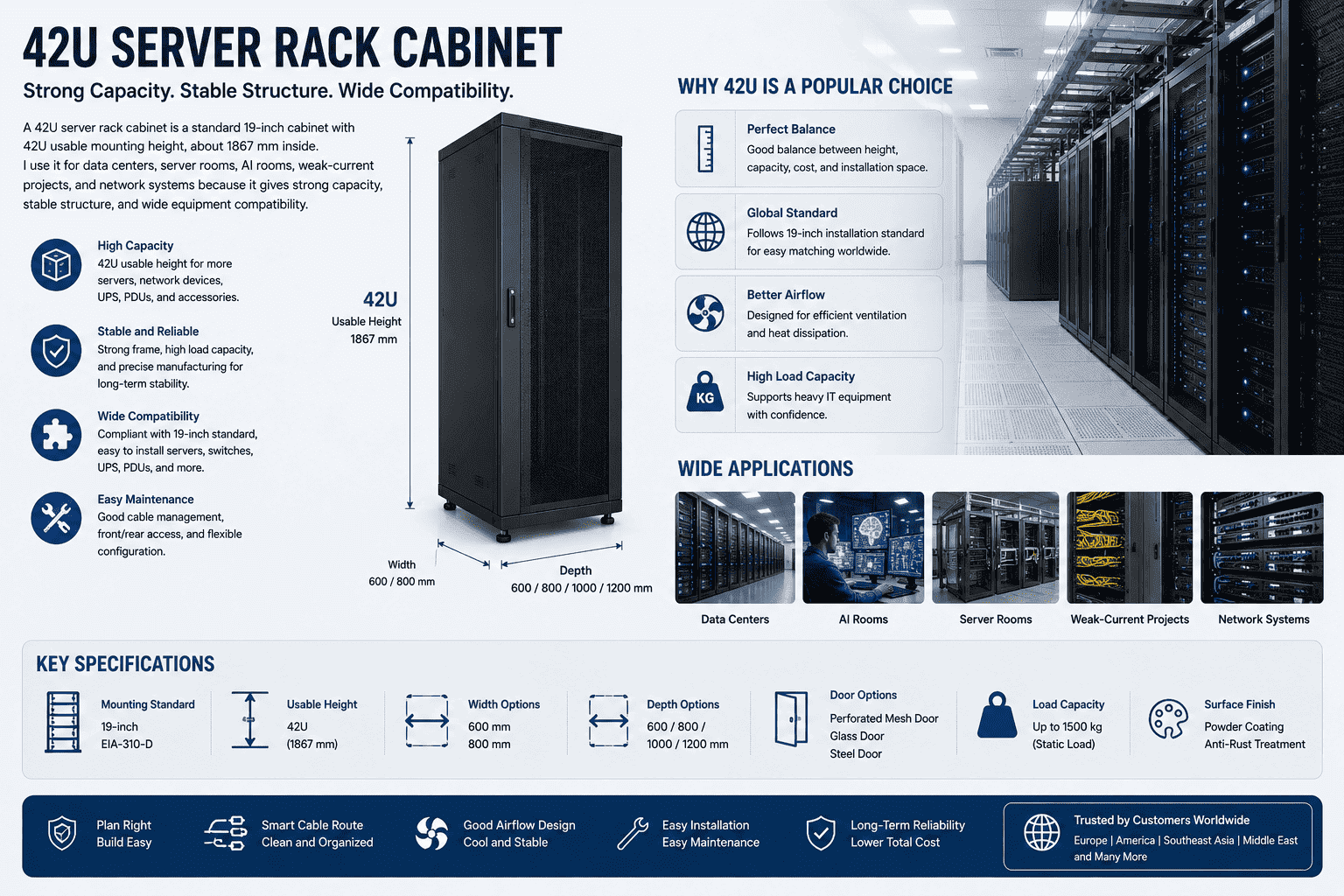
I treat the 42U server rack cabinet as a core carrier for IT hardware, not only as a metal box. I have seen many projects change direction after the customer checks the real equipment list, cable route, air flow, and room floor plan. The 42U size is popular because it gives a good balance between height, capacity, cost, and installation space.2 I also like this size because it follows the global 19-inch installation standard3, so it is easier for buyers in Europe, America, Southeast Asia, the Middle East, and other regions to match servers, switches, UPS units, PDUs, and other devices. If I choose the correct width, depth, door type, and cable route at the start, the whole server room becomes easier to build and easier to maintain later.
What Is The Standard Size Of A 42U Server Rack Cabinet?
I see buyers get confused by 42U because they know the height name, but they still need the real width, depth, and outside size.
A 42U server rack cabinet usually has 42U mounting height, where 1U is 44.45 mm4. So 42U is about 1867 mm usable height. Common full cabinet sizes include 600x800x2055, 600x1000x2055, 600x1200x2055, 800x800x2055, 800x1000x2055, and 800x1200x2055 mm.
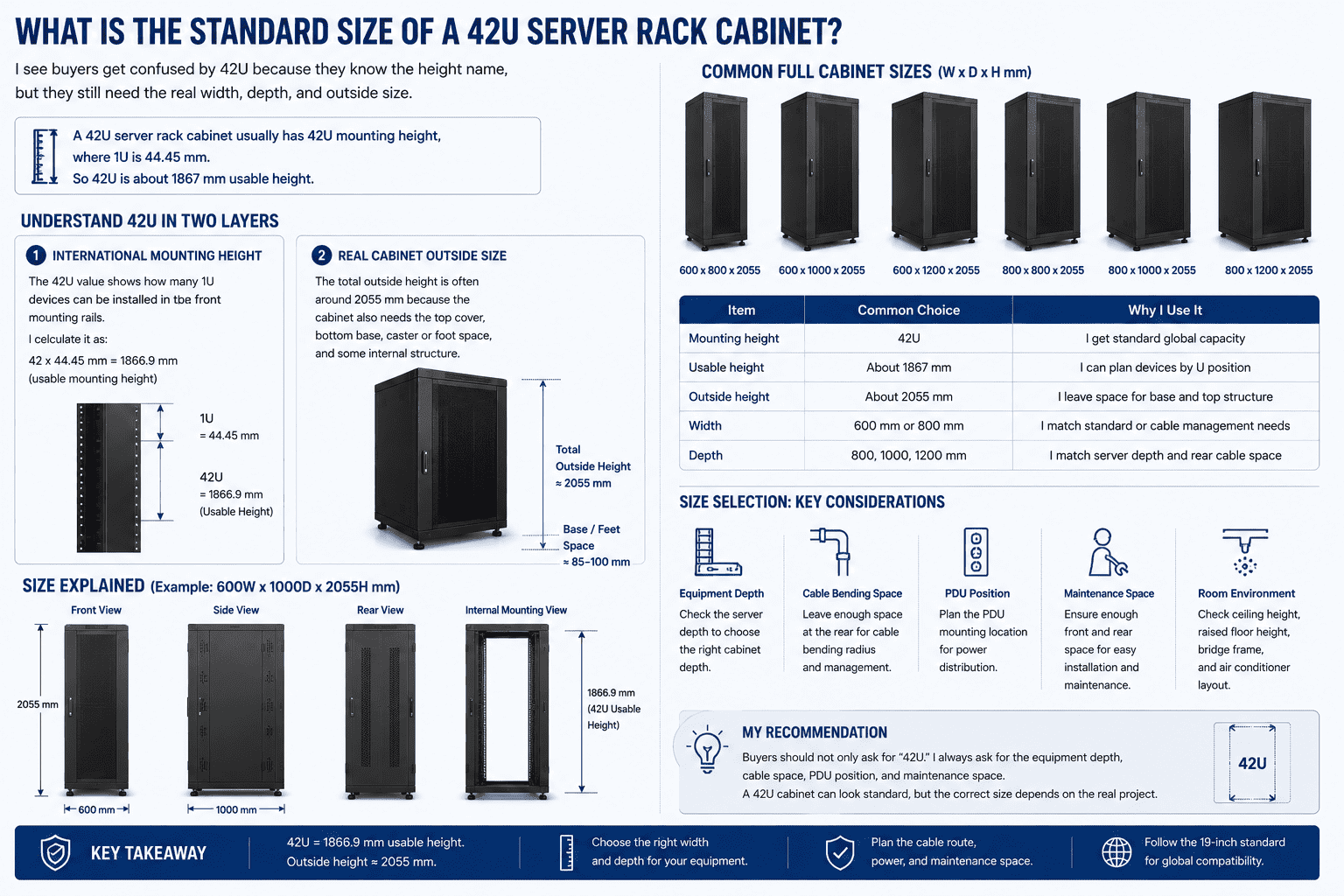
I usually explain the size in two layers. The first layer is the international mounting height. The second layer is the real cabinet outside size. The 42U value shows how many 1U devices can be installed in the front mounting rails. I calculate it as 42 x 44.45 mm, so the usable mounting height is about 1866.9 mm. The total outside height is often around 2055 mm because the cabinet also needs the top cover, bottom base, caster or foot space, and some internal structure. I see this point matter a lot during room design, because the engineer must check ceiling height, bridge frame height, raised floor height, and air conditioner layout.
| Item | Common Choice | Why I Use It |
|---|---|---|
| Mounting height | 42U | I get standard global capacity |
| Usable height | About 1867 mm | I can plan devices by U position |
| Outside height | About 2055 mm | I leave space for base and top structure |
| Width | 600 mm or 800 mm | I match standard or cable management needs |
| Depth | 800, 1000, 1200 mm | I match server depth and rear cable space |
I recommend that buyers do not only ask for “42U.” I always ask for the equipment depth, cable bending space, PDU position, and front and rear maintenance space. A 42U cabinet can look standard, but the correct size depends on the real project.
Should I Choose 600mm Or 800mm Width For A 42U Server Rack Cabinet?
I often meet customers who choose width by price only, then they find cable work is hard after the cabinet arrives.
I choose 600 mm width for standard server installation and compact server rooms. I choose 800 mm width when the project needs more side cable space, better cable sorting, stronger integrated wiring, or many network cables entering from the top or bottom.
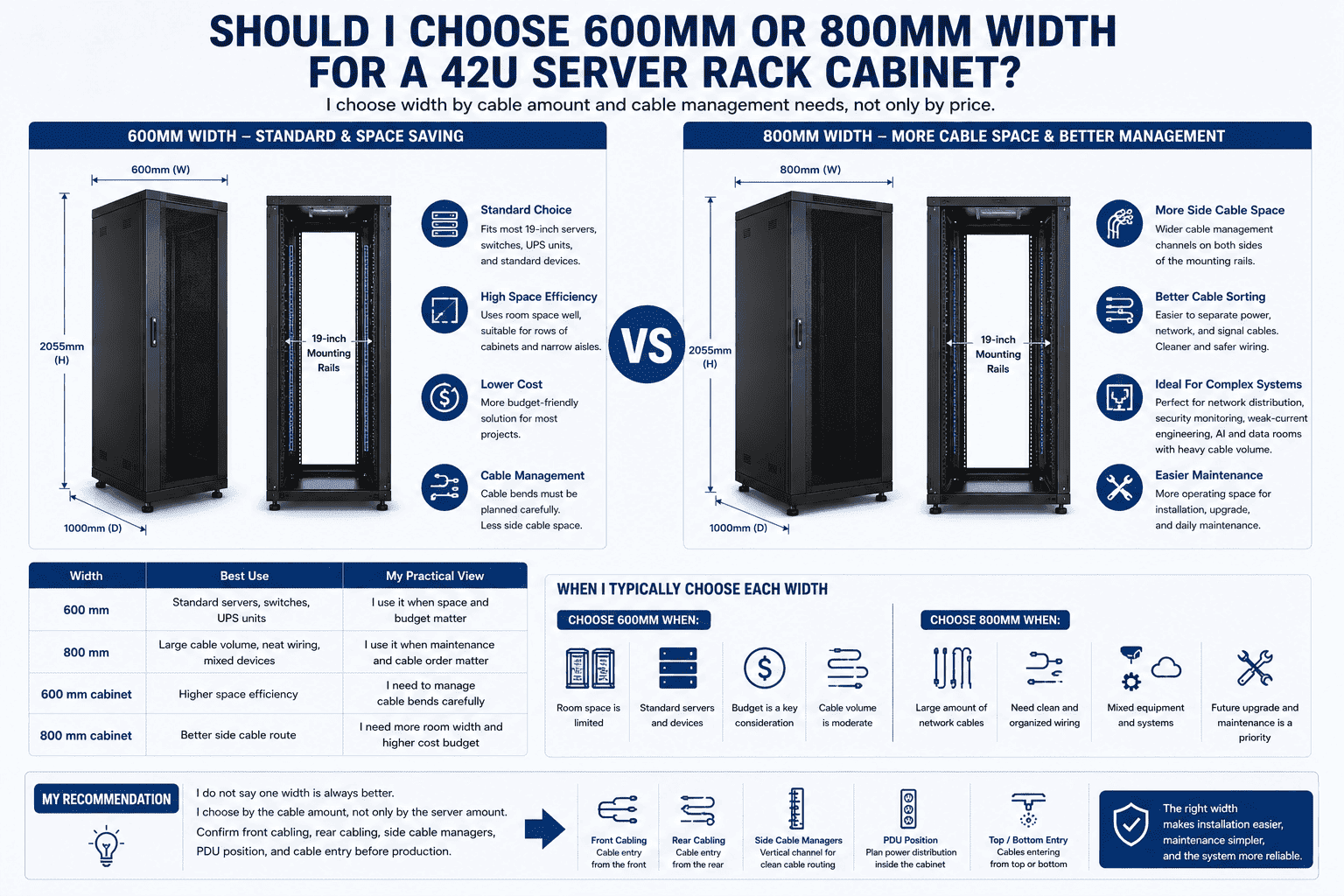
I see 600 mm width as the standard server cabinet width. It fits most 19-inch equipment and uses room space well. If the room has many cabinets in rows, I often use 600 mm width to keep the aisle and floor plan neat. I choose 800 mm width when the cabinet needs wider cable management channels on both sides of the mounting rails. This is very useful for network distribution, security monitoring systems, weak-current engineering, and mixed equipment rooms. I also see 800 mm width used in AI and data rooms when the cable amount is heavy and the engineer wants a cleaner front side.
| Width | Best Use | My Practical View |
|---|---|---|
| 600 mm | Standard servers, switches, UPS units | I use it when space and budget matter |
| 800 mm | Large cable volume, neat wiring, mixed devices | I use it when maintenance and cable order matter |
| 600 mm cabinet | Higher space efficiency | I need to manage cable bends carefully |
| 800 mm cabinet | Better side cable route | I need more room width and higher cost budget |
I do not say one width is always better. I choose by the cable amount, not only by the server amount. A cabinet with too little cable space may look fine on day one, but it becomes hard to maintain after several upgrades. I prefer to confirm front cabling, rear cabling, side vertical cable managers, PDU position, and cable entry before production. This makes the cabinet more suitable for real installation.
Which Depth Should I Select: 800mm, 1000mm, Or 1200mm?
I see many server cabinet problems come from depth, because servers fit in width, but they may not fit in depth with cables.
I choose 800 mm depth for shallow equipment and network use, 1000 mm for common server projects, and 1200 mm for deep servers, high-density systems, rear cable space, and better air flow. The depth must include equipment depth plus cable and maintenance space.5
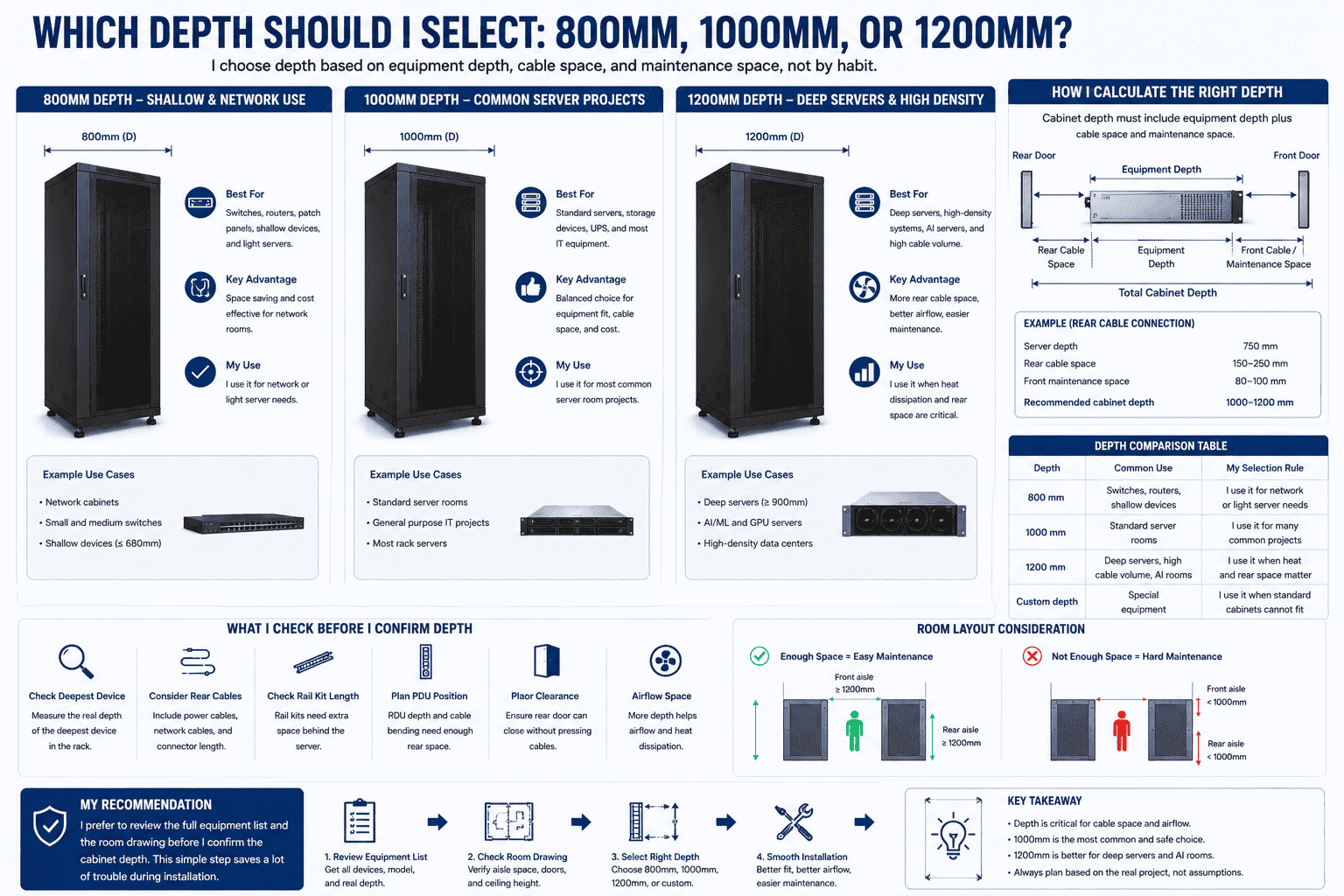
I always check the deepest device first. I do not only read the server body depth. I also check rear power cables, network cables, rail kit length, PDU position, and door clearance. If the server depth is close to the cabinet depth, the back door may press the cable. This can create cable damage, poor air flow, and hard maintenance.6 For many normal server rooms, I use 1000 mm depth as a safe and common choice. For AI computing rooms and high-density data rooms, I often suggest 1200 mm depth because deep servers and thick cable bundles need more rear space.
| Depth | Common Use | My Selection Rule |
|---|---|---|
| 800 mm | Switches, routers, shallow devices | I use it for network or light server needs |
| 1000 mm | Standard server rooms | I use it for many common projects |
| 1200 mm | Deep servers, high cable volume, AI rooms | I use it when heat and rear space matter |
| Custom depth | Special equipment | I use it when standard cabinets cannot fit |
I also think about room layout when I choose depth. A deep cabinet needs enough front and rear aisle space. If the room is small, a 1200 mm cabinet may create maintenance pressure. If the server is deep, an 800 mm cabinet may be a hidden risk. I prefer to review the full equipment list and the room drawing before I confirm the cabinet depth. This simple step saves a lot of trouble during installation.
Should I Use A Glass Door Or A High-Density Mesh Door?
I see customers like glass doors because they look clean, but heat control often decides the better door type.
I choose a glass front door when the customer needs visible equipment status and a neat appearance. I choose a high-density hexagonal mesh door when ventilation is more important. A mesh door can reach more than 75% ventilation and helps heat leave the cabinet faster.7
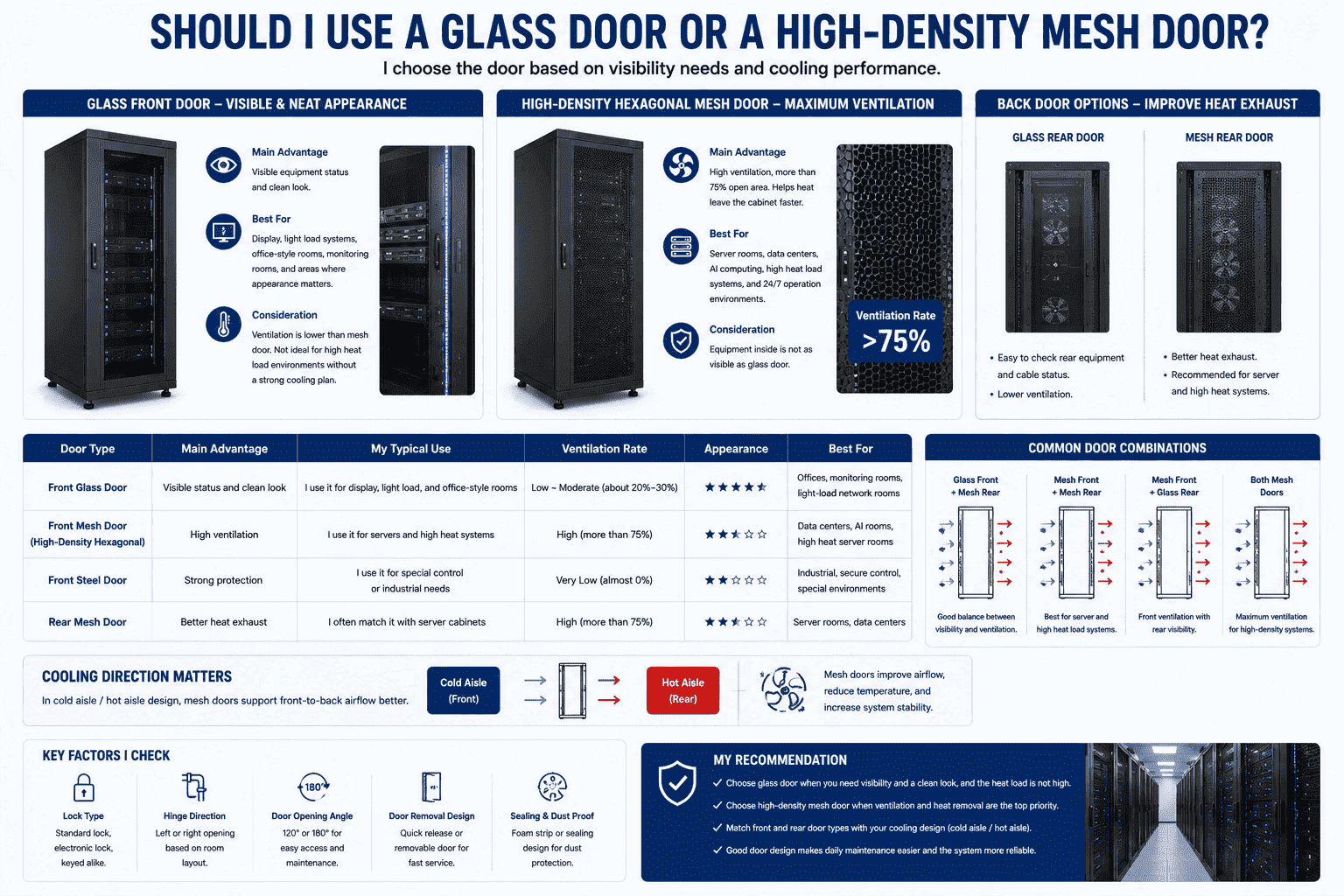
I treat the door as part of the cooling design. A glass door helps the operator see indicator lights, equipment status, and cabinet layout without opening the door. It also gives a clean look for offices, monitoring rooms, and light-load network rooms. Yet I do not suggest glass doors for high heat load server systems unless the room has a clear cooling plan. A high-density hexagonal mesh door gives large air flow. I use it for server rooms, data centers, and AI computing spaces because heat removal is more important than appearance there.
| Door Type | Main Advantage | My Typical Use |
|---|---|---|
| Front glass door | Visible status and clean look | I use it for display, light load, and office-style rooms |
| Mesh front door | High ventilation | I use it for servers and high heat systems |
| Steel door | Strong protection | I use it for special control or industrial needs |
| Rear mesh door | Better heat exhaust | I often match it with server cabinets |
I also check whether the customer needs a front glass door with rear mesh door, or both front and rear mesh doors. This choice depends on room cooling direction. Many professional projects use cold aisle and hot aisle design8. In this case, mesh doors support front-to-back air flow better. I also pay attention to lock type, hinge direction, door opening angle, and door removal design. These small details affect daily service work more than many people expect.
How Does A 42U Server Rack Cabinet Support Cabling And Installation?
I see clean wiring save more time than any decoration, because every upgrade and repair depends on cable order.
A 42U server rack cabinet supports top and bottom cable entry9, so I can match bridge frames, raised floors, and different room cable routes. The 800 mm wide model gives more side cable space, and it is better for integrated cabling and large network projects.
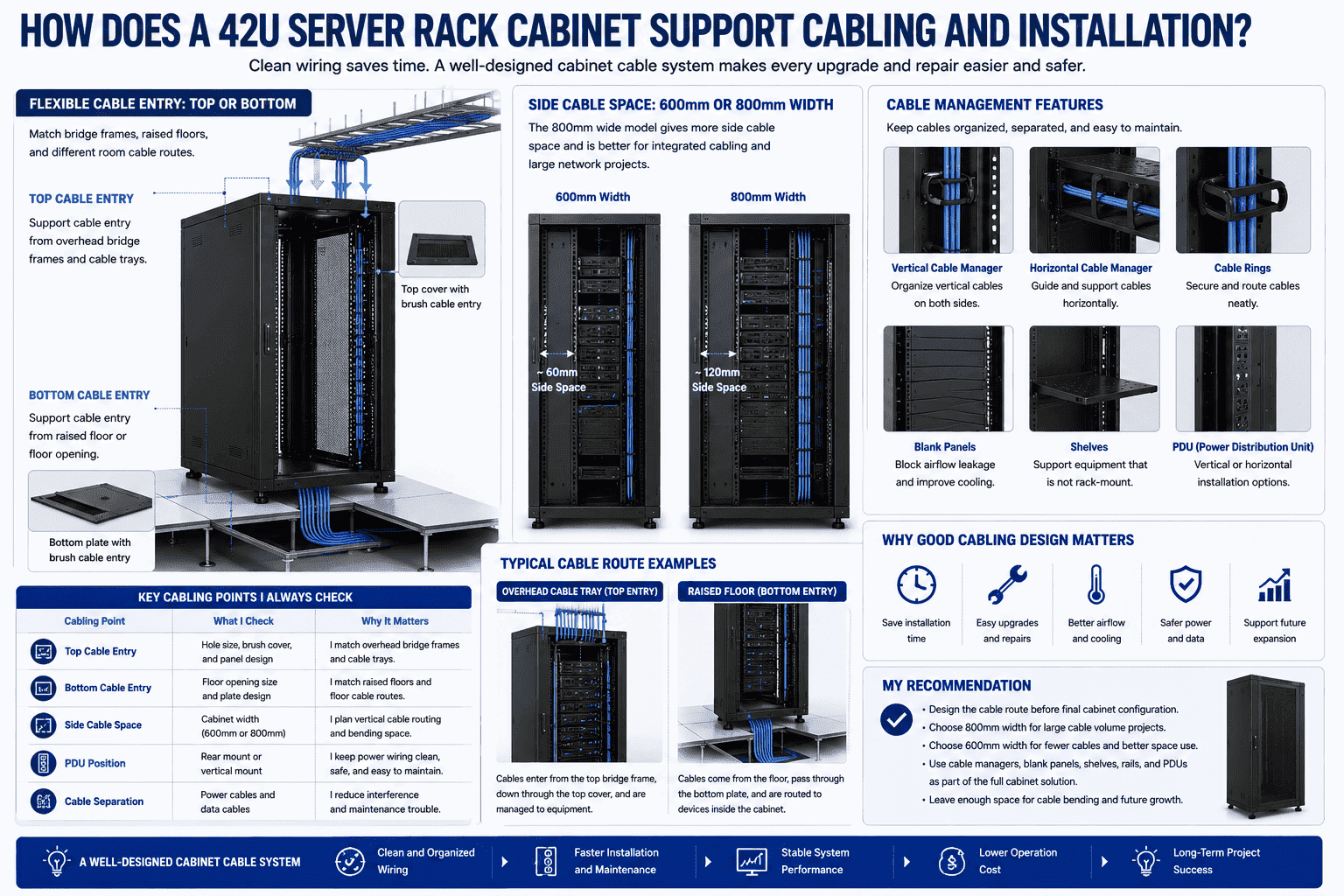
I often design the cabinet cable route before I design the final cabinet configuration. The top cover and bottom plate can support cable passing. This helps the cabinet match overhead cable trays and raised floor wiring. In many machine rooms, cables come from the top bridge frame. In other rooms, cables come from the floor. A good 42U cabinet should allow both directions, because real site conditions are not always the same as the first drawing. I also ask about power cable separation and data cable separation10. This keeps the cabinet safer and easier to maintain.
| Cabling Point | What I Check | Why It Matters |
|---|---|---|
| Top cable entry | Hole size and brush cover | I match overhead bridge frames |
| Bottom cable entry | Floor opening and plate design | I match raised floors |
| Side cable space | 600 mm or 800 mm width | I plan vertical cable routing |
| PDU position | Rear side or vertical mount | I keep power wiring clean |
| Cable separation | Power and data routes | I reduce maintenance trouble |
I prefer 800 mm width when the project has many network cables. I prefer 600 mm width when the project has fewer cables and wants better space use. I also use cable managers, blank panels, shelves, rails, and PDUs to make the cabinet work better. I do not see these as small accessories. I see them as parts of the full cabinet solution. When the cabinet leaves enough space for cable bending and future expansion, the customer can add equipment later without rebuilding the cabinet row.
What Materials And Surface Treatment Should I Expect From A Reliable 42U Cabinet?
I see strong cabinets last for years, while weak cabinets bend, rust, and lose door alignment after heavy equipment is installed.
I use thick cold-rolled steel for reliable 42U server rack cabinets. A common strong design uses 2.0 mm columns, 1.2 mm outer frame, 1.0 mm door panels, 1.2 mm top cover, and 1.2 mm base. A good cabinet can support more than 1200 kg.11
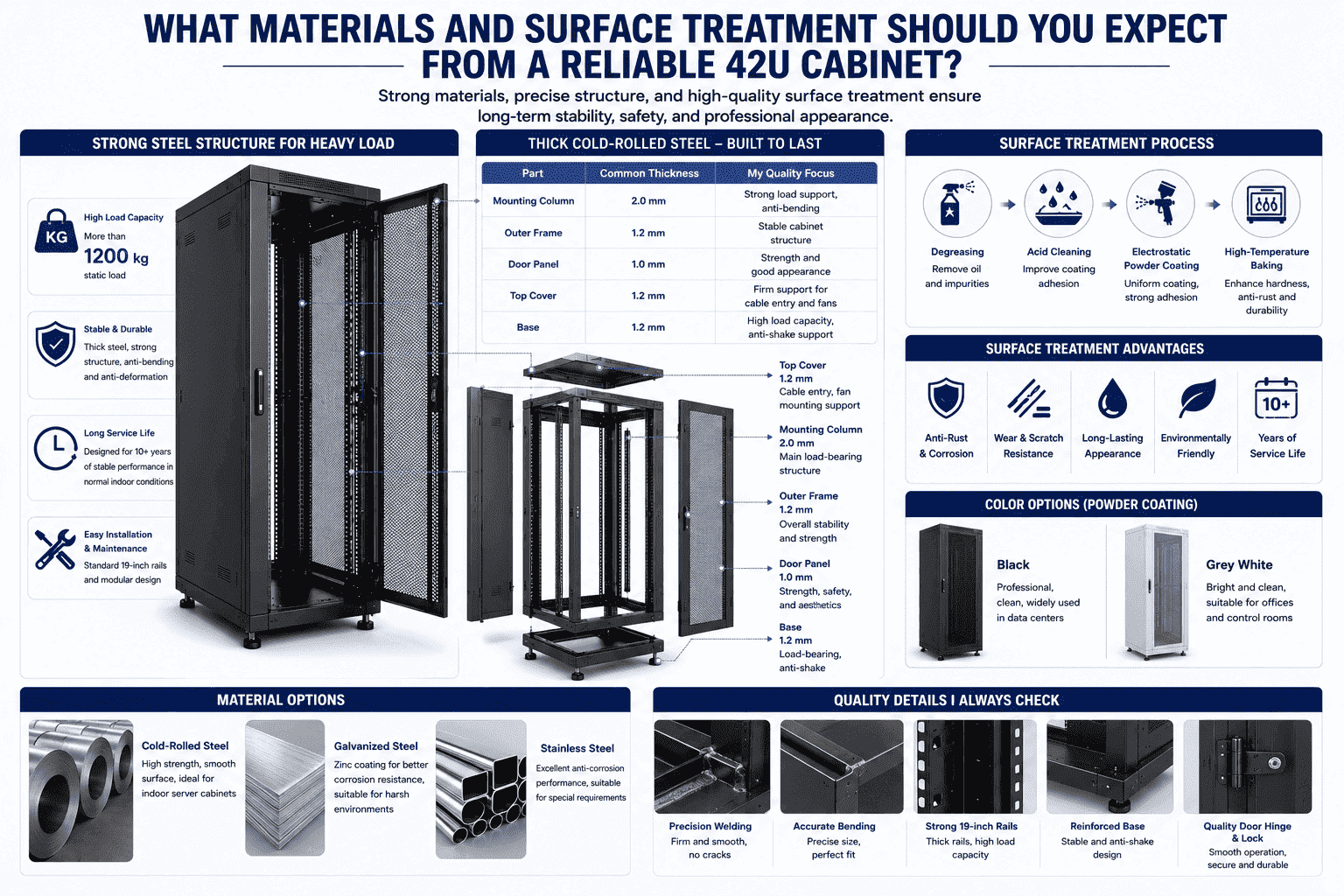
I care about material because a server cabinet carries expensive equipment. The cabinet must stay stable when servers, UPS units, switches, and cables are loaded together. I usually choose thick cold-rolled steel for indoor server cabinets. For special projects, I can also use stainless steel or galvanized steel. The main frame and mounting posts should be strong enough for heavy loads and repeated installation. I also look at welding quality, bending accuracy, rail strength, and base structure. These points decide whether the cabinet feels stable in real use.
| Part | Common Thickness | My Quality Focus |
|---|---|---|
| Mounting column | 2.0 mm | I need strong load support |
| Outer frame | 1.2 mm | I need stable cabinet structure |
| Door panel | 1.0 mm | I need strength and good appearance |
| Top cover | 1.2 mm | I need firm cable and fan support |
| Base | 1.2 mm | I need load and anti-shake support |
I also pay close attention to surface treatment. I use degreasing, acid cleaning, electrostatic powder coating, and high-temperature baking to improve anti-rust and anti-corrosion performance.12 The normal color choices are black and grey white. I see many customers choose black for data center layout because it looks professional and clean. A good coating helps the cabinet work for more than 10 years in normal indoor conditions. I see this as a basic export standard, not as an optional upgrade.
Can I Customize A Non-Standard 42U Server Rack Cabinet?
I often meet special equipment that cannot fit a normal cabinet, so standard size alone cannot solve every project need.
Yes, I can customize a 42U server rack cabinet by size, depth, door type, hole pattern, load structure, waterproof level, anti-rust treatment, cable entry, color, and accessories. I use non-standard customization when the site, equipment, or installation method needs a different design.
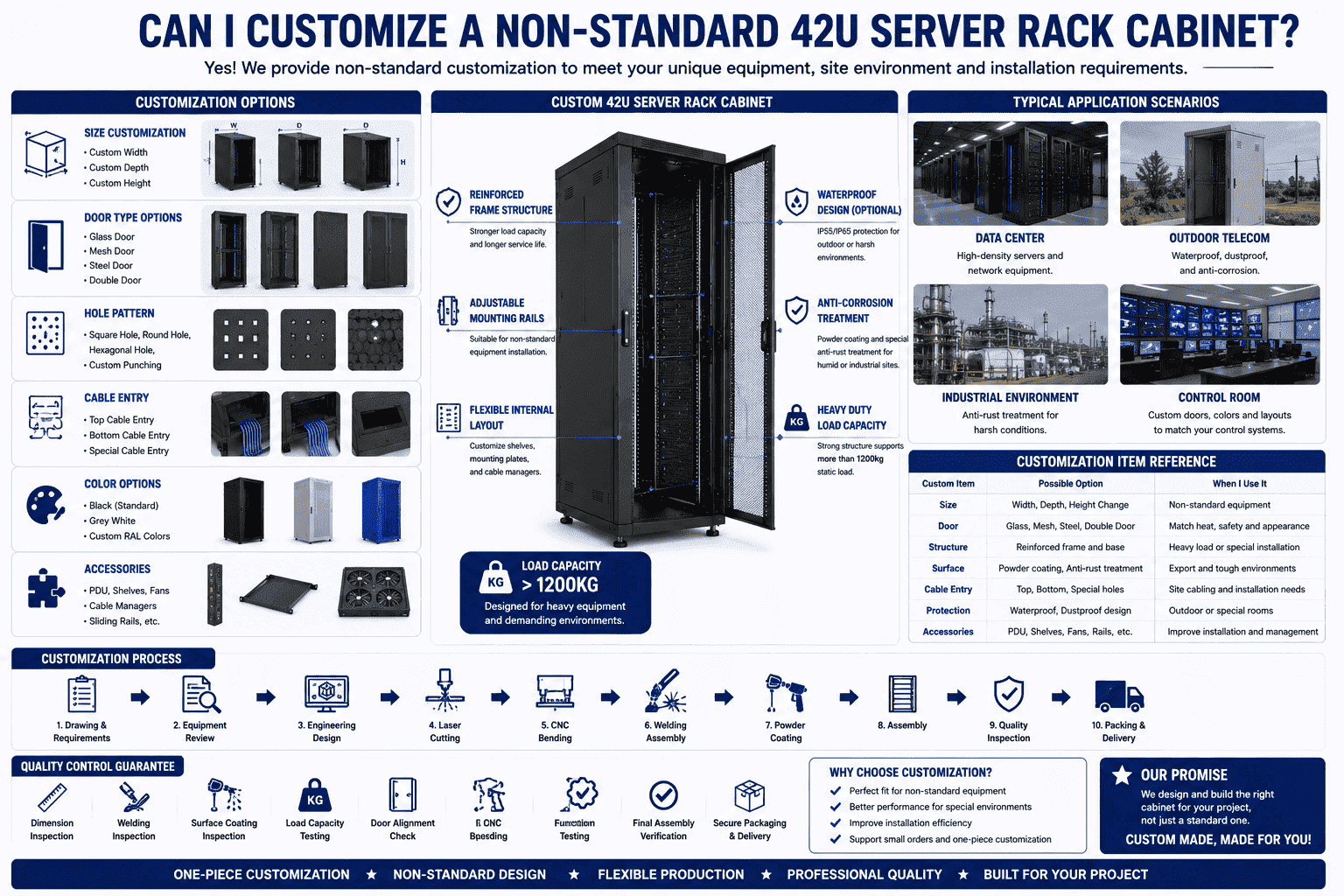
I see customization as a practical tool, not as a luxury choice. Some devices are wider, deeper, heavier, or shaped differently from normal 19-inch equipment. Some projects need outdoor waterproof cabinets. Some sites need anti-corrosion treatment because the environment is humid or industrial. Some control rooms need special punching, glass doors, steel doors, mesh doors, reinforced base, or fixed installation holes. I can adjust the cabinet around the real equipment and the real site. This is why I support small orders and one-piece customization.
| Custom Item | Possible Option | When I Use It |
|---|---|---|
| Size | Width, depth, height change | I use it when equipment is non-standard |
| Door | Glass, mesh, steel, double door | I match heat, safety, and appearance |
| Structure | Reinforced frame and base | I use it for heavy load |
| Surface | Powder coating, anti-rust treatment | I use it for export and tough sites |
| Cable entry | Top, bottom, special holes | I match site cabling |
| Protection | Waterproof and dustproof design | I use it for outdoor or special rooms |
I usually start customization with a drawing, equipment list, and installation environment. I ask where the cabinet will stand, how the cables enter, what load the cabinet must carry, and what surface color the customer wants. Then I design the structure, confirm the material, and produce through laser cutting, CNC bending, welding, powder coating, and assembly. I also check dimensions, welding, coating, load capacity, and overall finish before delivery. This process helps me give a cabinet that fits the project, not only a cabinet that looks similar.
Conclusion
I choose a 42U server rack cabinet by size, depth, door, cabling, material, and customization needs, because the right cabinet makes every IT room safer and easier to manage.
"19-inch rack - Wikipedia", https://en.wikipedia.org/wiki/19-inch_rack. The 19-inch rack format and rack-unit definition specify a unit height of 1.75 in. (44.45 mm), so 42 rack units provide approximately 1,867 mm of nominal mounting height. Evidence role: definition; source type: encyclopedia. Supports: A rack unit is 1.75 inches, or 44.45 mm, and 19-inch racks are a standard equipment mounting format; 42 units equal approximately 1867 mm.. ↩
"Understanding Data Center Server Rack Size: A Beginner's Guide", https://www.optcore.net/data-center-server-rack-size-guide-w11/?srsltid=AfmBOopj-coVEW405b7r55olKZSr5GTcpaWaNUPtwIXT-lKhX0zU4_3y. Data center planning references commonly treat 42U as a standard full-height rack size, linking rack height to equipment capacity and floor-space utilization. Evidence role: general_support; source type: institution. Supports: 42U is commonly referenced as a standard full-height rack size in data center planning, and rack height selection is tied to capacity and floor-space planning.. Scope note: Such sources can substantiate common use and design trade-offs, but may not directly prove cost advantages in every project. ↩
"19-inch rack", https://en.wikipedia.org/wiki/19-inch_rack. International rack specifications such as IEC 60297 and EIA-310 define the mechanical framework for 19-inch equipment mounting used across IT and telecommunications installations. Evidence role: definition; source type: institution. Supports: IEC/EIA rack standards define the mechanical dimensions used for 19-inch equipment mounting.. ↩
"Rack unit - Wikipedia", https://en.wikipedia.org/wiki/Rack_unit. A rack unit is defined as 1.75 in., which is equivalent to 44.45 mm. Evidence role: definition; source type: encyclopedia. Supports: One rack unit is defined as 1.75 inches, equivalent to 44.45 mm.. ↩
"Cabling a Data Center to TIA-942 Standard - Fosco Connect", https://www.fiberoptics4sale.com/blogs/archive-posts/95047686-cabling-a-data-center-to-tia-942-standard?srsltid=AfmBOoq9DR1WODlAmlL9wgYnOYTYmlN-oGpxfHeU3N51jg6wsNWiFOvn. Data center infrastructure guidance describes rack selection and layout as a function of equipment dimensions, cable-management space, airflow paths, and maintenance access, rather than chassis depth alone. Evidence role: expert_consensus; source type: institution. Supports: Data center and cabling design guidance treats rack planning as including equipment dimensions, cable management, airflow, and access clearance.. Scope note: The source would support the planning principle, while the exact clearance needed depends on the installed equipment and site layout. ↩
"[PDF] Best Practices Guide for Energy-Efficient Data Center Design", https://www.energy.gov/sites/default/files/2024-07/best-practice-guide-data-center-design.pdf. Research and data center guidance note that rear-rack congestion and improper cable routing can obstruct airflow and service access, and cabling standards warn against excessive cable bending that can degrade or damage cables. Evidence role: mechanism; source type: research. Supports: Restricted rear space and unmanaged cable bundles can interfere with airflow and access, while excessive cable bending can damage or impair cabling.. Scope note: The support is mechanistic; it does not prove that every shallow cabinet installation will produce all three problems. ↩
"quantifying air flow rate through a server in an operational ...", https://mavmatrix.uta.edu/context/mechaerospace_theses/article/1223/type/native/viewcontent. Thermal-management literature for data centers explains that high-open-area perforated rack doors reduce airflow resistance and support front-to-back cooling compared with solid doors. Evidence role: mechanism; source type: research. Supports: Perforated or mesh rack doors with high open area reduce airflow restriction and support front-to-back cooling in server racks.. Scope note: The source may support the airflow mechanism generally; the exact “more than 75%” value depends on the specific door design and should be verified with product test data. ↩
"Move to a Hot Aisle/Cold Aisle Layout", https://www.energystar.gov/products/data_center_equipment/16-more-ways-cut-energy-waste-data-center/move-hot-aislecold-aisle-layout. Data center energy-efficiency guidance describes hot-aisle/cold-aisle layouts as a standard method for separating cold supply air from hot equipment exhaust air to improve cooling management. Evidence role: expert_consensus; source type: government. Supports: Hot-aisle/cold-aisle arrangement is an established practice for separating supply and exhaust air in data centers.. ↩
"[PDF] Infrastructure Standard for Telecommunications Spaces", https://www.cfm.va.gov/til/dguide/OIT-InfrastrucStdTelecomSpaces.pdf. Data center cabling standards and design manuals recognize both overhead cable trays and underfloor pathways, providing context for cabinets with top and bottom cable-entry provisions. Evidence role: general_support; source type: institution. Supports: Data center cabling guidance recognizes both overhead and underfloor cable pathways, which correspond to cabinet top and bottom cable-entry designs.. Scope note: This supports the design rationale, not that every 42U cabinet model includes both entry types. ↩
"Data Cable Separation Distance from Source of Interference", https://www.elliottelectric.com/StaticPages/ElectricalReferences/DataComm/separation_interference.aspx. Telecommunications cabling guidance and electrical codes address separation between power and communications cabling as a measure for safety, interference control, and orderly cable management. Evidence role: expert_consensus; source type: institution. Supports: Cabling standards and guidance address separation of power and telecommunications cabling to manage safety, electromagnetic interference, and maintainability concerns.. Scope note: The exact separation distance varies by voltage, shielding, pathway type, and applicable local code. ↩
"EN IEC 61587-1:2022 - Mechanical Structures Test ...", https://standards.iteh.ai/catalog/standards/clc/24a2d15d-bd70-49ff-8c10-8143e33b8519/en-iec-61587-1-2022?srsltid=AfmBOopzbpEf71ebIJxTo7MHbRDio6FjqLpdPvxz5gzqhNbYMDy6baiw. Mechanical standards for electronic-equipment racks specify structural and static-load test methods by which cabinet load ratings, including ratings above 1,200 kg, can be verified. Evidence role: case_reference; source type: institution. Supports: Rack mechanical standards define structural and static-load testing methods that can be used to verify high load-capacity claims.. Scope note: A standards source supports how such a rating should be tested; direct proof for this specific cabinet would require a model-specific test report or certification. ↩
"Accelerated Corrosion Tests in Quality Labels for Powder Coatings ...", https://pmc.ncbi.nlm.nih.gov/articles/PMC8585214/. Materials research on steel coatings shows that surface pretreatment followed by cured powder coating can improve coating adhesion and corrosion resistance by creating a protective barrier on the metal surface. Evidence role: mechanism; source type: paper. Supports: Steel surface pretreatment and properly cured powder coatings improve coating adhesion and corrosion resistance.. Scope note: The durability achieved depends on pretreatment quality, coating chemistry, film thickness, curing conditions, and service environment. ↩
