
What does 1U, 2U, 3U, 4U mean?

I often see buyers feel unsure when they hear U height. The wrong U size causes wasted cabinet space, poor cooling, and difficult installation.
1U, 2U, 3U, and 4U are standard rack height units for cabinets and rack-mounted equipment. 1U equals 44.45 mm.1 2U equals 88.90 mm. 3U equals 133.35 mm. 4U equals 177.80 mm.2 These sizes are used worldwide in 19-inch network cabinets and server cabinets.3
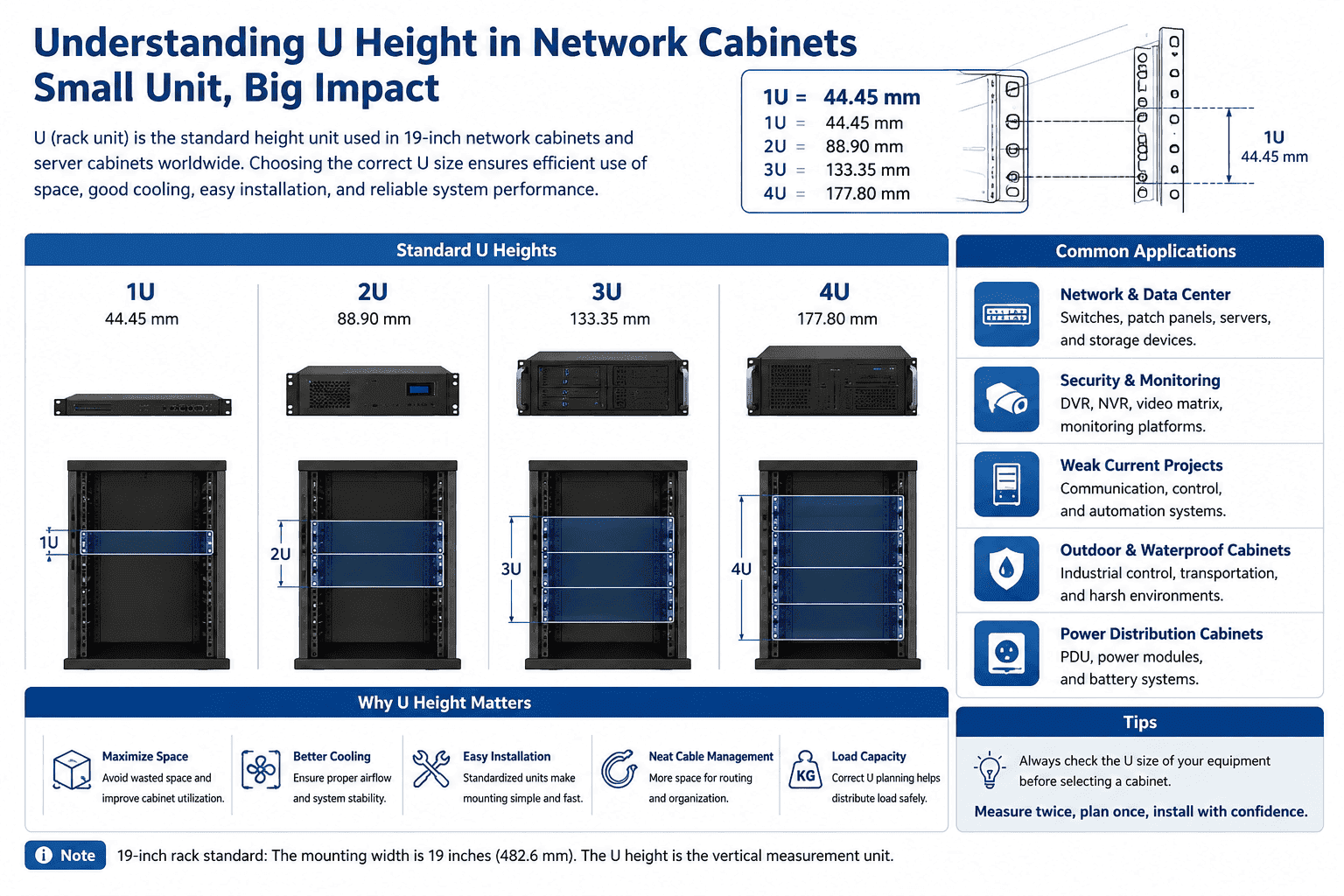
I have worked with network cabinets, server cabinets, wall-mounted cabinets, waterproof cabinets, and power distribution cabinets for many years. I learned one thing very early. If I do not understand U height, I cannot plan a cabinet well. The U number decides the equipment height. It also affects the installation gap, airflow, cable routing, and load capacity. I still remember a small security project where the buyer only told me the device model. I had to check the U size before I could confirm the cabinet height. That detail saved the project from buying a cabinet that was too small. I will explain U height in a simple way, because this small unit controls many big decisions in network, data center, weak current, monitoring, and security projects.
What is one U in a network cabinet?
I see many new buyers ask this question first. If I skip this basic point, the whole cabinet layout becomes confusing and easy to calculate wrong.
1U is a fixed rack height unit. 1U equals 44.45 mm. This unit is used around the world for regular rack-mounted equipment and 19-inch cabinets.
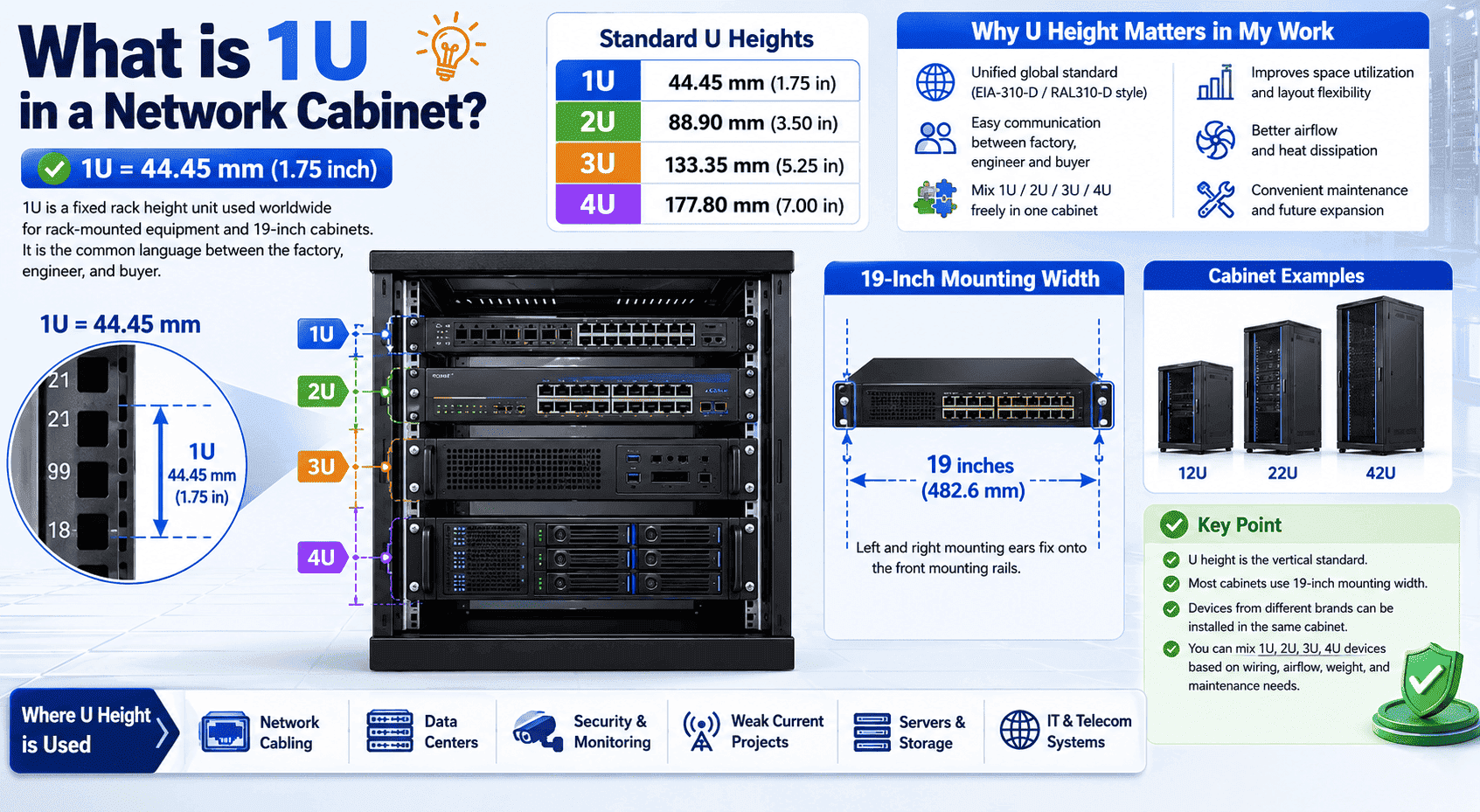
I use U height as the common language between my factory, the engineer, and the buyer. When I say a cabinet is 12U, 22U, or 42U, I am saying how many standard rack spaces it has. When I say a device is 1U or 2U, I am saying how much vertical space it takes inside the cabinet. This unit comes from the common 19-inch rack standard, which many people in the industry connect with the EIA-310-D style standard.4 Some people also call it RAL310-D in daily communication. The key point stays the same. The height is unified.
| U height | Height in mm | Common meaning in my work |
|---|---|---|
| 1U | 44.45 mm | I use it for slim network devices and high-density layouts. |
| 2U | 88.90 mm | I use it for balanced equipment with better space and value. |
| 3U | 133.35 mm | I use it for equipment that needs more function space. |
| 4U | 177.80 mm | I use it for servers, storage, and higher-performance systems. |
I always remind customers that U height is only the vertical standard. The cabinet width also matters. Most network cabinets and server cabinets use a 19-inch mounting width.5 The left and right mounting ears of the equipment fix onto the front mounting rails. The hole positions also follow the same idea. This is why devices from different brands can often be installed in the same cabinet.6 I do not need to install 1U first, then 2U, then 3U. I can mix them based on wiring, airflow, weight, and maintenance needs.
How do 1U, 2U, 3U, and 4U compare in real projects?
I often see buyers choose only by price. That can create hidden problems, because each U height has its own best use.
1U is light and dense. 2U is balanced and common. 3U supports more functions. 4U supports stronger performance, storage, and computing power.
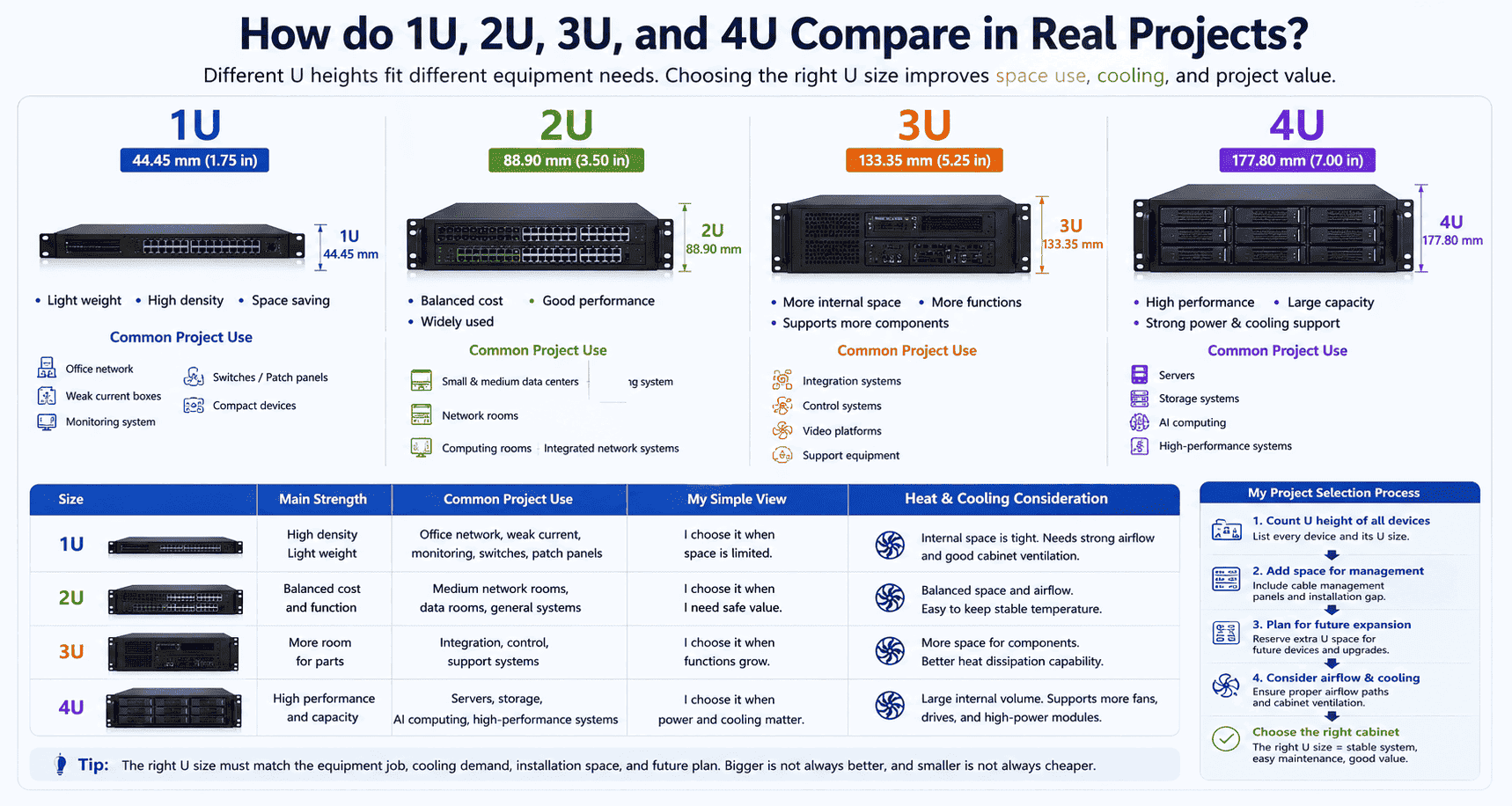
I usually explain 1U to 4U by using project scenes. 1U equipment appears most often in small office weak current boxes, corridor network cabinets, switches, patch panels, and compact devices. I like 1U when the project needs high density and does not have much space. 2U is the most general size in many projects. I often see it in small and medium data centers, computing rooms, and integrated network rooms. It gives enough internal space without taking too much cabinet height. 3U belongs to a middle-high equipment size. I often use it when the device needs more internal structure, more ports, or more support parts. 4U is common for servers and storage equipment. I see it often in data centers, AI computing rooms, and high-performance systems.
| Size | Main strength | Common project use | My simple view |
|---|---|---|---|
| 1U | High density and light weight | Office network, weak current, monitoring | I choose it when space is limited. |
| 2U | Balanced cost and function | Medium network rooms, data rooms | I choose it when I need safe value. |
| 3U | More room for parts | Integration, control, support systems | I choose it when functions grow. |
| 4U | High performance and capacity | Servers, storage, AI computing | I choose it when power and cooling matter. |
I also consider heat. A 1U device can save space, but it may need strong airflow because the internal space is tight.7 A 4U device has more internal space, so it can hold larger fans, more disks, or stronger power modules. I do not say one size is always better. I say the right U size must match the equipment job. When I help a buyer select a cabinet, I first count the U height of all devices. Then I add space for cable management, future expansion, and airflow.8 This simple habit prevents many mistakes.
-
How should I choose between 1U, 2U, 3U, and 4U equipment?
I know buyers want a quick answer. But a quick guess can lead to a wrong cabinet, extra cost, and delay at the site.
I choose U height by checking device function, heat, weight, cable volume, future expansion, and cabinet type. I do not choose only by the equipment price.

I use a simple method when I help customers plan. First, I list every device. I write down its U height, depth, weight, power, and cable direction. Second, I count the total U space. Third, I add extra space for cable management and future growth. I do not like using every U space from the first day. A full cabinet has less room for adjustment. It also makes cable work harder. I usually suggest leaving extra U space when the project may expand.
| If I need this | I usually consider this U size | My reason |
|---|---|---|
| Small office network | 1U or 2U | I save space and keep the cabinet simple. |
| Security monitoring project | 1U, 2U, or 3U | I match switches, NVRs, patch panels, and power units. |
| Small data room | 2U or 3U | I balance cost, cooling, and future change. |
| Server and storage | 2U or 4U | I check computing power, disks, and airflow. |
| AI computing or high load | 4U or larger layout | I focus on heat, power, and load strength. |
I also think about the cabinet structure. If the device is deep, I need a deeper cabinet. If the device is heavy, I need stronger mounting rails, support brackets, or shelves.9 If the site is outdoor, I need waterproof design, anti-corrosion treatment, and suitable ventilation.10 If the project is in a monitoring room, I may need a console, TV wall, or special sheet metal structure. My own factory supports small orders and non-standard customization, so I often solve these details by making the cabinet match the project instead of forcing the project to match a fixed cabinet. I believe this is important for overseas buyers, because one project may need only one special cabinet, but that one cabinet still needs to be accurate.
-
What common mistakes should I avoid when planning U space?
I have seen many simple cabinet mistakes become expensive site problems. Most of them come from not leaving enough space for real use.
I avoid five mistakes: counting only device height, ignoring depth, ignoring heat, ignoring weight, and leaving no future U space.

I do not plan a cabinet by total U number only. If a buyer says the devices total 10U, I do not choose a 10U cabinet right away. I check whether the devices need cable managers, shelves, power distribution units, fan trays, grounding bars, and blank panels. I also check whether the customer may add more switches or servers later. A cabinet that is too full from the first day creates trouble later. I prefer a clear and serviceable layout.
| Mistake | What may happen | What I do instead |
|---|---|---|
| I count only U height. | The device may fit in height but fail in depth. | I check depth and rear cable space. |
| I ignore heat. | The cabinet may become too hot. | I use mesh doors, fans, or better airflow. |
| I ignore weight. | Rails or frames may become unsafe. | I strengthen the structure when needed. |
| I ignore cable space. | Cables may bend too much or block airflow.11 | I add cable managers and extra space. |
| I leave no spare U. | Future expansion becomes difficult. | I reserve U space for later use. |
I also pay attention to door choice. A glass door looks clean and helps viewing, but a mesh door is better when the cabinet needs more airflow.12 A steel door gives stronger protection in some industrial or power environments. An outdoor waterproof cabinet needs a different design. It needs sealing, water protection, coating quality, and anti-rust material choices. In my production line, I use cold-rolled steel, stainless steel, and galvanized steel based on project needs. I also use laser cutting, CNC bending, welding, powder coating, and assembly control to keep the cabinet accurate. These details support the U plan. Without good cabinet quality, even a correct U plan may not perform well.
Conclusion
I treat U height as the basic language of rack design. When I understand 1U to 4U, I can plan safer, cleaner, and smarter cabinets.
"Rack unit", https://en.wikipedia.org/wiki/Rack_unit. The source defines one rack unit as 1.75 inches, or approximately 44.45 mm, supporting the article's stated metric value for 1U. Evidence role: definition; source type: encyclopedia. Supports: A rack unit is defined as 1.75 inches, which is approximately 44.45 millimeters.. ↩
"Rack unit - Wikipedia", https://en.wikipedia.org/wiki/Rack_unit. The source explains that rack-unit heights are measured in 1.75-inch increments, supporting the article's conversion of 2U, 3U, and 4U into millimeter values. Evidence role: definition; source type: encyclopedia. Supports: Rack-unit heights are multiples of 1.75 inches, allowing 2U, 3U, and 4U heights to be calculated in millimeters.. Scope note: The source supports the dimensional basis; the listed metric values are rounded conversions. ↩
"19-inch rack", https://en.wikipedia.org/wiki/19-inch_rack. International rack standards define the dimensional framework for 19-inch rack-mounted equipment, providing contextual support for the article's statement that U-based sizes are widely used in network and server cabinets. Evidence role: general_support; source type: institution. Supports: International rack standards define 19-inch rack dimensions used for rack-mounted electronic equipment.. Scope note: The source would establish international standardization and broad applicability, not prove usage in every country or installation. ↩
"Rack specifications", https://www.ibm.com/docs/en/n-series?topic=specifications-requirements. The EIA/ECA rack standard specifies dimensional requirements for 19-inch equipment racks, supporting the article's connection between rack-unit sizing and EIA-310-style standards. Evidence role: historical_context; source type: institution. Supports: EIA/ECA rack standards specify key dimensions for 19-inch racks, including vertical mounting increments and panel dimensions.. Scope note: The source would support the standards relationship, but not necessarily the informal industry wording used in the article. ↩
"19-inch rack", https://en.wikipedia.org/wiki/19-inch_rack. The source defines the 19-inch rack as a standardized mounting format for equipment modules, supporting the article's statement that network and server cabinets commonly use this mounting width. Evidence role: definition; source type: encyclopedia. Supports: A 19-inch rack is a standardized frame or enclosure for mounting equipment modules with a defined front-panel width.. Scope note: The source supports the common standardized format, not a quantified share of all cabinets sold or installed. ↩
"19-inch rack", https://en.wikipedia.org/wiki/19-inch_rack. Rack-mounting standards specify the relevant panel and mounting-hole dimensions, supporting the article's explanation that compliant devices from different manufacturers can often share the same cabinet. Evidence role: mechanism; source type: institution. Supports: Rack standards define mounting dimensions and hole spacing that allow compliant equipment to be mounted in compatible racks.. Scope note: The source supports dimensional interoperability; device depth, weight, airflow, and rail design can still prevent installation in particular cabinets. ↩
"[PDF] quantifying air flow rate through a server in an operational data", https://mavmatrix.uta.edu/context/mechaerospace_theses/article/1223/type/native/viewcontent. Thermal-design research on compact rack-mounted servers shows that constrained chassis volume and high component density can increase airflow and cooling requirements, providing contextual support for the article's statement about 1U devices. Evidence role: mechanism; source type: paper. Supports: High-density or low-profile rack equipment can impose more demanding airflow and cooling requirements because of constrained internal volume and heat dissipation paths.. Scope note: The source would support the thermal mechanism generally; it would not prove that every 1U device requires stronger airflow. ↩
"[PDF] Best Practices Guide for Energy-Efficient Data Center Design", https://www.energy.gov/sites/default/files/2024-07/best-practice-guide-data-center-design.pdf. Data-center and telecommunications infrastructure guidance identifies cable management, airflow control, and growth capacity as planning considerations for rack layouts, supporting the article's recommendation to reserve space for these functions. Evidence role: expert_consensus; source type: institution. Supports: Recognized infrastructure guidance treats cable management, airflow paths, and growth allowance as part of rack and data-center planning.. Scope note: The source would support the general planning principle, not prescribe a universal amount of spare U space for every project. ↩
"1926.600 - Equipment. | Occupational Safety and Health ... - OSHA", http://www.osha.gov/laws-regs/regulations/standardnumber/1926/1926.600. Technical rack-installation guidance states that heavy equipment must be supported by rails, shelves, or brackets rated for the equipment load, supporting the article's weight-related installation advice. Evidence role: mechanism; source type: institution. Supports: Rack-mounted equipment must be supported according to equipment weight, rail capacity, and rack load ratings.. Scope note: The source would support the safety principle; the required support method depends on the specific equipment and rack load ratings. ↩
"NEMA Enclosure Types", https://www.nema.org/docs/default-source/products-document-library/nema-enclosure-types.pdf. Enclosure standards and outdoor cabinet guidance address ingress protection, corrosion resistance, and thermal management, supporting the article's statement that outdoor sites require different cabinet design considerations. Evidence role: expert_consensus; source type: institution. Supports: Outdoor enclosures are specified according to ingress protection, environmental resistance, and thermal-management needs.. Scope note: The source would support the categories of concern; the exact waterproofing, coating, and ventilation design depends on the local environment and equipment heat load. ↩
"[DOC] 271116i.docx - Office of Construction and Facilities Management", https://www.cfm.va.gov/TIL/spec/271116i.docx. Cabling and data-center infrastructure guidance identifies minimum bend-radius requirements and notes that unmanaged cable congestion can obstruct airflow, supporting the article's warning about cable space. Evidence role: mechanism; source type: institution. Supports: Cabling standards address bend radius, and data-center cooling guidance recognizes cable congestion as a potential airflow obstruction.. Scope note: The source would support the mechanisms generally; the severity depends on cable type, routing, rack density, and airflow design. ↩
"Perforated Metal Components for Data Center Infrastructure - Syr-Tech", https://www.syrtech.com/data-center-infrastructure. Data-center cooling research and guidance indicate that perforated rack doors facilitate equipment airflow compared with solid door designs, supporting the article's preference for mesh doors when airflow is required. Evidence role: mechanism; source type: research. Supports: Perforated or mesh rack doors permit front-to-back airflow more effectively than solid doors in cooling-dependent rack layouts.. Scope note: The source would support the airflow principle; actual cooling performance depends on perforation area, fan configuration, room airflow, and equipment heat load. ↩
