
What is the Difference Between a Rack and a Cabinet?

Many buyers mix up racks and cabinets. This mistake can cause wrong orders, poor cooling, messy cables, and weak equipment protection.
A rack is an open frame for standard 19-inch equipment mounting. A cabinet is an enclosed protective unit with rack rails inside. I use racks when I need simple support and easy access. I use cabinets when I need security, dust control, cable order, and full equipment protection.
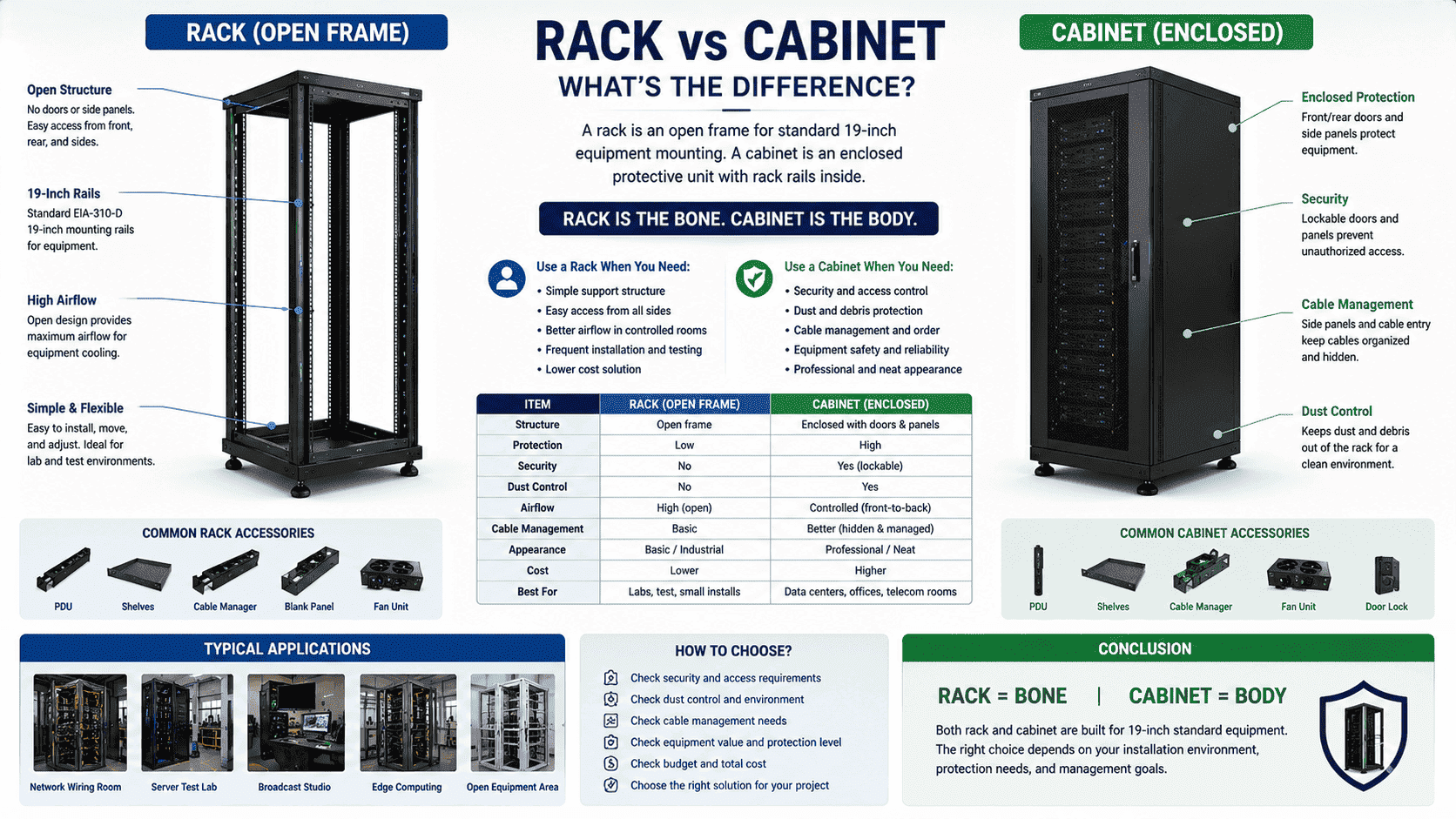
I meet this question often when I discuss projects with overseas customers. Some customers ask for a cabinet, but they only need an open rack. Some customers ask for a rack, but their site needs a closed cabinet with doors, side panels, fans, and a PDU. The names sound close. The structures look related. The use cases are not the same. I always start from one simple idea. A rack is the bone. A cabinet is the body. Once I explain this point, the whole choice becomes much easier.
What Is a Rack in Network and Data Center Projects?
Wrong rack selection can make an equipment room look simple at first. Later, the site may face weak protection, open cables, and limited safety.
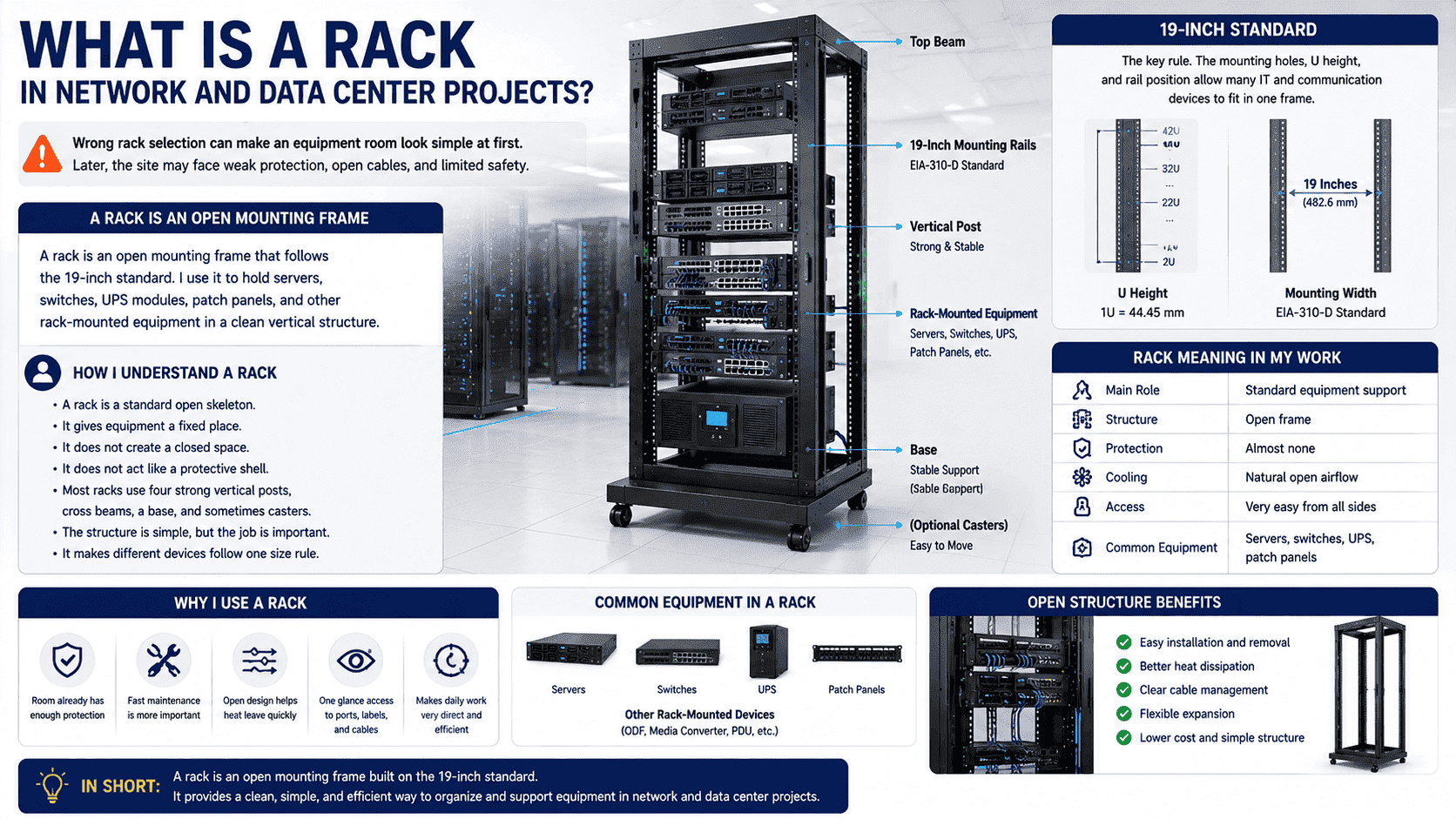
A rack is an open mounting frame that follows the 19-inch standard.1 I use it to hold servers, switches, UPS modules, patch panels, and other rack-mounted equipment in a clean vertical structure.
How I Understand a Rack
I see a rack as a standard open skeleton. It gives equipment a fixed place. It does not create a closed space. It does not act like a protective shell. Most racks use four strong vertical posts, cross beams, a base, and sometimes casters. The structure is simple, but the job is important. It makes different devices follow one size rule.
The key rule is the 19-inch standard. The mounting holes, U height, and rail position allow many IT and communication devices to fit in one frame.2 I have seen small weak-current projects become much cleaner after devices moved from random shelves to a proper rack. The cables became easier to trace. The devices became easier to remove. The air around the equipment became more open.
| Item | Rack Meaning in My Work |
|---|---|
| Main role | Standard equipment support |
| Structure | Open frame |
| Protection | Almost none |
| Cooling | Natural open airflow |
| Access | Very easy from all sides |
| Common equipment | Servers, switches, UPS, patch panels |
I use a rack when the room already has enough protection. I also use it when fast maintenance is more important than enclosure. The open design helps heat leave quickly. It also helps engineers see ports, labels, and cables at one glance. This makes daily work very direct.
What Is a Cabinet in Network and Server Rooms?
A cabinet may look like a larger rack from outside. This simple view can hide its real value in protection, order, and safety.
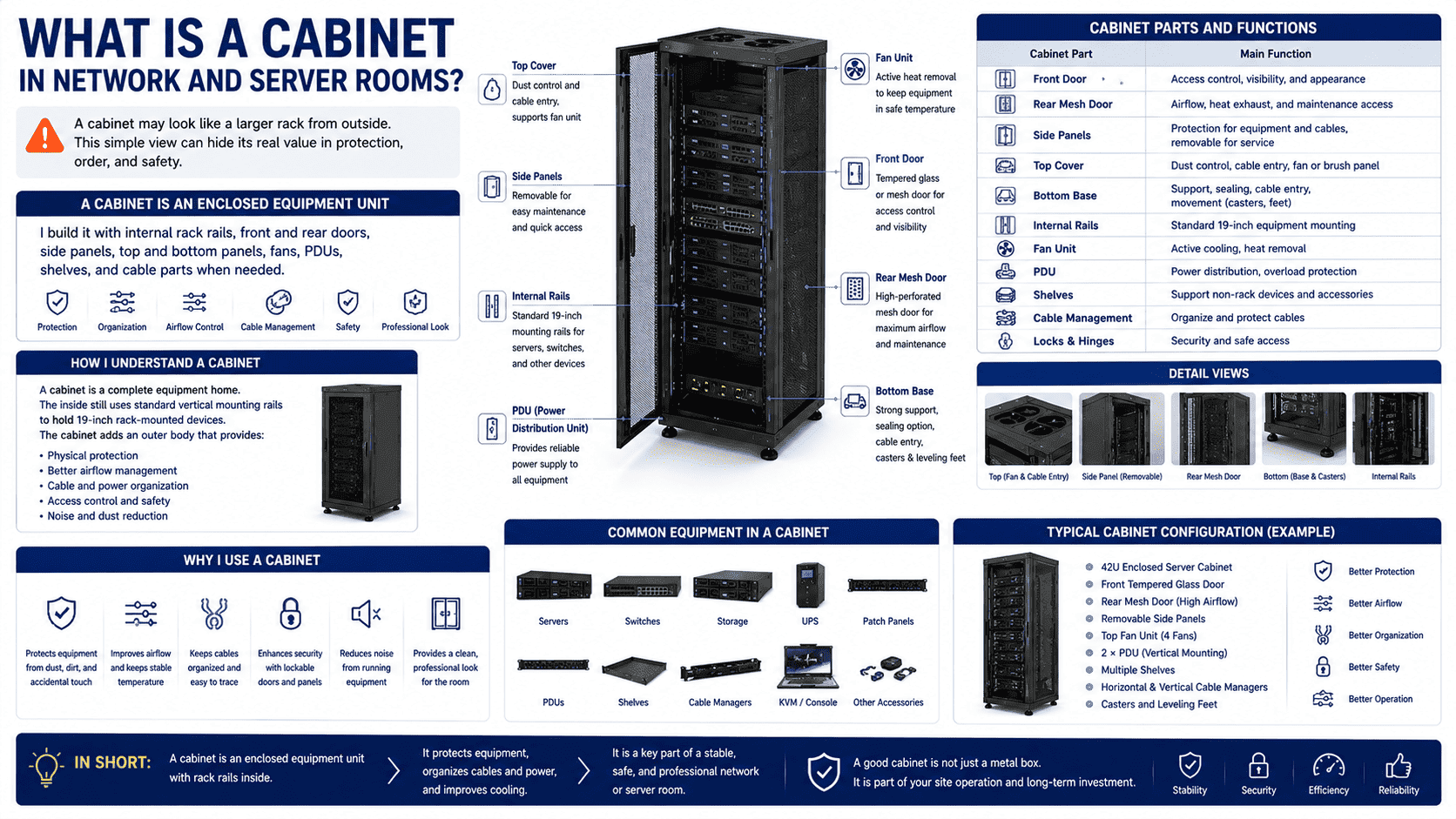
A cabinet is an enclosed equipment unit.3 I build it with internal rack rails, front and rear doors, side panels, top and bottom panels, fans, PDUs, shelves, and cable parts when needed.
How I Understand a Cabinet
I see a cabinet as a complete equipment home. The inside still uses standard vertical mounting rails. This means it can hold 19-inch rack-mounted devices. The difference is the cabinet adds an outer body around those rails. That outer body gives physical protection. It also helps manage air, cables, power, and access.
In my factory work, a standard network cabinet often includes a front tempered glass door or mesh door. The rear door is often a mesh door. The side panels can usually be removed quickly. The top panel can support cable entry or fans. The bottom can be sealed or designed with cable holes. The cabinet can also include casters and leveling feet. These details sound small, but they decide how the cabinet performs on site.
| Cabinet Part | Main Function |
|---|---|
| Front door | Access control and appearance |
| Rear mesh door | Airflow and maintenance |
| Side panels | Protection and service access |
| Top cover | Dust control and cable entry |
| Bottom base | Support, sealing, and movement |
| Internal rails | Standard equipment mounting |
| Fan unit | Active heat removal |
| PDU | Power distribution |
I use cabinets when the equipment needs a safer environment. A cabinet can reduce dust contact.4 It can reduce accidental touch. It can help control cables. It can also reduce noise from running equipment.5 In many projects, the cabinet is not only a metal box. It is part of the site operation plan.
How Are Rack and Cabinet Structures Different?
A wrong structure choice can make installation harder. It can also cause poor airflow, weak load support, or missing safety parts.
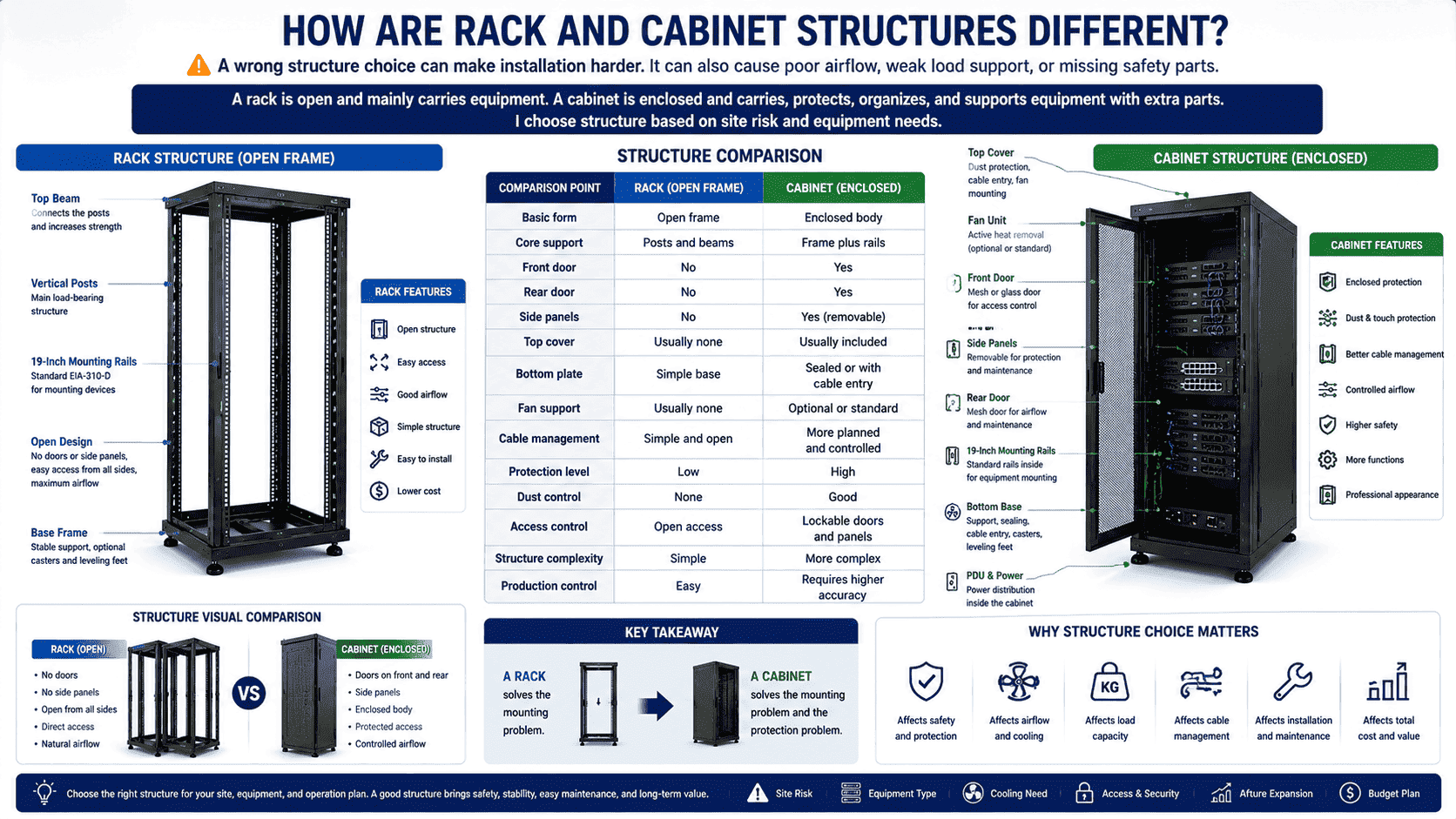
A rack is open and mainly carries equipment.6 A cabinet is enclosed and carries, protects, organizes, and supports equipment with extra parts. I choose structure based on site risk and equipment needs.
The Structure Difference I Check First
I always check the structure before I talk about price or appearance. The rack and cabinet may both accept 19-inch devices, but their metal design logic is different. A rack uses posts and beams to create a strong open frame. It is easier to produce. It is easier to move. It also gives very direct access to every cable and port.
A cabinet uses a frame plus external panels and functional parts. The cabinet needs stronger coordination between the frame, doors, panels, hinges, locks, top cover, bottom plate, fan openings, and cable entries.7 In custom cabinet production, I pay close attention to cutting, bending, welding, polishing, pickling, powder coating, and final assembly. A small error can affect door gaps, rail alignment, or equipment installation.
| Comparison Point | Rack | Cabinet |
|---|---|---|
| Basic form | Open frame | Enclosed body |
| Core support | Posts and beams | Frame plus rails |
| Doors | No front or rear door | Front and rear doors |
| Side panels | No side panels | Removable side panels |
| Top cover | Usually none | Usually included |
| Fan support | Usually none | Optional or standard |
| Cable management | Simple and open | More planned and controlled |
| Safety | Low | Higher |
I usually say this to customers in simple words. A rack solves the mounting problem. A cabinet solves the mounting problem and the protection problem. This is the main structural difference. The cabinet has more parts, so it has more functions. It also needs more accurate production control.
How Are Rack and Cabinet Functions Different?
A rack may hold devices well, but it may not protect them well. This gap becomes serious in dusty, public, or high-value equipment rooms.
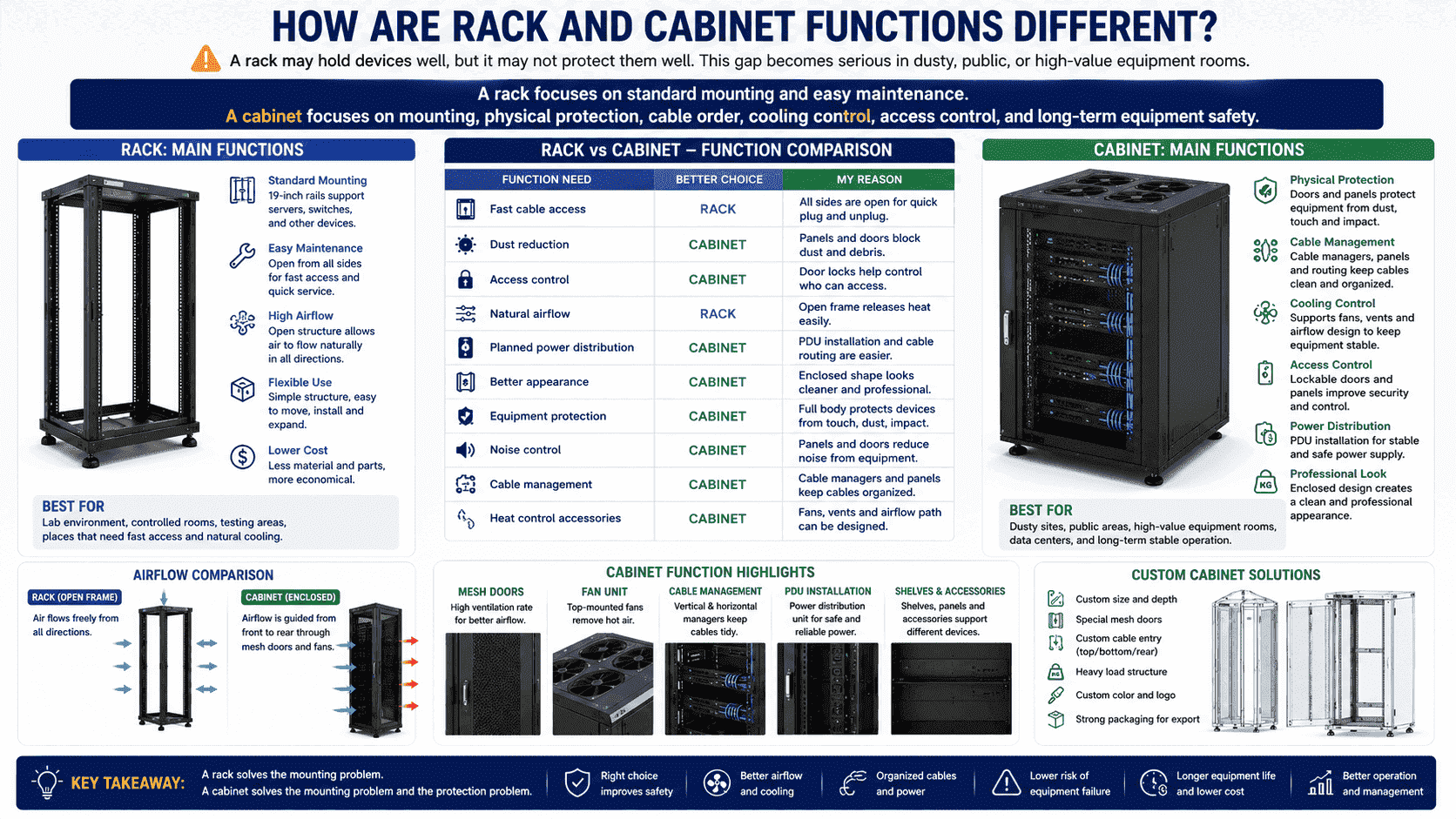
A rack focuses on standard mounting and easy maintenance.8 A cabinet focuses on mounting, physical protection, cable order, cooling control, access control, and long-term equipment safety.
The Function Difference I Use in Real Projects
I judge function by asking one question. What problem must this metal structure solve? If the main problem is how to install many devices in one vertical space, a rack may be enough. If the main problem includes dust, safety, noise, cable order, and controlled access, a cabinet is usually better.
The open rack has a clear advantage in heat release. Air can move from all directions.9 Maintenance staff can plug and unplug cables quickly. They can also change equipment without opening doors or removing panels. This is useful in labs, controlled rooms, and places where fast service matters.
The cabinet has a different value. It creates a physical boundary. It can keep hands away from devices. It can hide and guide cables. It can carry fans, shelves, PDUs, cable managers, and patch panels in a planned way. It also gives the room a cleaner and more professional look.
| Function Need | Better Choice | My Reason |
|---|---|---|
| Fast cable access | Rack | All sides are open |
| Dust reduction | Cabinet | Panels and doors block dust |
| Access control | Cabinet | Door locks help control entry10 |
| Natural airflow | Rack | Open frame releases heat |
| Planned power distribution | Cabinet | PDU installation is easier |
| Better appearance | Cabinet | Enclosed shape looks cleaner |
| Equipment protection | Cabinet | Full body protects devices |
I have handled many non-standard cabinet orders where the customer needed special mesh doors, custom rail depth, special cable holes, or heavy load design. These requests show one fact. A cabinet is not only a storage shell. It is a designed system for equipment life cycle protection.
When Should I Choose a Rack Instead of a Cabinet?
Some projects spend more money than needed. Some projects also buy a closed cabinet when an open rack would work better.
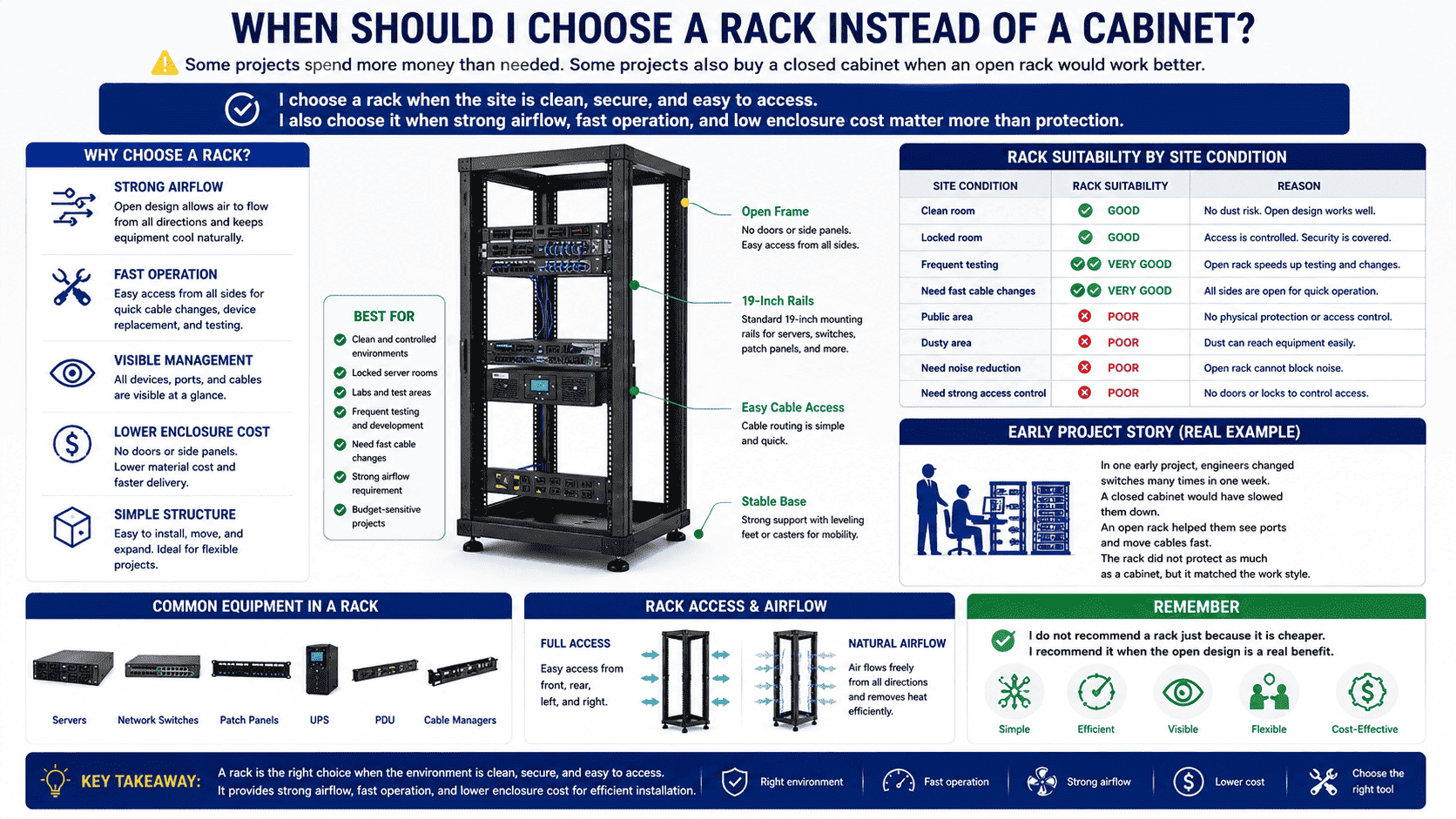
I choose a rack when the site is clean, secure, and easy to access. I also choose it when strong airflow, fast operation, and low enclosure cost matter more than protection.
The Rack Use Cases I Trust
I choose a rack when the environment already protects the equipment. For example, a closed server room with dust control and access rules may not need every device inside an enclosed cabinet. A rack can be practical in this kind of place. It keeps the installation neat and saves space. It also keeps heat from staying around the device body.
I also choose racks for testing areas. In one early project story from my own work, I saw engineers change switches many times in one week. A closed cabinet would have slowed them down. An open rack helped them see the ports and move cables fast. The rack did not protect as much as a cabinet, but it matched the work style.
| Site Condition | Rack Suitability |
|---|---|
| Clean room | Good |
| Locked room | Good |
| Frequent testing | Very good |
| Need fast cable changes | Very good |
| Public area | Poor |
| Dusty area | Poor |
| Need noise reduction | Poor |
| Need strong access control | Poor |
I do not recommend a rack just because it is cheaper. I recommend it when the open design is a real benefit. The rack is simple, but it is not a low-grade choice. It is a correct choice for the right environment. It carries standard devices very well. It also keeps installation direct and visible.
When Should I Choose a Cabinet Instead of a Rack?
An open rack can create risk when the room is dusty, shared, public, or hard to control. A cabinet can reduce that risk.
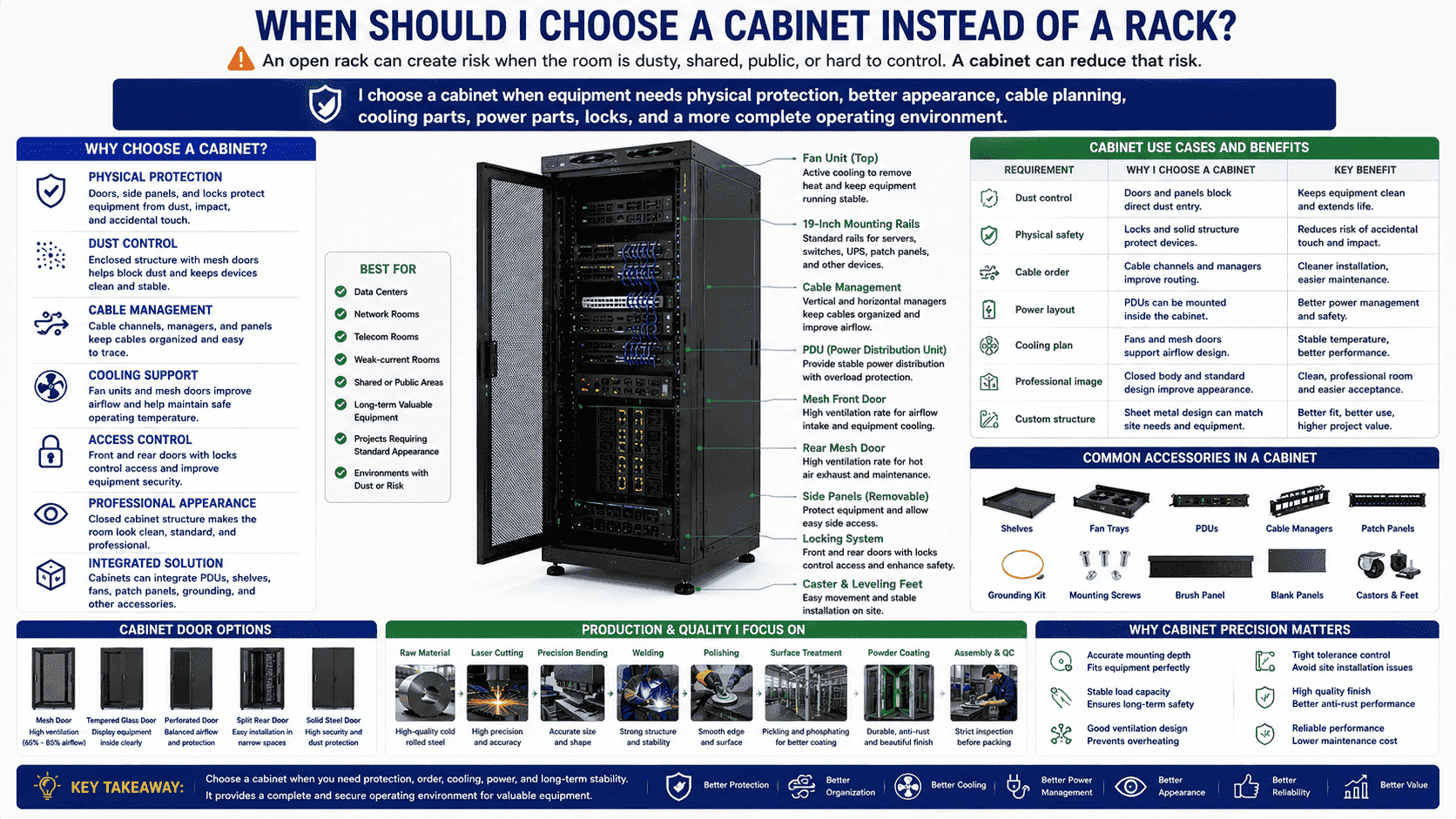
I choose a cabinet when equipment needs physical protection, better appearance, cable planning, cooling parts, power parts, locks, and a more complete operating environment.
The Cabinet Use Cases I Trust
I choose a cabinet when the equipment has long-term value and needs stable protection. Most data rooms, network rooms, telecom rooms, and weak-current rooms benefit from cabinets.11 The cabinet can protect devices from dust, accidental contact, and messy cable pulling. It can also give the whole room a standard look.
Cabinets are also better when customers need integrated accessories. I often see orders with adjustable shelves, fan trays, PDUs, cable managers, patch panels, grounding wires, mounting screws, and special mesh doors. These parts make the cabinet a complete work unit. The inside equipment becomes easier to manage. The power route becomes clearer. The cable route becomes cleaner.
| Requirement | Why I Choose a Cabinet |
|---|---|
| Dust control | Doors and panels reduce direct dust entry |
| Physical safety | Locks and panels protect devices |
| Cable order | Cable channels and managers improve routing |
| Power layout | PDUs can be mounted inside |
| Cooling plan | Fans and mesh doors support airflow |
| Professional room image | Closed body looks clean |
| Custom structure | Sheet metal design can match site needs |
I pay special attention to cabinet precision because network equipment often needs accurate mounting depth, stable load capacity, and good ventilation. In production, I care about raw material selection, laser cutting, precision bending, welding, polishing, surface treatment, powder coating, and assembly. I know one bad tolerance can become a site problem later. This is why cabinet manufacturing needs more process control than many people expect.
Why Do People Confuse Racks and Cabinets?
The two names are easy to mix because both can hold 19-inch equipment. The outside conversation often hides the inside structure difference.
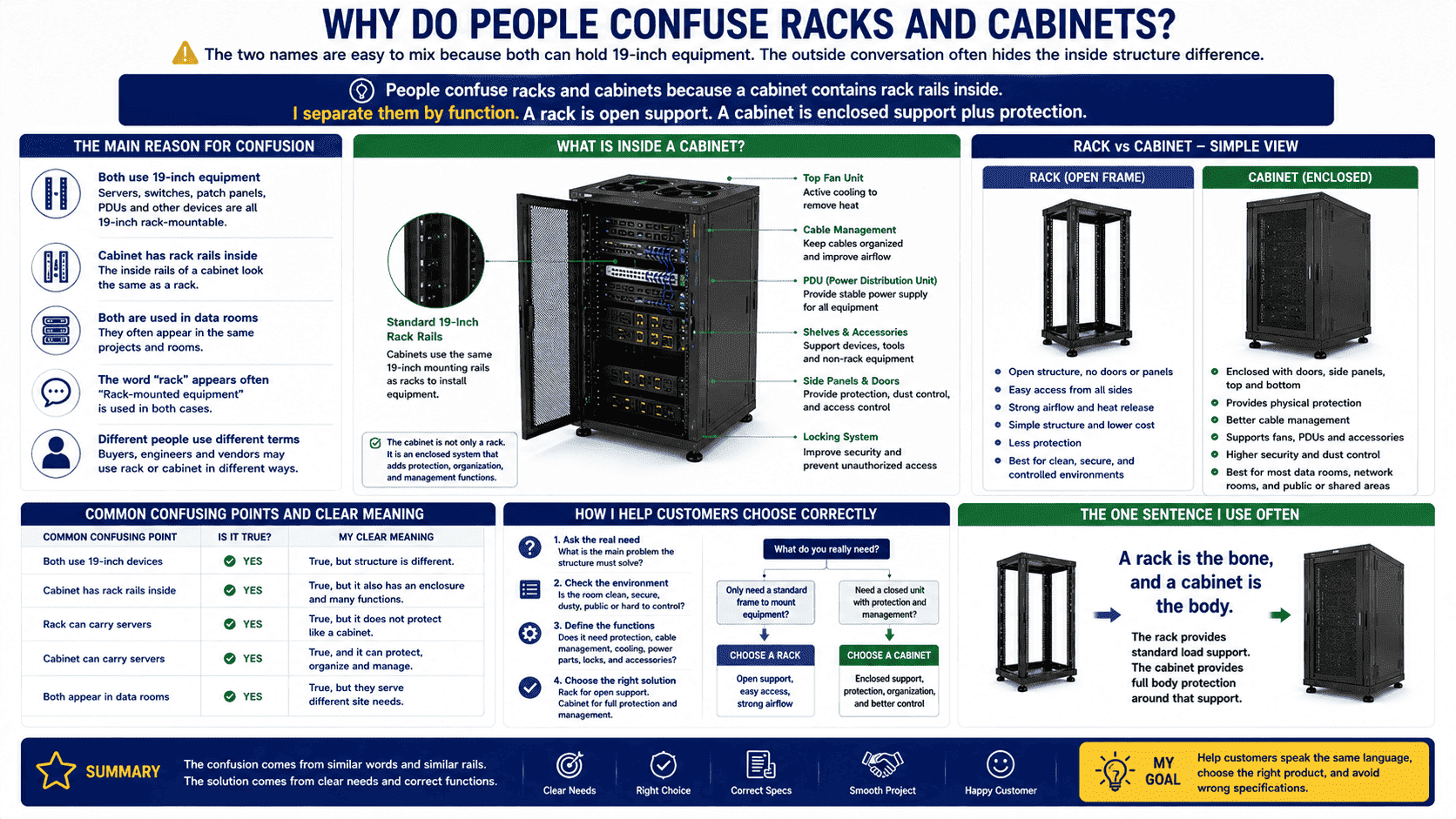
People confuse racks and cabinets because a cabinet contains rack rails inside. I separate them by function. A rack is open support. A cabinet is enclosed support plus protection.
The Simple Way I Explain the Confusion
I understand why customers confuse the two. A cabinet has standard rack rails inside. These rails look like a rack. Many devices installed inside a cabinet are also called rack-mounted equipment. So the word “rack” appears in both cases. This creates confusion in buying, design, and communication.
I solve this problem by asking what the customer really needs. Does the customer only need a standard frame to mount equipment? Or does the customer need a closed unit with doors, panels, cooling, cable routing, and safety? This question removes most confusion. The answer points to a rack or a cabinet.
| Common Confusing Point | My Clear Meaning |
|---|---|
| Both use 19-inch devices | Yes, but structure is different |
| Cabinet has rack rails | Yes, but it also has enclosure |
| Rack can carry servers | Yes, but it does not protect like a cabinet |
| Cabinet can carry servers | Yes, and it can protect and organize |
| Both appear in data rooms | Yes, but they serve different site needs |
I also use one sentence often. A rack is the bone, and a cabinet is the body. The rack provides standard load support. The cabinet provides full body protection around that support. This sentence helps buyers, engineers, and purchasing teams speak the same language. It also reduces wrong specifications before production starts.
Conclusion
I choose a rack for open standard support. I choose a cabinet for enclosed protection. The right choice starts with site needs, not only product names.
"19-inch rack - Wikipedia", https://en.wikipedia.org/wiki/19-inch_rack. ANSI/EIA-310 defines the dimensional interface for 19-inch rack-mounted equipment, including mounting flanges and rack-unit spacing. Evidence role: definition; source type: institution. Supports: The source should support that 19-inch racks use standardized mounting dimensions for rack-mounted equipment.. Scope note: The standard supports the 19-inch mounting interface, but it does not by itself require every rack implementation to be open-frame. ↩
"19-inch rack - Wikipedia", https://en.wikipedia.org/wiki/19-inch_rack. The EIA-310 and IEC 60297 rack standards specify rack-unit height and mounting dimensions that provide a common mechanical interface for rack-mounted equipment. Evidence role: mechanism; source type: institution. Supports: The source should explain how standardized rack-unit height and mounting geometry enable equipment compatibility within 19-inch racks.. Scope note: The standards establish dimensional compatibility; actual fit can still depend on equipment depth, weight, airflow requirements, and accessory clearances. ↩
"19-inch rack - Wikipedia", https://en.wikipedia.org/wiki/19-inch_rack. Neutral descriptions of 19-inch rack systems distinguish rack cabinets or enclosures from open-frame racks by the addition of surrounding panels and doors around the mounting rails. Evidence role: definition; source type: encyclopedia. Supports: The source should define a rack cabinet or enclosure as a structure that surrounds rack rails or rack-mounted equipment.. Scope note: Terminology varies by industry and region, so the source supports the common technical distinction rather than every commercial naming practice. ↩
"IP code", https://en.wikipedia.org/wiki/IP_code. IEC 60529 and NEMA enclosure classifications describe how enclosure construction can limit ingress of solid particles such as dust. Evidence role: mechanism; source type: institution. Supports: The source should support that enclosures can reduce dust ingress or dust contact when designed for that purpose.. Scope note: This support is conditional: ordinary ventilated or mesh network cabinets may reduce direct dust contact but do not provide high dust protection unless they are designed and rated for it. ↩
"Acoustic Enclosure: The 5 Key Benefits of Reducing Noise Effectively", https://www.softdb.com/blog/acoustic-enclosure/. Acoustic enclosure studies show that surrounding noisy equipment with an appropriately designed enclosure can attenuate radiated sound, although ventilation openings and structural leakage reduce attenuation. Evidence role: mechanism; source type: paper. Supports: The source should support the general acoustic principle that enclosing equipment can reduce radiated noise under appropriate design conditions.. Scope note: The evidence is contextual unless the cited study tests server or network cabinets specifically. ↩
"Open Frame Floor-Standing Racks - Hammond Mfg.", https://www.hammfg.com/dci/products/open-frame. Descriptions of open-frame 19-inch racks characterize them as mounting frames for standardized equipment rather than enclosed protective housings. Evidence role: definition; source type: encyclopedia. Supports: The source should support that open-frame racks are structures for mounting standardized equipment without an enclosing cabinet body.. Scope note: The source supports the typical form and function of open-frame racks; individual rack products may include additional cable or accessory features. ↩
"How to Get Sheet Metal Enclosure Design Right - Top Cabinet", https://topcabinet.com/sheet-metal-enclosure-design-a-practical-guide-for-engineers-and-buyers/. Mechanical design guidance for sheet-metal enclosures emphasizes tolerance control and feature alignment across panels, doors, hinges, and cutouts to ensure proper assembly and operation. Evidence role: mechanism; source type: education. Supports: The source should explain that sheet-metal enclosure assemblies require dimensional coordination among panels, doors, hinges, cutouts, and mounting features.. Scope note: This supports the engineering principle behind the claim rather than a cabinet-specific quantitative threshold. ↩
"What are the Benefits of Open Frame Server Racks? - RackSolutions", https://www.racksolutions.com/news/blog/what-are-the-benefits-of-open-frame-server-racks/?srsltid=AfmBOor7_o-nFohyGRwsxEGfRwhjL7h7jWNJQuROWlEi_5p22Sabjn0L. Technical descriptions of open-frame racks note that they provide standard 19-inch mounting while leaving equipment and cabling physically accessible from multiple sides. Evidence role: general_support; source type: institution. Supports: The source should support that open-frame rack designs provide standardized mounting and easier physical access for service or cabling.. Scope note: The evidence supports typical access characteristics; maintenance ease also depends on cable density, room layout, and equipment placement. ↩
"Thermal Guidelines and Temperature Measurements in Data ...", https://datacenters.lbl.gov/sites/default/files/FINAL%20Thermal%20Guidelines%20and%20Temp%20Measurements%209-15-2020.pdf. Data-center airflow guidance explains that rack and enclosure geometry affects air paths around IT equipment, with open structures presenting fewer enclosure barriers than closed cabinets. Evidence role: mechanism; source type: research. Supports: The source should support the airflow principle that open-frame structures impose fewer physical barriers to ambient air movement than enclosed cabinets.. Scope note: Open access to ambient air does not automatically mean better cooling; effective thermal performance also depends on equipment airflow direction, hot-aisle/cold-aisle layout, and room cooling design. ↩
"Physical Access Control Systems - NIST Risk Management Framework", https://csrc.nist.gov/projects/risk-management/sp800-53-controls/overlay-repository/government-wide-overlay-submissions/physical-access-control-systems. NIST physical-security controls identify locks and other access-control measures as mechanisms for restricting physical access to information-system assets. Evidence role: expert_consensus; source type: government. Supports: The source should support that locks are a physical access-control mechanism for limiting entry to protected systems or areas.. Scope note: Government security guidance supports the access-control function of locks generally; it does not prove that any specific cabinet lock provides sufficient security for a given risk level. ↩
"[DOC] 271116i.docx - Office of Construction and Facilities Management", https://www.cfm.va.gov/TIL/spec/271116i.docx. Data-center and telecommunications infrastructure standards discuss racks and cabinets as standard equipment-support elements used for mounting, cabling, airflow management, and physical organization in technical rooms. Evidence role: general_support; source type: institution. Supports: The source should support that cabinets are commonly used in technical rooms to organize, protect, cable, and cool equipment.. Scope note: Such standards support common use and functional relevance, but they do not prove that cabinets are the best choice for every room or that most rooms necessarily require them. ↩
