
Server Rack Buying Guide: How Do I Choose the Right Server Rack?

Wrong server racks create hidden problems. I have seen heavy equipment sag, cables block airflow, and maintenance become slow. A good rack prevents that.
To choose the right server rack, I check equipment size, rack depth, load capacity, cooling design, cable space, safety needs, and future expansion. I also confirm the 19-inch standard, U height, steel thickness, structure strength, and the room layout before I place an order.
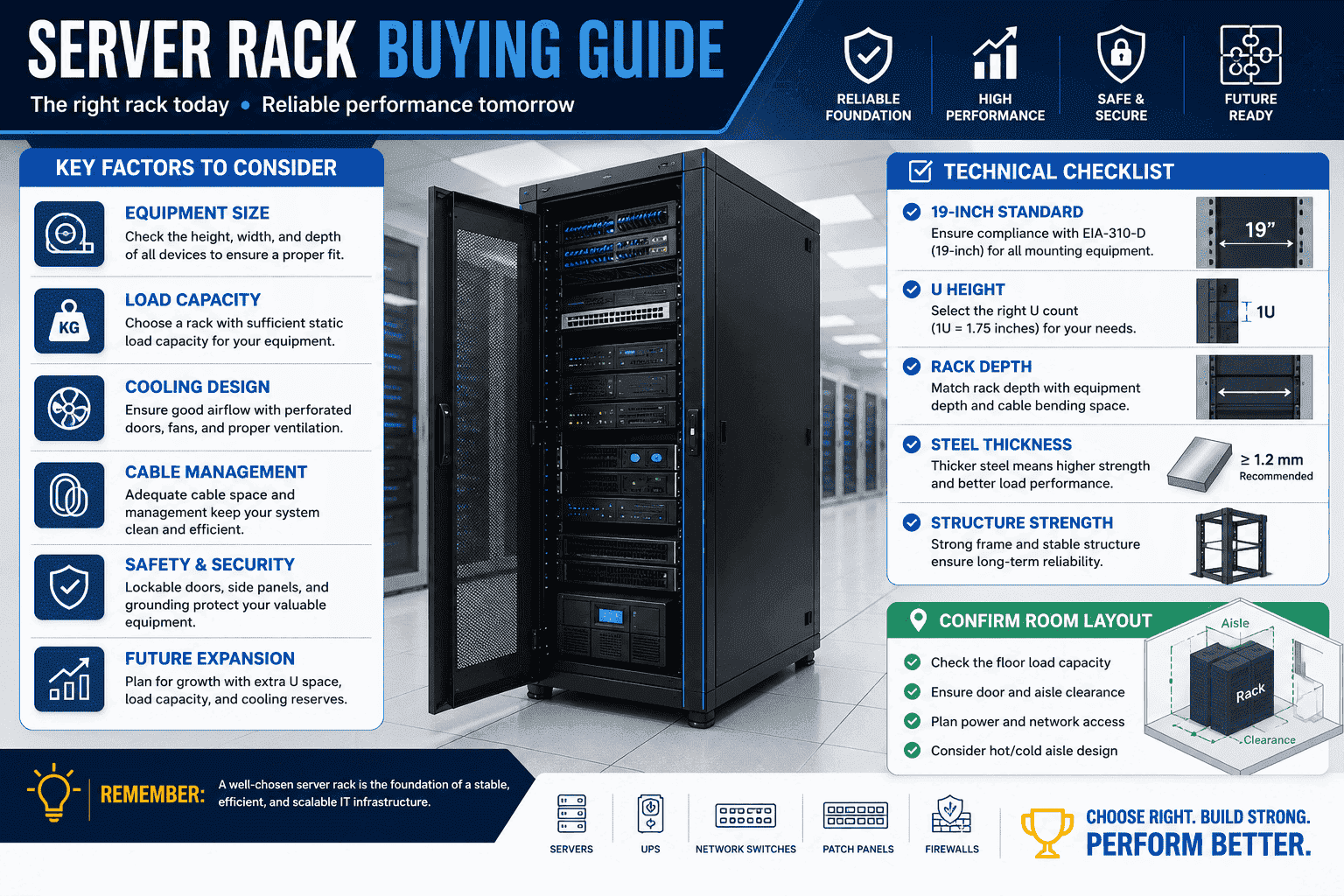
I see a server rack as more than a metal frame. I see it as the base of the whole equipment room. Servers, UPS units, firewalls, switches, and patch panels all depend on it. If I choose the wrong rack, the room may still look complete at first. After several months, the problems start to show. Heat builds up. Cables become messy. Rails fail to match. Heavy devices bend weak posts. Later upgrades become painful. This is why I always treat rack selection as an engineering decision, not a simple purchase.
What Is a Server Rack and Why Does It Matter?
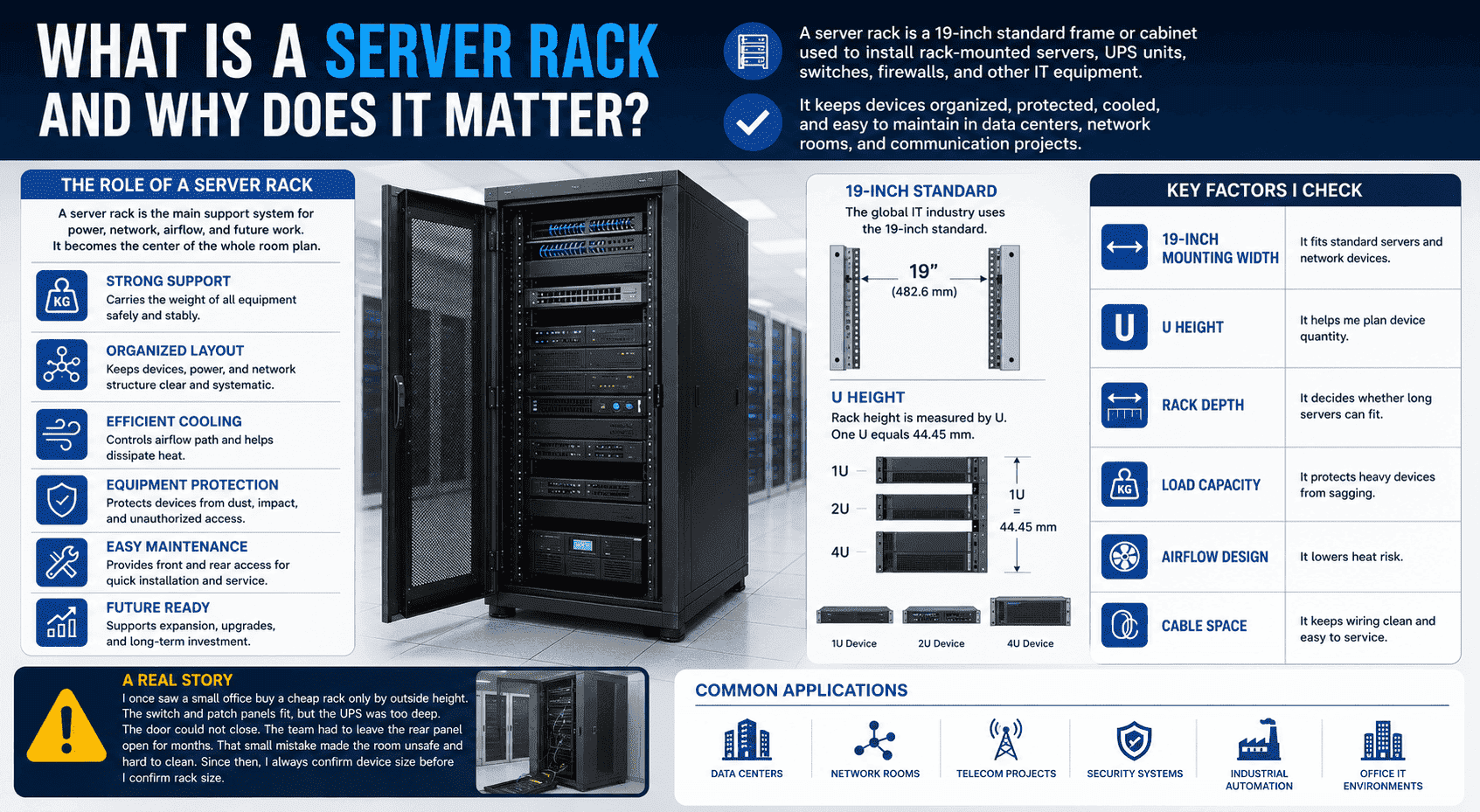
Many people only see a rack as a cabinet. I see it as the main support system for power, network, airflow, and future work.
A server rack is a 19-inch standard frame or cabinet used to install rack-mounted servers, UPS units, switches, firewalls, and other IT equipment.1 It keeps devices organized, protected, cooled, and easy to maintain in data centers, network rooms, and communication projects.
I first look at the role of the rack
When I help a customer choose a server rack, I do not start with the color or outside look. I start with the role of the rack in the room. A server rack carries the weight of the equipment. It also controls layout, wiring, airflow, protection, and service access. In many projects, the rack becomes the center of the whole room plan.
The global IT industry uses the 19-inch standard.2 This standard means that common servers and network devices can fit the mounting rails. Rack height is measured by U. One U equals 44.45 mm.3 Many devices are made as 1U, 2U, or 4U units. This makes planning simple, but only when the rack is made with accurate mounting holes.
| Item I Check | Why I Check It |
|---|---|
| 19-inch mounting width | It fits standard servers and network devices |
| U height | It helps me plan device quantity |
| Rack depth | It decides whether long servers can fit |
| Load capacity | It protects heavy devices from sagging |
| Airflow design | It lowers heat risk |
| Cable space | It keeps wiring clean and easy to service |
I once saw a small office buy a cheap rack only by outside height. The switch and patch panels fit, but the UPS was too deep. The door could not close. The team had to leave the rear panel open for months. That small mistake made the room unsafe and hard to clean. Since then, I always confirm device size before I confirm rack size.
Which Server Rack Size Should I Choose?
A wrong rack size wastes space, blocks doors, or leaves no room for cables. I always match U height, width, and depth together.
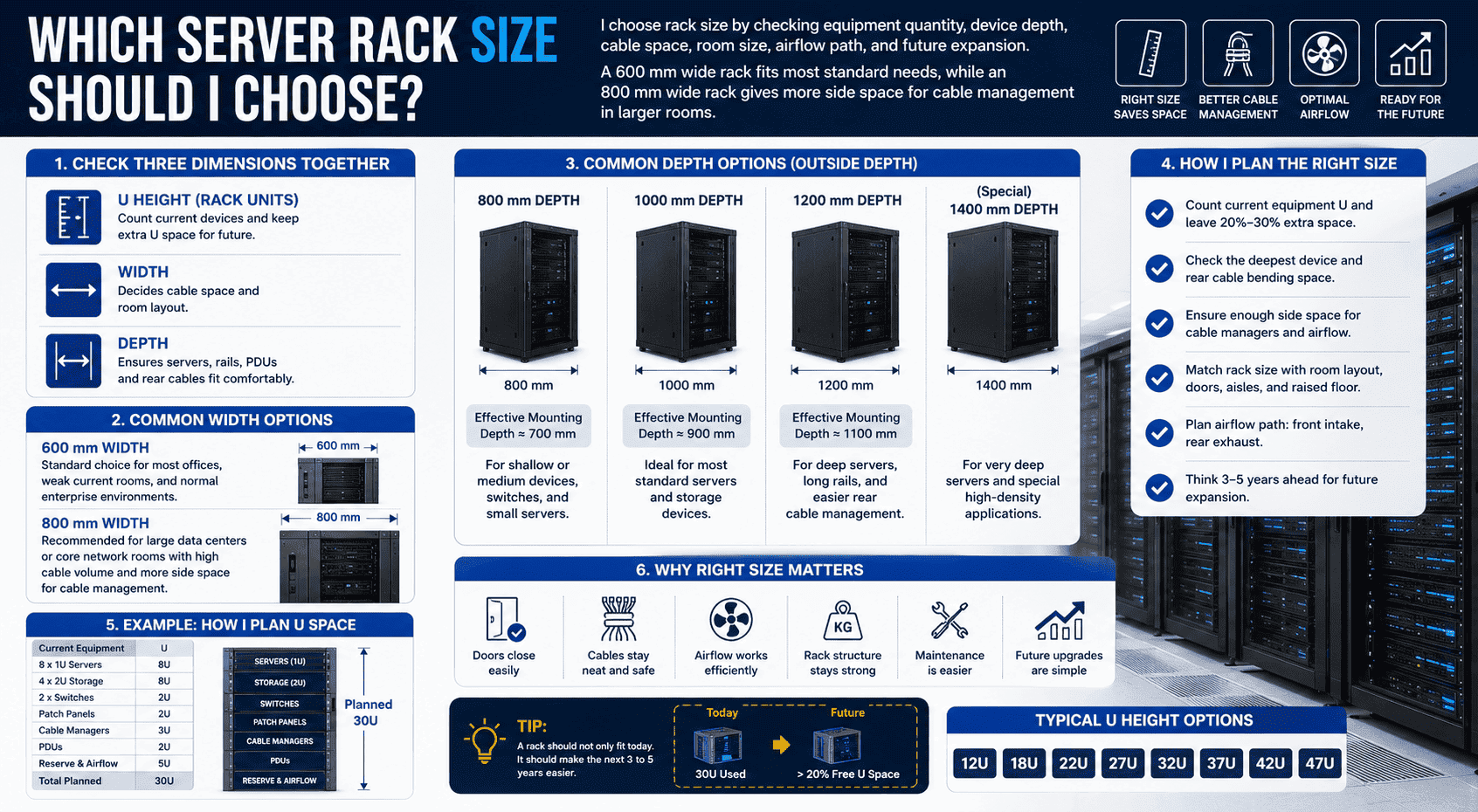
I choose rack size by checking equipment quantity, device depth, cable space, room size, airflow path, and future expansion. A 600 mm wide rack fits most standard needs, while an 800 mm wide rack gives more side space for cable management in larger rooms.4
I check height, width, and depth as one group
I never choose a server rack by height alone. Height decides how many devices I can install. Width decides cable space and room layout. Depth decides whether servers, rails, power strips, and rear cables can fit without pressure. If one of these is wrong, the rack becomes difficult to use.
The common outside width is 600 mm. The inner mounting space still follows the 19-inch standard. This width is enough for many offices, weak current rooms, small server rooms, and normal enterprise rooms. For large data centers or core network rooms, I often suggest 800 mm wide cabinets. The wider structure gives more side space for vertical cable managers. It also helps when many network cables need to turn and group clearly.
| Rack Size Point | My Practical Rule |
|---|---|
| U height | I count current devices and keep extra U space |
| 600 mm width | I use it for standard equipment rooms |
| 800 mm width | I use it when cable quantity is high |
| 800 mm depth | I use it for shallow or medium devices |
| 1000 mm depth | I use it for many servers |
| 1200 mm depth | I use it for deep servers and easier rear wiring |
I also leave expansion space. If a customer has 20U of current equipment, I do not suggest a 22U rack. That leaves no space for a new switch, cable manager, blank panel, or airflow path. A rack should not only fit today. It should make the next three to five years easier.
Should I Choose an Open Rack or an Enclosed Server Cabinet?
Open racks look simple and cost less. Enclosed cabinets add protection, airflow control, and cleaner management. I choose based on the room.
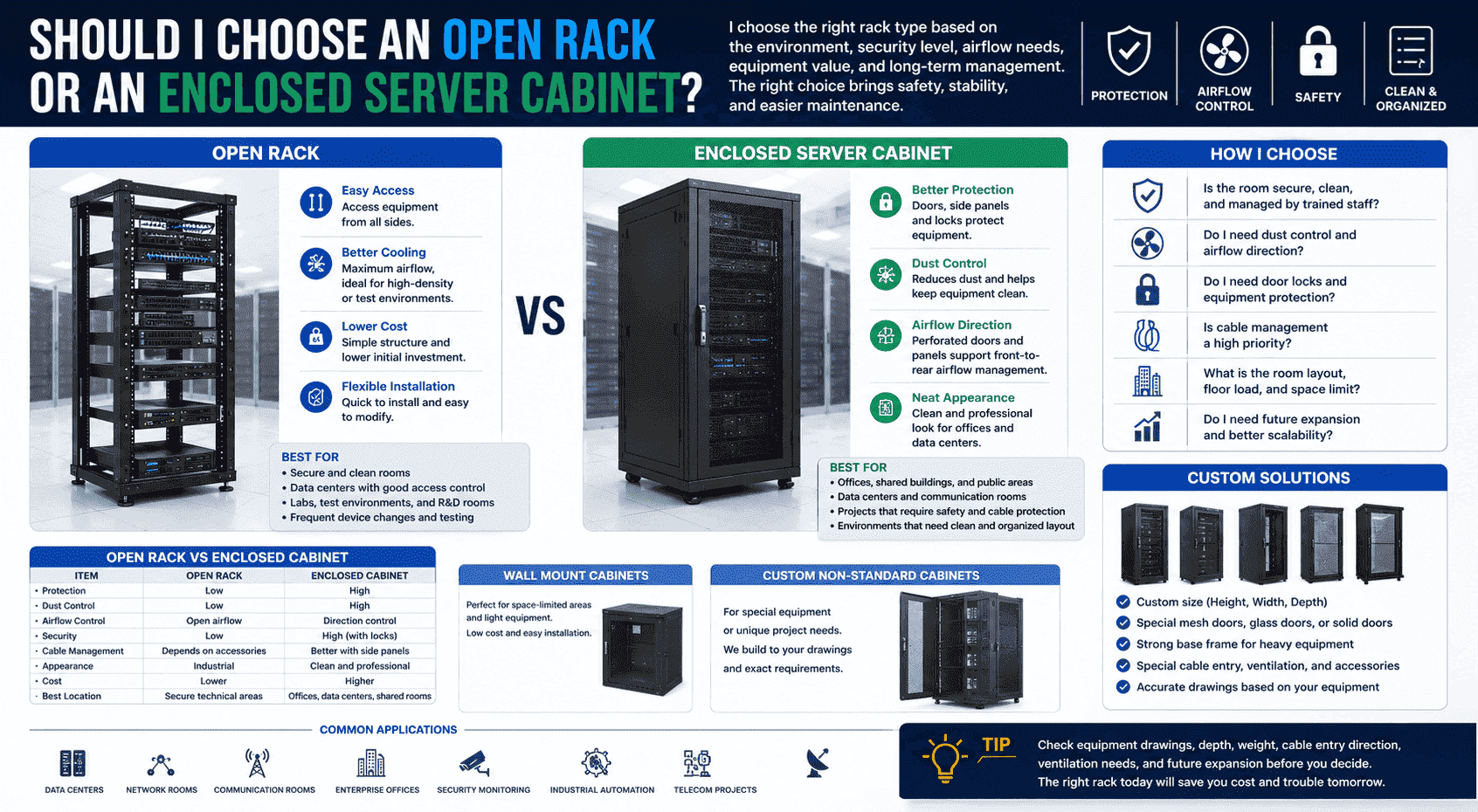
I choose an open rack when the room is secure, clean, and managed by trained staff. I choose an enclosed server cabinet when I need better safety, dust control, cable protection, airflow direction, and a cleaner appearance for office, data center, or communication rooms.
I match the rack type with the site
Open racks and enclosed cabinets both have value. I do not say one is always better. I look at the site first. An open rack gives easy access from all sides. It works well in a controlled room where only technicians can enter. It also helps when devices need frequent testing or fast changes.
An enclosed server cabinet has front and rear doors, side panels, locks, and better structure protection.5 It is more suitable for offices, shared buildings, data centers, communication rooms, and projects where the owner asks for a clean and safe layout. A perforated mesh door helps airflow while keeping equipment protected. A lock helps prevent casual contact with power and network devices.
| Rack Type | I Use It When | Main Risk |
|---|---|---|
| Open rack | The room is secure and clean | Less protection |
| Enclosed cabinet | The room needs safety and order | Needs correct airflow design |
| Wall mount cabinet | Space is limited and devices are light | Low load capacity |
| Custom cabinet | Equipment is special or non-standard | Needs accurate drawings |
I have made many custom non-standard cabinets for overseas customers. Some needed special mesh doors. Some needed deeper bodies. Some needed stronger base frames for heavy UPS units. In these cases, standard selection rules still matter, but custom engineering matters more. I always ask for device drawings, mounting depth, weight, cable entry direction, and ventilation needs before production.
How Much Load Capacity Does a Server Rack Need?
A weak rack may look fine when empty. It becomes dangerous when heavy servers and UPS units are installed for long-term use.
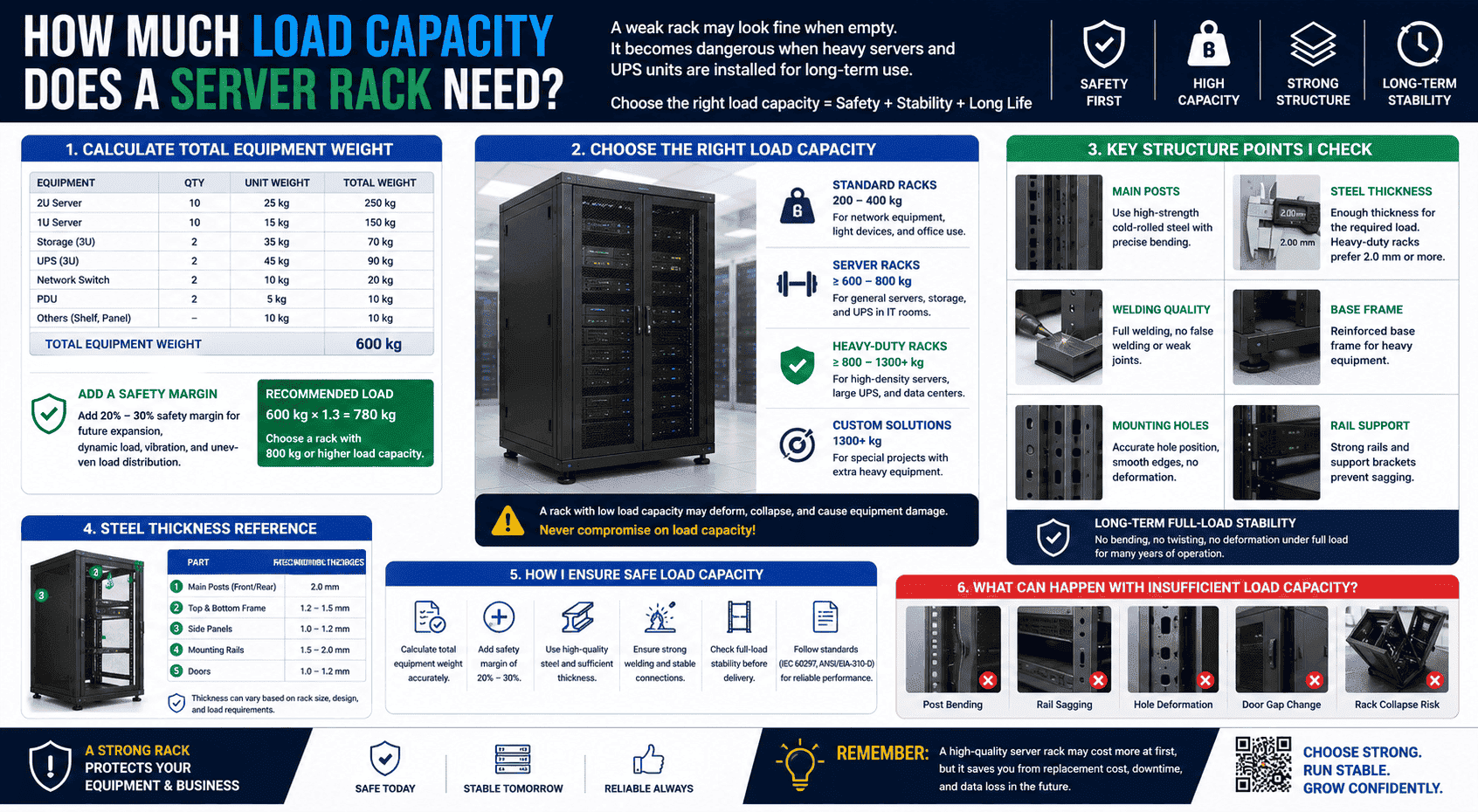
I choose load capacity by adding the weight of all equipment, then leaving a safe margin.6 I also check steel thickness, post structure, welding points, base strength, rail support, and long-term full-load stability before I trust the rack.
I treat load capacity as a safety issue
Load capacity is one of the first things I check. A server, storage unit, and UPS can be very heavy. If the rack structure is weak, the vertical posts may twist. The mounting holes may deform. The rails may sag.7 The door gap may change. These problems may not happen on the first day. They often appear after months of heat, vibration, and full load.
In my factory work, I pay close attention to the main posts. A good server rack should use high-strength cold-rolled steel. For heavy-duty racks, I prefer 2.0 mm thick main structure parts. The posts should be formed by precise bending. The screw holes must be accurate. There should be no wrong hole position, no stripped thread, and no loose contact when the device is installed.
| Structure Point | What I Want to See |
|---|---|
| Main post | Strong cold-rolled steel with accurate bending |
| Steel thickness | Enough thickness for the required load |
| Welding | No false welding or weak joints |
| Base frame | Reinforced for heavy equipment |
| Mounting holes | Accurate and smooth |
| Long-term load | No bending under full load |
I once inspected a rack that looked acceptable from the outside. After loading several UPS units, the lower frame started to bend. The customer had saved a small amount on the rack, but later spent much more on replacement and downtime. This is why I always say that a server rack is not a place to reduce cost blindly. Strong structure protects the whole room.
How Do Cooling and Airflow Affect Server Rack Selection?
Heat is a silent threat. I have seen equipment restart, slow down, or fail because the rack blocked airflow.
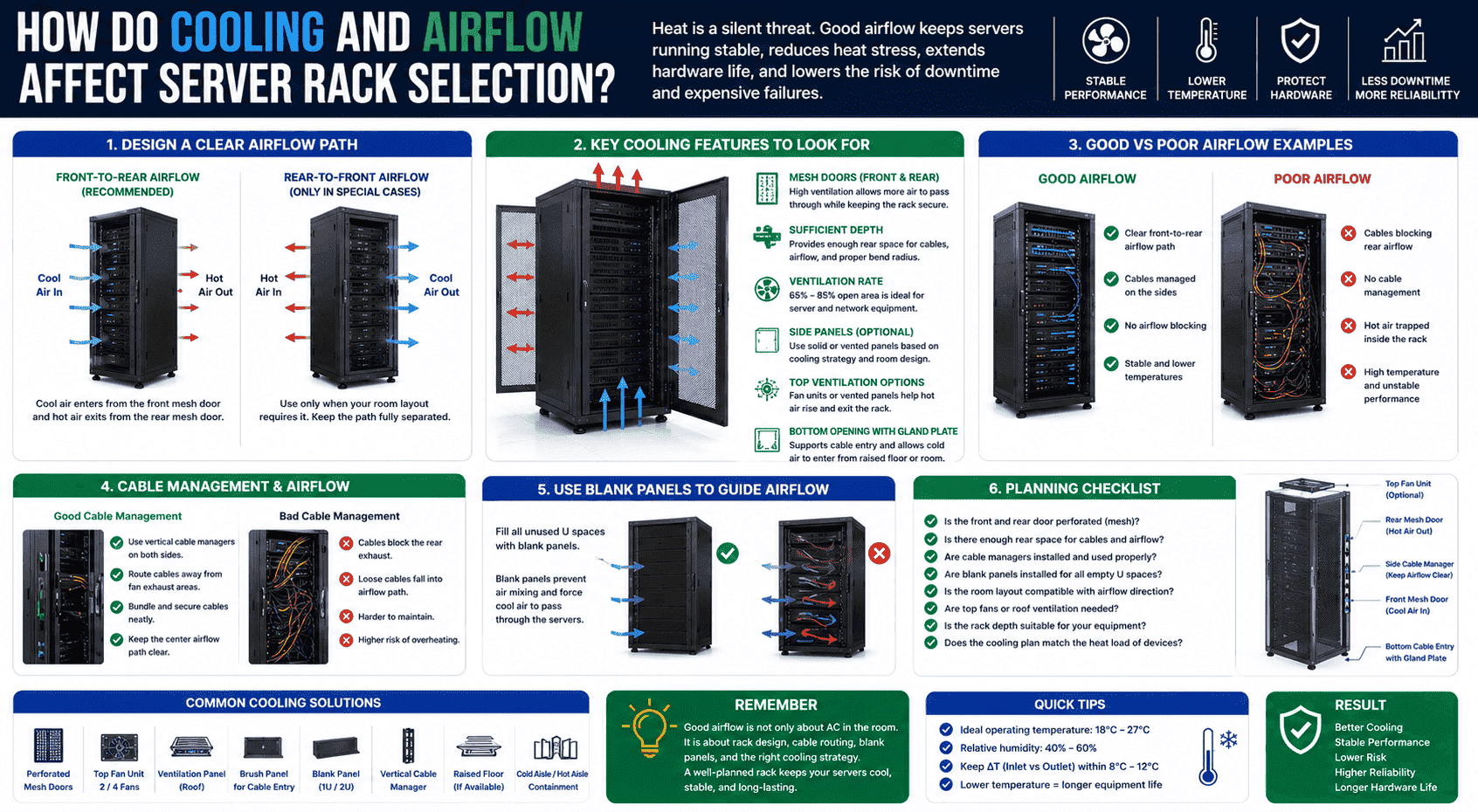
I choose a rack with good ventilation, mesh doors, clear front-to-rear airflow, enough rear space, and proper cable management. Good cooling helps servers run more stable, reduces heat stress, and lowers the risk of hardware damage.
I design the rack around heat movement
Servers create heat every minute.8 If hot air cannot leave the rack, equipment temperature rises. When temperature rises, devices may restart, reduce performance, or suffer hardware damage.9 This is why I never treat ventilation as a small detail.
A good server rack should support front-to-rear airflow.10 Perforated mesh doors are common because they allow air to pass through while keeping the cabinet protected. The rear door should also support exhaust. Cable bundles should not block the airflow path. I also use blank panels when needed, because open gaps can cause hot and cold air to mix in the wrong way.11
| Cooling Detail | Why It Matters |
|---|---|
| Front mesh door | It allows cool air to enter |
| Rear mesh door | It helps hot air leave |
| Proper depth | It gives rear cable and airflow space |
| Cable managers | They keep cables away from fans |
| Blank panels | They guide airflow in the right path |
| Top and bottom openings | They support cable entry and air planning |
In one project, the customer had good air conditioning, but the servers still ran hot. When I checked the rack, I found thick cable bundles behind the servers. The airflow was blocked. After we changed cable routing and used better vertical cable management, the temperature became more stable. The cooling problem was not only about the room. It was also about the rack.
How Important Is Cable Management in a Server Rack?
Messy wiring wastes time and creates risk. I have seen simple repair work become difficult because cables had no clear path.
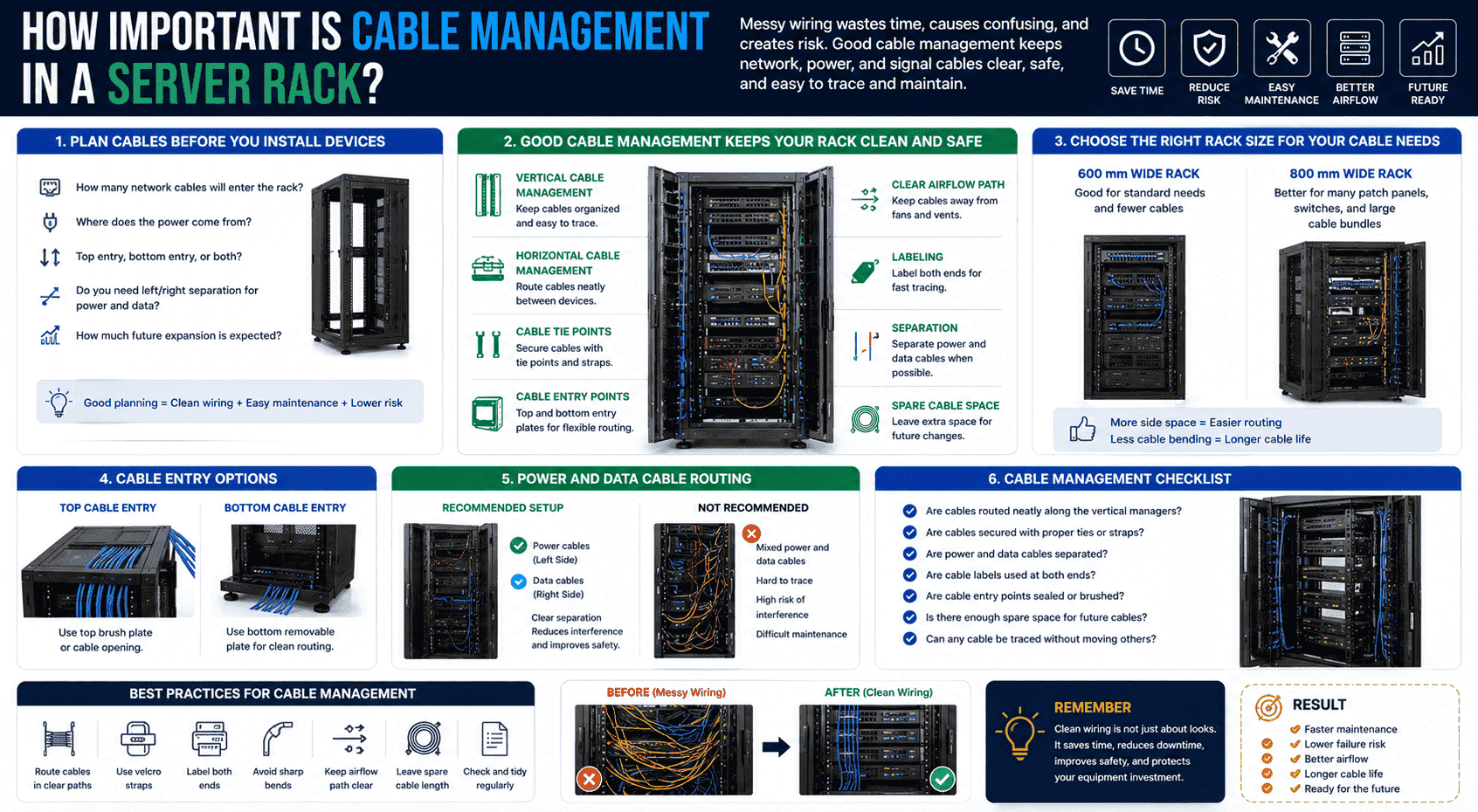
Good cable management keeps network, power, and signal cables clear, safe, and easy to trace.12 I choose racks with enough side space, vertical cable channels, cable entry points, and tie positions, especially when many switches and patch panels are installed.
I plan cables before I install devices
Cable management should not start after all devices are installed. I plan it before the rack is ordered. I ask how many network cables will enter the rack. I ask where power comes from. I ask whether cables enter from the top, bottom, or both. I also ask whether the customer needs left and right separation for power and data cables.
A 600 mm wide rack can meet many standard wiring needs. An 800 mm wide rack is better when there are many patch panels, switches, fiber boxes, or large cable bundles. The extra side space allows cable routing without bending cables too sharply. It also makes future maintenance easier. A technician can trace one cable without pulling ten other cables by mistake.
| Cable Planning Point | My Common Choice |
|---|---|
| Few devices | 600 mm wide cabinet |
| Many network cables | 800 mm wide cabinet |
| Top cable entry | Top brush plate or cable opening |
| Bottom cable entry | Bottom removable plate |
| Power and data | Separate routes when possible |
| Future expansion | Keep spare cable space |
I still remember a project where the rack looked clean from the front. The rear side was a different story. Cables crossed everywhere. No labels were used. The customer had to shut down extra devices just to replace one patch cord. After that case, I started to place cable space at the same level as load and cooling. Clean wiring saves time every year.
What Structure Quality Should I Check Before Buying?
Paint can hide poor work. I always check steel, bending, welding, holes, surface treatment, assembly, and protection details.
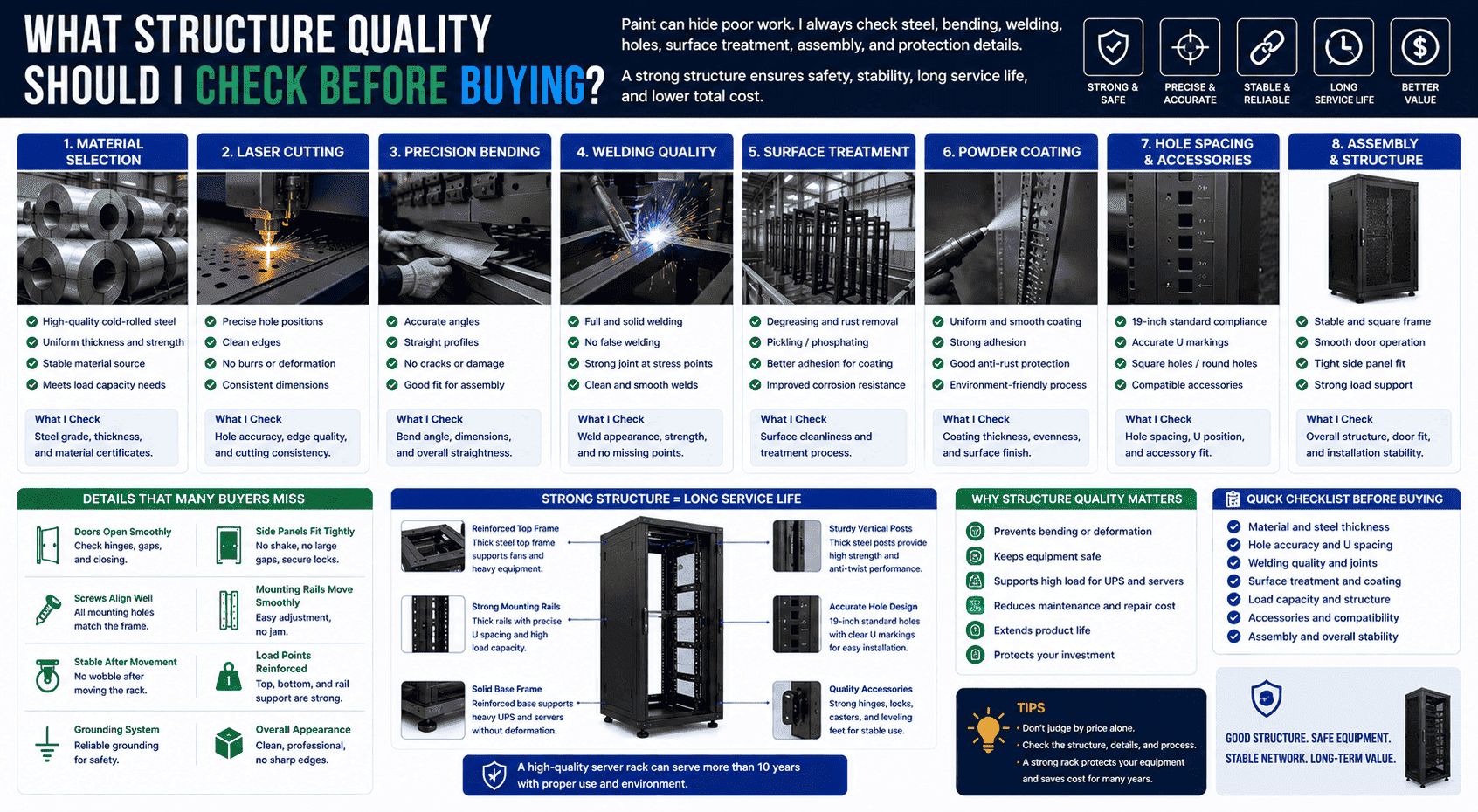
I check whether the rack uses strong cold-rolled steel, precise laser cutting, accurate bending, solid welding, smooth surface treatment, good powder coating, correct hole spacing, reinforced load points, and stable assembly before I accept it.
I look past the surface finish
A server rack may look simple, but good production needs many controlled steps. In my own production work, I care about raw material selection, laser cutting, precision bending, welding, polishing, pickling, powder coating, and final assembly. Each step affects the final strength and service life.
Accurate laser cutting makes hole positions correct. Precise bending keeps posts straight. Good welding prevents weak joints. Surface cleaning and powder coating protect the steel from rust. Careful assembly makes the cabinet stable and square. If any step is rushed, the rack may have problems during installation or after long-term use.
| Production Step | Quality Result I Expect |
|---|---|
| Material selection | Strong and stable steel |
| Laser cutting | Accurate holes and clean edges |
| Precision bending | Straight posts and correct angles |
| Welding | Solid joints with no false welds |
| Surface treatment | Better rust resistance |
| Powder coating | Smooth and durable finish |
| Assembly | Stable frame and good door fit |
I also check details that many buyers miss. I check whether doors open smoothly. I check whether side panels fit tightly. I check whether screws align with the frame. I check whether the mounting rails can move smoothly. I check whether the rack stays stable after movement. A high-quality rack can serve for more than ten years when it is used in the right environment. That long service life makes the rack a good value, even if the first price is not the lowest.
When Should I Choose a Custom Server Rack or Custom Mesh Door?
Standard racks solve most projects. Custom racks solve special size, special load, special airflow, and special installation problems.
I choose a custom server rack when standard size, depth, load, door type, cable entry, color, structure, or installation method cannot meet the project needs. Custom mesh doors are useful when airflow, protection, and special opening rate are required.
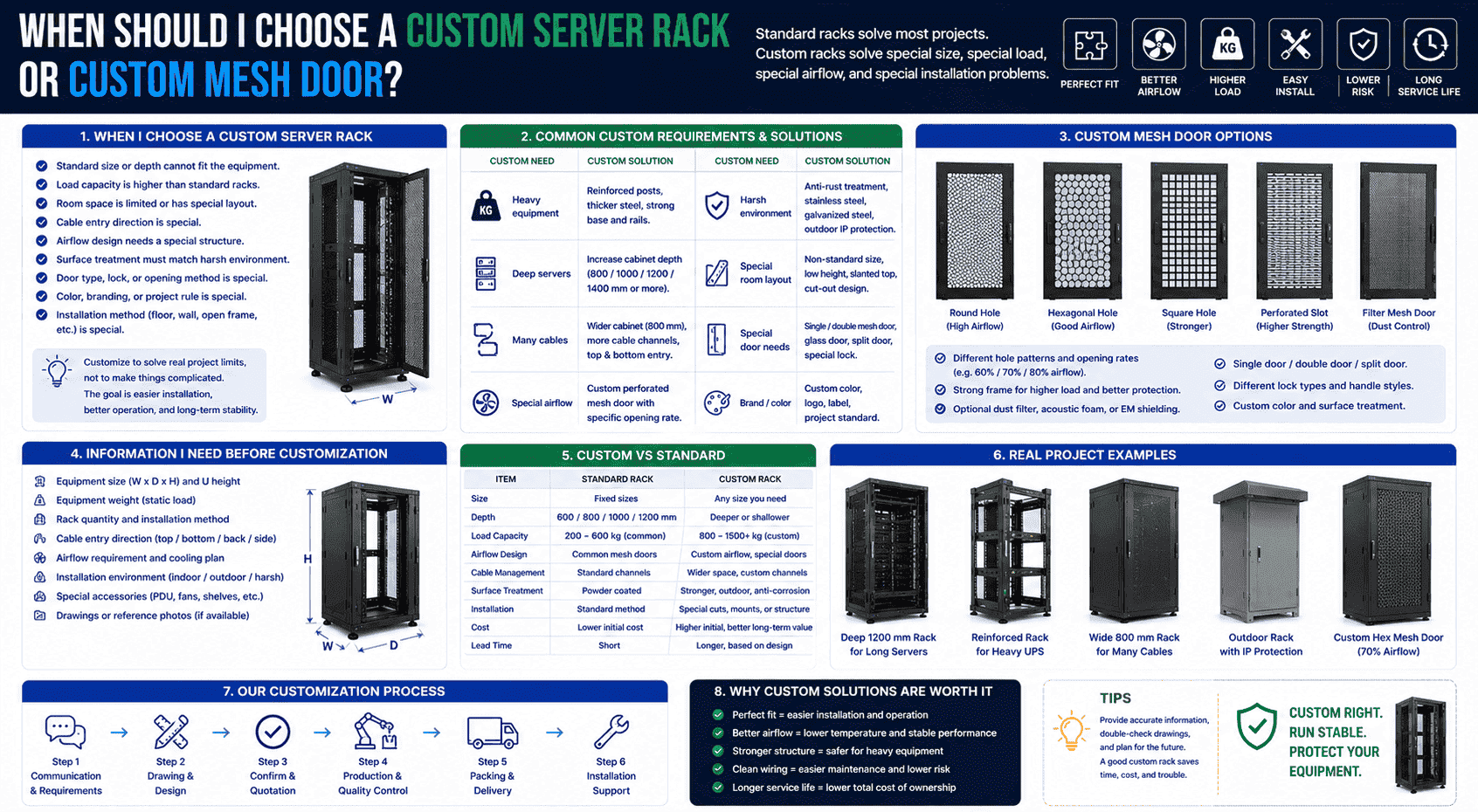
I use customization to solve real project limits
Custom server racks are not only for unusual projects. They are often needed when the equipment is special, the room space is limited, or the owner has clear project rules. Some customers need a deeper cabinet for long servers. Some need a reinforced frame for heavy UPS units. Some need anti-rust surface treatment for harsh sites. Some need special mesh doors with a certain hole pattern, airflow rate, or lock design.
When I work on a custom rack, I always start with confirmed information. I need equipment size, weight, mounting method, cable direction, ventilation needs, and installation environment. If the customer has drawings, I check the key dimensions. If the customer only has equipment data, I help build the structure idea first.
| Custom Need | Custom Solution |
|---|---|
| Heavy equipment | Reinforced posts and base |
| Deep servers | Increased cabinet depth |
| Many cables | Wider cabinet and more cable channels |
| Special airflow | Custom perforated mesh door |
| Harsh environment | Stronger surface treatment |
| Special room layout | Non-standard size or structure |
In export projects, I often see different customer requirements from different markets. Some focus on cost. Some focus on long-term stability. Some need batch standard cabinets. Some need small batches of non-standard cabinets. My view is simple. A custom rack should not be complicated for no reason. It should solve a clear problem and make installation, operation, and maintenance easier.
Conclusion
I choose a server rack by matching equipment, load, cooling, wiring, safety, quality, and future growth, not by appearance or price alone.
"19-inch rack - Wikipedia", https://en.wikipedia.org/wiki/19-inch_rack. The cited source defines the 19-inch rack as a standardized frame or enclosure for mounting electronic equipment, supporting the article’s basic definition of a server rack. Evidence role: definition; source type: encyclopedia. Supports: A neutral source should define the 19-inch rack as a standardized mounting system for electronic and IT equipment.. ↩
"19-inch rack - Wikipedia", https://en.wikipedia.org/wiki/19-inch_rack. International rack standards such as IEC 60297 and EIA-310 specify the 19-inch mounting format, providing context for its widespread use in IT and telecommunications equipment rooms. Evidence role: expert_consensus; source type: institution. Supports: A standards body or neutral technical reference should show that 19-inch racks are an internationally recognized format for electronic and telecommunications equipment.. Scope note: The standards establish the format and its interoperability role; they may not quantify global market adoption. ↩
"Rack unit", https://en.wikipedia.org/wiki/Rack_unit. The cited reference defines one rack unit as 1.75 inches, or 44.45 mm, supporting the article’s measurement of U height. Evidence role: definition; source type: encyclopedia. Supports: A neutral source should define one rack unit as 1.75 inches, equivalent to 44.45 mm.. ↩
"RACKS AND ACCESSORIES", https://www.qubix.it/wp-content/uploads/2023/12/ENG_RACK_2023_web.pdf. Neutral data-center infrastructure guidance commonly identifies 600 mm and 800 mm as standard cabinet widths and notes that wider cabinets provide additional space for vertical cable routing. Evidence role: general_support; source type: institution. Supports: A neutral infrastructure or data-center design source should describe common 600 mm and 800 mm rack widths and explain that wider cabinets allow more side cable-management space.. Scope note: This supports the sizing rationale generally; the best width for a specific room still depends on equipment depth, cable volume, and maintenance access. ↩
"Data Center Security Standards | Policies - Boston University", https://www.bu.edu/policies/data-center-security-standards/. Government and institutional physical-security guidance treats locked equipment enclosures and controlled access as protective measures for information-system hardware. Evidence role: general_support; source type: government. Supports: A neutral security or facilities source should support the idea that locked enclosures and controlled access reduce casual or unauthorized contact with IT equipment.. Scope note: Such guidance supports the protective role of locks and enclosures in general, but does not prove that every enclosed cabinet has superior structural strength. ↩
"Server Rack Load Ratings Explained | AMCO Guide", https://www.amcoenclosures.com/how-are-server-rack-load-ratings-calculated/. Facilities guidance for equipment racks requires comparing the rack’s rated load with the combined weight of installed devices and accessories, supporting the use of a margin above calculated load. Evidence role: expert_consensus; source type: institution. Supports: A neutral engineering or data-center facilities source should state that rack load ratings must exceed the combined weight of installed equipment and accessories.. Scope note: The source may describe load-rating practice rather than prescribe a single universal safety factor. ↩
"Pallet Rack Damage: How to Identify, Assess and Repair", https://www.wwmh.net/blog/pallet-rack-damage-how-to-identify-assess-and-repair-your-warehouse-racks/. Structural mechanics sources explain that components subjected to loads above their stiffness or design capacity may deflect, twist, or permanently deform, providing the mechanical basis for rack-post and rail deformation. Evidence role: mechanism; source type: education. Supports: A structural mechanics or equipment-rack reference should explain that members loaded beyond their design capacity can bend, twist, or deform.. Scope note: This supports the failure mechanism generally; specific deformation risk depends on the rack design, materials, installation, and load distribution. ↩
"[PDF] Best Practices Guide for Energy-Efficient Data Center Design", https://www.energy.gov/sites/default/files/2024-07/best-practice-guide-data-center-design.pdf. Data-center thermal-management literature explains that nearly all electrical power consumed by IT equipment is released as heat, supporting the claim that operating servers continuously generate heat. Evidence role: mechanism; source type: research. Supports: A data-center thermal-management source should explain that IT equipment converts electrical power into heat that must be removed by cooling systems.. ↩
"[PDF] Temperature Management in Data Centers: Why Some (Might) Like ...", https://users.ece.cmu.edu/~gamvrosi/assets/tr_sigmetrics12.pdf. Research on electronic-equipment reliability and thermal management associates elevated operating temperatures with reduced reliability and protective performance controls such as throttling or shutdown. Evidence role: mechanism; source type: paper. Supports: A research paper or ASHRAE thermal guidance should link elevated operating temperature with reduced reliability, thermal throttling, or shutdown behavior in IT equipment.. Scope note: The exact temperature threshold and failure mode vary by device model, firmware policy, workload, and cooling design. ↩
"Move to a Hot Aisle/Cold Aisle Layout | ENERGY STAR", https://www.energystar.gov/products/data_center_equipment/16-more-ways-cut-energy-waste-data-center/move-hot-aislecold-aisle-layout. Data-center cooling guidance describes rack-mounted IT equipment as typically using front air intake and rear exhaust, supporting the recommendation that racks preserve front-to-rear airflow paths. Evidence role: expert_consensus; source type: institution. Supports: A data-center cooling standard or institutional guide should describe front-to-rear airflow as the common arrangement for rack-mounted IT equipment.. Scope note: Some specialized equipment uses side-to-side or other airflow patterns, so the guidance applies primarily to common server and network-room designs. ↩
"[PDF] Data Center Airflow Management Retrofit", https://datacenters.lbl.gov/sites/default/files/airflow-doe-femp.pdf. Data-center efficiency guidance states that blanking panels in unused rack spaces help limit hot-air recirculation and unwanted mixing between supply and exhaust air streams. Evidence role: mechanism; source type: government. Supports: A government or institutional data-center efficiency guide should explain that blanking panels reduce bypass airflow and hot-air recirculation in racks.. ↩
"TIA-606-C: Cable Labeling Standards - What's New? - BradyID.com", https://www.bradyid.com/resources/tia-606-c-cable-labeling-standards. Structured-cabling guidance emphasizes organized pathways, cable identification, and orderly administration, supporting the article’s claim that cable management improves traceability and maintenance safety. Evidence role: expert_consensus; source type: institution. Supports: A structured-cabling standard or institutional guide should support organized pathways, labeling, and separation as practices that improve maintenance and reduce errors.. Scope note: The source supports the general maintenance and administration benefits; it may not separately evaluate every cable type named in the article. ↩
