
What is PSU and PDU?

I often see new buyers mix up PSU and PDU. This mistake can slow a cabinet project, create wrong purchase lists, and cause unsafe power planning.
PSU and PDU are two different power devices. I use PSU for power conversion inside one IT device. I use PDU for power distribution inside one server cabinet or network cabinet. PSU changes AC power into DC power.1 PDU does not change voltage.2 It gives many devices a safe place to take power.
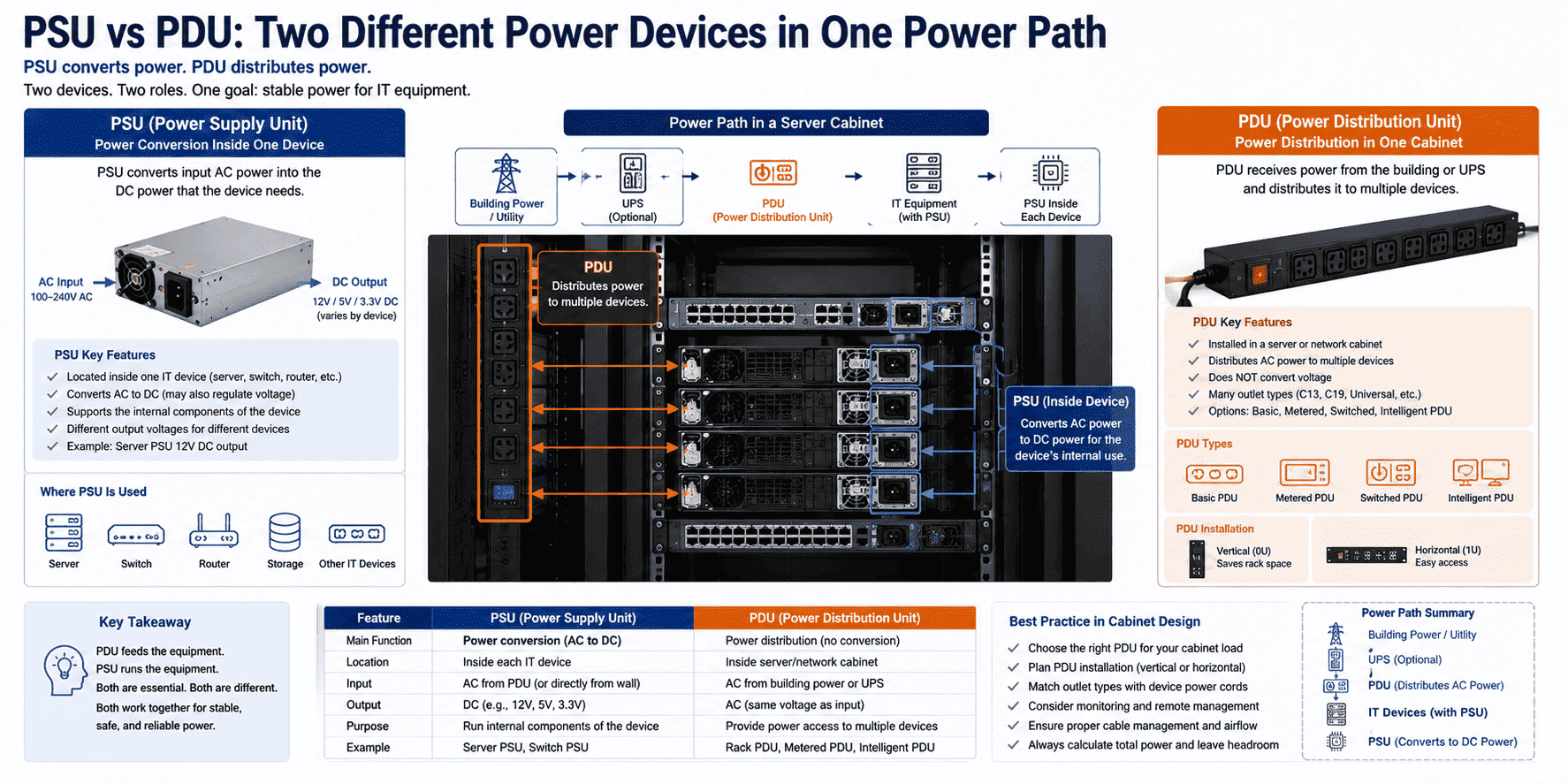
In my daily cabinet work, I do not treat PSU and PDU as similar products. I treat them as two links in one power path. The power usually comes from the building supply or UPS first. Then it goes into the cabinet PDU. Then each server, switch, router, or other device uses its own PSU to turn that input power into the power it needs inside. If I explain it in a simple way, the PDU feeds the equipment, and the PSU runs the equipment. This difference looks small on paper, but it matters a lot when I prepare a server cabinet, network cabinet, or custom non-standard cabinet for a real project.
What does a PSU do inside IT equipment?
I have seen many equipment problems start from wrong power understanding. A buyer may order a cabinet correctly, but still forget the device power supply part.
A PSU, or power supply unit, is the internal power heart of one IT device. I use it to convert AC power from the mains into DC power for servers, switches, routers, DVRs, and other equipment. Without a working PSU, that single device cannot start or run.
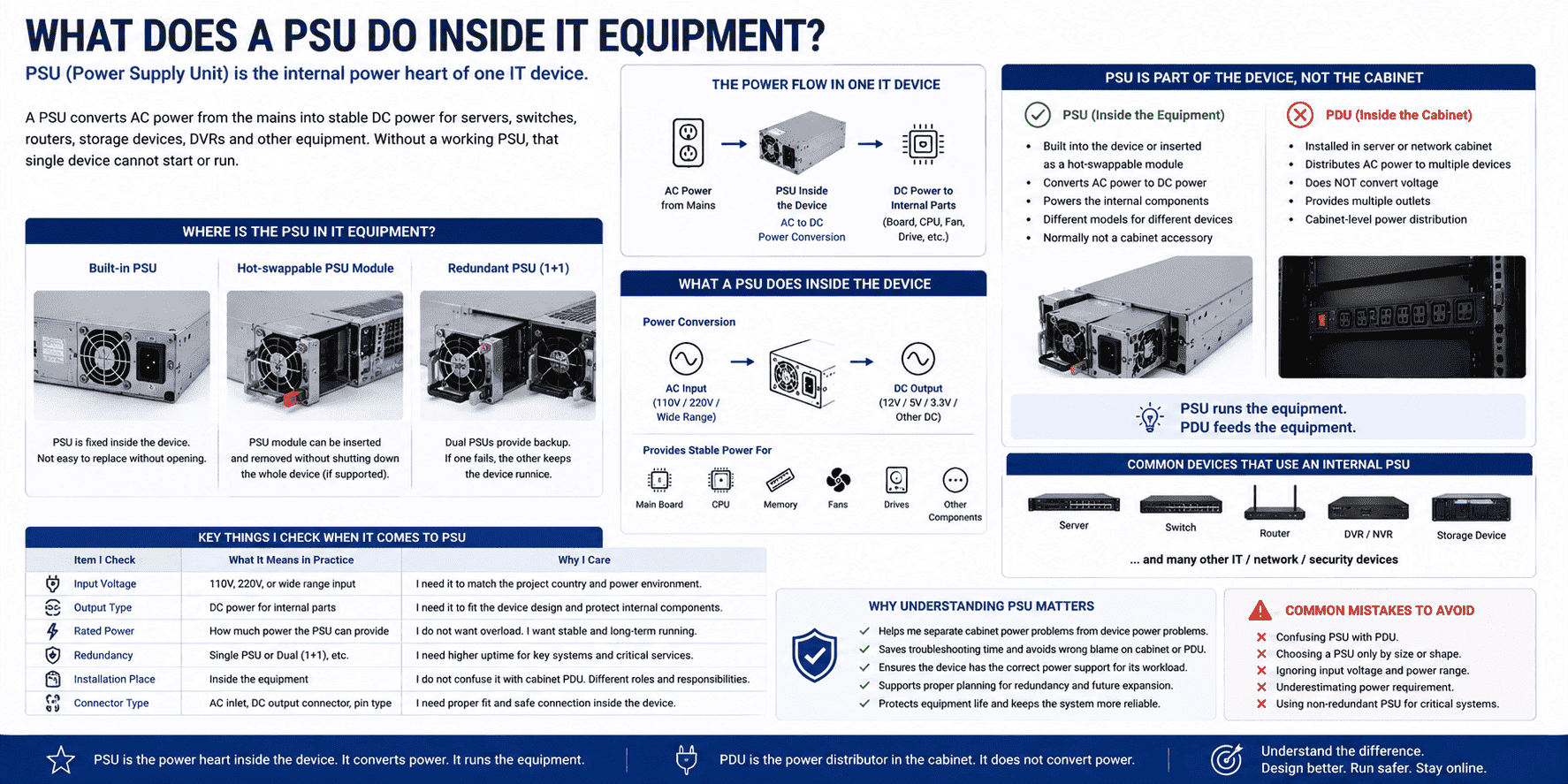
I usually explain PSU from the equipment side, not from the cabinet side. A PSU belongs to the server, switch, router, host machine, storage device, or network device. It is not normally a cabinet accessory. It is built into the device body, or it is inserted into the device as a replaceable power module. Its main job is to convert power. Most IT equipment cannot use the raw AC power from the wall directly.3 The internal boards, chips, fans, drives, and control parts need stable DC power.
In real projects, I pay attention to the PSU because it affects whether one device can work normally. I also pay attention to redundancy, rated power, input range, and connector type. I do not choose the PSU only by looking at the outside shape. I check the device requirement first.
| Item I check | What it means in practice | Why I care |
|---|---|---|
| Input voltage | 110V, 220V, or wide range input | I need it to match the project country |
| Output type | DC power for internal parts | I need it to fit the device design |
| Rated power | How much power the PSU can provide | I do not want overload |
| Redundancy | Single PSU or dual PSU | I need uptime for key systems4 |
| Installation place | Inside the equipment | I do not confuse it with cabinet PDU |
When I build or supply network cabinets, I normally do not manufacture the PSU, because it is part of the equipment. I still need to understand it. If a customer asks why a server cannot power on, I first separate cabinet power problems from device PSU problems. This saves time and avoids wrong blame on the cabinet or the PDU.
What does a PDU do inside a server cabinet?
I have seen neat cabinets become unsafe because the power distribution was ignored. Many devices were installed, but the power plan was treated like an afterthought.
A PDU, or power distribution unit, is the cabinet power socket system.5 I use it to distribute upstream power from UPS or main supply to many devices inside the cabinet. It does not convert voltage. It gives equipment standard, organized, and safer power access.
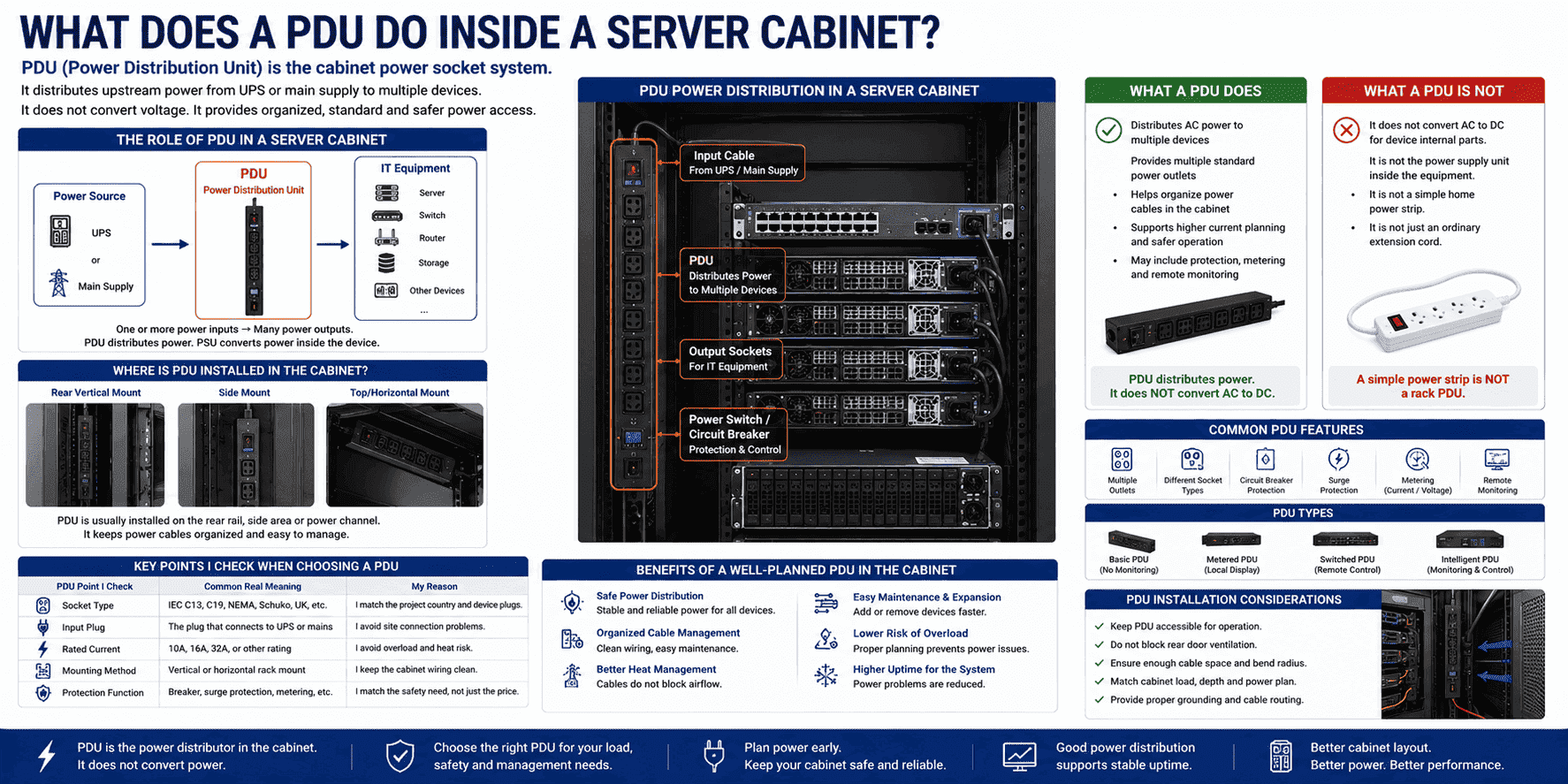
I treat the PDU as a cabinet-level power accessory. It is commonly installed on the rear vertical mounting rail, side area, or power channel inside a server cabinet or network cabinet. Its job is simple but important. It takes one or more power inputs and provides several output sockets for IT equipment. In a real cabinet, I may see servers, switches, routers, firewalls, storage units, fiber equipment, and monitoring devices. Each device needs a stable place to plug in. The PDU gives that place.
I do not say a PDU is just a normal home power strip. That description is too simple and can be risky. A cabinet PDU is made for rack installation, higher current planning, better cable management, and a more controlled machine room environment.6 Some PDUs also include switches, breakers, surge protection, metering, or remote monitoring.7 But I still keep the basic idea clear. A PDU distributes power. It does not turn AC into DC for the device internal boards.
| PDU point I check | Common real meaning | My reason |
|---|---|---|
| Socket type | IEC, NEMA, Schuko, UK, or others | I match the project country and device plugs |
| Input plug | The plug that connects to UPS or mains | I avoid site connection problems |
| Rated current | 10A, 16A, 32A, or other rating | I avoid overload and heat risk |
| Mounting method | Vertical or horizontal rack mount | I keep the cabinet wiring clean |
| Protection function | Breaker, surge protection, or metering | I match the safety need, not just the price |
In my cabinet production work, the PDU often comes together with the cabinet configuration. I consider it with cable holes, rear door ventilation, equipment depth, vertical space, and grounding. A good cabinet layout should let the PDU stay accessible, but it should not block airflow or make power cables press against the rear mesh door.
How are PSU and PDU different in real cabinet projects?
I have seen purchase lists with PSU and PDU written as one item. That small wording mistake can lead to wrong quotations and wrong delivery.
I separate PSU and PDU by function and position. A PSU converts power inside one device. A PDU distributes power inside the cabinet. The PSU is downstream of the PDU. The PDU is upstream of equipment PSUs.8 They work together, but they are not the same product.
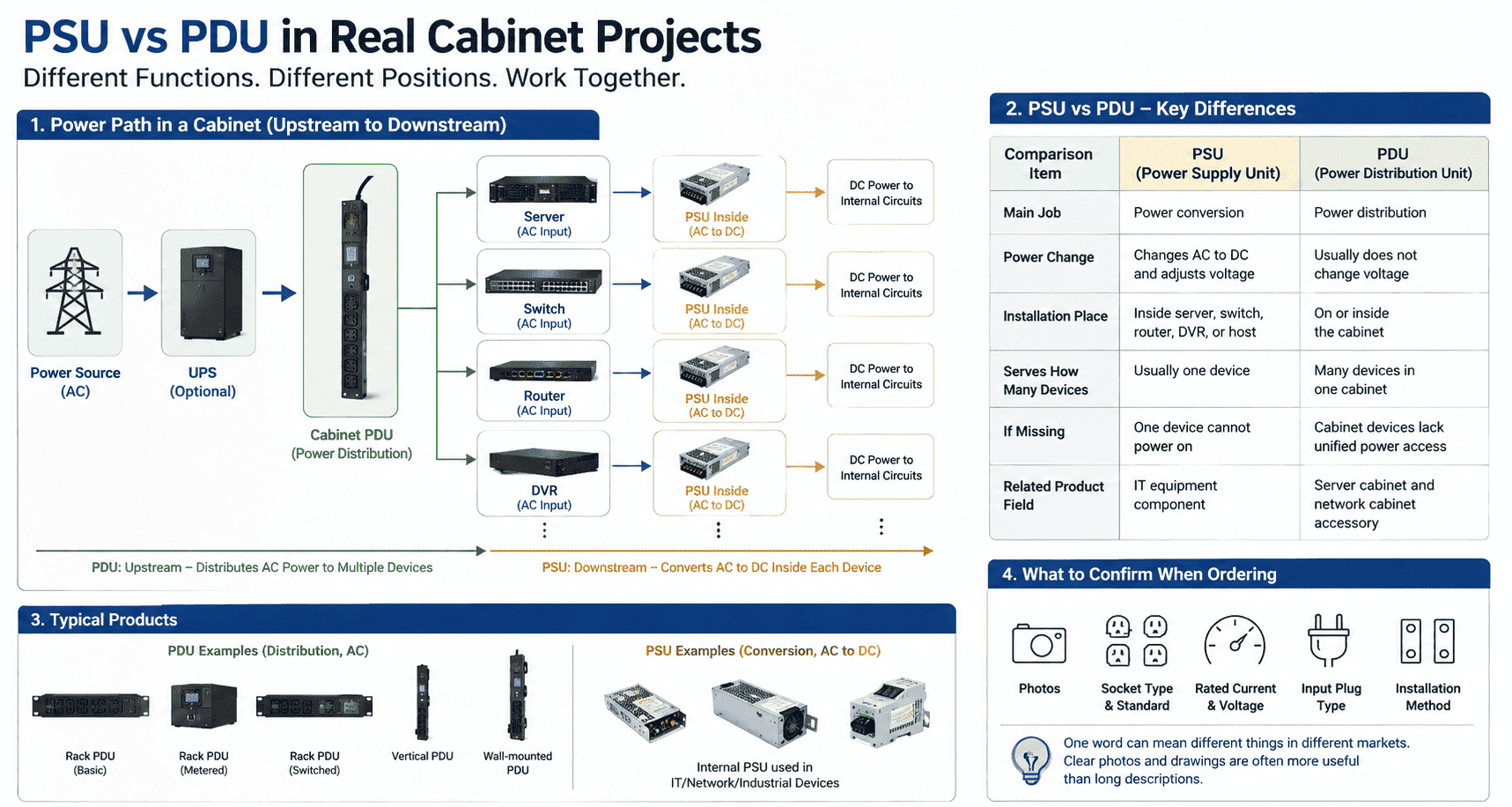
I use a simple power path when I explain this to new customers. The power source enters the machine room. It may pass through a UPS. Then it reaches the cabinet PDU. After that, each device takes AC power from the PDU. Inside each device, the PSU converts that AC power into the DC power needed by the internal circuits. This is why I call them upstream and downstream parts. The PDU sits before the equipment. The PSU sits inside the equipment.
The main difference is not only the name. The main difference is the job. A PSU changes electrical form. It may change voltage. It changes AC to DC. A PDU does not do that in normal use. It keeps the same power type and voltage and only divides the power into multiple outputs. If I confuse these two, I may choose the wrong accessory, calculate power wrongly, or design the cabinet layout poorly.
| Comparison item | PSU | PDU |
|---|---|---|
| Full name I use | Power Supply Unit | Power Distribution Unit |
| Main job | Power conversion | Power distribution |
| Power change | Changes AC to DC and adjusts voltage | Usually does not change voltage |
| Installation place | Inside server, switch, router, DVR, or host | On or inside the cabinet |
| Serves how many devices | Usually one device | Many devices in one cabinet |
| If missing | One device cannot power on | Cabinet devices lack unified power access |
| Related product field | IT equipment component | Server cabinet and network cabinet accessory |
In real overseas projects, I also see language differences. Some customers use “power supply” for many things. Some use “PDU” when they mean a rack socket. I always ask for photos, socket standards, rated current, input plug type, and installation method. I do this because one word can mean different things in different markets. A clear drawing or photo is often more useful than a long description.
How do I choose PSU and PDU for a network cabinet?
I have seen projects focus only on cabinet size. Later, the buyer finds that plugs, cables, and power loading do not match the site.
I choose PSU according to the equipment requirement. I choose PDU according to the cabinet power plan. For PSU, I check device voltage, power, and redundancy. For PDU, I check socket type, input plug, rated current, mounting position, cable route, and protection needs.
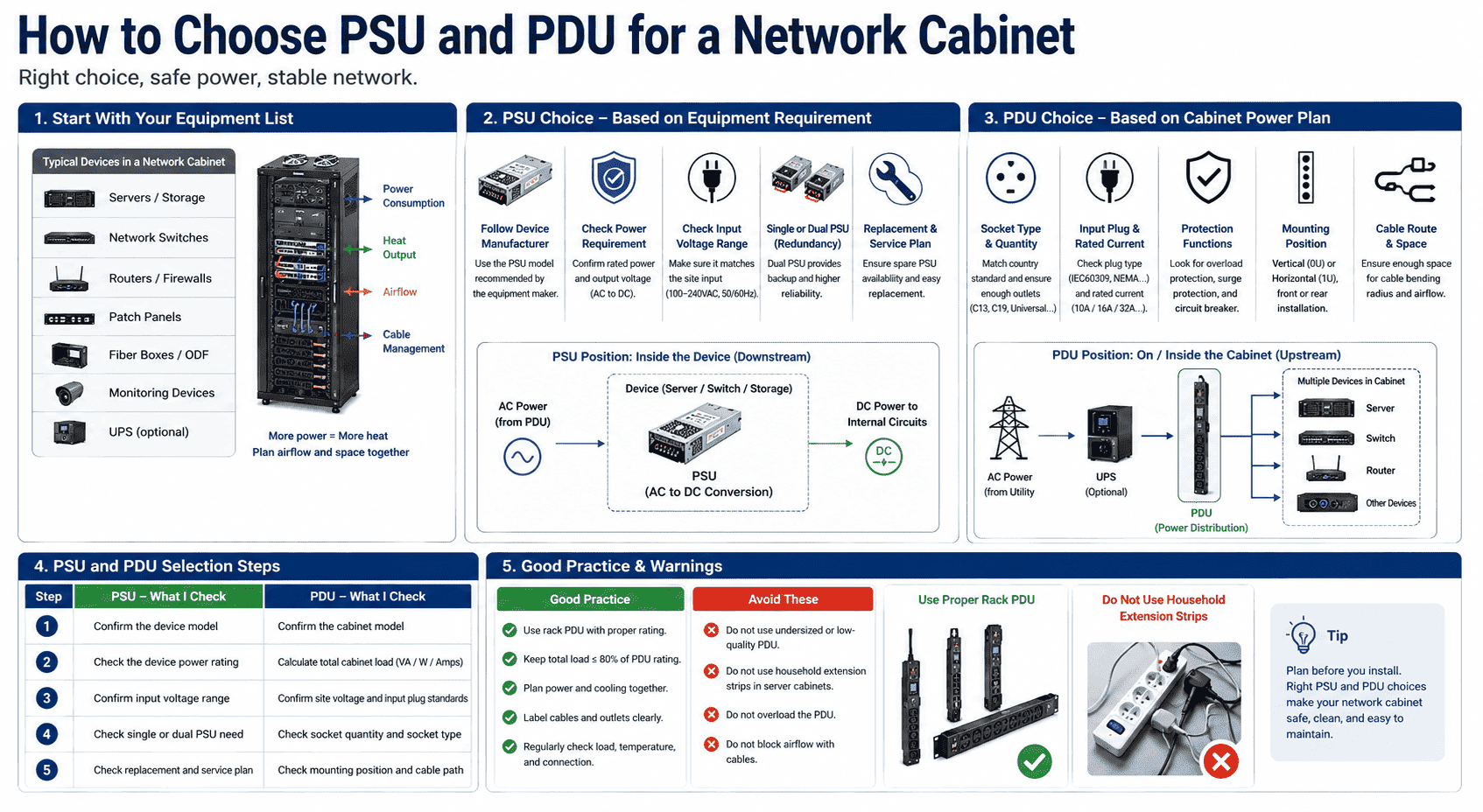
I start with the equipment list. I ask what devices will be installed in the cabinet. I check how many servers, switches, routers, patch panels, fiber boxes, monitoring devices, or storage units will be placed inside. I also check the depth and heat output, because power and cooling are connected in a cabinet. A device with higher power use usually brings more heat.9 A cabinet with many powered devices needs better airflow, better cable planning, and enough space near the rear side.
For PSU choice, I normally follow the device manufacturer. If the server needs a certain PSU module, I do not replace it casually. If the device supports dual PSU, I check whether the project needs redundancy. For PDU choice, I work from the cabinet side. I check the country socket standard and the site input condition. I also check the cabinet height and the position where the PDU can be mounted.
| Step I follow | PSU focus | PDU focus |
|---|---|---|
| Step 1 | I confirm the device model | I confirm the cabinet model |
| Step 2 | I check the device power rating | I calculate total cabinet load |
| Step 3 | I confirm input voltage range | I confirm site voltage and plug |
| Step 4 | I check single or dual PSU need | I check socket quantity and type |
| Step 5 | I check replacement and service plan | I check mounting and cable path |
I do not recommend choosing the cheapest PDU without checking the real load. A low-quality or undersized PDU can create heat, loose contact, or unstable power access.10 I also do not recommend adding random household extension strips inside a server cabinet.11 That may look convenient, but it often makes wiring messy and service work harder. In a standard or custom cabinet project, I prefer a planned rack PDU with correct rating and clear installation.
What mistakes do I often see when buyers compare PSU and PDU?
I have seen some buyers ask for a “cabinet PSU” when they actually need a PDU. I have also seen others ask for a PDU to fix a broken device power module.
The most common mistake I see is mixing product level. PSU belongs to one IT device. PDU belongs to the cabinet power distribution system. A PDU cannot replace a PSU. A PSU cannot organize power for the whole cabinet. I separate the fault before I suggest a solution.
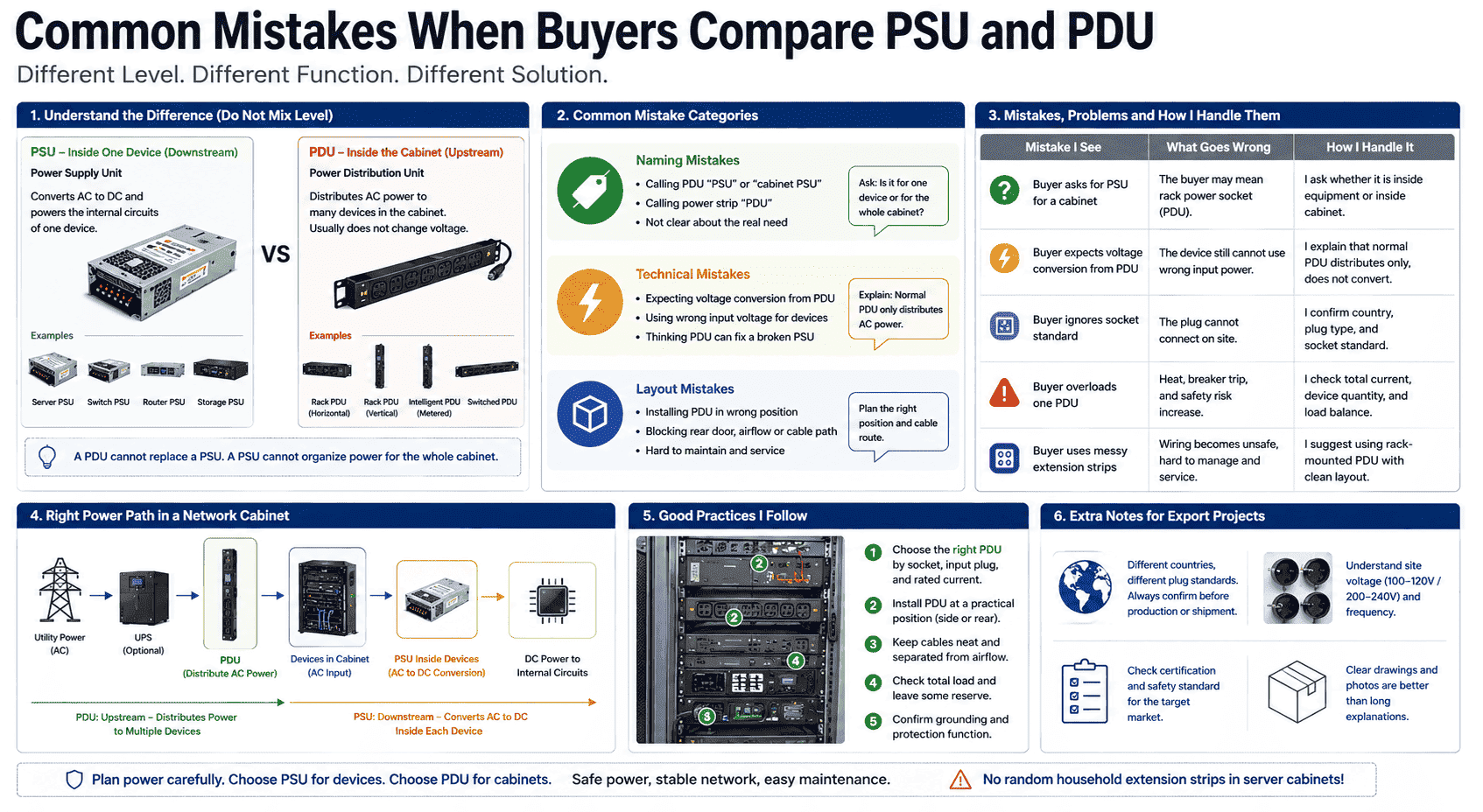
I usually divide mistakes into naming mistakes, technical mistakes, and layout mistakes. A naming mistake happens when a customer says PSU but means PDU, or says power strip but means rack PDU. A technical mistake happens when the buyer thinks PDU can convert voltage for a device. In normal cabinet use, it cannot. A layout mistake happens when the PDU is installed in a place that blocks service access, cable bending, airflow, or rear door closing.
I also see mistakes in export projects. Different countries use different plug standards.12 A cabinet shipped with the wrong PDU socket may still look complete, but it may not be easy to use on site. I have learned to confirm plug type before production or shipment. This is a very practical step. It is not fancy, but it prevents real trouble.
| Mistake I see | What goes wrong | How I handle it |
|---|---|---|
| Buyer asks for PSU for a cabinet | The buyer may mean rack power socket | I ask whether it is inside equipment or inside cabinet |
| Buyer expects voltage conversion from PDU | The device still cannot use wrong input power | I explain that normal PDU distributes only |
| Buyer ignores socket standard | The plug cannot connect on site | I confirm country, plug, and socket |
| Buyer overloads one PDU | Heat and safety risk increase | I check total current and device quantity |
| Buyer uses messy extension strips | Wiring becomes unsafe and hard to service | I suggest a rack-mounted PDU layout |
In my own production process, I also look at how the PDU affects the cabinet structure. A server cabinet is not only a metal box. It needs correct space, mounting rails, cable entry, grounding, heat dissipation, and rear access. When I produce standard cabinets or custom non-standard cabinets, I try to leave a practical power area. I also consider mesh door opening, cable manager position, and the depth of installed equipment. A PDU may be a small accessory, but its placement can affect daily maintenance.
Why does this difference matter for server cabinet manufacturing?
I have seen cabinets pass size checks but fail practical use. The reason was not the frame. The reason was poor power and cable planning.
I care about the PSU and PDU difference because it affects cabinet design, wiring, heat, safety, and delivery communication. I do not need to manufacture the PSU to understand it. I need to plan the PDU position so the whole cabinet works better on site.
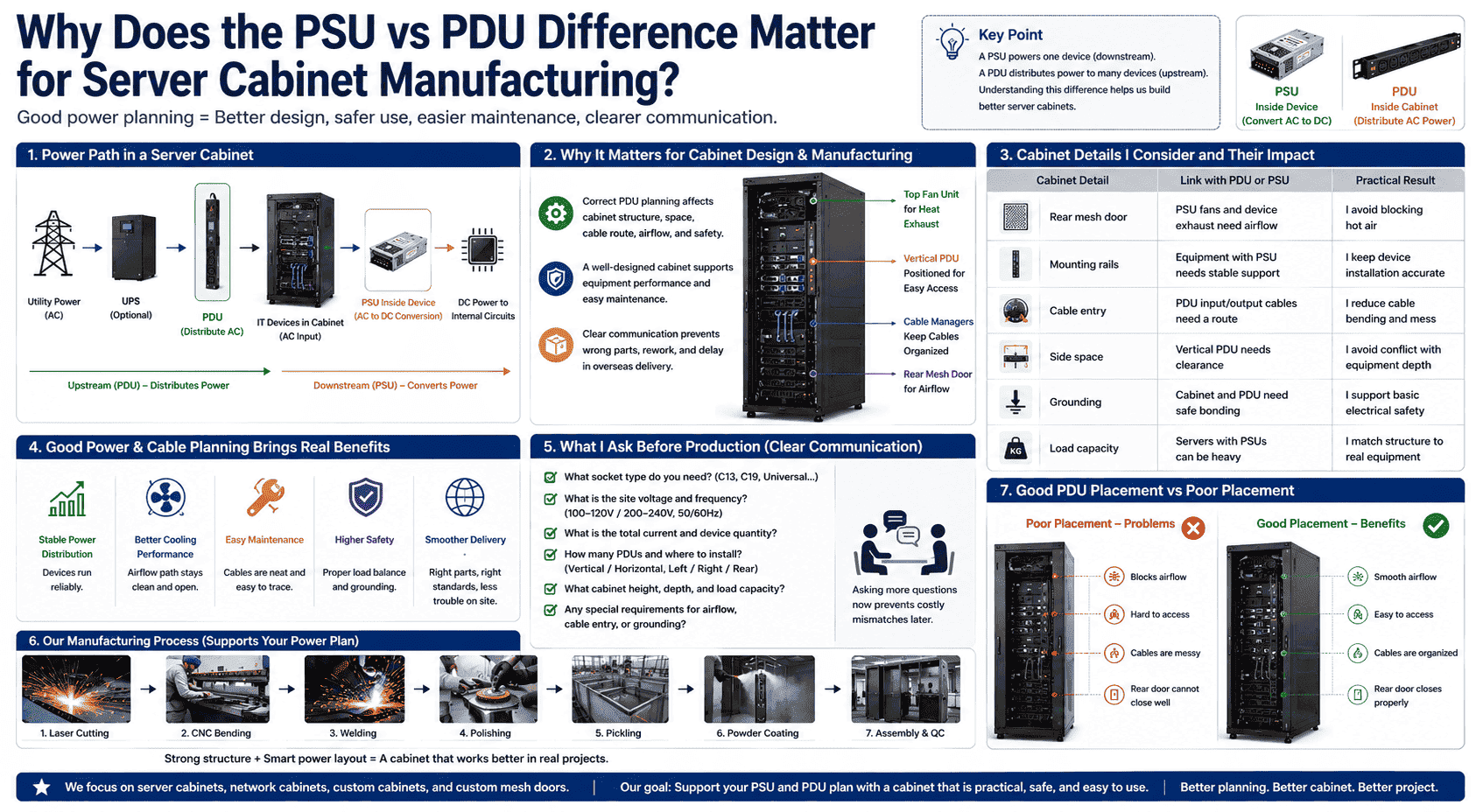
In my factory work, I focus on server cabinets, network cabinets, custom non-standard cabinets, and custom mesh doors. I handle sheet metal structure, cutting, bending, welding, polishing, pickling, powder coating, and final assembly. These steps are physical, but the cabinet still serves electrical equipment. That is why power layout matters. A well-made cabinet should support the equipment, not fight against it.
When I discuss a custom cabinet with an overseas customer, I often ask about equipment depth, quantity, heat, cable direction, and power distribution. I do not need private technical data. I only need enough information to make the structure practical. If the customer needs vertical PDU mounting, I check side clearance. If the customer needs heavy equipment, I check load and rail support. If the customer needs many cables, I check cable entry and cable manager space. If the customer needs high airflow, I check door perforation, fan position, and equipment spacing.
| Cabinet detail I consider | Link with PDU or PSU | Practical result |
|---|---|---|
| Rear mesh door | PSU fans and device exhaust may need airflow | I avoid blocking hot air |
| Mounting rails | Equipment with PSU needs stable support | I keep device installation accurate |
| Cable entry | PDU input and output cables need a route | I reduce cable bending and mess |
| Side space | Vertical PDU needs clearance | I avoid conflict with equipment depth |
| Grounding | Cabinet and PDU need safe bonding | I support basic electrical safety |
| Load capacity | Servers with PSUs can be heavy | I match structure to real equipment |
I prefer clear, real communication before production. If a buyer tells me only “I need a cabinet with power,” I will ask more questions. I will ask about socket type, voltage, current, plug, PDU quantity, cabinet height, and installation side. I ask these questions because they reduce rework. I also ask them because overseas delivery takes time. A small mismatch can become a large cost after shipping.
Conclusion
I treat PSU as the device power converter and PDU as the cabinet power distributor. I separate them first, then I plan the cabinet.
"Power supply - Wikipedia", https://en.wikipedia.org/wiki/Power_supply. An encyclopedia entry on computer power supply units defines the PSU as the component that converts mains AC input into regulated DC outputs used by the computer's internal circuits. Evidence role: definition; source type: encyclopedia. Supports: A neutral reference should define a computer PSU as a device that converts mains AC power into regulated DC outputs for internal components.. ↩
"Power distribution unit - Wikipedia", https://en.wikipedia.org/wiki/Power_distribution_unit. A reference definition of a rack power distribution unit describes it as a device for distributing electrical power to multiple rack-mounted loads, supporting the distinction between distribution and conversion. Evidence role: definition; source type: encyclopedia. Supports: A source should define a rack PDU as equipment that distributes electrical power to multiple devices, rather than functioning as a power converter.. Scope note: This supports the normal function of rack PDUs; it does not exclude specialized products that may include transformers or other conditioning features. ↩
"Power supply unit (computer)", https://en.wikipedia.org/wiki/Power_supply_unit_(computer). Educational material on computer power supplies explains that internal electronic components require regulated DC voltages, while mains power is AC and must be converted before use. Evidence role: mechanism; source type: education. Supports: A source should explain that computer and electronic components operate on regulated DC voltages supplied by a power supply, not directly on mains AC.. ↩
"[PDF] Contingency Planning Guide for Federal Information Systems", https://nvlpubs.nist.gov/nistpubs/legacy/sp/nistspecialpublication800-34r1.pdf. Guidance on high-availability system design identifies redundant power supplies as a fault-tolerance measure that can keep equipment operating after a single power-supply failure. Evidence role: expert_consensus; source type: institution. Supports: A source should support that redundant power supplies are a fault-tolerance measure intended to maintain operation if one supply fails.. Scope note: The source can support the availability mechanism, but actual uptime depends on the complete power architecture, maintenance practices, and failure modes. ↩
"Power distribution unit - Wikipedia", https://en.wikipedia.org/wiki/Power_distribution_unit. An encyclopedia entry on power distribution units defines a PDU as equipment with multiple outputs for distributing electrical power, including use in computer racks and data centers. Evidence role: definition; source type: encyclopedia. Supports: A source should define a PDU as a device with multiple outputs used to distribute electric power, especially in computer racks or data centers.. ↩
"[PDF] Better Buildings, Better Data Centers: Applying Best Practices", https://datacenters.lbl.gov/sites/default/files/Energy%20Exchange%20Data%20Center%20Workshop%20081117.pdf. Data-center infrastructure guidance treats rack PDUs as rack-installed power-distribution equipment selected according to load ratings, outlet configuration, and cable-management requirements. Evidence role: expert_consensus; source type: institution. Supports: A source should support that rack PDUs are designed for data-center or equipment-rack installation and are selected according to load, outlet, and cabling requirements.. Scope note: This provides contextual support for the distinction from household strips, rather than proving that every rack PDU is superior in all conditions. ↩
"Monitoring & Controls", https://datacenters.lbl.gov/monitoring-controls. Institutional guidance on data-center power distribution describes rack PDUs as available with additional functions such as metering, switching, monitoring, and protective devices. Evidence role: general_support; source type: institution. Supports: A source should document that rack PDUs can be basic, metered, switched, monitored, or protected by breakers or surge protection devices.. Scope note: The source supports the range of possible PDU features; individual PDU models may include only some of these functions. ↩
"Power distribution unit - Wikipedia", https://en.wikipedia.org/wiki/Power_distribution_unit. A data-center power-distribution reference describes rack PDUs as the rack-level distribution point supplying power to installed IT equipment, whose internal power supplies perform final conversion for electronic components. Evidence role: mechanism; source type: institution. Supports: A source should show that power is commonly delivered to rack PDUs and then to server power supplies in installed equipment.. Scope note: The source supports the common rack architecture; exact power paths can vary in systems with busways, in-row distribution, or specialized power equipment. ↩
"Data Centers and Their Energy Consumption - Congress.gov", https://www.congress.gov/crs-product/R48646. Data-center energy literature explains that most electrical energy consumed by IT equipment is ultimately released as heat, so higher equipment power draw generally increases the cooling load. Evidence role: mechanism; source type: research. Supports: A source should explain that electrical power consumed by IT equipment is largely converted into heat, making power draw a basis for cooling load.. Scope note: The source supports the general energy-to-heat relationship; actual cabinet temperatures also depend on airflow path, ambient conditions, and equipment efficiency. ↩
"Compliance requirements for relocatable power taps or " ...", http://www.osha.gov/laws-regs/standardinterpretations/2002-11-18. Electrical safety guidance from public authorities identifies overloaded or improperly rated power distribution devices and loose connections as causes of overheating and fire risk. Evidence role: expert_consensus; source type: government. Supports: A source should support that overloaded, undersized, or improperly connected electrical distribution devices can overheat and create fire or reliability hazards.. Scope note: The source supports the safety mechanism generally; it may not evaluate any specific PDU model or manufacturing quality level. ↩
"Use of flexible cords and cables for wiring in permanent or ... - OSHA", http://www.osha.gov/laws-regs/standardinterpretations/2006-05-05. Government electrical-safety guidance treats extension cords and relocatable power taps as limited-use devices and warns against overloading or using them as substitutes for properly rated power distribution. Evidence role: expert_consensus; source type: government. Supports: A source should support that extension cords or household power strips are not intended to replace properly rated permanent or rack-specific power distribution.. Scope note: The source supports the general safety concern; local electrical codes and the listing of a particular product determine the exact compliance status. ↩
"AC power plugs and sockets - Wikipedia", https://en.wikipedia.org/wiki/AC_power_plugs_and_sockets. International reference material on AC power plugs and sockets documents the use of different plug and socket systems across countries, supporting the need to verify socket type for overseas installations. Evidence role: historical_context; source type: institution. Supports: A source should document that countries use different AC plug and socket systems and that plug compatibility varies by location.. ↩
