
What Is a Small Network Cabinet?

I often see good network devices fail early because they sit in dust, heat, and messy cables. The problem looks small, but the loss feels serious.
-
Why Do I Recommend A Small Network Cabinet For Small Network Projects?
I see many small network failures start from disorder. A low-cost setup can become expensive when cables are exposed, devices overheat, and maintenance becomes guesswork.
I recommend a small network cabinet because I can place network devices in one protected space. I can manage cables, reduce dust, improve safety, and use limited space better. I can also make later inspection and repair much easier.
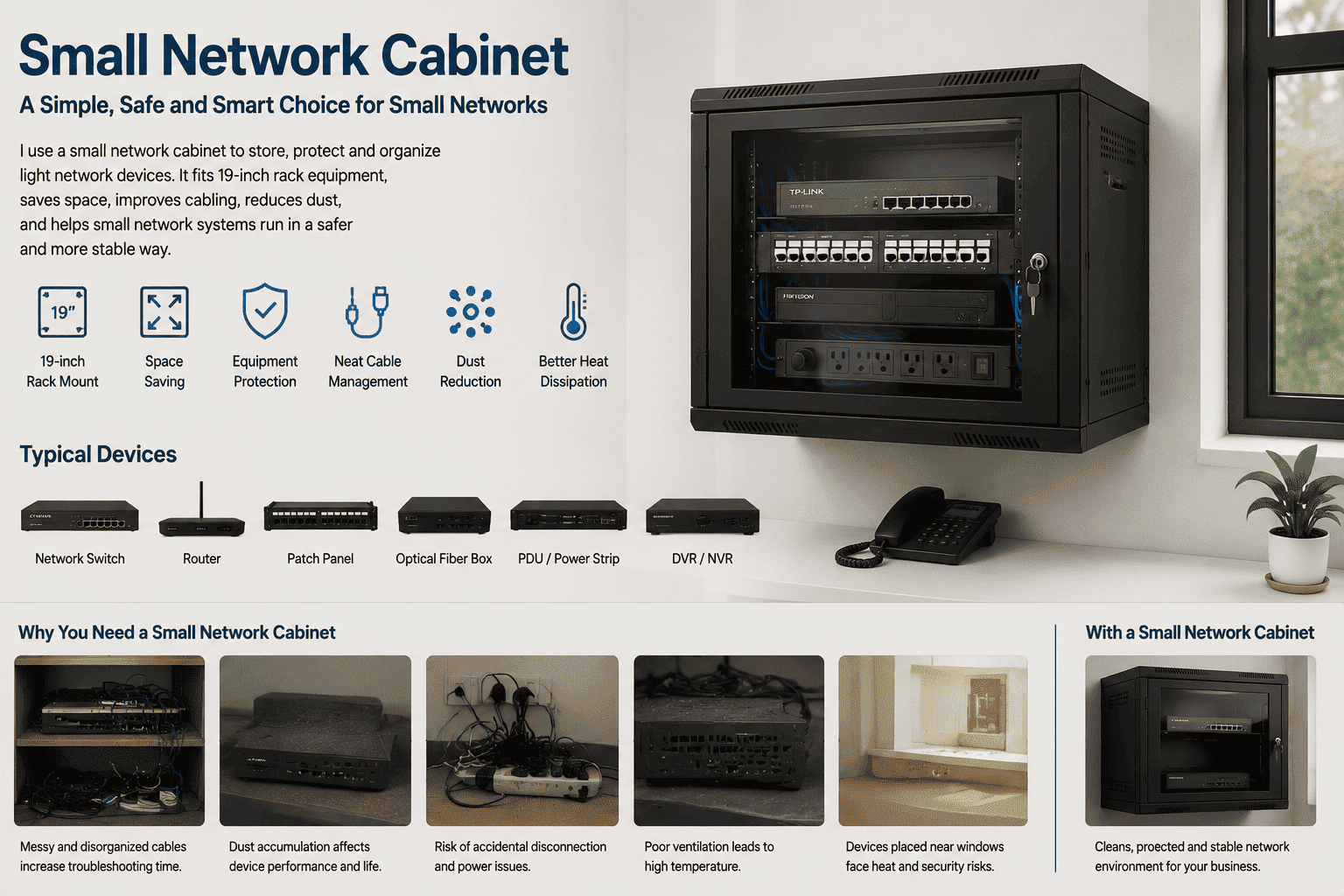
I usually meet three common project types. The first type is a small office with 10 to 50 staff. The second type is a shop, restaurant, clinic, or training room. The third type is a home network room or CCTV corner. These sites do not need a full-size 42U cabinet. They need a compact cabinet that can hold standard devices and protect them.
I see the cabinet as a small system, not only a metal box. It brings order to the weak current project. It gives each device a fixed place. It gives each cable a clear path. It gives the maintenance person a door, a lock, and a simple view of the system.
What problems do I usually solve?
| Problem I see on site | What I do with a small cabinet | Result I expect |
|---|---|---|
| Devices are placed on a desk | I mount them inside the cabinet | The equipment area becomes clean |
| Cables hang everywhere | I use patch panels and cable rings | The wiring becomes clear |
| Dust enters ports and fans | I use a closed cabinet body | The devices stay cleaner |
| People touch devices by mistake | I use a lockable front door | The system becomes safer |
| Space is too small | I choose wall mount or compact floor type | The room keeps more usable space |
I have seen small cabinets make a site look more professional within one afternoon. The customer can open the door and understand where the network starts. The installer can label cables and leave a record. The next worker does not need to guess.
Which Types Of Small Network Cabinets Do I Usually Make?
I often ask the customer where the cabinet will be installed before I talk about size. The wrong installation type can waste space or create heat problems.
I usually make wall mount cabinets, floor standing cabinets, recessed wall cabinets, outdoor waterproof wall cabinets, and outdoor waterproof floor cabinets. I choose the type by site space, device weight, wiring direction, dust level, and weather exposure.
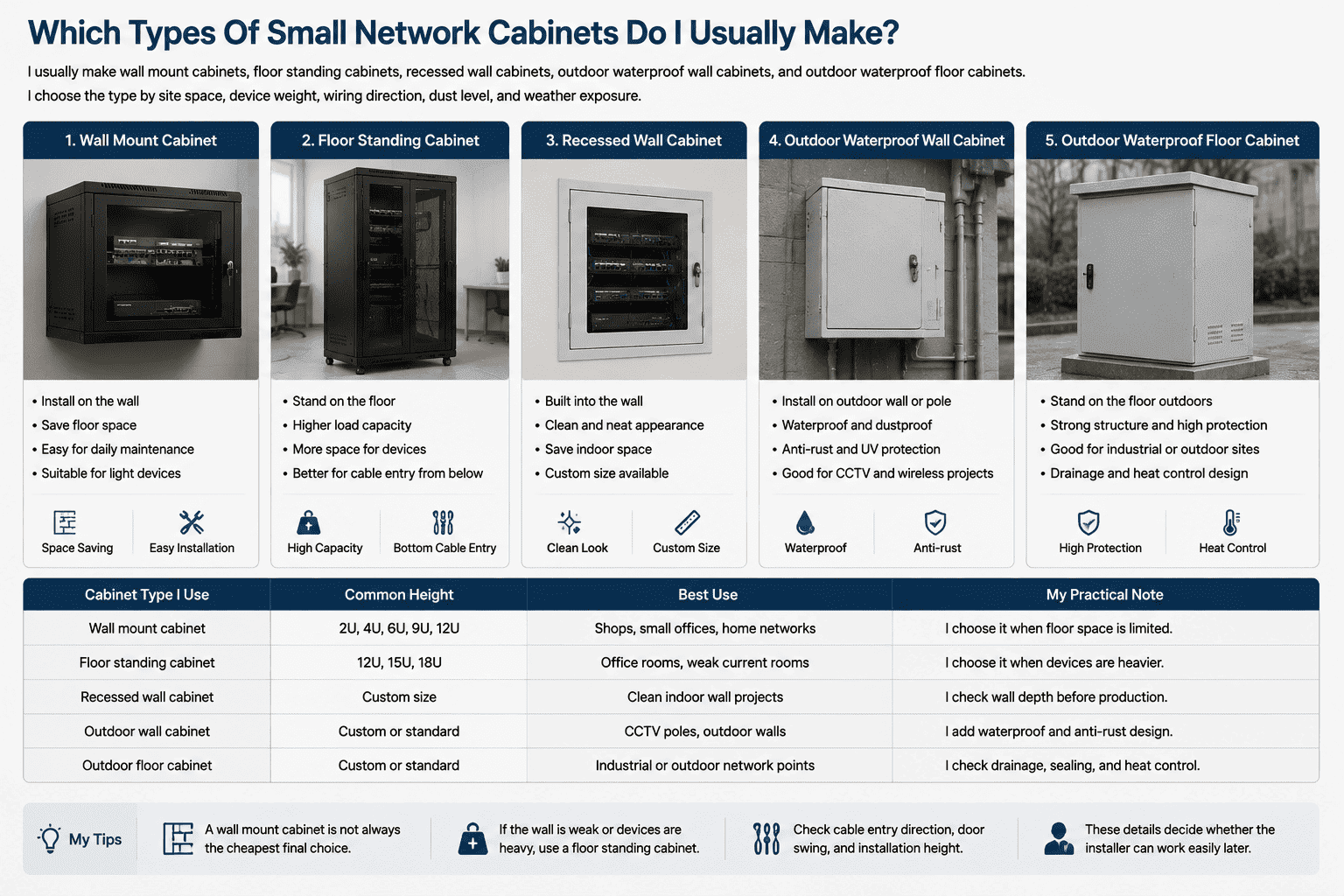
I do not treat every small cabinet as the same product. A shop may only need a 6U wall mount cabinet for a router, a switch, and a patch panel. A small office may need a 12U cabinet with better cable space. A surveillance project may need more depth because the NVR and power devices take more room. An outdoor monitoring point may need a waterproof structure, a stronger lock, and better anti-rust treatment.
How I compare common cabinet types
| Cabinet type I use | Common height | Best use | My practical note |
|---|---|---|---|
| Wall mount cabinet | 2U, 4U, 6U, 9U, 12U | Shops, small offices, home networks | I choose it when floor space is limited |
| Floor standing cabinet | 12U, 15U, 18U | Office rooms, weak current rooms | I choose it when devices are heavier |
| Recessed wall cabinet | Custom size | Clean indoor wall projects | I check wall depth before production |
| Outdoor wall cabinet | Custom or standard | CCTV poles, outdoor walls | I add waterproof and anti-rust design |
| Outdoor floor cabinet | Custom or standard | Industrial or outdoor network points | I check drainage, sealing, and heat control |
I often tell customers that a wall mount cabinet is not always the cheapest final choice. If the wall is weak, the device is heavy, or many cables enter from below, a small floor standing cabinet may be safer. I also check the door swing direction, the rear cable entry, and the installation height. These details decide whether the installer can work easily later.
What Size Small Network Cabinet Should I Choose?
I see many buyers choose the cabinet only by height. That is risky because device depth, cable bending space, and future expansion also matter.
I choose cabinet size by U height, device depth, cable space, load, and future spare capacity. I use the 19-inch standard for rack equipment, and I match common depths like 400mm, 450mm, and 600mm to real device size.
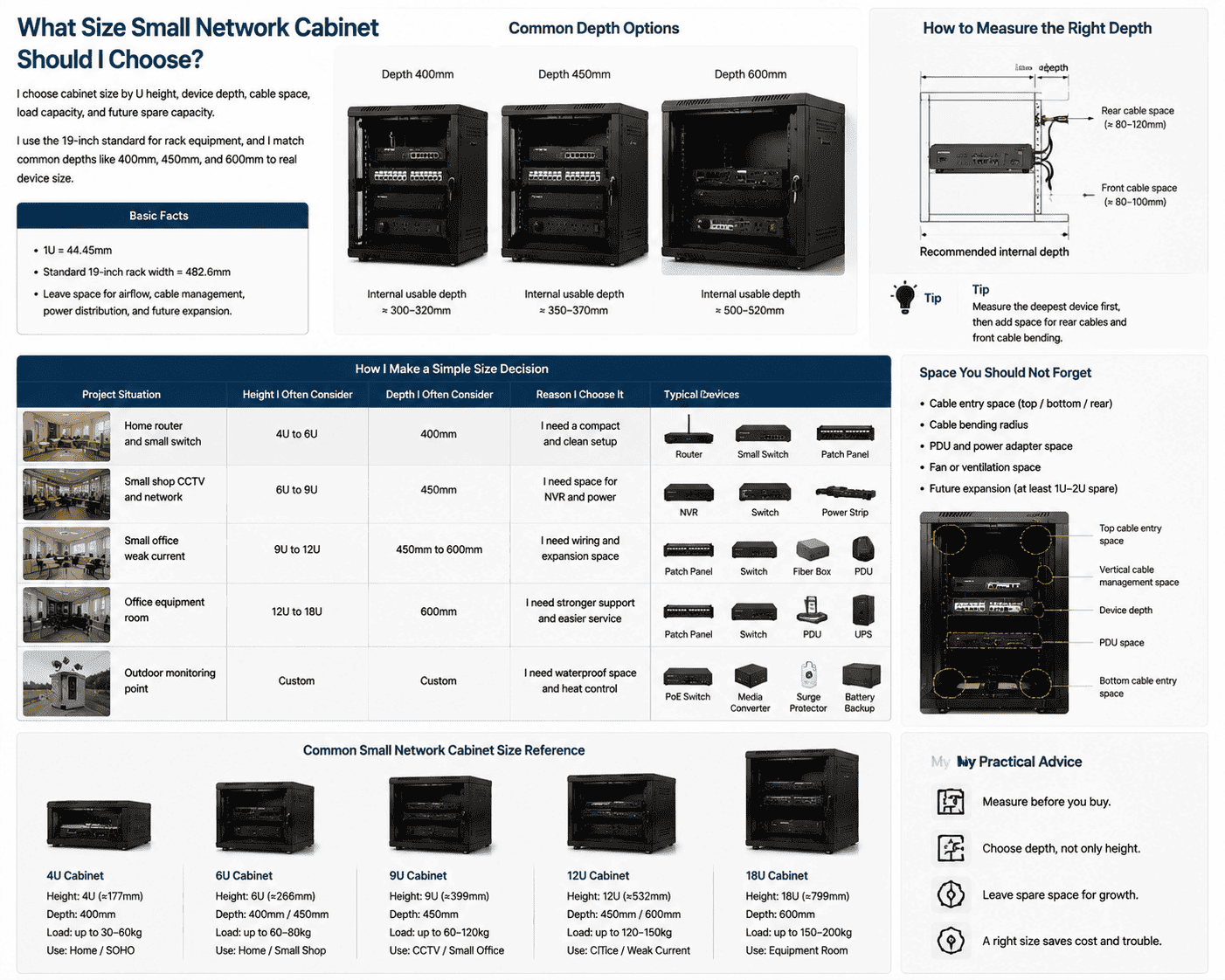
I use “U” as the height unit. One U is 44.45mm.1 A 6U cabinet can hold six units of rack space in theory. But I do not fill every U tightly in a real project. I leave space for airflow, cable management, power distribution, and later equipment.2 I often see a 6U project become an 8U or 9U project after the customer adds one more switch, one optical device, or one UPS.
How I make a simple size decision
| Project situation | Height I often consider | Depth I often consider | Reason I choose it |
|---|---|---|---|
| Home router and small switch | 4U to 6U | 400mm | I need a compact and clean setup |
| Small shop CCTV and network | 6U to 9U | 450mm | I need space for NVR and power |
| Small office weak current | 9U to 12U | 450mm to 600mm | I need wiring and expansion space |
| Office equipment room | 12U to 18U | 600mm | I need stronger support and easier service |
| Outdoor monitoring point | Custom | Custom | I need waterproof space and heat control |
I always measure the deepest device first. I then add space for rear cables and front cable bending. If a switch is 300mm deep, I do not want a 300mm internal depth. The cable will press against the door or the back panel. I usually suggest a deeper cabinet when the device has rear power cables, fiber jumpers, or thick network cable bundles. I also ask the customer if a PDU, fan, or small UPS will be installed. These parts take real space.
What Materials And Structure Do I Trust For A Small Network Cabinet?
I have seen cabinets look fine in photos but bend during installation. Thin steel and weak posts can cause door gaps, loose rails, and poor load safety.
I trust industrial cold-rolled steel for small network cabinets. In my production, I commonly use 1.2mm posts, 1.0mm frame parts, and 0.8mm door panels for light network equipment. I also use surface treatment to resist rust.
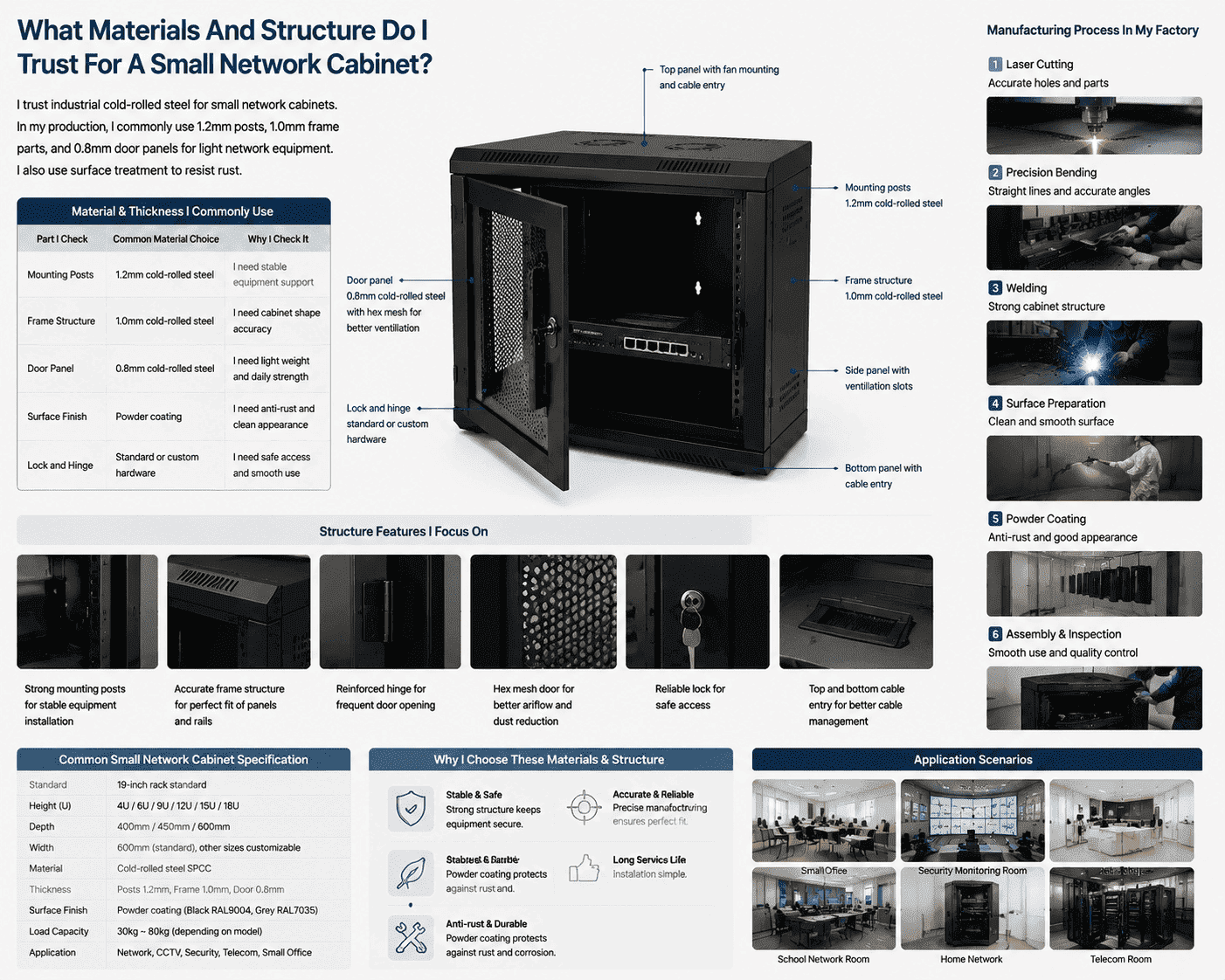
I run a sheet metal cabinet factory, so I pay close attention to structure. I know a small cabinet must stay light, but it must not feel weak. The post needs enough strength because the device rails carry the load. The frame needs enough accuracy because the door, side panel, and mounting rails must fit together. The door panel needs enough stiffness because it opens often and carries the lock.
What I focus on in production
| Part I check | Common material choice | Why I check it |
|---|---|---|
| Mounting posts | 1.2mm cold-rolled steel | I need stable equipment support |
| Frame structure | 1.0mm cold-rolled steel | I need cabinet shape accuracy |
| Door panel | 0.8mm cold-rolled steel | I need light weight and daily strength |
| Surface finish | Powder coating | I need anti-rust and clean appearance |
| Lock and hinge | Standard or custom hardware | I need safe access and smooth use |
In my factory, I see each step affect the final cabinet. Laser cutting controls hole position. Precision bending controls straight lines. Welding controls cabinet strength. Polishing and surface preparation affect the coating. Powder coating affects rust resistance and the final look.3 Assembly decides whether the door opens well and whether the rails sit straight. A small cabinet still needs the same process discipline as a large server cabinet. The size is smaller, but the quality risk is not smaller.
How Does A Small Network Cabinet Help Cable Management?
I often see network problems that are not caused by devices. They are caused by messy cables, unclear labels, and tight bending4.
I use a small network cabinet to create a clear cable path. I place patch panels, cable managers, power devices, and equipment in a planned order. I also leave enough space for bending and labeling.
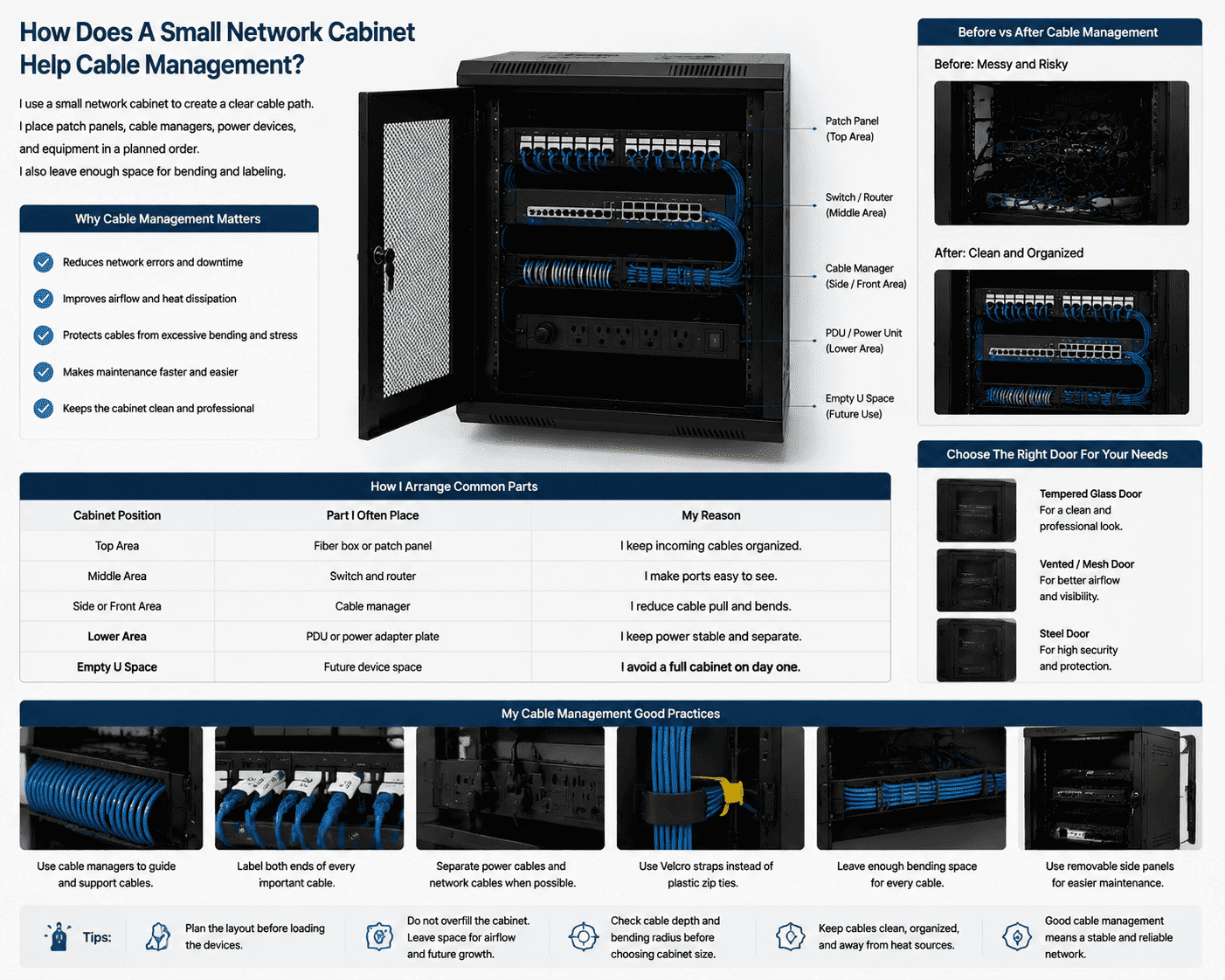
I like to build the cabinet layout before I load the devices. I usually place the patch panel near the top, the switch close to it, and the power unit in a safe position. I avoid crossing strong power cables and network cables when the site allows it.5 I also leave hand space for plug removal. This sounds basic, but it saves a lot of time during maintenance.
How I arrange common parts
| Cabinet position | Part I often place | My reason |
|---|---|---|
| Top area | Fiber box or patch panel | I keep incoming cables organized |
| Middle area | Switch and router | I make ports easy to see |
| Side or front area | Cable manager | I reduce cable pull and bends |
| Lower area | PDU or power adapter plate | I keep power stable and separate |
| Empty U space | Future device space | I avoid a full cabinet on day one |
I do not like forcing long cable bundles into a shallow cabinet. The door may close, but the cable stress stays there. Over time, plugs loosen, labels fall, and fiber may bend too much6. I prefer a cabinet that gives enough depth and side space. I also prefer removable side panels when maintenance space is small. If the site needs a clean front look, I can use a tempered glass door or a steel door. If the site needs airflow and visibility, I can use a vented door or mesh design.
Where Can I Use A Small Network Cabinet In Real Projects?
I have supplied many small cabinets to projects where the network area was only a corner. The customer still needed order, safety, and a standard look.
I can use a small network cabinet in small offices, stores, home network rooms, security monitoring systems, school rooms, clinics, hotels, and light industrial sites. I choose indoor or outdoor design based on the real environment.
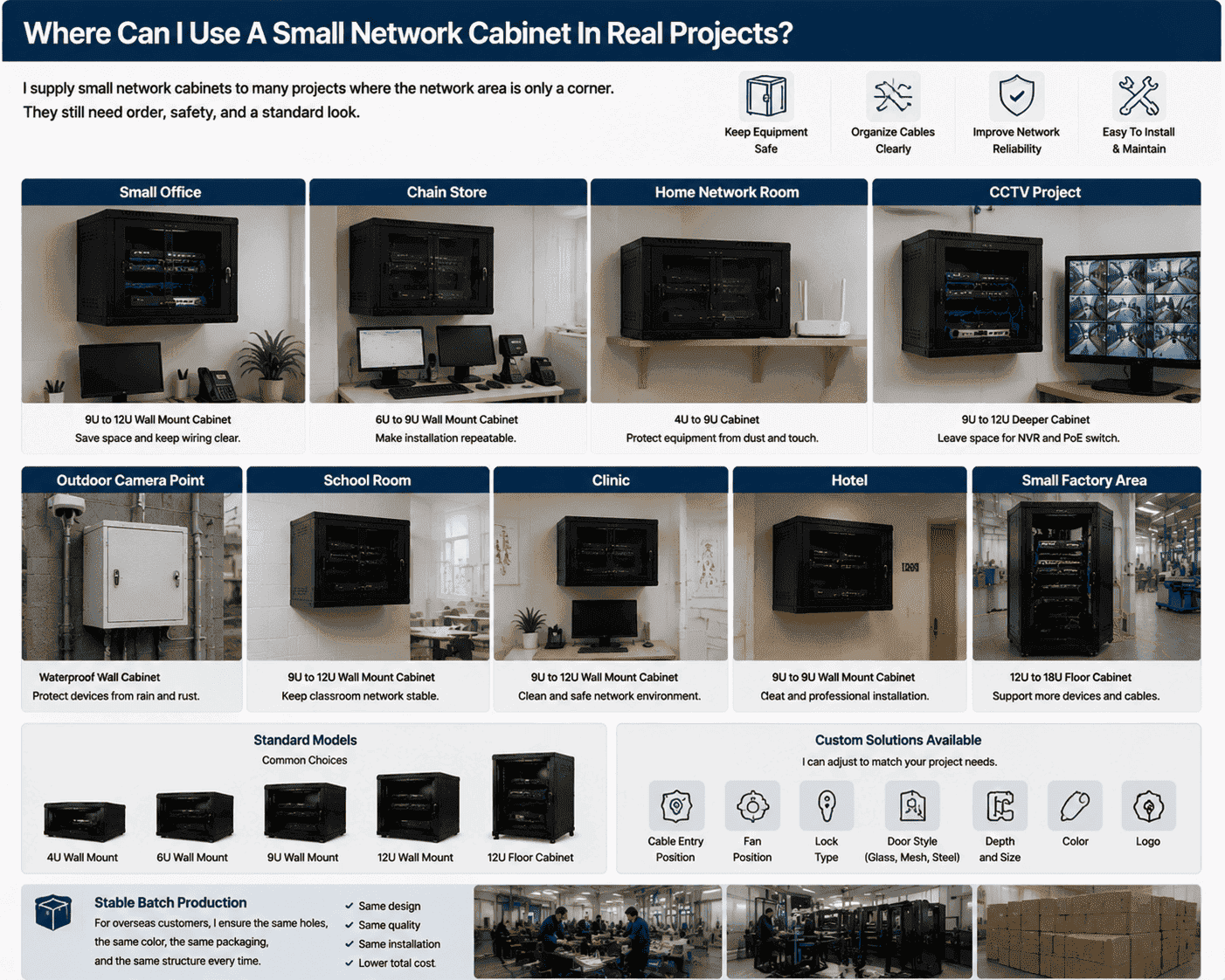
I remember one small retail project where the customer had a router, a PoE switch, an NVR, and many camera cables. At first, all parts were placed on a wooden shelf. The shop looked clean from the front, but the back room was full of hanging cables. I suggested a 9U wall mount cabinet with enough depth. The installer moved the devices into the cabinet and labeled the cables. The customer later told me that cleaning became easier, and the camera system looked more reliable.
Where I usually match cabinet designs
| Site I serve | Cabinet I often suggest | Main reason |
|---|---|---|
| Small company office | 9U to 12U wall mount | I save space and keep wiring clear |
| Chain store | 6U to 9U wall mount | I make installation repeatable |
| Home network room | 4U to 9U cabinet | I protect equipment from dust and touch |
| CCTV project | 9U to 12U deeper cabinet | I leave space for NVR and PoE switch |
| Outdoor camera point | Waterproof wall cabinet | I protect devices from rain and rust |
| Small factory area | 12U to 18U floor cabinet | I support more devices and cables |
I also see many overseas customers need stable batch production. They may have one cabinet drawing for many store locations. They need the same holes, the same color, the same packaging, and the same structure every time. I can support standard models, and I can also adjust cable entry, fan position, lock type, door style, depth, color, and logo. For small cabinets, repeatable production is very important because the installer expects the cabinet to fit the same way on each site.
What Should I Check Before Ordering A Small Network Cabinet?
I know a cabinet order can look simple, but wrong details can cause rework. A few checks before production can prevent most problems.
I check the device list, cabinet height, depth, load, installation wall or floor, cable entry direction, ventilation need, lock type, color, and packaging. I also confirm if the project needs standard stock or custom production.
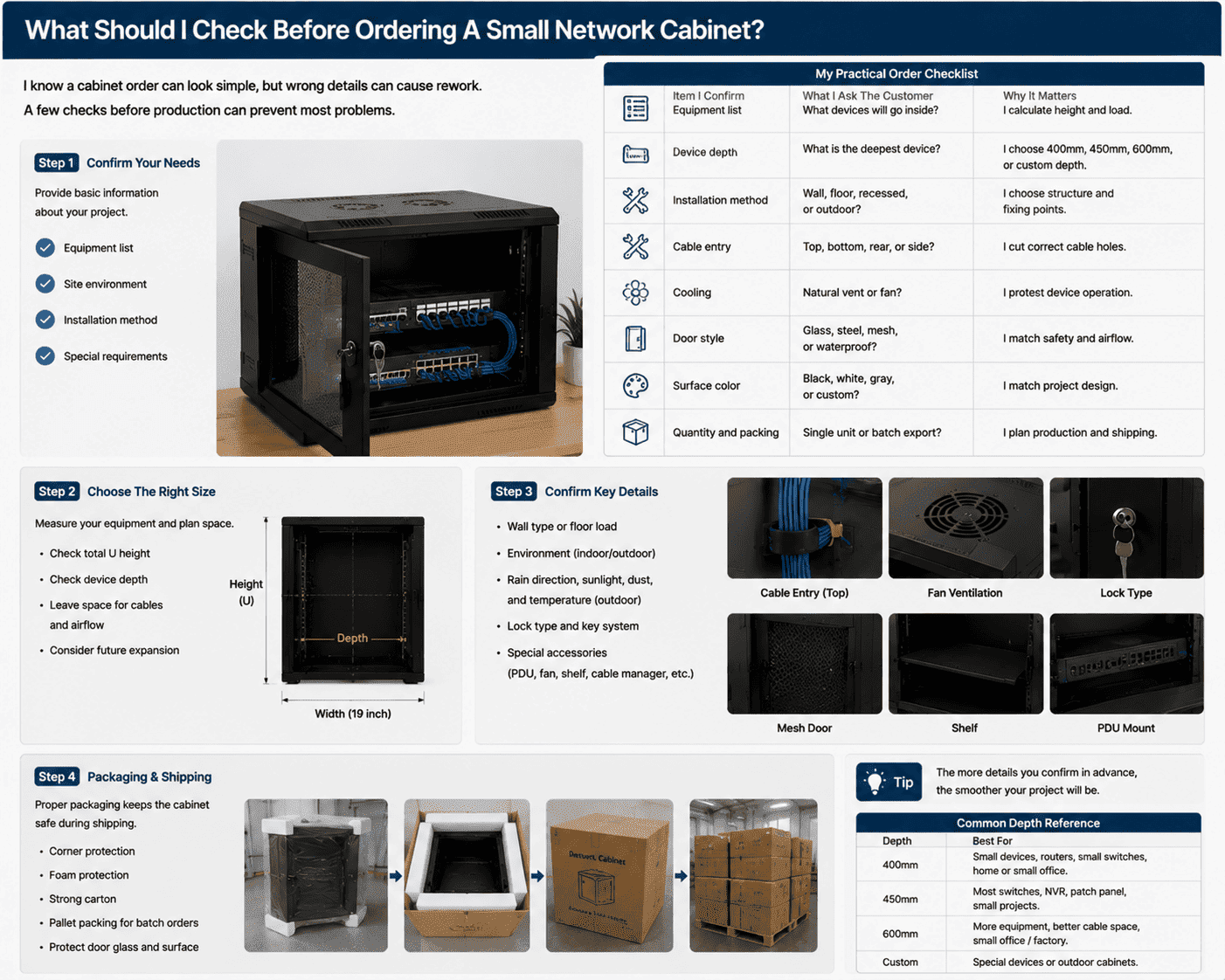
I like to ask for the equipment list first. I do not need a very formal document. A simple list with device names and dimensions is useful. I then check the deepest device, total U height, heat level, and cable quantity. If the cabinet will be wall mounted, I ask about the wall type. A concrete wall, brick wall, and light partition wall are not the same.7 If the cabinet will be used outdoors, I ask about rain direction, sunlight, dust, and temperature8.
My practical order checklist
| Item I confirm | What I ask the customer | Why it matters |
|---|---|---|
| Equipment list | What devices will go inside? | I calculate height and load |
| Device depth | What is the deepest device? | I choose 400mm, 450mm, 600mm, or custom depth |
| Installation method | Wall, floor, recessed, or outdoor? | I choose structure and fixing points |
| Cable entry | Top, bottom, rear, or side? | I cut correct cable holes |
| Cooling | Natural vent or fan? | I protect device operation |
| Door style | Glass, steel, mesh, or waterproof? | I match safety and airflow |
| Surface color | Black, white, gray, or custom? | I match project design |
| Quantity and packing | Single unit or batch export? | I plan production and shipping |
I also pay attention to export packaging. A small network cabinet may be light, but it still needs proper corner protection, foam, carton, and sometimes pallet packing. Overseas shipping can be rough.9 If the door bends or the paint scratches, the customer loses time before installation. I prefer to prevent damage before it happens. That is part of real cabinet manufacturing, not an extra service.
Conclusion
I choose a small network cabinet when I need clean wiring, safe storage, flexible installation, and stable operation in a limited network space.
"Rack unit - Wikipedia", https://en.wikipedia.org/wiki/Rack_unit. A rack unit is conventionally defined as 1.75 inches, equivalent to 44.45 mm, which supports the dimensional explanation of U height in rack cabinets. Evidence role: definition; source type: encyclopedia. Supports: The source should confirm that one rack unit equals 1.75 inches, or 44.45 mm.. ↩
"271116i.docx", https://www.cfm.va.gov/TIL/spec/271116i.docx. Institutional guidance on IT equipment environments treats airflow management, cabling, and power distribution as core rack-planning considerations, supporting the practice of reserving space rather than fully loading a cabinet on day one. Evidence role: general_support; source type: institution. Supports: The source should support that airflow paths, cable organization, and power distribution planning are recognized considerations in rack design.. Scope note: Most formal guidance is written for larger IT rooms or data centers, so the support is contextual for small network cabinets. ↩
"Accelerated Corrosion Tests in Quality Labels for Powder Coatings ...", https://pmc.ncbi.nlm.nih.gov/articles/PMC8585214/. Studies of powder-coated steel report that coating formulation, surface preparation, and curing can affect corrosion protection and finish quality, supporting the statement that powder coating influences rust resistance and appearance. Evidence role: general_support; source type: paper. Supports: The source should support that powder coatings on steel can provide a protective barrier and affect surface appearance.. Scope note: Actual corrosion performance depends on pretreatment, coating thickness, curing quality, and the service environment. ↩
"General Standards ( EIA/TIA 568B. ...", https://www.stpetersburg.usf.edu/resources/computing/documents/network-wiring-standard.pdf. Structured cabling standards address cable administration, identification, and bend-radius limits, supporting the view that labeling and physical cable routing affect maintainability and installation quality. Evidence role: expert_consensus; source type: institution. Supports: The source should support that labeling, administration, and bend-radius control are recognized parts of structured cabling practice.. Scope note: The standards support accepted practice but may not quantify the probability of failure from messy cabling in a small cabinet. ↩
"Cable Separation Guidelines in Data Centers: Avoiding EMI and ...", https://www.linkedin.com/pulse/cable-separation-guidelines-data-centers-avoiding-emi-mohammad-zaboli-qs7ze. Telecommunications pathway and cabling guidance recognizes separation from electrical power conductors as a method for managing electromagnetic interference and installation safety, supporting the practice of avoiding unnecessary crossings between power and network cabling. Evidence role: mechanism; source type: institution. Supports: The source should support that proximity to power cabling can create electromagnetic interference concerns and that separation is part of accepted cabling practice.. Scope note: The need for separation depends on cable type, shielding, power level, and local electrical code. ↩
"Understanding Bend-Insensitive Fibre: ITU-G.657", https://nordencommunication.com/public/en/blog/understanding-bend-insensitive-fibre-itu-g-657. Optical-fiber standards and technical guidance specify minimum bend-radius limits because excessive bending can increase attenuation or physically damage the fiber, supporting the need for adequate cable space in a cabinet. Evidence role: mechanism; source type: institution. Supports: The source should support that optical fibers have minimum bend-radius limits and that excessive bending can increase attenuation or cause damage.. Scope note: Exact bend limits vary by fiber type, cable construction, and manufacturer specification. ↩
"FEMA E-74, Reducing the Risks of Nonstructural Earthquake Damage", https://www.fema.gov/emergency-managers/risk-management/earthquake/training/fema-e-74. Government guidance on anchoring nonstructural components notes that anchorage capacity depends on the supporting material, fastener selection, and loading conditions, supporting the need to distinguish concrete, brick, and light partition walls before mounting equipment. Evidence role: general_support; source type: government. Supports: The source should support that anchorage performance depends on substrate material, fastener type, and load conditions.. Scope note: Such guidance establishes the principle of substrate-dependent anchorage but does not specify a safe load for any particular cabinet without engineering assessment. ↩
"IP code - Wikipedia", https://en.wikipedia.org/wiki/IP_code. Enclosure rating systems such as IEC 60529 and NEMA enclosure types classify protection against dust and water ingress, supporting the need to evaluate rain and dust exposure when selecting outdoor network cabinets. Evidence role: definition; source type: institution. Supports: The source should explain enclosure ratings for dust and water ingress and contextualize environmental protection for outdoor equipment.. Scope note: These ratings directly address ingress protection; sunlight and temperature require additional material and thermal-design evaluation. ↩
"ASTM D4169 Testing - Tektronix", https://www.tek.com/en/services/testing-services/astm-d4169-testing. Transport-packaging standards model distribution hazards such as shock, vibration, compression, and handling impacts, supporting the claim that cabinets shipped internationally need protective packaging. Evidence role: general_support; source type: institution. Supports: The source should support that packaged products in distribution may experience shock, vibration, compression, and handling stresses.. Scope note: The standards describe expected hazard categories and test methods, not the damage rate for this specific cabinet or route. ↩
