
What is a rack server?

I often see buyers know the word server, but they still choose the wrong type. That mistake wastes space, money, and future upgrade room.
I define a rack server as an industrial computer built for 19-inch server cabinets.1 It has its own CPU, memory, storage, power, fans, network cards, and system. It runs business tasks day and night, and it fits standard rack mounting holes for clean, high-density deployment.
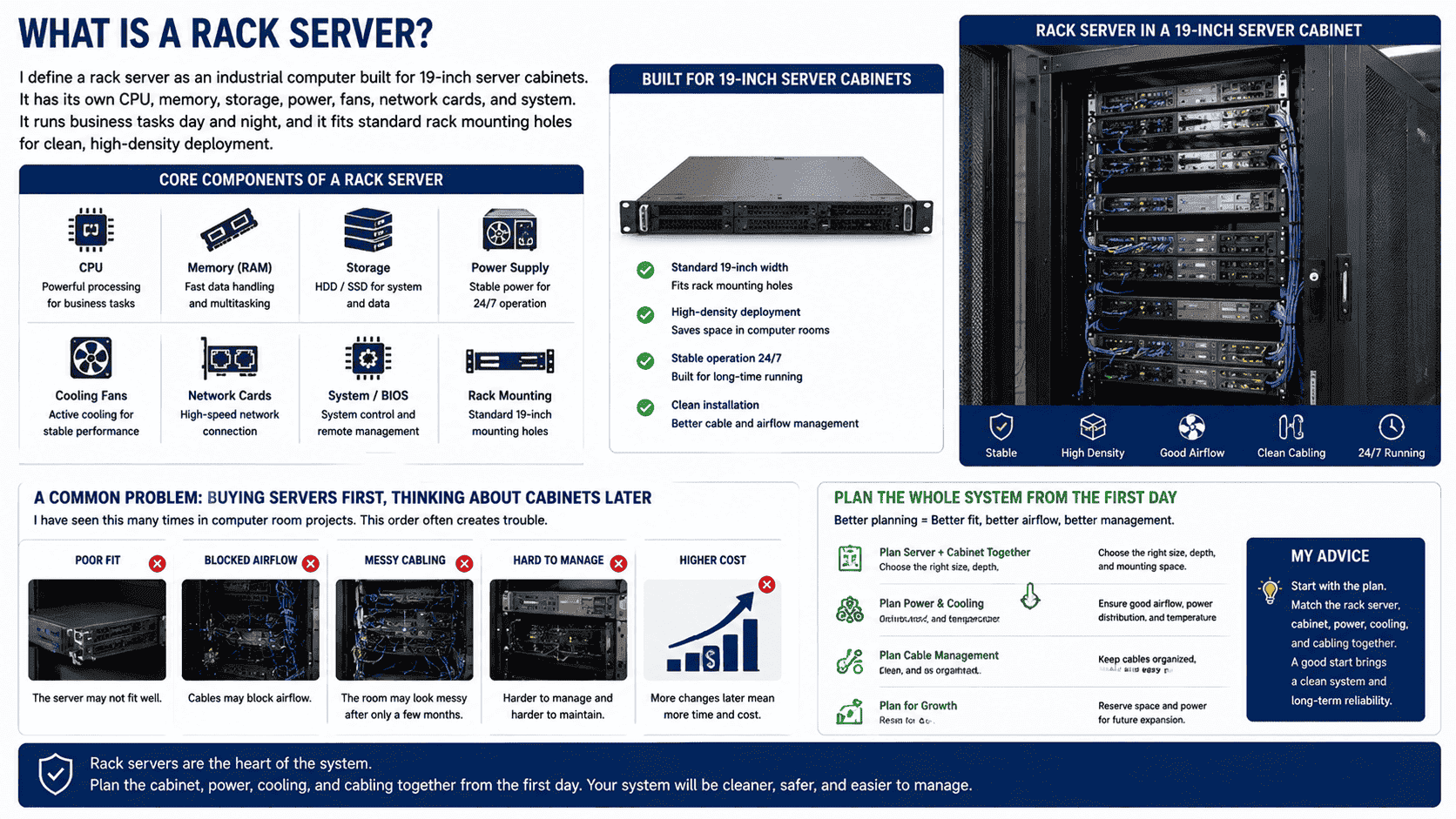
I have worked with many computer room projects, and I have seen one common problem. Many teams buy servers first and think about cabinets later. This order often creates trouble. The server may not fit well. The cables may block airflow. The room may look messy after only a few months. I will explain rack servers in a simple way, because I want the whole system to be easier to plan from the first day.
How is a rack server different from tower and blade servers?
I see many customers compare server types only by price. That is risky. The wrong form can make later maintenance slow and expensive.
I describe a rack server as the most common standard server for cabinet deployment. A tower server stands like a PC. A blade server sits in a blade chassis. A rack server mounts directly into a 19-inch cabinet and works as an independent computing unit.2
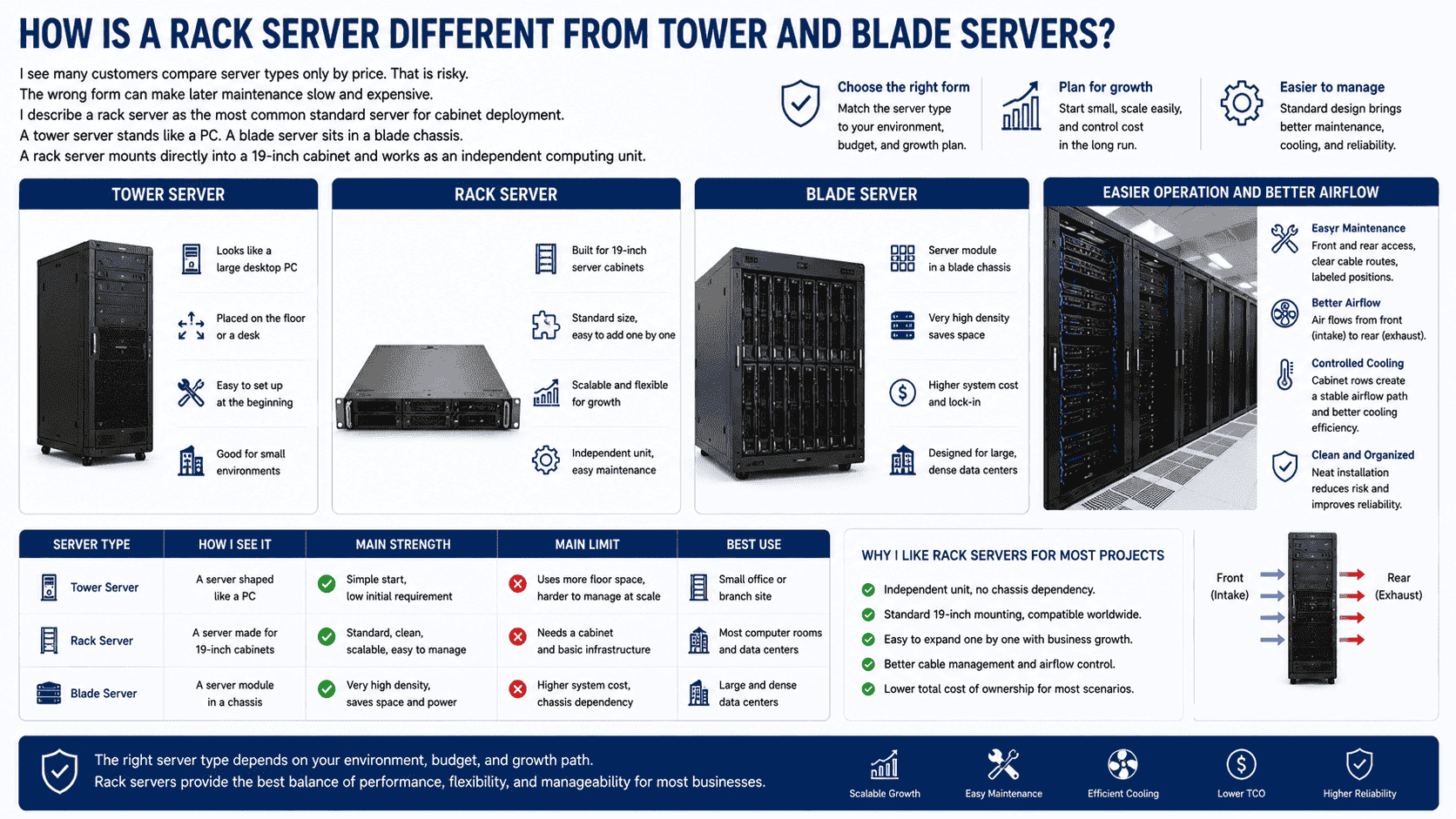
I often explain this difference with a simple idea. A tower server is like a larger desktop computer. It can work well in a small office. It does not need a full cabinet at the beginning. But it takes floor space, and it is not easy to manage when the number grows. A blade server is a high-density system. It needs a blade chassis. It can save space in large data centers, but the first cost and system lock-in can be higher.3 A rack server sits between these two in a very practical way. It is independent, standard, and easy to add one by one. I like rack servers for most projects because they match the normal growth path of a company.
| Server type | How I see it | Main strength | Main limit | Best use |
|---|---|---|---|---|
| Tower server | A server shaped like a PC | Simple start | Uses more space | Small office or branch site |
| Rack server | A server made for 19-inch cabinets | Standard, clean, scalable | Needs a cabinet | Most computer rooms and data centers |
| Blade server | A server module in a chassis | Very high density | Higher system cost | Large and dense data centers |
I also pay attention to service work. With rack servers, I can plan front and rear access, clear cable routes, and labeled positions. This makes later work easier for engineers. It also helps cooling, because air usually flows from the front to the rear.4 When servers are installed in a cabinet row, the airflow path is much easier to control.
Why does a rack server use the 19-inch standard?
I have seen many installation delays caused by non-standard equipment. A small size error can stop a whole cabinet row from being completed.
I use the 19-inch standard because it makes rack servers, network devices, rails, shelves, and cabinets fit together. The server width is 19 inches, or 482.6 mm.5 This shared size reduces installation risk and keeps rooms neat.
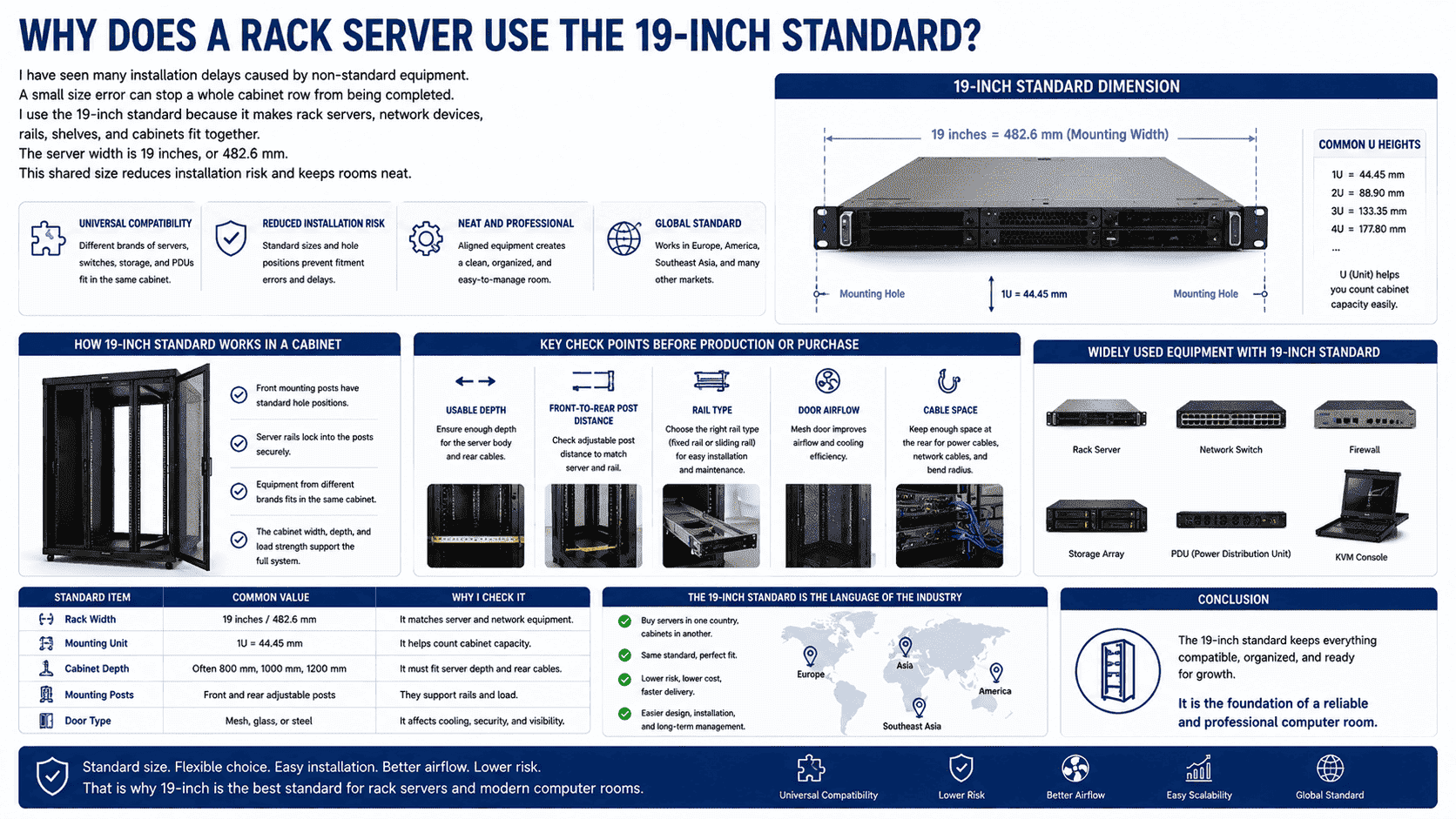
The 19-inch standard is one of the main reasons rack servers became so common. I can choose different brands of rack servers, switches, firewalls, storage devices, and power units, and I can still install them in the same server cabinet. This gives me a stable base for design. The front mounting posts have standard hole positions. The server rails lock into the cabinet posts. The cabinet width, depth, and load strength then support the full system.
When I design or customize server cabinets, I always check several points before production. I check usable depth. I check the distance between front and rear posts. I check rail type. I check door airflow. I check cable space at the rear. These points matter because a rack server is not only a box. It needs power cables, network cables, airflow, and maintenance space.
| Standard item | Common value | Why I check it |
|---|---|---|
| Rack width | 19 inches / 482.6 mm | It matches server and network equipment |
| Mounting unit | 1U = 44.45 mm | It helps count cabinet capacity |
| Cabinet depth | Often 800 mm, 1000 mm, 1200 mm | It must fit server depth and rear cables |
| Mounting posts | Front and rear adjustable posts | They support rails and load |
| Door type | Mesh, glass, or steel | It affects cooling and security |
I see the 19-inch standard as a language shared by the whole industry. It lets customers buy servers in one country and cabinets in another country. It also helps overseas projects, because the same rule works in Europe, America, Southeast Asia, and many other markets.
What sizes do rack servers use in a server cabinet?
I see people focus on server performance first. Then they forget height. This can make one cabinet full before the project really grows.
I measure rack server height in U. One U equals 44.45 mm.6 The common rack server sizes are 1U, 2U, and 4U. Some special projects use 3U, 5U, or 7U servers.
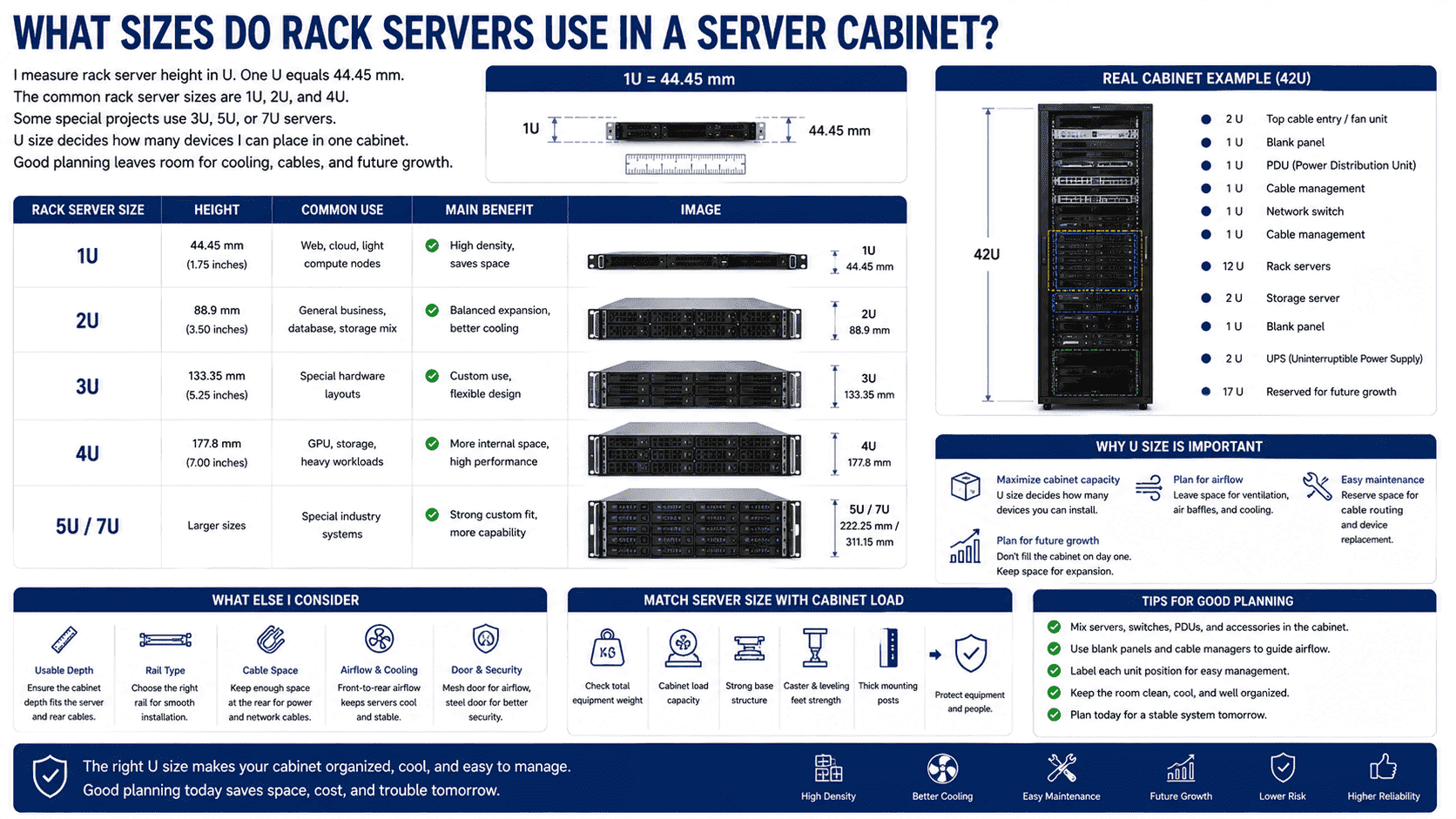
The U size is very important because it decides how many devices I can place in one cabinet. A 42U cabinet does not mean I should install 42 pieces of 1U servers without planning.7 I still need space for switches, power distribution units, cable managers, blank panels, airflow control parts, and maintenance space. In real projects, I also leave room for future growth. If I fill the cabinet too tightly on day one, I create heat and service problems later.
A 1U rack server is thin. It saves space and is common in cloud computing, web services, and high-density rooms.8 A 2U server gives more internal space. It may support more hard drives, stronger cooling, and more expansion cards.9 A 4U server is larger. It fits storage, GPU computing, industrial work, or special business tasks. The size choice should follow the workload, not only the cabinet capacity.
| Rack server size | Height | What I use it for | Main benefit |
|---|---|---|---|
| 1U | 44.45 mm | Web, cloud, light compute nodes | High density |
| 2U | 88.9 mm | General business, database, storage mix | Balanced expansion |
| 3U | 133.35 mm | Special hardware layouts | Custom use |
| 4U | 177.8 mm | GPU, storage, heavy workloads | More internal space |
| 5U / 7U | Larger sizes | Special industry systems | Strong custom fit |
I also match server size with cabinet load. A cabinet may look strong, but total weight can become high after many servers are installed. So I check load capacity, base structure, caster strength, leveling feet, and post thickness. In my sheet metal work, these details are not decoration. They protect the equipment and the people who maintain it.
What parts are inside a rack server?
I have met buyers who think a rack server is only a metal box with chips inside. That view hides many important choices.
I see each rack server as an independent computing node. It normally has CPU, memory, motherboard, storage, power supplies, fans, network cards, and remote management. It can run one task or many business services.
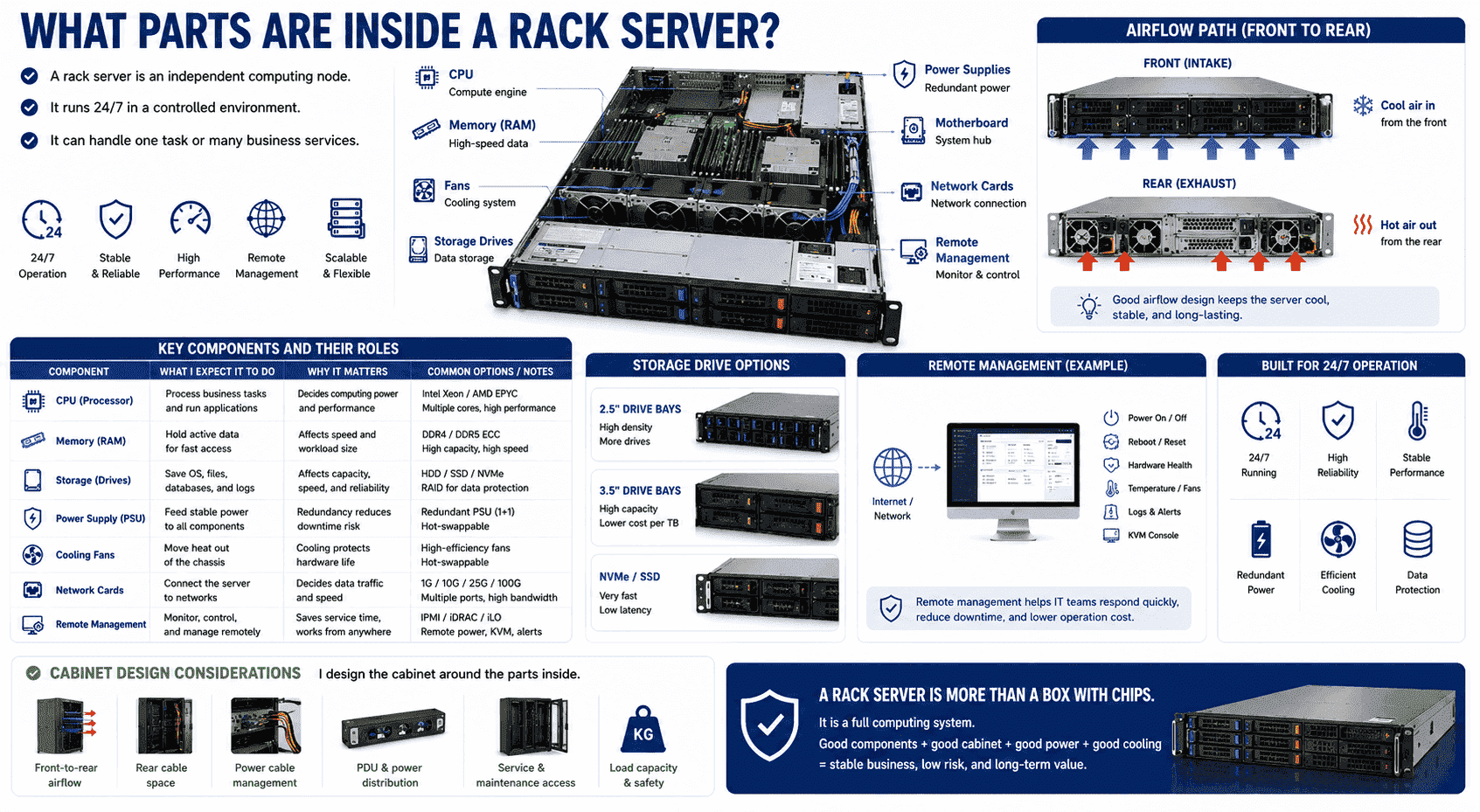
A rack server is built for 24-hour operation. It is not a normal office computer. I expect it to run day and night in a controlled room. The CPU handles computing tasks. The memory supports fast data access. Storage holds systems, files, databases, and logs. Fans move air through the chassis. Power modules supply stable power. Many servers use redundant power supplies, so one power module can fail without stopping the server.10 Network cards connect the server to switches, storage networks, and external services.
Remote management is also important. Many rack servers support IPMI, iDRAC, iLO, or similar systems.11 I can power on, power off, restart, check health status, and view alarms remotely. This matters when the server is in another city or another country. It also reduces the need to enter the computer room for every small issue.
| Component | What I expect it to do | Why it matters |
|---|---|---|
| CPU | Process business tasks | It decides computing power |
| Memory | Hold active data | It affects speed and workload size |
| Storage | Save systems and data | It affects capacity and reliability |
| Power supply | Feed stable power | Redundancy reduces downtime |
| Fans | Move heat out | Cooling protects hardware life |
| Network card | Connect to the network | It decides data traffic ability |
| Remote management | Control and monitor from far away | It saves service time |
When I design cabinets for these servers, I think about each internal part from the outside. The fans need clear front and rear airflow. The storage bays may need front access. The power supplies need rear cable space. The network ports need cable management. A good rack server setup is not only about server performance. It is also about the cabinet, power, cooling, and service path.
Where should I use a rack server?
I see rack servers in almost every digital industry. But I still ask one question first. Does the site need stable, managed, and scalable computing?
I use rack servers in enterprise IT rooms, data centers, cloud platforms, e-commerce systems, storage systems, finance, healthcare, education, security monitoring, power, and industrial control. They fit more than 90% of standard computer room needs.12
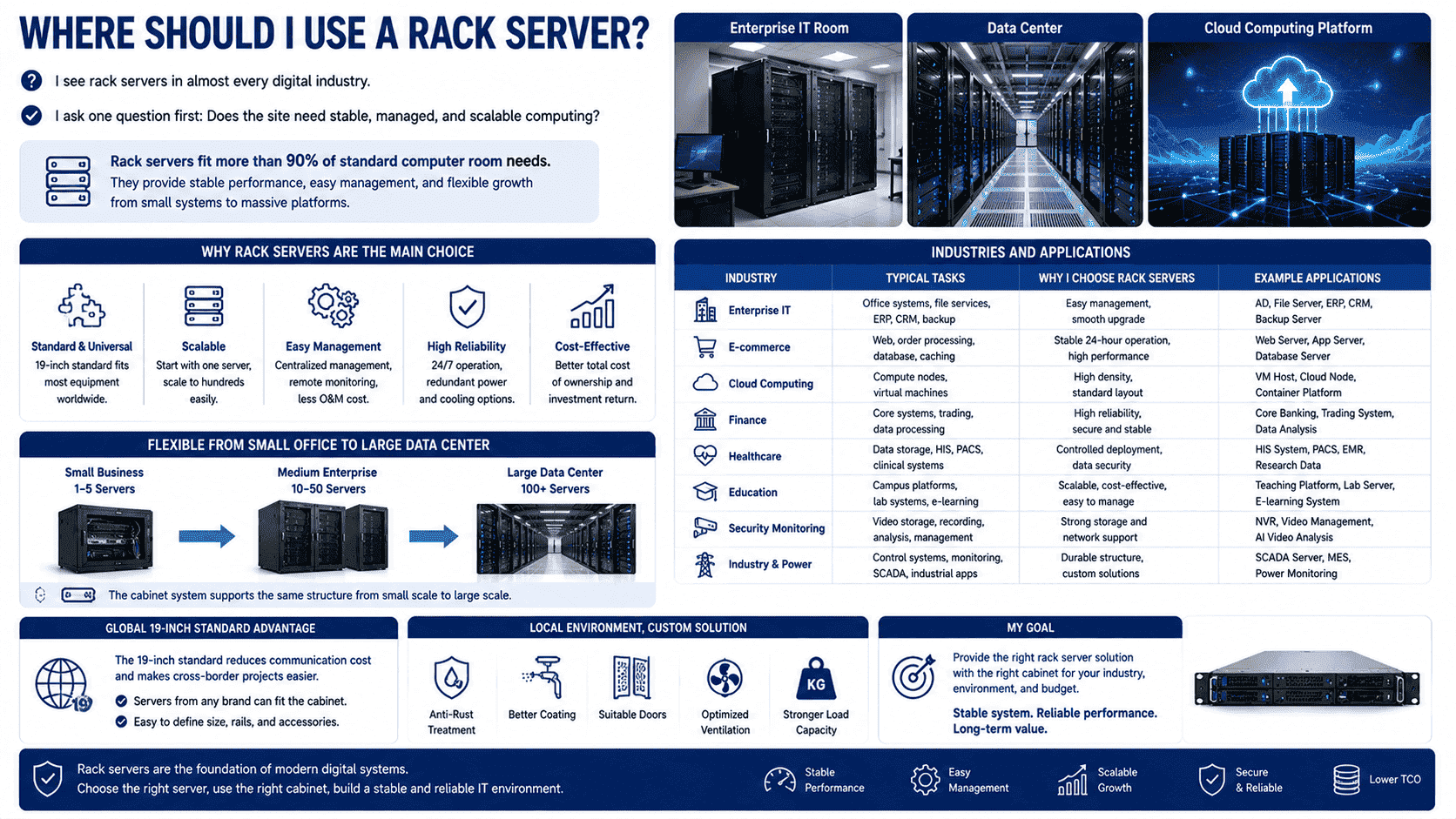
Rack servers became the main force of modern computing because they are standard and flexible. I can install one server for a small business system. I can also install hundreds of servers for a large platform. This growth path is clear. The cabinet system supports the same structure from small scale to large scale.
In enterprise IT, rack servers can run office systems, file services, ERP, CRM, and backup tasks. In cloud computing, they work as computing nodes. In data storage, they can hold large disk arrays or connect to storage systems. In security monitoring, they record, process, and manage video data. In education and healthcare, they support digital platforms and private data systems. In power and industrial automation, they can work with control systems and monitoring platforms.
| Industry | Typical task | Why I choose rack servers |
|---|---|---|
| Enterprise IT | Office systems and internal platforms | Easy management and upgrade |
| E-commerce | Web, order, and database systems | Stable 24-hour operation |
| Cloud computing | Compute nodes and virtual machines | High density and standard layout |
| Finance | Core systems and data processing | Reliability and clean management |
| Healthcare | Data storage and hospital systems | Controlled deployment |
| Education | Campus platforms and lab systems | Scalable and cost-effective |
| Security | Video storage and monitoring | Strong storage and network support |
| Industry and power | Control and monitoring systems | Durable structure and custom cabinets |
I also see rack servers as a good match for overseas projects. The global 19-inch rule reduces communication cost. A customer in Europe can send a server size and rail type. I can then design or customize the matching cabinet. A customer in Southeast Asia may need anti-rust treatment because the climate is humid. I can adjust materials, coating, doors, and ventilation. The server stays standard, and the cabinet adapts to the real site.
How do I choose the right cabinet for rack servers?
I have seen good servers fail in bad cabinets. Poor airflow, weak load support, and messy cables can damage the whole system.
I choose a rack server cabinet by checking size, depth, load capacity, airflow, cable space, door type, power layout, and future expansion. I also match the cabinet to the server quantity, site environment, and maintenance plan.
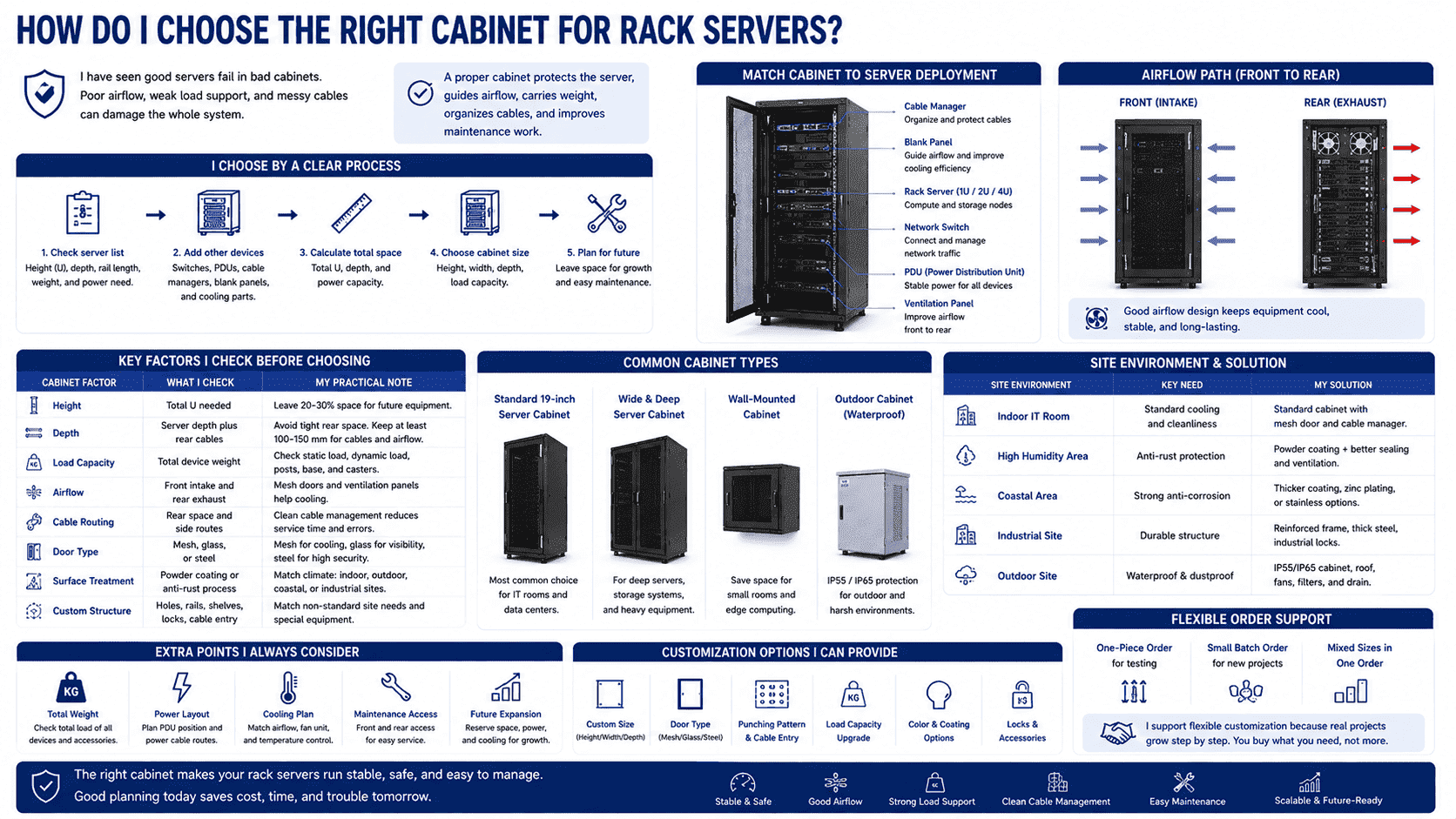
A rack server needs a proper home. The cabinet is not only a frame. It protects the server, guides airflow, carries weight, organizes cables, and improves maintenance work. I usually start with the server list. I check each server height, depth, rail length, weight, and power need. Then I add switches, PDUs, cable managers, blank panels, and cooling parts. After that, I choose the cabinet height, width, and depth.
For many projects, a 19-inch standard server cabinet is enough. But some projects need custom work. I may customize size, door type, punching pattern, load structure, waterproof level, anti-corrosion coating, and cable entry. Outdoor sites may need waterproof design. Coastal sites may need stronger anti-rust treatment. Industrial sites may need reinforced sheet metal and special locks. Small rooms may need wall-mounted cabinets or compact cabinets.
| Cabinet factor | What I check | My practical note |
|---|---|---|
| Height | Total U needed | I leave room for future equipment |
| Depth | Server depth plus rear cables | I avoid tight rear space |
| Load capacity | Total device weight | I check posts, base, and casters |
| Airflow | Front intake and rear exhaust | Mesh doors often help cooling |
| Cable routing | Rear space and side routes | Clean cables reduce service errors |
| Door type | Mesh, glass, or steel | I match cooling and security needs |
| Surface treatment | Powder coating or anti-rust process | I match climate and site risk |
| Custom structure | Holes, rails, shelves, locks | I match non-standard site needs |
In my factory work, I value flexible customization because real projects are not always standard. Some customers need only one cabinet for testing. Some need a small batch for a new room. Some need many different sizes in one order. I support this type of work because rack server deployment often grows step by step. A cabinet should not force the customer to buy more than needed. It should support the real project plan.
Conclusion
I see a rack server as the standard computing unit for modern cabinet-based rooms. It saves space, improves management, and supports long-term growth.
"19-inch rack - Wikipedia", https://en.wikipedia.org/wiki/19-inch_rack. A general technical reference defines a rack-mounted server as a server designed for installation in a standardized equipment rack, commonly the 19-inch rack format. Evidence role: definition; source type: encyclopedia. Supports: A neutral source should define rack servers as servers designed to be mounted in standard racks, commonly 19-inch racks.. Scope note: This supports the rack-mounting aspect of the definition but may not use the author's phrase "industrial computer." ↩
"Blade server", https://en.wikipedia.org/wiki/Blade_server. Educational material on server form factors distinguishes tower servers as upright standalone systems, rack servers as rack-mounted units, and blade servers as modules installed in a shared chassis. Evidence role: definition; source type: education. Supports: A source should explain the basic physical distinctions among tower servers, rack-mounted servers, and blade servers.. Scope note: This would support the general classification, not the suitability of each type for a particular buyer. ↩
"What the Rise and Fall of Blade Servers Reveals About Technology", https://skywardtel.com/From-Peak-to-Transformation-What-the-Rise-and-Fall-of-Blade-Servers-Reveals-About-Technology.html. Research or technical guidance on blade-server architecture notes that blade systems can increase compute density by sharing chassis infrastructure, while also tying deployments to chassis ecosystems and up-front enclosure costs. Evidence role: expert_consensus; source type: research. Supports: A neutral source should discuss blade-server density advantages and the tradeoff of chassis-based dependency or higher up-front infrastructure cost.. Scope note: The cost and lock-in effects vary by deployment scale, procurement model, and vendor ecosystem. ↩
"[PDF] Best Practices Guide for Energy-Efficient Data Center Design", https://www.energy.gov/sites/default/files/2024-07/best-practice-guide-data-center-design.pdf. ASHRAE data-center thermal guidance describes the common front-intake and rear-exhaust airflow pattern used to separate cold supply air from hot exhaust air in rack-based layouts. Evidence role: mechanism; source type: institution. Supports: A data-center thermal guideline should confirm that IT equipment commonly draws cool air from the front and exhausts warm air to the rear.. Scope note: Some equipment uses side-to-side or other airflow paths, so the support is for common rack-server practice rather than every device. ↩
"19-inch rack - Wikipedia", https://en.wikipedia.org/wiki/19-inch_rack. The 19-inch rack standard, reflected in IEC 60297 and EIA-310 documentation, defines the nominal equipment mounting width as 19 inches, equivalent to 482.6 mm. Evidence role: definition; source type: institution. Supports: A standards source should identify 19 inches as 482.6 mm in the context of rack-mounted equipment.. Scope note: The standard refers to the rack-mounting interface and panel width; the physical chassis body may be narrower than the nominal 19-inch dimension. ↩
"Rack unit - Wikipedia", https://en.wikipedia.org/wiki/Rack_unit. A rack unit is conventionally defined as 1.75 inches, or 44.45 mm, and is used to measure the vertical height of rack-mounted equipment. Evidence role: definition; source type: encyclopedia. Supports: A reference source should define one rack unit as 1.75 inches, or 44.45 mm.. ↩
"A Free Guide to Data Center Racks - Device42", https://www.device42.com/data-center-infrastructure-management-guide/data-center-racks/. Data-center planning guidance treats rack utilization as a function of mechanical space, power delivery, cooling capacity, airflow management, and service access rather than rack-unit count alone. Evidence role: expert_consensus; source type: institution. Supports: A data-center operations or standards source should explain that rack population depends on power density, thermal limits, airflow management, and cabling as well as U height.. Scope note: This supports the planning principle but does not prescribe a universal maximum number of 1U servers for a 42U cabinet. ↩
"Rack Server Solutions for Enterprise & Data Center - Supermicro", https://www.supermicro.com/en/products/rackmount. Technical educational sources describe 1U rack servers as one-rack-unit systems used to increase compute density in rack-based data-center environments. Evidence role: general_support; source type: education. Supports: A source should explain that 1U servers occupy one rack unit and are used to increase server density in racks.. Scope note: This supports the density rationale but does not prove that 1U servers are predominant in every cloud or web-service environment. ↩
"1U vs 2U vs 4U Rack Servers: Best Choice for Business Needs", https://directmacro.com/blog/post/1u-vs-2u-vs-4u-rack-servers?srsltid=AfmBOorIFUGkxrEq8SEdNBLVPQtlzgm-Pov7BeHilFKykVq9wQKZqhwu. References on rack-server form factors note that increasing chassis height from 1U to 2U provides greater internal volume, which can be used for additional storage bays, larger cooling assemblies, or expansion-card support. Evidence role: mechanism; source type: education. Supports: A technical source should explain how larger rack-unit height gives chassis designers more internal volume for drives, fans, power supplies, and expansion cards.. Scope note: This is a design tendency, not a guarantee that every 2U model exceeds every 1U model in all expansion categories. ↩
"N+1 redundancy", https://en.wikipedia.org/wiki/N%2B1_redundancy. Technical guidance on redundant power supplies explains that N+1 or dual-redundant configurations are intended to maintain server operation when one power-supply module fails. Evidence role: mechanism; source type: education. Supports: A source should explain that redundant power supplies are designed so that one unit can fail while the remaining unit or units continue powering the server.. Scope note: Continued operation depends on correct configuration, sufficient remaining power capacity, and functioning power inputs. ↩
"Intelligent Platform Management Interface - Wikipedia", https://en.wikipedia.org/wiki/Intelligent_Platform_Management_Interface. References on the Intelligent Platform Management Interface describe it as an out-of-band management standard that enables remote monitoring and control of server hardware, including power and health status functions. Evidence role: definition; source type: encyclopedia. Supports: A source should describe IPMI or baseboard management controllers as enabling remote monitoring, power control, and hardware management independent of the main operating system.. Scope note: This supports IPMI-like management generally; support for specific proprietary systems such as iDRAC or iLO depends on the server model. ↩
"How many servers are typically in a rack in a large data center?", https://www.quora.com/How-many-servers-are-typically-in-a-rack-in-a-large-data-center. A neutral deployment survey reporting rack-mounted systems as the dominant server form factor in standard computer rooms would provide statistical context for the asserted level of suitability. Evidence role: statistic; source type: other. Supports: A neutral market survey or data-center deployment study would need to show that rack servers account for about 90% or more of relevant standard computer-room deployments or requirements.. Scope note: Unless the source directly reports a figure near or above 90% and defines the surveyed population, it would only support a weaker claim that rack servers are common or dominant. ↩
