
What Are My Server Rack Cable Management Recommendations?

I see many stable-looking server rooms fail because cables are mixed, blocked, tangled, and hard to trace when one small fault appears.
My main recommendation is simple. I separate power and data cables, keep left and right routes clear, protect airflow in the cabinet center, label every line, and leave space for later maintenance. Good cable management supports cooling, safety, uptime, and long equipment life.1
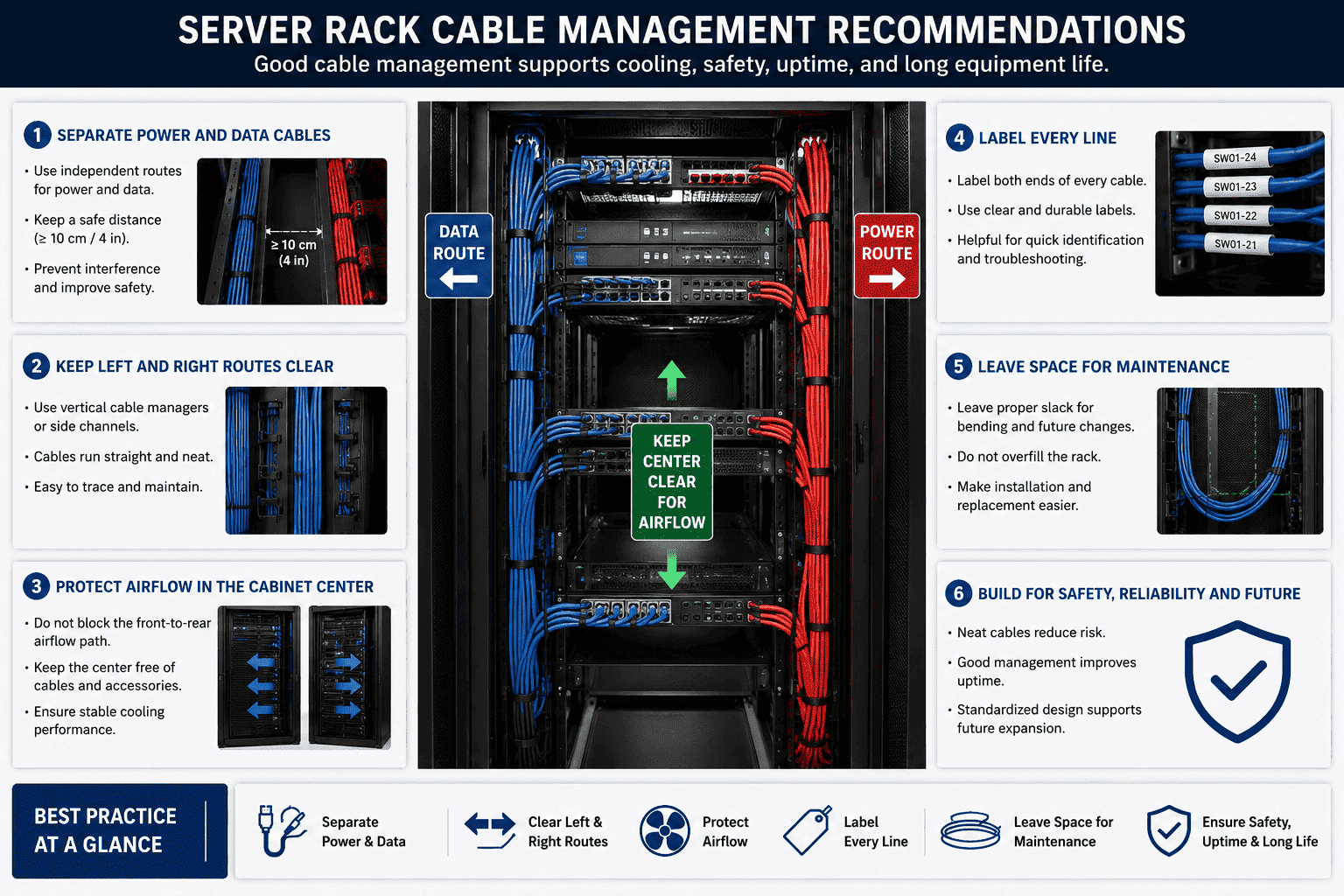
I treat cable management as a basic part of server rack quality, not as a decoration. I have seen customers check only whether the equipment is powered on. I have also seen engineers open the rear door and judge the whole room in ten seconds. They look at airflow. They look at cable routes. They look at whether later repair is easy. I write these recommendations from my daily work with network cabinets, server cabinets, data centers, weak current projects, and communication equipment rooms.
Why Do I Treat Server Rack Cable Management As A Stability Standard?
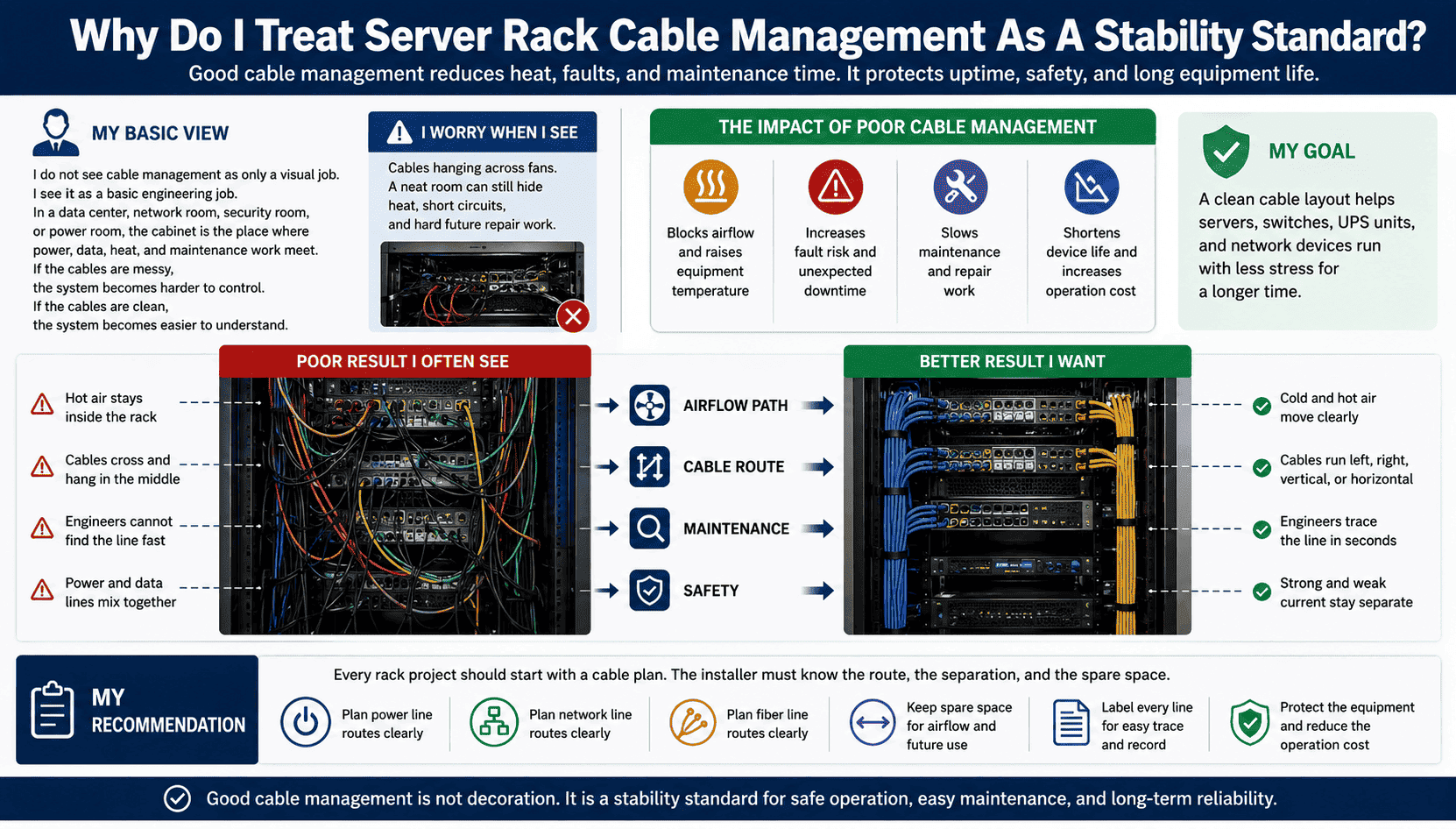
I worry when I see cables hanging across fans, because a neat room can still hide heat, short circuits, and hard future repair work.
I treat cable management as a stability standard because poor routing can block airflow, raise equipment temperature, increase fault risk, and slow maintenance.2 A clean cable layout helps servers, switches, UPS units, and network devices run with less stress for a longer time.
My Basic View
I do not see cable management as only a visual job. I see it as a basic engineering job. In a data center, network room, security room, or power room, the cabinet is not only a metal box. It is the place where power, data, heat, and maintenance work meet. If the cables are messy, the system becomes harder to control. If the cables are clean, the system becomes easier to understand.
I have handled many cabinet projects where the equipment itself was good, but the failure came from the cable layout. A cable bundle blocked rear airflow. A power cable was mixed with a signal cable. A fiber jumper was bent too much. A server ran hot for months because the front and rear airflow path was not open. These problems are simple, but they can cause network drops, data loss, power risk, and shorter device life.
| Cable management area | Poor result I often see | Better result I want |
|---|---|---|
| Airflow path | Hot air stays inside the rack | Cold and hot air move clearly |
| Cable route | Cables cross and hang in the middle | Cables run left, right, vertical, or horizontal |
| Maintenance | Engineers cannot find the line fast | Engineers trace the line in seconds |
| Safety | Power and data lines mix together | Strong and weak current stay separate |
I recommend that every rack project start with a cable plan. I want the installer to know where power lines go, where network lines go, where fiber lines go, and where spare space stays open. This plan protects the equipment and also protects the customer’s later operation cost.
How Should I Separate Power Cables And Data Cables?
I see risk when power cables and network cables are tied together, because heat, interference, and maintenance mistakes can grow from one bad bundle.
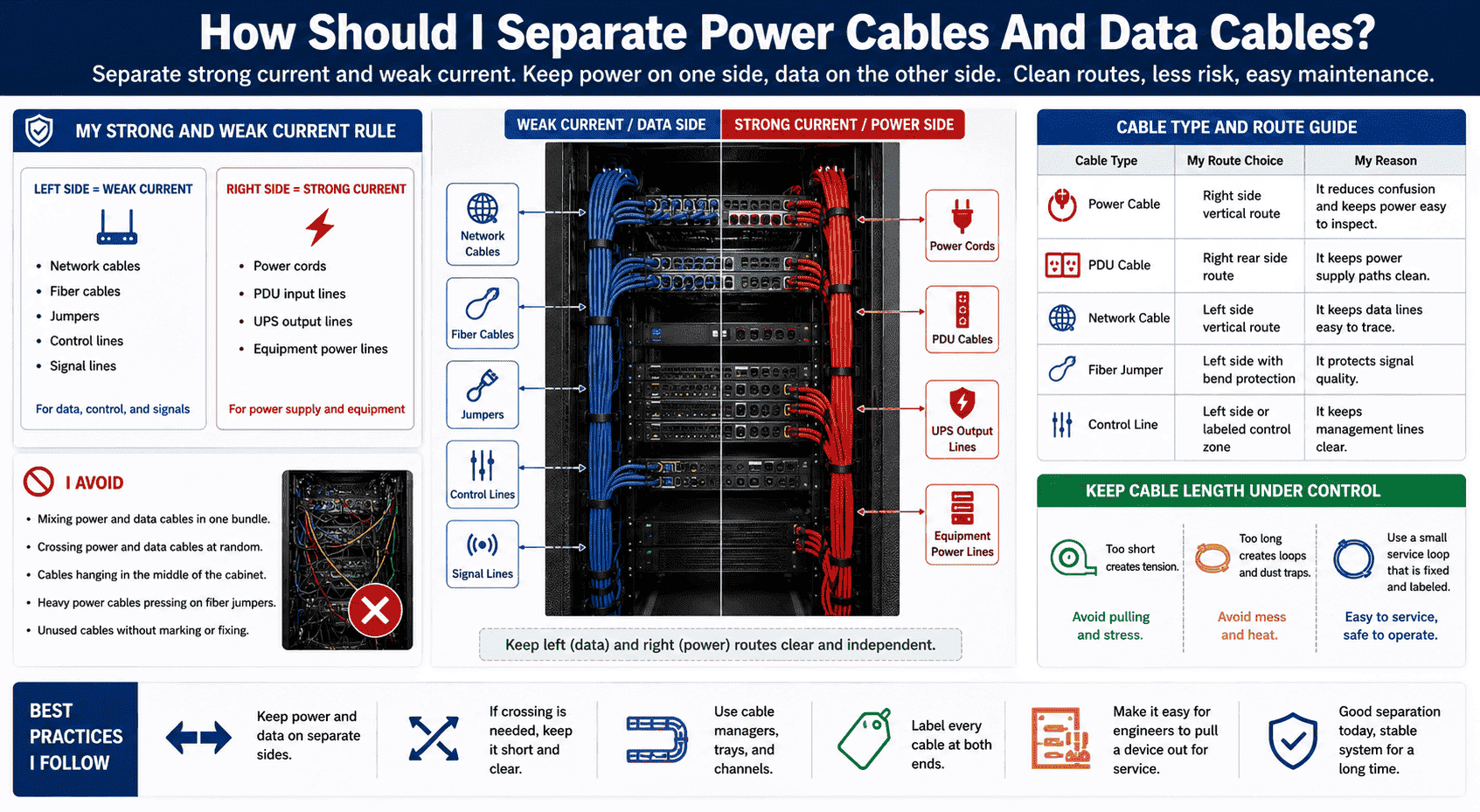
I separate strong current and weak current. I place power cables, PDU cables, and device supply lines on one side. I place network cables, fiber cables, jumpers, control lines, and signal lines on the other side.
My Strong And Weak Current Rule
I normally recommend a clear left and right rule. I use the left side for weak current cables, such as network cables, optical fiber, control cables, jumpers, and signal cables. I use the right side for strong current cables, such as power cords, PDU input lines, UPS output lines, and equipment power lines. This rule is simple. It is also easy for different installers to follow.
I avoid mixing power and data cables in one bundle.3 I also avoid crossing them at random. If crossing is needed, I keep the crossing short and clear. I do not let cables hang in the middle of the cabinet. I do not let heavy power cables press on fiber jumpers. I do not let unused cables stay inside the cabinet without marking or fixing.
| Cable type | My route choice | My reason |
|---|---|---|
| Power cable | Right side vertical route | It reduces confusion and keeps power easy to inspect |
| PDU cable | Right rear side route | It keeps power supply paths clean |
| Network cable | Left side vertical route | It keeps data lines easy to trace |
| Fiber jumper | Left side with bend protection | It protects signal quality |
| Control line | Left side or labeled control zone | It keeps management lines clear |
I also keep cable length under control. A cable that is too short creates tension. A cable that is too long creates loops and dust traps.4 I prefer a small service loop that is fixed and labeled. I want the engineer to pull a device out for service without pulling other cables. This small detail can save much time during emergency repair.
What Layout Rules Should I Follow Inside A Server Rack?
I feel concerned when I see diagonal cables across the rack, because one fast installation can create years of daily trouble.
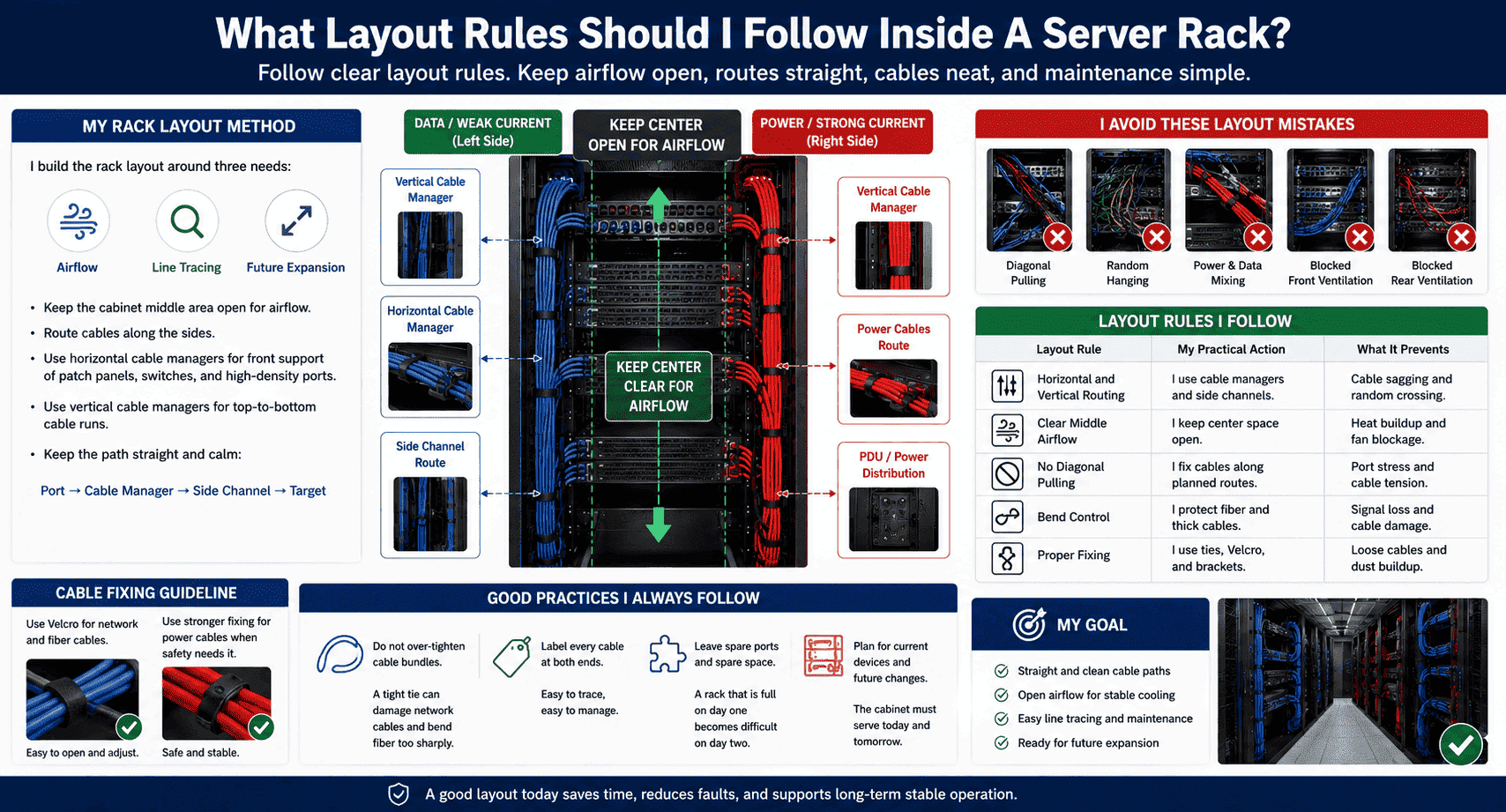
I follow clear layout rules inside the server rack. I use vertical cable managers, horizontal cable managers, fixed routes, cable ties, labels, and open airflow space. I avoid random hanging, diagonal pulling, cross mixing, and blocked front or rear ventilation.
My Rack Layout Method
I build the rack layout around three needs. I need airflow. I need line tracing. I need future expansion. I keep the cabinet middle area open as much as possible, because this area supports front and rear air movement. I route cables along the side. I use horizontal cable managers when patch panels, switches, or high-density ports need front cable support. I use vertical cable managers when many cables travel from top to bottom.
I do not like cables that float in the air. I do not like cables that pull at an angle. I do not like cables that cross many units without reason. I want the cable path to look straight and calm. I want the line to move from port to cable manager, then to side channel, then to its target point. This route looks simple, and it also makes later maintenance simple.
| Layout rule | My practical action | What it prevents |
|---|---|---|
| Horizontal and vertical routing | I use cable managers and side channels | Cable sagging and random crossing |
| Clear middle airflow | I keep center space open | Heat buildup and fan blockage |
| No diagonal pulling | I fix cables along planned routes | Port stress and cable tension |
| Bend control | I protect fiber and thick cables | Signal loss and cable damage |
| Proper fixing | I use ties, Velcro, and brackets | Loose cables and dust buildup |
I prefer Velcro for network and fiber cables because it is easy to open and adjust. I use stronger fixing methods for power cables when safety needs it. I do not over-tighten any cable bundle. A tight tie can damage a network cable and can bend fiber too sharply.5 I also leave spare ports and spare space in the layout. A rack that is full on day one becomes difficult on day two. I always remind customers that a cabinet must serve current devices and future changes.
How Does Good Cable Management Improve Cooling And Equipment Life?
I have seen high-quality servers fail early because hot air could not leave the rack, and the root cause was only blocked cable routing.
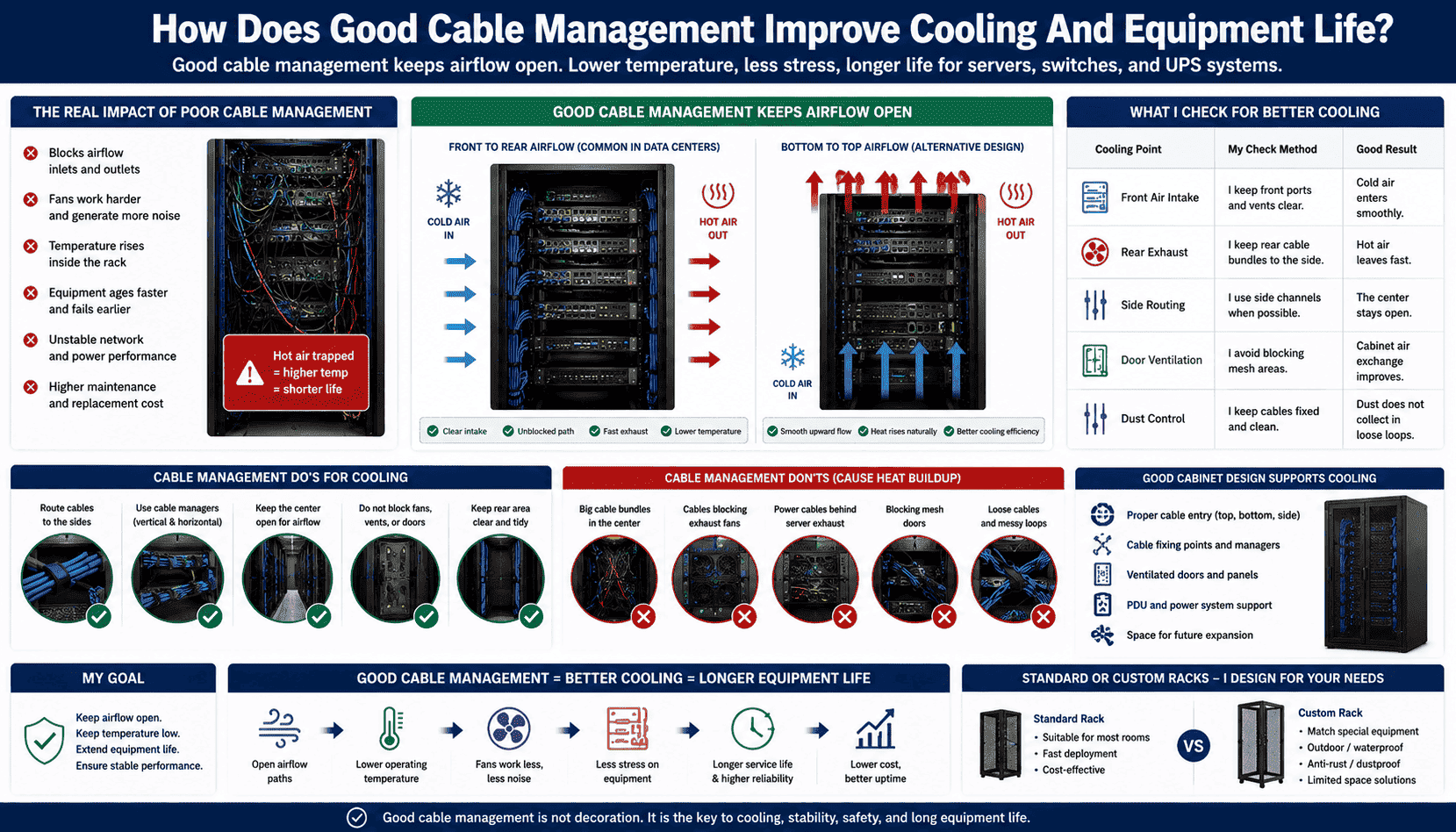
Good cable management improves cooling because it keeps the front-to-rear or bottom-to-top airflow open.6 When cables do not block fans, vents, and rear doors, equipment runs at a lower temperature, and the service life of servers, switches, and UPS units can increase.7
My Cooling Focus
I always connect cable management with thermal management. A server cabinet is not only for holding equipment. It is also for guiding air. Cold air must enter the equipment. Hot air must leave the equipment. If cable bundles block the air path, the fans work harder.8 The noise increases. The temperature rises. The equipment ages faster.9 The customer may only see unstable network performance, but the hidden cause may be poor airflow.
I check the front door, rear door, side cable space, top entry, bottom entry, and cable outlet. I make sure cables do not block mesh doors, fans, or ventilation holes. I also check whether power cable bundles sit behind server exhaust areas. This is a common mistake. A thick rear bundle can stop hot air from moving out. The server then runs in its own hot exhaust.
| Cooling point | My check method | Good result |
|---|---|---|
| Front air intake | I keep front ports and vents clear | Cold air enters smoothly |
| Rear exhaust | I keep rear cable bundles to the side | Hot air leaves fast |
| Side routing | I use side channels when possible | The center stays open |
| Door ventilation | I avoid blocking mesh areas | Cabinet air exchange improves |
| Dust control | I keep cables fixed and clean | Dust does not collect in loose loops |
I also consider cabinet design. A good server rack should support cable entry, cable fixing, door ventilation, PDU installation, and future expansion. In my work, I often customize cabinet size, door type, punching pattern, load structure, and cable holes for different projects. A standard rack can work for many rooms. A custom rack works better when the project has special equipment, outdoor use, waterproof needs, anti-rust needs, or limited floor space.
What Should I Check Before Project Acceptance?
I know many formal data centers and communication rooms will not pass acceptance if cable routing is messy10, even when all devices can power on.
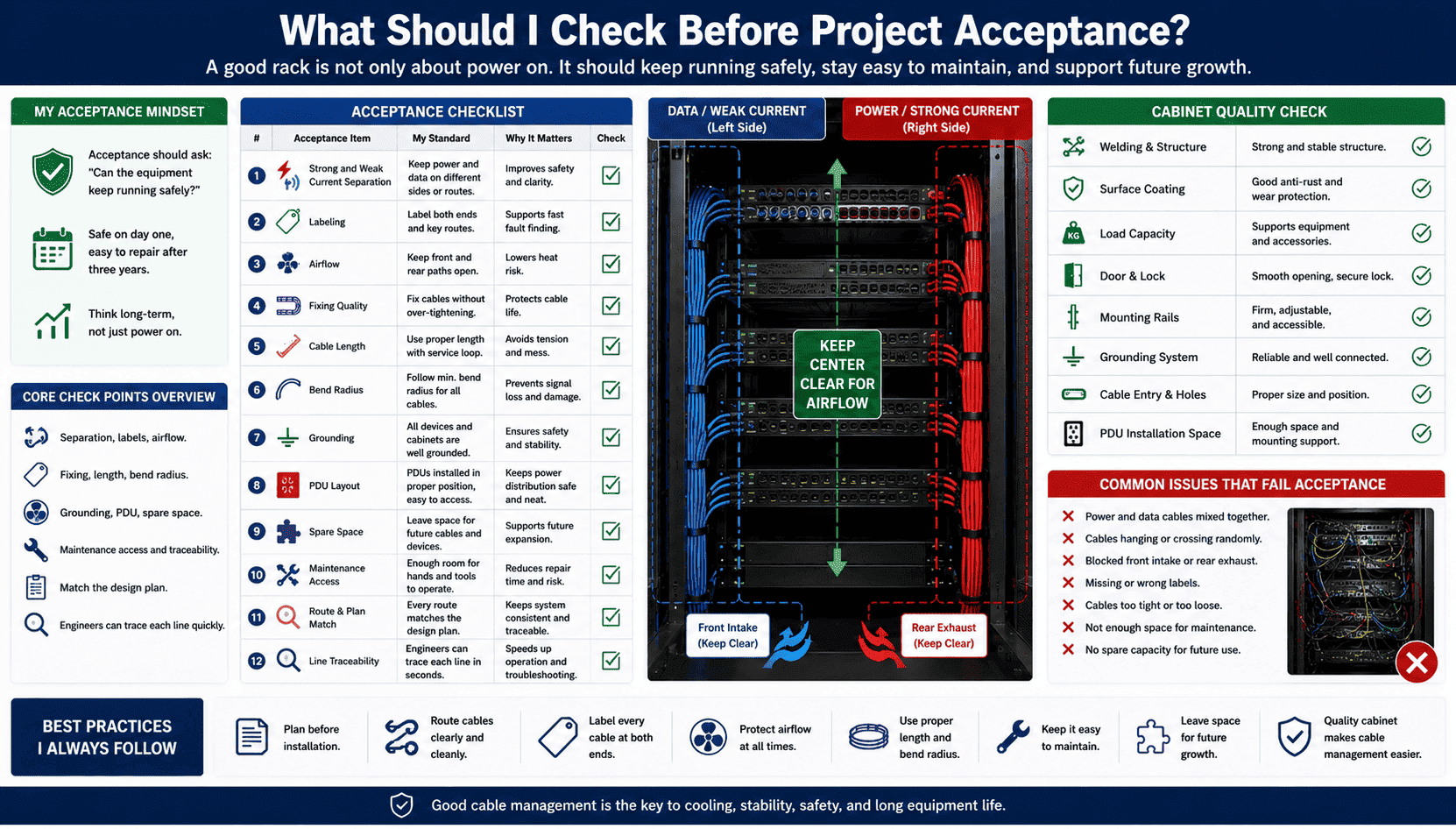
I check cable separation, labels, airflow, fixing quality, cable length, bend radius, grounding, PDU layout, spare space, and maintenance access before acceptance. I also check whether every route matches the design plan and whether engineers can trace each line quickly.
My Acceptance Checklist
I believe acceptance should not only ask, “Is the equipment running?” I believe it should also ask, “Can the equipment keep running safely?” A rack may pass a simple power test, but it may fail in real use if the cable layout is poor. I always look at the cabinet as a long-term operating system. I want the rack to be safe on day one, and I want it to stay easy to repair after three years.
I start with cable separation. I check whether power lines and data lines are clearly divided. I then check route quality. I look for hanging cables, crossing cables, and blocked airflow. I check labels on both ends.11 I check whether labels are readable and consistent with the drawing. I check whether cable length is proper. I check whether there is enough room to replace a device without pulling the whole bundle.
| Acceptance item | My standard | Why it matters |
|---|---|---|
| Strong and weak current separation | I keep them on different sides or routes | It improves safety and clarity |
| Labeling | I label both ends and key routes | It supports fast fault finding |
| Airflow | I keep front and rear paths open | It lowers heat risk |
| Fixing | I fix cables without over-tightening | It protects cable life |
| Maintenance space | I leave access for hands and tools | It reduces repair time |
| Spare capacity | I leave space for later cables | It supports future expansion |
I also check the cabinet itself. I look at welding, coating, load capacity, door opening, grounding, and mounting rails. I do this because cable management depends on cabinet structure. If the cabinet has poor cable channels, weak mounting points, or no space for PDU layout, even a good installer will struggle. This is why I focus on cabinet design and production quality from the start.
How Do I Maintain Cable Management During Long-Term Operation?
I see many clean racks become messy after small changes, because no one follows the same rules after the first installation.
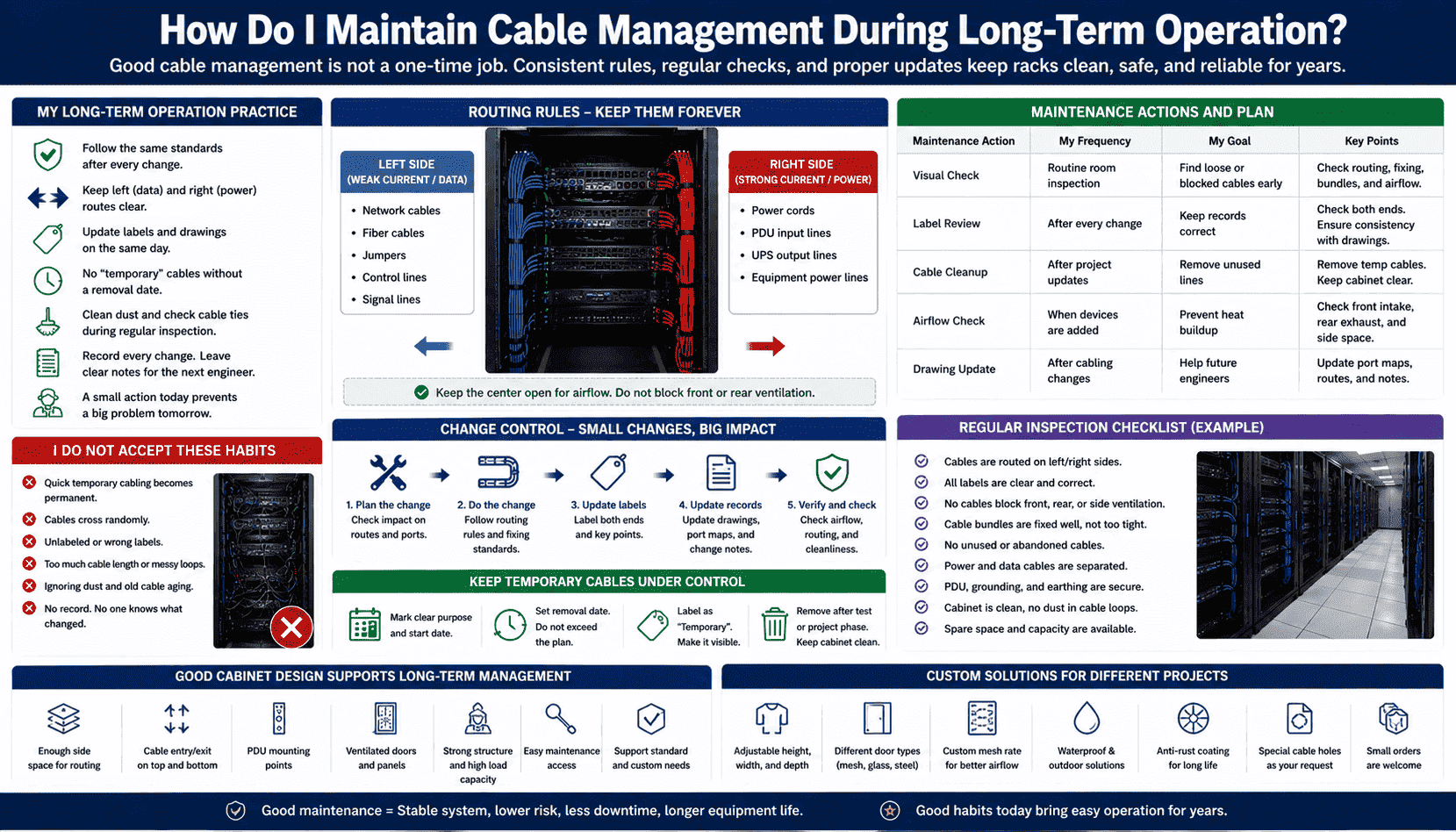
I maintain cable management by using fixed standards, update records, planned spare routes, regular inspection, and simple change control. I do not allow quick temporary cabling to become a permanent hidden risk inside the cabinet.
My Long-Term Operation Practice
I treat rack maintenance as a repeated habit. A good first installation is important, but daily changes decide the final result. A data center often adds servers, replaces switches, changes ports, and adjusts UPS lines. If every change has no rule, the rack becomes messy again. I ask my team to follow the same left and right route rule after every change. I also ask them to update labels and drawings on the same day.
I do not accept “temporary” cables without a removal date. Temporary cables are useful during testing, but they should not stay inside the cabinet for months. I mark them clearly. I record their purpose. I remove them after testing. I also clean dust and check cable ties during regular inspection. Dust can gather in loose cable loops. Heat can damage old power cords. A loose connector can create a fault that is hard to find.
| Maintenance action | My frequency | My goal |
|---|---|---|
| Visual check | I do it during routine room inspection | I find loose or blocked cables early |
| Label review | I do it after every change | I keep records correct |
| Cable cleanup | I do it after project updates | I remove unused lines |
| Airflow check | I do it when devices are added | I prevent heat buildup |
| Drawing update | I do it after cabling changes | I help future engineers |
I also suggest using cabinets that support easy long-term management. A cabinet should have enough side space, cable holes, PDU mounting points, and ventilation. It should also support custom needs when the project is not standard. In my factory work, I support small orders and non-standard customization because many real projects do not match one fixed size. I can adjust cabinet height, depth, door type, mesh rate, cable entry, waterproof structure, anti-rust treatment, and load design. This helps the customer build a rack that is easy to manage from the beginning.
Conclusion
I recommend clean separation, clear routing, open airflow, firm labeling, and regular checks because good cable management protects uptime, safety, cooling, and long-term cabinet value.
"How Researchers Are Driving Advances for Data Centers", https://eta.lbl.gov/news/how-researchers-are-driving-advances-data-centers. ASHRAE and data center infrastructure guidance identify unobstructed airflow paths, maintainable cabling, and controlled operating environments as factors in reliable IT equipment operation; this supports the general link between cable management, cooling, safety, and uptime, although it does not prove a specific service-life gain for every rack. Evidence role: general_support; source type: institution. Supports: A neutral data center thermal or infrastructure guidance source should support that organized cabling helps preserve airflow, reduce operational risk, and support maintainability.. Scope note: Contextual support; the source is likely to support the relationship between cabling and operational conditions rather than quantify all outcomes in the sentence. ↩
"[PDF] Best Practices Guide for Energy-Efficient Data Center Design", https://www.energy.gov/sites/default/files/2024-07/best-practice-guide-data-center-design.pdf. Research and institutional guidance on data center airflow management describe cable congestion as a potential obstruction to supply or exhaust air paths and associate organized routing and documentation with easier maintenance; this supports the stated mechanism, but the magnitude of fault-risk reduction depends on the specific installation. Evidence role: mechanism; source type: research. Supports: A research or institutional source should explain how obstructions in rack airflow paths affect equipment inlet or exhaust temperatures and how documented cabling improves maintainability.. Scope note: Contextual support; it may not directly measure maintenance delay or fault risk for the exact rack type discussed. ↩
"Cable Separation Standards | Winnie Industries", https://winnieindustries.com/resources/knowledge_center/guides_main/cable_separation/. Telecommunications cabling standards and electrical codes address separation between power conductors and communications cabling to reduce safety and electromagnetic-interference risks; this supports avoiding mixed bundles, although required separation distances depend on cable ratings, shielding, installation method, and jurisdiction. Evidence role: expert_consensus; source type: institution. Supports: A cabling standard or code source should support separating power and communications cabling to manage safety, interference, and maintainability concerns.. Scope note: Contextual support; exact spacing and bundling rules are code- and installation-specific. ↩
"[PDF] LSUHSC Cabling Infrastructure Installation Standards", https://www.lsuhsc.edu/admin/it/networking/docs/wiring_standards.pdf. Structured cabling installation guidance emphasizes strain relief, controlled slack, and avoidance of excessive loops to protect connectors and preserve orderly maintenance access; this supports the claim that both overly short and overly long cables can create operational problems. Evidence role: general_support; source type: institution. Supports: A cabling installation standard or guide should support controlling cable slack and avoiding mechanical stress at connectors and routing points.. Scope note: Contextual support; the dust-trap effect may be discussed as housekeeping or airflow management rather than as a quantified failure mechanism. ↩
"The FOA Reference For Fiber Optics-Installing Fiber Optic Cable", https://www.thefoa.org/tech/ref/install/installcbl.html. Fiber-optic installation guidance states that excessive bending and compression can increase optical loss or damage the cable, and copper cabling guidance similarly warns against deformation from tight fastening; this supports the warning about over-tightened ties. Evidence role: mechanism; source type: education. Supports: An educational or standards-based fiber-optic cabling source should explain that excessive bend radius violation or compression can increase attenuation or damage cable structure.. Scope note: Direct for fiber bend radius and compression; broader copper cable damage depends on cable construction and tie pressure. ↩
"Manage Airflow for Cooling Efficiency - Energy Star", https://www.energystar.gov/products/data_center_equipment/16-more-ways-cut-energy-waste-data-center/manage-airflow-cooling-efficiency. Government and institutional data center airflow-management guidance identifies unobstructed supply and return air paths as central to effective cooling, supporting the claim that organized cabling can help preserve front-to-rear or other designed airflow patterns. Evidence role: mechanism; source type: government. Supports: A government or institutional energy-efficiency source should support that open air paths and reduced obstructions improve data center cooling effectiveness.. Scope note: Contextual support; the source may discuss airflow management generally rather than testing this exact rack layout. ↩
"Temperature Management in Data Centers: Why Some ( ...", https://users.ece.cmu.edu/~gamvrosi/assets/tr_sigmetrics12.pdf. Electronics reliability literature commonly shows that higher operating temperatures accelerate many failure mechanisms, while data center thermal guidance treats unobstructed airflow as necessary for maintaining equipment inlet temperatures; this supports the claim that avoiding blocked fans and vents can improve thermal conditions and may extend service life. Evidence role: mechanism; source type: paper. Supports: A paper or technical institution source should support that elevated operating temperature accelerates electronic component degradation and that unobstructed airflow helps control equipment temperature.. Scope note: Contextual support; actual service-life increase depends on equipment design, ambient conditions, workload, and maintenance. ↩
"[PDF] quantifying air flow rate through a server in an operational data", https://mavmatrix.uta.edu/context/mechaerospace_theses/article/1223/type/native/viewcontent. Research on IT equipment cooling and fan control indicates that increased thermal load or airflow restriction can cause fans to operate at higher speeds to maintain component temperatures; this supports the claim that obstructive cable bundles may make fans work harder. Evidence role: mechanism; source type: research. Supports: A research or institutional source should support that airflow restriction or higher inlet temperature can increase fan speed or fan power in IT equipment.. Scope note: Contextual support; the response depends on the equipment's fan-control design and sensor thresholds. ↩
"Data Center Efficiency and IT Equipment Reliability at ...", https://www.energy.gov/sites/prod/files/2013/12/f5/data_center_efficiency_and_reliabilit_at_wider_operating_ranges.pdf. Electronics reliability studies use temperature-acceleration models, including Arrhenius-type relationships, to describe how elevated temperatures can increase degradation rates in electronic components; this supports the statement that hotter equipment can age faster. Evidence role: mechanism; source type: paper. Supports: A reliability paper should support that elevated temperature accelerates degradation mechanisms in electronic components.. Scope note: Direct for many component-level mechanisms; it does not alone quantify aging for a complete server, switch, or UPS in every operating environment. ↩
"[PDF] Installation of Telecommunications Cables in Federal Buildings", https://www.usda.gov/sites/default/files/documents/DR3300-001-K_Installation_of_Telecomm_Cables_in_Federal_Bldgs_final.pdf. Structured cabling standards and data center installation guidance include requirements or best practices for routing, administration, labeling, and workmanship, supporting the claim that visibly disordered cabling can affect formal acceptance where those criteria are enforced. Evidence role: expert_consensus; source type: institution. Supports: A structured cabling or data center standard should support that cabling workmanship, routing, labeling, and administration are part of compliant installation and acceptance review.. Scope note: Contextual support; pass/fail decisions depend on the contract, local code, inspection authority, and standards specified for the project. ↩
"[PDF] Labeling - Information Technologies", https://it.unm.edu/communications/design-guidelines/design-guidelines-files/labeling.pdf. Telecommunications administration standards such as ANSI/TIA-606 establish identification and labeling practices for cabling infrastructure, supporting the practice of labeling cable ends to make circuits traceable during operation and maintenance. Evidence role: definition; source type: institution. Supports: A cabling administration standard should support labeling and documenting cable identifiers at termination points.. Scope note: Direct for labeling and administration; exact label format and placement depend on the standard version and project specification. ↩
