
What Is a PDU in Data Centers and Why Is It Important?

A server can be built well, but weak power distribution can still stop it. I have seen small power mistakes create large downtime pressure.
-
What Does a PDU Do Inside a Server Cabinet?
A rack can look clean from the front, but power chaos can hide in the back. I have opened cabinets where cables were hot, tight, and badly labeled.
A PDU receives power from a UPS, power panel, or industrial plug, then distributes that power to equipment inside the rack through standard outlets such as IEC C13, IEC C19, or regional socket types.1 It also supports protection, monitoring, and control, based on the PDU type.
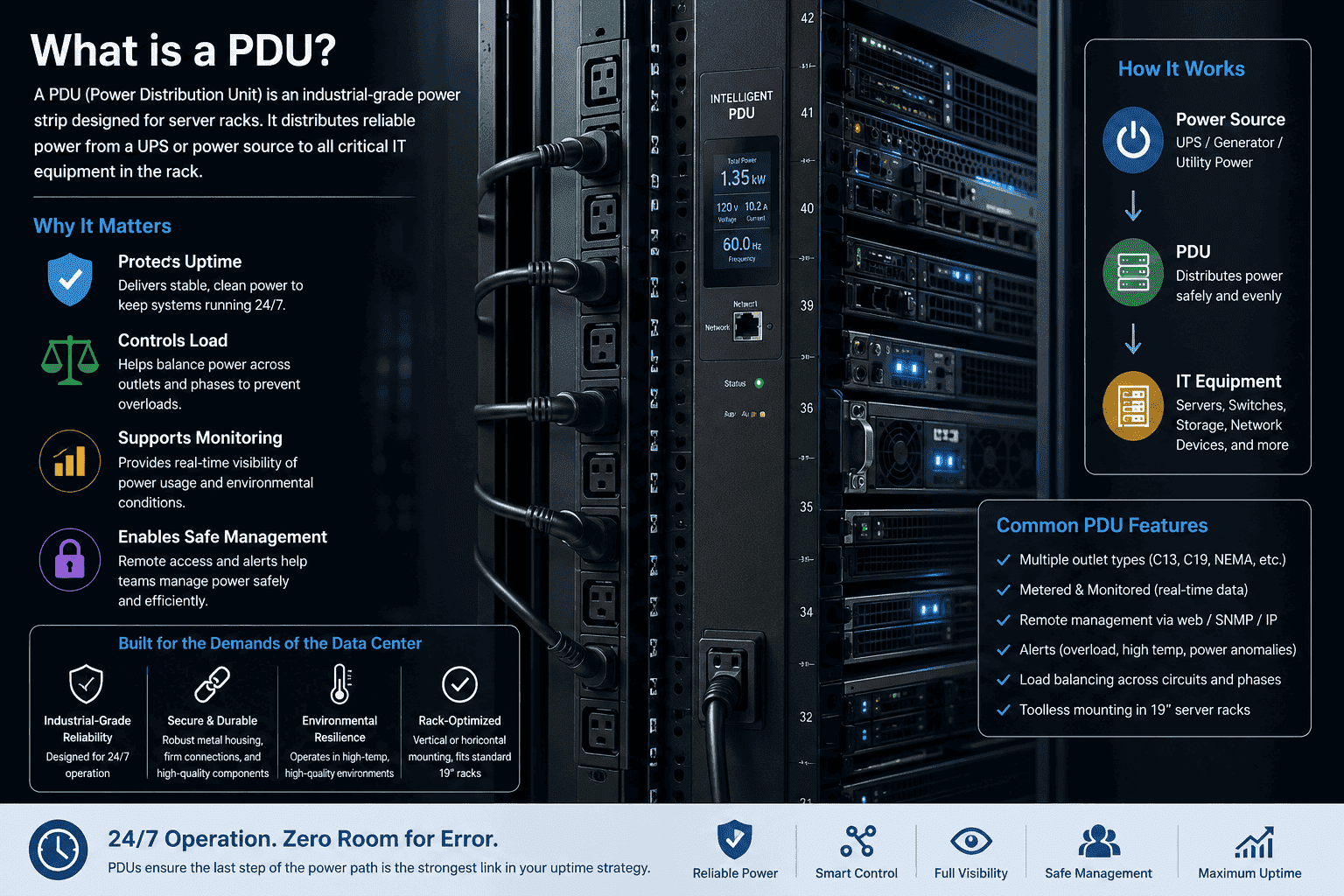
I see the PDU as a bridge between the data center power system and the cabinet-level IT devices. The UPS provides stable backup power. The rack PDU makes that power usable inside the cabinet. In a normal server cabinet or network cabinet, the PDU is mounted vertically on the rear side rails or horizontally on rack posts. The choice depends on cabinet depth, cable space, outlet count, and airflow design.
A basic PDU only distributes power. A better PDU adds protection. A smart PDU adds measurement, network control, and outlet-level management. This is why I do not treat a PDU as a small accessory. I treat it as part of the rack design.
Common PDU Functions I Check
| Function | What It Means | Why I Care |
|---|---|---|
| Power distribution | Sends input power to many devices | It keeps rack devices connected to one managed power path |
| [Overload protection | Trips when current is too high | It helps prevent overheating and fire risk](http://www.osha.gov/laws-regs/regulations/standardnumber/1910/1910.303)%%%FOOTNOTE_REF_2%%% |
| [Surge protection | Reduces damage from sudden voltage spikes | It protects sensitive electronics](https://www.nist.gov/document/tvsscompatibilitypdf)%%%FOOTNOTE_REF_3%%% |
| Monitoring | Shows voltage, current, and power use | It helps find overload before failure |
| Remote control | Turns outlets on or off through network access | It helps reboot frozen equipment without site access |
When I build or supply cabinets for overseas projects, I always ask about the PDU early. The rack structure, rear cable space, mounting holes, door type, and airflow path all affect PDU use. A good cabinet should not force the customer to squeeze power cables into a narrow corner. Power wiring should have a clear path, firm fixing points, and enough space for safe bending.
Why Is a PDU Important for Data Center Uptime?
Many people think downtime starts with a server fault. I have seen downtime start with an overloaded outlet, a wrong plug, or a weak power strip.
A PDU is important for uptime because it gives rack equipment stable, organized, and protected power. It also helps operators see load levels, avoid overload, restart failed devices remotely, and keep critical equipment running during power problems.
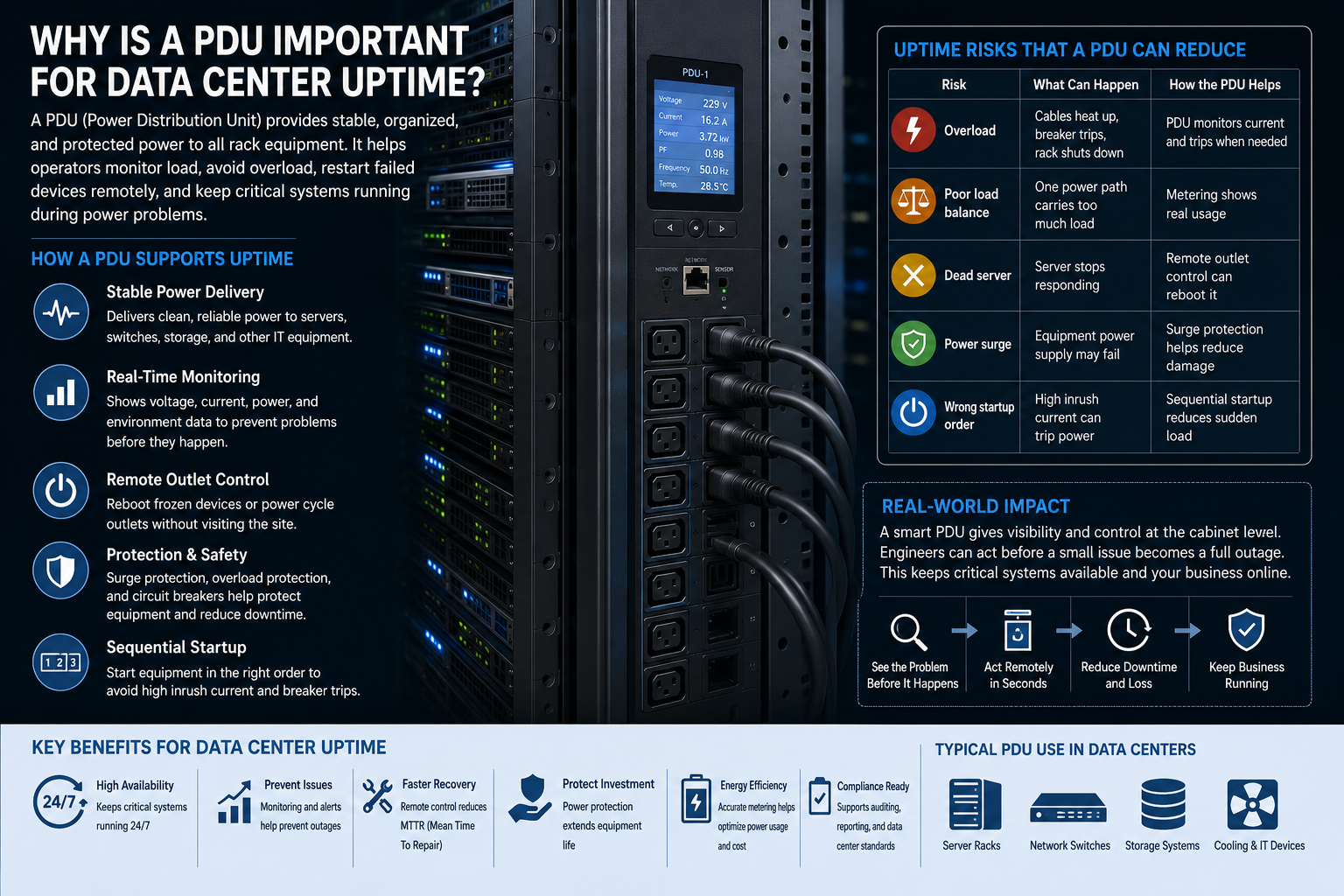
In a data center, power is not only about electricity. Power is about availability. A server may have strong processors and high memory, but it still depends on steady input power. If power drops, spikes, or cuts out, the equipment may shut down. It may also restart in the wrong order. It may lose data. It may damage the power supply unit.
A PDU helps reduce these risks at the cabinet level. For me, the most important part is visibility. If a smart PDU shows the cabinet is close to overload, the operator can act before the breaker trips.4 If one server freezes, a remote-controlled PDU can reboot only that outlet. The engineer does not need to travel to the site for a simple power cycle.
Uptime Risks That a PDU Can Reduce
| Risk | What Can Happen | How the PDU Helps |
|---|---|---|
| Overload | Cables heat up, breaker trips, rack shuts down | PDU monitors current and trips when needed |
| Poor load balance | One power path carries too much load | Metering shows real usage |
| Dead server | Server stops responding | Remote outlet control can reboot it5 |
| Power surge | Equipment power supply may fail | Surge protection helps reduce damage |
| Wrong startup order | High inrush current can trip power | Sequential startup reduces sudden load6 |
I once handled a cabinet project where the customer cared most about airflow and load capacity. That was correct, but I also asked about PDU position and power cable routing. The reason was simple. If power cables block rear airflow or bend sharply near outlets, the cabinet may look fine but work badly. Uptime comes from many small details. The PDU is one of those details that looks small until it fails.
What Types of PDU Are Common in Data Centers?
Choosing a PDU can feel easy until the rack grows. Then simple power distribution becomes monitoring, remote access, redundancy, and outlet-level control.
Common PDU types include basic PDU, overload-protection PDU, metered PDU, remote switched PDU, outlet-metered PDU, and dual-input redundant PDU. Each type fits a different level of power safety, monitoring, and control need.
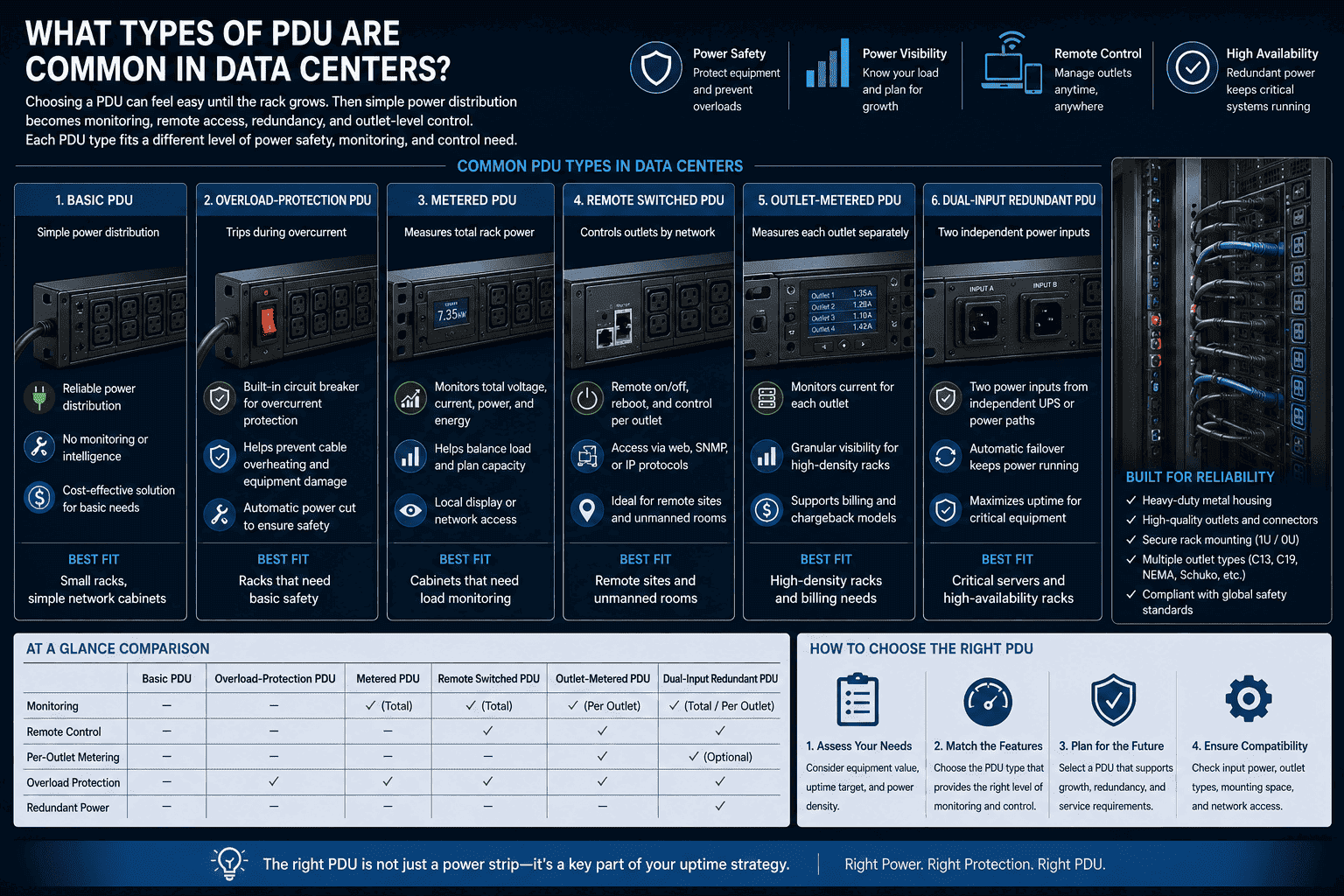
I usually divide PDUs by how much control the data center team needs. A basic PDU is like an industrial power strip. It has strong materials, rack mounting, and many outlets, but it has no intelligence. It is useful for simple racks or low-cost projects. An overload-protection PDU adds a safety layer. If current rises above the rated value, it trips and cuts power. This helps prevent cable overheating.
A metered PDU shows total power use. A remote switched PDU has a network module, so an operator can turn single outlets on or off. An outlet-metered PDU goes deeper because it can measure each outlet. A dual-input redundant PDU uses two power inputs from two independent UPS systems or power paths. If one path fails, the other path can continue to supply power.7
PDU Type Comparison
| PDU Type | Main Feature | Best Fit |
|---|---|---|
| Basic PDU | Simple power distribution | Small racks, simple network cabinets |
| Overload-protection PDU | Trips during overcurrent | Racks that need basic safety |
| Metered PDU | Measures total rack power | Cabinets that need load monitoring |
| Remote switched PDU | Controls outlets by network | Remote sites and unmanned rooms |
| Outlet-metered PDU | Measures each outlet separately | High-density racks and billing needs |
| Dual-input redundant PDU | Two independent power inputs | Critical servers and high-availability racks |
I do not believe every rack needs the most expensive PDU. I believe each rack needs the right PDU. A test rack may only need a basic model. A cabinet in a core data center may need dual power paths, outlet metering, and remote switching. The decision should follow the equipment value, uptime target, power density, and service model.
What Specifications Should I Check Before Selecting a PDU?
A PDU can have many outlets, but it can still be wrong. I have seen projects delayed because the plug, current, or outlet standard did not match.
Before selecting a PDU, I check input type, rated current, voltage, outlet type, outlet quantity, mounting direction, cable length, protection features, monitoring level, and compatibility with the server cabinet and local electrical standard.
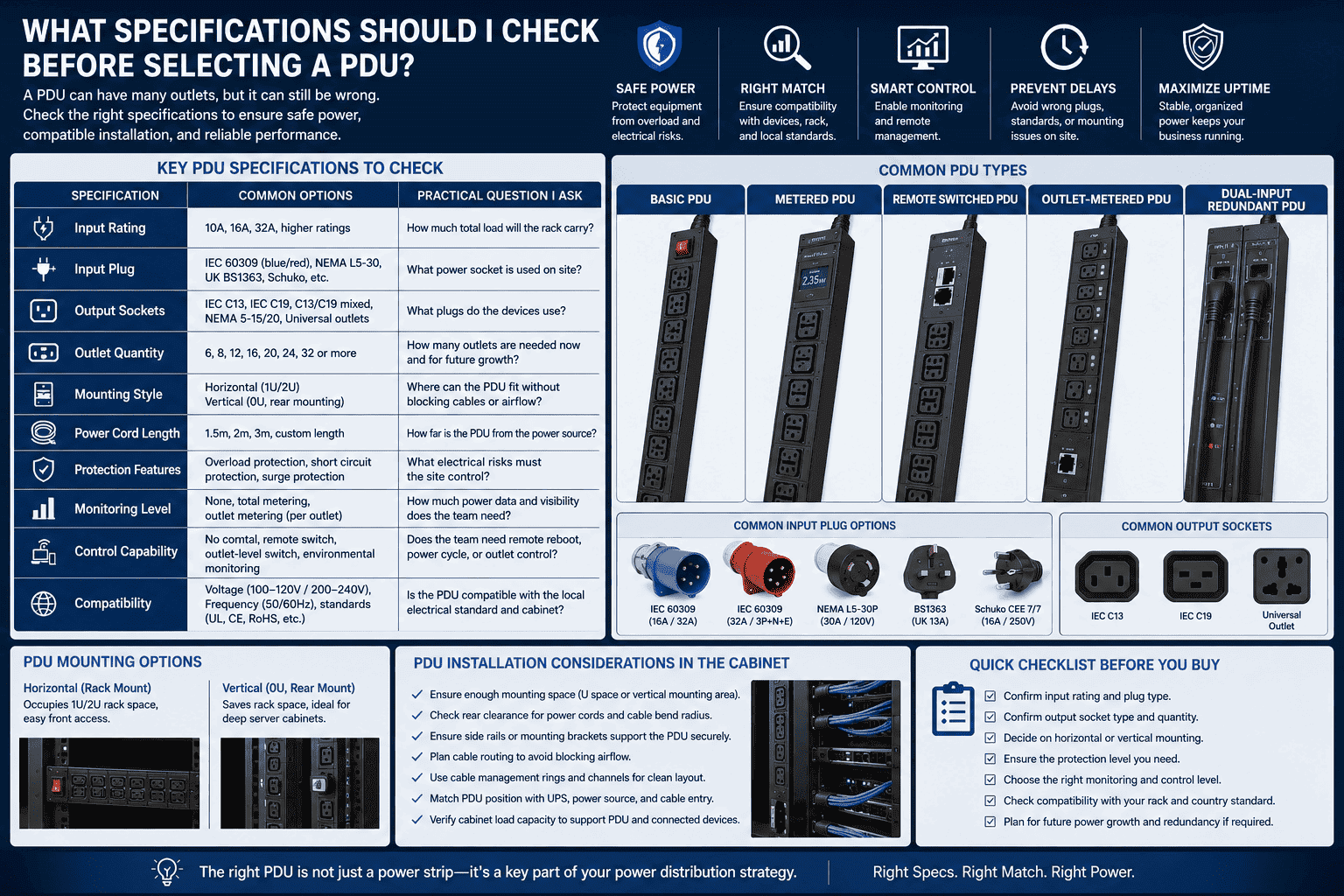
When I support overseas cabinet orders, I never choose the PDU only by outlet number. I first confirm the country or region standard. Then I confirm input current. Common input ratings include single-phase 10A, 16A, and 32A. Some projects use industrial IEC plugs. Some use regional three-pin plugs. Some customers need IEC C14, C20, C13, or C19 combinations. The wrong plug can make the PDU useless on site.
I also check mounting style. Horizontal PDUs take rack units. Vertical PDUs save front space and are often mounted on rear side rails. In deep server cabinets, vertical mounting is common. In smaller network cabinets, horizontal mounting may be easier.
Key PDU Specifications I Confirm
| Specification | Common Options | Practical Question I Ask |
|---|---|---|
| Input rating | 10A, 16A, 32A, higher ratings | How much total load will the rack carry? |
| Input plug | IEC industrial plug, regional plug | What power socket is used on site? |
| Output sockets | IEC C13, IEC C19, regional outlets | What plugs do the devices use? |
| Mounting | Horizontal or vertical | Where can the PDU fit without blocking cables? |
| Protection | Overload, short circuit, surge protection | What risks must the site control? |
| Monitoring | None, total metering, outlet metering | How much power data does the team need? |
| Control | No control, remote switch, outlet switch | Does the team need remote reboot? |
I also look at the cabinet structure. A rack with a mesh door, strong rear frame, and clean cable channels makes PDU installation easier. As a cabinet manufacturer, I pay attention to PDU mounting holes, side beam position, rear clearance, and cable management rings. These small metal parts support safe power use. A PDU is electrical equipment, but the cabinet decides how well it can be installed and maintained.
How Does a Smart PDU Help Data Center Management?
A data center team cannot manage what it cannot see. I have seen smart PDU data expose problems before anyone touched the cabinet.
A smart PDU helps data center management by monitoring voltage, current, power, and energy use in real time.8 It can send alerts, support remote outlet control, restart frozen devices, and help operators prevent overload and plan capacity.
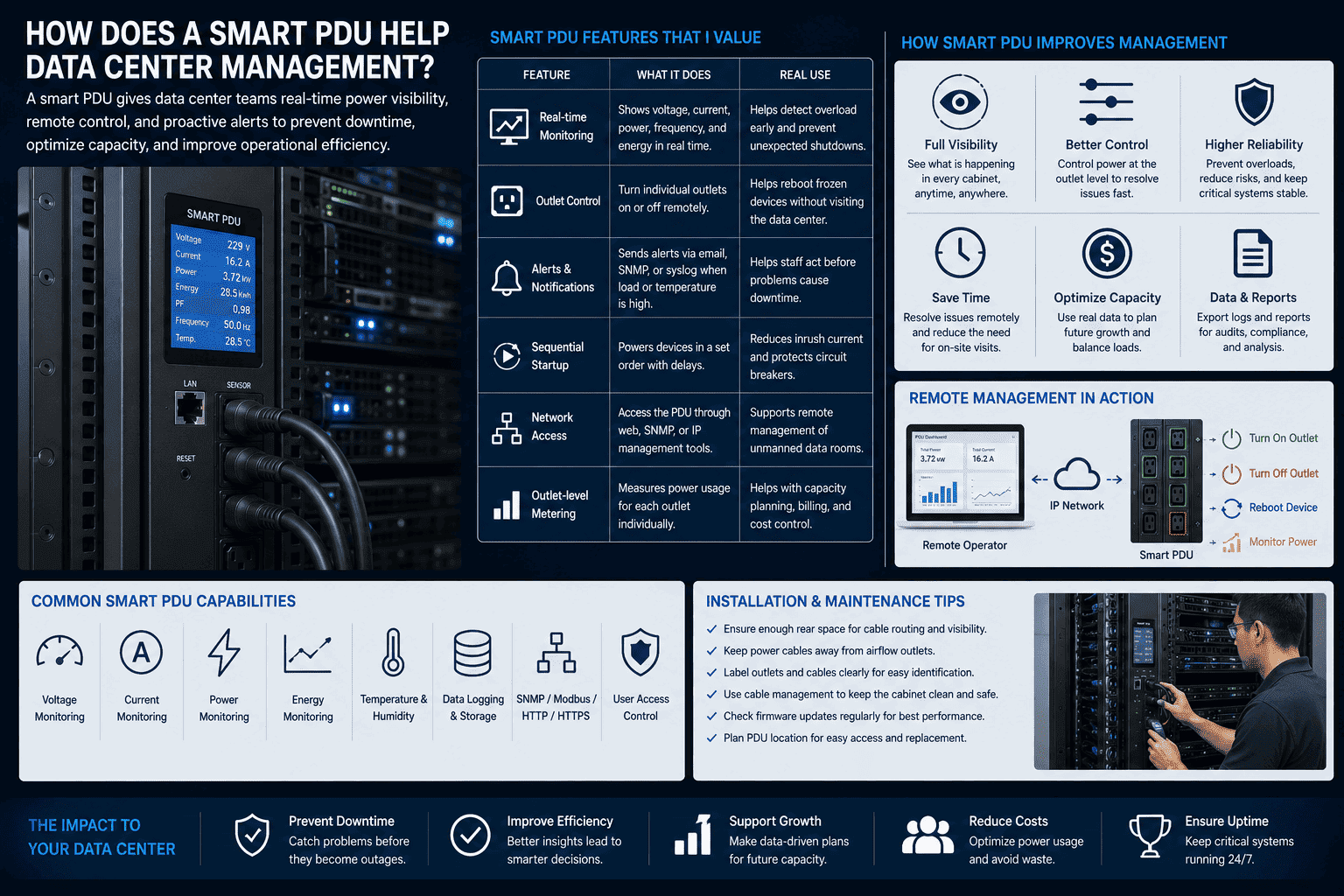
A smart PDU turns cabinet power into visible data. This matters because modern racks often carry high-density equipment.9 A single cabinet may hold many servers, high-speed switches, and storage devices. Without monitoring, the operator may only discover a power issue after a breaker trips. With a smart PDU, the operator can see load changes before failure.
Remote switching is another useful feature. If a server freezes, the operator can restart only one outlet. The operator does not need to shut down the full cabinet. The operator also does not need to enter the data center for a basic reset. Some smart PDUs also support sequential startup. This means devices start one by one, not all at the same time. This reduces inrush current.
Smart PDU Features That I Value
| Feature | What It Does | Real Use |
|---|---|---|
| Real-time monitoring | Shows voltage, current, power, and energy | Helps detect overload early |
| Outlet control | Turns single outlets on or off | Helps reboot failed devices |
| Alerts | Sends warning when load is high | Helps staff act before shutdown |
| Sequential startup | Powers devices in order | Reduces startup current pressure |
| Network access | Allows remote management | Supports unmanned data rooms |
| Outlet-level metering | Tracks each device power use | Helps capacity planning and cost control |
I also care about maintenance. A smart PDU should be easy to read, easy to label, and easy to replace if needed. The cabinet should leave enough rear working space, because technicians need to see outlet labels and unplug devices safely. I have learned that a clean cabinet is not only about beauty. A clean cabinet helps people fix problems faster.
How Should a PDU Be Installed in a Server Rack?
A good PDU can perform badly if it is installed badly. I have seen airflow blocked, cables pulled tight, and outlets hidden behind equipment.
A PDU should be installed in a rack where it has safe clearance, firm mounting, clean cable routing, correct grounding, and easy access. It should not block airflow, bend power cables sharply, or exceed its rated load.
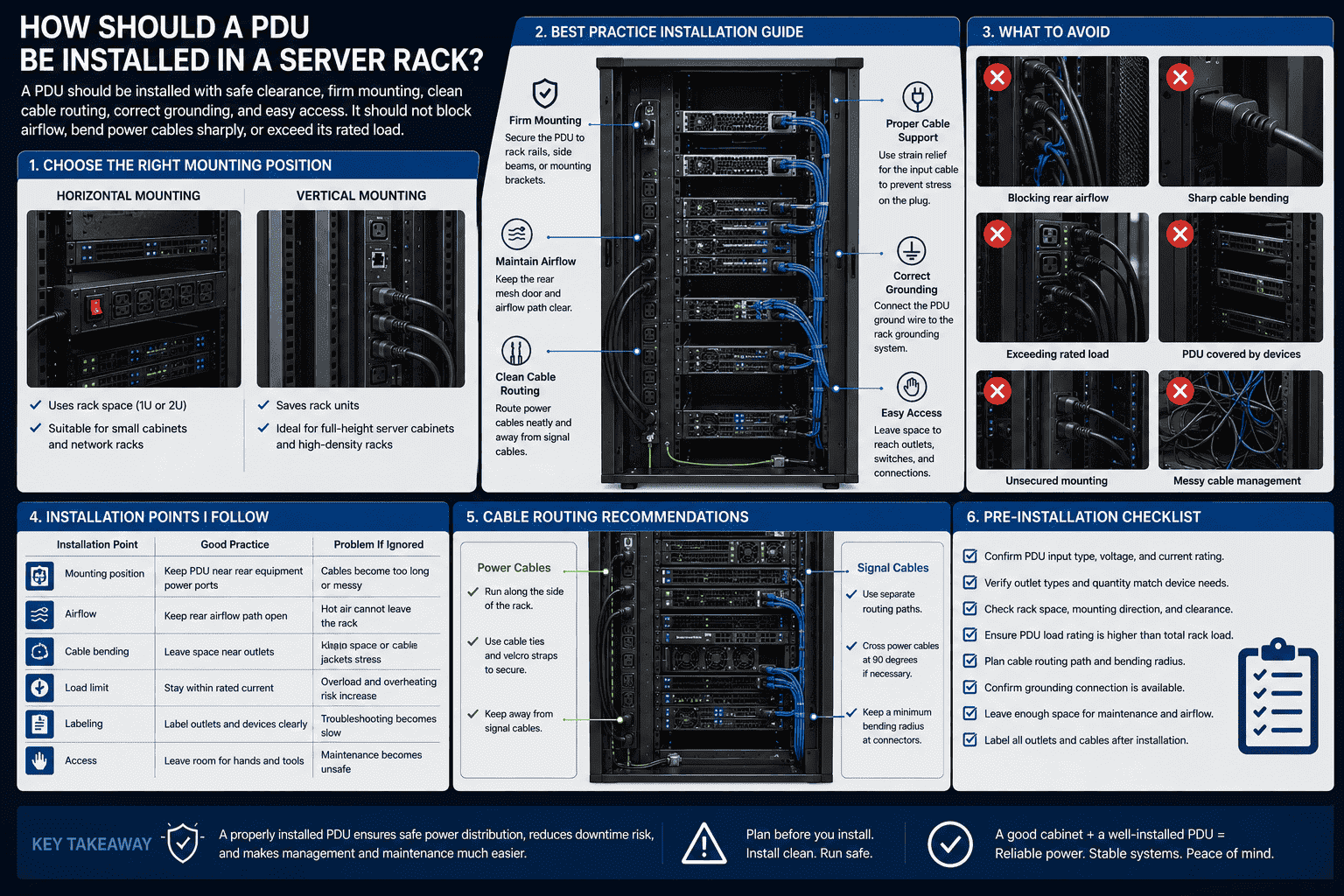
I always treat PDU installation as part of cabinet planning. The common mounting methods are horizontal and vertical. A horizontal PDU uses rack space, so it may fit smaller cabinets or network racks. A vertical PDU is often better for full-height server cabinets because it saves rack units and keeps outlets close to equipment cables. The PDU can be fixed to rear posts, side beams, or dedicated mounting brackets.
Cable routing is just as important as the PDU itself. Power cables should not block rear mesh doors or fan airflow. They should not cross signal cables in a messy way. They should have enough bending space near IEC C13 and C19 outlets. The PDU input cable should have strain relief, so the plug is not pulled by cable weight.
Installation Points I Follow
| Installation Point | Good Practice | Problem If Ignored |
|---|---|---|
| Mounting position | Keep PDU near rear equipment power ports | Cables become too long or messy |
| Airflow | Keep rear airflow path open | Hot air cannot leave the rack |
| Cable bending | Leave space near outlets | Plugs loosen or cable jackets stress |
| Load limit | Stay within rated current | Overload and overheating risk increase |
| Labeling | Label outlets and devices clearly | Troubleshooting becomes slow |
| Access | Leave room for hands and tools | Maintenance becomes unsafe |
As a sheet metal cabinet manufacturer, I know the cabinet frame must support this work. Strong side rails, accurate mounting holes, enough rear depth, and well-made mesh doors all matter. The PDU is not separate from the cabinet. It works with the cabinet. If the cabinet is poorly designed, even a good PDU may become hard to manage.
Conclusion
A data center PDU protects the last power path to the rack. I choose it by load, safety, monitoring need, and cabinet design.
"IEC 60320 - Wikipedia", https://en.wikipedia.org/wiki/IEC_60320. IEC 60320 connector references identify C13 and C19 as standardized appliance coupler formats used for equipment power connections, supporting the article's description of common rack PDU outlet types. Evidence role: definition; source type: institution. Supports: A standards or technical reference should identify IEC C13 and IEC C19 as standardized appliance coupler outlets/connectors used for electrical equipment power connections.. Scope note: Connector standards verify the outlet types but do not by themselves specify which outlet mix is appropriate for a particular rack load. ↩
"1910.303 - General. | Occupational Safety and Health ...", http://www.osha.gov/laws-regs/regulations/standardnumber/1910/1910.303. Electrical safety guidance describes overcurrent protection as a means of interrupting excessive current before conductors or equipment overheat, which supports the article's statement that overload protection helps reduce overheating and fire risk. Evidence role: mechanism; source type: institution. Supports: An electrical safety source should explain that overcurrent protective devices interrupt excessive current to prevent conductor overheating and reduce fire hazards.. Scope note: The source supports the safety principle; actual protection depends on correct device rating, wiring, and installation. ↩
"Characterization of TVSS from a system compatibility ...", https://www.nist.gov/document/tvsscompatibilitypdf. Technical guidance on surge protective devices states that they limit transient overvoltages reaching connected equipment, supporting the article's statement that surge protection can reduce damage to sensitive electronics. Evidence role: mechanism; source type: government. Supports: A government or technical source should explain that surge protective devices limit transient overvoltages and thereby reduce the risk of damage to electronic equipment.. Scope note: Surge protection reduces risk but cannot eliminate all damage, especially from extreme events or improperly coordinated protection systems. ↩
"Rack PDU Circuit Breaker Operation and Expectations", https://www.se.com/us/en/faqs/FA234961/. Data center power-management guidance describes intelligent rack PDUs as devices that monitor current or power draw and can alert operators to high-load conditions, supporting the article's claim that operators can respond before an overload causes a trip. Evidence role: mechanism; source type: institution. Supports: A data center infrastructure source should explain that metered or intelligent PDUs monitor current and power draw and can alert operators to high-load conditions.. Scope note: The source supports the monitoring mechanism; whether a breaker trip is avoided depends on alert thresholds, response time, and electrical design. ↩
"Looking for cost-effective remote power cycle solution for 15 industrial ...", https://www.reddit.com/r/sysadmin/comments/1lctoku/looking_for_costeffective_remote_power_cycle/. Technical descriptions of switched rack PDUs state that individual outlets can be remotely turned off and on, which supports the article's claim that a nonresponsive device can be power-cycled without shutting down the full cabinet. Evidence role: general_support; source type: institution. Supports: A technical data center source should state that switched or intelligent PDUs allow remote control of individual outlets, enabling connected equipment to be power-cycled.. Scope note: Remote power cycling may not resolve software or hardware faults and should be used within operational procedures. ↩
"PowerUp sequence", https://www.netio-products.com/en/glossary/powerup-sequence. Engineering literature on inrush current explains that simultaneous energization of multiple loads can create high transient current, while staged or sequential startup reduces the combined peak, supporting the article's statement about sequential startup. Evidence role: mechanism; source type: paper. Supports: A technical paper or engineering source should explain that energizing electrical loads sequentially reduces peak inrush current compared with simultaneous startup.. Scope note: The source supports the electrical principle rather than measuring the exact reduction for every server or PDU configuration. ↩
"Data center tiers - Wikipedia", https://en.wikipedia.org/wiki/Data_center_tiers. Data center reliability guidance describes redundant A/B power paths as a method for maintaining load power when one upstream path is unavailable, supporting the article's explanation of dual-input redundant PDU operation. Evidence role: mechanism; source type: institution. Supports: A data center reliability source should explain that redundant A/B power feeds or dual-input rack power equipment provide continuity when one upstream path is unavailable.. Scope note: The support is architectural; actual continuity depends on load compatibility, transfer behavior, upstream capacity, and proper configuration. ↩
"Intelligent (Smart) PDUs vs. Basic PDUs", https://www.enconnex.com/intelligent-smart-pdus-vs-basic-pdus/. Technical descriptions of intelligent rack PDUs identify real-time monitoring of electrical parameters, including voltage, current, power, and energy consumption, as a core capability, supporting the article's description of smart PDU functions. Evidence role: definition; source type: institution. Supports: A neutral technical source should define intelligent or smart PDUs as rack power devices that monitor electrical parameters such as voltage, current, power, and energy consumption.. Scope note: The exact measurements available may vary by PDU class, firmware, and sensor design. ↩
"How Researchers Are Driving Advances for Data Centers", https://newscenter.lbl.gov/2025/12/16/how-researchers-are-driving-advances-for-data-centers/. Research on data center energy use and rack power density documents that modern facilities may concentrate substantial computing load within individual cabinets, providing context for the article's emphasis on rack-level monitoring. Evidence role: historical_context; source type: research. Supports: A research or institutional source should document rising or significant rack power densities in data centers and explain the associated management challenges.. Scope note: The evidence supports the broader density trend, not the density of every individual rack. ↩
