
4 Post Rack vs Cabinets in the Data Center: r/networking?

A wrong rack choice can make a clean data center turn into a hot, messy, and hard-to-maintain room. I have seen this happen.
-
What Is a 4 Post Rack in a Data Center?
A weak open rack can shake, bend, or limit deep servers. A good 4 post rack solves that with simple strength.
A 4 post rack is an open 19-inch metal frame with four vertical mounting posts, front and rear beams, and adjustable support parts. It has no doors, no side panels, no top cover, and no enclosed shell. It mainly supports equipment and gives free access.
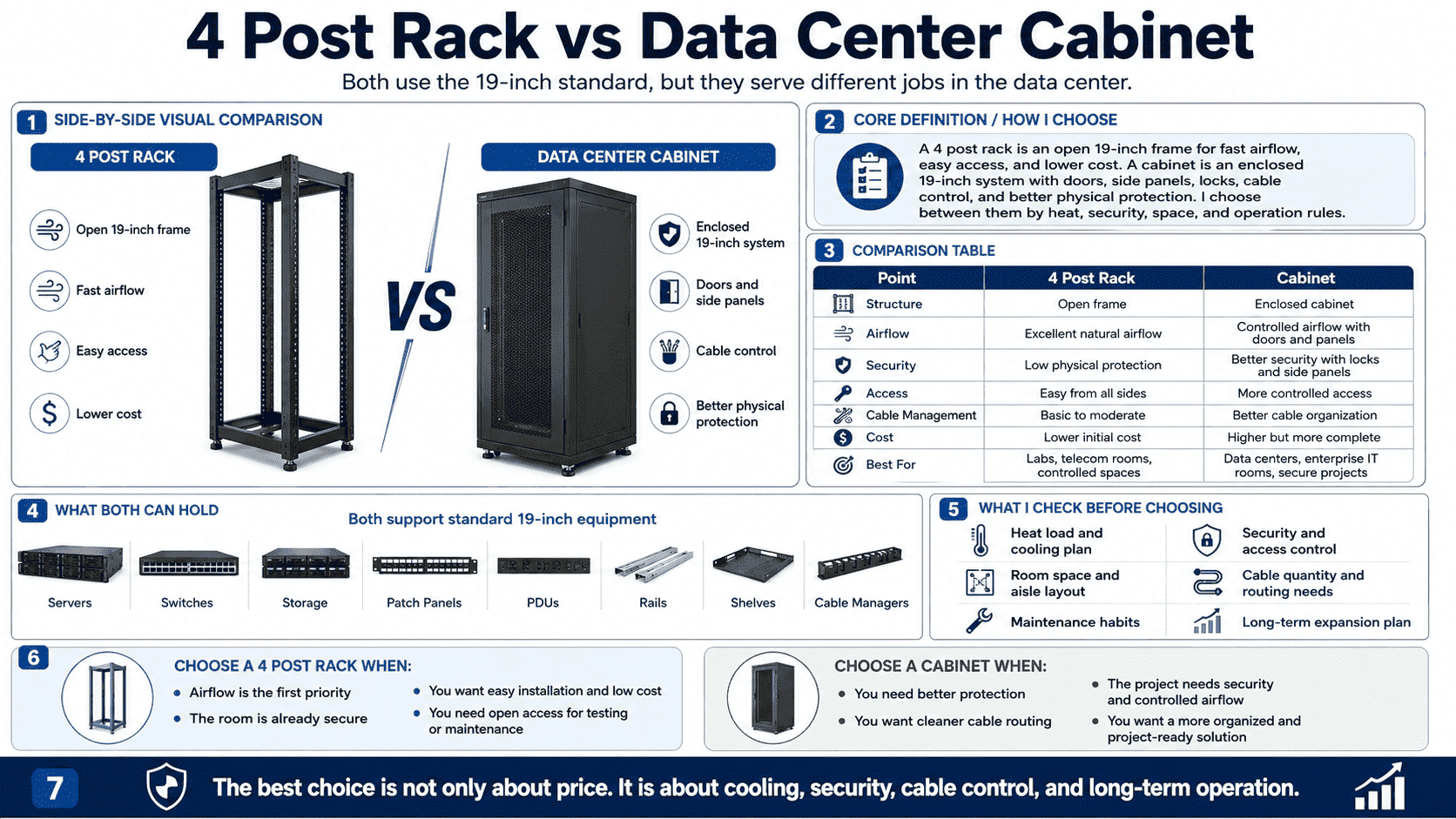
I see the 4 post rack as the most basic and honest equipment carrier in a data center. It does not try to hide cables. It does not try to create a closed air path by itself. It gives me four standard mounting posts, clear U markings, strong load support, and open space around the device. In our factory work, I often treat it as the base structure behind many cabinet designs. The width follows the 19-inch standard, which is 482.6 mm.1 The depth can be 600 mm, 800 mm, 1000 mm, 1070 mm, or other custom sizes. The height is often 42U2, but I also make other heights when a project needs them.
| Item | My practical view |
|---|---|
| Structure | Four open vertical posts with cross beams |
| Access | Front, rear, left, and right access are open |
| Cooling | Very strong natural airflow |
| Cable work | Easy to plug, trace, and change cables |
| Cost | Usually lower than a full cabinet |
| Load | Commonly 360 kg to 900 kg, based on steel and design |
| Best use | Lab, staging room, telecom room, high-airflow area |
When I install heavy servers, I care about the steel thickness, hole accuracy, welding quality, and base stability. A rack may look simple, but a poor rack can create real trouble. If the U holes are not accurate, rails do not slide well. If the posts are not straight, the server sits under stress. If the base is weak, the full rack may lean after loading. I like open 4 post racks for GPU servers and high-power devices because air can move freely. I also like them when engineers need to work fast. The open sides save time during patching, testing, and expansion.
What Is a Data Center Cabinet?
An open rack can expose valuable equipment. A cabinet adds a full protective shell when the room needs control.
A data center cabinet is an enclosed 19-inch equipment system. It has internal mounting posts, front and rear mesh or glass doors, removable side panels, top and bottom covers, locks, cable paths, and airflow control parts. It supports equipment and improves safety, order, and cooling control.
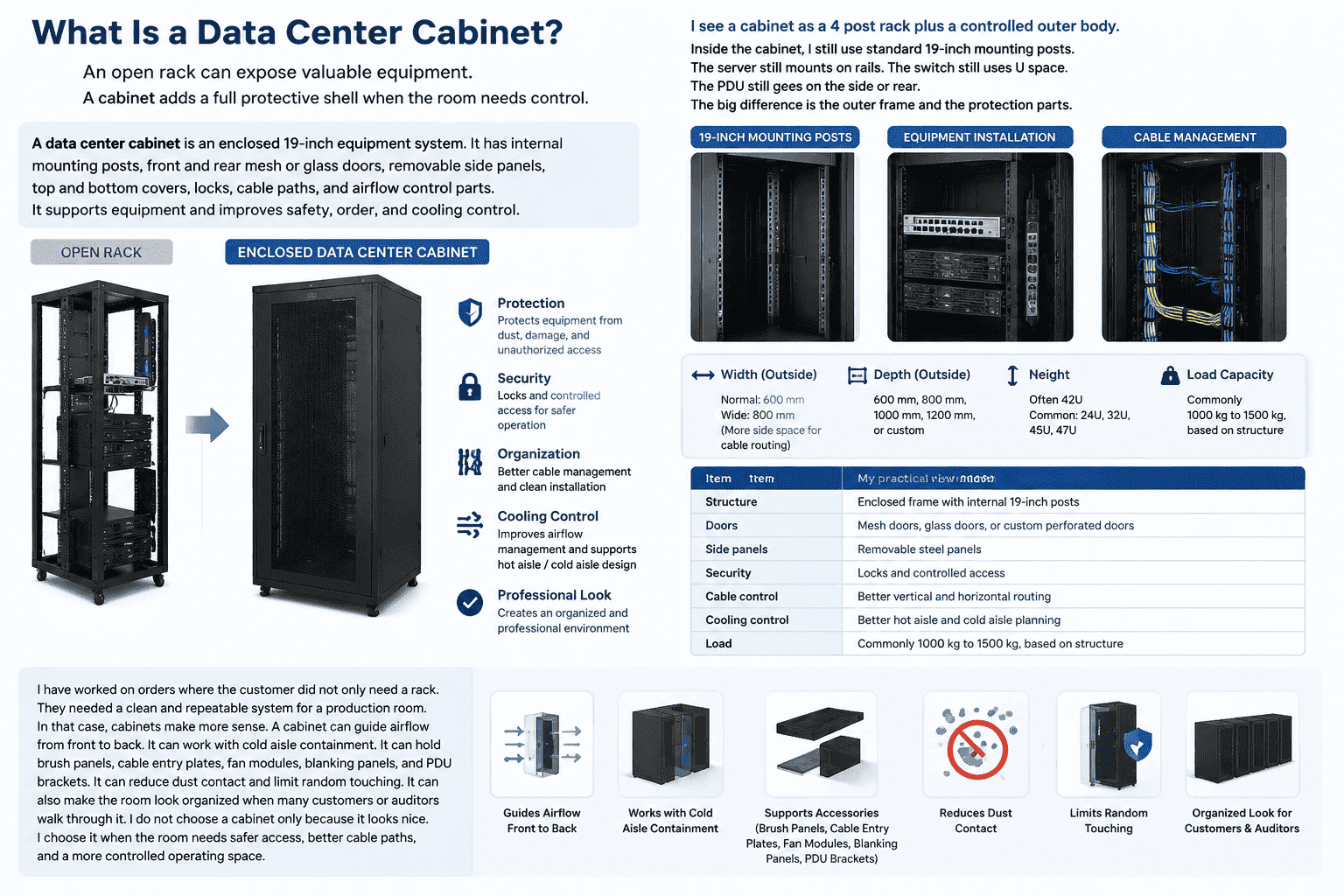
I see a cabinet as a 4 post rack plus a controlled outer body. Inside the cabinet, I still use standard 19-inch mounting posts. The server still mounts on rails. The switch still uses U space. The PDU still goes on the side or rear. The big difference is the outer frame and the protection parts. A normal cabinet may have a 600 mm outside width. An 800 mm wide cabinet gives more side space for cable routing. Depth can be 600 mm, 800 mm, 1000 mm, 1200 mm, or custom. Height is often 42U, but many projects use 24U, 32U, 45U, or 47U.
| Item | My practical view |
|---|---|
| Structure | Enclosed frame with internal 19-inch posts |
| Doors | Mesh doors, glass doors, or custom perforated doors |
| Side panels | Removable steel panels |
| Security | Locks and controlled access |
| Cable control | Better vertical and horizontal routing |
| Cooling control | Better hot aisle and cold aisle planning |
| Load | Commonly 1000 kg to 1500 kg, based on structure |
I have worked on orders where the customer did not only need a rack. They needed a clean and repeatable system for a production room. In that case, cabinets make more sense. A cabinet can guide airflow from front to back.3 It can work with cold aisle containment. It can hold brush panels, cable entry plates, fan modules, blanking panels, and PDU brackets. It can reduce dust contact and limit random touching. It can also make the room look organized when many customers or auditors walk through it. I do not choose a cabinet only because it looks nice. I choose it when the room needs safer access, better cable paths, and a more controlled operating space.
Which One Cools Better for Servers and Network Gear?
Heat kills hardware slowly.4 I have seen bad airflow turn a good rack plan into a constant alarm problem.
A 4 post rack gives the most open airflow because nothing blocks air around the device. A cabinet gives better controlled airflow when it uses mesh doors, blanking panels, sealed cable openings, and proper hot aisle or cold aisle design. Open air is not always better than controlled air.
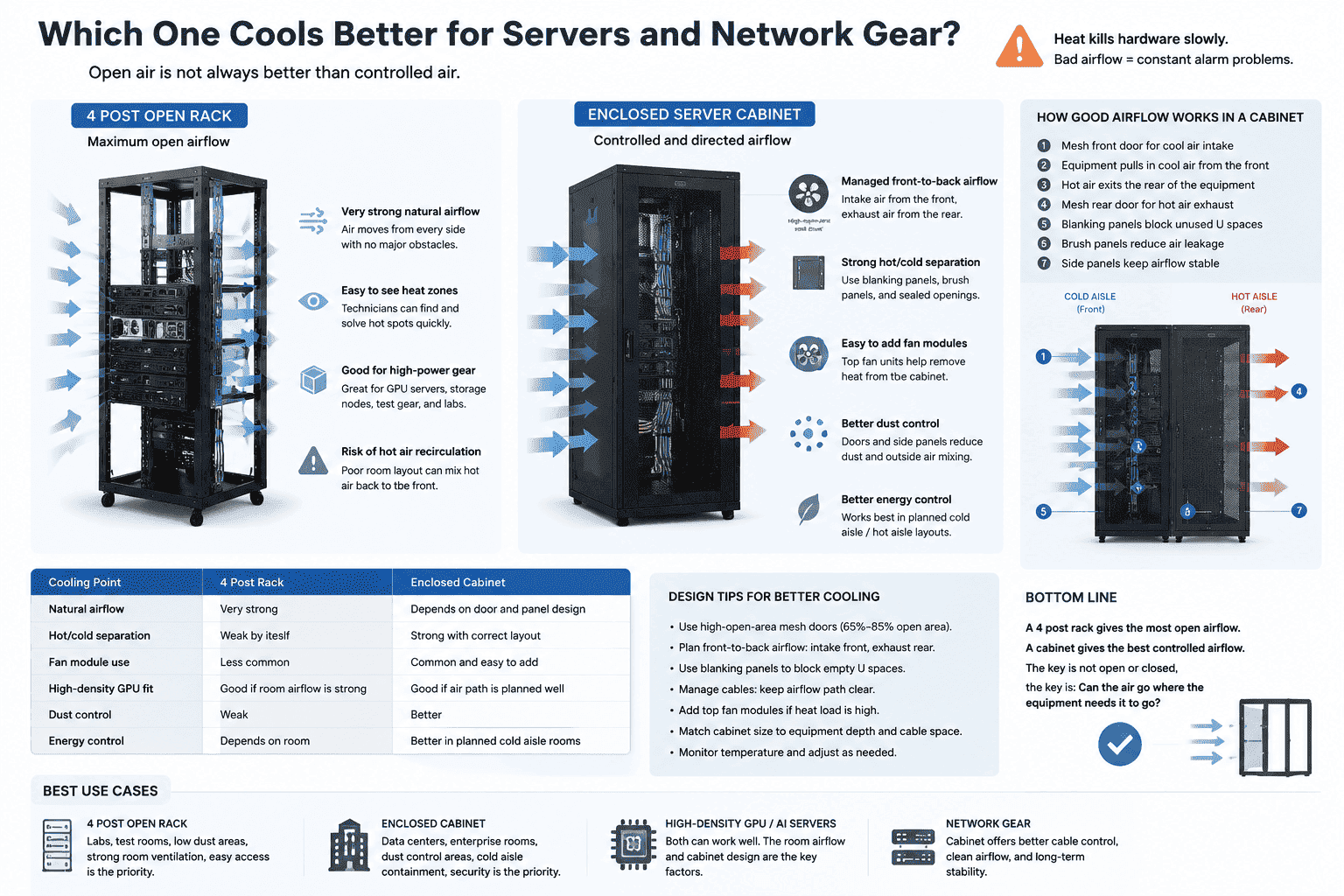
I look at cooling in two different ways. The first way is free airflow. The second way is managed airflow. A 4 post rack wins in free airflow. Air can move from every side. Technicians can see heat buildup areas quickly. High-power GPU servers, storage nodes, test gear, and lab devices often benefit from this open space. The risk is that the room air may mix freely. Hot air may return to the front of the devices if the data center layout is poor.5
| Cooling point | 4 post rack | Enclosed cabinet |
|---|---|---|
| Natural airflow | Very strong | Depends on door and panel design |
| Hot/cold separation | Weak by itself | Strong with correct layout |
| Fan module use | Less common | Common and easy to add |
| High-density GPU fit | Good if room airflow is strong | Good if air path is planned well |
| Dust control | Weak | Better |
| Energy control | Depends on room | Better in planned cold aisle rooms |
A cabinet can cool very well when the design is right. Many people think doors always block air. That is not true if the cabinet uses high-open-area mesh doors and the room uses front-to-back airflow6. I often make mesh doors because server rooms need air, not decoration. A cabinet can force intake air to the front and exhaust air to the rear. Blanking panels can stop hot air from looping back through empty U space.7 Cable brushes can reduce air leakage. Side panels can help keep the air path stable. In real data center operation, this control can reduce wasted cooling. But if the cabinet is badly designed, too shallow, too full of cables, or fitted with a low-open-area door, it can trap heat. So I do not ask only, “Is it open or closed?” I ask, “Can the air go where the equipment needs it to go?”
Which One Is Better for Security and Access Control?
Fast access is useful, but open access can become a risk when many people enter the room.
A cabinet is better for physical security because it has lockable doors and side panels.8 A 4 post rack is better for quick hands-on work because everything is open. I choose cabinets for shared, hosted, audited, or public-access environments. I choose open racks for trusted technical rooms.
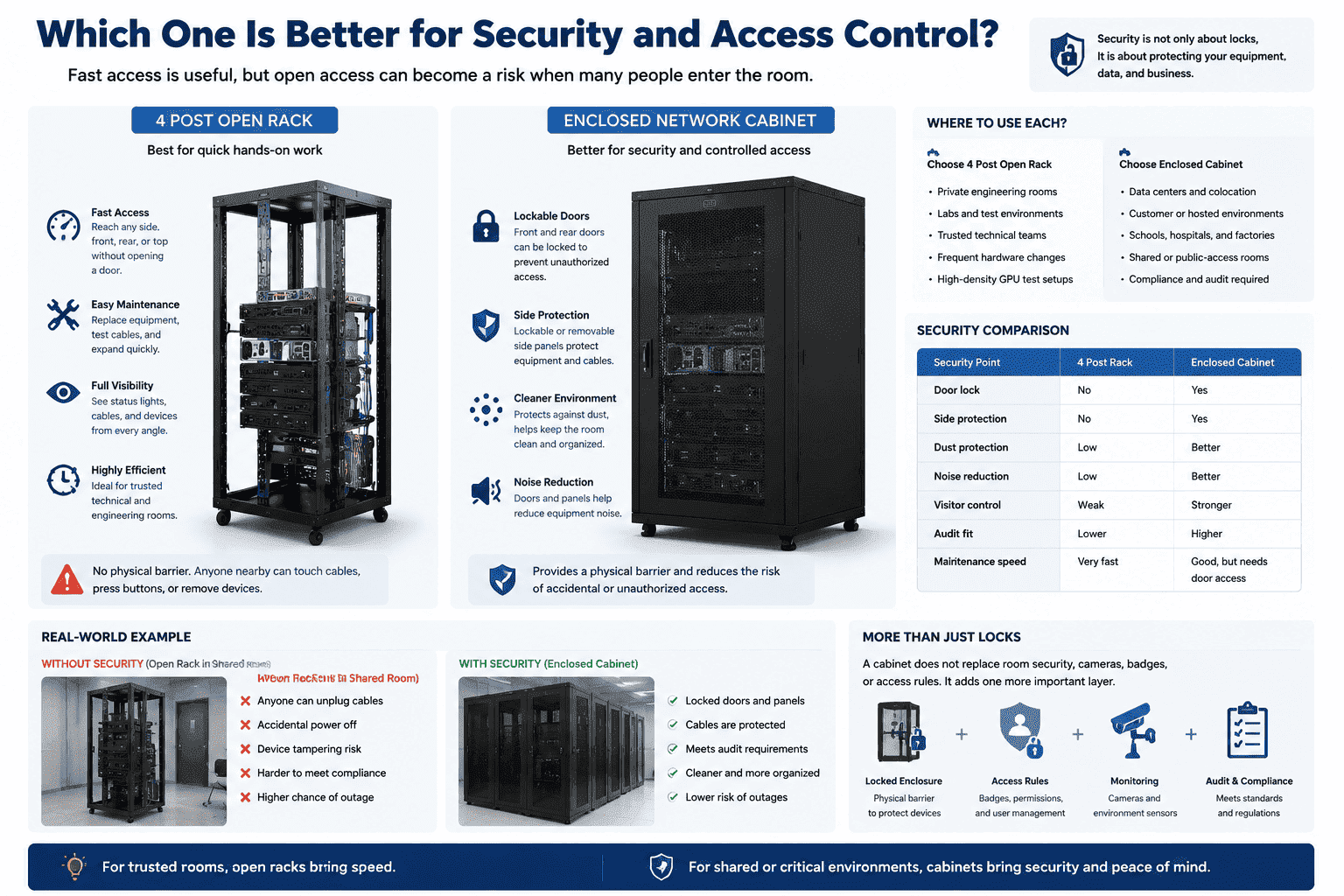
I have seen both sides of this issue. In a private engineering room, an open rack can be very practical. Engineers can move around, test cables, replace devices, and expand fast. They do not need to open a door every time. They can reach the rear port, side rail, PDU, or tray without delay. This makes open racks feel very efficient. But in a colocation room, customer room, school, factory floor, or shared facility, the same open access becomes a problem. Anyone near the rack can touch a patch cord, pull a cable, press a power button, or remove a device.
| Security point | 4 post rack | Enclosed cabinet |
|---|---|---|
| Door lock | No | Yes |
| Side protection | No | Yes |
| Dust protection | Low | Better |
| Noise reduction | Low | Better |
| Visitor control | Weak | Stronger |
| Audit fit | Lower | Higher |
| Maintenance speed | Very fast | Good, but needs door access |
A cabinet gives a basic physical barrier. It does not replace room security, cameras, badges, or proper access rules.9 But it adds one more layer. I like this layer in hosting and production environments. The front and rear doors can be locked. The side panels can be fixed or removable by key. The cable entry can be guided. The cabinet can also keep the room cleaner by hiding loose cables and limiting casual access. For some customers, the cabinet is not optional because their compliance rule needs a locked enclosure.10 I also see cabinets used when the room has cleaning staff, visitors, or mixed teams. In that setting, the price difference becomes small when compared with the cost of one accidental outage.
Which One Costs Less in Real Projects?
A cheap first purchase can become expensive when cooling, cable work, and downtime are counted.
A 4 post rack usually costs less to buy, ship, and install because it has fewer parts. A cabinet costs more because it includes doors, panels, locks, frame parts, cable parts, and airflow parts. The real cost depends on the room, not only the product.
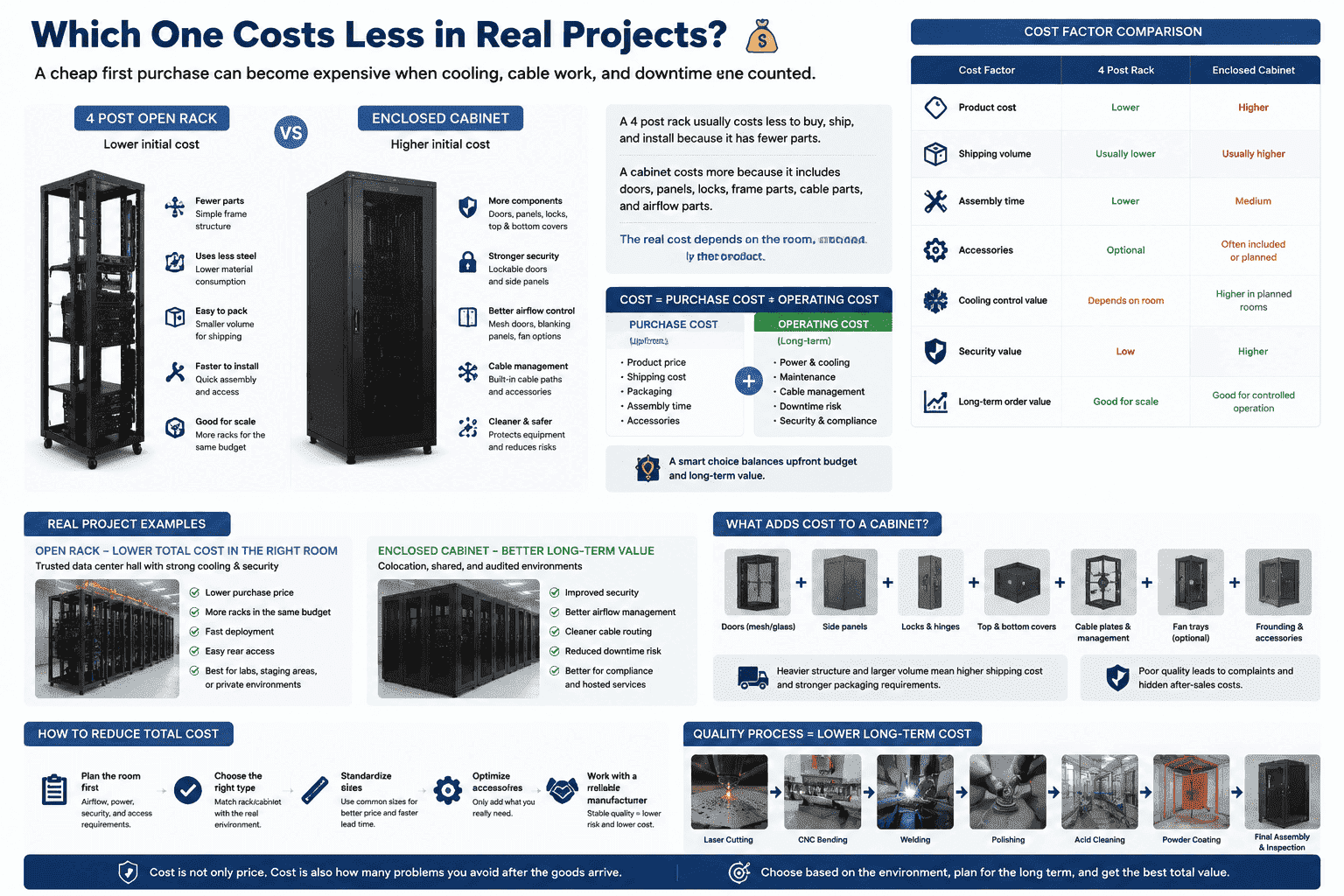
I always separate purchase cost from operating cost. A 4 post rack uses less steel and fewer accessories. It is easier to pack. It is often faster to assemble. It may be the best choice when the room already has strong access control and good cooling. In a lab, staging area, or trusted data center hall, this lower cost is real. I have seen customers choose open racks for large batch orders because they wanted maximum rack count at a controlled budget.
| Cost factor | 4 post rack | Enclosed cabinet |
|---|---|---|
| Product cost | Lower | Higher |
| Shipping volume | Usually lower | Usually higher |
| Assembly time | Lower | Medium |
| Accessories | Optional | Often included or planned |
| Cooling control value | Depends on room | Higher in planned rooms |
| Security value | Low | Higher |
| Long-term order value | Good for scale | Good for controlled operation |
A cabinet has a higher starting cost. It needs doors, hinges, locks, panels, top covers, bottom plates, cable plates, grounding parts, and sometimes fan trays. The steel structure is also heavier. Shipping can cost more because the product takes more space and needs stronger packing. But I do not call it expensive without looking at the use case. If the cabinet reduces wrong access, improves cable paths, supports hot and cold aisle layout, and makes maintenance cleaner, it may save money later. For overseas projects, I also look at packaging and repeat quality. A cabinet with poor door alignment, weak coating, or bad mesh punching can create complaints after shipping. So I care about process control from laser cutting, bending, welding, polishing, acid cleaning, powder coating, and final assembly. Cost is not only price. Cost is also how many problems I avoid after the goods arrive.
Which One Fits r/networking, Homelab, and Real Data Center Use?
Online advice can sound simple, but real rooms have different heat, noise, people, and budget limits.
I use a 4 post rack when I need low cost, open airflow, fast access, and easy expansion. I use a cabinet when I need locks, cleaner cable paths, dust control, airflow planning, noise reduction, and a more formal operating space.
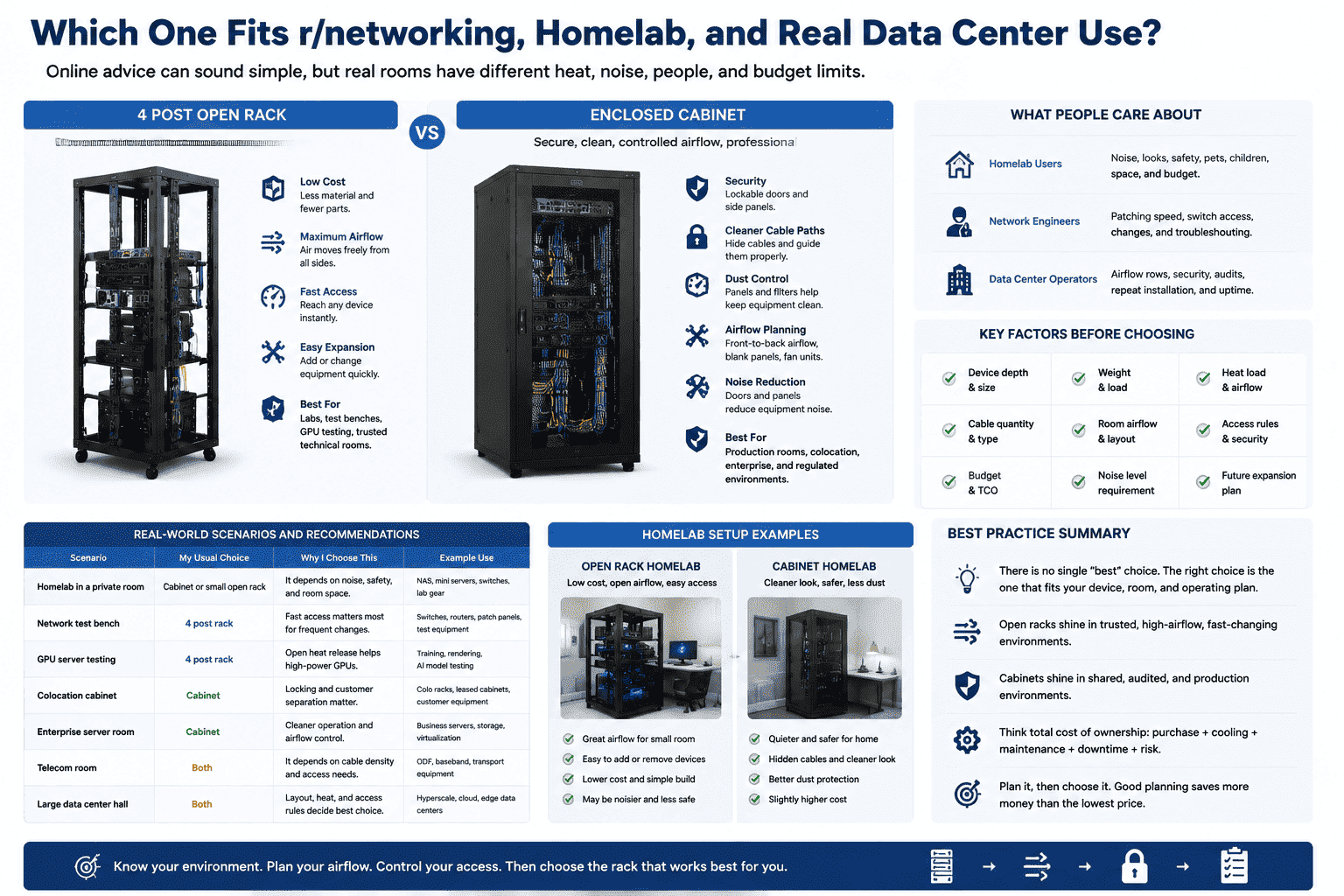
When I read r/networking or homelab discussions, I notice that many people answer from their own room. That is normal. A home lab user may care about noise, looks, children, pets, and room space. A network engineer may care about patching speed and switch access. A data center operator may care about airflow rows, security, audits, and repeat installation. A manufacturer like me has to think about all of these at the same time because each order has its own use case.
| Scenario | My usual choice | Reason |
|---|---|---|
| Homelab in a private room | Cabinet or small open rack | It depends on noise and safety |
| Network test bench | 4 post rack | Fast access matters most |
| GPU server testing | 4 post rack | Open heat release helps |
| Colocation cabinet | Cabinet | Locking and customer separation matter |
| Enterprise server room | Cabinet | Cleaner operation and airflow control |
| Telecom room | Both | It depends on cable density and access |
| Large data center hall | Both | Layout decides the best choice |
For a homelab, I may choose a cabinet if the equipment sits near people. A closed cabinet with mesh doors can look cleaner and feel safer. But I would not use a sealed glass door for hot servers unless the airflow is planned. For a network lab, I like open racks because switches and patch panels change often. For a production data center, I usually lean toward cabinets because rules, security, and standard operation matter. For very large halls with strong room-level airflow and strict access control, open 4 post racks can also be a smart choice. They save cost, speed up work, and support high-density layouts. The answer is not fixed. I choose after I know the device depth, weight, heat load, cable quantity, room airflow, access rule, and future expansion plan.
What Should I Check Before I Buy a 4 Post Rack or Cabinet?
The wrong depth or weak load rating can ruin the whole install even when the rack looks correct.
I check equipment depth, total weight, airflow direction, cable space, door style, side access, U height, rail support, PDU position, packing method, and custom needs before I place an order. A good rack or cabinet must fit the equipment and the room.
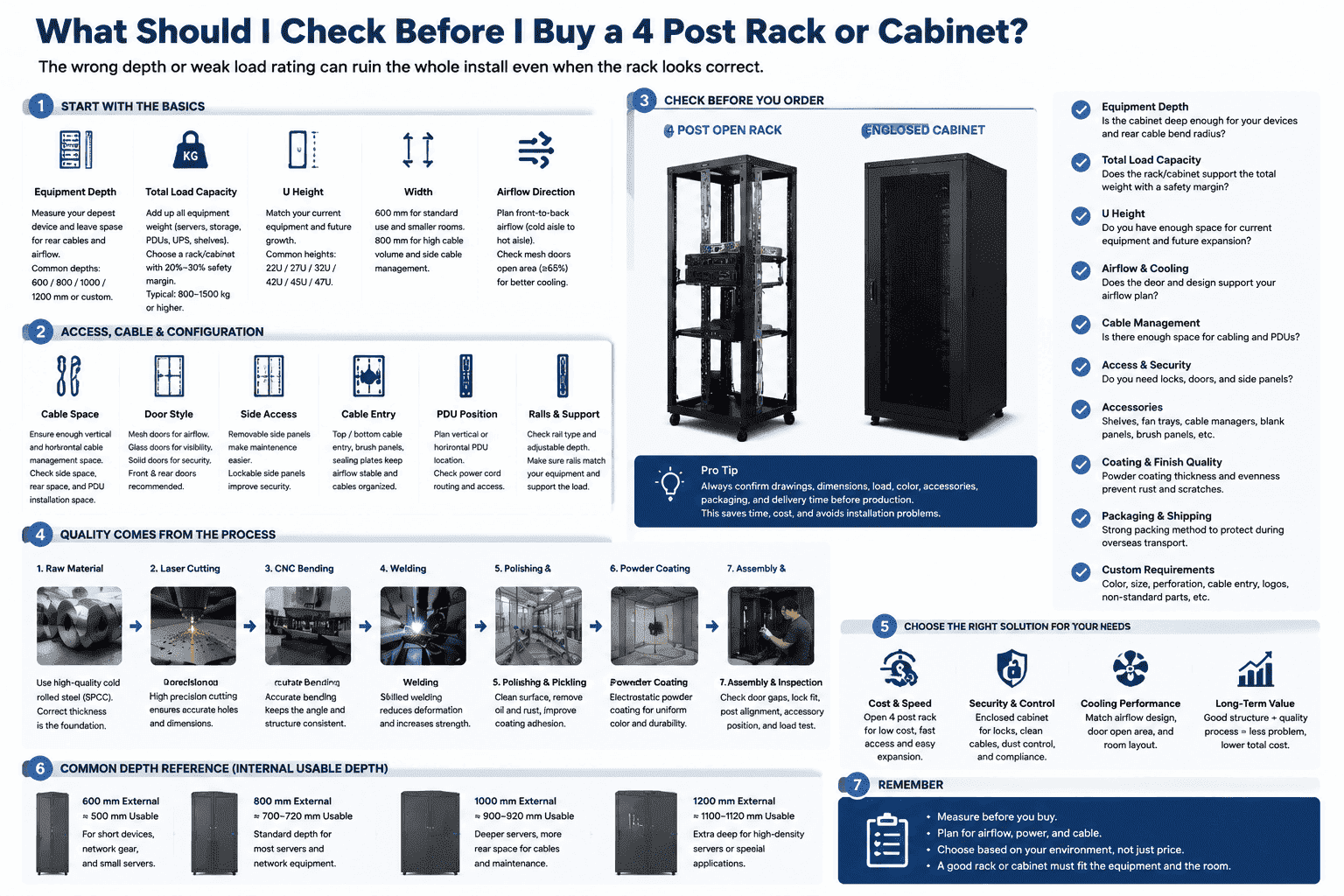
I never choose only by photo. Photos hide many important details. I start with the server depth. A deep server may need a 1000 mm or 1200 mm cabinet. If the cabinet is too shallow, the rear cables may bend too hard, and the door may not close.11 I then check the total weight. A cabinet loaded with servers, UPS units, storage, and PDUs can become very heavy. I want the frame, posts, base, casters, and leveling feet to match that load. I also check the door open area. A mesh door must allow enough airflow. I check if the customer needs front and rear doors, side panels, top cable entry, bottom cable entry, brush panels, fan trays, shelves, rails, or special perforated doors.
| Check item | Why I check it |
|---|---|
| Equipment depth | I need enough rear cable space |
| Total load | I need safe long-term support |
| U height | I need enough space for growth |
| Width | I choose 600 mm or 800 mm based on cable needs |
| Door type | I match airflow, security, and appearance |
| Cable entry | I avoid messy cable bending |
| Coating quality | I prevent rust and surface damage |
| Packaging | I protect the product during overseas shipping |
| Custom parts | I match non-standard project needs |
As a factory, I pay close attention to process quality. I know many problems start before assembly. The raw material must be correct. Laser cutting must be accurate. Bending must keep the angle. Welding must control shape change. Polishing must clean the surface. Pickling and powder coating must protect the steel. Final assembly must check door gaps, lock fit, post alignment, and accessory position. This matters more for custom non-standard cabinets because one wrong hole can stop the whole install. I prefer to confirm drawings, dimensions, load, color, packaging, and accessories before production. This saves time for both sides.
Conclusion
I choose 4 post racks for open airflow, speed, and cost. I choose cabinets for security, order, airflow control, and production-grade operation.
"19-inch rack", https://en.wikipedia.org/wiki/19-inch_rack. The cited standards-oriented source identifies 19 inches as 482.6 mm in the context of standardized rack mounting dimensions, supporting the article's metric statement. Evidence role: definition; source type: institution. Supports: The source should confirm that the nominal 19-inch rack width equals 482.6 mm and is used in equipment rack standards.. ↩
"42U Server Racks & Cabinets, price ⚡️", https://sysracks.com/catalog/racks-by-size/42u/?srsltid=AfmBOopAIjO9ldYwQ4R_HG0up0WkHTdq9Y8JkTULrrOMTCc23kGMaeL4. The cited reference explains rack-unit sizing and documents 42U as a commonly used full-height rack configuration, supporting the article's statement about typical cabinet height. Evidence role: general_support; source type: encyclopedia. Supports: The source should explain rack units and show that full-height racks are commonly described in U counts such as 42U.. Scope note: This supports 42U as a common convention, not as a mandatory standard for all data centers. ↩
"(PDF) ASHRAE TC9.9 Data Center Networking Equipment", https://www.academia.edu/40756897/ASHRAE_TC9_9_Data_Center_Networking_Equipment_Issues_and_Best_Practices. The cited data center thermal guidance explains that many IT systems are designed for front-to-back airflow and that rack design can help preserve the separation of intake and exhaust paths, supporting the article's statement about cabinet airflow guidance. Evidence role: mechanism; source type: institution. Supports: The source should explain that server airflow is commonly front-to-back and that rack or cabinet design can support this airflow path.. Scope note: This is contextual support; actual airflow performance depends on cabinet perforation, cable management, blanking, equipment placement, and room cooling design. ↩
"[PDF] Achieving Energy-Efficient Data Centers with New ASHRAE ...", https://www1.eere.energy.gov/femp/pdfs/fft_datacenter_presentation.pdf. The cited reliability literature explains that elevated temperatures can accelerate electronic component degradation and failure mechanisms, supporting the article's claim that poor thermal conditions can shorten hardware life. Evidence role: mechanism; source type: paper. Supports: The source should explain how higher operating temperatures accelerate failure mechanisms or reduce reliability in electronic equipment.. Scope note: The exact rate of degradation depends on component design, workload, humidity, and manufacturer specifications. ↩
"Move to a Hot Aisle/Cold Aisle Layout", https://www.energystar.gov/products/data_center_equipment/16-more-ways-cut-energy-waste-data-center/move-hot-aislecold-aisle-layout. The cited data center airflow source describes how exhaust air can recirculate to server intakes when airflow paths are poorly arranged, supporting the warning about hot air returning to the front of equipment. Evidence role: mechanism; source type: research. Supports: The source should describe exhaust-air recirculation and its effect on IT equipment inlet temperatures in poorly managed rack layouts.. ↩
"quantifying air flow rate through a server in an operational ...", https://mavmatrix.uta.edu/context/mechaerospace_theses/article/1223/type/native/viewcontent. The cited thermal-management source notes that perforated cabinet doors can support IT equipment cooling when sufficient open area is provided and airflow is organized from intake to exhaust, supporting the article's point that doors are not inherently cooling barriers. Evidence role: mechanism; source type: institution. Supports: The source should explain that perforated or mesh rack doors can be compatible with data center cooling when they provide adequate open area and align with front-to-back equipment airflow.. Scope note: This does not prove that every mesh door is adequate; performance depends on perforation percentage, static pressure, equipment density, and room airflow. ↩
"Manage Airflow for Cooling Efficiency - Energy Star", https://www.energystar.gov/products/data_center_equipment/16-more-ways-cut-energy-waste-data-center/manage-airflow-cooling-efficiency. The cited data center efficiency guidance states that blanking panels in unused rack spaces help limit recirculation and maintain proper airflow separation, supporting the article's claim about stopping hot-air looping through empty U positions. Evidence role: mechanism; source type: government. Supports: The source should state that blanking panels in unused rack positions help prevent bypass or recirculation airflow and improve inlet-air management.. ↩
"[PDF] NIST.SP.800-171r3.pdf", https://nvlpubs.nist.gov/nistpubs/SpecialPublications/NIST.SP.800-171r3.pdf. The cited information-security guidance identifies locks, barriers, and controlled physical access as relevant safeguards for information systems, supporting the article's view that lockable cabinets add physical security compared with open racks. Evidence role: general_support; source type: government. Supports: The source should describe physical access controls such as barriers, locks, or controlled access to protect information systems and equipment.. Scope note: The source supports the security principle rather than comparing a specific cabinet model against a specific open rack. ↩
"NIST.SP.800-53r5.pdf", https://nvlpubs.nist.gov/nistpubs/specialpublications/NIST.SP.800-53r5.pdf. The cited security-control framework treats physical protection as a combination of access authorization, monitoring, visitor management, and barriers, supporting the article's statement that a locked cabinet is only one element of physical security. Evidence role: expert_consensus; source type: government. Supports: The source should describe multiple physical security control types, such as access authorization, monitoring, visitor control, and physical barriers.. ↩
"NIST.SP.800-53r5.pdf", https://nvlpubs.nist.gov/nistpubs/specialpublications/NIST.SP.800-53r5.pdf. The cited compliance or security standard requires organizations to restrict physical access to sensitive systems or components, supporting the article's statement that some customers may need locked enclosures to satisfy access-control requirements. Evidence role: general_support; source type: institution. Supports: The source should show that compliance frameworks may require restricting physical access to systems or media, which can include locked rooms or enclosures depending on implementation.. Scope note: This is contextual support; specific compliance obligations vary by standard, audit scope, risk assessment, and whether room-level controls already satisfy the requirement. ↩
"Network Infrastructure and Installation Standard - VUIT Support", https://tdx.vanderbilt.edu/TDClient/33/Portal/KB/ArticleDet?ID=306. The cited cabling guidance states that telecommunications and data cables should maintain specified minimum bend radii, supporting the article's warning that insufficient cabinet depth can create rear-cable clearance and bending problems. Evidence role: mechanism; source type: institution. Supports: The source should explain that cables have minimum bend-radius requirements and that rack or cabinet layouts must provide enough clearance to avoid excessive bending.. Scope note: The source supports the cable-bending mechanism; whether a door closes depends on the particular cabinet depth, connector type, cable bundle size, and equipment layout. ↩
