
Server Racks, Data Center Cabinets & Power Units: What Do They Really Do?

I see many projects lose time because the rack, cabinet, and power unit are treated as small parts. That mistake creates heat, wiring, and safety problems.
-
What Is A Server Rack In A Data Center?
I have seen buyers choose a rack only by height. That can be risky. A wrong rack makes equipment hard to install, align, and support.
A server rack is a 19-inch metal frame that holds rack-mounted equipment. I use it to support servers, switches, patch panels, storage units, and other devices. Its main job is mechanical carrying, fixed positioning, and standard mounting.
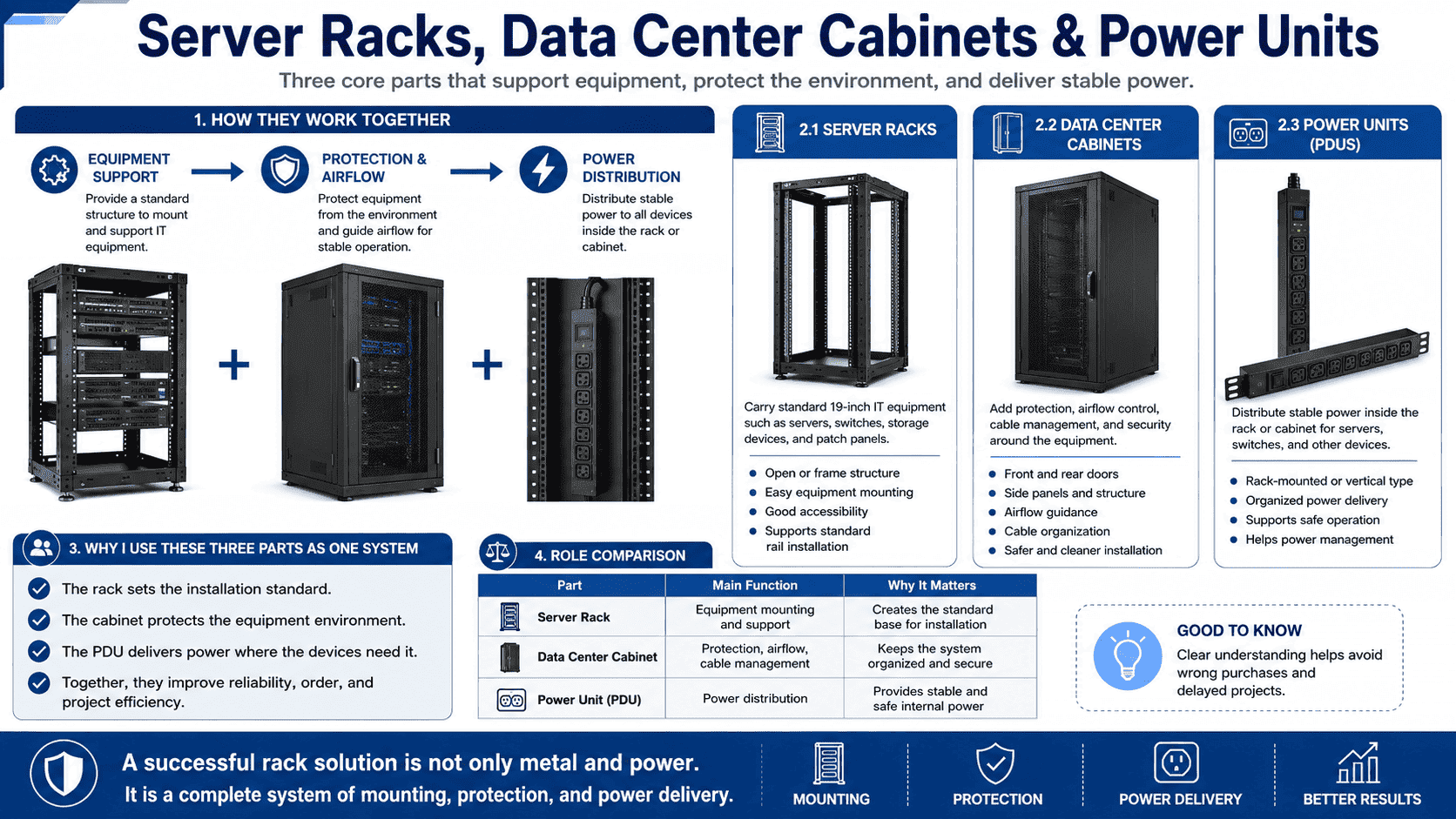
A server rack is the most basic structure in a data center. I call it the skeleton of the equipment system. It follows the international 19-inch standard.1 The width is standard. The vertical height is measured by RU. One RU is 1.75 inches.2 This makes equipment stacking simple and global.
A rack does not usually include front doors, rear doors, side panels, top covers, bottom panels, or lock systems. It also does not manage dust, airflow, or power by itself. Its core value is accurate mounting. Four vertical mounting rails carry the devices. The hole spacing must be correct.3 The frame must stay square. The load capacity must match the project.
When I check a server rack in our factory, I always look at several points first.
| Item I Check | Why I Check It | What It Affects |
|---|---|---|
| 19-inch mounting width | It must match global rack equipment | Equipment compatibility |
| RU height marking | It guides equipment placement | Installation order |
| Vertical rail strength | It carries device weight | Load safety |
| Frame squareness | It keeps holes aligned | Fast installation |
| Surface finish | It protects metal from rust | Long service life |
I have produced many standard and custom rack structures for overseas customers. Some customers need open frames for labs. Some need heavy-duty frames for storage equipment. Some need special hole patterns for non-standard devices. I always ask about equipment weight, depth, cable direction, and installation place before production. A rack is simple, but it must be precise. If the frame is not precise, every device after it will suffer.
What Makes A Data Center Cabinet Different From A Server Rack?
I have seen people call every metal IT enclosure a rack. That wording can hide real differences. A cabinet is not only a rack with doors.
A data center cabinet is a closed equipment cabinet built around a standard rack frame. I use it to provide equipment mounting, dust protection, physical security, airflow control, cable routing, and a cleaner data center layout.
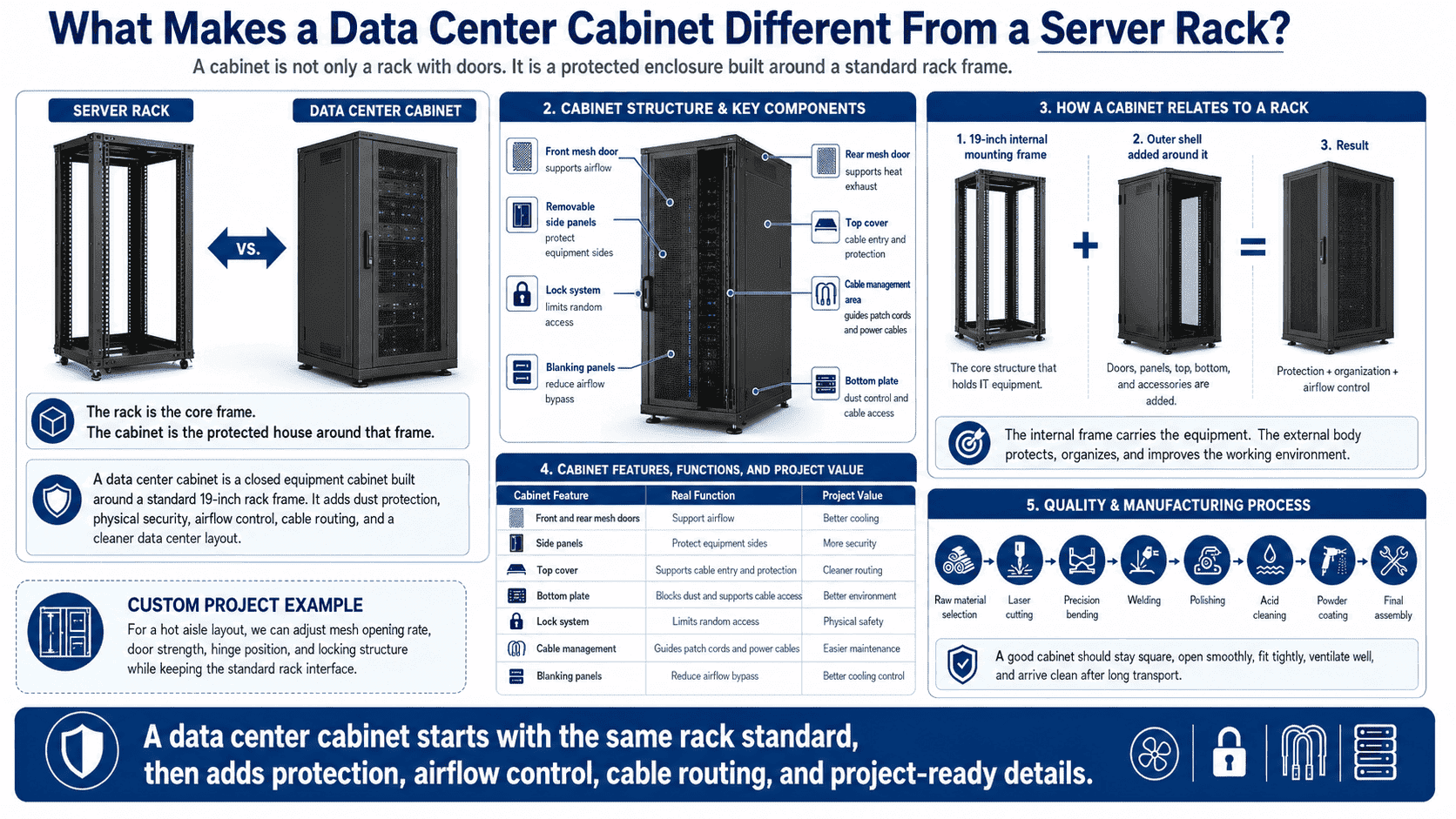
A data center cabinet starts with the same 19-inch internal mounting structure.4 Then it adds an outer shell. This shell changes the function. The cabinet can include front and rear doors, removable side panels, top panels, bottom plates, cable entry points, fan trays, mesh doors, locks, grounding, and accessories.
I often describe the relationship in one simple way. The rack is the core frame. The cabinet is the protected house around that frame. The internal frame carries the equipment. The external body protects, organizes, and improves the working environment.
A cabinet helps with many real site problems.
| Cabinet Feature | Real Function | Project Value |
|---|---|---|
| Front and rear mesh doors5 | They support airflow | Better cooling |
| Side panels | They protect equipment sides | More security |
| Top cover | It supports cable entry and protection | Cleaner routing |
| Bottom plate | It blocks dust and supports cable access | Better environment |
| Lock system | It limits random access | Physical safety |
| Cable management | It guides patch cords and power cables | Easier maintenance |
| Blind panels | They reduce airflow bypass | Better cooling control |
In our sheet metal production, cabinet quality depends on many small steps. I pay attention to raw material selection, laser cutting, precision bending, welding, polishing, acid cleaning, powder coating, and final assembly. A good cabinet should not twist after assembly. The door should open smoothly. The mesh should allow enough air. The panels should fit tightly. The coating should be even. The cabinet should look clean after long transport.
I remember one custom order where the customer needed special mesh doors for a hot aisle layout. The equipment produced more heat than normal network devices. We adjusted the mesh opening rate and door strength. We also checked the hinge position and locking structure. The final cabinet still looked standard, but its details were made for that project. This is why I never treat a cabinet as a simple box.
Why Is A PDU Important Inside A Rack Or Cabinet?
I have seen stable equipment fail because power distribution was ignored. A cheap power strip can become the weakest point in an expensive cabinet.
A PDU is a rack-mounted power distribution unit.6 I use it to divide UPS power or room power into safe outputs for servers, switches, and network devices. It can support overload protection, power monitoring, circuit control, and remote management.
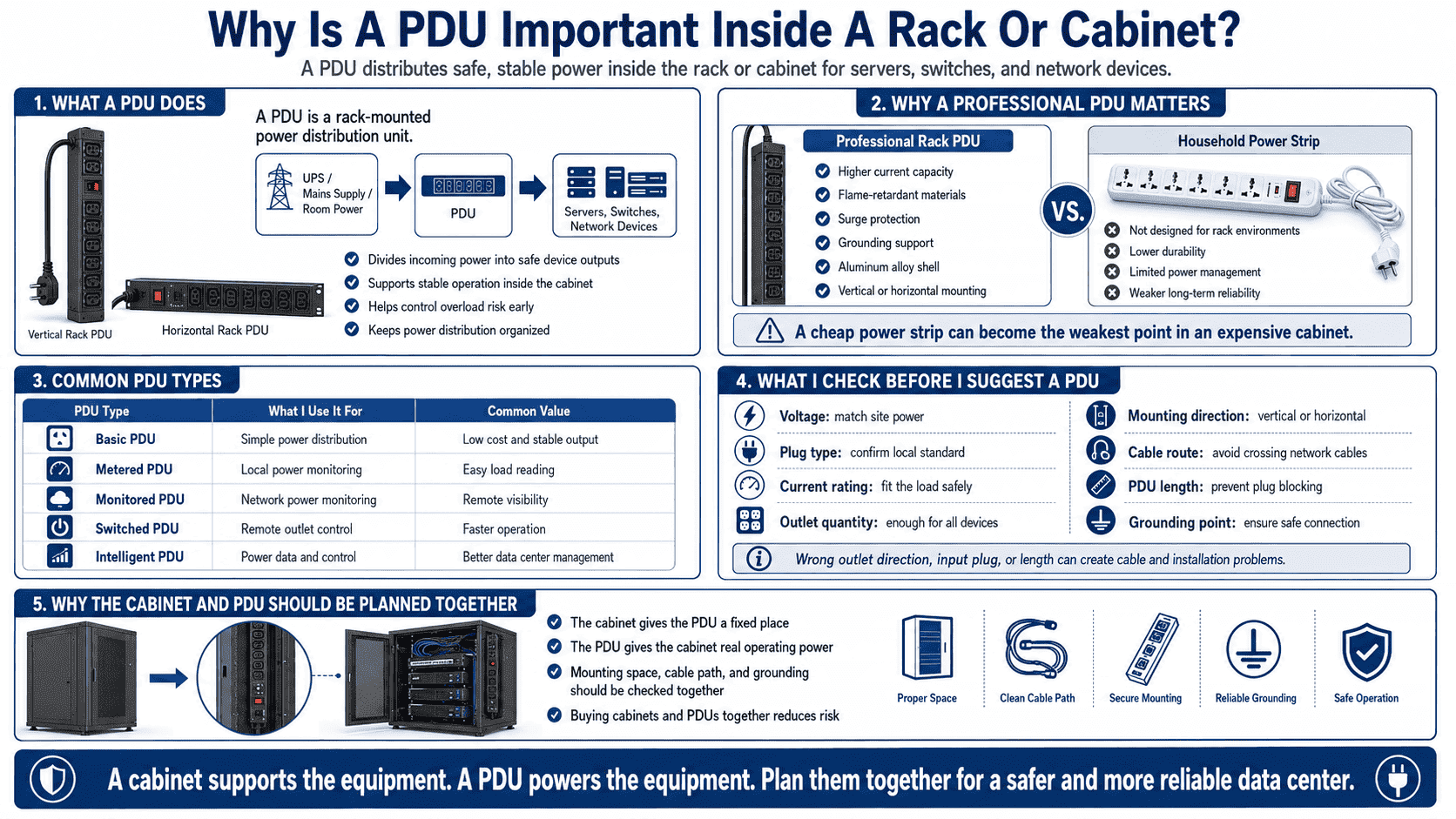
A PDU is the power end point inside the cabinet. It takes power from the UPS, mains supply, or data room distribution system. Then it supplies each device in the cabinet.7 This job sounds basic, but it is critical. Every server needs stable power. Every switch needs safe power. Every overload risk must be controlled early.
A professional PDU is not the same as a household power strip. A data center PDU needs stronger current capacity, flame-retardant materials, surge protection, grounding8, and a stable shell. Many PDUs use an aluminum alloy shell. Many models support vertical or horizontal installation. Smart PDUs can monitor current, voltage, power, and energy use.9 Some can support remote switching and alarm functions10.
I usually divide PDUs by function like this.
| PDU Type | What I Use It For | Common Value |
|---|---|---|
| Basic PDU | Simple power distribution | Low cost and stable output |
| Metered PDU | Local power monitoring | Easy load reading |
| Monitored PDU | Network power monitoring | Remote visibility |
| Switched PDU | Remote outlet control | Faster operation |
| Intelligent PDU | Power data and control | Better data center management |
The PDU also affects cable order. If the outlet direction is wrong, power cables may cross network cables. If the PDU length is wrong, plugs may block equipment. If the input plug is wrong, the cabinet may not connect to site power. I always ask customers about voltage, plug type, current, outlet quantity, mounting direction, and cable route before I suggest a PDU.
In many overseas orders, customers buy cabinets and PDUs together. This is safer because I can check the mounting space, cable path, and grounding points at the same time. The cabinet gives the PDU a fixed place. The PDU gives the cabinet real operating power. They should be planned together, not separately.
How Do These Three Parts Work As One System?
I have seen projects buy racks, cabinets, and PDUs from different places without checking fit. That often creates gaps, blocked airflow, and messy wiring.
The server rack provides mechanical carrying. The data center cabinet provides environmental protection and structure. The PDU provides power distribution. I treat them as one complete system for mounting, protection, cooling, wiring, and safe operation.
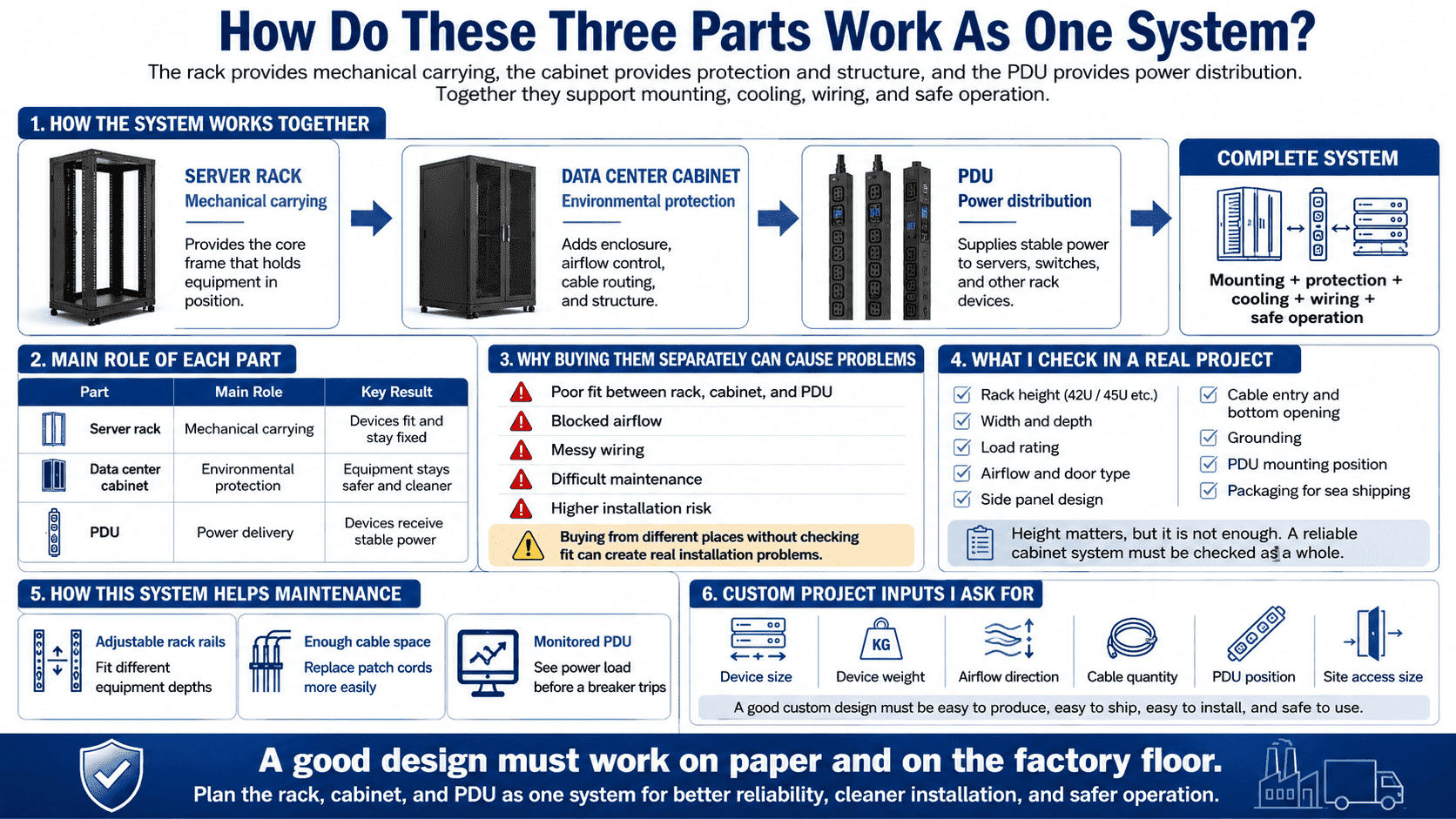
A complete data center installation needs more than a strong metal frame. It needs equipment to be mounted in the right place. It needs air to move in the right direction. It needs cables to be clear and serviceable. It needs power to be stable and safe. The rack, cabinet, and PDU each take one part of this job.
I usually explain the system with three simple words.
| Part | Main Role | Key Result |
|---|---|---|
| Server rack | Mechanical carrying | Devices fit and stay fixed |
| Data center cabinet | Environmental protection | Equipment stays safer and cleaner |
| PDU | Power delivery | Devices receive stable power |
This system also affects future maintenance. If the rack rails are adjustable, technicians can install different depths of equipment. If the cabinet has enough cable space, technicians can replace patch cords without pulling everything out. If the PDU has monitoring, the operation team can see power load before a breaker trips.
I often see customers focus only on cabinet height, such as 42U or 45U. Height matters, but it is not enough. I also check width, depth, load rating, airflow, door type, side panel design, cable entry, bottom opening, grounding, PDU mounting, and packaging for sea shipping. A cabinet for a clean data room is different from a cabinet for a weak current room. A cabinet for network switches is different from a cabinet for heavy servers.
When I build custom non-standard cabinets, I also need to check the real equipment list. I ask for device size, device weight, airflow direction, cable quantity, PDU position, and site access size. I do this because a cabinet must be easy to produce, easy to ship, easy to install, and safe to use. A good design must work on paper and on the factory floor.
What Should I Check Before Buying Or Customizing Cabinets?
I have seen good designs fail because small details were not confirmed early. A missing cable hole or wrong depth can delay the whole project.
Before I buy or customize a rack cabinet system, I check equipment size, load, airflow, cable path, power needs, material thickness, surface finish, packaging, and site installation limits. These details decide whether the cabinet works smoothly after delivery.
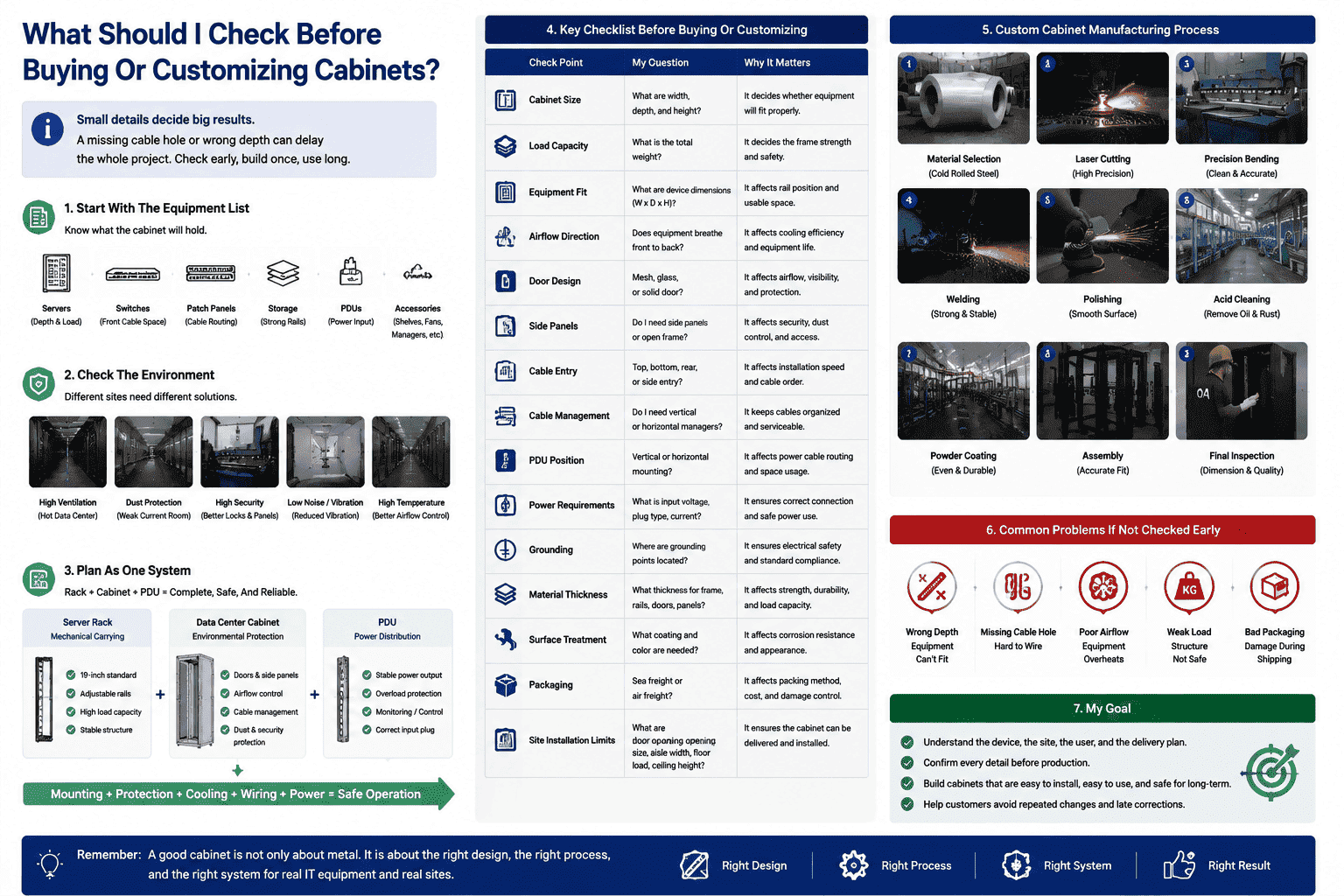
I always start with the equipment list. I need to know what the cabinet will hold. Servers need depth and load strength. Switches may need front cable space. Patch panels need clean cable routing. Storage devices may need stronger rails. PDUs need fixed mounting space and correct input plugs. Accessories like shelves, fans, blanking panels, and cable managers also need space.
Then I check the environment. A data center may need high ventilation mesh doors. A weak current room may need more dust protection. A high-security site may need better locks and side panels. A noisy equipment room may need a cabinet structure that reduces vibration. A hot site may need better air path control.
For custom production, I use a simple checklist.
| Check Point | My Question | Why It Matters |
|---|---|---|
| Cabinet size | What are width, depth, and height? | It decides equipment fit |
| Load capacity | What is the total weight? | It decides frame strength |
| Airflow | Does equipment breathe front to back?11 | It affects cooling |
| Door design | Mesh, glass, or solid door? | It affects airflow and protection |
| Cable entry | Top, bottom, rear, or side? | It affects installation speed |
| PDU position | Vertical or horizontal mounting? | It affects power cable order |
| Surface treatment | What coating and color are needed? | It affects durability and appearance |
| Packaging | Is it for sea freight or air freight? | It affects damage control |
In our factory, I prefer to solve these questions before cutting metal. Laser cutting is precise, but wrong data still makes a wrong part. Precision bending can make clean lines, but the structure must be planned well. Welding can make the frame strong, but the cabinet must not deform. Powder coating can make a clean surface, but all holes and grounding points must be ready before coating.
I believe custom cabinet production is not only sheet metal work. It is a bridge between IT equipment and the real machine room. I need to understand the device, the site, the user, and the delivery plan. This is how I help customers avoid repeated changes and late corrections.
Conclusion
I treat racks, cabinets, and PDUs as one system because they decide equipment support, protection, airflow, wiring, and safe power in every data center.
"19-inch rack - Wikipedia", https://en.wikipedia.org/wiki/19-inch_rack. IEC 60297 and EIA-310 define standardized dimensions for 19-inch rack mounting, supporting the statement that conventional server racks follow an international 19-inch equipment format. Evidence role: definition; source type: institution. Supports: The source should identify IEC 60297 or EIA-310 as standards for 19-inch rack mounting dimensions.. ↩
"Rack unit - Wikipedia", https://en.wikipedia.org/wiki/Rack_unit. Reference descriptions of the 19-inch rack system define one rack unit as 1.75 inches, supporting the article’s stated RU measurement. Evidence role: definition; source type: encyclopedia. Supports: The source should confirm that one rack unit, or U/RU, equals 1.75 inches.. ↩
"19-inch rack", https://en.wikipedia.org/wiki/19-inch_rack. Rack standards such as EIA-310 and IEC 60297 specify mounting-hole pitch and rack-unit spacing, supporting the claim that correct hole spacing is required for proper equipment alignment. Evidence role: mechanism; source type: institution. Supports: The source should show that rack mounting-hole spacing is standardized and affects the fit of rack-mounted equipment.. ↩
"19-inch rack", https://en.wikipedia.org/wiki/19-inch_rack. Standards and technical references for rack enclosures describe cabinets as enclosures built around standardized 19-inch mounting structures; this supports the article’s description of standard data center cabinets, although custom cabinets may vary. Evidence role: definition; source type: institution. Supports: The source should support that standard rack enclosures or cabinets use a 19-inch internal mounting frame.. Scope note: Contextual support for standard rack cabinets, not proof that every custom data center cabinet uses the same internal structure. ↩
"Move to a Hot Aisle/Cold Aisle Layout", https://www.energystar.gov/products/data_center_equipment/16-more-ways-cut-energy-waste-data-center/move-hot-aislecold-aisle-layout. Data center thermal-management guidance describes perforated rack doors as a means of permitting front-to-rear airflow through equipment cabinets, supporting the claim that mesh doors aid cooling; the guidance does not establish that any specific mesh design is sufficient for every heat load. Evidence role: mechanism; source type: institution. Supports: The source should explain that perforated or mesh rack doors allow cooling air to pass through equipment cabinets.. Scope note: Contextual support; actual cooling performance depends on perforation area, equipment airflow, fan capacity, and room layout. ↩
"Data center - Wikipedia", https://en.wikipedia.org/wiki/Data_center. Reference sources define a power distribution unit as equipment used to distribute electrical power and describe rack-mounted PDUs as versions installed in equipment racks, supporting the article’s definition. Evidence role: definition; source type: encyclopedia. Supports: The source should define a power distribution unit and identify rack-mounted PDUs as devices used to distribute power in equipment racks.. ↩
"Electrical Power Chain Tool", https://datacenters.lbl.gov/resources/electrical-power-chain-tool. Data center power-management references describe rack PDUs as downstream distribution devices that deliver upstream facility or UPS power to IT equipment in racks, supporting the article’s account of the PDU’s role. Evidence role: mechanism; source type: research. Supports: The source should explain that rack PDUs distribute branch or UPS-fed power to IT loads within racks or cabinets.. ↩
"PRVV0001-R1_UL 62368-1 2019.pdf", https://www.eac.gov/sites/default/files/2024-08/PRVV0001-R1_UL%2062368-1%202019.pdf. Electrical safety standards for information and communication technology equipment address fire hazards, protective bonding or grounding, and related safety controls, while surge-protection standards address transient overvoltage protection; together these sources contextualize the safety features listed for data center PDUs. Evidence role: expert_consensus; source type: institution. Supports: The source should support the relevance of fire safety, protective grounding, and surge protection standards for electrical distribution equipment.. Scope note: Contextual support; the exact required features depend on jurisdiction, product certification, facility design, and whether surge protection is integrated into the PDU or installed elsewhere. ↩
"Electrical Power Chain Tool", https://datacenters.lbl.gov/resources/electrical-power-chain-tool. Research and data center energy-management references describe monitored or intelligent PDUs as collecting electrical load data such as current, voltage, power, and energy consumption, supporting the article’s description of smart PDU monitoring functions. Evidence role: general_support; source type: research. Supports: The source should describe intelligent or monitored rack PDUs as devices that collect electrical measurements such as current, voltage, power, and energy.. ↩
"APC Switched Rack PDUs", https://www.apcguard.com/Switched-Rack-PDU.asp. Technical references on intelligent rack PDUs describe remote outlet control and alerting as common functions of switched or managed PDU models, supporting the article’s statement that some PDUs provide remote switching and alarms. Evidence role: general_support; source type: research. Supports: The source should support that switched or intelligent PDUs may provide remote outlet switching and alerting or alarm features.. Scope note: Contextual support; these functions are model-dependent and are not present in all PDUs. ↩
"Move to a Hot Aisle/Cold Aisle Layout", https://www.energystar.gov/products/data_center_equipment/16-more-ways-cut-energy-waste-data-center/move-hot-aislecold-aisle-layout. ASHRAE and data center thermal-management guidance treat equipment airflow direction, commonly front-to-back for servers, as a key factor in rack layout and hot-aisle/cold-aisle cooling design, supporting the article’s planning question. Evidence role: expert_consensus; source type: institution. Supports: The source should support that rack equipment airflow direction is central to data center cooling design, including hot-aisle/cold-aisle practices.. Scope note: Contextual support; not all equipment uses front-to-back airflow, so the source supports checking airflow direction rather than assuming a single pattern. ↩
