
What is a network rack?

Loose switches, routers, and cables can turn a simple room into a risk. I see heat, downtime, and slow maintenance happen when equipment has no clear home.
A network rack is a standard 19-inch metal frame or cabinet used to install and organize switches, routers, servers, patch panels, PDUs, and other network devices in one safe, fixed place.1
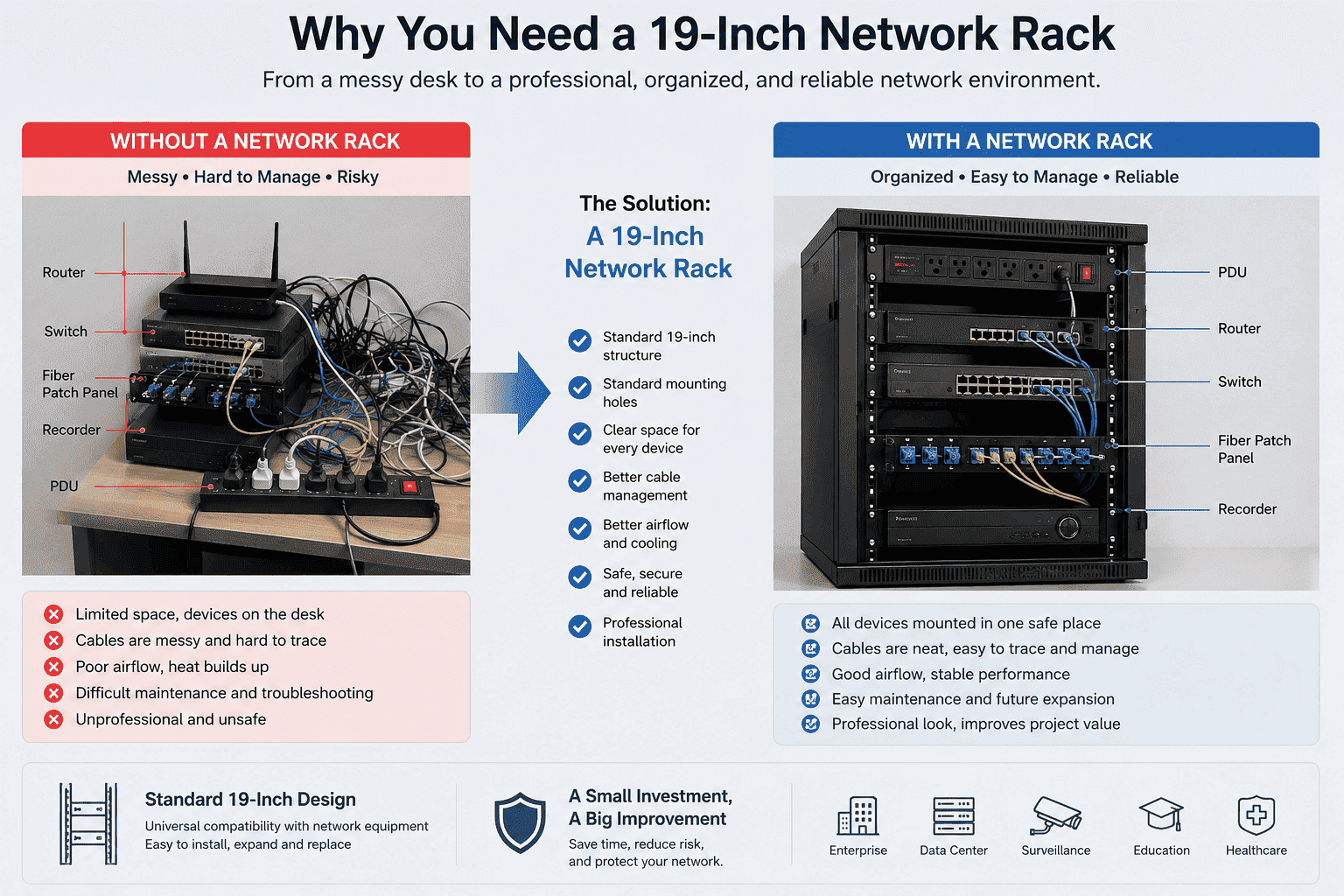
I have seen many projects start with only one switch on a desk. Then the customer adds a router, an optical fiber patch panel, a PDU, and a recorder. The desk becomes full. The cables become hard to trace. The heat becomes harder to control. A network rack solves this simple problem with a standard structure, standard mounting holes, and clear space for every device. I will explain it in the way I usually explain it to buyers, engineers, and project teams.
Why does a network rack use a 19-inch standard?
Wrong rack size wastes money fast. A switch may not fit. A shelf may shake. A PDU may block cables. I have seen this mistake many times.
A network rack uses the global 19-inch standard because most network devices are designed for this mounting width. The 19-inch size equals 482.6 mm2, and it lets switches, routers, servers, patch panels, and other equipment fit different racks worldwide.
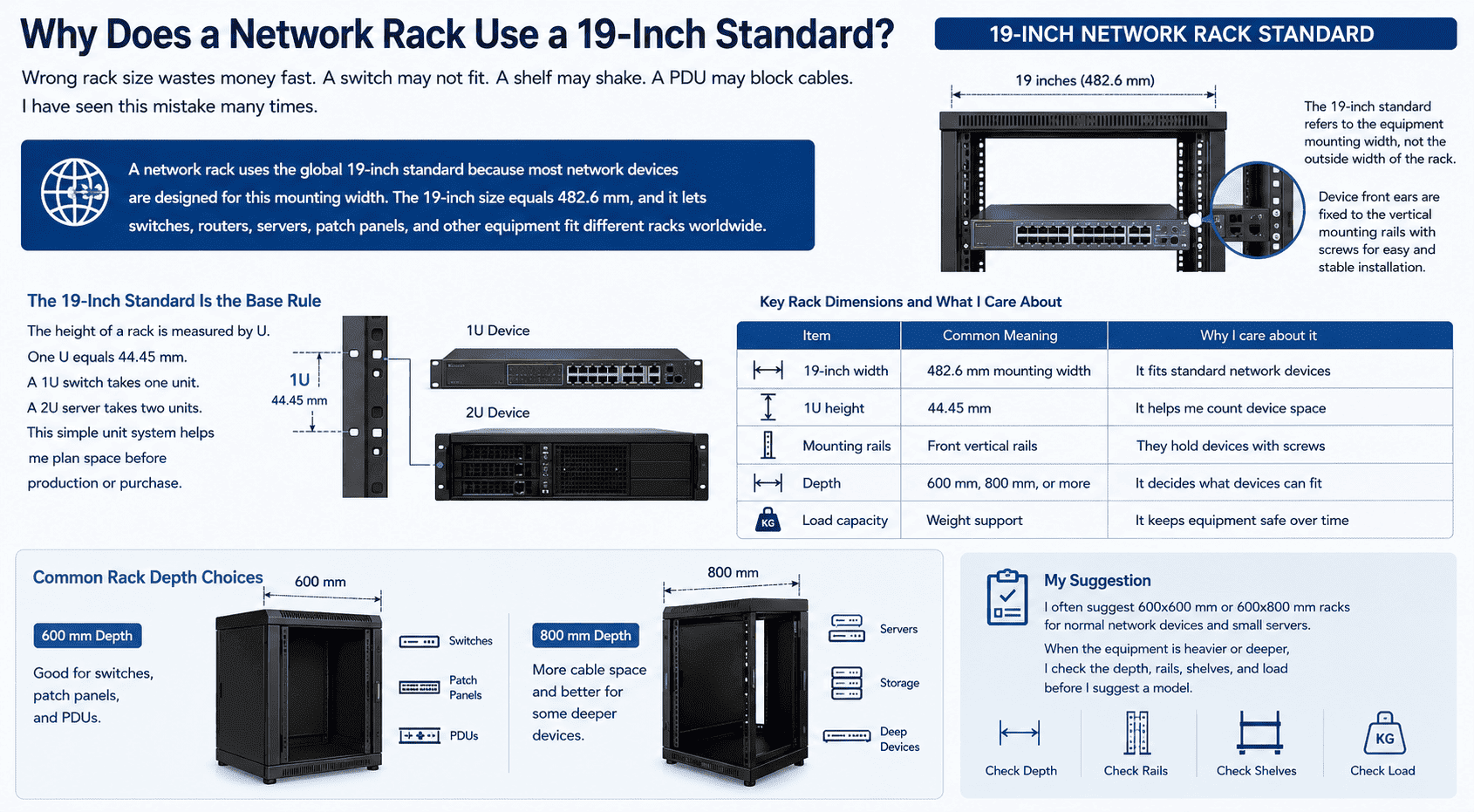
The 19-inch standard is the base rule of most network racks and cabinets. I usually tell customers that 19 inches does not mean the outside width of the rack. It means the standard equipment mounting width. The device front ears can be fixed to the vertical mounting rails with screws.3 This makes installation easier and more stable.
The height of a rack is measured by U. One U equals 44.45 mm.4 A 1U switch takes one unit. A 2U server takes two units. This simple unit system helps me plan space before production or purchase.
| Item | Common Meaning | Why I care about it |
|---|---|---|
| 19-inch width | 482.6 mm mounting width | It fits standard network devices |
| 1U height | 44.45 mm | It helps me count device space |
| Mounting rails | Front vertical rails | They hold devices with screws |
| Depth | 600 mm, 800 mm, or more | It decides what devices can fit |
| Load capacity | Weight support | It keeps equipment safe over time |
I often suggest 600x600 mm or 600x800 mm racks for normal network devices and small servers. A 600 mm depth is good for switches, patch panels, and PDUs. An 800 mm depth gives more cable space and works better for some deeper devices. When the equipment is heavier or deeper, I check the depth, rails, shelves, and load before I suggest a model.
What equipment can I install in a network rack?
Many people buy the rack after they buy the devices. Then they find no place for cables, power, or airflow. That order can create trouble.
I can install switches, routers, servers, optical fiber patch panels, copper patch panels, PDUs, hard disk video recorders, shelves, fans, cable managers, guide rails, grounding bars, and other network accessories in a network rack.
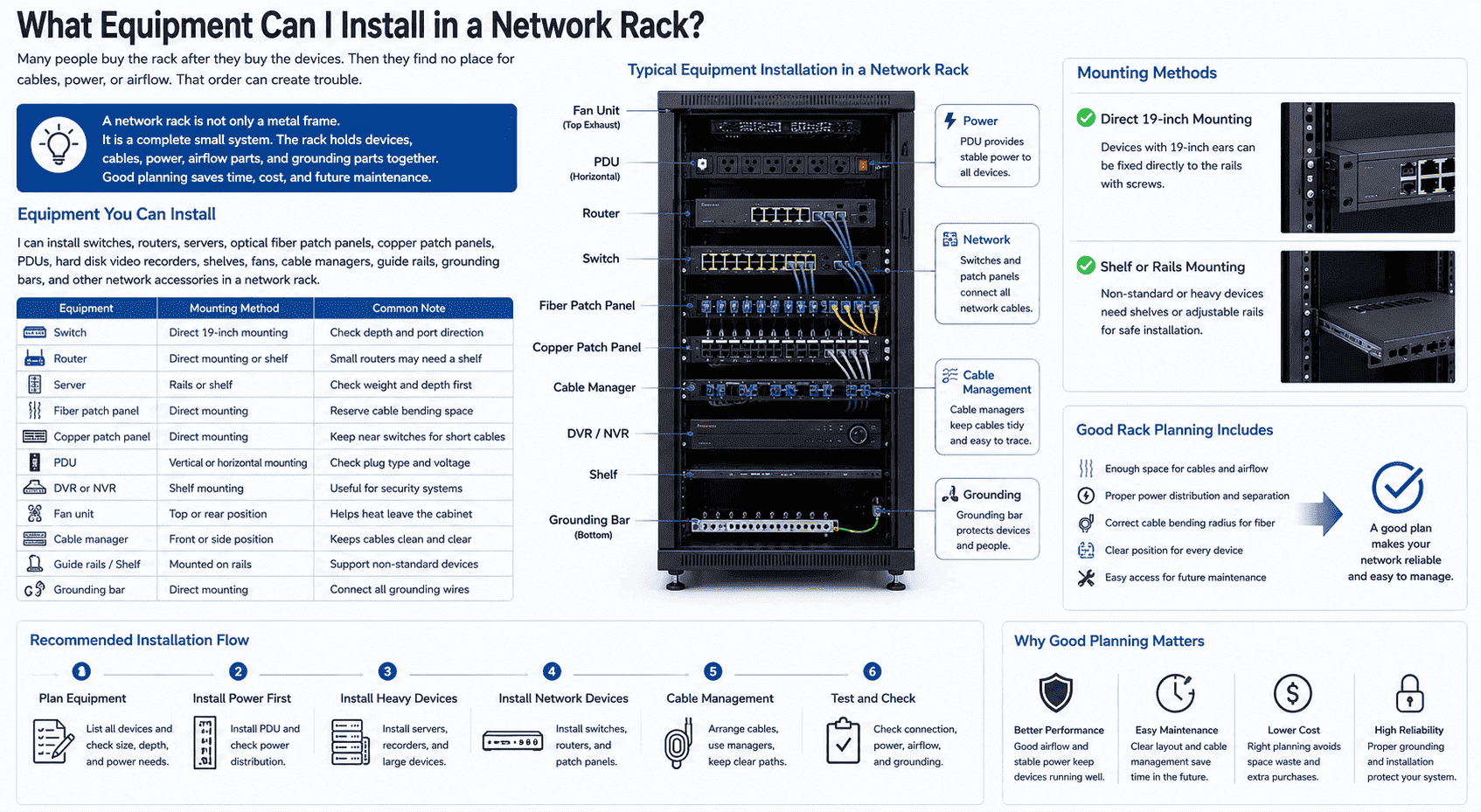
A network rack is not only a metal frame. I see it as a complete small system. The rack holds devices, cables, power, airflow parts, and grounding parts together. When I design a rack for a customer, I ask what equipment will be installed first. This step saves time and cost later.
Some devices can be fixed directly to the 19-inch rails. These include switches, routers, patch panels, and many PDUs. Some devices cannot be fixed directly. These devices need shelves or adjustable rails. A desktop router, a small recorder, or a non-standard device may need a fixed shelf.
| Equipment | Mounting Method | Common Note |
|---|---|---|
| Switch | Direct 19-inch mounting | Check depth and port direction |
| Router | Direct mounting or shelf | Small routers may need a shelf |
| Server | Rails or shelf | Check weight and depth first |
| Fiber patch panel | Direct mounting | Reserve cable bending space |
| PDU | Vertical or horizontal mounting | Check plug type and voltage |
| DVR or NVR | Shelf mounting | Useful for security systems |
| Fan unit | Top or rear position | Helps heat leave the cabinet |
| Cable manager | Front or side position | Keeps cables clean and clear |
I also check the wiring path. Network cables need space. Power cables need separation when possible. Fiber cables need a safe bending radius.5 If the rack is crowded, future work becomes slow. A good rack plan makes maintenance faster because every cable and device has a clear position.6
What sizes are common for floor-standing and wall-mounted network racks?
A rack that is too small fills up quickly. A rack that is too large wastes space. I always choose size by equipment count, room space, and future growth.
Common floor-standing network racks include 12U, 15U, 18U, 22U, 27U, 32U, 37U, 42U, and 47U. Common wall-mounted racks include 4U, 6U, 9U, 12U, 15U, and 18U.
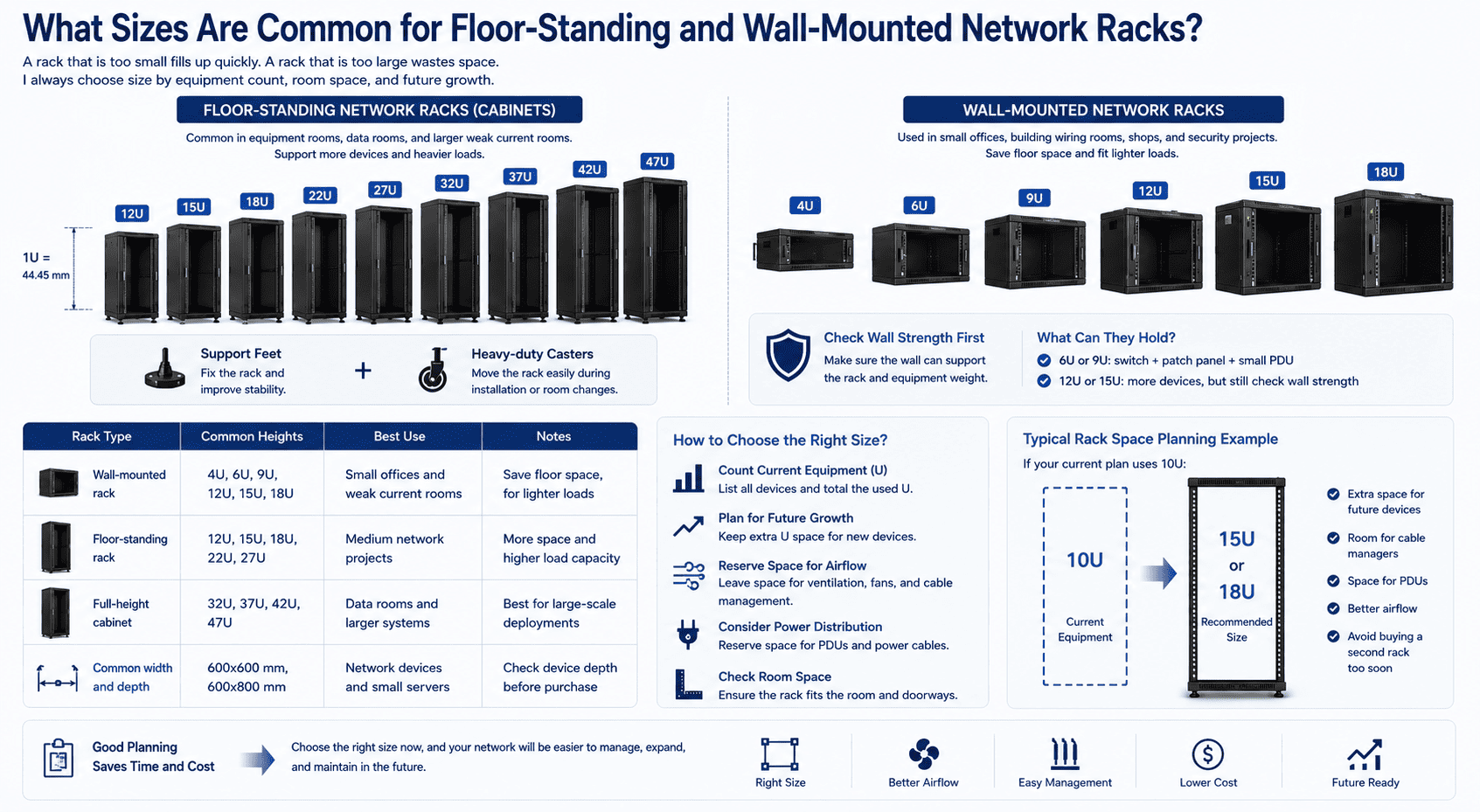
Floor-standing network racks are common in equipment rooms, data rooms, and larger weak current rooms. These racks support more devices and heavier loads. I often add support feet and heavy-duty casters for these racks. The feet help fix the rack. The casters help move it during installation or room changes. This mix is practical because many projects need both stability and movement.
Wall-mounted racks are different. I use them for small offices, building wiring rooms, shops, and security projects. They save floor space.7 They are good when the device count is low and the weight is not heavy. A 6U or 9U wall rack can hold a switch, a patch panel, and a small PDU. A 12U or 15U wall rack can hold more parts, but I still check the wall strength first.
| Rack Type | Common Heights | Best Use |
|---|---|---|
| Wall-mounted rack | 4U, 6U, 9U, 12U, 15U, 18U | Small offices and weak current rooms |
| Floor-standing rack | 12U, 15U, 18U, 22U, 27U | Medium network projects |
| Full-height cabinet | 32U, 37U, 42U, 47U | Data rooms and larger systems |
| Common width and depth | 600x600 mm, 600x800 mm | Network devices and small servers |
I usually keep extra U space for future devices. If the current plan uses 10U, I may suggest 15U or 18U. This simple choice prevents a second rack purchase too soon. I also remind customers to reserve space for airflow, cable managers, and PDUs, not only active equipment.
What is the difference between an open rack and an enclosed network cabinet?
Choosing the wrong style creates daily problems. An open rack may lack protection. A closed cabinet may trap heat. I choose by site conditions.
An open rack has no doors or side panels, so it is light and easy to access. An enclosed network cabinet has doors and side panels, so it gives better dust protection, security, and cleaner appearance.8

I often use the word rack for open structures and cabinet for closed structures, but many customers use both words in a general way. The open rack is simple. It has vertical posts, beams, base parts, and strong support. It gives easy cable access from all sides. It also gives better natural airflow because no door blocks the front or rear.9 I like open racks in controlled rooms where security and dust are not big problems.
An enclosed cabinet has front and rear doors. It can also have left and right side panels. The front door can be a glass door or a mesh door. A glass door looks clean. It helps block dust, mice, and noise. It also gives a better appearance in an office or customer-facing room. The weakness is ventilation. A mesh door gives better heat flow. It is more suitable for high-density equipment and data center use.10
| Style | Main Strength | Main Weakness | I use it when |
|---|---|---|---|
| Open rack | Easy access and good airflow | Less dust and security protection | The room is controlled and clean |
| Glass door cabinet | Clean look and dust protection | Lower ventilation | The equipment load is low or medium |
| Mesh door cabinet | Strong airflow | Less visual cover | Heat output is high |
| Steel door cabinet | Strong protection | Harder to view equipment | Security is more important |
I also check load capacity. For heavier open racks, I use thicker posts, such as 2.0 mm uprights, stronger beams, a stable base, and heavy-duty casters. For cabinets, I check door strength, side panels, locks, and grounding. These small details decide long-term safety.
What materials and structure make a network rack reliable?
A weak rack may look fine at first. Then it bends, shakes, or rusts after use. I judge a rack by material, structure, and finish.
A reliable network rack is usually made from high-strength cold-rolled steel. It should have strong posts, stable beams, accurate mounting holes, good surface coating, proper grounding, and enough load capacity for long-term equipment use.
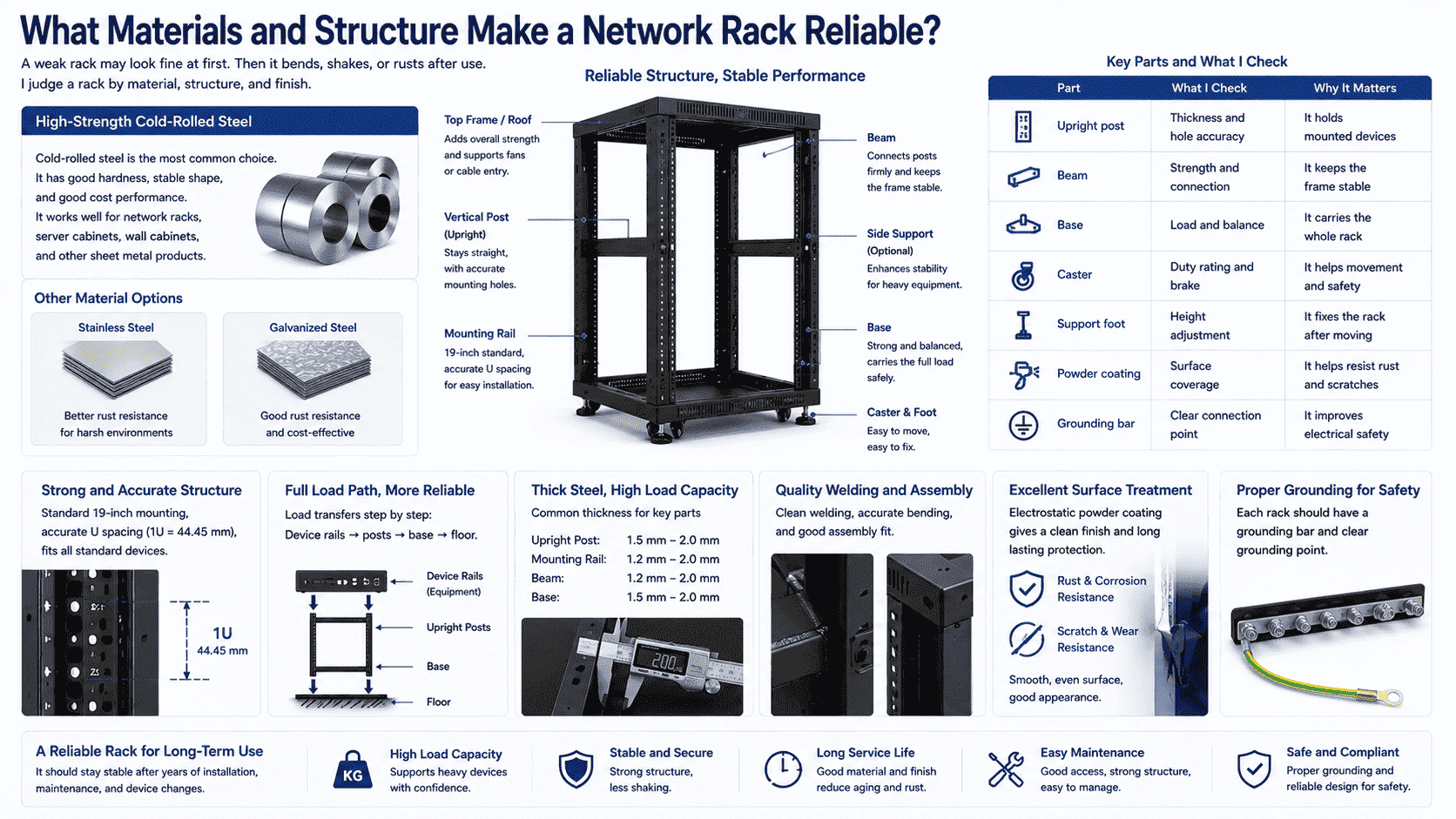
In my factory work, I pay close attention to steel quality. Cold-rolled steel is common because it has good hardness, stable shape, and good cost performance.11 It works well for network racks, server cabinets, wall cabinets, and other sheet metal products. Stainless steel and galvanized steel can also be used when the environment needs better rust resistance.
The structure matters as much as the material. The vertical posts must stay straight. The mounting holes must match standard equipment. The base must hold the full load. The beams must keep the rack stable. If the rack needs to carry servers or heavy power equipment, I do not only look at the outside size. I check the full load path from device rails to posts, from posts to base, and from base to floor.
| Part | What I check | Why it matters |
|---|---|---|
| Upright post | Thickness and hole accuracy | It holds mounted devices |
| Beam | Strength and connection | It keeps the frame stable |
| Base | Load and balance | It carries the whole rack |
| Caster | Duty rating and brake | It helps movement and safety |
| Support foot | Height adjustment | It fixes the rack after moving |
| Powder coating | Surface coverage | It helps resist rust and scratches |
| Grounding bar | Clear connection point | It improves electrical safety |
Surface treatment is also important. Electrostatic powder coating gives a clean surface and helps protect the steel.12 I check coating adhesion, color, and coverage. I also check welding, bending accuracy, and assembly fit. A good rack should not only look good on delivery. It should stay stable after years of installation, maintenance, and device changes.
What accessories should I choose for a network rack?
A rack without accessories can still hold equipment. Yet cable mess, heat, and power limits will appear soon. I always plan accessories early.
Common network rack accessories include shelves, cooling fans, cable managers, cable rings, PDUs, grounding bars, blank panels, ventilation panels, fixed rails, sliding rails, and adjustable mounting parts.
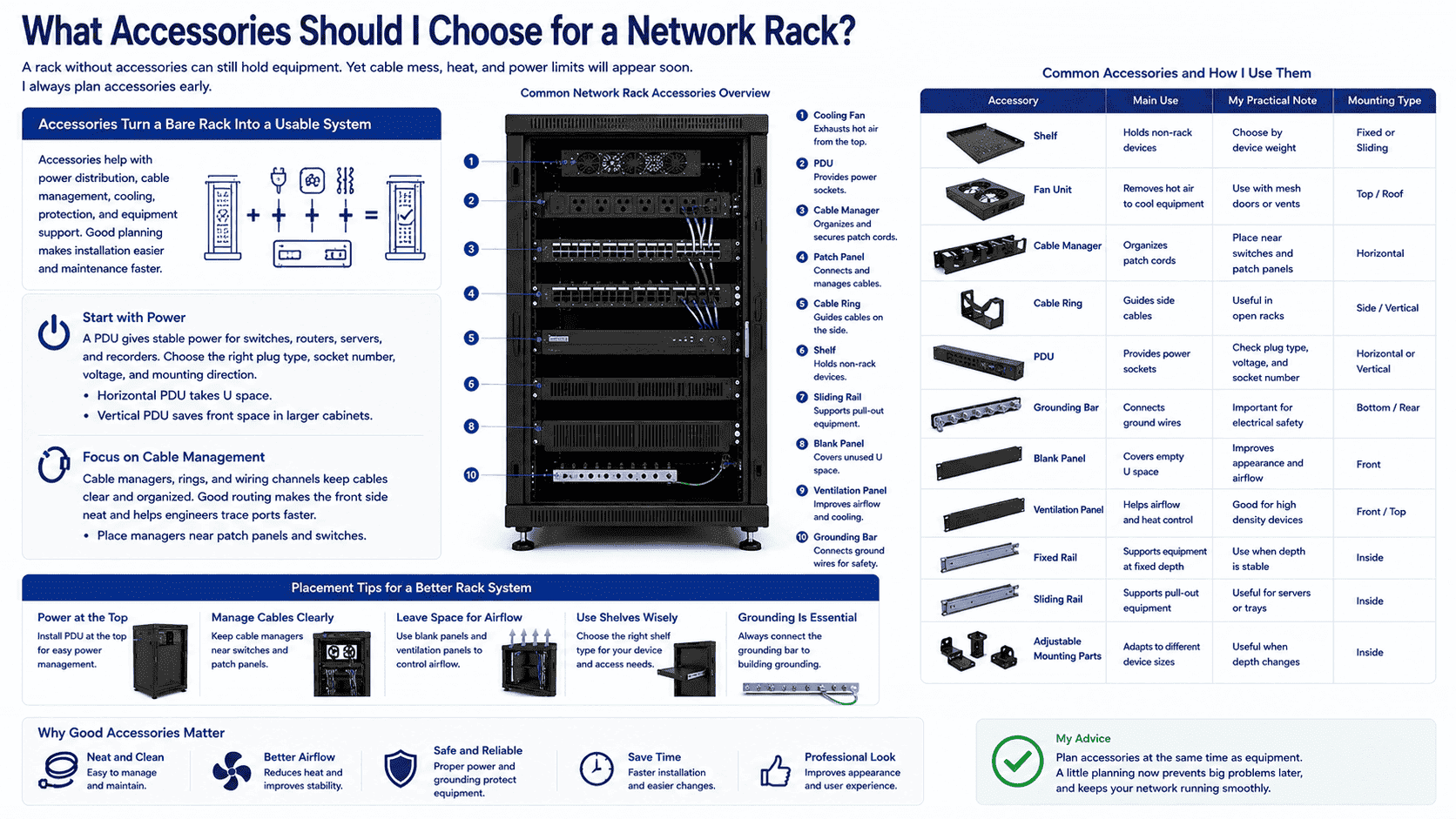
Accessories turn a bare rack into a usable system. I usually start with power. A PDU gives stable power distribution for switches, routers, servers, and recorders. The plug type, socket number, voltage, and mounting direction must match the project. A horizontal PDU takes U space. A vertical PDU saves front space in larger cabinets.
Then I check cable management. Cable managers, cable rings, and wiring channels keep network cables clear. Good cable routing makes the front side neat and helps engineers trace ports faster. Patch panels and switches usually need cable managers nearby. If I ignore this part, the rack looks fine on day one but becomes hard to maintain after changes.
| Accessory | Main Use | My practical note |
|---|---|---|
| Shelf | Holds non-rack devices | Choose by device weight |
| Fan | Removes hot air | Use with mesh doors or vents |
| Cable manager | Organizes patch cords | Place near switches and panels |
| Cable ring | Guides side cables | Useful in open racks |
| PDU | Provides power sockets | Check plug and voltage |
| Grounding bar | Connects ground wires | Important for safety |
| Blank panel | Covers empty U space | Improves appearance and airflow |
| Ventilation panel | Helps airflow | Good for heat control |
| Sliding rail | Supports pull-out equipment | Useful for servers or trays |
Shelves are also common. A fixed shelf works for small devices. A sliding shelf helps when the device needs access. Adjustable rails are useful when equipment depth changes. Grounding bars should not be forgotten. Network rooms often have many metal and electrical parts. A clear grounding point helps build a safer system.
Where do I use network racks most often?
Without a rack, a network project stays hard to manage. The problem grows with every new cable and device. I see this in many places.
Network racks are commonly used in network communication, data centers, building weak current systems, small offices, security monitoring rooms, industrial automation sites, power facilities, and energy projects.
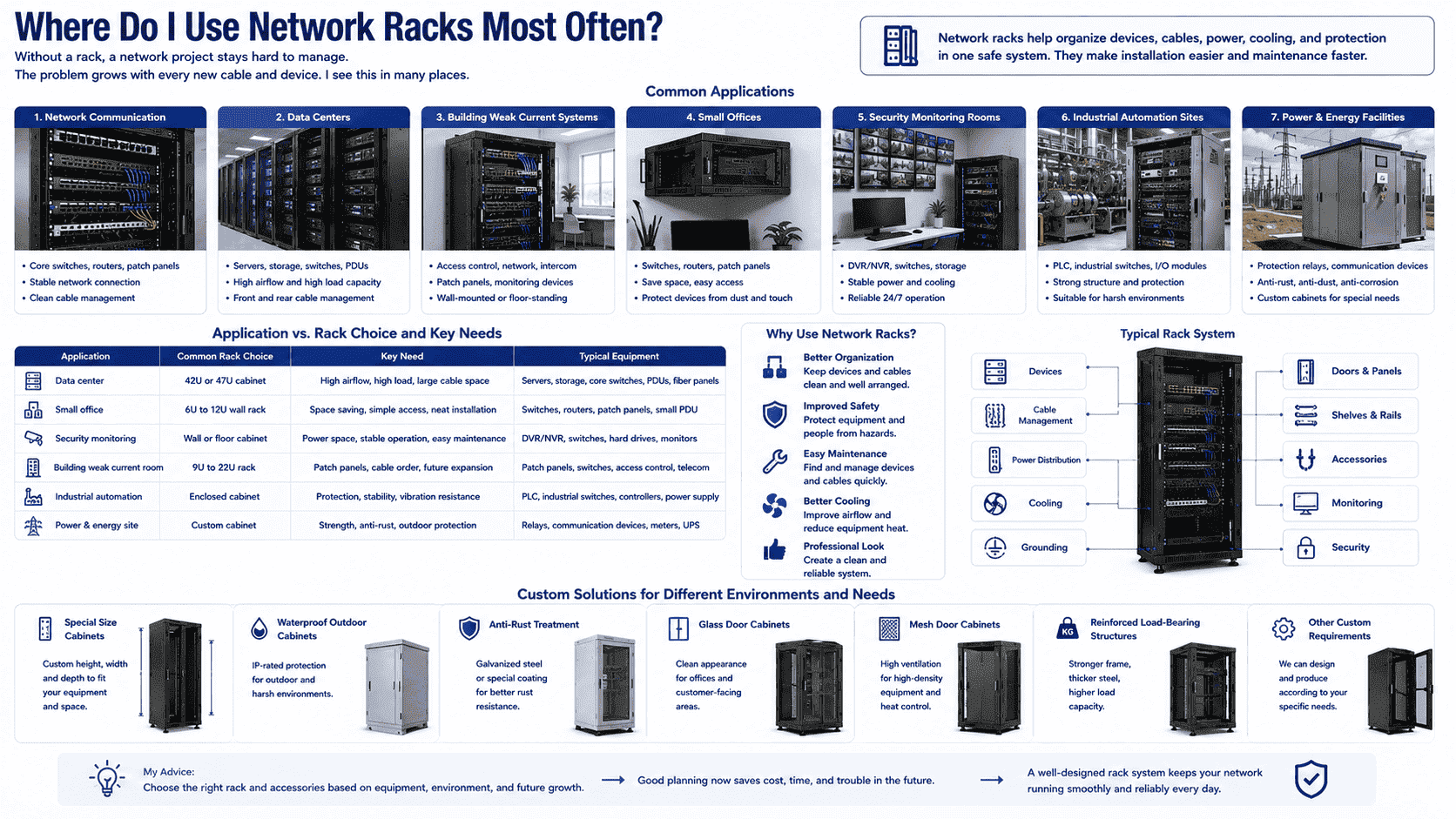
I see network racks in many types of projects. In a data center, racks and cabinets carry servers, switches, fiber panels, PDUs, and cable systems. These projects usually need better airflow, higher load capacity, and clear front and rear cable paths. Mesh doors, fan units, strong rails, and grounding parts become important.
In building weak current systems, the rack may hold access control equipment, network switches, patch panels, and monitoring devices. The room may be small. The rack may need a wall-mounted design. In offices, a compact wall rack is often enough. It keeps devices away from desks and protects them from touch, dust, and damage.
| Application | Common Rack Choice | Key Need |
|---|---|---|
| Data center | 42U or 47U cabinet | Airflow, load, cable space |
| Small office | 6U to 12U wall rack | Space saving and simple access |
| Security monitoring | Wall or floor cabinet | DVR, switch, and power space |
| Building weak current room | 9U to 22U rack | Patch panels and cable order |
| Industrial automation | Enclosed cabinet | Protection and stable structure |
| Power and energy site | Custom cabinet | Strength and anti-rust treatment |
I also receive many non-standard requests. Some customers need special size cabinets. Some need waterproof outdoor cabinets. Some need anti-rust treatment. Some need glass doors for appearance. Some need mesh doors for ventilation. Some need reinforced load-bearing structures. This is why I do not treat a network rack as one fixed product. I treat it as a base structure that must match the equipment, site, and future maintenance plan.
How do I choose the right network rack for a project?
A cheap rack can become expensive later. If it cannot fit devices, cool equipment, or manage cables, the project must be changed.
I choose a network rack by checking equipment size, total U height, device depth, load weight, airflow needs, cable space, power layout, room size, wall or floor installation, and future expansion.
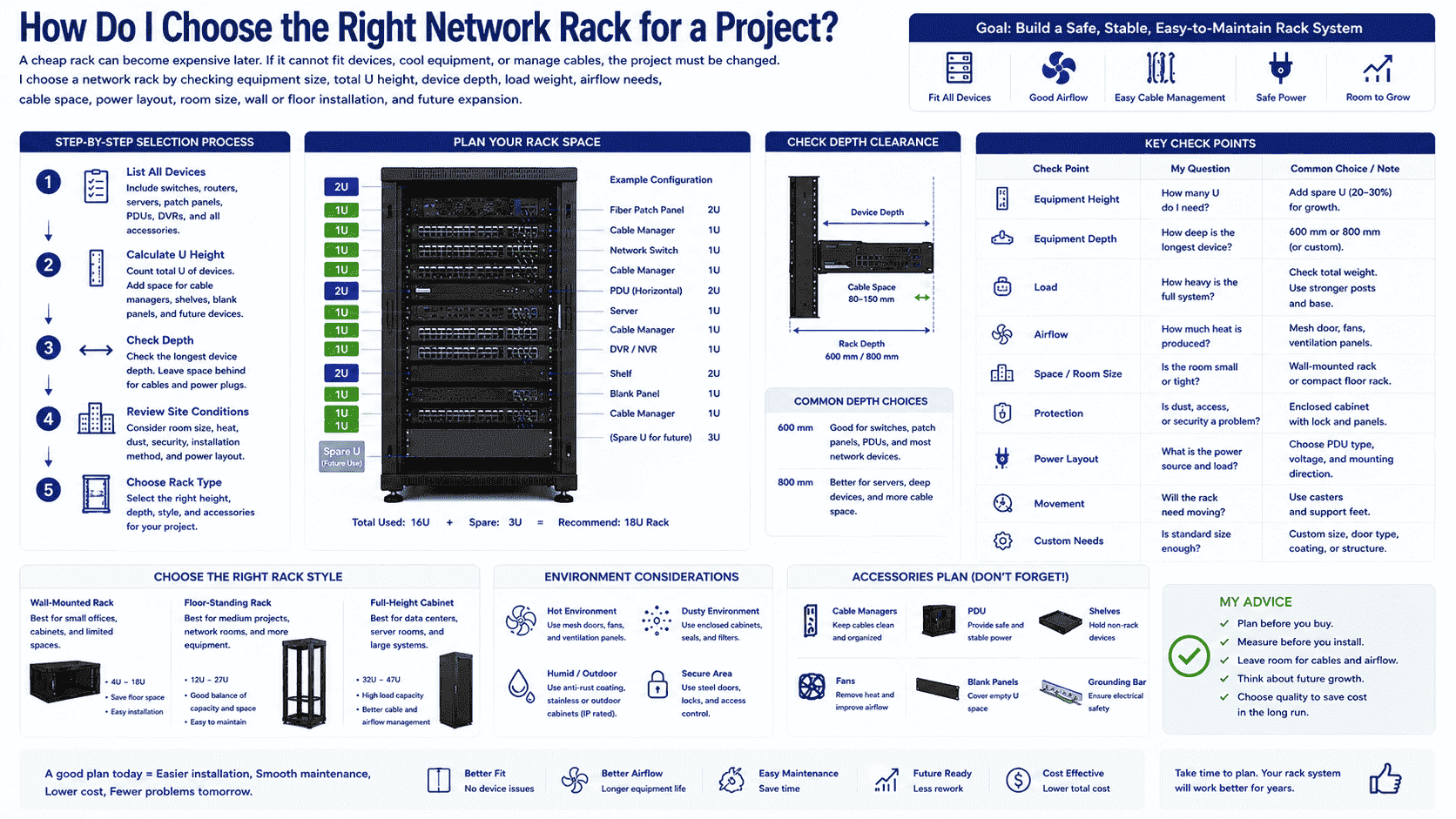
I use a simple process when I help a customer choose a rack. First, I list every device. I include switches, routers, servers, patch panels, PDUs, DVRs, and extra accessories. Then I count the U space. I add extra space for cable managers, shelves, blank panels, and future devices. This step gives the basic height.
Second, I check depth. A shallow device can fit in a 600 mm deep rack. A deeper device may need 800 mm or more. I also leave space behind the device for cables and power plugs. This is very important for servers and fiber equipment.
| Check Point | My Question | Common Choice |
|---|---|---|
| Equipment height | How many U do I need? | Add spare U for growth |
| Equipment depth | How deep is the longest device? | 600 mm or 800 mm depth |
| Load | How heavy is the full system? | Use stronger posts and base |
| Airflow | How much heat is produced? | Mesh door, fans, vents |
| Space | Is the room small? | Wall-mounted or compact rack |
| Protection | Is dust or access a problem? | Enclosed cabinet with lock |
| Movement | Will the rack need moving? | Casters and support feet |
| Custom need | Is standard size enough? | Custom size or structure |
Third, I check the site. A small office may need a wall-mounted rack. A server room may need a floor-standing cabinet. A dusty room may need an enclosed cabinet. A hot room may need mesh doors and fans. A project near outdoor or humid conditions may need better anti-rust treatment.
I always prefer to solve these questions before production. A clear plan makes the rack easier to install and easier to maintain. It also reduces rework, delivery delays, and extra cost.
Conclusion
A network rack gives network devices a standard, safe, and clean home. I choose it by size, load, airflow, accessories, and site needs.
"19-inch rack - Wikipedia", https://en.wikipedia.org/wiki/19-inch_rack. A general reference on 19-inch racks defines them as standardized frames or enclosures used to mount electronic equipment modules in computing, audio, video, and telecommunications contexts. Evidence role: definition; source type: encyclopedia. Supports: A neutral reference should define a 19-inch rack as a standardized frame or enclosure for mounting multiple electronic equipment modules, including computing and telecommunications equipment.. Scope note: The source supports the general definition and standard form factor, but it may not list every device category named in the article. ↩
"19-inch rack - Wikipedia", https://en.wikipedia.org/wiki/19-inch_rack. Rack-mount standards and reference summaries identify the nominal 19-inch rack width as 482.6 mm. Evidence role: definition; source type: institution. Supports: A standards or reference source should confirm that 19 inches equals 482.6 mm in the rack-mount equipment context.. ↩
"19-inch rack", https://en.wikipedia.org/wiki/19-inch_rack. Standards-based descriptions of 19-inch rack construction explain that equipment front panels or mounting flanges are secured to vertical rack rails with screws. Evidence role: mechanism; source type: institution. Supports: A standards-oriented source should explain that 19-inch rack equipment is attached to mounting rails through front panels, flanges, or ears using screws.. Scope note: The source supports the typical mounting mechanism; individual products may also require rear support rails, shelves, or tool-less mounting systems. ↩
"Rack unit - Wikipedia", https://en.wikipedia.org/wiki/Rack_unit. Reference descriptions of rack units state that 1U is 1.75 inches, or 44.45 mm, in the vertical spacing system for rack-mounted equipment. Evidence role: definition; source type: encyclopedia. Supports: A reference source should confirm that one rack unit is 1.75 inches, equivalent to 44.45 mm.. ↩
"What is the Bend Radius & Durability of Fiber Optic Cable?", https://store.cablesplususa.com/cabling-insider-blog/what-is-the-bend-radius-and-durability-of-fiber-optic-cable/?srsltid=AfmBOop8NuV27476pLE7FDWR7w5XXM3PYRw-xE6C38vVF-BunQystwRx. Fiber optic cabling guidance states that cables should not be bent below their specified minimum radius because tight bends can increase attenuation or damage the fiber. Evidence role: mechanism; source type: education. Supports: A fiber optic cabling source should explain that excessive bending can increase attenuation or damage optical fibers, so minimum bend radius requirements must be observed.. Scope note: The exact bend radius depends on fiber type, cable construction, and manufacturer specification. ↩
"[PDF] Infrastructure Standard for Telecommunications Spaces", https://www.cfm.va.gov/til/dguide/OIT-InfrastrucStdTelecomSpaces.pdf. Structured cabling and data center best-practice guidance associates organized cable routing and labeling with easier identification, access, and troubleshooting during maintenance. Evidence role: general_support; source type: institution. Supports: A cabling or data center best-practice source should state that structured cable management improves identification, access, and troubleshooting.. Scope note: The source supports the maintenance rationale qualitatively rather than proving a specific time reduction for the article's rack layouts. ↩
"2.2 requirements", http://telecom.olemiss.edu/specification/chap2.html. Telecommunications-room planning materials describe wall-mounted enclosures as a space-saving option for smaller installations with limited equipment requirements. Evidence role: general_support; source type: institution. Supports: A telecommunications-room planning source should support that wall-mounted enclosures are used where equipment loads are modest and floor space is limited.. Scope note: The source supports the general space-saving use case; actual suitability depends on wall structure, load rating, equipment depth, and access requirements. ↩
"19-inch rack - Wikipedia", https://en.wikipedia.org/wiki/19-inch_rack. Technical descriptions of rack types distinguish open-frame racks from enclosed cabinets by the presence of doors and side panels, which affect access, physical protection, and environmental isolation. Evidence role: definition; source type: institution. Supports: A technical reference should distinguish open-frame racks from enclosed cabinets and describe the functional effects of doors and side panels.. Scope note: The source supports the structural and functional distinction; the degree of dust protection or security depends on cabinet design, room conditions, and lock hardware. ↩
"[PDF] quantifying air flow rate through a server in an operational data", https://mavmatrix.uta.edu/context/mechaerospace_theses/article/1223/type/native/viewcontent. Data center cooling literature explains that rack doors, panels, and other obstructions can influence airflow resistance, whereas open-frame structures reduce front and rear airflow blockage. Evidence role: mechanism; source type: research. Supports: A cooling guidance or research source should explain that physical obstructions at rack fronts or rears can restrict airflow, while open structures reduce such obstruction.. Scope note: The source supports the airflow mechanism in general; actual thermal performance also depends on room airflow design, equipment fan direction, cable congestion, and heat load. ↩
"[PDF] Best Practices Guide for Energy-Efficient Data Center Design", https://www.energy.gov/sites/default/files/2024-07/best-practice-guide-data-center-design.pdf. Data center thermal-management guidance identifies perforated rack doors as a means of reducing airflow restriction and supporting front-to-rear cooling in higher-density equipment installations. Evidence role: expert_consensus; source type: institution. Supports: A data center thermal-management source should support that perforated doors allow greater airflow than solid doors and are common in higher-density rack environments.. Scope note: The source supports the general cooling rationale; whether a mesh door is sufficient depends on perforation area, cooling architecture, rack power density, and room conditions. ↩
"What is Cold Rolled Steel? Properties and Advantages", https://www.industrialmetalsupply.com/blog/cold-rolled-steel. Materials engineering references describe cold-rolled steel as having improved dimensional tolerances, surface finish, and mechanical properties compared with hot-rolled material, which helps explain its use in sheet-metal enclosures. Evidence role: general_support; source type: education. Supports: A materials source should explain that cold-rolled steel provides improved surface finish, dimensional tolerance, and mechanical properties suitable for sheet-metal fabrication.. Scope note: The source supports the material rationale generally; it does not prove that cold-rolled steel is the best or lowest-cost material for every rack design. ↩
"[PDF] Powder Coatings Technology Update - EPA", https://www.epa.gov/sites/default/files/2016-01/documents/powdercoatingstechupdate.pdf. Coatings literature describes powder coating as a dry finishing process that forms a polymer film on metal surfaces, providing decorative finish quality and a protective barrier against environmental exposure. Evidence role: mechanism; source type: research. Supports: A coatings source should explain that powder coatings form a protective polymer layer on metal surfaces that can improve appearance and reduce corrosion or abrasion exposure.. Scope note: The source supports the protective mechanism; actual corrosion resistance depends on pretreatment, coating thickness, curing quality, coating chemistry, and service environment. ↩
