
What Are the Key Components Inside a Network Cabinet?

A weak cabinet design can create heat, loose equipment, messy cables, and unsafe power. I have seen small parts cause big project delays.
The key components inside a network cabinet include vertical mounting rails, beams, shelves, fans, PDU power units, cable managers, screws, locks, hinges, feet, and casters. I treat these parts as one working system because they support equipment, power, cooling, cabling, safety, and daily maintenance.
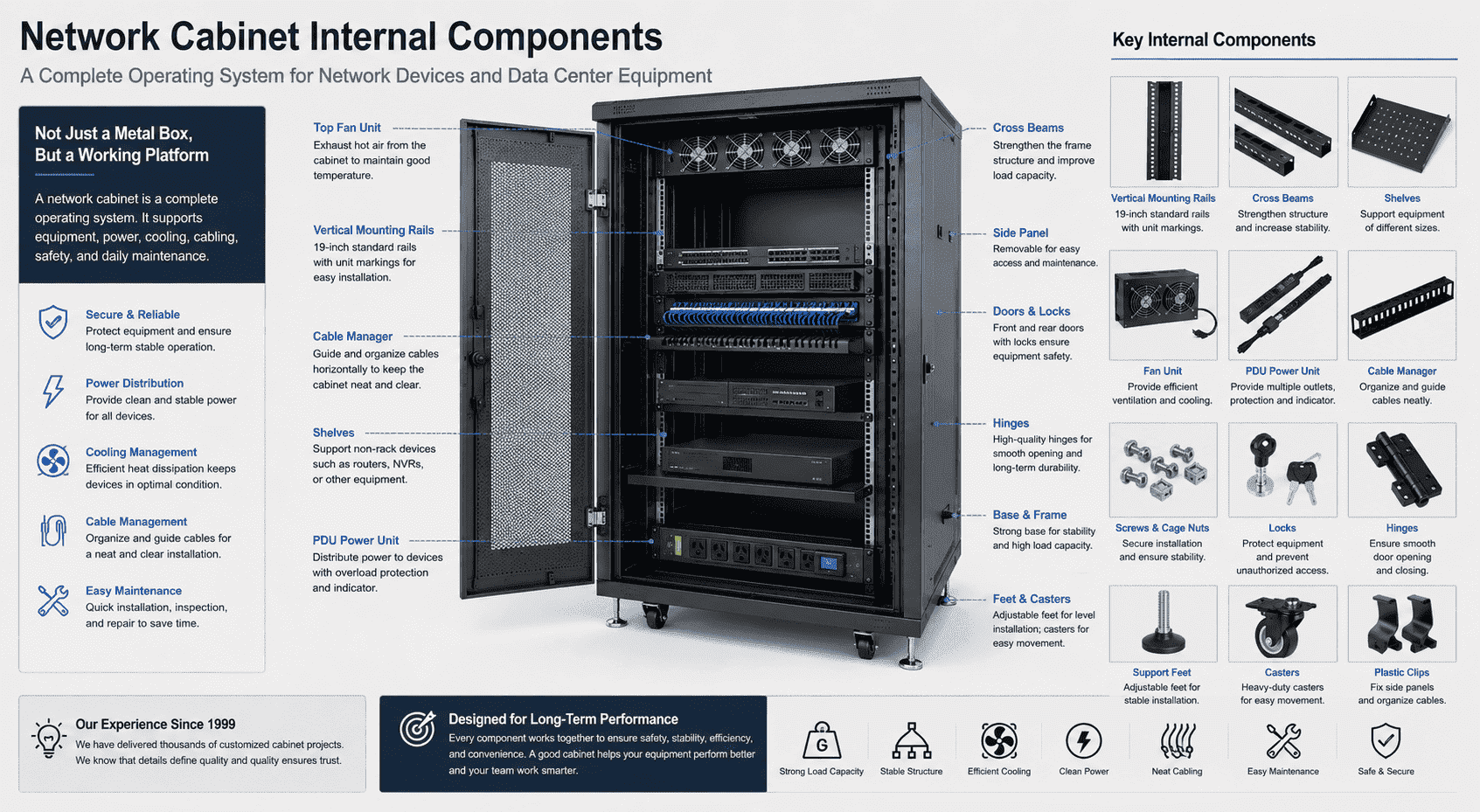
When I explain a network cabinet to a new customer, I do not describe it as a simple metal box. I describe it as a working platform for network devices, communication devices, weak current projects, security monitoring systems, and data center equipment. The outer shell is easy to see. The inner structure is easier to ignore. I think the inner structure is the real reason a cabinet can work for a long time.
A standard network cabinet is usually made from high-quality cold-rolled steel.1 The outside includes the front frame, rear frame, front door, rear door, side panels, top cover, and base. These parts form the cabinet body. The inside includes vertical rails, cross beams, shelves, fans, PDU units, support feet, casters, screws, pins, hinges, locks, and small plastic clips for side doors. Each part has a clear job. Each job affects equipment safety.
I have worked with many customized cabinet projects since 1999. I have learned one clear point. A cabinet is not a storage box. A cabinet is a complete operating system. It must carry heavy devices. It must keep devices stable. It must give clean power. It must guide cables. It must release heat. It must allow engineers to install, adjust, inspect, and repair equipment without wasting time.
Why Are the Vertical Mounting Rails the Core Components Inside a Network Cabinet?
Loose rails can make equipment tilt, fall, or vibrate. I worry about this first because heavy devices need firm support every day.
The vertical mounting rails are the main load-bearing parts inside a network cabinet.2 I use four rails in most network cabinets, and I use six rails in some deeper server cabinets to improve support for heavier equipment.
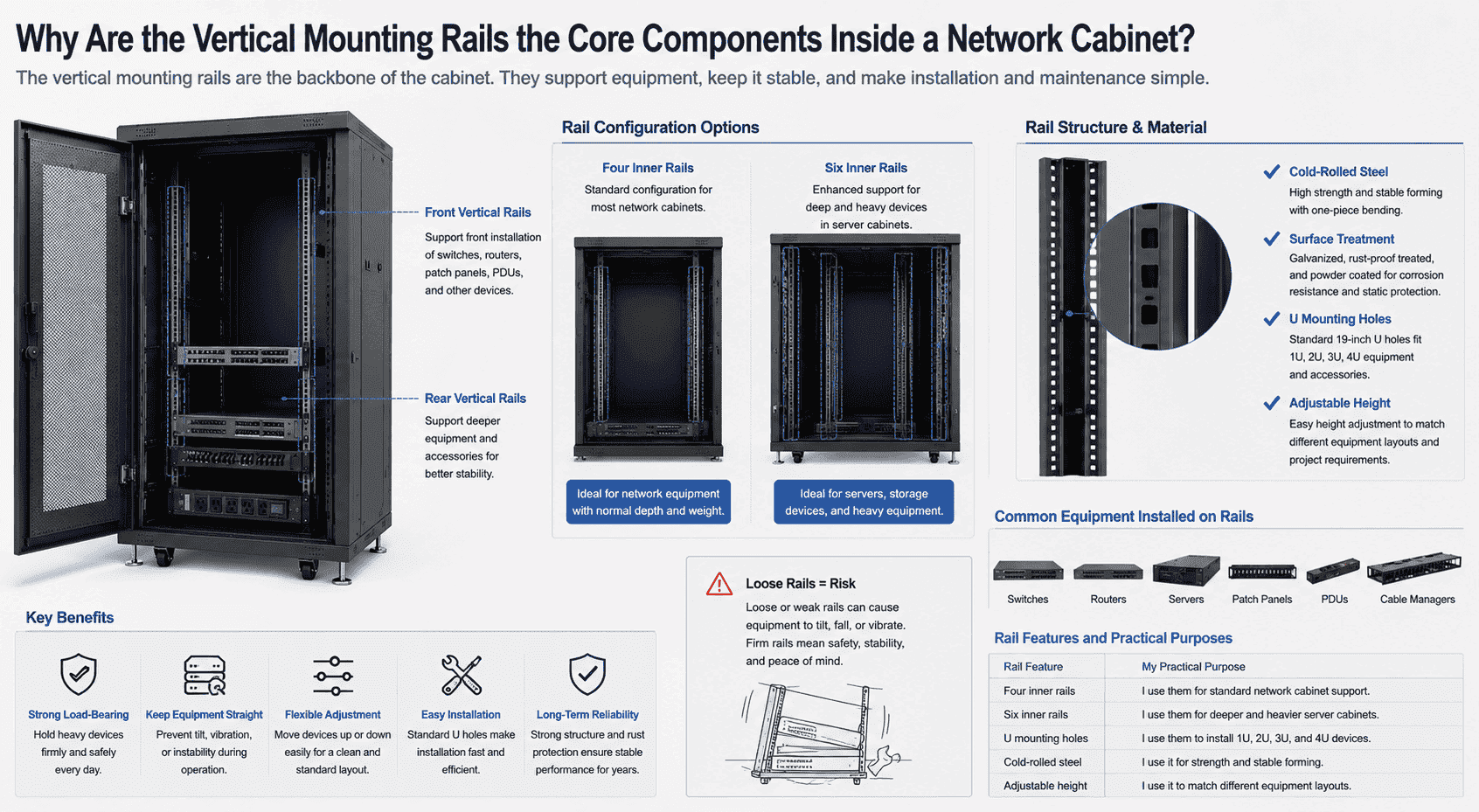
I see the vertical rails as the backbone of the cabinet. A normal network cabinet has four inner vertical rails. The front rails support device installation from the front side. The rear rails help support deeper equipment and accessories. In some large and deep server cabinets, I add six inner rails. This structure gives better support when the cabinet holds servers, storage devices, and other heavy equipment.
The rails are usually formed by bending cold-rolled steel sheets. I use one-piece bending because it improves strength and keeps the structure stable. After forming, the rails can be galvanized, rust-proof treated, and powder coated. This helps the rail resist rust and static issues.
The rails are full of standard U mounting holes.3 These holes match 19-inch equipment.4 They help install switches, routers, servers, patch panels, PDUs, and cable managers.
| Rail Feature | My Practical Purpose |
|---|---|
| Four inner rails | I use them for standard network cabinet support. |
| Six inner rails | I use them for deeper and heavier server cabinets. |
| U mounting holes | I use them to install 1U, 2U, 3U, and 4U devices. |
| Cold-rolled steel | I use it for strength and stable forming. |
| Adjustable height | I use it to match different equipment layouts. |
The biggest value of rails is not only holding screws. The rails keep devices straight and safe. They also make height adjustment simple. I can move a device up or down based on the project layout. This is important when customers need a clean and standard equipment plan.
How Do Shelves Support Devices That Cannot Be Mounted Directly?
Some devices cannot fit standard rail mounting. I have seen small devices sit loose, block airflow, and make maintenance harder.
Shelves support non-rackmount equipment inside a network cabinet.5 I use fixed shelves, sliding shelves, and reinforced shelves based on device weight, installation style, and maintenance needs.
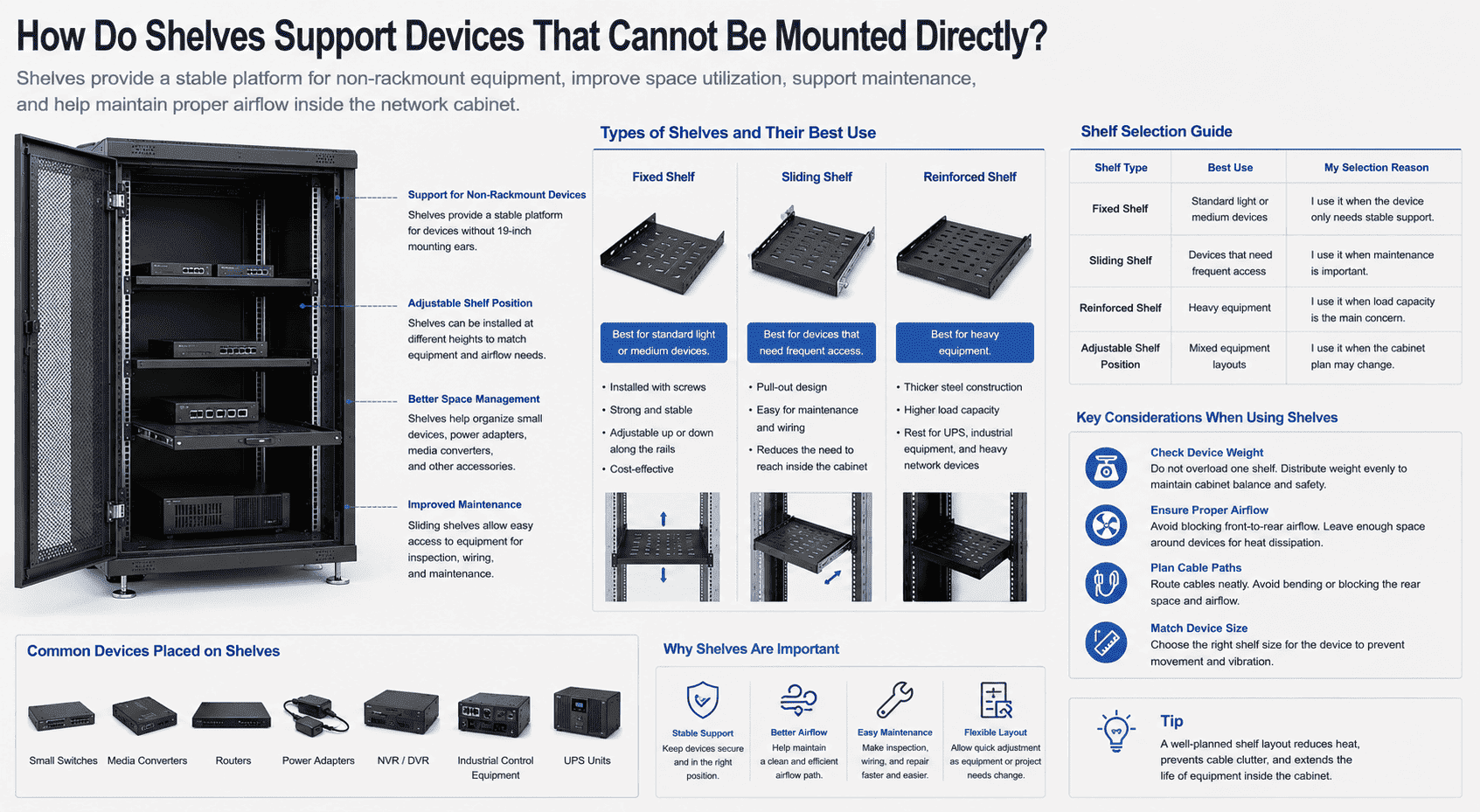
I use shelves when a device cannot be fixed on the 19-inch rails directly. Some equipment has no rack ears. Some equipment is small. Some equipment needs a flat platform. In these cases, a shelf becomes a simple but important support part.
A fixed shelf is common in many network cabinets. It is installed with screws. It can be moved up or down along the rails. This helps me adjust the inside space. A sliding shelf is useful when an engineer needs to pull out equipment for checking or wiring. A reinforced shelf is better for heavy devices. I choose it when the cabinet holds UPS units, industrial control equipment, or heavier network devices.
| Shelf Type | Best Use | My Selection Reason |
|---|---|---|
| Fixed shelf | Standard light or medium devices | I use it when the device only needs stable support. |
| Sliding shelf | Devices that need frequent access | I use it when maintenance is important. |
| Reinforced shelf | Heavy equipment | I use it when load capacity is the main concern. |
| Adjustable shelf position | Mixed equipment layouts | I use it when the cabinet plan may change. |
A shelf should not be treated as a simple board. It affects equipment balance and air space. If I place too many devices on one shelf, I may create heat and pressure in one area. If I place shelves without planning cable paths, the cables may bend or block the rear space. I usually check device size, weight, airflow direction, and cable direction before I suggest the shelf type. This small step can reduce later trouble.
Why Is the PDU an Important Power Component Inside a Network Cabinet?
Poor power distribution can stop a whole system. I take this part seriously because stable equipment needs stable power first.
A PDU is an industrial power distribution unit used inside a network cabinet.6 I use it to provide safer power output, overload protection, and better device power management than a normal household socket.
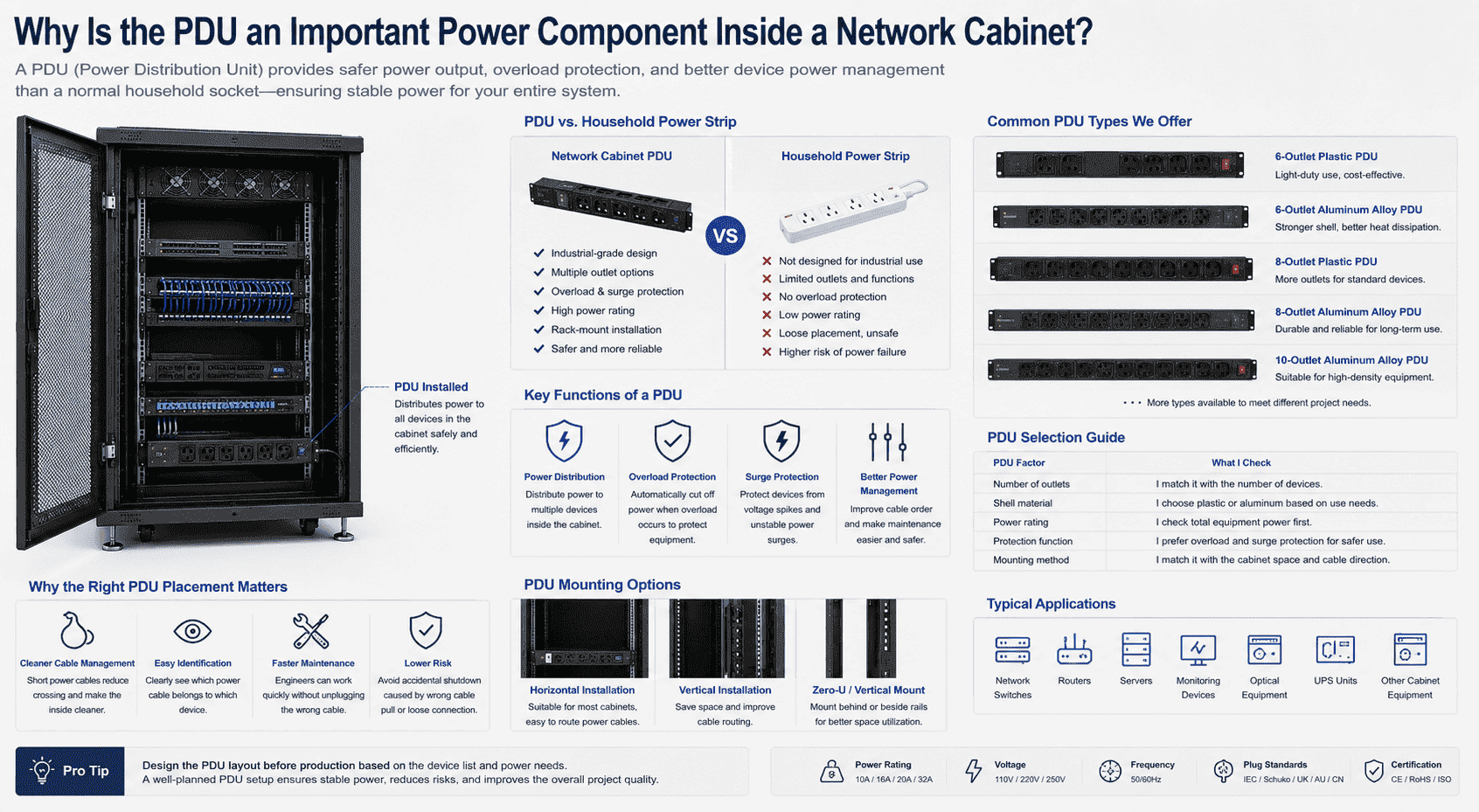
I often tell customers that a PDU is not the same as a home power strip. A network cabinet PDU is made for industrial and project use. It distributes power to switches, routers, servers, monitoring devices, optical equipment, and other cabinet equipment. It can include overload protection and surge protection.7 These functions help reduce the risk from unstable power.
PDUs come in many forms. I have worked with six-outlet plastic PDUs, six-outlet aluminum alloy PDUs, eight-outlet plastic PDUs, eight-outlet aluminum alloy PDUs, ten-outlet aluminum alloy PDUs, and other designs. The right choice depends on how many devices the cabinet has, how much power the devices need, and what plug standard the project uses.
| PDU Factor | What I Check |
|---|---|
| Number of outlets | I match it with the number of devices. |
| Shell material | I choose plastic or aluminum based on use needs. |
| Power rating | I check total equipment power first. |
| Protection function | I prefer overload and surge protection for safer use. |
| Mounting method | I match it with the cabinet space and cable direction. |
A good PDU also improves cable order. If the PDU is placed in the right position, short power cables can reach equipment without crossing the whole cabinet. This makes the inside cleaner. It also helps maintenance. When an engineer opens the cabinet, he can see which power cable belongs to which device. This sounds simple, but it matters in real projects. A wrong cable pull can shut down the wrong device. I try to design the PDU layout before production when the customer gives a device list.
How Do Cabinet Fans Control Heat and Protect Network Equipment?
Heat builds up fast inside a closed cabinet. I have seen good devices fail early because the hot air had no clear exit.
Cabinet fans remove hot air from the upper area of the network cabinet. I usually use two-fan or four-fan units so cool air enters from the bottom and hot air exits from the top.
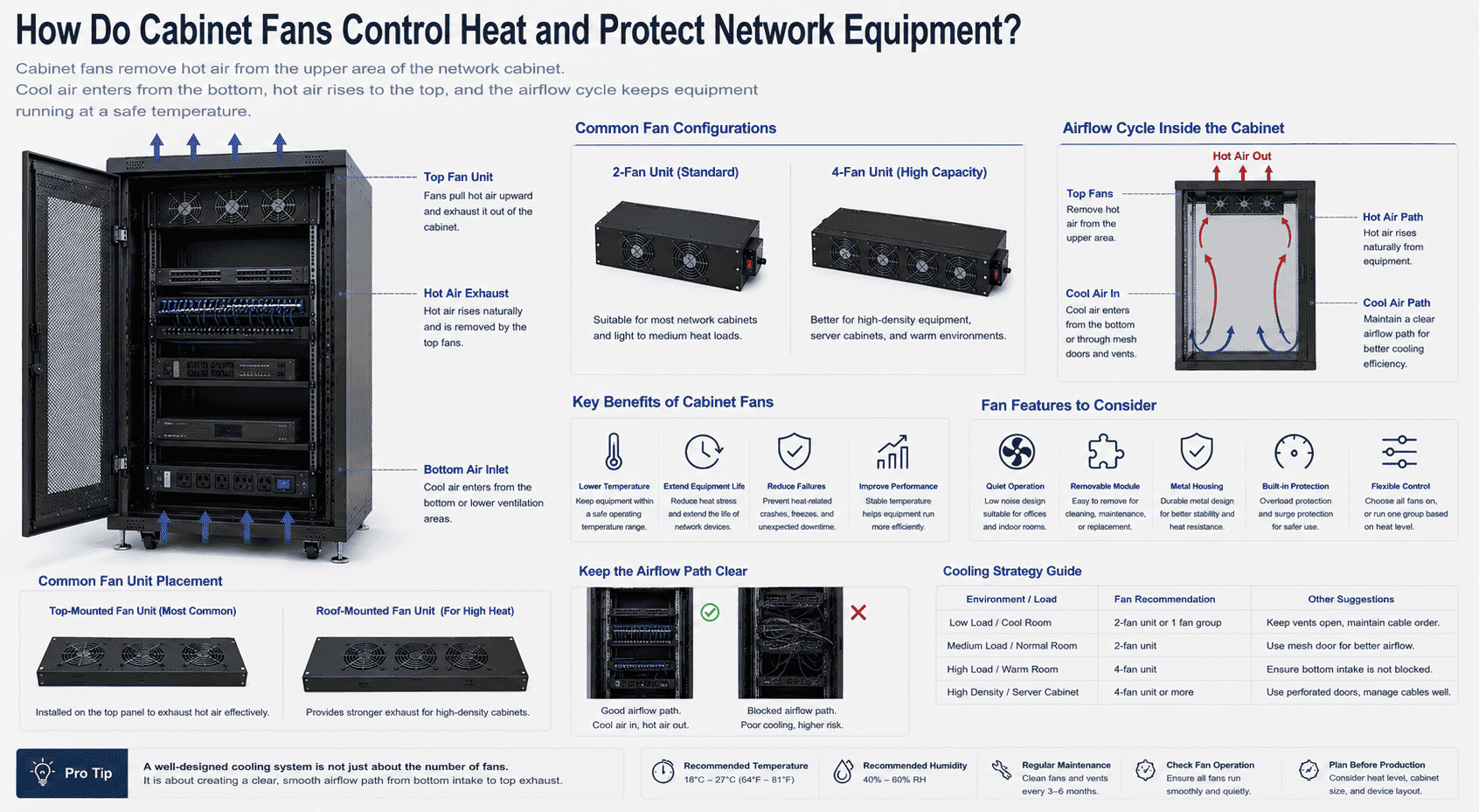
I see cooling as one of the main reasons a cabinet must be designed as a system. Network devices, servers, power units, and optical devices all create heat during operation.8 If the heat stays inside the cabinet, device life becomes shorter.9 Faults may also become more common.
Most network cabinets use top fan units. Many projects use two fans. Some projects use four fans. The fans pull hot air upward.10 Cool air enters from the bottom or lower ventilation areas. This creates a simple hot and cold air cycle. The airflow path should stay open. If cables block the path, the fan effect becomes weaker.11
| Cooling Part | My Practical View |
|---|---|
| Top fan unit | I use it to pull hot air upward. |
| Bottom air inlet | I keep it open for cool air entry. |
| Mesh door | I choose it when airflow demand is higher. |
| Quiet fan design | I use it for office or indoor equipment rooms. |
| Removable fan module | I prefer it for cleaning and replacement. |
The fan structure should also be easy to maintain. A removable fan unit allows the user to replace or clean fans without changing the whole cabinet. This is useful for long-term projects. Some customers also ask whether all fans need to run at the same time. I usually look at the device heat level. If the load is light, one fan group may be enough. If the cabinet holds many devices or works in a warm place, more fans may be needed. I always treat fan choice as part of the whole cabinet plan, not as an extra item.
How Do Small Accessories Improve Safety and Daily Maintenance?
Small accessories look simple, so people ignore them. I have seen missing screws, weak locks, or poor hinges slow down installation work.
Small accessories like screws, hinges, locks, pins, feet, casters, and plastic clips help the cabinet stay safe, stable, movable, and easy to maintain during daily use.
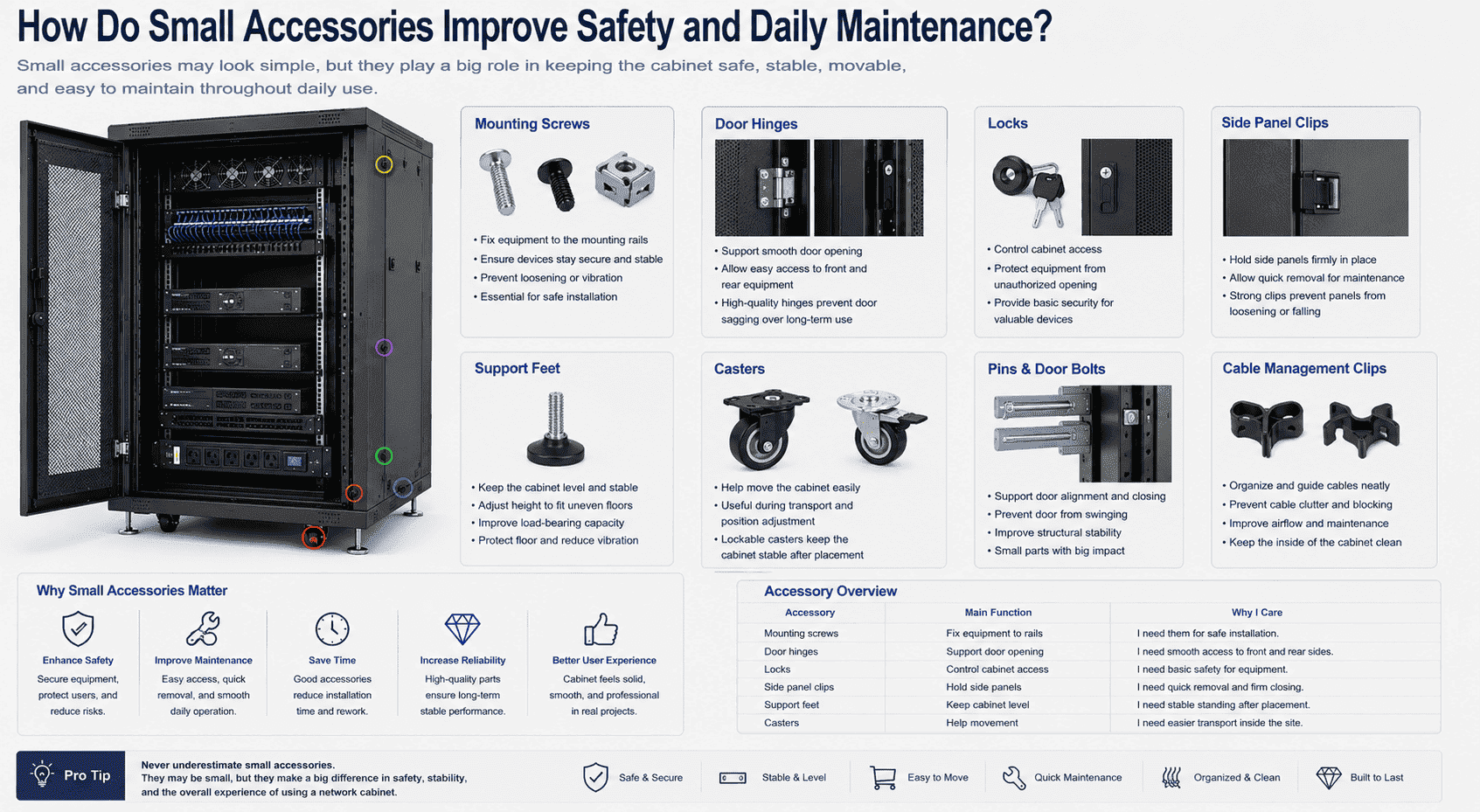
I pay attention to small accessories because they affect the user experience after delivery. Mounting screws fix devices to the rails. Pins and hinges support doors. Locks protect equipment from casual opening.12 Plastic clips hold side panels. Support feet help level the cabinet. Casters help move the cabinet before final placement. These parts do not look as important as the rails or fans, but they decide whether installation feels smooth.
| Accessory | Main Function | Why I Care |
|---|---|---|
| Mounting screws | Fix equipment to rails | I need them for safe installation. |
| Door hinges | Support door opening | I need smooth access to front and rear sides. |
| Locks | Control cabinet access | I need basic safety for equipment. |
| Side panel clips | Hold side panels | I need quick removal and firm closing. |
| Support feet | Keep cabinet level | I need stable standing after placement. |
| Casters | Help movement | I need easier transport inside the site. |
A cabinet is often moved, opened, closed, checked, and adjusted many times during a project. If the casters are weak, movement becomes risky. If the support feet cannot adjust well, the cabinet may not stand level. If the door hinges are poor, the door may sag after long use. If side panel clips break easily, the panel may feel loose. I see these as practical details. They may not appear in a simple product photo, but they matter when the cabinet enters a real equipment room. Good accessories help the cabinet feel reliable.
How Do Cable Management Parts Keep the Cabinet Organized?
Messy cables create heat blocks, wrong connections, and slow repairs. I have seen one unclear cable waste an engineer’s whole afternoon.
Cable management parts guide data cables, power cables, and fiber cables inside the cabinet. I use metal cable managers, cable trays, routing slots, and fiber boxes to keep wiring clear and safe.
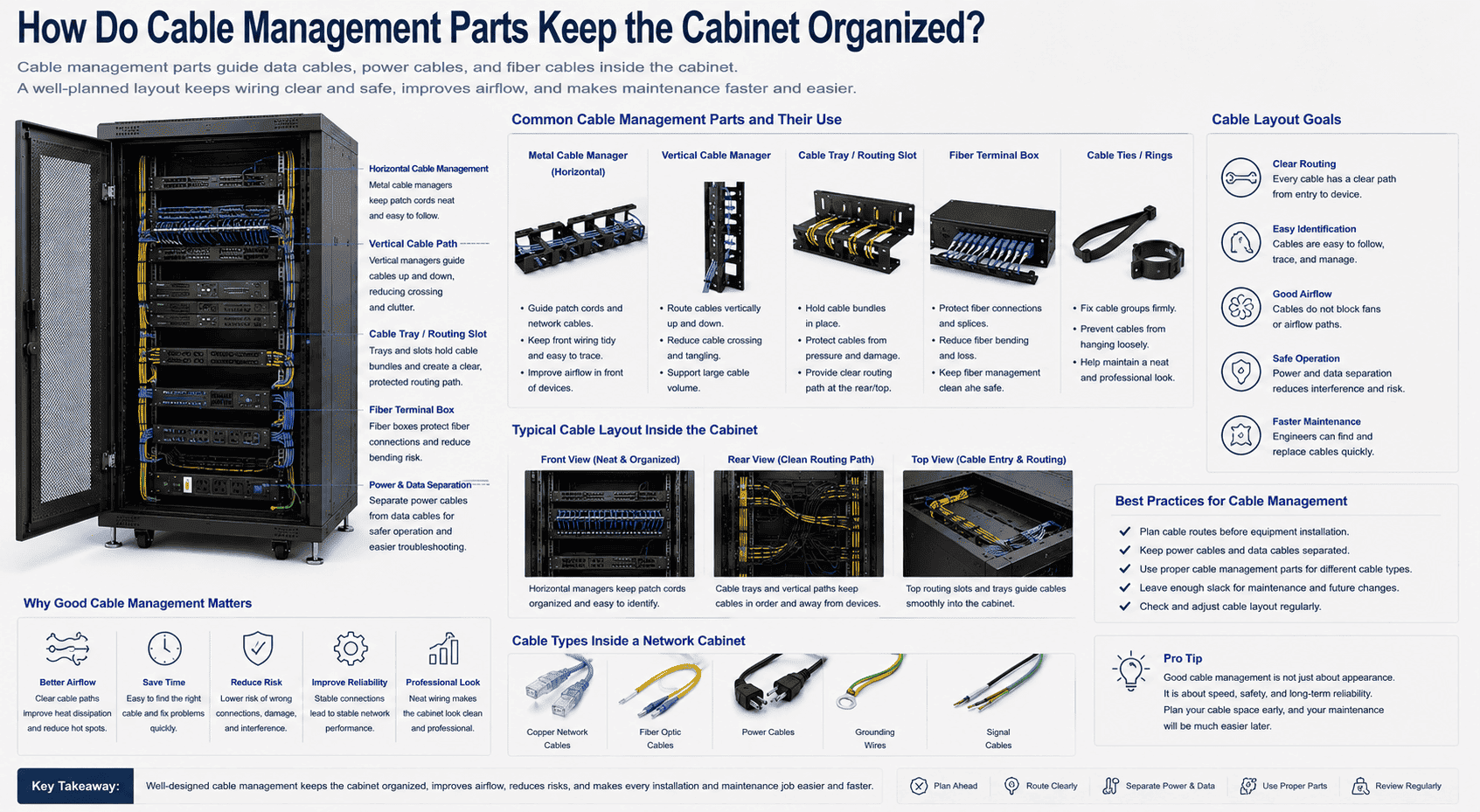
A network cabinet usually holds many cable types. It may include copper network cables, fiber cables, power cables, grounding wires, and signal cables. If these cables have no route, they cross each other and block space. This makes the cabinet hard to read. It also makes heat removal worse.
I use metal cable managers to guide horizontal cables near patch panels and switches. I use routing slots or cable trays when the project needs clear vertical or rear cable paths. I use optical fiber terminal boxes when fiber cables need protected termination. I also suggest separating power cables and data cables when the layout allows it. This reduces confusion and helps safer maintenance.
| Cable Part | Use Inside Cabinet | My Layout Goal |
|---|---|---|
| Metal cable manager | Guides patch cords | I keep front wiring tidy. |
| Vertical cable path | Routes cables up and down | I reduce cable crossing. |
| Cable tray | Holds cable bundles | I protect cable order. |
| Fiber terminal box | Protects fiber connections | I reduce fiber bending risk. |
| Cable ties or rings | Fix cable groups | I stop cables from hanging loosely. |
Cable management is not only about appearance. It is about speed and safety. If each cable has a clear route, maintenance becomes easier. An engineer can find the right line faster. The cabinet also has better airflow because cables do not block the main cooling path. I prefer to plan cable space before the customer installs equipment. If the cabinet is customized, I can add special punching, cable holes, or routing space based on the project drawing. This is one reason flexible customization is important in real network projects.
How Do All Internal Components Work Together as One System?
A cabinet fails when each part is chosen alone. I have learned that one weak part can reduce the value of the whole structure.
All internal components work together by supporting equipment, distributing power, guiding data cables, removing heat, and protecting devices. I treat the cabinet as a closed-loop operating system.
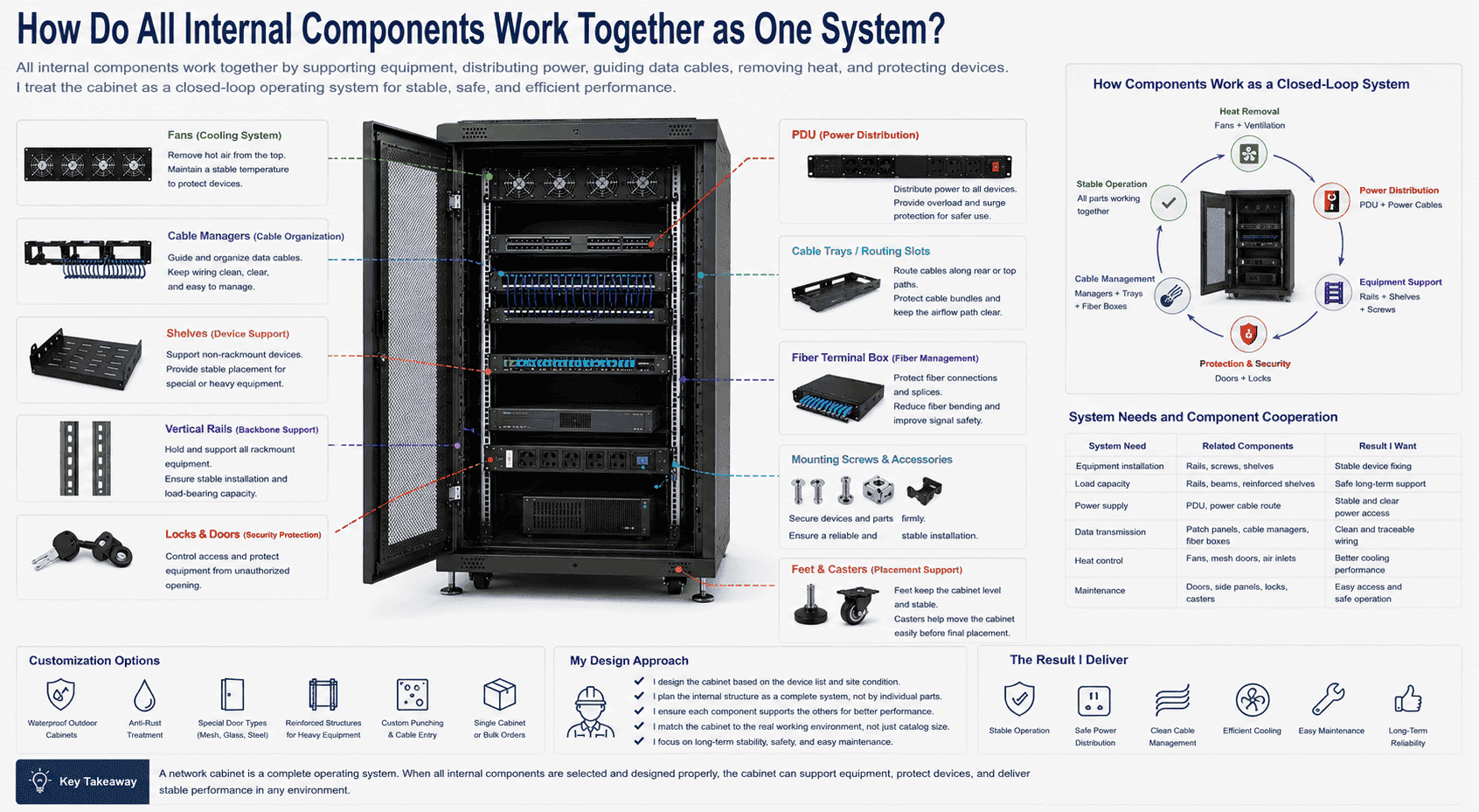
I do not design a network cabinet by looking at one part only. I look at the full inside system. The rails hold standard devices. The shelves support special devices. The PDU provides power. The fans remove heat. The cable managers guide wiring. The locks and doors protect equipment. The feet and casters help safe placement. These parts support each other.
| System Need | Related Components | Result I Want |
|---|---|---|
| Equipment installation | Rails, screws, shelves | I want stable device fixing. |
| Load capacity | Rails, beams, reinforced shelves | I want safe long-term support. |
| Power supply | PDU, power cable route | I want stable and clear power access. |
| Data transmission | Patch panels, cable managers, fiber boxes | I want clean and traceable wiring. |
| Heat control | Fans, mesh doors, air inlets | I want better cooling performance. |
| Maintenance | Doors, side panels, locks, casters | I want easy access and safe operation. |
This system view is important for customization. Some customers need waterproof outdoor cabinets. Some customers need anti-rust treatment. Some customers need special door types, reinforced structures, or special punching. Some customers only need one piece for a small project. I can still design the inner structure based on the device list and site condition. I think this is where manufacturing experience matters. A cabinet should match the real working scene, not only the catalog size. When the inner components are planned well, the equipment has a stable place to run, cool, connect, and be maintained.
Conclusion
I see a network cabinet as a complete working system. Its real value comes from the inner components that support, power, cool, protect, and organize equipment.
"19-inch rack - Wikipedia", https://en.wikipedia.org/wiki/19-inch_rack. Technical rack and enclosure specifications commonly identify sheet steel, including cold-rolled steel in many cabinet designs, as a structural material for equipment cabinets. Evidence role: general_support; source type: institution. Supports: A neutral technical specification or standards-related document should support that steel, often cold-rolled sheet steel, is a common structural material for network or server cabinets.. Scope note: This would support common practice rather than prove that every standard network cabinet uses cold-rolled steel. ↩
"19-inch rack - Wikipedia", https://en.wikipedia.org/wiki/19-inch_rack. Rack standards and technical references describe vertical mounting rails as the interface by which rack equipment is fixed to the cabinet frame and its load is supported. Evidence role: mechanism; source type: institution. Supports: A rack standard or technical reference should explain that rack-mounted equipment is attached to vertical mounting rails, which transfer equipment loads into the cabinet frame.. Scope note: The source may define mounting interfaces and load ratings generally, while exact load-bearing performance depends on the specific cabinet design. ↩
"19-inch rack - Wikipedia", https://en.wikipedia.org/wiki/19-inch_rack. The 19-inch rack system defines rack units and standardized mounting-hole arrangements used to install rack-mounted equipment on vertical rails. Evidence role: definition; source type: encyclopedia. Supports: A source should define the 19-inch rack system, rack units, and standardized mounting-hole spacing.. ↩
"19-inch rack - Wikipedia", https://en.wikipedia.org/wiki/19-inch_rack. The EIA/IEC 19-inch rack dimensional standards specify mounting interfaces intended to make compliant equipment compatible with standardized rack rails. Evidence role: definition; source type: institution. Supports: A rack dimensional standard should support that 19-inch equipment is designed to mount to standardized rail openings in equipment racks.. Scope note: This supports dimensional compatibility for compliant equipment, not compatibility with all nonstandard devices. ↩
"Server Rack Shelf Buying Guide: Everything You Need To Know", https://www.racksolutions.com/news/blog/server-rack-shelf-buying-guide-everything-you-need-to-know/?srsltid=AfmBOoo_ZhelzdkYOAdmplRX8pa5ikIrcsj-EOfmtYPkSXjY9EHAy_pB. Rack installation guidance describes shelves as accessories used to place equipment that is not designed for direct rack-rail mounting. Evidence role: general_support; source type: education. Supports: A university or institutional installation guide should support that shelves are used in racks for equipment lacking rack-mount brackets or ears.. Scope note: Such guidance supports the use case generally; shelf load capacity and suitability still depend on the shelf rating and installed device weight. ↩
"Power distribution unit - Wikipedia", https://en.wikipedia.org/wiki/Power_distribution_unit. A power distribution unit is defined as equipment that distributes electrical power to multiple loads, and rack-mounted PDUs are commonly used for IT and data-center equipment. Evidence role: definition; source type: encyclopedia. Supports: A neutral definition should identify a PDU as equipment used to distribute electrical power, including in racks or data centers.. ↩
"6 Way PDUs with Overload & Surge Protection - Penn Elcom", https://www.penn-elcom.com/us/6-way-pdu-with-overload-surge-protection-pdu-xx-6-series. Technical references on rack power distribution note that certain PDUs include protective functions such as circuit overload protection and surge suppression for connected equipment. Evidence role: mechanism; source type: institution. Supports: A technical or standards-based source should explain that some PDUs incorporate overload protection and surge-protective components.. Scope note: This supports the possibility of these features; not all PDUs include them, and protection performance varies by rating and design. ↩
"[PDF] Best Practices Guide for Energy-Efficient Data Center Design", https://www.energy.gov/sites/default/files/2024-07/best-practice-guide-data-center-design.pdf. Data-center thermal-management literature explains that operating IT equipment dissipates electrical power as heat, creating a cooling load within racks and rooms. Evidence role: mechanism; source type: research. Supports: A thermal-management or data-center engineering source should explain that electrical energy consumed by IT equipment is largely released as heat.. ↩
"[PDF] Chapter 2. Reliability Overview", https://parts.jpl.nasa.gov/mmic/2.PDF. Electronics reliability research and data-center thermal guidelines identify elevated operating temperature as a factor associated with higher failure rates and reduced component lifetime. Evidence role: expert_consensus; source type: research. Supports: A reliability or thermal-guidelines source should support that elevated temperature is associated with increased failure rates or reduced life of electronic components.. Scope note: This supports the temperature-reliability relationship generally; the exact life reduction depends on device design, workload, airflow, and environmental limits. ↩
"Move to a Hot Aisle/Cold Aisle Layout | ENERGY STAR", https://www.energystar.gov/products/data_center_equipment/16-more-ways-cut-energy-waste-data-center/move-hot-aislecold-aisle-layout. Data-center cooling guidance describes managed airflow as a means of removing heat from rack equipment, with fans used to move exhaust air from the enclosure to a return or exhaust path. Evidence role: mechanism; source type: institution. Supports: A data-center cooling or HVAC reference should support the principle that fans move warm exhaust air out of an enclosure and that airflow paths must be managed.. Scope note: This is contextual support; it does not prove that every top-fan cabinet creates an optimal upward airflow pattern under all cable and room conditions. ↩
"Server Rack Cable Management Best Practices | EziBlank", https://www.eziblank.com/server-rack-cable-management-best-practices/. Data-center airflow guidance notes that obstructions, including poorly managed cabling, can restrict airflow through racks and reduce cooling effectiveness. Evidence role: mechanism; source type: institution. Supports: A data-center operations or thermal-management source should support that unmanaged cabling can obstruct airflow and impair cooling efficiency.. Scope note: The degree of airflow reduction depends on cable density, rack layout, fan capacity, and room cooling design. ↩
"Security Guidelines for Storage Infrastructure", https://nvlpubs.nist.gov/nistpubs/SpecialPublications/NIST.SP.800-209.pdf. Information-system physical security guidance treats locked enclosures and access controls as measures for limiting unauthorized or casual access to equipment. Evidence role: general_support; source type: government. Supports: A security-control source should support that physical locks and access controls are used to limit access to information-system equipment.. Scope note: Locks provide a basic access-control layer and do not by themselves establish comprehensive physical security. ↩
