
What are the four types of servers?

I often see buyers choose the wrong server first. The project then faces heat, space, wiring, and cost problems before it even starts.
The four types of servers are cabinet servers, blade servers, rack servers, and tower servers. I choose among them by checking space, computing power, wiring, cooling, budget, and future expansion needs. Each type fits a different use case, from small offices to large data centers.
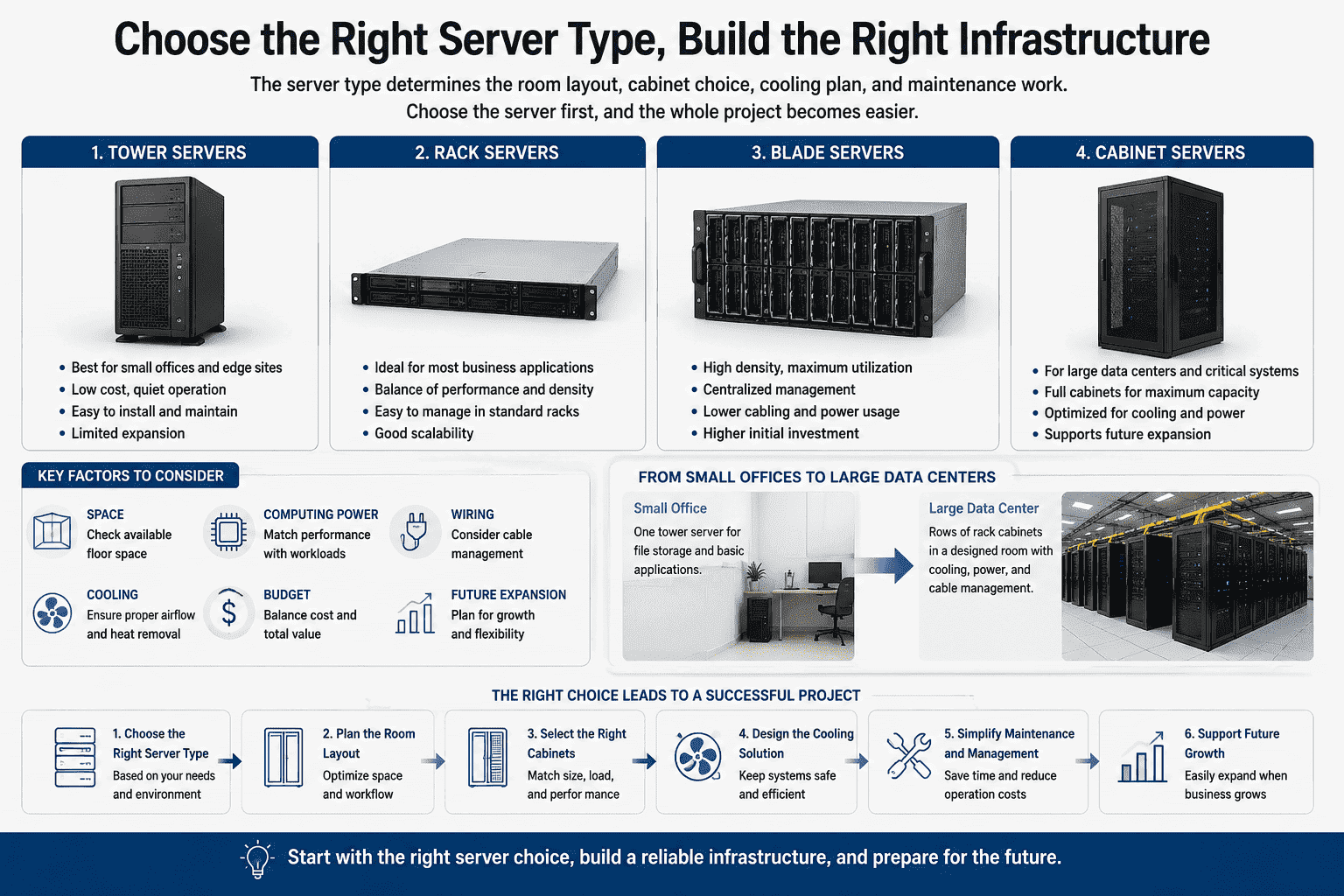
I have worked with many server cabinet and sheet metal projects since I entered this industry. I have seen small companies use one tower server for file storage. I have also seen large projects plan whole rooms with rows of rack cabinets. I learned one simple thing from these cases. The server type decides the room layout, the cabinet choice, the cooling plan, and the later maintenance work.1 If I choose the server first in the right way, the whole project becomes easier.
What is a cabinet server?
I sometimes see large projects split too many systems apart. The team then buys cabinets, power units, cooling, monitoring, and protection one by one.
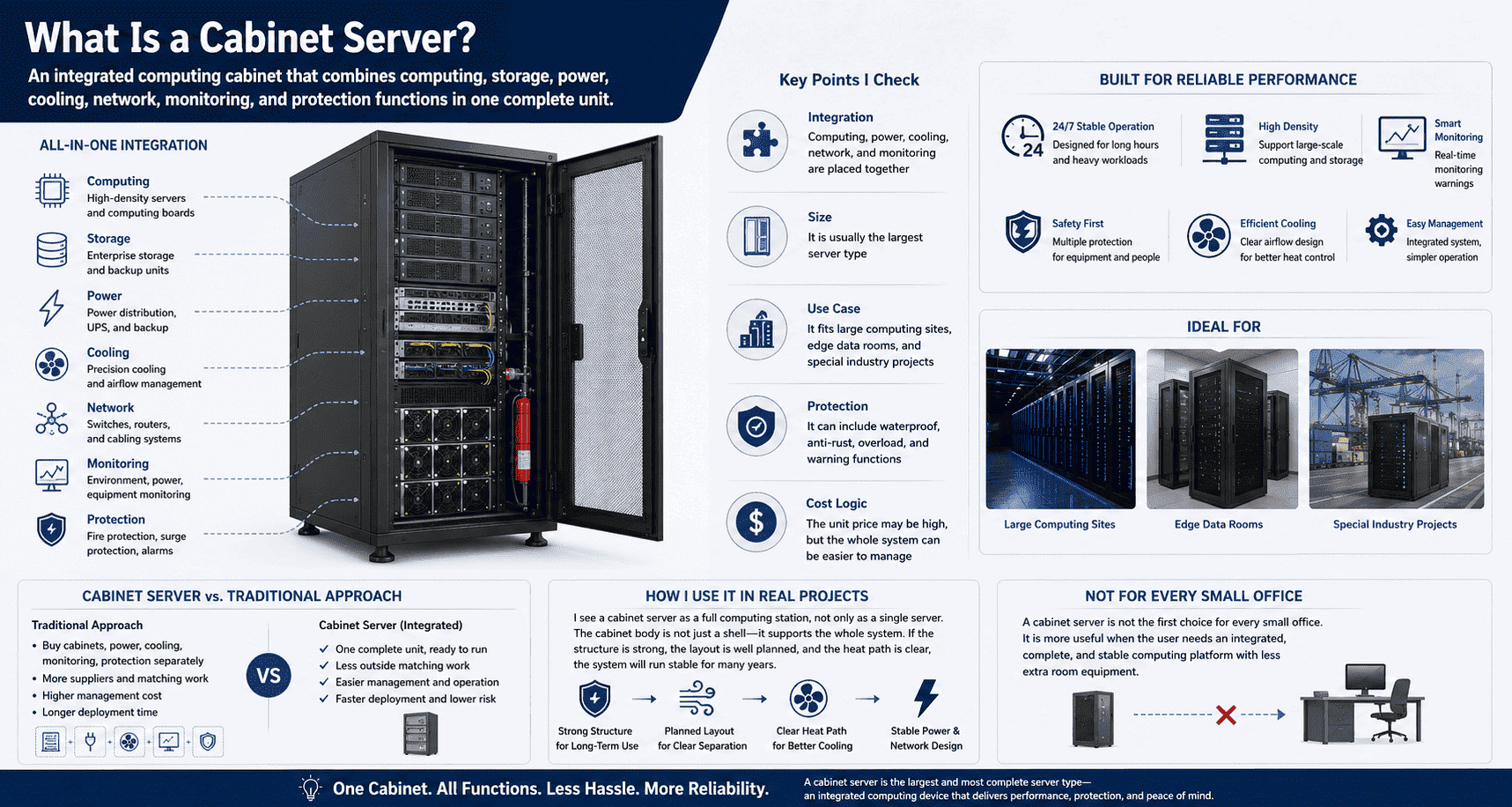
A cabinet server is an integrated server system built inside a standard cabinet. It combines computing, storage, power, cooling, network, monitoring, and protection functions in one complete unit.2
How I understand a cabinet server in real projects
I see a cabinet server as a full computing station, not only as a single server. It is the largest and most complete type among the four server styles. It looks like a cabinet, but it is not only an empty cabinet. It can include high-density computing boards, storage units, power modules, network modules, fire protection parts, monitoring hardware, cooling systems, and warning systems.3
I like this type when the project needs one complete unit with less outside matching work. The buyer does not need to buy a cabinet, power distribution, monitoring equipment, and protection parts from many different suppliers. One cabinet server can run as an all-in-one system. It can work for long hours and handle heavy tasks.
| Point I check | What it means in a cabinet server |
|---|---|
| Integration | Computing, power, cooling, network, and monitoring are placed together |
| Size | It is usually the largest server type |
| Use case | It fits large computing sites, edge data rooms, and special industry projects |
| Protection | It can include waterproof, anti-rust, overload, and warning functions |
| Cost logic | The unit price may be high, but the whole system can be easier to manage |
I often compare this type with a custom cabinet project. The outside structure must be strong. The inside space must be planned well. The heat path must be clear. The power area and network area must be separated in a clean way. In my work with network cabinets and server cabinet structures, I have learned that the cabinet body is not only a shell. It supports the whole system. If the shell is weak, the system will suffer later.
A cabinet server fits projects that need a complete and stable platform. It is not the first choice for every small office. It is more useful when the user wants an integrated computing device that can work with less extra room equipment.
What is a blade server?
I have seen large data centers lose space fast. The room looks big at first, but normal servers soon fill every cabinet.
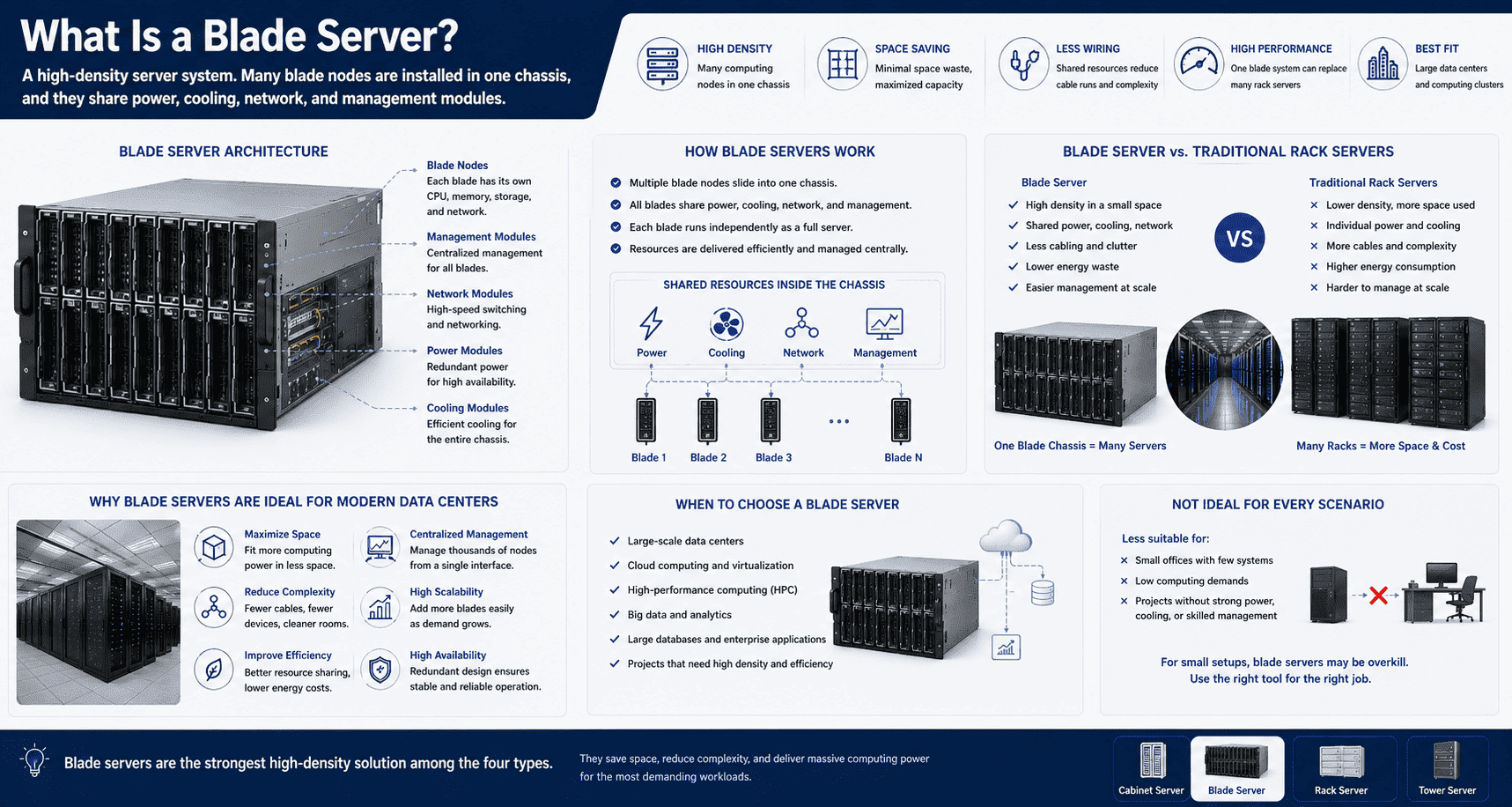
A blade server is a high-density server system. Many blade nodes are installed in one chassis, and they share power, cooling, network, and management modules.4
Why I see blade servers as high-density computing clusters
I think of a blade server as a computing cluster packed into a very small space. It has one chassis. Many blade nodes slide into this chassis. Each blade can have its own CPU, memory, hard drive, and network card. Each blade can run as an independent computing unit. The whole chassis gives shared power, cooling, network, and management.
This structure saves space. It also reduces repeated wiring.5 A normal rack server often needs its own power cables and network cables. A blade server reduces that repeated work because many blades use the same main chassis resources. This is why I see blade servers in large data centers and high-performance computing projects more often than in small offices.
| Feature | Blade server meaning |
|---|---|
| Density | Many computing nodes fit into one chassis |
| Space use | The space waste is very low |
| Wiring | The chassis reduces many separate cable runs |
| Computing power | One blade system can replace many rack servers in some projects |
| Best fit | It fits large data centers and large computing clusters |
I do not treat blade servers as simple plug-and-play products for every company. They need a strong room plan. They need good cooling. They need stable power. They also need a skilled operation team.6 If one project has only a few office systems, a blade server may be too much. If one project needs heavy computing, virtualization, cloud service, or large database tasks, blade servers can show clear value.
I once discussed a layout with a customer who wanted to place many normal servers in a limited area. I first checked the cabinet count, power load, and cooling load. The result was clear. The room could not accept many separate units without a big change. A blade system became a better idea because it used less space and reduced repeated hardware parts. This is the main reason I call blade servers the strongest high-density style among the four types.
What is a rack server?
I often find that most server room projects start with rack servers. The reason is simple. The size is standard, and the installation is direct.
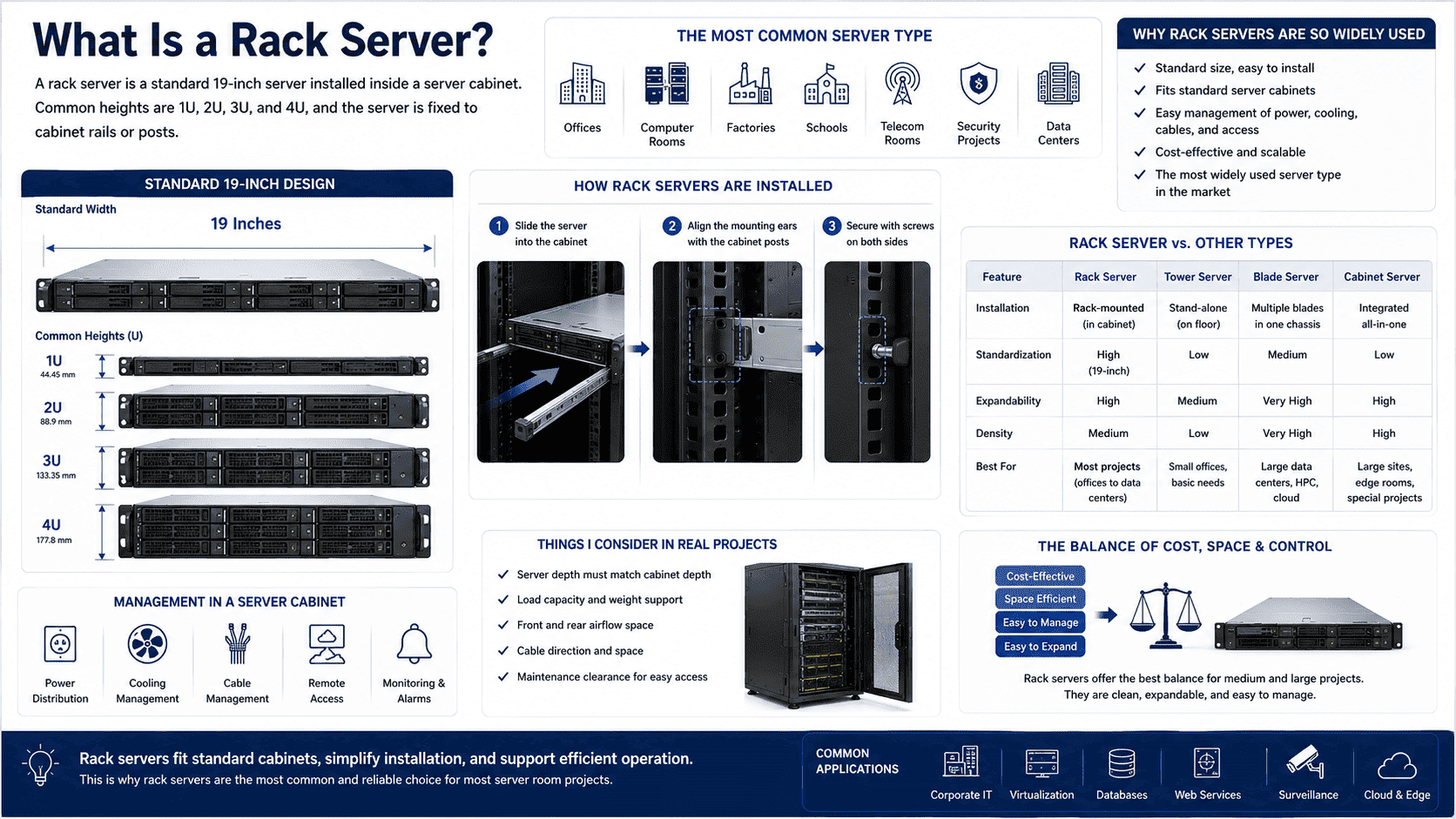
A rack server is a standard 19-inch server installed inside a server cabinet. Common heights are 1U, 2U, 3U, and 4U, and the server is fixed to cabinet rails or posts.7
Why rack servers are the most common type I see
I see rack servers in offices, computer rooms, factories, schools, telecom rooms, security projects, and data centers. They are the most common server type in the market. They use a standard chassis size. The width is usually 19 inches. The height is often measured by U.8 Common rack servers are 1U, 2U, 3U, and 4U.
A rack server has mounting ears or rails on both sides. I install it into a server cabinet and fix it to the cabinet posts with screws. After that, I can manage power, cooling, cables, and remote access in one cabinet. This is why rack servers match standard server cabinets so well.
| Rack server point | My practical view |
|---|---|
| Standard width | 19 inches is common |
| Common height | 1U to 4U is the usual range |
| Installation | It fits into standard server cabinets |
| Management | Power, cooling, cables, and access can be managed together |
| Market use | It is the most widely used server type |
I also know the limits of rack servers. The chassis is flat and compact. The inside space is limited. The number of hard drives, memory sticks, graphics cards, and cooling fans depends on the server height. A 1U server saves space, but it has less inside room. A 4U server gives more space, but it takes more cabinet height.
In my cabinet manufacturing work, I often ask customers about server depth, load weight, cable direction, airflow, and maintenance space. A rack server needs a matching cabinet depth. It also needs enough front and rear space for air and cables. If the cabinet is too shallow, the server may not fit. If the cable space is too tight, the maintenance team will struggle later.9
I like rack servers for medium and large projects because they balance cost, space, and control. They are easier to expand than tower servers. They are easier to buy than many integrated systems. They also match many standard cabinet solutions. This is why I often recommend rack server planning when a customer wants a clean, expandable, and manageable server room.
What is a tower server?
I still remember many early office server setups. A large tower server stood beside a desk, and it handled files, finance software, and small websites.
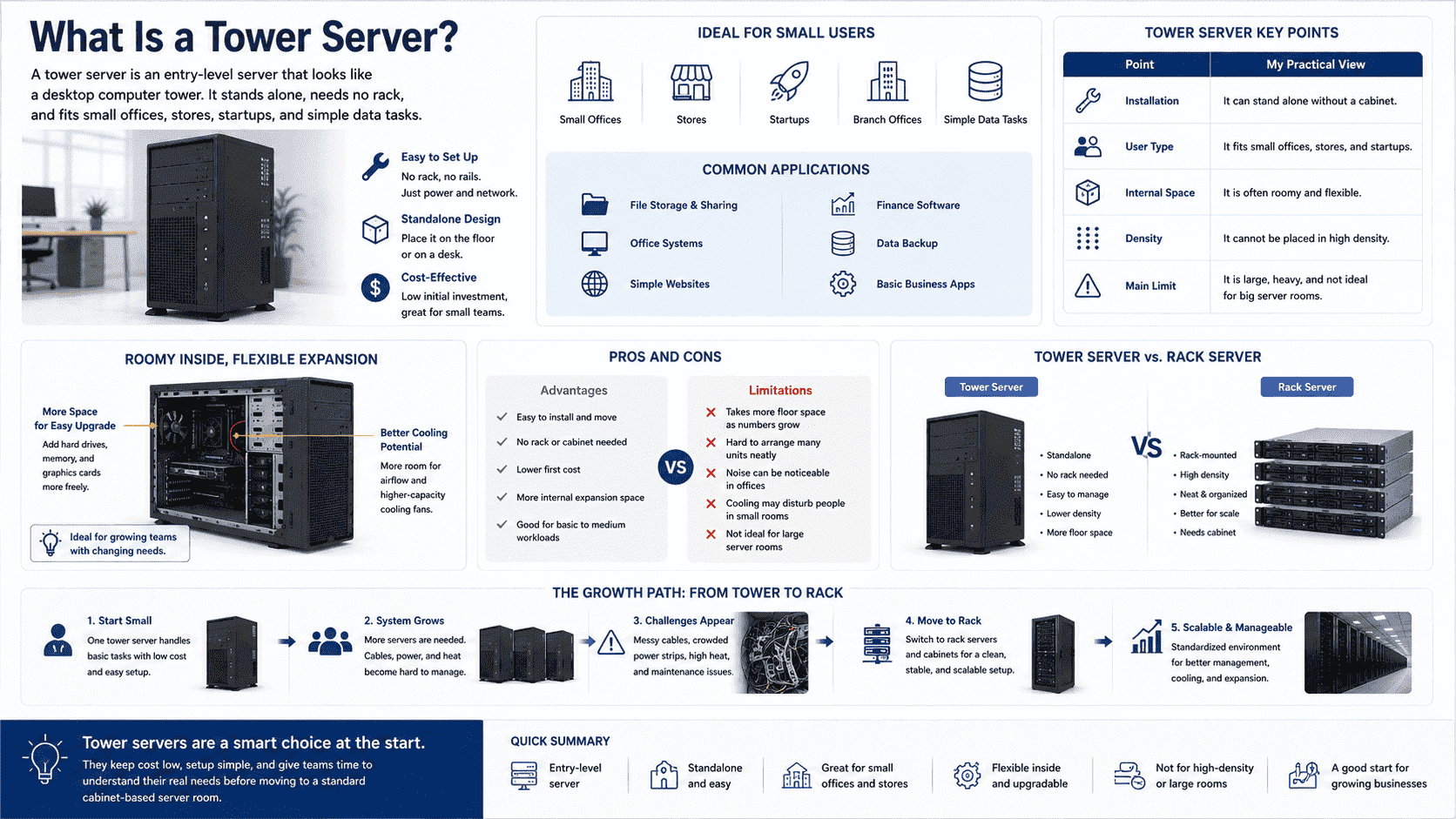
A tower server is an entry-level server that looks like a desktop computer tower. It stands alone, needs no rack, and fits small offices, stores, startups, and simple data tasks.10
Why tower servers still matter for small users
I see a tower server as the easiest server type to understand. Its shape is close to a normal desktop computer. It can stand on the floor or on a desk. It does not need a server cabinet. It does not need rack rails. It can start working in a small office with simple power and network conditions.
Tower servers are common in small companies, startup teams, stores, and branch offices. They can support file storage, office systems, simple websites, finance software, and basic data backup. The inside space is usually more relaxed than a compact rack server. The user can add hard drives, memory, graphics cards, and cooling fans more freely in many models.
| Tower server point | My practical view |
|---|---|
| Installation | It can stand alone without a cabinet |
| User type | It fits small offices, stores, and startups |
| Internal space | It is often roomy and flexible |
| Density | It cannot be placed in high density |
| Main limit | It is large, heavy, and not ideal for big server rooms |
I also see clear weaknesses. A tower server takes more floor space when the number grows. It is hard to place many tower servers in a neat line. It does not fit large-scale cabinet deployment well.11 The noise can be obvious in an office. The cooling path may also disturb people if the server runs near staff.
I have met buyers who start with one tower server and later need ten servers. At that moment, the room becomes messy. Cables spread across desks or walls. Power strips become crowded. Heat builds up in corners. The user then has to move to rack servers and cabinets. I do not see this as a mistake. I see it as a growth path. A tower server is good at the start. A rack server is better when the system grows.
For a small team, I think a tower server is still a smart choice when the task is simple. It keeps the first cost low. It keeps installation easy. It also gives the team time to understand its real computing needs before it moves into a standard cabinet room.
How do I choose the right server type for one project?
I have seen projects fail because the server was chosen only by price. The lowest price often creates higher costs in space, cooling, and maintenance.
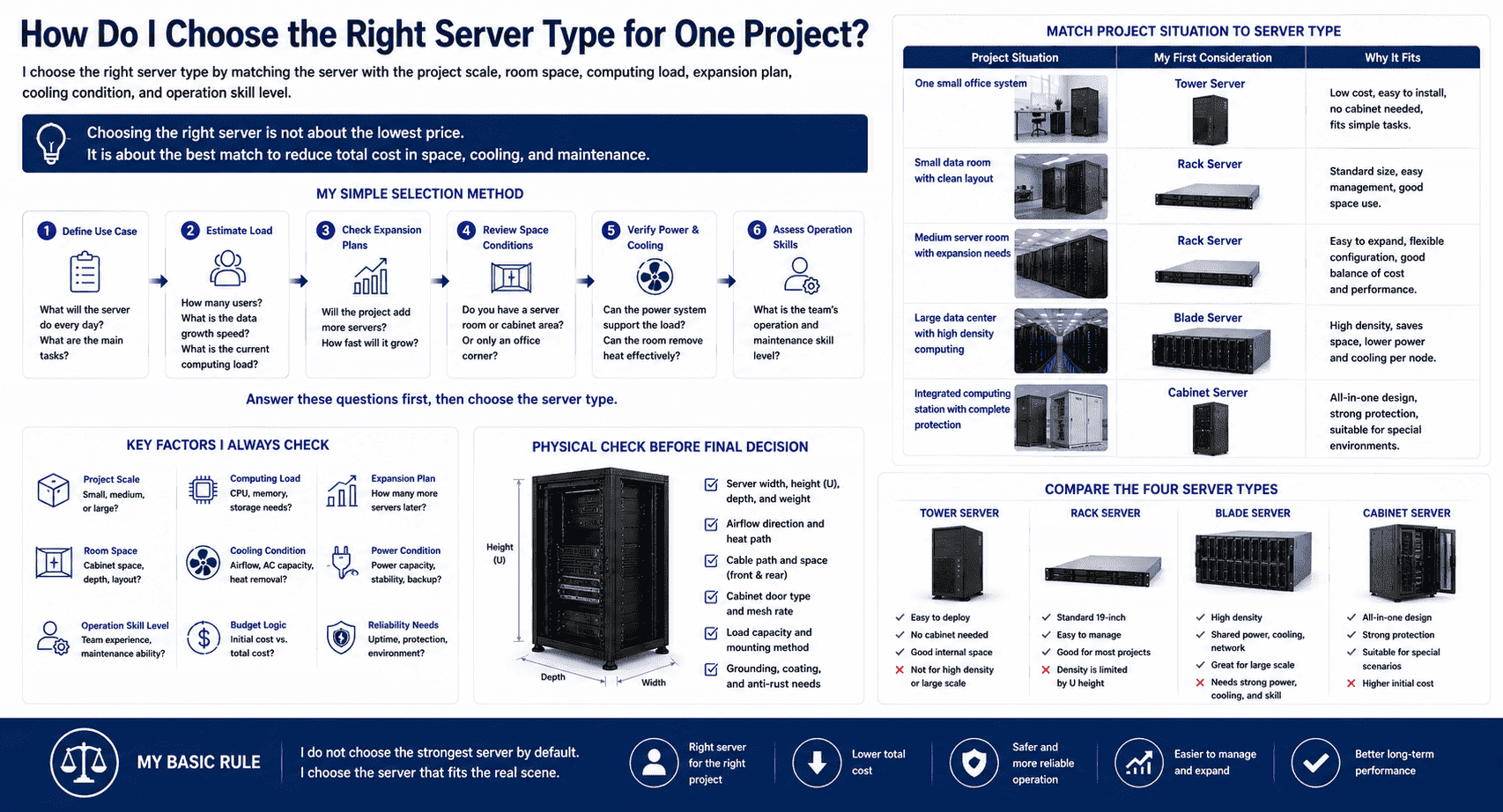
I choose the right server type by matching the server with the project scale, room space, computing load, expansion plan, cooling condition, and operation skill level.
My simple selection method before I plan cabinets and rooms
I usually do not start with the server model number. I start with the use case. I ask what the server must do every day. I ask how many users will access it. I ask whether the data will grow fast. I ask whether the project will add more servers later. I also ask whether the customer has a server room, a cabinet area, or only an office corner.
| Project situation | Server type I usually consider first |
|---|---|
| One small office system | Tower server |
| Small data room with clean layout | Rack server |
| Medium server room with expansion needs | Rack server |
| Large data center with high density computing | Blade server |
| Integrated computing station with complete protection | Cabinet server |
I also check power and cooling before I confirm the answer. A powerful server is not useful if the room cannot remove heat.12 A high-density blade system is not safe if the power plan is weak. A rack server layout is not clean if the cabinet depth is wrong. A tower server is not convenient if many units will appear later.
As a cabinet manufacturer, I pay close attention to the physical part. I check the server width, height, depth, weight, airflow, and cable path. I also check the door type, mesh rate, load capacity, grounding, coating, and anti-rust needs of the cabinet. These details sound simple, but they decide whether the server can run safely for years.
I use one basic rule in my own work. I do not choose the strongest server by default. I choose the server that fits the real scene. A small office does not need a blade server. A large computing cluster should not depend on many loose tower servers. A standard server room should not ignore rack server cabinet planning. A special outdoor or integrated project may need a cabinet server with custom structure and protection.
Conclusion
I choose among cabinet, blade, rack, and tower servers by matching computing power, space, cooling, wiring, and future growth with the real project scene.
"How Researchers Are Driving Advances for Data Centers", https://newscenter.lbl.gov/2025/12/16/how-researchers-are-driving-advances-for-data-centers/. Data-center infrastructure guidance identifies equipment layout, rack or cabinet configuration, airflow management, cabling paths, and service access as linked design considerations, supporting the claim that server form factor influences room planning and later maintenance. Evidence role: expert_consensus; source type: institution. Supports: Data-center design guidance treats equipment layout, cabinet/rack configuration, airflow, cabling, and service access as interdependent planning factors.. Scope note: The source would support the general design relationship rather than prove that every individual project is determined mainly by server type. ↩
"Data center - Wikipedia", https://en.wikipedia.org/wiki/Data_center. References on modular and micro data centers describe integrated enclosures that combine IT equipment with supporting power, cooling, networking, and monitoring systems, providing contextual support for defining a cabinet server as an integrated cabinet-based computing unit. Evidence role: definition; source type: encyclopedia. Supports: Modular or micro data-center references describe integrated enclosures that combine compute, networking, power, cooling, and monitoring functions.. Scope note: The support is contextual because 'cabinet server' is not a universally standardized server form-factor term. ↩
"Micro Data Centers / Mini Data Centers", https://www.datacenterexperts.com/products/modular-self-contained-data-centers/micro-data-center. Technical literature on micro data centers and integrated data-center racks commonly describes these systems as combining IT equipment with power distribution, cooling, monitoring, networking, and protective subsystems, supporting the component categories listed here. Evidence role: general_support; source type: research. Supports: Technical descriptions of micro data centers or integrated data-center racks list compute, storage, networking, power, cooling, environmental monitoring, and sometimes fire-suppression or alarm subsystems.. Scope note: Specific included components vary by design and vendor, so the source should be used to support possibility rather than universal inclusion. ↩
"Blade server - Wikipedia", https://en.wikipedia.org/wiki/Blade_server. A blade server is generally defined as a modular server installed in a chassis that provides shared infrastructure such as power, cooling, networking, and management, supporting the description of blade nodes sharing chassis resources. Evidence role: definition; source type: encyclopedia. Supports: A blade-server reference defines blade servers as modular servers housed in a chassis with shared services such as power, cooling, networking, and management.. ↩
"Blade server", https://en.wikipedia.org/wiki/Blade_server. Descriptions of blade-server architecture note that multiple server modules share chassis-level infrastructure, which can reduce external cabling and physical footprint relative to separately cabled servers. Evidence role: mechanism; source type: encyclopedia. Supports: Blade-server architecture consolidates multiple server modules into a shared chassis, which can reduce external cabling and physical space requirements.. Scope note: Actual space and cabling savings depend on workload, chassis design, network architecture, and comparison baseline. ↩
"Ensemble-level Power Management for Dense Blade ...", http://www.ecs.umass.edu/irwin/hp.pdf. Studies of high-density server environments associate blade-server deployments with concentrated power and heat loads, indicating that cooling capacity, electrical design, and operational management must be planned before deployment. Evidence role: expert_consensus; source type: paper. Supports: Research or technical guidance on high-density server deployments links blade systems with concentrated power and cooling requirements and the need for careful operational management.. Scope note: The source would support the general operational concern; the required skill level varies by system scale and management tooling. ↩
"Rack unit - Wikipedia", https://en.wikipedia.org/wiki/Rack_unit. The 19-inch rack standard and rack-unit convention define a common mounting width and vertical unit measurement for rack-mounted electronic equipment, supporting the description of rack servers as 19-inch systems commonly sold in 1U to 4U heights. Evidence role: definition; source type: encyclopedia. Supports: The 19-inch rack and rack-unit references define standard rack width and vertical unit measurement used for rack-mounted equipment.. Scope note: Some specialized servers and cabinets use nonstandard depths, mounting methods, or larger heights. ↩
"Rack unit - Wikipedia", https://en.wikipedia.org/wiki/Rack_unit. A rack unit, abbreviated U, is the standard vertical measurement used for rack-mounted equipment, with one rack unit equal to 1.75 inches, supporting the article’s use of U to describe server height. Evidence role: definition; source type: encyclopedia. Supports: Rack-unit references define U as the unit used to measure the vertical height of rack-mounted equipment.. ↩
"7 Best Practices For Data Center Cable Management - ServerLIFT", https://serverlift.com/blog/best-7-practices-for-clean-cable-management-in-data-centers/. Data-center rack and cabling guidance treats equipment depth, cable-management space, and front or rear access clearance as installation requirements, supporting the claim that shallow cabinets and tight cabling can impair fit and maintenance. Evidence role: general_support; source type: institution. Supports: Data-center cabling and rack-design guidance identifies cabinet depth, cable routing, and access clearance as factors affecting installation and maintenance.. Scope note: The exact clearance needed depends on the server model, connector type, rail kit, and maintenance procedure. ↩
"List of PowerEdge servers - Wikipedia", https://en.wikipedia.org/wiki/List_of_PowerEdge_servers. Server form-factor references describe tower servers as standalone tower-style machines that do not require rack mounting, supporting their characterization as entry-level systems for smaller deployments. Evidence role: definition; source type: encyclopedia. Supports: Server form-factor references describe tower servers as standalone tower-style systems often used where rack infrastructure is unnecessary.. Scope note: The source may not specifically mention every listed use case, such as stores or startups. ↩
"Comparing Blade, Rack, and Tower Servers for Optimal Deployment", https://www.fs.com/blog/comparing-blade-rack-and-tower-servers-for-optimal-deployment-2187.html. Comparative server form-factor guidance explains that rack servers are designed for standardized rack mounting and higher deployment density, while tower servers are standalone systems, supporting the claim that tower servers are less suitable for large cabinet-based deployments. Evidence role: mechanism; source type: education. Supports: Educational or technical sources comparing server form factors explain that rack servers are designed for standardized rack density, whereas tower servers are standalone and consume more floor space at scale.. Scope note: Tower-to-rack conversion kits and small mixed environments can be exceptions. ↩
"[PDF] Best Practices Guide for Energy-Efficient Data Center Design", https://www.energy.gov/sites/default/files/2024-07/best-practice-guide-data-center-design.pdf. Thermal guidelines for data-processing environments identify heat removal and allowable inlet-temperature control as necessary conditions for reliable IT equipment operation, supporting the warning that server capacity is constrained by room cooling capability. Evidence role: mechanism; source type: institution. Supports: Thermal guidelines for data-processing environments state that IT equipment requires adequate heat removal and temperature control for reliable operation.. ↩
