
What Are Server & Data Racks?

I see many companies lose speed, space, and money because they treat servers and racks like simple boxes and metal frames.
Server and data racks are the core hardware base of a data center. The server handles storage, computing, and data work.1 The rack supports, protects, cools, and organizes servers, switches, routers, UPS units, and cables in a standard 19-inch structure2.
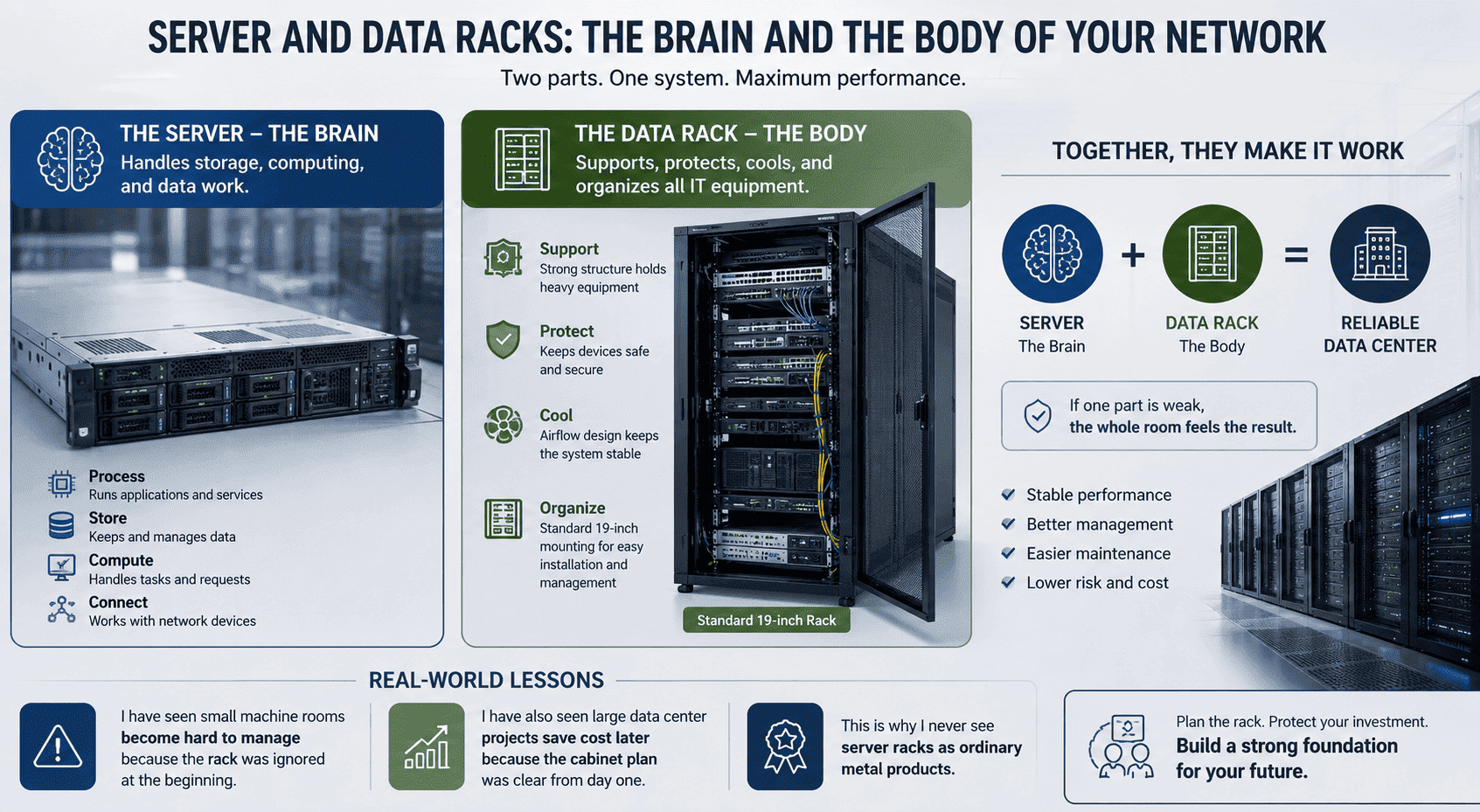
I often explain this idea to customers in a simple way. The server is the working brain of the network system. The data rack is the strong body that holds that brain in the right place. If one part is weak, the whole room feels the result. I have seen small machine rooms become hard to manage because the rack was ignored at the beginning. I have also seen large data center projects save cost later because the cabinet plan was clear from day one. This is why I never see server racks as ordinary metal products.
Why Are Servers More Than Ordinary Computers?
I meet buyers who compare servers with desktop computers, and that mistake can lead to downtime, slow service, and higher repair cost.
A server is a high-performance computer built for continuous work.3 It stores data, runs programs, handles user requests, and supports remote control. It uses tested parts like CPU, memory, disks, power modules, fans, and motherboards for stable long-time operation.
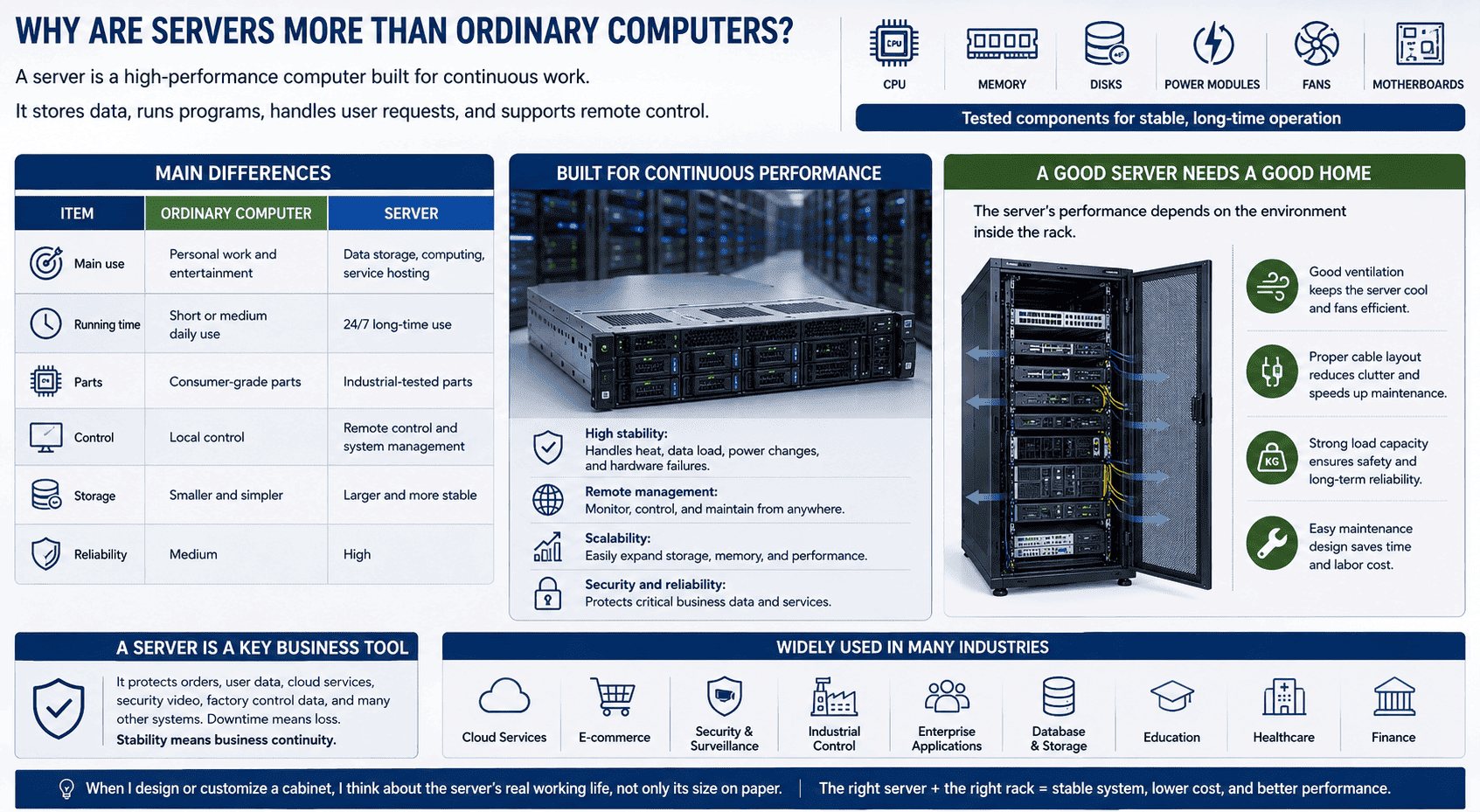
I see a server as the central work unit in a network system. A personal computer serves one person most of the time. A server serves many users, many devices, and many tasks at the same time.4 It must run day and night.5 It must also handle heat, data load, power changes, and remote management. This is why server parts need higher stability than normal computer parts.
Main differences I focus on
| Item | Ordinary Computer | Server |
|---|---|---|
| Main use | Personal work and entertainment | Data storage, computing, service hosting |
| Running time | Short or medium daily use | 24/7 long-time use |
| Parts | Consumer-grade parts | Industrial-tested parts |
| Control | Local control | Remote control and system management |
| Storage | Smaller and simpler | Larger and more stable |
| Reliability | Medium | High |
In my daily work, I also pay attention to how the server sits inside the rack. A good server still needs a good space to breathe. If the cabinet blocks air, the server fan will work harder. If the cable layout is poor, repair time becomes longer. If the load capacity is weak, safety risk grows. I always remind customers that a server is not just a machine. It is a key business tool. It protects orders, user data, cloud services, security video, factory control data, and many other systems. When I design or customize a cabinet, I think about the server’s real working life, not only its size on paper.
Why Do Data Racks Matter in a Server Room?
I have seen server rooms with good devices but poor racks, and the result is heat, messy cables, weak safety, and slow maintenance.
A data rack is an industrial metal frame or cabinet that holds IT equipment in a standard way. It supports servers, switches, routers, patch panels, UPS power units, cable managers, and other devices.6 It improves space use, cooling, safety, and service work.7
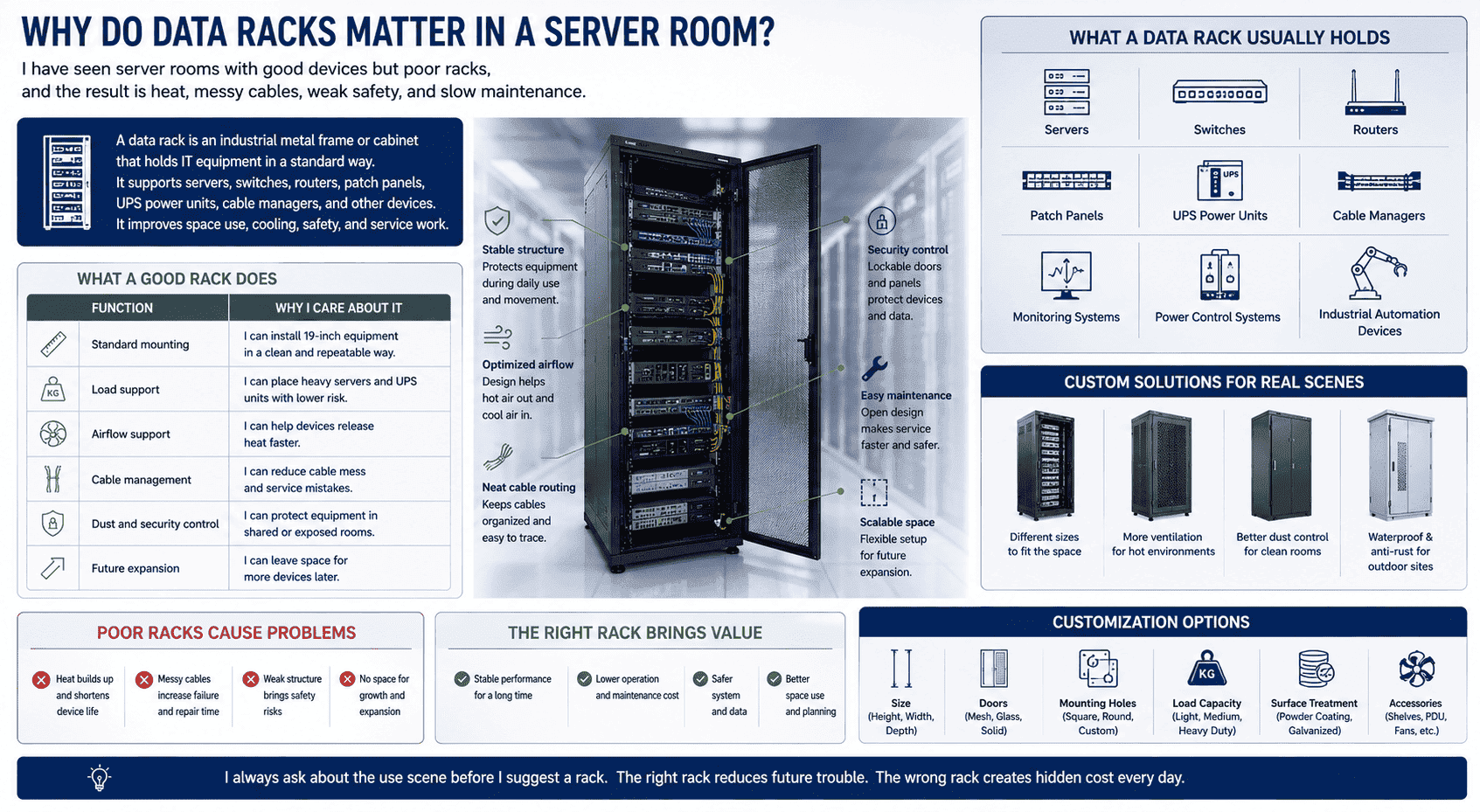
I treat a data rack as the basic platform of the whole machine room. The rack is not only a storage shelf. It decides how equipment is fixed, how air moves, how cables pass, and how engineers repair the system. A stable rack also protects the equipment during daily use and movement. In many projects, I see that customers care about CPU, storage, and network speed first. I understand that. These parts are easy to connect with performance. But the rack decides if the performance can stay stable for a long time8.
What a good rack does
| Function | Why I care about it |
|---|---|
| Standard mounting | I can install 19-inch equipment in a clean and repeatable way |
| Load support | I can place heavy servers and UPS units with lower risk |
| Airflow support | I can help devices release heat faster |
| Cable management | I can reduce cable mess and service mistakes |
| Dust and security control | I can protect equipment in shared or exposed rooms |
| Future expansion | I can leave space for more devices later |
A data rack usually holds servers, switches, routers, patch panels, UPS power units, and cable managers. I also see racks used with monitoring systems, power control systems, and industrial automation devices. In our factory, I often customize sizes, doors, holes, load structures, and surface treatment based on the real site. A standard product can solve many needs. A non-standard product can solve the rest. Some rooms need more ventilation. Some rooms need better dust control. Some outdoor sites need waterproof and anti-rust design9. I always ask about the use scene before I suggest a rack. The right rack reduces future trouble. The wrong rack creates hidden cost every day.
Open Rack or Enclosed Cabinet: Which One Should I Choose?
I see many buyers choose by price only, and they later find that access, airflow, dust, and security do not match the site.
I choose an open rack when the room is clean, secure, and needs easy access and strong airflow. I choose an enclosed cabinet when the site needs better dust control, door locks, side panels, equipment protection, and a more complete structure.
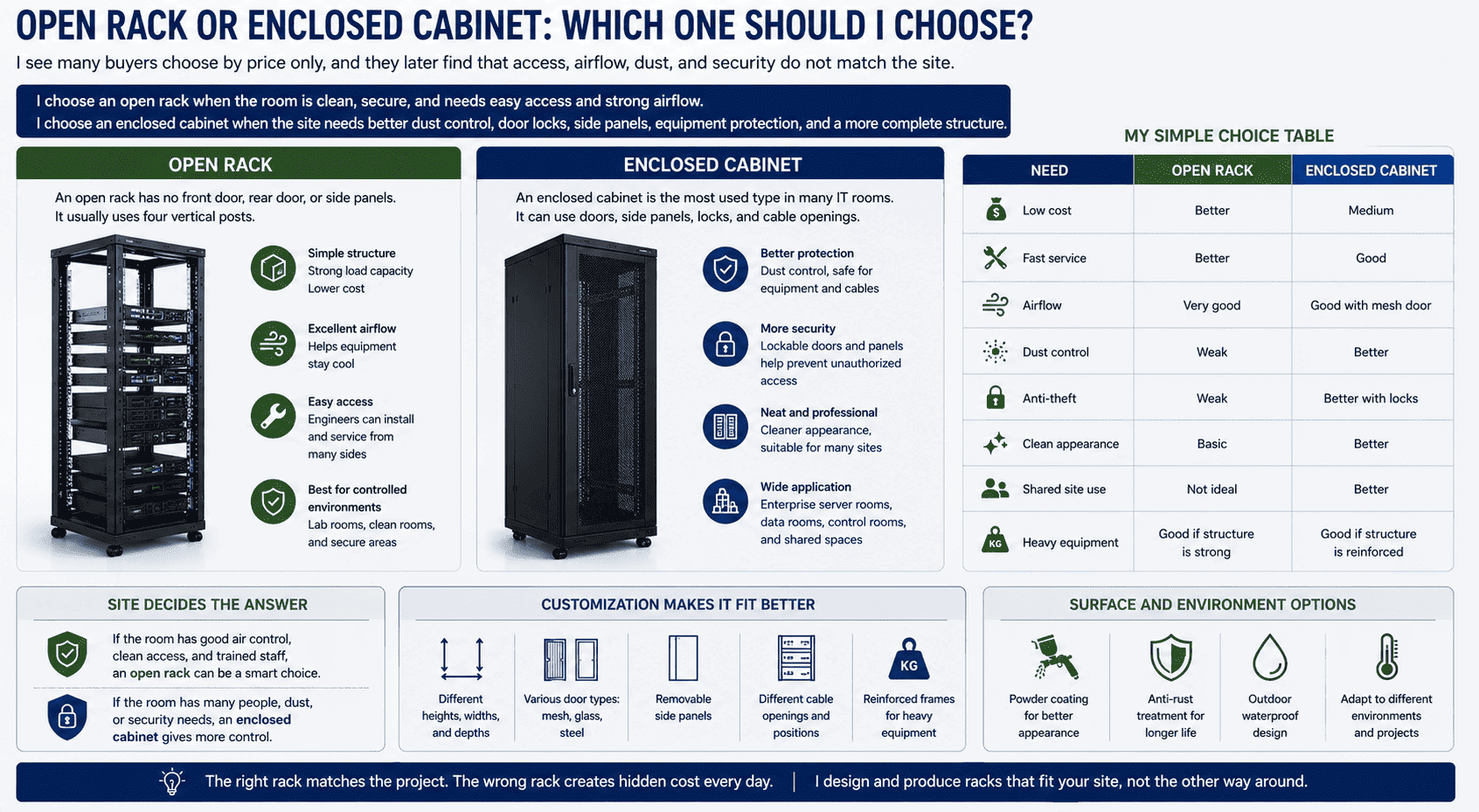
I often compare open racks and enclosed cabinets for customers. An open rack has no front door, rear door, or side panels. It usually uses four vertical posts. It has a simple structure, strong load capacity, lower cost, and good airflow. It also makes installation and service easier because engineers can touch equipment and cables from many sides. I like open racks for controlled machine rooms, lab rooms, and places where cooling and fast service matter more than dust protection.
An enclosed cabinet is the most used type in many IT rooms. It can use mesh doors, glass doors, steel doors, removable side panels, locks, and cable openings. It gives better protection and a cleaner look. It also supports standard 19-inch equipment installation. I often recommend it for enterprise server rooms, data rooms, control rooms, and shared spaces.
My simple choice table
| Need | Open Rack | Enclosed Cabinet |
|---|---|---|
| Low cost | Better | Medium |
| Fast service | Better | Good |
| Airflow | Very good | Good with mesh door |
| Dust control | Weak | Better |
| Anti-theft | Weak | Better with locks |
| Clean appearance | Basic | Better |
| Shared site use | Not ideal | Better |
| Heavy equipment | Good if structure is strong | Good if structure is reinforced |
I do not believe one type is always better. I believe the site decides the answer. If the room has good air control, clean access, and trained staff, an open rack can be a smart choice. If the room has many people, dust, or security needs, an enclosed cabinet gives more control. In our production work, I also adjust the structure. I can make reinforced frames, different depths, different door types, and different cable holes. I can also make powder coating, anti-rust treatment, and outdoor waterproof structures. These details help the rack match the project instead of forcing the project to match the rack.
How Do Rack Design, Cooling, and Cable Layout Affect Performance?
I see many performance problems start from small physical details, and these details are often ignored during early planning.
Rack design affects airflow, heat control, cable order, load safety, repair speed, and space use. A good rack plan helps servers run more steadily. It also lowers downtime risk, reduces maintenance time, and supports future expansion.
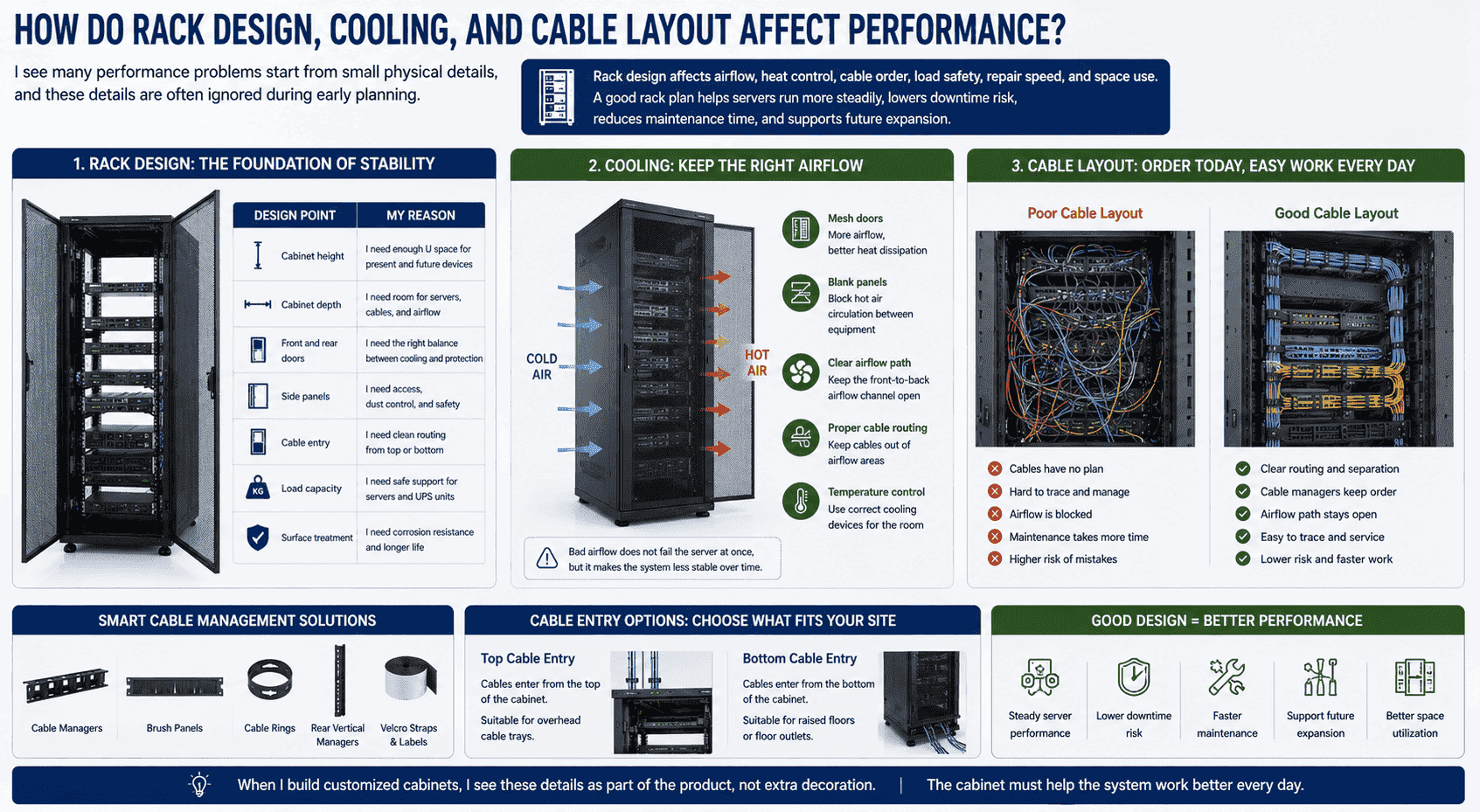
I always ask about cooling before I confirm a cabinet plan. Servers create heat every minute. If heat stays around the equipment, performance drops and parts age faster.10 Mesh doors help air pass through the cabinet. Correct blank panels can also reduce hot air circulation.11 Proper cable routing keeps the airflow path clear.12 I have seen cabinets with good devices but blocked airflow because cable bundles sat in the wrong place. The server did not fail at once, but the room became less stable.
Design points I check
| Design point | My reason |
|---|---|
| Cabinet height | I need enough U space for present and future devices |
| Cabinet depth | I need room for servers, cables, and airflow |
| Front and rear doors | I need the right balance between cooling and protection |
| Side panels | I need access, dust control, and safety |
| Cable entry | I need clean routing from top or bottom |
| Load capacity | I need safe support for servers and UPS units |
| Surface treatment | I need corrosion resistance and longer life |
Cable layout looks simple, but it affects daily work. If cables have no plan, engineers waste time tracing lines. If power cables and network cables mix without order, the room becomes harder to service. Cable managers, brush panels, cable rings, and rear vertical managers can make the cabinet cleaner. I like to leave service space at the rear because many servers need deep cable access. I also ask whether the room uses top cable entry or bottom cable entry. This one detail changes the cabinet hole design. When I build customized cabinets, I see these details as part of the product, not extra decoration. The cabinet must help the system work better every day.
Why Does Customization Matter for Server and Data Rack Projects?
I meet many projects that cannot use a standard cabinet well, and a forced standard choice often creates extra work on site.
Customization matters because each server room has different space, load, airflow, cable, power, and protection needs. Custom racks can match size, door type, punching, load structure, waterproof level, anti-rust treatment, and special equipment layout.
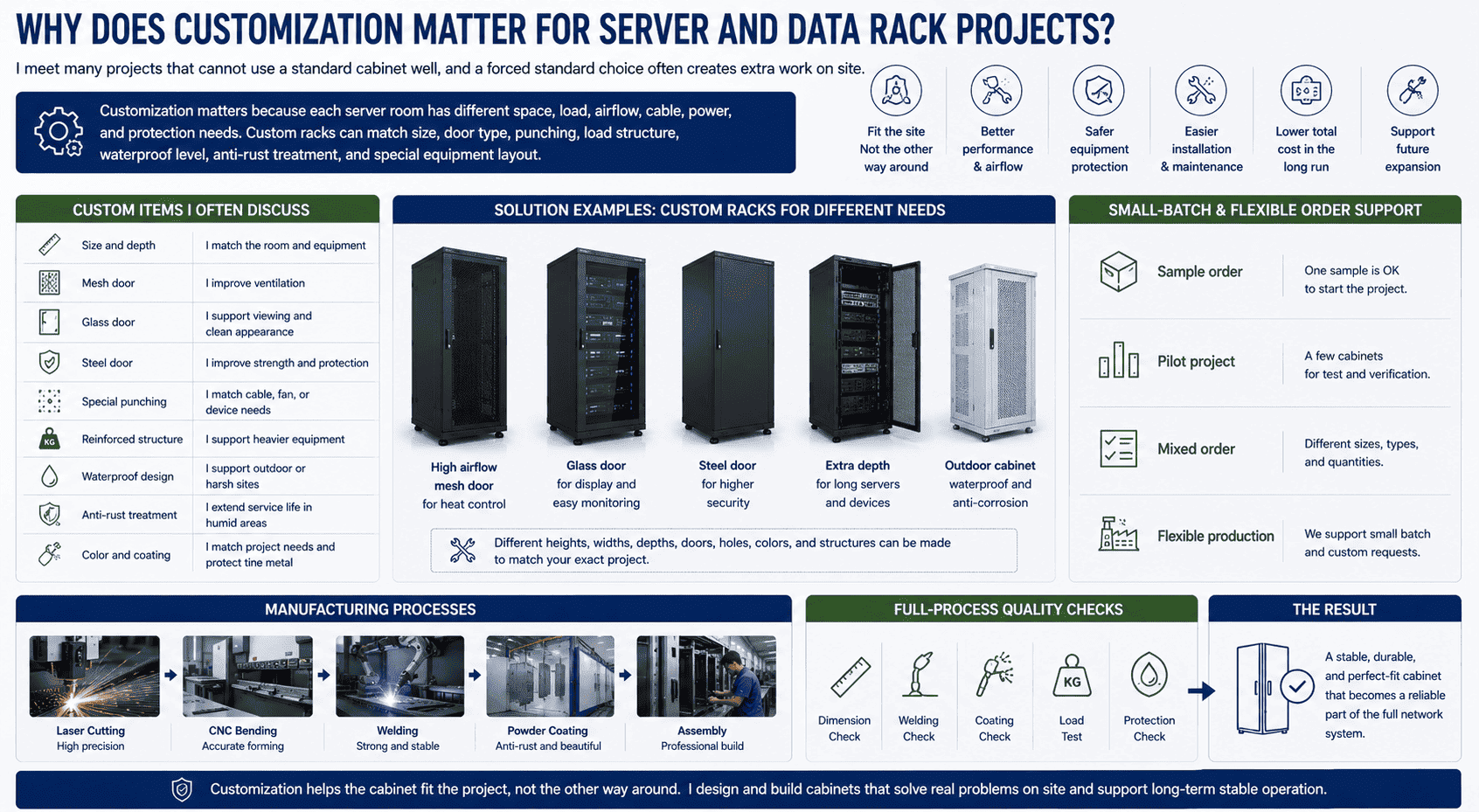
I work in a factory that focuses on network cabinets, server cabinets, and sheet metal products. Because of this, I know that many real projects do not fit one standard model. Some customers need a special depth because their servers are longer. Some need a narrow cabinet because the room space is limited. Some need reinforced shelves because the UPS is heavy. Some need glass doors for display, and some need mesh doors for airflow. Some need steel doors for security. I also see projects that need outdoor waterproof cabinets, anti-corrosion coating, special punching, and non-standard cable holes.
Custom items I often discuss
| Custom item | Common purpose |
|---|---|
| Size and depth | I match the room and equipment |
| Mesh door | I improve ventilation |
| Glass door | I support viewing and clean appearance |
| Steel door | I improve strength and protection |
| Special punching | I match cable, fan, or device needs |
| Reinforced structure | I support heavier equipment |
| Waterproof design | I support outdoor or harsh sites |
| Anti-rust treatment | I extend service life in humid areas |
| Color and coating | I match project needs and protect the metal |
Small-batch customization is also important. Many buyers do not need a full container at the start. Some need one sample. Some need a few cabinets for a pilot room. Some need a mixed order with different sizes. I support this kind of demand because our production mode is flexible. We use laser cutting, CNC bending, welding, powder coating, and assembly lines. These processes help me control shape, accuracy, strength, and appearance. I also follow full-process quality checks, from raw material to finished product. I check dimensions, welding, coating, load, and protection details. This work helps the cabinet become a stable part of the full network system, not just a metal shell.
How Should I Plan a Server Rack Purchase for a New Project?
I see project delays happen when buyers order cabinets before they confirm equipment size, power needs, cooling plan, and cable direction.
I plan a server rack purchase by checking equipment list, U height, depth, load, airflow, cable entry, power layout, room size, security needs, and future expansion. I also confirm whether the project needs standard cabinets or non-standard customization.
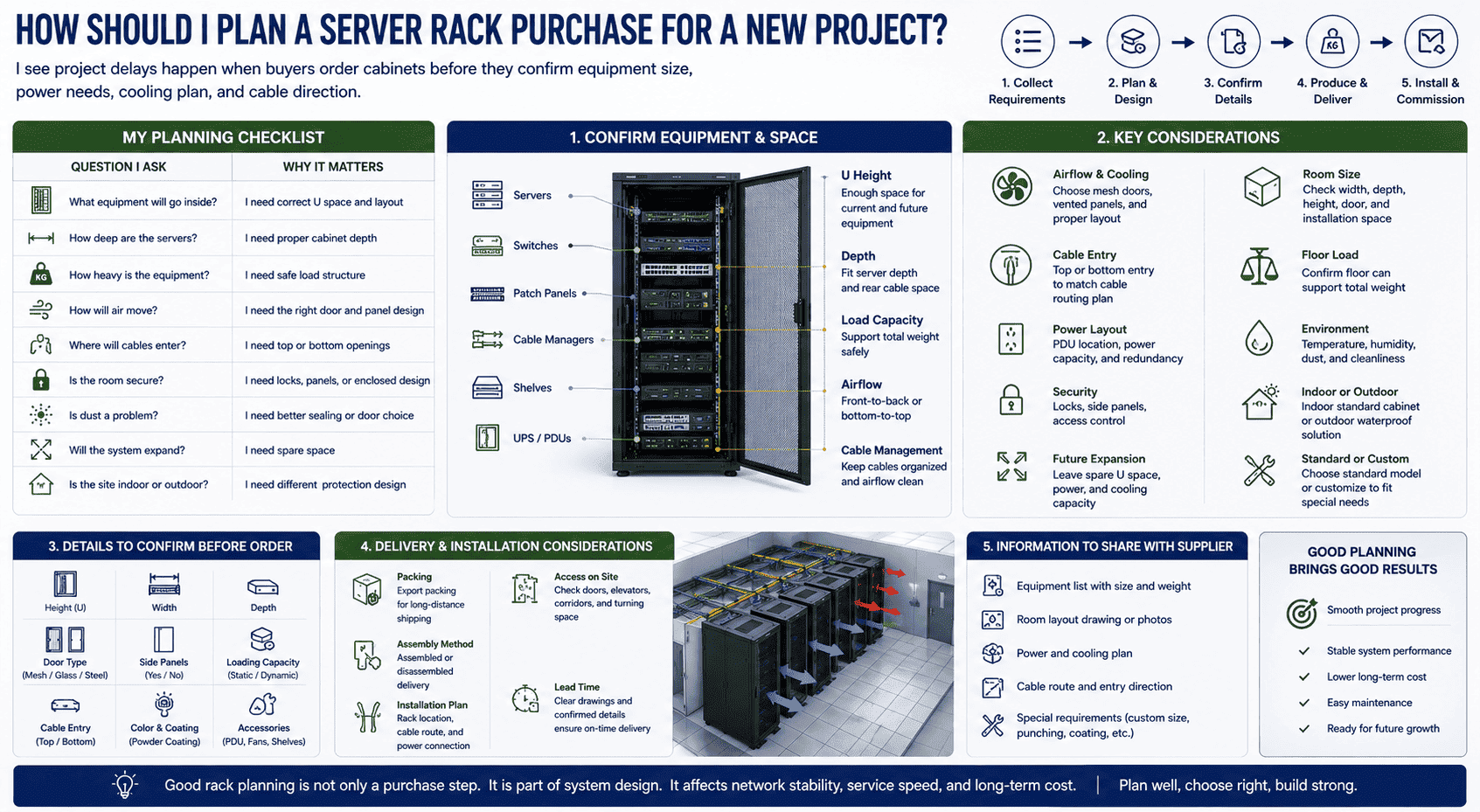
When I help a customer plan a rack, I start with the equipment list. I ask how many servers, switches, routers, patch panels, UPS units, shelves, and cable managers will be installed. I also ask about the size and weight of each device. This step sounds basic, but it prevents many problems. A cabinet can look large from the outside and still be too shallow for a deep server. A rack can have enough U height and still lack rear space for cables. I prefer to solve these issues before production, not during installation.
My planning checklist
| Question I ask | Why it matters |
|---|---|
| What equipment will go inside? | I need correct U space and layout |
| How deep are the servers? | I need proper cabinet depth |
| How heavy is the equipment? | I need safe load structure |
| How will air move? | I need the right door and panel design |
| Where will cables enter? | I need top or bottom openings |
| Is the room secure? | I need locks, panels, or enclosed design |
| Is dust a problem? | I need better sealing or door choice |
| Will the system expand? | I need spare space |
| Is the site indoor or outdoor? | I need different protection design |
I also think about delivery and installation. If the project is overseas, packaging matters. If the site has narrow doors or elevators, cabinet size and assembly method matter. If the project needs fast delivery, I need clear drawings and confirmed details early. I have seen many urgent projects become smooth because the customer shared layout drawings, equipment lists, and photos at the start. I have also seen simple projects become slow because key details were missing. Good rack planning is not only a purchase step. It is part of system design. It affects network stability, service speed, and long-term cost.
Conclusion
I see servers as the brain and racks as the stable body. When both are planned well, the whole data system runs better.
"Cloud computing", https://en.wikipedia.org/wiki/Cloud_computing. The cited source defines a server as a computing system that provides resources, data, or services to clients over a network, supporting the article's description of storage and computation functions. Evidence role: definition; source type: encyclopedia. Supports: A reference source should define a server as a computer or program that provides data, resources, or services to other devices.. ↩
"19-inch rack - Wikipedia", https://en.wikipedia.org/wiki/19-inch_rack. The cited source defines the 19-inch rack as a standardized equipment-mounting frame and notes its widespread use for servers, networking, and telecommunications hardware. Evidence role: definition; source type: encyclopedia. Supports: A neutral source should define the 19-inch rack as a standardized frame for mounting electronic equipment.. ↩
"Reliability, availability and serviceability - Wikipedia", https://en.wikipedia.org/wiki/Reliability,_availability_and_serviceability. The cited source describes servers as systems intended to provide ongoing services to client devices and commonly designed with reliability and availability considerations. Evidence role: general_support; source type: encyclopedia. Supports: A source should explain that servers are built to provide services continuously and often include features for reliability and availability.. Scope note: The source may support the general design purpose of servers but may not prove that every server is high-performance. ↩
"Client–server model - Wikipedia", https://en.wikipedia.org/wiki/Client%E2%80%93server_model. The cited source explains that, in client-server architecture, a server provides services or resources to client devices, supporting the distinction between personal and multi-user service roles. Evidence role: mechanism; source type: education. Supports: A source should explain that servers provide resources or services to multiple clients in client-server architecture.. ↩
"[PDF] Zero Trust Architecture - NIST Technical Series Publications", https://nvlpubs.nist.gov/nistpubs/specialpublications/NIST.SP.800-207.pdf. The cited source describes data-center services as availability-focused infrastructure commonly planned for continuous operation. Evidence role: expert_consensus; source type: institution. Supports: A source should document that data centers and hosted services are commonly designed around continuous availability requirements.. Scope note: This supports the expectation for enterprise and data-center servers, but not every server deployment requires uninterrupted operation. ↩
"19-inch rack - Wikipedia", https://en.wikipedia.org/wiki/19-inch_rack. The cited source identifies 19-inch racks as standardized mounting systems used for electronic and network equipment, providing context for the listed servers, switches, patch panels, and support devices. Evidence role: general_support; source type: encyclopedia. Supports: A source should identify 19-inch racks as mounting systems for computing, networking, telecommunications, and related support equipment.. Scope note: The source may confirm the general equipment categories rather than every device named in the article. ↩
"Data Center and Server Room Standards - The University of Kansas", https://services.ku.edu/TDClient/818/Portal/KB/ArticleDet?ID=21009. The cited source discusses rack layout as part of data-center design, linking equipment organization with airflow management, cabling practices, safety, and maintainability. Evidence role: general_support; source type: institution. Supports: A data-center design source should connect rack layout with space organization, airflow, cable management, safety, and maintenance access.. Scope note: This provides contextual design support rather than measuring the improvement from a specific rack model. ↩
"[PDF] Best Practices Guide for Energy-Efficient Data Center Design", https://www.energy.gov/sites/default/files/2024-07/best-practice-guide-data-center-design.pdf. The cited source treats rack arrangement and airflow management as part of the environmental controls that support reliable operation of data-processing equipment. Evidence role: expert_consensus; source type: institution. Supports: A source should explain that rack layout, airflow, and environmental management influence equipment reliability and stable operation.. Scope note: The support is contextual because overall performance stability also depends on servers, power systems, software, and facility cooling. ↩
"IP code - Wikipedia", https://en.wikipedia.org/wiki/IP_code. The cited source defines enclosure protection ratings for ingress of water and environmental exposure, providing a standards context for waterproof and corrosion-resistant cabinet design. Evidence role: definition; source type: institution. Supports: A standards source should define enclosure ratings for water ingress and environmental protection, including outdoor exposure contexts.. Scope note: The source supports the need for rated protection categories but does not verify the performance of any particular cabinet. ↩
"[PDF] Temperature Management in Data Centers: Why Some (Might) Like ...", https://users.ece.cmu.edu/~gamvrosi/assets/tr_sigmetrics12.pdf. The cited source reports that elevated operating temperatures in electronic equipment are associated with increased reliability risk and can affect performance or component lifetime. Evidence role: mechanism; source type: paper. Supports: A source should explain the relationship between operating temperature, electronic component reliability, and performance or failure behavior.. ↩
"Move to a Hot Aisle/Cold Aisle Layout | ENERGY STAR", https://www.energystar.gov/products/data_center_equipment/16-more-ways-cut-energy-waste-data-center/move-hot-aislecold-aisle-layout. The cited source explains that blanking panels installed in unused rack spaces help limit hot-air recirculation and improve separation of cold supply air from warm exhaust air. Evidence role: mechanism; source type: government. Supports: A source should state that blanking panels help separate supply and exhaust air by closing unused rack spaces.. ↩
"[PDF] Best Practices Guide for Energy-Efficient Data Center Design", https://www.energy.gov/sites/default/files/2024-07/best-practice-guide-data-center-design.pdf. The cited source states that cable-management practices should avoid blocking rack airflow paths and should preserve access for maintenance. Evidence role: mechanism; source type: institution. Supports: A source should support that cable placement affects airflow paths and maintenance access inside racks.. Scope note: This supports the general mechanism; the airflow impact depends on cable volume, rack geometry, and cooling design. ↩
