
Standard Cabinets: What Are They And Why Do I Use Them?

Messy IT equipment creates heat, risk, and slow repair work. I have seen small wiring problems turn into long and costly shutdowns.
A standard cabinet is a metal enclosure built to hold 19-inch rack equipment in fixed U sizes.1 I use it to install, protect, cool, power, and manage servers, switches, routers, UPS units, and other IT or network devices in a clean and safe way.
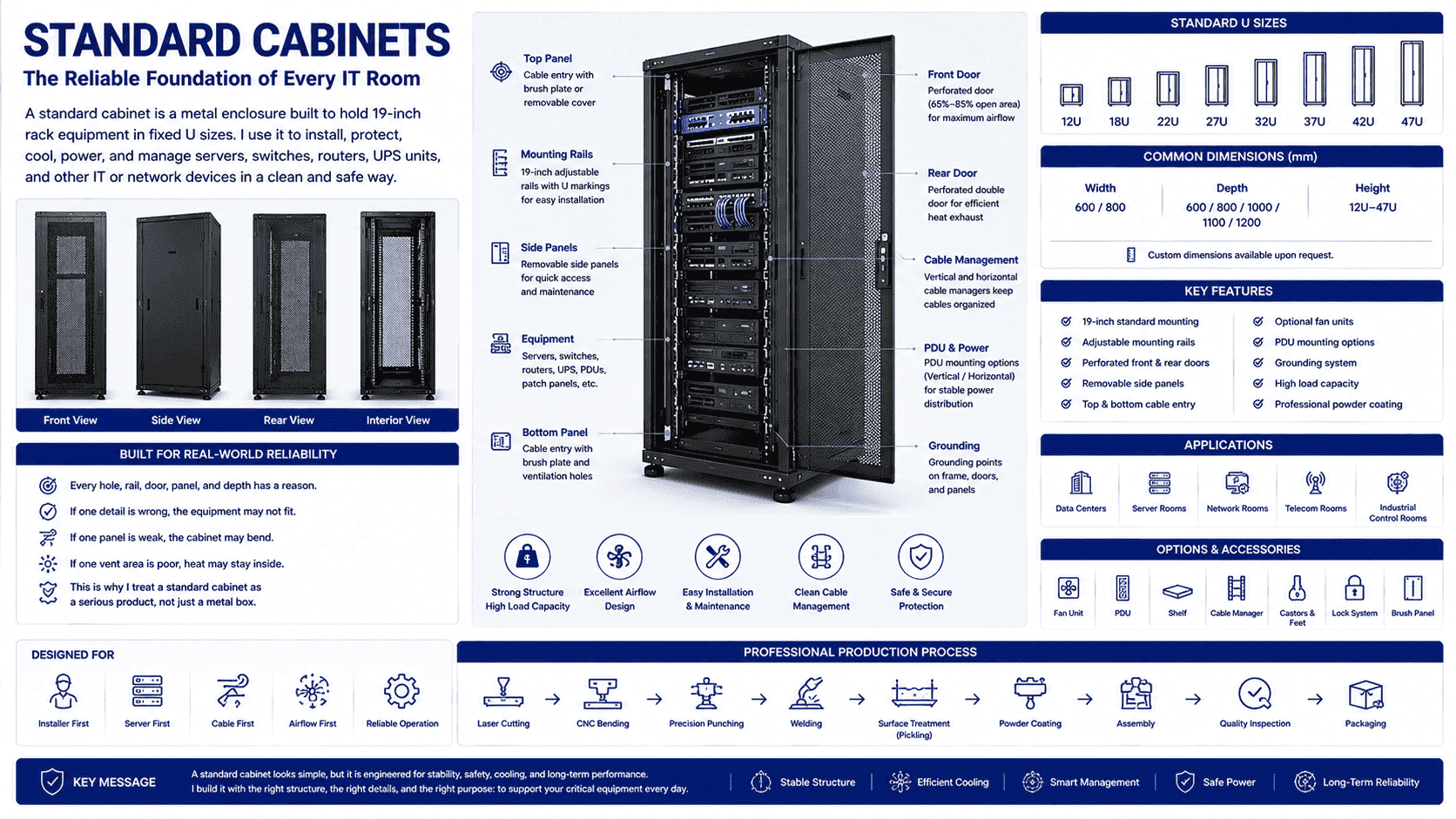
I often describe a standard cabinet as the basic frame behind a stable IT room. It looks simple from the outside. It is not simple in real production. Every hole, rail, door, panel, and depth has a reason. When I build a cabinet, I think about the server first, then the cable, then the airflow, then the installer who must finish the job on site. If one detail is wrong, the equipment may not fit. If one panel is weak, the cabinet may bend. If one vent area is poor, heat may stay inside. This is why I treat a standard cabinet as a serious product, not just a metal box.
What Is A Standard Cabinet?
Loose devices on tables look easy at first. I have seen them become dusty, hot, and hard to repair after only a short time.
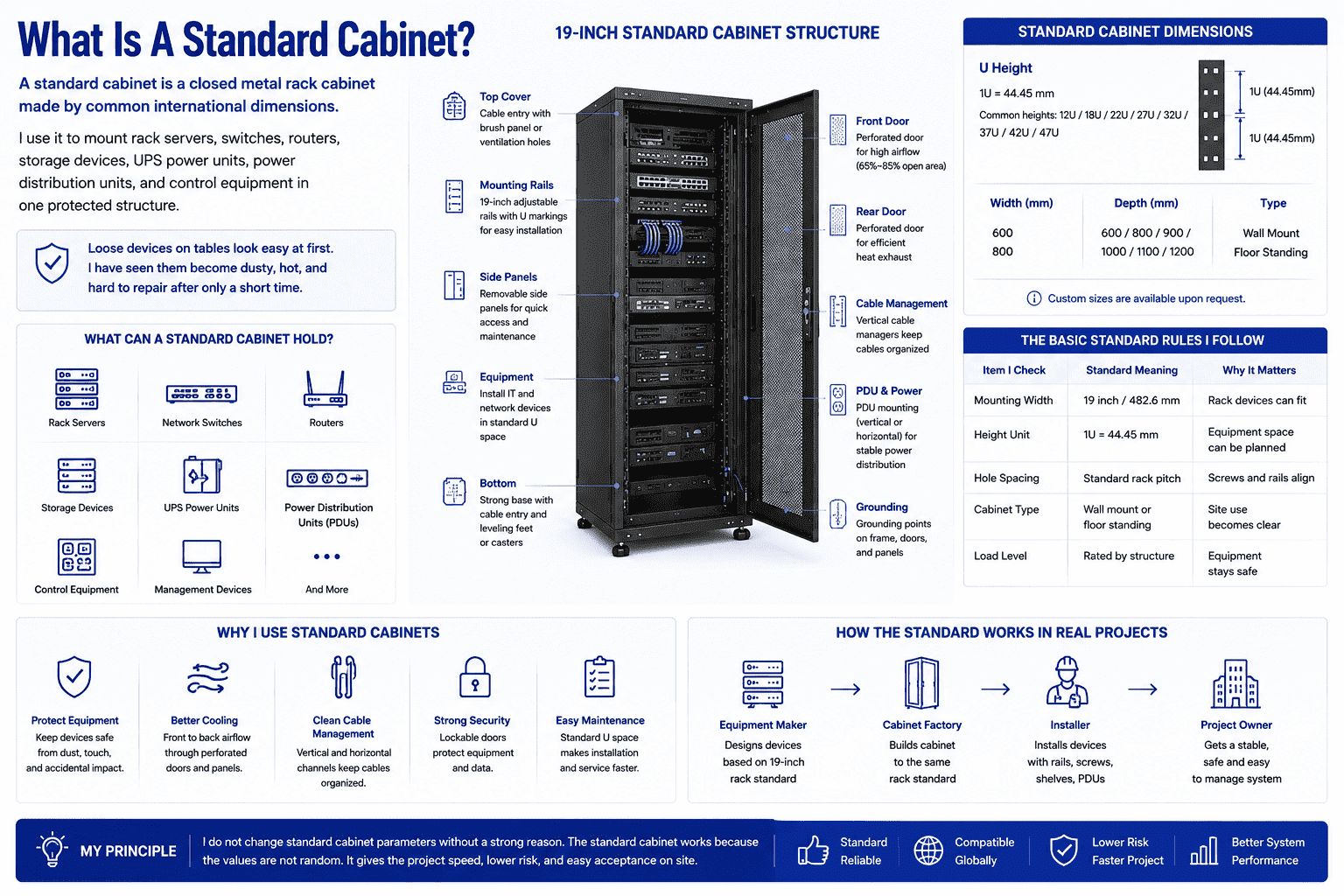
A standard cabinet is a closed metal rack cabinet made by common international dimensions. I use it to mount rack servers, switches, routers, storage devices, UPS power units, power distribution units, and control equipment in one protected structure.
The Basic Meaning I Use In Production
When I say “standard cabinet,” I mean a cabinet that follows fixed rack rules. The most important rule is the 19-inch mounting system. The internal mounting width is 482.6 mm. The height is measured in U. One U is 44.45 mm.2 This system lets many brands of servers and network devices fit into one cabinet type.3
I see the standard cabinet as a shared language between equipment makers, cabinet factories, installers, and project owners. A server maker designs the device for the 19-inch rack. I design the cabinet rails and holes for the same rack rule. The installer then uses cage nuts, screws, shelves, or slide rails to mount the equipment. This chain works because the standard is fixed.
| Item I Check | Standard Meaning | Why It Matters |
|---|---|---|
| Mounting width | 19 inch / 482.6 mm | Rack devices can fit |
| Height unit | 1U = 44.45 mm | Equipment space can be planned |
| Hole spacing | Standard rack pitch | Screws and rails align |
| Cabinet type | Wall mount or floor standing | Site use becomes clear |
| Load level | Rated by structure | Equipment stays safe |
I do not like to change standard cabinet parameters without a strong reason. A standard cabinet works because the values are not random. If a customer needs a special width, a special depth, or a special door, I treat that as a custom cabinet. That is a different process. The standard cabinet gives the project speed, lower risk, and easy acceptance on site.
Which Standard Cabinet Sizes Should I Choose?
Wrong size selection creates wasted space or blocked airflow. I have seen good equipment placed in bad cabinets and then blamed for heat problems.
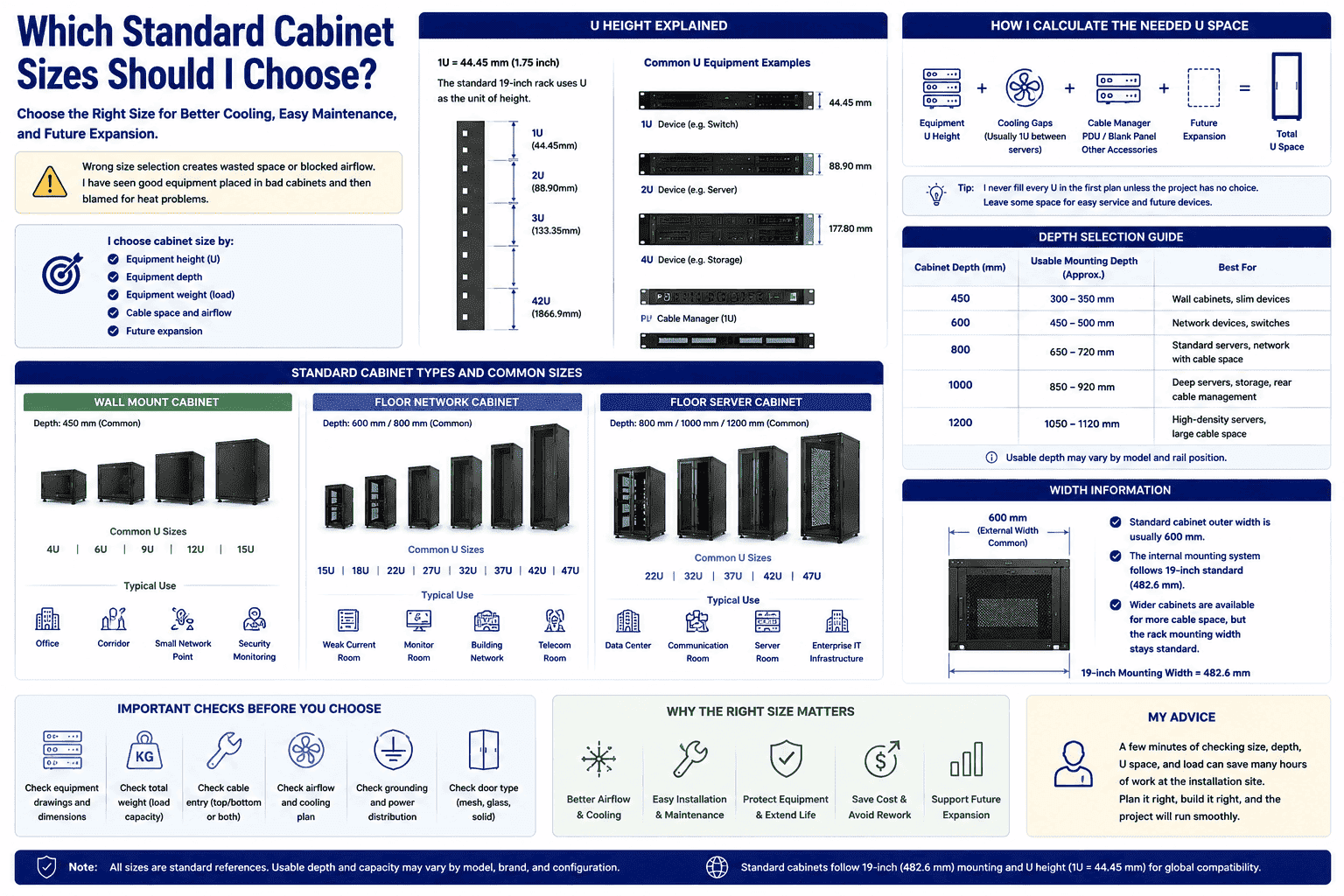
I choose cabinet size by equipment height, depth, weight, cable space, and future expansion. Wall cabinets are usually 4U to 15U. Floor network cabinets often reach 42U or 47U. Server cabinets usually need deeper bodies, often 800 mm to 1200 mm.4
The Size Logic I Follow
I start with height. I count how many U each device needs. I add space for the PDU, cable manager, blank panel, fan unit, and future equipment. I never fill every U in the first plan unless the project has no choice. A full cabinet looks efficient on paper, but service work becomes hard when every space is used.
Then I check depth. Network switches often fit in 600 mm or 800 mm deep cabinets. Servers need more room. A server body may be long. The rear cable bend also needs space. The power cable should not be pressed against the rear door. This is why server cabinets often use 800 mm, 1000 mm, or 1200 mm depth.
| Cabinet Type I Often Produce | Common U Sizes | Common Depth | Typical Use |
|---|---|---|---|
| Wall mount cabinet | 4U, 6U, 9U, 12U, 15U | 450 mm | Office, corridor, small network point |
| Floor network cabinet | 15U, 18U, 22U, 27U, 32U, 37U, 42U, 47U | 600 mm, 800 mm | Weak current room, monitor room, building network |
| Floor server cabinet | 22U, 32U, 37U, 42U, 47U | 800 mm, 1000 mm, 1200 mm | Data center, communication room, server room |
I also check the cabinet width. A common standard cabinet outer width is 600 mm. The internal rack mounting system still follows 19-inch rules. Some projects use wider cabinets for more cable space, but the rack mounting width stays standard. I always ask for equipment drawings if the customer plans to mount heavy servers, deep storage devices, or special power units. A few minutes of checking can save many hours at the installation site.
How Is A Standard Cabinet Built?
A cabinet may look strong from far away. I know that strength comes from steel choice, bending accuracy, welding control, and clean assembly.
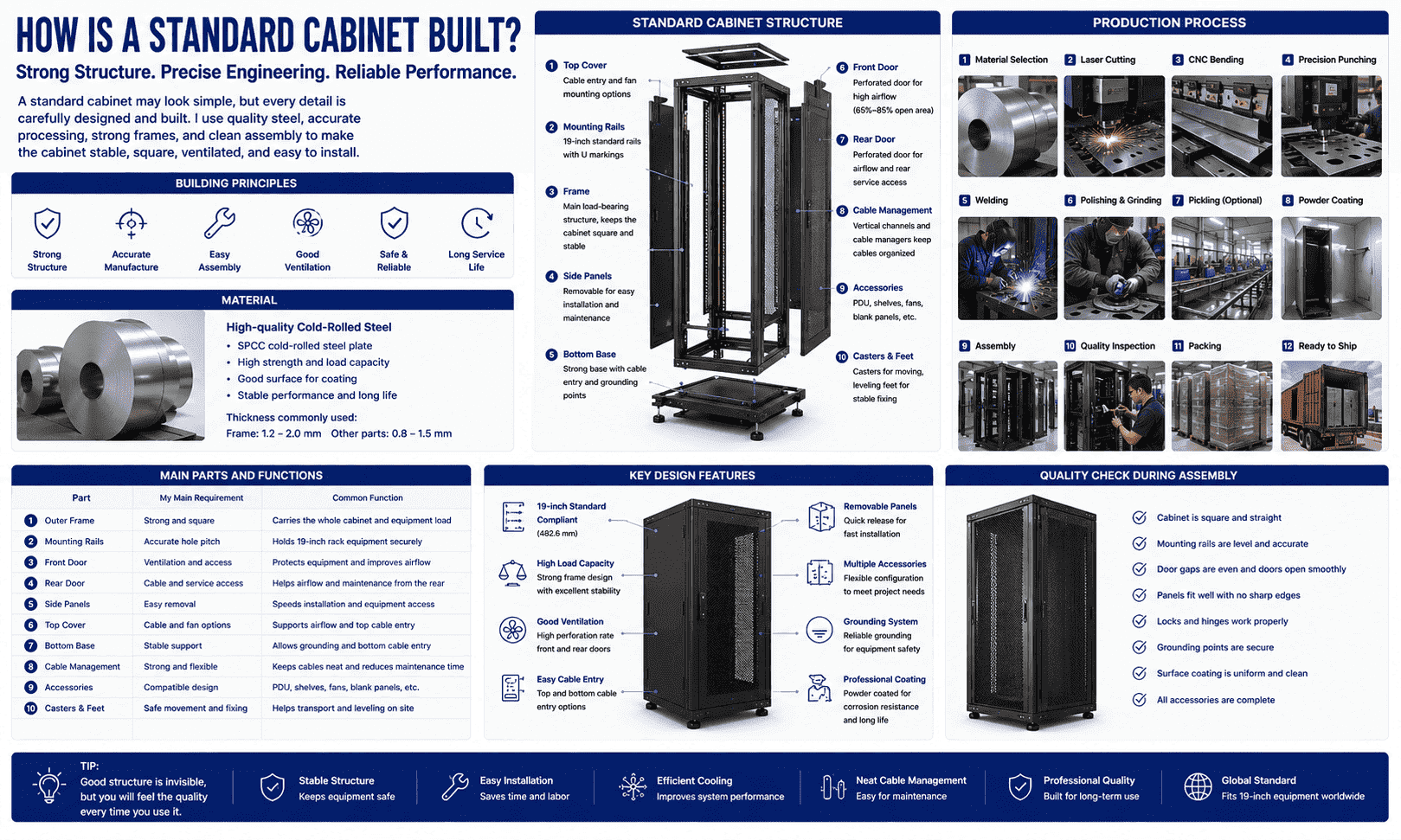
I build standard cabinets with cold-rolled steel, a load-bearing frame, mounting rails, doors, side panels, top cover, bottom base, and support parts. Good structure keeps the cabinet stable, square, ventilated, and easy to assemble.
The Structure I Care About Most
In my factory work, the first thing I care about is the main frame. The frame must carry the load. The mounting rails must stay straight. The hole positions must match the rack standard. If the frame twists, the cabinet becomes hard to install. The door may not close well. The device rails may not align. I have learned this from real production, not only from drawings.
A standard cabinet is usually made from several systems. I divide them into the load system, protection system, airflow system, cable system, and accessory system. Each system has a task. Each task affects the final user.
| Cabinet Part | My Main Requirement | Common Function |
|---|---|---|
| Outer frame | Strong and square | Carries the whole cabinet |
| Mounting rails | Accurate hole pitch | Holds rack equipment |
| Front door | Ventilation and access | Protects and cools equipment |
| Rear door | Cable and service access | Helps airflow and maintenance |
| Side panels | Easy removal | Speeds installation work |
| Top cover | Cable and fan options | Supports airflow and cable entry |
| Bottom base | Stable support | Allows grounding and cable entry |
| Casters and feet | Safe movement and fixing | Helps transport and leveling |
I usually use high-strength cold-rolled steel plate for standard cabinets. The process includes material selection, laser cutting, precise bending, welding, polishing, pickling when needed, powder coating, and final assembly. Powder coating is not just for color. It also protects the metal surface. During assembly, I check door gaps, rail position, lock function, panel fit, and grounding points. These small checks make the cabinet feel reliable when the customer opens it.
What Accessories Can I Add To A Standard Cabinet?
A bare cabinet can hold devices, but it may not support daily operation well. I often see accessories decide whether the cabinet is easy to use.
I add accessories such as fans, fixed shelves, sliding trays, PDUs, cable managers, cable channels, L brackets, mounting screws, locks, blank panels, grounding bars, support feet, and rack rails to match real equipment needs.
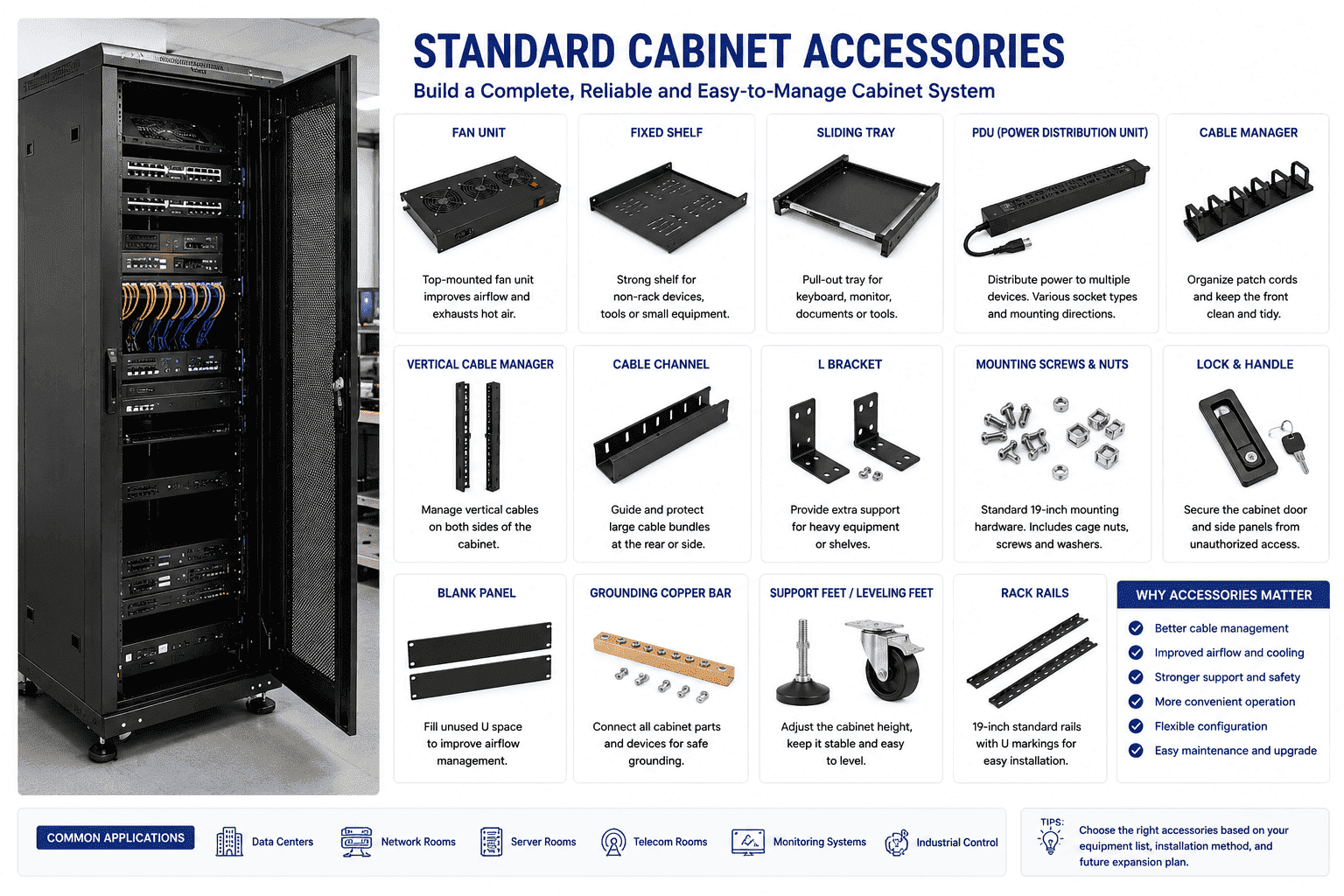
The Accessories I Select With Customers
When a customer asks me for a standard cabinet, I do not stop at height and depth. I ask what they will install inside. A switch may need front cable access. A server may need slide rails. A monitor system may need a fixed shelf. A UPS may be heavy and may need stronger support. A power system may need one or more PDUs. These details shape the cabinet package.
Accessories also help the cabinet stay clean. Cable managers guide patch cords. Cable channels keep vertical wiring in order. Blank panels close unused U space and help manage airflow.5 Grounding bars connect metal parts and improve safety. Fans can help exhaust heat in small rooms, but I still check the room airflow first. A fan cannot solve every heat problem.
| Accessory I Often Supply | Where I Use It | Why I Use It |
|---|---|---|
| Fixed shelf | Non-rack devices | Holds small equipment |
| Sliding tray | Keyboard, monitor, tools | Gives pull-out access |
| PDU | Power distribution | Feeds several devices |
| Cable manager | Front or vertical area | Keeps cables clean |
| Cable channel | Side or rear area | Guides large cable groups |
| Fan unit | Top or rear area | Helps hot air leave |
| L bracket | Heavy equipment support | Adds load safety |
| Blank panel | Empty U space | Improves airflow control |
| Grounding copper bar | Cabinet grounding point | Supports electrical safety |
| Lock | Door and panel | Protects equipment |
I like accessories that follow 19-inch standards because they give the user more freedom. A customer can add or remove parts later. The cabinet can change with the project. This is one reason standard cabinets remain useful for many years. They are not closed products. They are base platforms.
Where Do I Use Different Standard Cabinets?
One cabinet type cannot fit every site. I have seen wall cabinets used where floor cabinets were needed, and the result was poor maintenance.
I use wall mount cabinets for small network points, floor network cabinets for weak current and monitoring rooms, and deeper server cabinets for data centers, communication rooms, and larger server rooms.
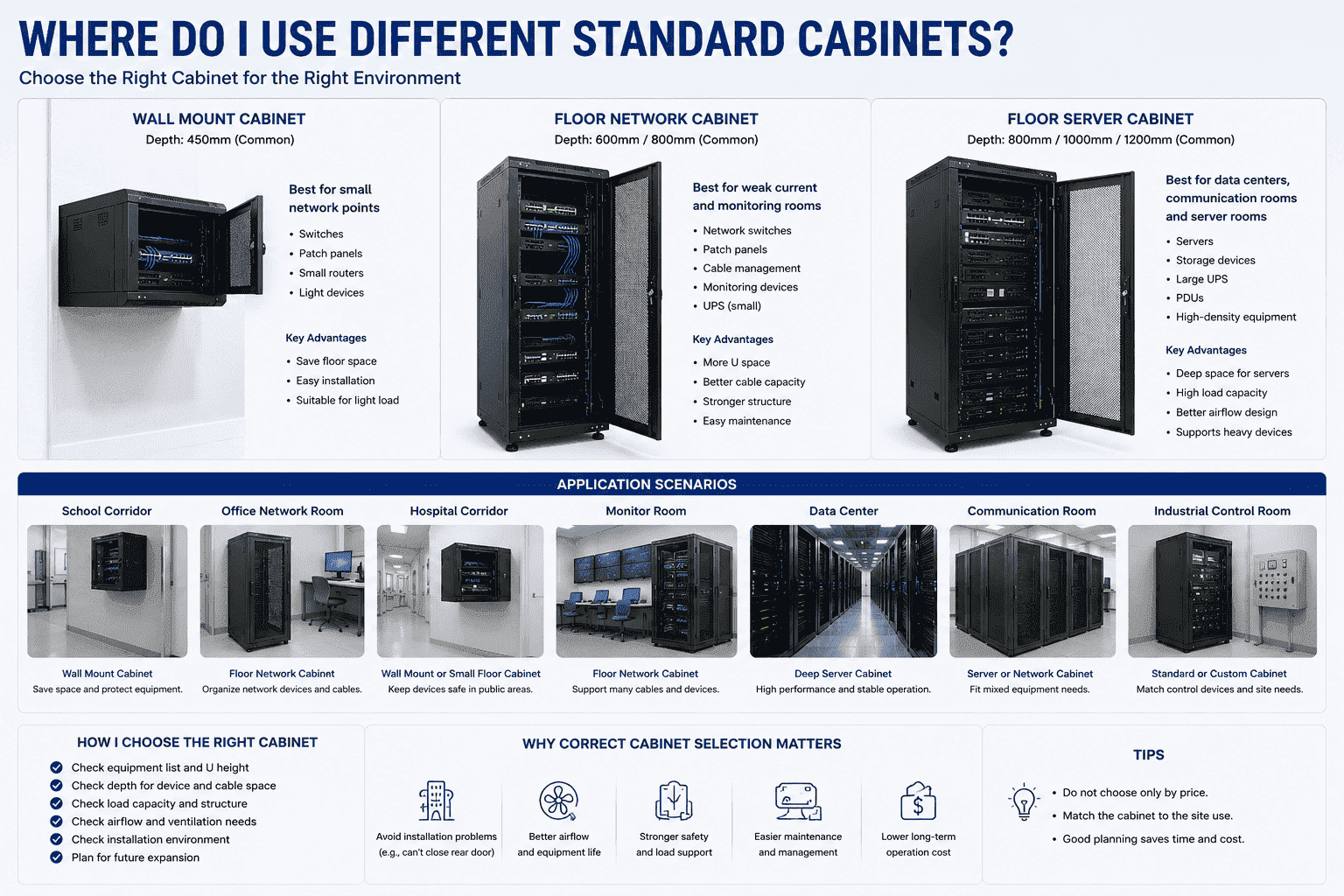
The Application Choice I Make
A wall mount cabinet is useful when the site has limited floor space. I see it in schools, building corridors, hospitals, offices, and small machine rooms. It often holds switches, patch panels, small routers, and light network devices. Its common depth is around 450 mm. I choose it when the load is not too high and service access is simple.
A floor network cabinet is more common in office buildings, residential weak current rooms, monitor rooms, hospital equipment rooms, and small data rooms. It gives more height, better cable space, and stronger support. A 600 mm depth cabinet is enough for many network devices. An 800 mm depth cabinet is better when cables need more rear space.
A floor server cabinet needs deeper space and stronger structure. I use 800 mm, 1000 mm, and 1200 mm depths for different server lengths. I also check the load rating, airflow door type, and power layout.
| Site I Often See | Cabinet I Prefer | Main Reason |
|---|---|---|
| School corridor | Wall mount cabinet | Saves floor space |
| Office network room | Floor network cabinet | Holds switches and patch panels |
| Hospital corridor | Wall mount or small floor cabinet | Protects devices in public space |
| Monitor room | Floor network cabinet | Handles many cables |
| Data center | Deep server cabinet | Supports servers and airflow |
| Communication room | Server or network cabinet | Fits mixed equipment |
| Industrial control room | Standard or custom cabinet | Matches control devices |
I do not select a cabinet only by price. I select it by site use. A cheap shallow cabinet can become expensive when the installer cannot close the rear door. A weak cabinet can become dangerous when the load increases. A poor cable layout can make every repair slower. Good cabinet selection prevents these small problems before they reach the user.
Why Does Standardization Matter So Much?
Without standard sizes, every installation becomes a custom job. I have seen projects slow down because the cabinet and equipment did not match.
Standardization lets global IT, telecom, power, automation, and cloud equipment fit into a common cabinet system.6 I rely on fixed dimensions, U height, mounting holes, and load rules to make installation faster and safer.
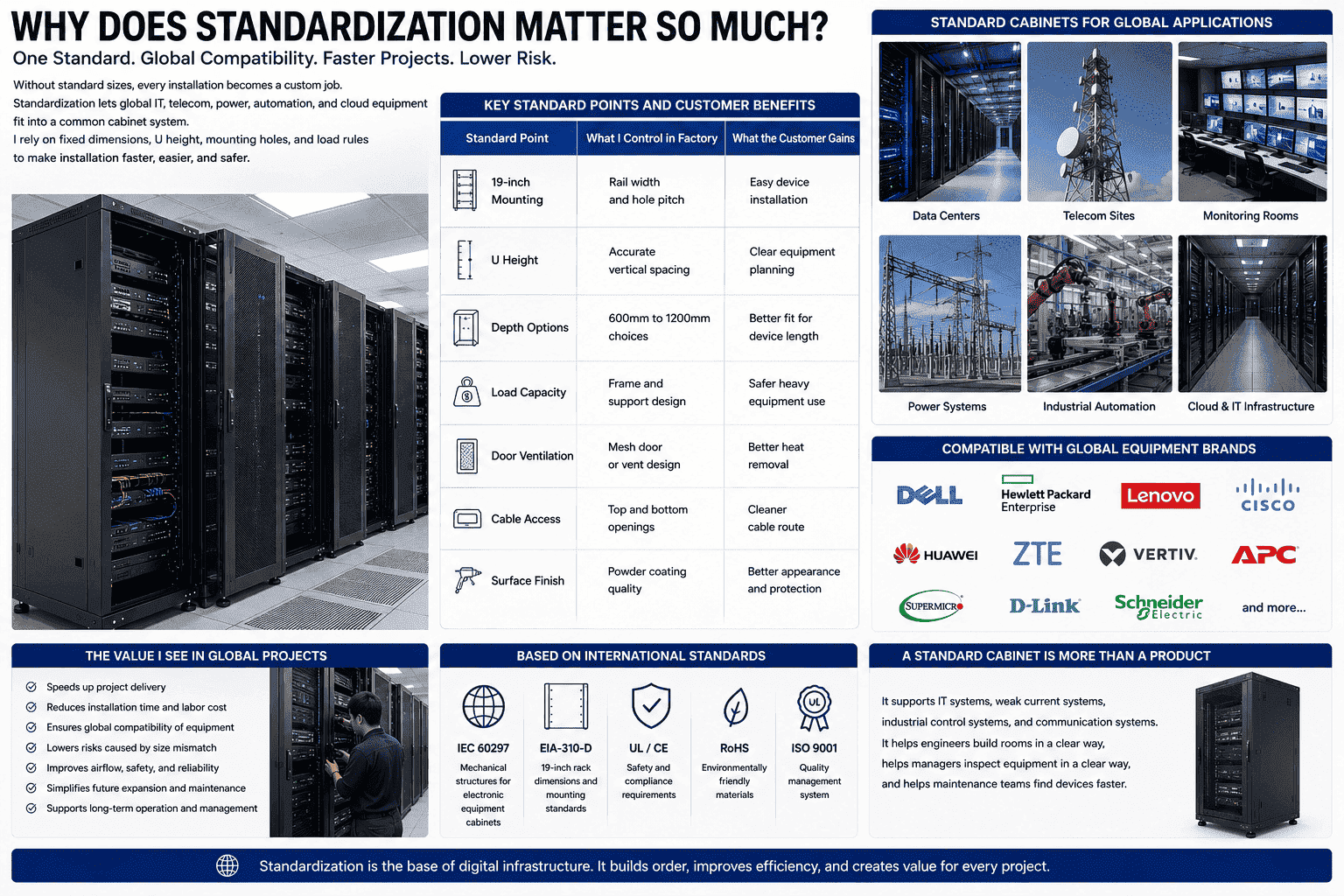
The Value I See In Global Projects
Most of my customers are overseas customers. Many of them buy cabinets for standard IT rooms, communication sites, and data centers. They may use servers from one country, switches from another country, and PDUs from another supplier. The standard cabinet becomes the common meeting point for all of these products.
This is why I respect standard dimensions. The cabinet width, depth, U height, rail spacing, door opening, grounding point, and load structure must follow a clear plan. The customer may not visit my factory before shipment. The installer may open the package weeks later in another country. The cabinet must work when it reaches the project site. There should be no guessing.
| Standard Point | What I Control In Factory | What The Customer Gains |
|---|---|---|
| 19-inch mounting | Rail width and hole pitch | Easy device installation |
| U height | Accurate vertical spacing | Clear equipment planning |
| Depth option | 600 mm to 1200 mm choices | Better fit for device length |
| Load capacity | Frame and support design | Safer heavy equipment use |
| Door ventilation7 | Mesh door or vent design | Better heat removal |
| Cable access | Top and bottom openings | Cleaner cable route |
| Surface finish | Powder coating quality | Better appearance and protection |
I also see standard cabinets as the base of digital infrastructure. They carry IT systems, weak current systems, industrial control systems, and communication systems. They help engineers build rooms in a clear way. They help managers inspect equipment in a clear way. They help maintenance teams find devices faster. A standard cabinet is not only a product. It is part of the working order of a modern site.
How Do I Check Quality Before Delivery?
A cabinet can pass a quick look and still fail during installation. I check details because small errors can cause big site problems.
I check material thickness, frame squareness, rail spacing, door alignment, coating quality, accessory fit, grounding points, packaging strength, and final assembly before I ship a standard cabinet.
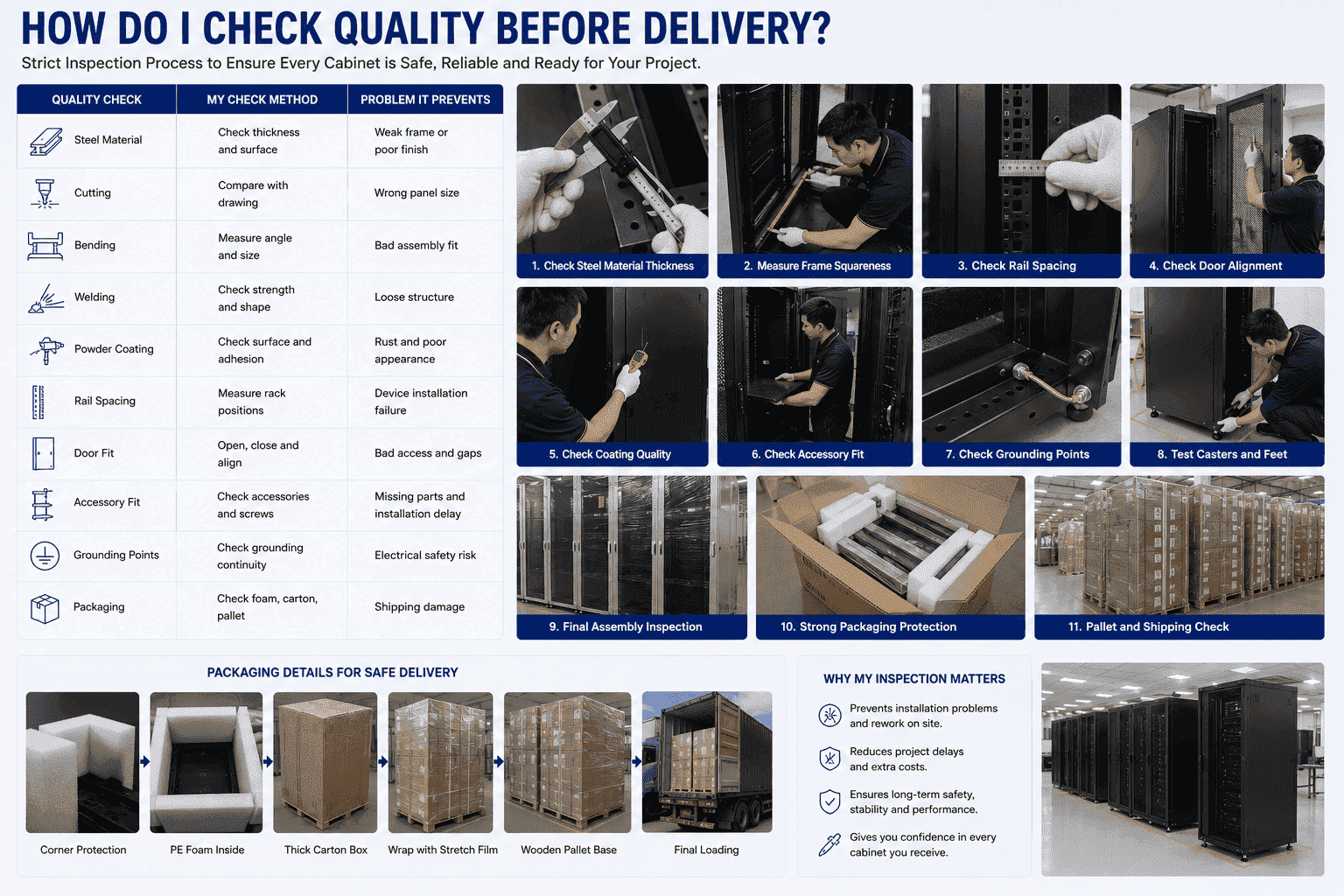
The Quality Steps I Use In My Factory
I start quality control from the raw material. I check the steel plate, because the cabinet strength starts there. Then I control laser cutting. The cutting size must match the drawing. After that, I focus on bending. A small bending error can change the cabinet shape.8 Welding must be strong and clean. Polishing must remove sharp edges. Powder coating must be even, firm, and clean.
During final assembly, I open and close the doors. I remove and install the side panels. I check the mounting rails. I test the lock. I check whether the casters roll well and whether the feet can support the cabinet. I also check whether the accessories match the order list. I do not want the customer to discover a missing shelf or screw package after the container arrives.
| Quality Check | My Check Method | Problem It Prevents |
|---|---|---|
| Steel material | Check thickness and surface | Weak frame or poor finish |
| Cutting | Compare with drawing | Wrong panel size |
| Bending | Measure angle and size | Bad assembly fit |
| Welding | Check strength and shape | Loose structure |
| Powder coating | Check surface and adhesion | Rust and poor appearance |
| Rail spacing | Measure rack positions | Device installation failure |
| Door fit | Open, close, and align | Bad access and gaps |
| Packaging | Check foam, carton, pallet | Shipping damage |
I have learned that export orders need strong packaging. A cabinet may travel by truck, sea container, and warehouse before it reaches the site. Good packaging protects corners, doors, locks, and coating. I see packaging as the last production step, not as an afterthought.
Conclusion
I see standard cabinets as the basic support system for stable IT rooms, clean wiring, safe equipment, good airflow, and global rack equipment installation.
"19-inch rack - Wikipedia", https://en.wikipedia.org/wiki/19-inch_rack. The 19-inch rack format is a standardized equipment-mounting system in which compatible devices are installed in vertical rack units, providing the dimensional basis for rack cabinets. Evidence role: definition; source type: institution. Supports: The source should define the 19-inch rack format and explain that rack-mounted equipment is organized by rack units.. Scope note: A standards source supports the dimensional framework, but it may not use the article's exact commercial term “standard cabinet.” ↩
"Rack unit - Wikipedia", https://en.wikipedia.org/wiki/Rack_unit. Technical references on 19-inch racks define the rack width as 19 inches, or 482.6 mm, and define one rack unit as 1.75 inches, or 44.45 mm. Evidence role: definition; source type: encyclopedia. Supports: The source should verify that 19 inches equals 482.6 mm and that one rack unit is 1.75 inches, or 44.45 mm.. ↩
"19-inch rack - Wikipedia", https://en.wikipedia.org/wiki/19-inch_rack. Rack standards provide a common mechanical interface for equipment mounting, which supports interchangeability among devices designed by different manufacturers. Evidence role: expert_consensus; source type: institution. Supports: The source should show that rack standards exist to provide consistent mechanical interfaces for equipment from multiple suppliers.. Scope note: The source supports general interoperability of rack-mounted equipment, not every possible server or network device model. ↩
"Server Rack Cabinet", https://www.racksolutions.com/server-rack-enclosure.html?srsltid=AfmBOoqLc8vLTopIP34P2ehfxNZrKSJaSlbSznQEanBpFRfqfC5cowv0. Technical guidance on data-center racks commonly describes server racks as deeper than many network cabinets, often using depths around 800 mm, 1000 mm, or 1200 mm to accommodate equipment length and rear cabling. Evidence role: general_support; source type: education. Supports: The source should document common data-center or server-rack depths and explain why deeper cabinets are used for server equipment and cabling.. Scope note: This would support the stated range as common practice, not as a universal standard for all server cabinets. ↩
"[PDF] Data Center Airflow Management Retrofit", https://datacenters.lbl.gov/sites/default/files/airflow-doe-femp.pdf. Data-center thermal-management guidance identifies blanking panels as a method for closing unused rack spaces and reducing unwanted air recirculation through equipment cabinets. Evidence role: mechanism; source type: research. Supports: The source should explain that blanking panels reduce bypass or recirculated airflow through unused rack openings.. Scope note: The source supports the airflow-management mechanism; actual cooling improvement depends on room layout, equipment load, and containment design. ↩
"19 inch Rack | Comms InfoZone - Comms Express", https://www.comms-express.com/infozone/article/19-inch-rack/. International rack standards define common mechanical dimensions for cabinets, panels, and associated equipment, supporting the use of one rack system across IT and telecommunications installations. Evidence role: expert_consensus; source type: institution. Supports: The source should show that 19-inch rack standards are used for electronic, telecommunications, and IT equipment mounting.. Scope note: The source supports broad cross-industry use, but not necessarily every power, automation, or cloud device without adapter hardware. ↩
"Move to a Hot Aisle/Cold Aisle Layout | ENERGY STAR", https://www.energystar.gov/products/data_center_equipment/16-more-ways-cut-energy-waste-data-center/move-hot-aislecold-aisle-layout. Data-center airflow guidance describes perforated or mesh rack doors as components that reduce airflow restriction and allow conditioned air and exhaust air to pass through equipment cabinets. Evidence role: mechanism; source type: research. Supports: The source should explain how perforated or mesh rack doors permit airflow through cabinets and can reduce airflow restriction.. Scope note: Ventilated doors assist airflow but do not by themselves guarantee adequate cooling, which depends on equipment heat load and room airflow design. ↩
"[PDF] Analytical prediction of springback based on residual differential ...", http://wpfiles.mines.edu/wp-content/uploads/aspprc/ResearchMaterials/Publications/352-Yi.pdf. Sheet-metal fabrication references explain that bend angle errors, bend allowance, and springback can alter final part geometry, affecting the alignment and fit of assembled structures. Evidence role: mechanism; source type: education. Supports: The source should explain that bend angle, bend allowance, and springback affect final sheet-metal dimensions and assembly accuracy.. Scope note: The source supports the manufacturing mechanism generally, not the tolerances of this specific cabinet design. ↩
