
Racks and Cabinets in a Data Center?

I often see buyers confuse racks and cabinets, and that confusion can cause wrong layouts, poor cooling, and extra cost in a data center project.
-
What Is a Rack in a Data Center?
I often describe a rack as the open support structure that holds IT equipment, because this simple answer helps buyers see its real purpose.
A rack is an open metal frame with standard mounting holes.1 It normally has vertical posts and beams, but it has no front door, rear door, side panels, or top cover. I use racks when airflow, easy wiring, fast testing, and lower cost matter more than enclosure protection.
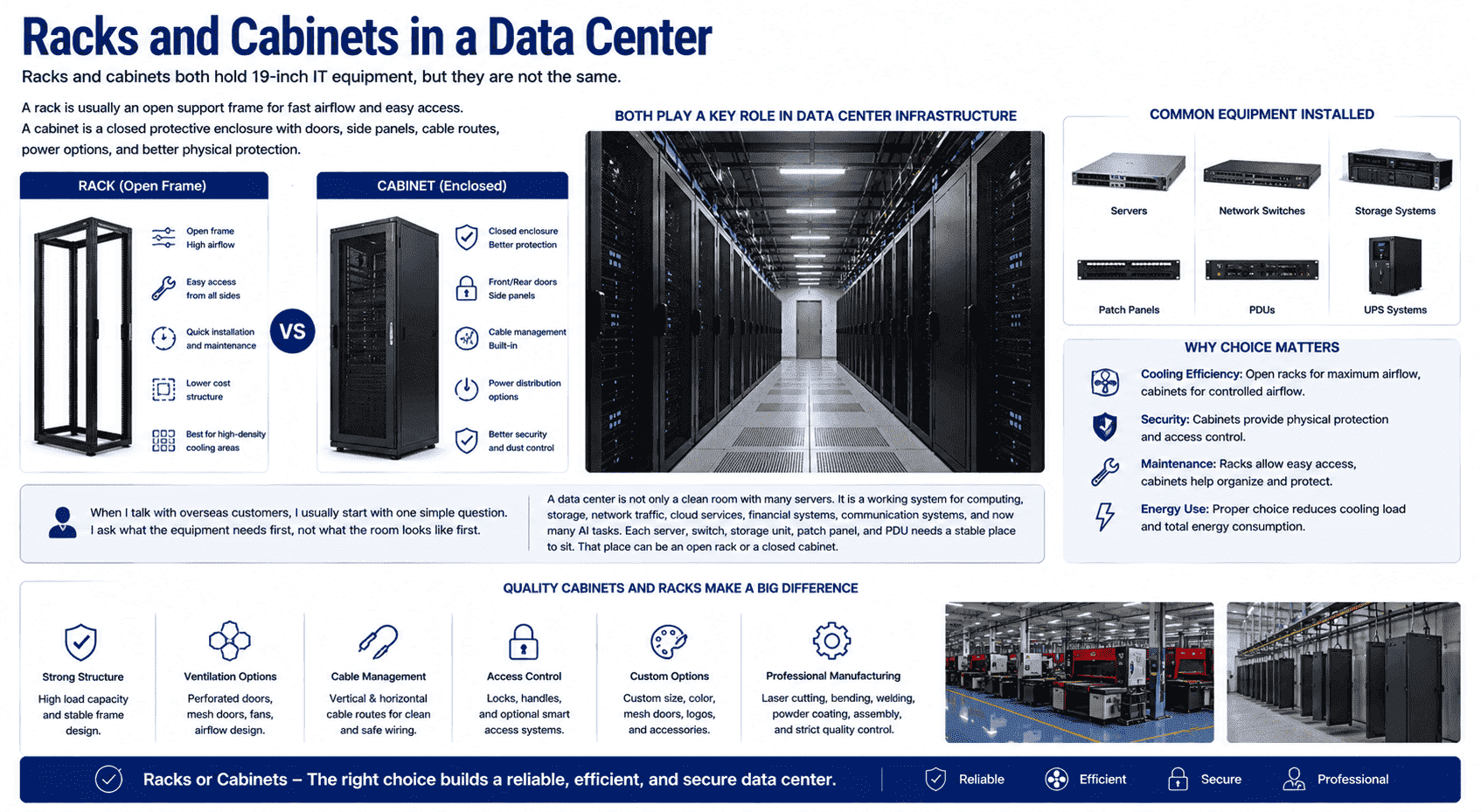
A rack looks simple, but I do not see it as a low-value product. I see it as the first layer of equipment support. Most racks follow the 19-inch mounting standard.2 This standard allows servers, switches, patch panels, storage devices, and PDUs to fit in the same mounting width.3 The height is measured in U units. One U is 44.45 mm.4 This unit makes planning easier, because I can calculate how many devices can fit in one rack.
In my production work, I pay close attention to the frame strength, hole accuracy, beam position, and surface finish. A rack has an open structure, so it must depend on the strength of its posts and beams. It cannot hide weak design behind panels. The rack must hold equipment weight and stay stable during installation and daily maintenance.
| Rack Part | Main Function | Why I Care in Production |
|---|---|---|
| Front and rear posts | Hold rack-mounted equipment | I need accurate holes and stable spacing |
| Cross beams | Keep the frame square | I need clean welding or strong bolted joints |
| Mounting holes | Fix servers and devices | I need standard pitch and no sharp burrs |
| Base frame | Support total load | I need enough thickness and proper leveling |
| Open sides | Improve airflow and access | I need safe edges and clean finishing |
I often recommend open racks for large rooms with controlled access, strong cooling design, and a high need for fast service. The open shape lets air move freely. Technicians can reach cables from the front, back, and sides. They can install, remove, and test devices quickly. This is useful in large data centers where many units must be installed in batches.
What Is a Cabinet in a Data Center?
I explain a cabinet as a complete protective enclosure, because it holds equipment and also protects it from the room around it.
A cabinet has an internal rack structure and an external enclosure. It usually includes four mounting posts, front and rear doors, removable side panels, top cover, base, cable entries, grounding points, and options for fans, locks, PDUs, and mesh doors.
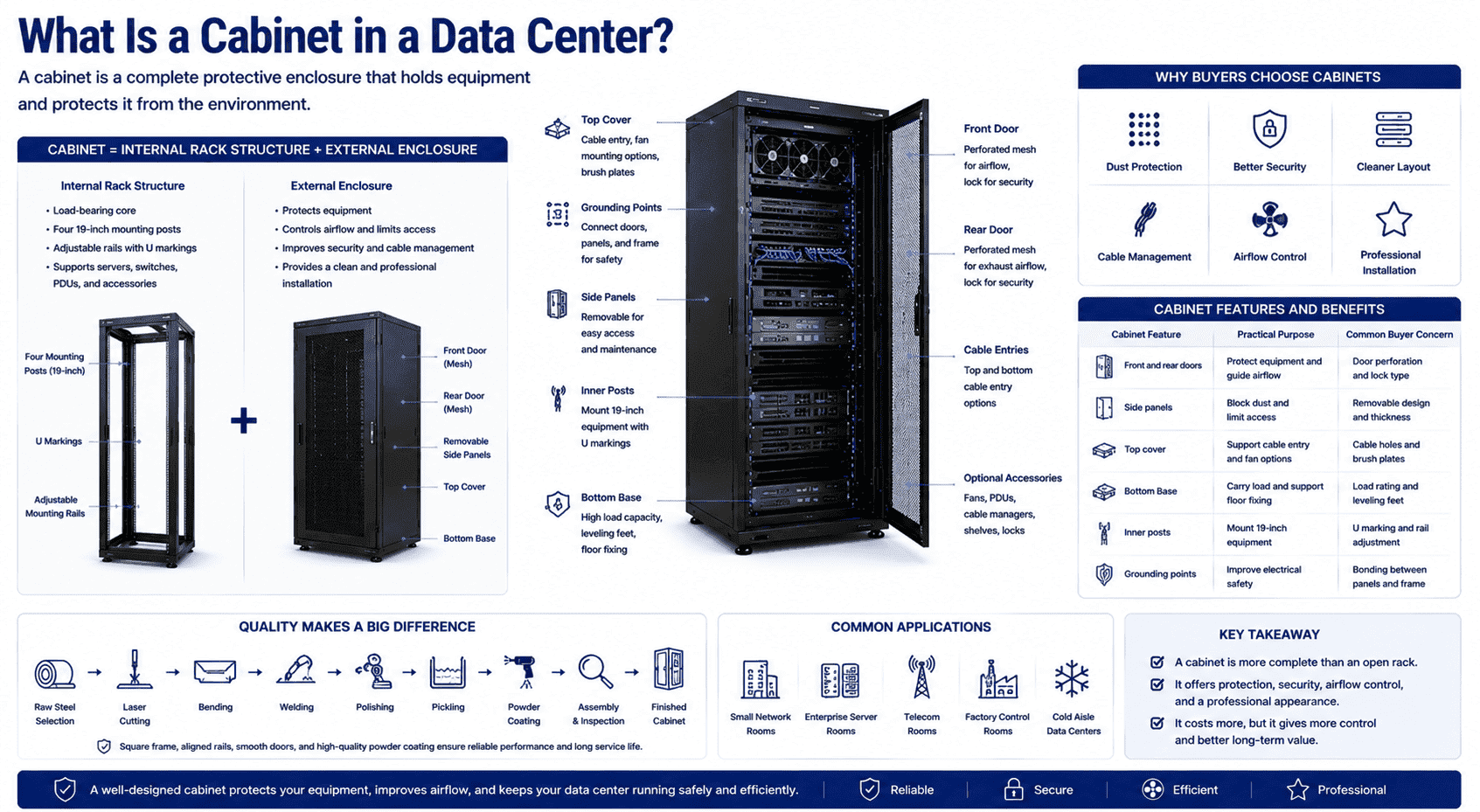
A cabinet is more complete than an open rack. I see the inner frame as the load-bearing core. I see the outer shell as the protection system. In many projects, customers ask for a cabinet because they need dust protection, safer cable control, better physical security, and a cleaner room layout. A cabinet can also support controlled airflow when the front and rear doors use mesh panels. I often make mesh doors with specific open area needs because airflow has a direct effect on server temperature.
A cabinet is also heavier than a rack. It takes more material, more processing steps, and more assembly work. I need to control the quality from raw steel selection, laser cutting, bending, welding, polishing, pickling, powder coating, and final assembly. If the frame is not square, the doors may not close well. If the mounting rails are not aligned, the server may not slide in smoothly. If the powder coating is uneven, the product may not meet the expected finish or corrosion resistance.
| Cabinet Feature | Practical Purpose | Common Buyer Concern |
|---|---|---|
| Front and rear doors | Protect equipment and guide airflow | Door perforation and lock type |
| Side panels | Block dust and limit access | Removable design and thickness |
| Top cover | Support cable entry and fan options | Cable holes and brush plates |
| Bottom base | Carry load and support floor fixing | Load rating and leveling feet |
| Inner posts | Mount 19-inch equipment | U marking and rail adjustment |
| Grounding points | Improve electrical safety | Bonding between panels and frame |
I usually suggest a cabinet when the site needs more protection or a more finished installation. Small network rooms, enterprise server rooms, telecom rooms, factory control rooms, and cold aisle data centers often use cabinets.5 A cabinet costs more than an open rack, but it gives more control.
Why Do Both Racks and Cabinets Use 19-Inch Standards?
I always tell customers that the 19-inch standard is the reason global data center equipment can be planned and installed with less risk.
Both racks and cabinets use the 19-inch standard so servers, switches, patch panels, storage devices, and PDUs can fit across different brands and projects. The height uses U units, so I can plan capacity, spacing, airflow, and future expansion in a clear way.
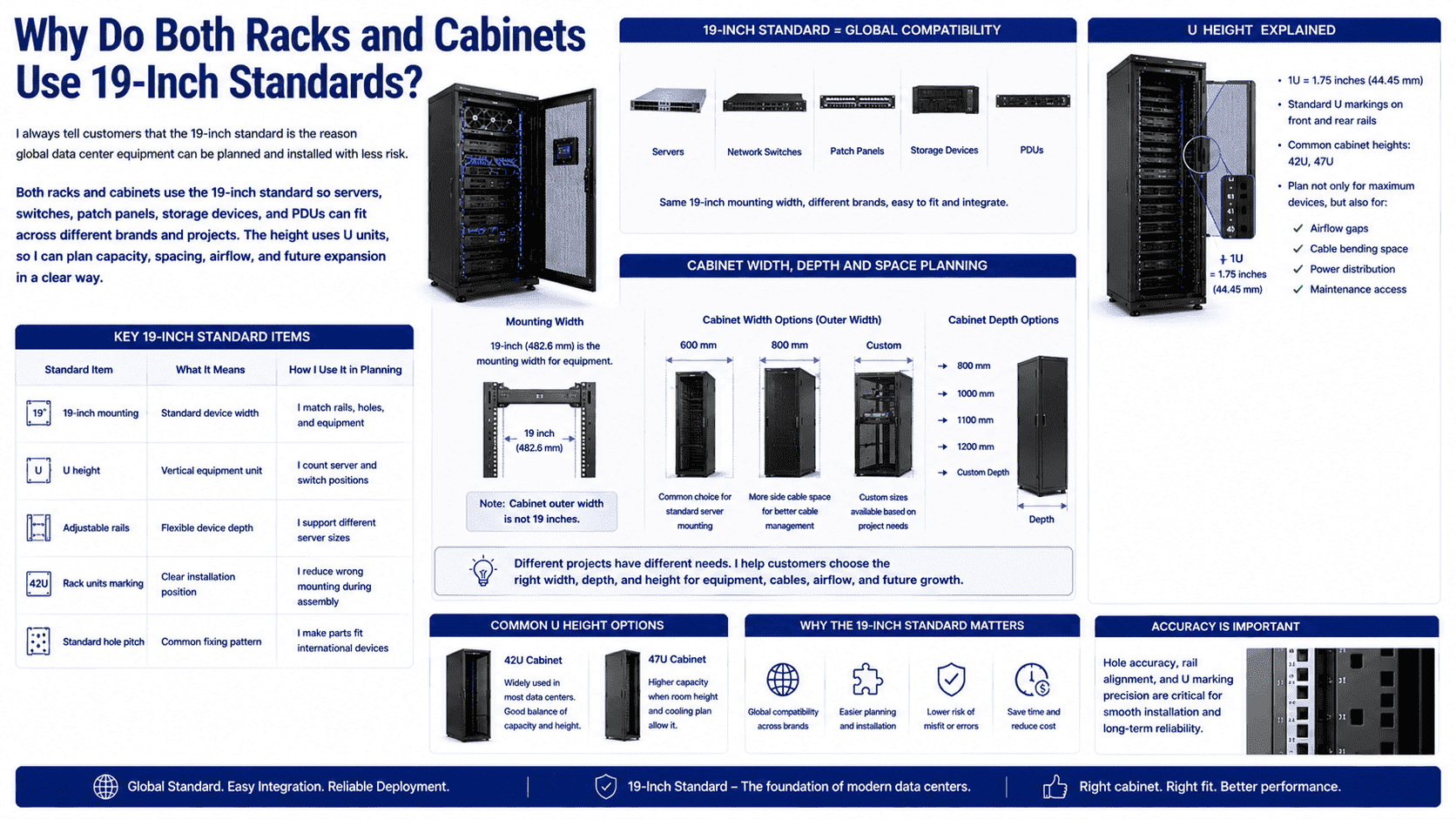
The 19-inch width does not mean the whole cabinet is only 19 inches wide.6 It means the equipment mounting width follows the standard. The outside cabinet width can be 600 mm, 800 mm, or another custom size. I often use 600 mm wide cabinets for standard server mounting. I use 800 mm wide cabinets when customers need more cable space on the sides. Depth can also change. Common depths include 800 mm, 1000 mm, 1100 mm, and 1200 mm. Some high-density servers need deeper cabinets, and some network devices need more cable space rather than more depth.
The U height is just as important. A 42U cabinet is common in many data centers.7 A 47U cabinet is also used when the room height and cooling plan allow it. I do not only look at the maximum number of devices. I also look at airflow gaps, cable bending space, power distribution, and maintenance access.
| Standard Item | What It Means | How I Use It in Planning |
|---|---|---|
| 19-inch mounting | Standard device width | I match rails, holes, and equipment |
| U height | Vertical equipment unit | I count server and switch positions |
| Adjustable rails | Flexible device depth | I support different server sizes |
| Rack units marking | Clear installation position | I reduce wrong mounting during assembly |
| Standard hole pitch | Common fixing pattern | I make parts fit international devices |
This standard is very useful for overseas orders. A customer may buy servers from one country, switches from another country, and cabinets from my factory. If we all follow the same standard, the installation becomes easier. This is why I treat hole accuracy as a serious detail, not a small production point.
When Should I Choose an Open Rack?
I choose an open rack when the room has controlled access, good cooling, high maintenance needs, and a clear plan for cable management.
An open rack is suitable for large data centers, test rooms, lab rooms, and high-airflow environments. It gives fast heat release, easy wiring, simple installation, and lower cost. I avoid it when dust, accidental touch, noise control, or physical security is a main concern.
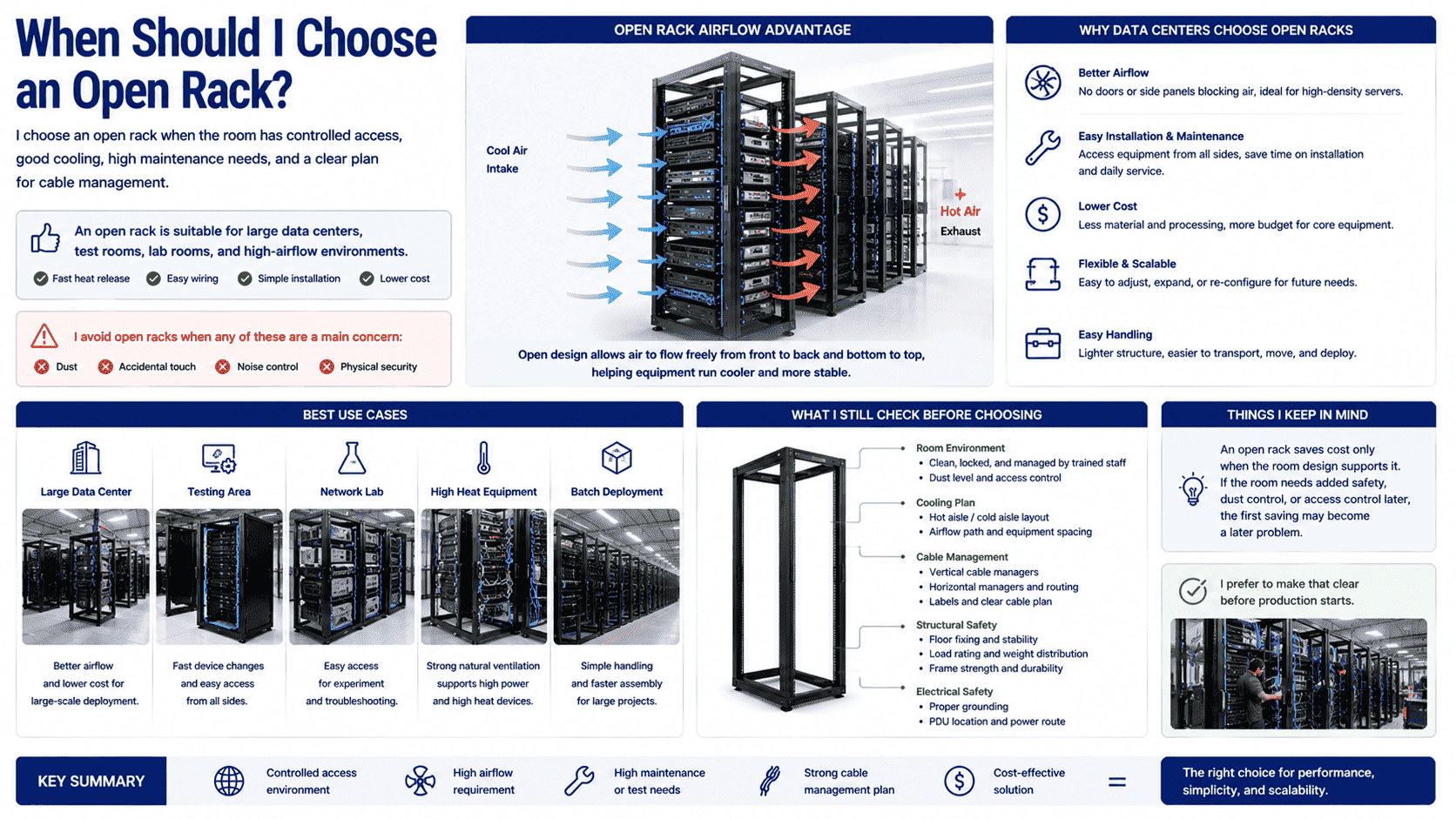
In many large data centers, I see open racks used as the main equipment support. The reason is simple. Airflow is better. Technicians can work faster. The structure is easier to move. The cost is lower. When a project needs hundreds or thousands of positions, these points matter. An open rack also reduces the weight that workers need to handle during installation. It can be easier to bring into the site, line up, and fix to the floor.
I still do not choose an open rack for every project. I first ask about the room environment. If the room is clean, locked, and managed by trained staff, an open rack can work well. If the room has dust, shared access, or a risk of impact, I become careful. I also ask about cable planning. An open rack gives easy access, but it can become messy if the cable design is weak. Good cable managers, vertical channels, labels, and proper route planning are still needed.
| Best Use Case | Why I May Choose a Rack | What I Still Check |
|---|---|---|
| Large data center | Better airflow and lower cost | Floor fixing and load rating |
| Testing area | Fast device changes | Cable support and grounding |
| Network lab | Easy access from all sides | Stability and safe edges |
| High heat equipment | Strong natural ventilation | Hot aisle and cold aisle layout |
| Batch deployment | Simple handling and assembly | Hole accuracy and frame strength |
I often tell buyers that an open rack saves cost only when the room design supports it. If the room needs added safety, dust control, or access control later, the first saving may become a later problem. I prefer to make that clear before production starts.
When Should I Choose a Cabinet?
I choose a cabinet when the project needs equipment protection, cleaner appearance, controlled access, better cable hiding, and a more complete room system.
A cabinet is suitable for server rooms, telecom rooms, office network rooms, industrial control rooms, and cold aisle data centers. It protects devices from dust, touch, water vapor, impact, and some electromagnetic interference.8 It also supports locks, mesh doors, fans, PDUs, and cable systems.
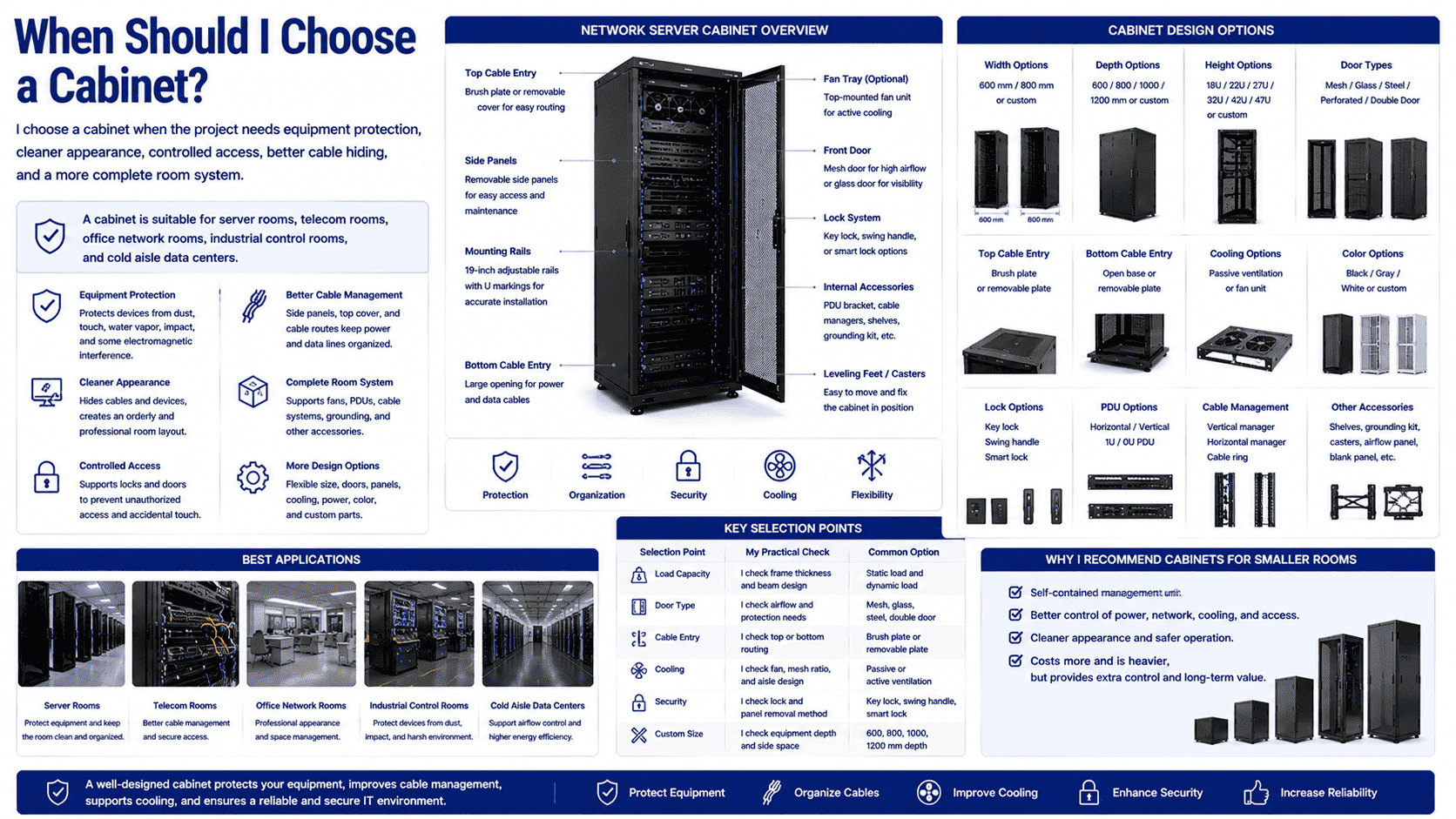
A cabinet gives me more design options. I can adjust the width, depth, height, door type, side panel structure, top cable entry, bottom cable entry, fan tray, PDU bracket, grounding wire, caster, leveling feet, and color. For non-standard projects, I can also change the mesh door open area, hinge position, lock type, and internal mounting rail position. This is useful when the customer has special servers, special network equipment, or a special room layout.
A cabinet is also better for physical security. A locked door will not stop every risk, but it prevents casual touch and simple mistakes. In a shared room, this matters. It also makes cable and power management cleaner. The side panels and top cover can hide or guide routes in a planned way. This helps the room look ordered, but it also helps maintenance staff find lines faster.
| Cabinet Selection Point | My Practical Check | Common Option |
|---|---|---|
| Load capacity | I check frame thickness and beam design | Static load and dynamic load |
| Door type | I check airflow and protection needs | Mesh, glass, steel, double door |
| Cable entry | I check top or bottom routing | Brush plate or removable plate |
| Cooling | I check fan, mesh ratio, and aisle design | Passive or active ventilation |
| Security | I check lock and panel removal method | Key lock, swing handle, smart lock |
| Custom size | I check equipment depth and side space | 600, 800, 1000, 1200 mm depth |
I often recommend cabinets for smaller rooms because the cabinet becomes a self-contained management unit. It gives structure to power, network, cooling, and access. It costs more and is heavier, but the project may need that extra control.
How Do Cooling and Airflow Change the Choice?
I often see cooling become the real reason behind the rack or cabinet decision, because server heat does not wait for a perfect design.
Open racks allow air to move freely, so they can help high-heat equipment release heat faster. Cabinets need proper mesh doors, airflow paths, blanking panels, and aisle planning.9 I choose the design based on heat load, room cooling, equipment layout, and maintenance needs.
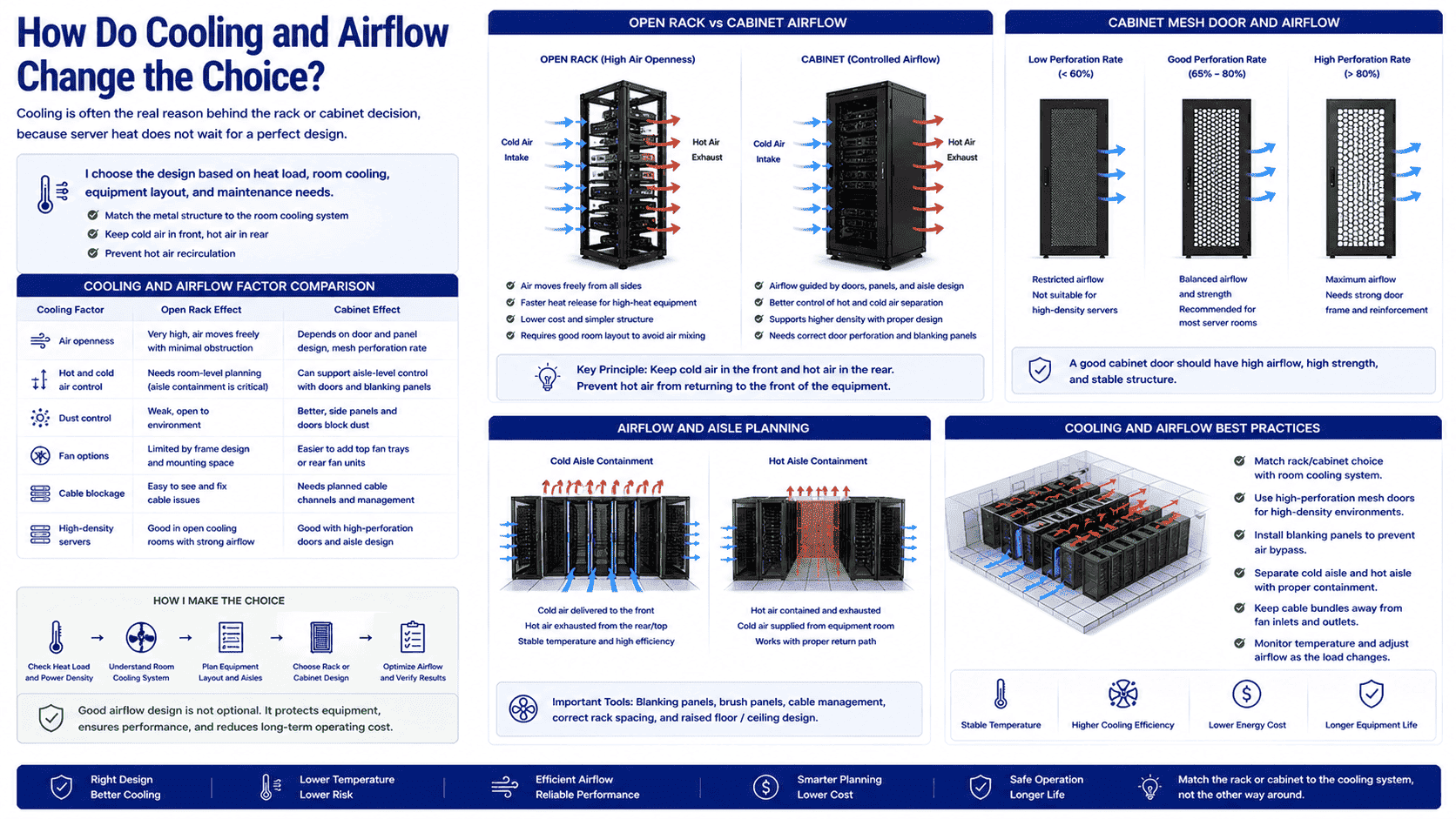
Cooling is not only about adding fans. I always look at the full path of air. Cold air should reach the front of the equipment. Hot air should leave from the rear.10 If hot air returns to the front, the server temperature rises.11 An open rack can reduce airflow blockage, but it can also allow air to mix if the room layout is weak. A cabinet can guide air better when it is used with proper front and rear mesh doors, blanking panels, and cold aisle design.
For cabinet mesh doors, I pay close attention to the perforation rate. A door with poor opening area can look neat but restrict air.12 A door with a good open area can support high-density servers better. I also care about door strength because a highly perforated door still needs to stay flat and stable. This is where sheet metal processing experience matters. The cutting, bending, and reinforcing design must work together.
| Cooling Factor | Rack Effect | Cabinet Effect |
|---|---|---|
| Air openness | Very high | Depends on door and panel design |
| Hot and cold air control | Needs room-level planning | Can support aisle-level control |
| Dust control | Weak | Better with closed panels |
| Fan options | Limited by frame design | Easier to add fan trays |
| Cable blockage | Easy to see and fix | Needs planned cable channels |
| High-density servers | Good in open cooling rooms | Good with high mesh doors and aisle design |
I do not claim one option cools better in every case. I first ask about the cooling system in the room. I then match the metal structure to that system. This is a practical way to avoid heat problems after installation.
How Do Cost, Handling, and Maintenance Affect the Decision?
I always talk about cost after function, because a cheap structure is not cheap if it creates labor, heat, or repair problems later.
Open racks usually cost less, weigh less, and install faster. Cabinets usually cost more, weigh more, and need more workers to handle, but they provide protection, cable control, security, and more complete room management. I compare total use cost, not only purchase price.
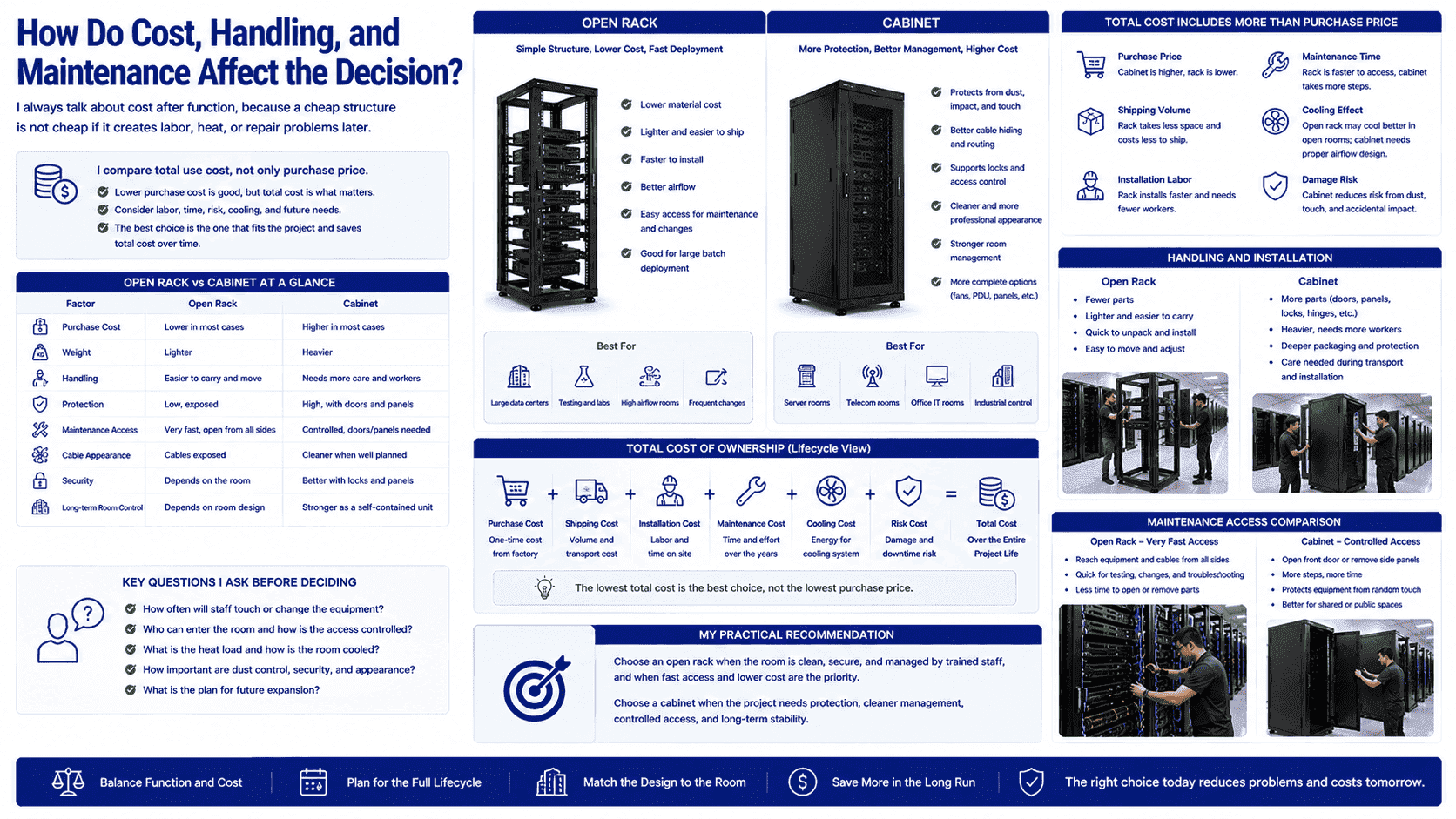
In real projects, cost is not only the factory price. It includes shipping volume, installation labor, maintenance time, cooling effect, damage risk, and future expansion. A rack has fewer parts, so the material cost and assembly time are usually lower. It is also easier to carry and move. This helps when the project needs large batch deployment. A cabinet has more panels, doors, locks, hinges, grounding parts, cable plates, and packaging needs. It also needs more care during transport because doors and panels must stay straight and clean.
Maintenance is another clear difference. On an open rack, a technician can reach equipment and cables quickly. This is useful for frequent testing or changes. On a cabinet, access is more controlled. The technician may need to open doors or remove side panels. This takes more time, but it also protects the equipment from random touch. The best choice depends on the working style of the site.
| Factor | Open Rack | Cabinet |
|---|---|---|
| Purchase cost | Lower in most cases | Higher in most cases |
| Weight | Lighter | Heavier |
| Handling | Easier | Needs more care |
| Protection | Low | High |
| Maintenance access | Very fast | Controlled |
| Cable appearance | Exposed | Cleaner when planned |
| Long-term room control | Depends on room | Stronger as a unit |
I usually ask the customer how often staff will touch the equipment. I also ask who can enter the room. If only trained data center staff enter the room, open racks may be fine. If different people share the space, cabinets often reduce risk.
How Do I Decide Between a Rack and a Cabinet for a Real Project?
I decide by matching the equipment, room, cooling plan, security need, and budget, because no single answer works for every data center.
I choose a rack for open airflow, fast access, lower cost, and large controlled rooms. I choose a cabinet for protection, cable control, security, dust reduction, and complete room management. I always check load, depth, U height, airflow, and installation method before production.
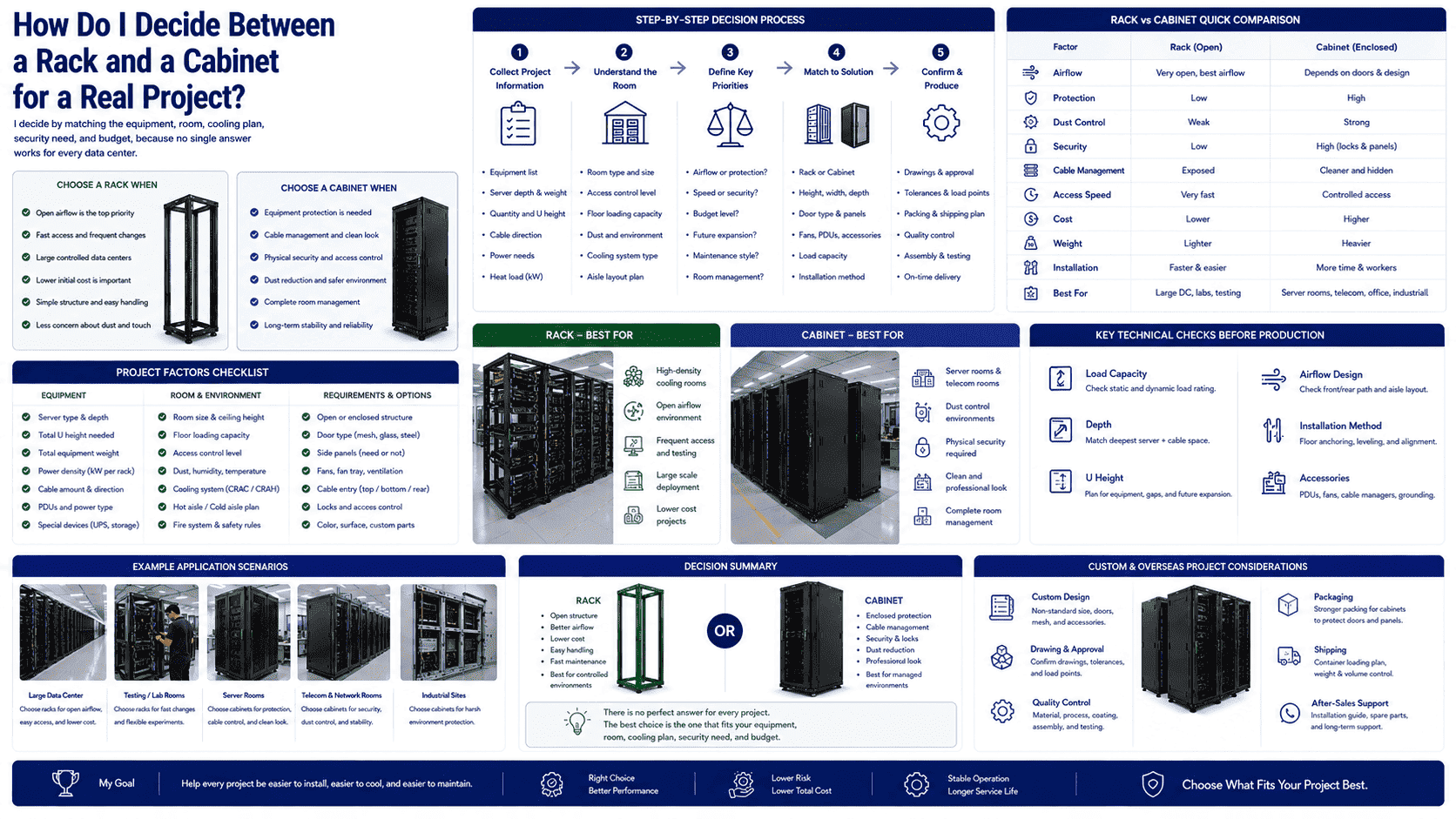
When I receive a project inquiry, I do not start with a catalog model only. I first ask for the equipment list. I want to know the server depth, weight, quantity, cable direction, power needs, and heat load. I also ask about the room. I want to know whether it is a large data center, a small server room, a telecom room, or an industrial site. I ask whether the cooling uses cold aisle and hot aisle design. I ask whether the customer needs doors, locks, side panels, fan units, PDUs, grounding kits, or custom mesh doors.
For overseas orders, I also check packing and shipping. A cabinet may need stronger packaging because the surface finish and door flatness matter. A rack may be easier to pack, but it still needs protection at corners and mounting surfaces. For custom non-standard cabinets, I confirm drawings, tolerances, load points, and assembly details before production.
| Project Question | If the Answer Points to Rack | If the Answer Points to Cabinet |
|---|---|---|
| Is the room highly controlled? | Yes | No or partly |
| Is fast airflow the top need? | Yes | Maybe, with mesh doors |
| Is dust protection needed? | No | Yes |
| Is physical security needed? | Low need | High need |
| Is frequent cable testing needed? | Yes | Maybe |
| Is a clean enclosed look needed? | No | Yes |
| Is cost very tight? | Usually yes | Only if protection is worth it |
I see racks and cabinets as two different tools. I do not treat one as better than the other. I choose the one that fits the site. This practical match is what helps a data center stay easier to install, easier to cool, and easier to maintain.
Conclusion
I choose racks for openness and speed, and I choose cabinets for protection and control. The right choice starts with the equipment and the room.
"19-inch rack - Wikipedia", https://en.wikipedia.org/wiki/19-inch_rack. A neutral technical reference on 19-inch racks defines them as standardized mounting structures for electronic equipment, supporting the description of a rack as a frame with standard mounting points. Evidence role: definition; source type: encyclopedia. Supports: A 19-inch rack is a standardized frame or enclosure used to mount electronic equipment with defined mounting dimensions.. Scope note: The source may describe both open racks and enclosed rack cabinets, so it supports the standardized mounting concept more directly than the absence of doors or panels. ↩
"19-inch rack", https://en.wikipedia.org/wiki/19-inch_rack. References to the 19-inch rack standard identify it as the common standardized mounting format for electronic equipment, supporting the statement that data center racks generally follow this width convention. Evidence role: expert_consensus; source type: encyclopedia. Supports: The 19-inch rack format is a widely used standard for mounting electronic and IT equipment.. Scope note: The source establishes widespread standardization but may not quantify the exact share represented by 'most racks.' ↩
"19-inch rack - Wikipedia", https://en.wikipedia.org/wiki/19-inch_rack. The 19-inch rack standards define common mounting dimensions for rack-mounted equipment, providing the dimensional basis for fitting servers, networking equipment, patch panels, storage devices, and power units into the same rack format. Evidence role: mechanism; source type: institution. Supports: Standardized 19-inch rack dimensions allow equipment from different categories to be mounted in compatible racks or cabinets.. Scope note: The standard supports dimensional compatibility; it does not guarantee compatibility for depth, weight, airflow, rail type, or power connections. ↩
"Rack unit - Wikipedia", https://en.wikipedia.org/wiki/Rack_unit. The rack unit is conventionally defined as 1.75 inches, or 44.45 millimeters, which directly supports the stated 1U height. Evidence role: definition; source type: encyclopedia. Supports: A rack unit is defined as 1.75 inches, equivalent to 44.45 millimeters.. ↩
"Data Center and Server Room Standards - The University of Kansas", https://services.ku.edu/TDClient/818/Portal/KB/PrintArticle?ID=21009. Data center and telecommunications infrastructure guidance treats racks and cabinets as standard support systems for IT and network equipment in server rooms, telecom spaces, and controlled equipment rooms. Evidence role: general_support; source type: institution. Supports: Infrastructure guidance recognizes racks and cabinets as standard equipment-support systems in data centers, telecommunications rooms, and related equipment spaces.. Scope note: Such guidance supports the general use of cabinets in these environments but may not separately verify every listed room type. ↩
"19-inch rack - Wikipedia", https://en.wikipedia.org/wiki/19-inch_rack. Technical descriptions of 19-inch racks explain that the term refers to the standardized equipment mounting width rather than the full external width of a rack or cabinet. Evidence role: definition; source type: encyclopedia. Supports: The 19-inch rack designation concerns the standardized mounting width for equipment, while cabinet external dimensions may vary.. ↩
"42U Server Racks & Cabinets, price ⚡️ - Sysracks", https://sysracks.com/catalog/racks-by-size/42u/?srsltid=AfmBOopttxm0_Dz6fCw7-bPlyB99G9qLUeWioOeJVn9aVR2dlM-ZmJlL. Data center planning references commonly use 42U as a standard rack or cabinet height, supporting the article's statement that 42U cabinets are common in many facilities. Evidence role: general_support; source type: institution. Supports: 42U is a commonly referenced cabinet or rack height in data center planning and equipment specifications.. Scope note: The source may show that 42U is common by convention or specification examples rather than through a statistical survey of installed cabinets. ↩
"NEMA enclosure types - Wikipedia", https://en.wikipedia.org/wiki/NEMA_enclosure_types. Enclosure rating systems and shielding references show that equipment enclosures can be designed to limit access, dust ingress, moisture exposure, mechanical impact, and electromagnetic interference. Evidence role: general_support; source type: institution. Supports: Enclosures can provide varying degrees of protection against contact, dust, water ingress, mechanical impact, and electromagnetic interference depending on design and rating.. Scope note: This support is conditional: a generic data center cabinet provides these protections only to the extent allowed by its specific construction, sealing, grounding, and certification ratings. ↩
"[PDF] Data Center Airflow Management Retrofit", https://datacenters.lbl.gov/sites/default/files/airflow-doe-femp.pdf. Data center energy-efficiency guidance identifies hot-aisle/cold-aisle planning, control of airflow paths, and blanking panels as established methods for reducing bypass airflow and recirculation in racks and cabinets. Evidence role: expert_consensus; source type: government. Supports: Airflow management practices in data centers include aisle separation, control of bypass and recirculation paths, and use of blanking panels in racks or cabinets.. Scope note: The source supports these measures as general cooling practices; the required mesh-door design depends on cabinet airflow demand and equipment heat load. ↩
"[PDF] Best Practices Guide for Energy-Efficient Data Center Design", https://www.energy.gov/sites/default/files/2024-07/best-practice-guide-data-center-design.pdf. Government and ASHRAE-aligned data center efficiency guidance describes the hot-aisle/cold-aisle approach in which cool air is supplied to equipment fronts and heated exhaust exits to the rear. Evidence role: expert_consensus; source type: government. Supports: Data center airflow best practices use cold aisles at equipment intakes and hot aisles at equipment exhausts, typically front-to-back through servers.. Scope note: This describes the dominant front-to-back airflow practice; some specialized equipment may use different airflow directions. ↩
"Raise the Temperature - Data Center Equipment - Energy Star", https://www.energystar.gov/products/data_center_equipment/5-simple-ways-avoid-energy-waste-your-data-center/raise-temperature. Data center cooling research identifies hot-air recirculation as a mechanism that increases equipment inlet temperatures, directly supporting the claim that returning hot air to the server front raises server temperature. Evidence role: mechanism; source type: research. Supports: Hot exhaust air recirculating to equipment intakes raises inlet air temperature and can worsen thermal conditions for servers.. ↩
"quantifying air flow rate through a server in an operational ...", https://mavmatrix.uta.edu/context/mechaerospace_theses/article/1223/type/native/viewcontent. Thermal-management studies of data center racks and cabinets show that perforated door open area contributes to airflow resistance, supporting the statement that inadequate door opening area can restrict air movement. Evidence role: mechanism; source type: research. Supports: Perforated cabinet door open area affects airflow resistance and can limit cooling airflow when the opening area is insufficient.. Scope note: The degree of restriction depends on fan pressure, equipment airflow demand, perforation geometry, and the surrounding aisle design. ↩
