
Server Racks: Everything You Need to Know?

I have seen stable IT systems fail because the rack was weak, crowded, hot, or hard to manage.
A server rack is a standard 19-inch hardware frame for servers, switches, routers, UPS units, patch panels, and other rack-mounted devices.1 I use it to keep equipment safe, cooled, organized, and easy to install, repair, replace, and expand.
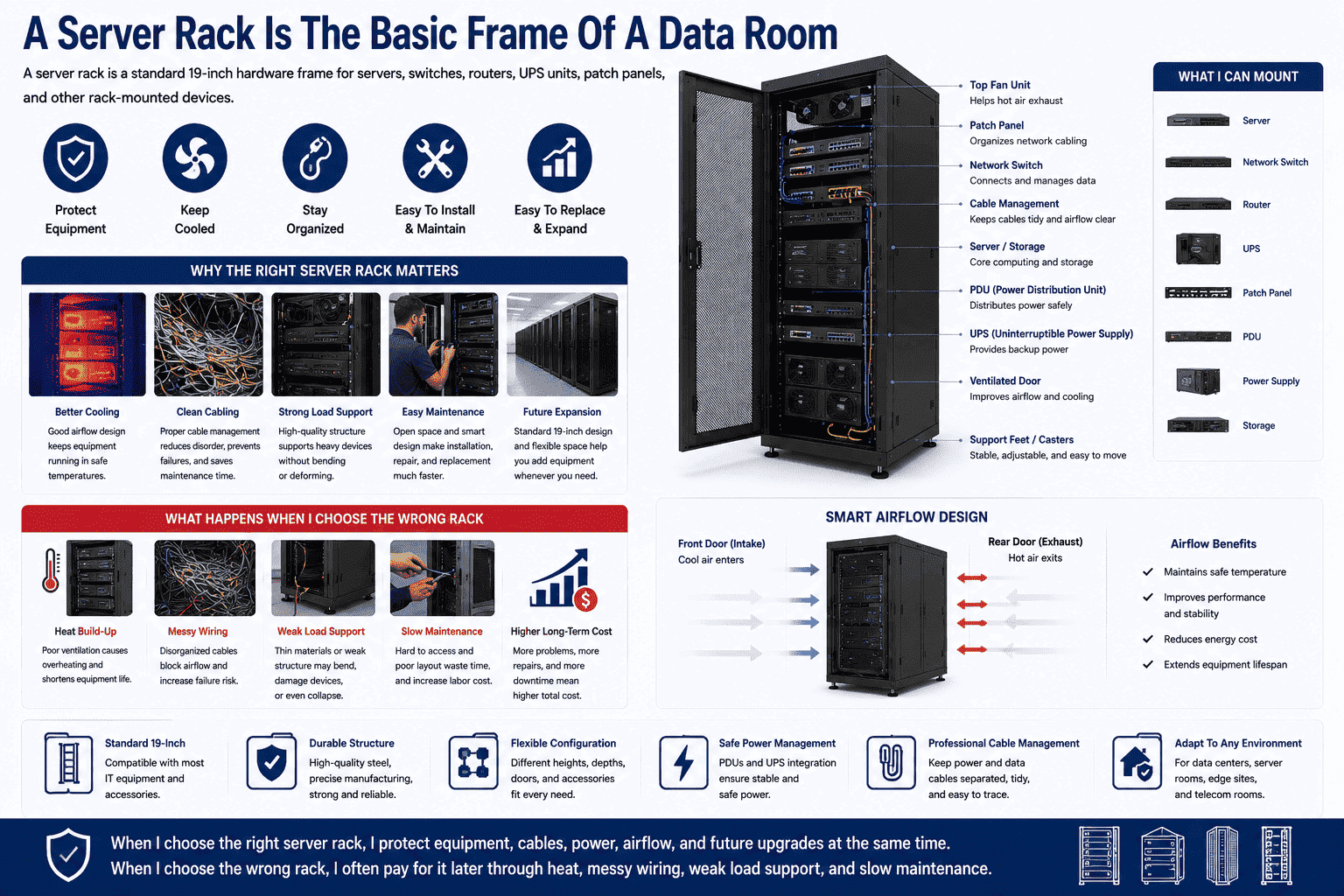
I treat a server rack as the basic frame of a data room, not as a simple metal box. When I choose the right rack, I protect equipment, cables, power, airflow, and future upgrades at the same time. When I choose the wrong rack, I often pay for it later through heat, messy wiring, weak load support, and slow maintenance.
What Is a Standard 19-Inch Server Rack?
I often meet buyers who know their equipment model, but they do not know why the rack must follow the 19-inch standard.
A standard 19-inch server rack is a floor-standing enclosed cabinet with four vertical mounting rails. I use it to install rack-mounted IT devices that follow the same global mounting width standard.
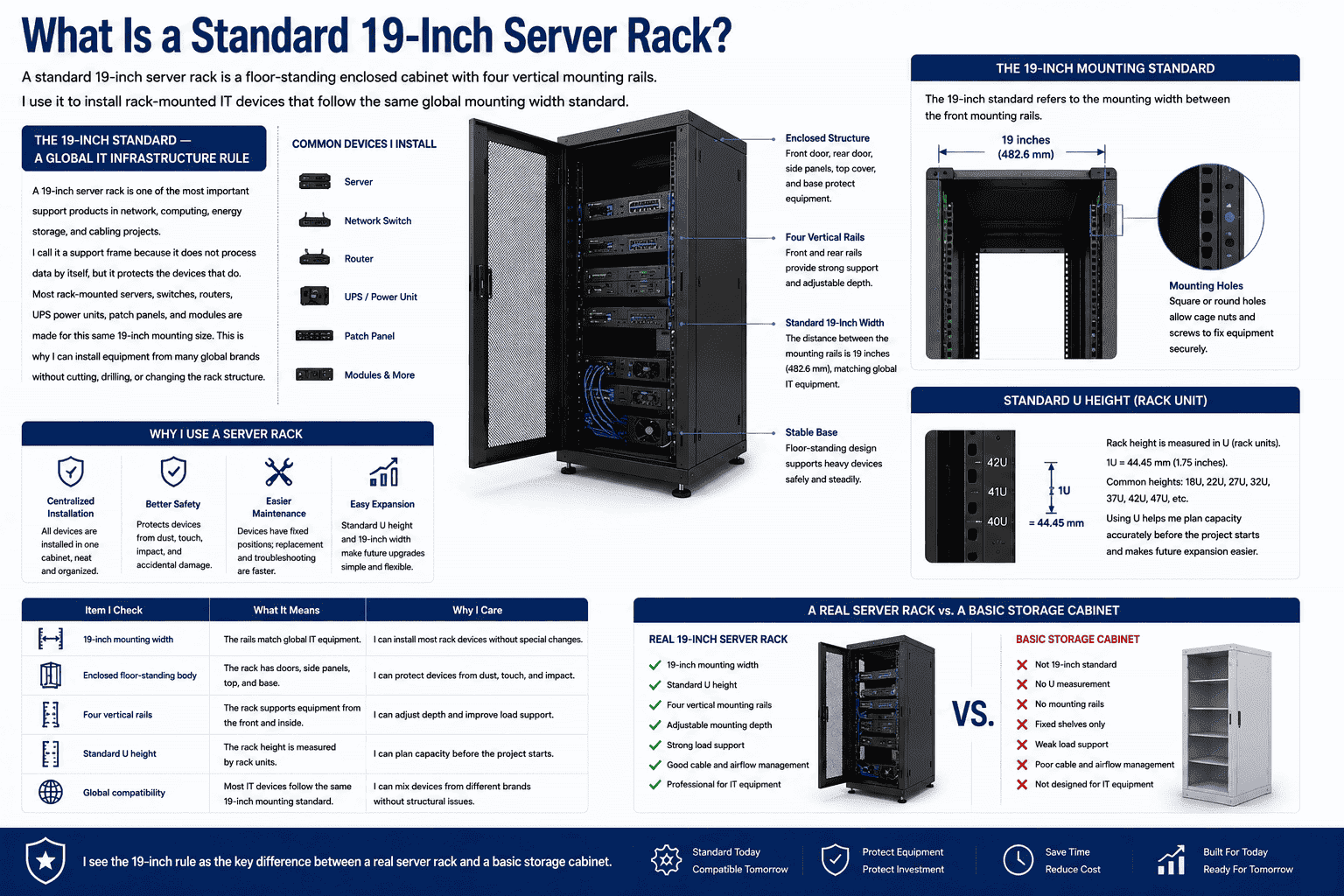
A 19-inch server rack is one of the most important support products in network, computing, energy storage, and cabling projects. I call it a support frame because it does not process data by itself, but it protects the devices that do. Most rack-mounted servers, switches, routers, UPS power units, patch panels, and modules are made for this same 19-inch mounting size.2 This is why I can install equipment from many global brands without cutting, drilling, or changing the rack structure.
I use a server rack when I need centralized installation, better safety, and easier maintenance. The rack gives each device a fixed place. It also helps me keep cables away from fans, doors, and sharp edges. I can replace a device faster because the mounting size is clear. I can also expand the system later because the cabinet height is measured by U.
| Item I Check | What It Means | Why I Care |
|---|---|---|
| 19-inch mounting width | The rails match global IT equipment. | I can install most rack devices without special changes. |
| Enclosed floor-standing body | The rack has doors, side panels, top, and base. | I can protect devices from dust, touch, and impact. |
| Four vertical rails | The rack supports equipment from the front and inside. | I can adjust depth and improve load support. |
| Standard U height | The rack height is measured by rack units. | I can plan capacity before the project starts. |
I see the 19-inch rule as the key difference between a real server rack and a basic storage cabinet.
Why Does Server Rack Quality Affect IT Equipment Stability?
I have visited machine rooms where the devices were good, but the cabinet caused heat, cable stress, and unsafe maintenance.
Server rack quality affects equipment stability because the rack controls load support, airflow, cable order, grounding, access, and physical protection.3 I use a strong rack to reduce hardware damage, short circuits, downtime, and data safety risks.
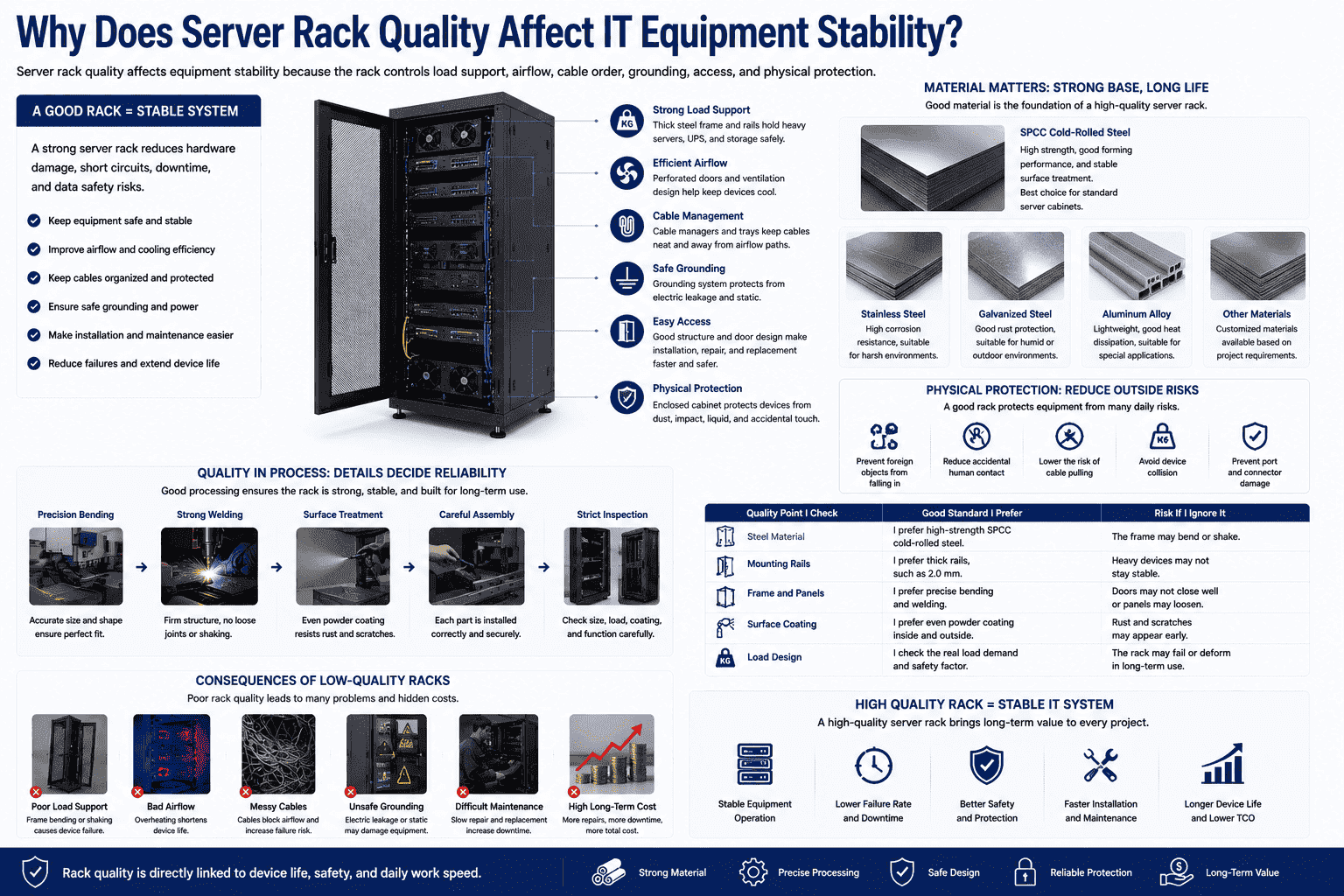
A good server rack starts with strong material. In my work, I prefer high-strength SPCC cold-rolled steel for standard server cabinets. This material gives the rack good strength, smooth forming, and stable surface treatment. I can also use stainless steel, galvanized steel, aluminum alloy, or other materials when a project has special needs. The material choice matters because the cabinet must hold heavy equipment for years.
A server rack also protects equipment from outside risks. It stops random objects from falling into devices. It reduces accidental human contact. It lowers the chance of cable pulling, device collision, and port damage. In some sites, this simple protection already saves a lot of repair cost.
Good processing also matters. I pay attention to bending, welding, coating, and assembly. A weak frame may shake when I pull out a server.4 A poor coating may rust in humid rooms. A thin rail may deform under heavy UPS units.
| Quality Point I Check | Good Standard I Prefer | Risk If I Ignore It |
|---|---|---|
| Steel material | I prefer high-strength SPCC cold-rolled steel. | The frame may bend or shake. |
| Mounting rails | I prefer thick rails, such as 2.0 mm. | Heavy devices may not stay stable. |
| Frame and panels | I prefer precise bending and welding. | Doors may not close well. |
| Surface coating | I prefer even powder coating. | Rust and scratches may appear early. |
| Load design | I check the real load demand. | The rack may fail in long use. |
I believe rack quality is directly linked to device life, safety, and daily work speed.
Which Server Rack Size Should I Choose?
I often ask clients three questions first: how many devices they have, how deep the devices are, and how many cables they need.
I choose a server rack size by checking U height, width, and depth. Common heights include 22U, 27U, 32U, 37U, and 42U. Most data centers and enterprise rooms often use 42U racks.5
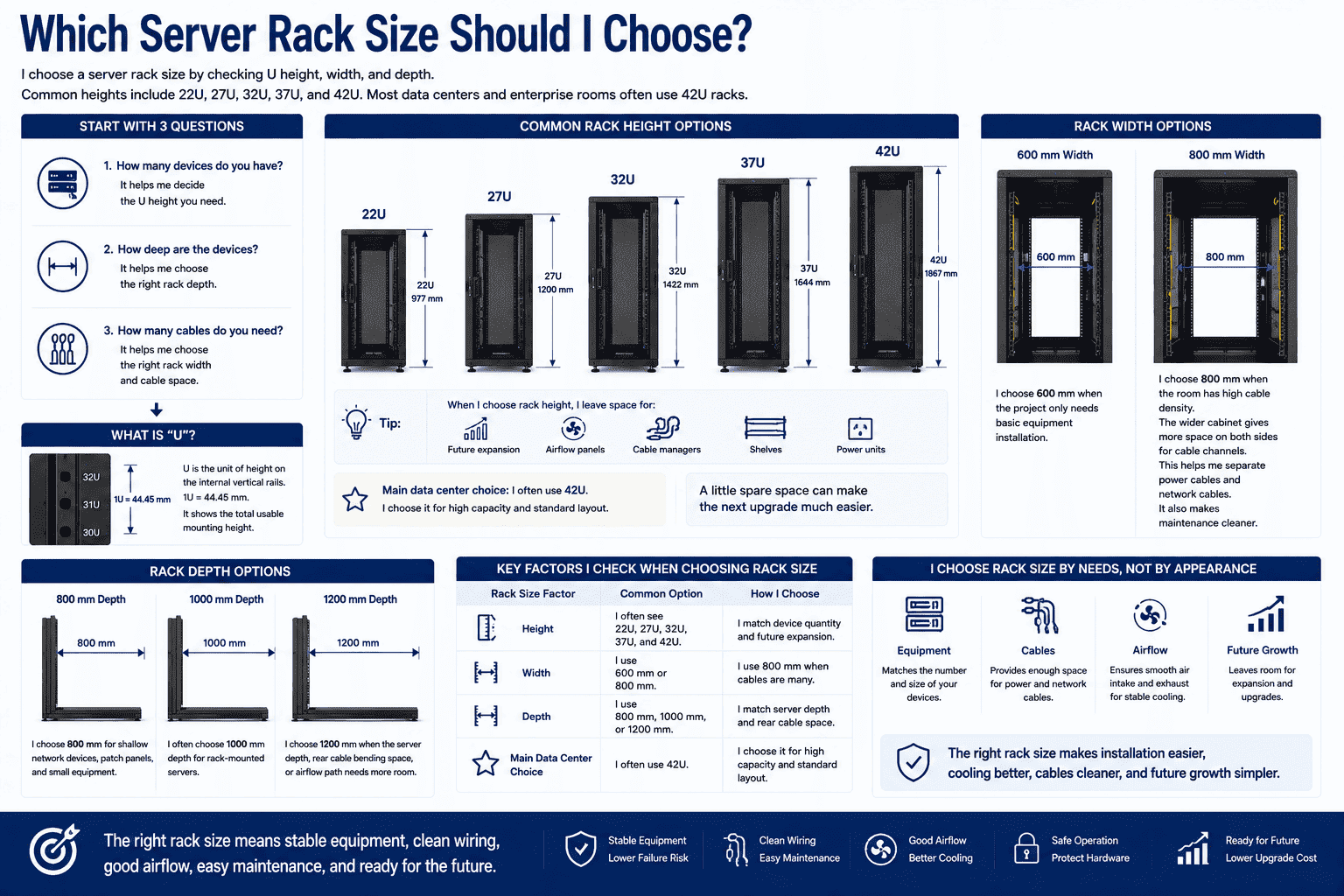
The U number means the total usable height on the internal vertical rails. One U is 44.45 mm.6 When I choose rack height, I do not only count today’s equipment. I also leave space for future expansion, airflow panels, cable managers, shelves, and power units. I have seen small rooms fill up faster than expected. A little spare space can make the next upgrade much easier.
The common rack widths are 600 mm and 800 mm. I choose 600 mm when the project only needs basic equipment installation. I choose 800 mm when the room has high cable density. The wider cabinet gives more space on both sides for cable channels.7 This helps me separate power cables and network cables. It also makes maintenance cleaner.
The common depths are 800 mm, 1000 mm, and 1200 mm. I often choose 1000 mm depth for rack-mounted servers. I choose deeper racks when the server depth, rear cable bending space, or airflow path needs more room.
| Rack Size Factor | Common Option | How I Choose |
|---|---|---|
| Height | I often see 22U, 27U, 32U, 37U, and 42U. | I match device quantity and future expansion. |
| Width | I use 600 mm or 800 mm. | I use 800 mm when cables are many. |
| Depth | I use 800 mm, 1000 mm, or 1200 mm. | I match server depth and rear cable space. |
| Main data center choice | I often use 42U. | I choose it for high capacity and standard layout. |
I do not choose rack size by appearance. I choose it by equipment, cable, airflow, and future growth.
What Structure and Accessories Should a Server Rack Include?
I once helped a client replace several low-cost racks because the doors, rails, and cable space could not support daily work.
A standard server rack should include a strong frame, four 19-inch mounting rails, front and rear doors, removable side panels, cable entry points, fans, shelves, PDUs, cable managers, feet, casters, grounding, and support brackets.
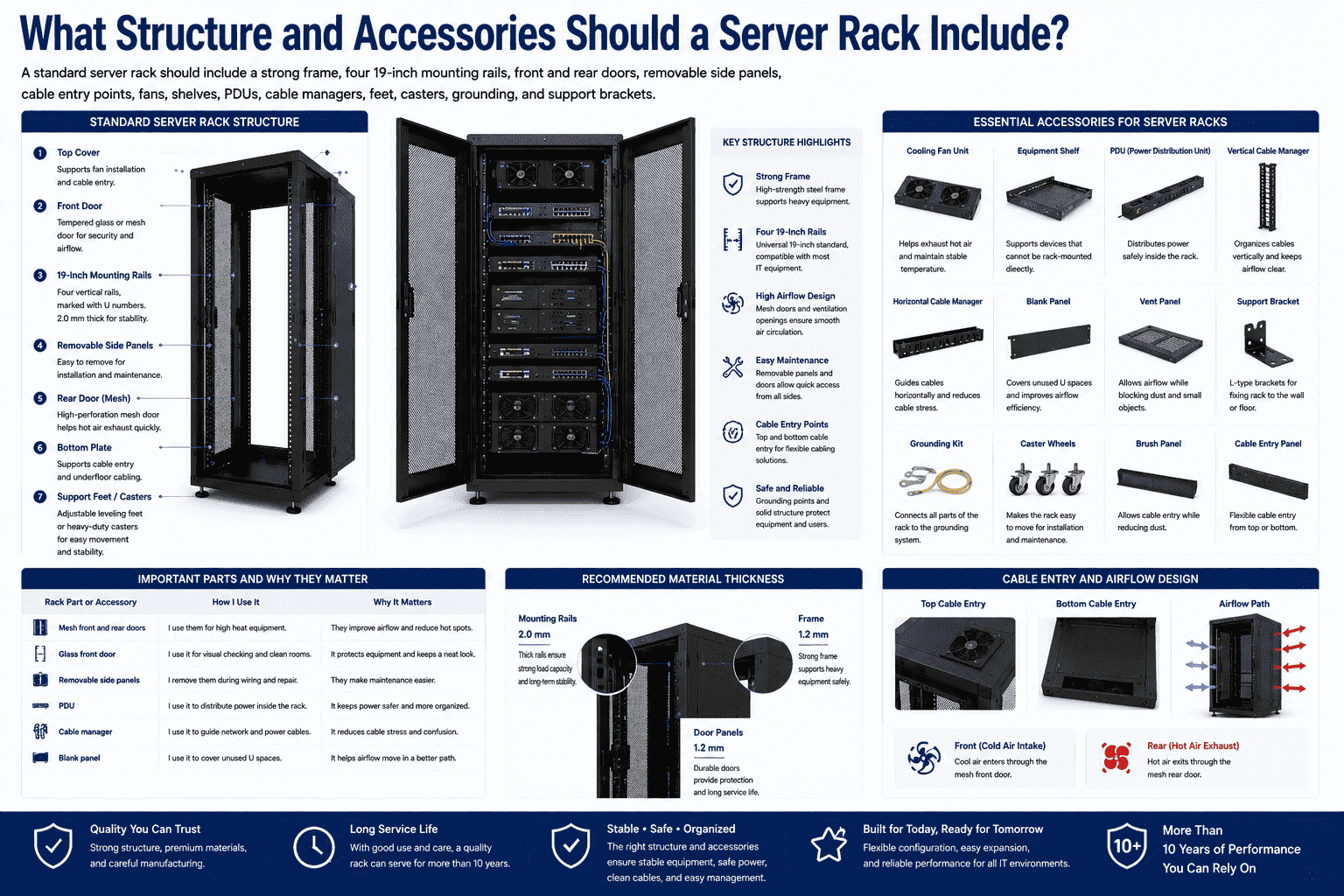
A standard server rack is built from a frame structure. The main frame carries the load. The four inner vertical rails provide the 19-inch mounting positions. The front door can be tempered glass when I need visual checking and a cleaner appearance. It can also be a mesh door when I need better airflow. The rear door is usually mesh because hot air must leave the cabinet quickly.8
The side panels should be removable. This helps me install, check, and repair cables from both sides. The top cover and bottom plate should support cable entry. This gives me more freedom in overhead and underfloor cabling rooms. I also look for dust control, grounding points, and smooth cable openings because these small details affect real use.
Accessories are also important. A rack without the right accessories is not complete. I often add cooling fans, equipment shelves, vertical cable channels, PDUs, support feet, casters, L-type brackets, blank panels, vent panels, cable managers, and grounding wires.
| Rack Part or Accessory | How I Use It | Why It Matters |
|---|---|---|
| Mesh front and rear doors | I use them for high heat equipment. | They improve airflow and reduce hot spots. |
| Glass front door | I use it for visual checking and clean rooms. | It protects equipment and keeps a neat look. |
| Removable side panels | I remove them during wiring and repair. | They make maintenance easier. |
| PDU | I use it to distribute power inside the rack. | It keeps power safer and more organized. |
| Cable manager | I use it to guide network and power cables. | It reduces cable stress and confusion. |
| Blank panel9 | I use it to cover unused U spaces. | It helps airflow move in a better path. |
I prefer racks with thick 2.0 mm mounting rails and strong 1.2 mm frame and door panels. With good use and care, I expect a quality rack to serve for more than 10 years.
How Do I Customize a Server Rack for Special Projects?
I know many overseas projects cannot use only one fixed catalog model, because site space and equipment needs are often different.
I customize server racks by changing size, material, doors, punching, load structure, waterproof design, anti-rust treatment, cable entry, and accessories. I do this when standard racks cannot match the project site or equipment plan.
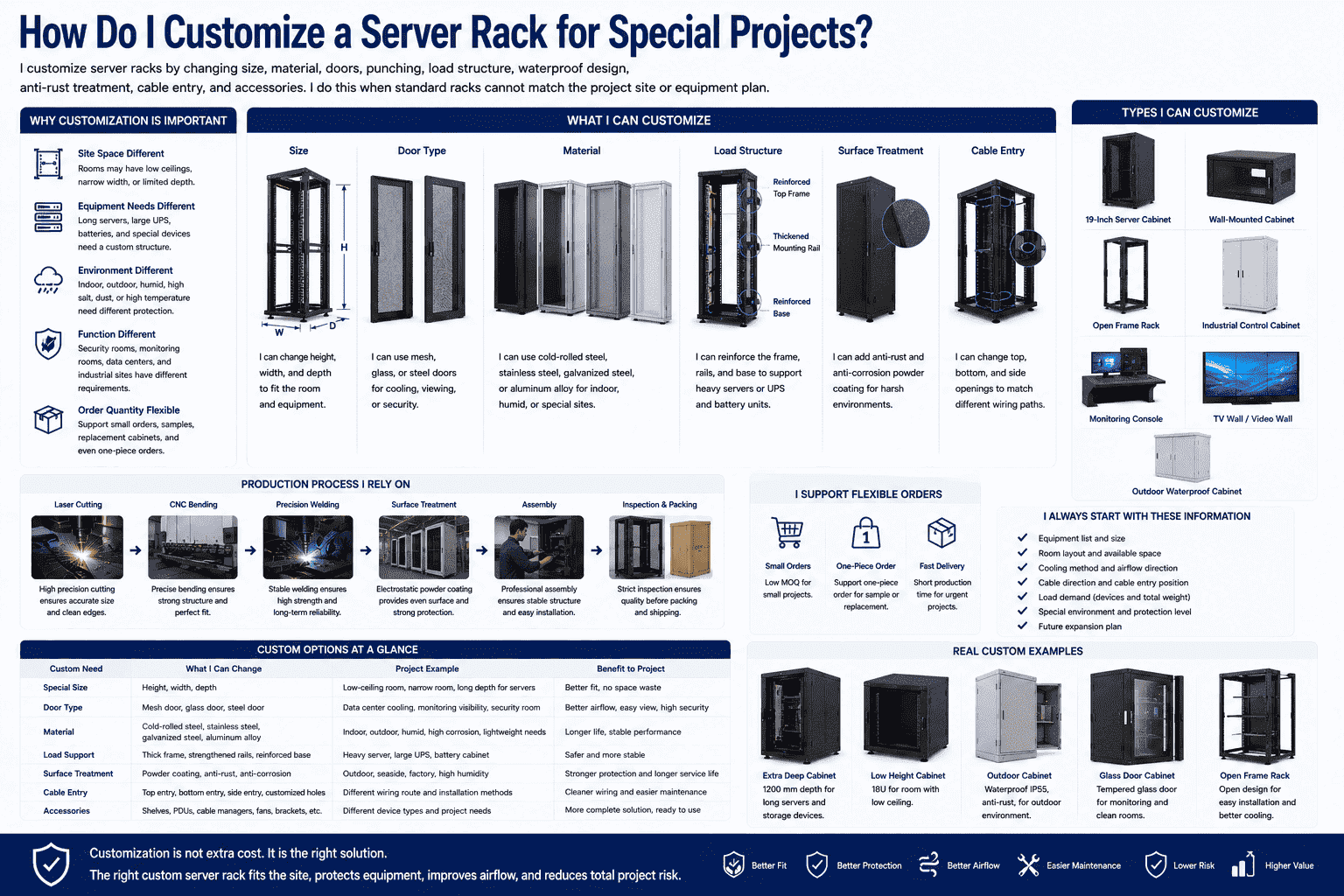
Customization is very important in my work because many projects have special limits. Some rooms have low ceilings. Some projects need extra depth for long servers. Some security projects need glass doors. Some data rooms need mesh doors for cooling. Some outdoor or semi-outdoor sites need waterproof, anti-corrosion, and anti-rust treatment. I do not see customization as decoration. I see it as a way to make the rack fit the real working condition.
I can customize standard 19-inch cabinets, wall-mounted cabinets, open frames, industrial control cabinets, monitoring consoles, TV walls, and outdoor waterproof cabinets. I can also support small orders and even one-piece orders when the project needs a sample, a replacement cabinet, or a small batch. This is useful for overseas buyers who do not want high stock pressure.
The production process also matters. I rely on laser cutting, CNC bending, precision welding, electrostatic powder coating, and assembly. These steps help me control size, strength, and surface quality.
| Custom Need | What I Can Change | Project Example |
|---|---|---|
| Special size | I can change height, width, and depth. | I use this for rooms with limited space. |
| Door type | I can use mesh, glass, or steel doors. | I use this for cooling, viewing, or security. |
| Material | I can use cold-rolled steel, stainless steel, galvanized steel, or aluminum alloy. | I use this for indoor, humid, or special sites. |
| Load support | I can reinforce the frame and rails. | I use this for heavy servers or UPS units. |
| Surface treatment | I can add anti-rust and anti-corrosion coating. | I use this for harsh environments. |
| Cable entry | I can change top, bottom, and side openings. | I use this for different wiring paths. |
I always start customization by asking about equipment list, room layout, cooling method, cable direction, and load demand.
How Do I Maintain a Server Rack for Long-Term Use?
I have learned that a strong rack can still fail early if nobody checks heat, dust, load, cables, and grounding.
I maintain a server rack by keeping airflow open, cleaning dust, checking screws, checking load, managing cables, testing grounding, and protecting the coating. Good maintenance can help a quality rack last more than 10 years.
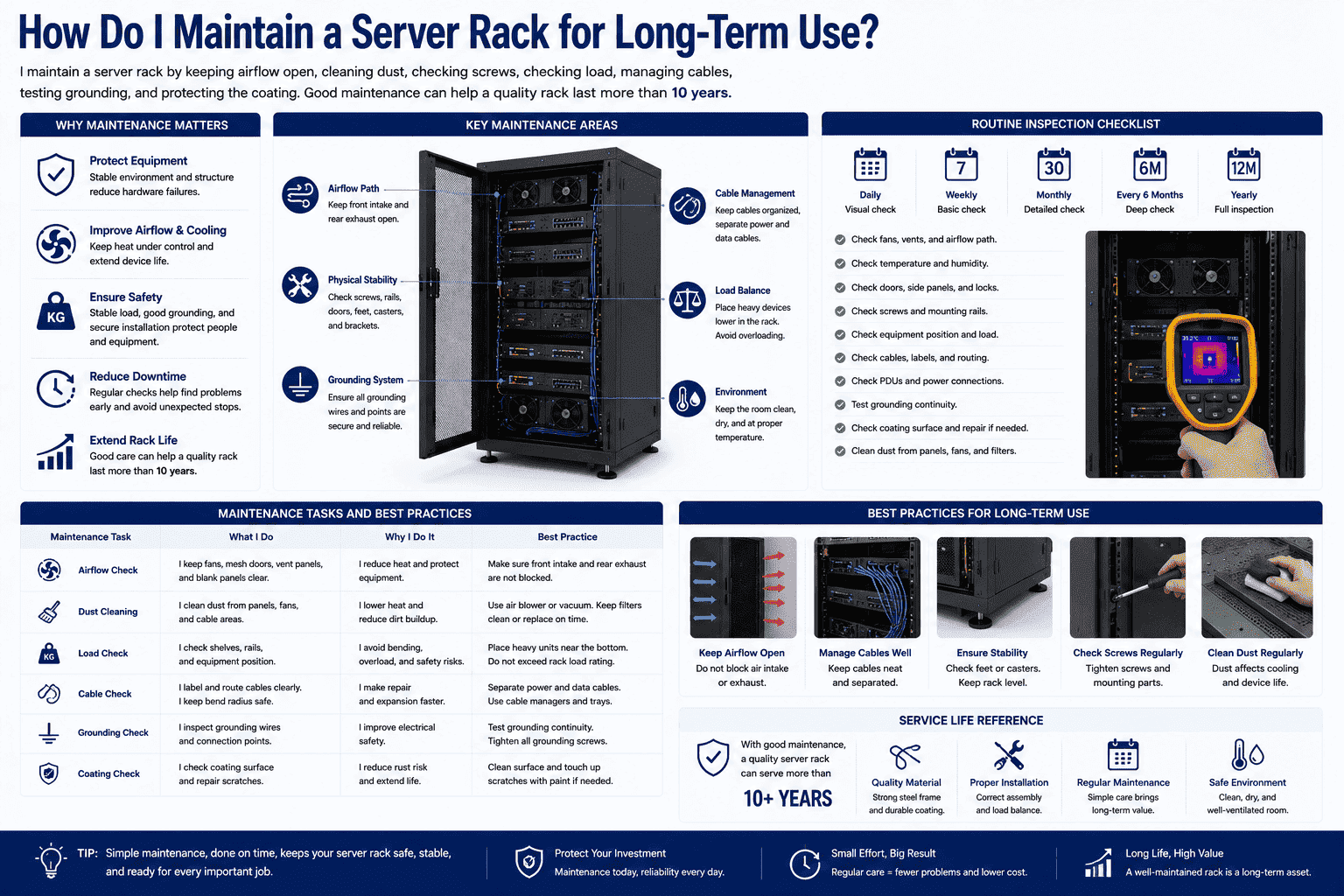
Server rack maintenance is simple, but it must be regular. I first check airflow. Mesh doors, fans, vent panels, and blank panels must work together. If cables block the rear air path, hot air stays inside the rack. If unused U spaces are open in the wrong place, airflow may become less controlled. I also check whether the room cooling system matches the heat load of the equipment.
I then check physical stability. I check screws, rails, shelves, casters, feet, and brackets. Heavy devices should sit in the correct position. I prefer heavier units near the lower part of the rack.10 This makes the cabinet safer and more stable. I also check whether the rack is level because a tilted rack can cause door and rail problems.
Cable maintenance is another key point. I label cables, separate power and data cables, and keep bend radius safe. I also check grounding wires because grounding helps protect equipment and people.11
| Maintenance Task | What I Do | Why I Do It |
|---|---|---|
| Airflow check | I keep fans, mesh doors, and vents clear. | I reduce heat and protect equipment. |
| Dust cleaning | I clean dust from panels, fans, and cable areas. | I lower heat and reduce dirt buildup. |
| Load check | I check shelves, rails, and equipment position. | I avoid bending and safety risks. |
| Cable check | I label and route cables clearly. | I make repair and expansion faster. |
| Grounding check | I inspect grounding wires and points. | I improve electrical safety. |
| Coating check | I repair scratches when needed. | I reduce rust risk and extend life. |
I see maintenance as part of the rack value. A well-made rack plus simple care gives a much longer service life.
Why Are Server Racks Essential for Data Centers and Computing Centers?
I see server racks as the main carrier of modern IT rooms, because they connect equipment safety, cooling, power, wiring, and upgrades.12
Server racks are essential because they organize and protect core IT equipment. I use them in data centers, computing centers, network communication, power systems, security monitoring, industrial automation, and energy projects.
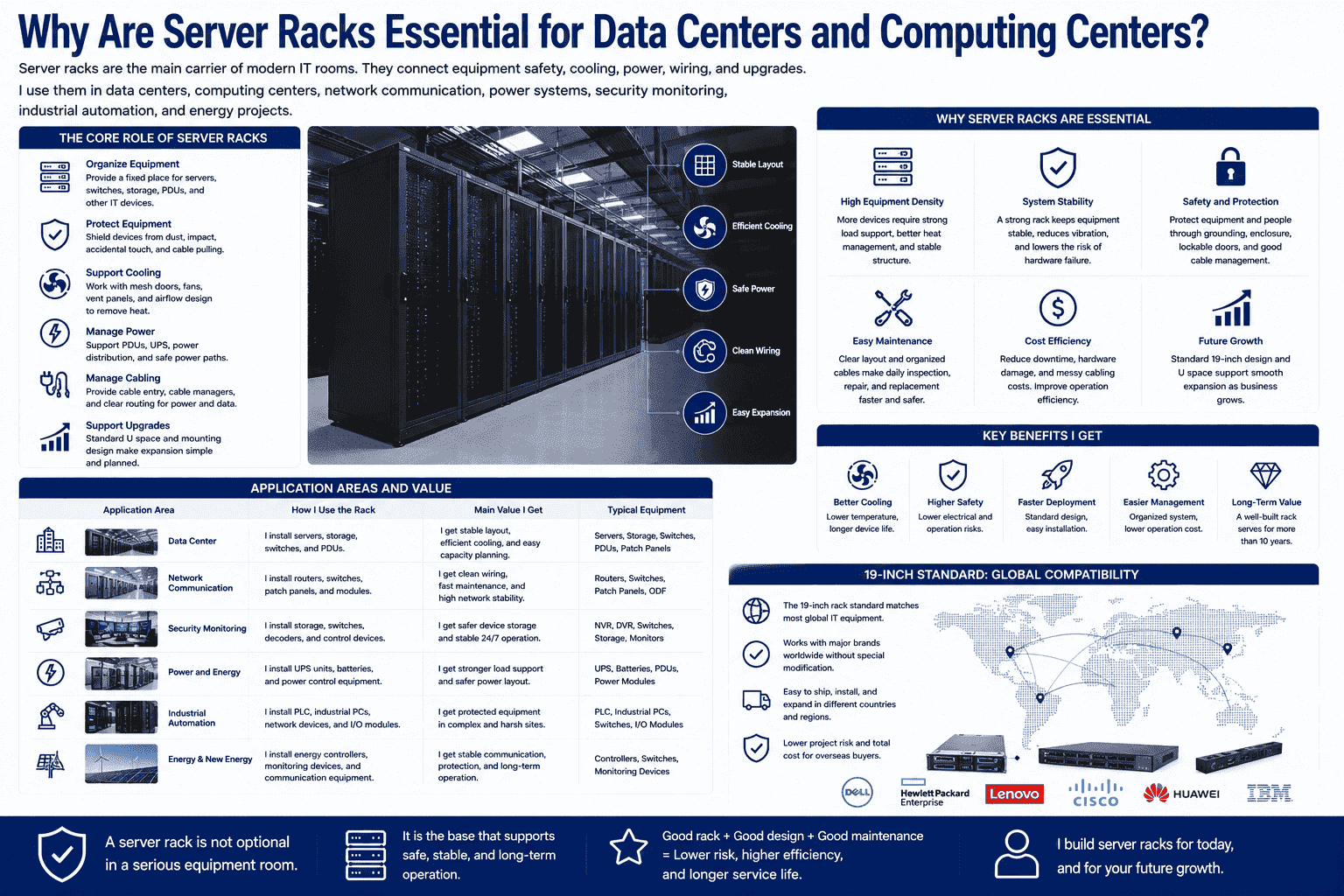
A data center is not only a room with many servers. It is a system that needs order. The server rack gives that order. It gives each device a fixed height, a fixed mounting point, a power path, a cable path, and a cooling path. This is why I treat the rack as a core product in any serious IT project.
In computing centers, hardware density is often high. More devices create more heat. More cables create more service risk. More power units create more safety demand. A strong rack helps me manage all of these at once. It also supports upgrades. When the business grows, I can add servers, switches, patch panels, shelves, and PDUs in a planned way.
For global projects, the standard 19-inch design also reduces buying risk. I can match international equipment brands. I can ship cabinets to Europe, America, Southeast Asia, and other markets with clear structure and stable quality.
| Application Area | How I Use the Rack | Main Value I Get |
|---|---|---|
| Data center | I install servers, switches, and PDUs. | I get stable layout and easier cooling. |
| Network communication | I install routers, patch panels, and modules. | I get clean wiring and fast maintenance. |
| Security monitoring | I install storage, switches, and control devices. | I get safer device storage. |
| Power and energy | I install UPS units and control equipment. | I get stronger load support and safer power layout. |
| Industrial automation | I install control and network devices. | I get protected equipment in complex sites. |
I believe a server rack is not optional in a serious equipment room. It is the base that supports safe, stable, and long-term operation.
Conclusion
I choose server racks by standard, size, strength, airflow, wiring, customization, and maintenance, because the rack protects the whole IT system.
"19-inch rack - Wikipedia", https://en.wikipedia.org/wiki/19-inch_rack. A reference on the 19-inch rack standard defines it as a standardized frame or enclosure for mounting electronic equipment, providing contextual support for describing server racks as 19-inch frames for IT hardware. Evidence role: definition; source type: encyclopedia. Supports: A neutral source should define a 19-inch rack as a standardized frame or enclosure for mounting electronic equipment, including computer and network devices.. Scope note: The source supports the general form factor and use case, but it may not list every device category named in the article. ↩
"19-inch rack - Wikipedia", https://en.wikipedia.org/wiki/19-inch_rack. Industry rack standards such as EIA-310 and IEC 60297 specify the 19-inch mounting format used for a broad range of rack-mounted electronic equipment, supporting the article’s compatibility claim in general terms. Evidence role: expert_consensus; source type: institution. Supports: A standards or institutional source should show that rack-mounted electronic and IT equipment commonly follows the 19-inch rack form factor.. Scope note: The standards establish the common mounting format, but they do not prove that every listed equipment type or brand conforms to it. ↩
"[PDF] Security Guidelines for Storage Infrastructure", https://nvlpubs.nist.gov/nistpubs/SpecialPublications/NIST.SP.800-209.pdf. Data-center infrastructure guidance treats racks as part of the facility system that affects equipment support, airflow management, cabling, grounding, and service access, supporting the mechanism described in the article. Evidence role: mechanism; source type: institution. Supports: A data-center infrastructure source should explain how racks support equipment organization, airflow paths, cable routing, grounding, and physical access.. Scope note: The support is mechanistic and contextual; it does not quantify the exact reliability improvement from a higher-quality rack. ↩
"1926.600 - Equipment. | Occupational Safety and Health ... - OSHA", http://www.osha.gov/laws-regs/regulations/standardnumber/1926/1926.600. Rack installation and safety guidance notes that extending heavy equipment from a rack can create stability hazards, supporting the article’s warning that weak rack frames may shake during server maintenance. Evidence role: mechanism; source type: institution. Supports: A safety or installation source should explain that extending heavy rack-mounted equipment can affect rack stability and requires adequate rack strength or anti-tip precautions.. Scope note: The source would support the general mechanical risk, not a specific failure threshold for any one rack model. ↩
"A Guide to Server Rack Sizes for Data Centers", https://www.datacenterknowledge.com/servers/a-guide-to-server-rack-sizes-for-data-centers. Technical descriptions of data-center rack layouts commonly identify 42U as a standard full-height cabinet size, providing contextual support for the article’s statement that 42U racks are widely used. Evidence role: general_support; source type: education. Supports: A neutral educational or technical source should describe 42U as a common full-height rack size used in data centers.. Scope note: Usage varies by facility design, region, and equipment density, so the source would support common practice rather than a universal rule. ↩
"Rack unit - Wikipedia", https://en.wikipedia.org/wiki/Rack_unit. A rack unit is conventionally defined as 1.75 inches, or 44.45 mm, which supports the article’s explanation of U-based rack height measurement. Evidence role: definition; source type: encyclopedia. Supports: A source should define a rack unit as 1.75 inches, equivalent to 44.45 mm.. ↩
"Server Rack Vertical Cable Management - Dell", https://www.dell.com/en-us/shopping/server-rack-vertical-cable-management. Data-center cabling guidance describes the need for dedicated cable-management space in and around racks, providing contextual support for the article’s statement that wider cabinets can leave more side space for cable channels. Evidence role: mechanism; source type: institution. Supports: A data-center cabling or infrastructure guide should describe how wider cabinets can accommodate side cable management and higher cable density.. Scope note: The source may not endorse the exact 600 mm versus 800 mm choice for all installations. ↩
"Move to a Hot Aisle/Cold Aisle Layout | ENERGY STAR", https://www.energystar.gov/products/data_center_equipment/16-more-ways-cut-energy-waste-data-center/move-hot-aislecold-aisle-layout. Data-center thermal guidance recognizes perforated rack doors as part of maintaining front-to-rear airflow and removing server exhaust heat, supporting the article’s explanation of mesh rear doors. Evidence role: mechanism; source type: institution. Supports: A thermal-management source should explain that perforated or mesh rack doors support front-to-rear airflow and hot-air exhaust from IT equipment.. Scope note: Door choice also depends on room cooling design, equipment airflow direction, and security requirements. ↩
"[PDF] Data Center Airflow Management Retrofit", https://datacenters.lbl.gov/sites/default/files/airflow-doe-femp.pdf. Data-center energy-efficiency guidance states that blanking panels help prevent unwanted air recirculation through empty rack spaces, supporting the article’s claim that they improve the airflow path. Evidence role: mechanism; source type: government. Supports: A government or institutional energy-efficiency source should explain that blanking panels reduce air recirculation through unused rack spaces and improve cooling airflow management.. ↩
"Warehouse shelving and racking safety", https://www.tdi.texas.gov/tips/safety/warehouse.html. Rack safety guidance commonly advises placing heavier equipment near the bottom of a cabinet to lower the center of gravity and reduce tipping risk, supporting the article’s maintenance recommendation. Evidence role: expert_consensus; source type: institution. Supports: A safety or installation guide should state that heavier equipment should be mounted near the bottom of a rack to reduce tipping risk and improve stability.. ↩
"How to Ground a Server Rack | Requirements of Data Cabinet ...", https://sysracks.ca/blog/the-importance-of-proper-server-rack-grounding/?srsltid=AfmBOoqR2g6ZiiZyafBJ2K4jjVMV5QOZZi5d9pvQugcvG8lbEKTcOTWX. Electrical safety guidance explains that grounding and bonding provide a controlled path for fault current and help reduce shock and equipment-damage risks, supporting the article’s statement about rack grounding. Evidence role: mechanism; source type: government. Supports: An electrical safety source should explain that grounding and bonding provide fault-current paths and reduce shock or equipment-damage risks.. Scope note: The source supports the safety function of grounding generally; proper protection depends on compliant design, installation, and inspection. ↩
"Data Center and Server Room Standards - The University of Kansas", https://services.ku.edu/TDClient/818/Portal/KB/ArticleDet?ID=21009. Data-center design guidance describes racks as the physical interface for IT equipment, power distribution, cabling, and airflow management, supporting the article’s characterization of racks as central infrastructure in IT rooms. Evidence role: general_support; source type: institution. Supports: A data-center design source should describe racks as infrastructure that organizes IT equipment and interfaces with cooling, power, and cabling systems.. Scope note: The source would support the general infrastructure role, not the author’s subjective phrase 'main carrier.' ↩
