
Data Center Server Racks: Understanding the Basics?

I see many projects lose space, money, and uptime because the rack choice looks simple but carries hidden risks.
A data center server rack is a standard frame or cabinet that holds IT equipment in a 19-inch format.1 I use it to organize servers, switches, power units, cables, cooling paths, and security protection in data centers, weak-current rooms, small server rooms, and edge sites.
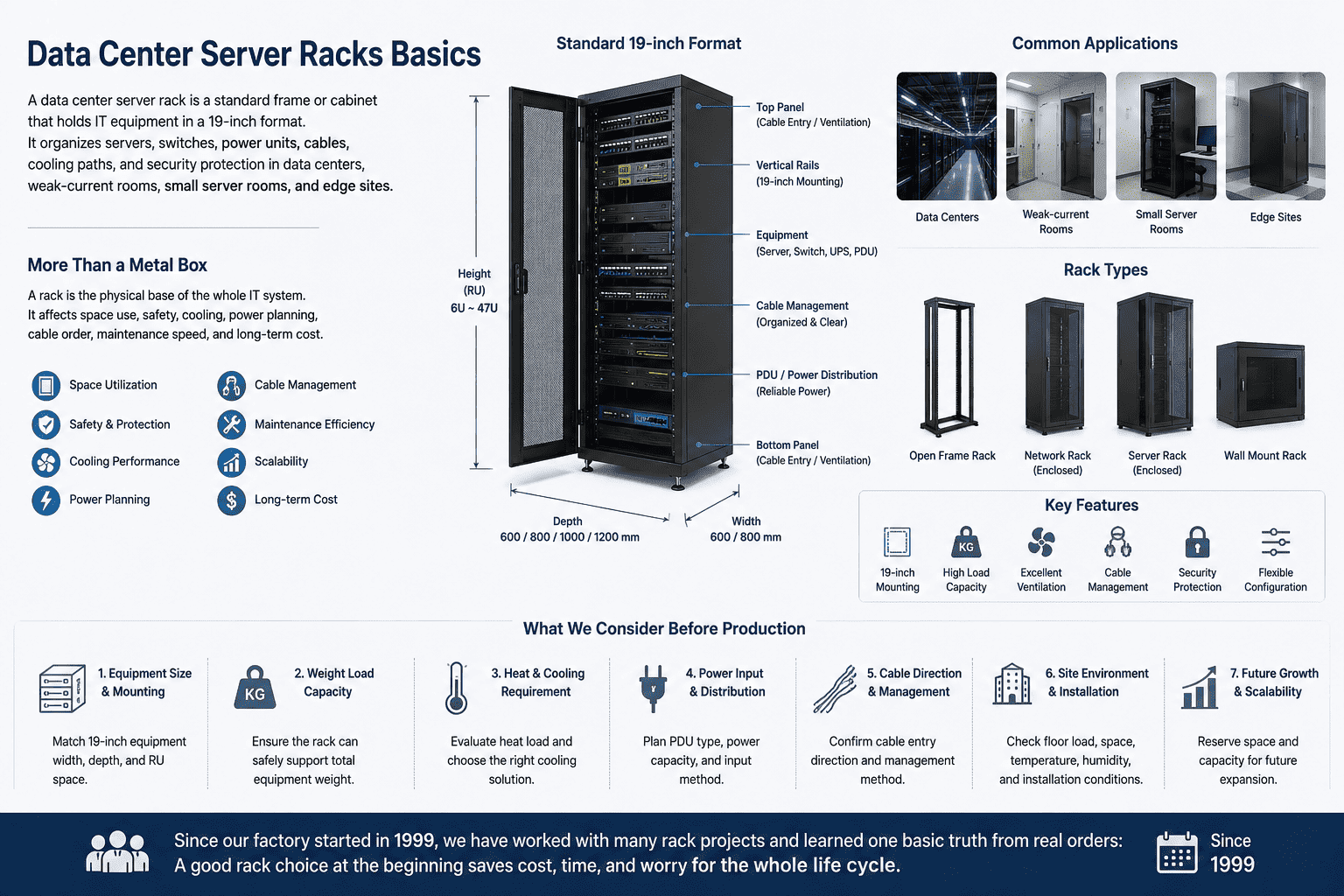
I have worked with many rack projects since our factory started in 1999. I learned one basic truth from real orders. A rack is not only a metal box. It is the physical base of the whole IT system. It affects space use, safety, cooling, power planning, cable order, maintenance speed, and long-term cost.2 When I help a client choose a rack, I first ask about equipment size, weight, heat, site condition, cable direction, and future growth. This simple step helps me avoid many problems before production starts.
Why Does A Data Center Server Rack Matter So Much?
I have seen good equipment perform badly when the rack is weak, crowded, or hard to manage.
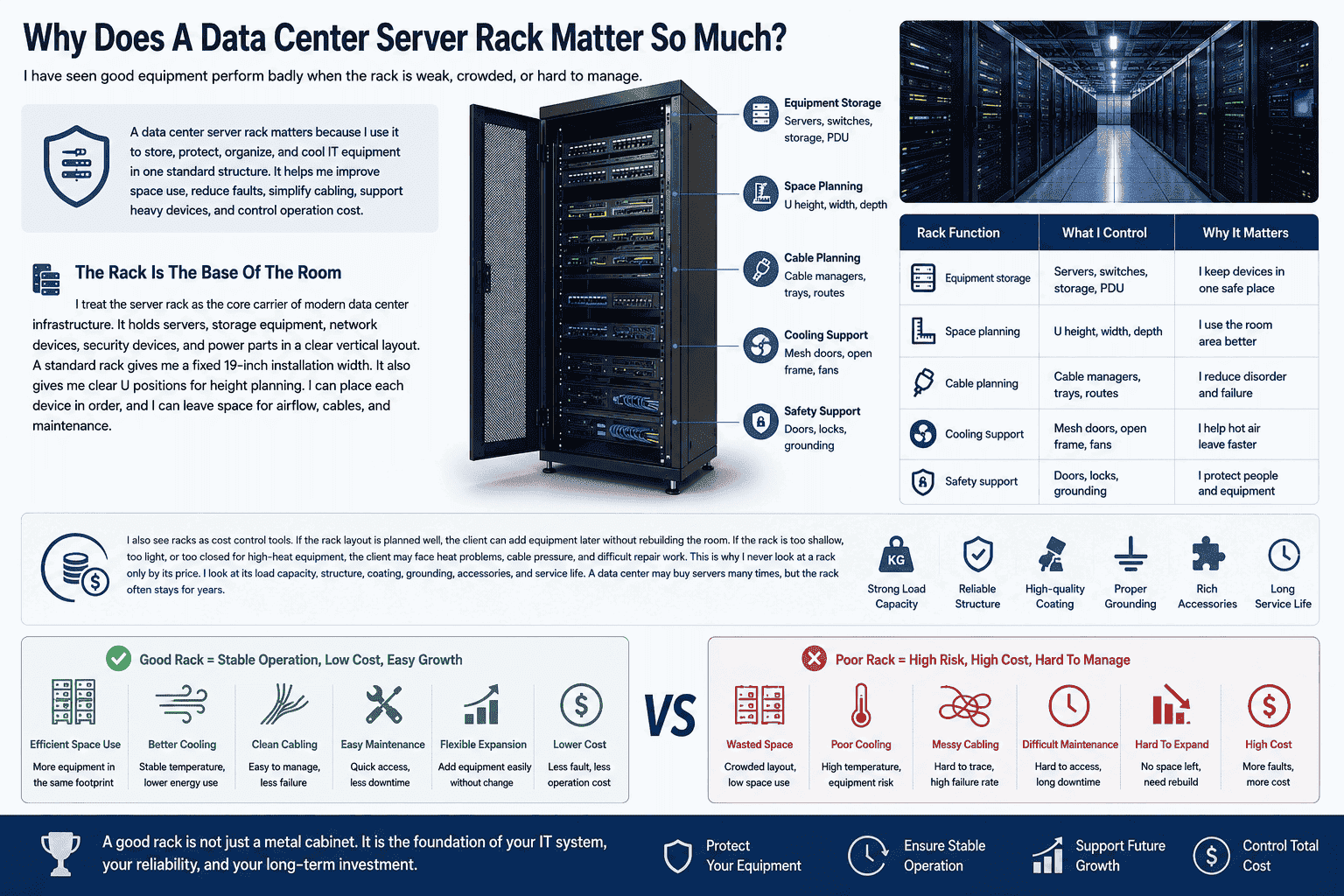
A data center server rack matters because I use it to store, protect, organize, and cool IT equipment in one standard structure. It helps me improve space use, reduce faults, simplify cabling, support heavy devices, and control operation cost.
The Rack Is The Base Of The Room
I treat the server rack as the core carrier of modern data center infrastructure. It holds servers, storage equipment, network devices, security devices, and power parts in a clear vertical layout. A standard rack gives me a fixed 19-inch installation width. It also gives me clear U positions for height planning. I can place each device in order, and I can leave space for airflow, cables, and maintenance.
| Rack Function | What I Control | Why It Matters |
|---|---|---|
| Equipment storage | Servers, switches, storage, PDU | I keep devices in one safe place |
| Space planning | U height, width, depth | I use the room area better |
| Cable planning | Cable managers, trays, routes | I reduce disorder and failure |
| Cooling support | Mesh doors, open frame, fans | I help hot air leave faster |
| Safety support | Doors, locks, grounding | I protect people and equipment |
I also see racks as cost control tools. If the rack layout is planned well, the client can add equipment later without rebuilding the room. If the rack is too shallow, too light, or too closed for high-heat equipment, the client may face heat problems, cable pressure, and difficult repair work. This is why I never look at a rack only by its price. I look at its load capacity, structure, coating, grounding, accessories, and service life. A data center may buy servers many times, but the rack often stays for years.
What Is A Standard 19-Inch Server Rack?
I often meet buyers who know the server model but do not know the rack standard behind it.
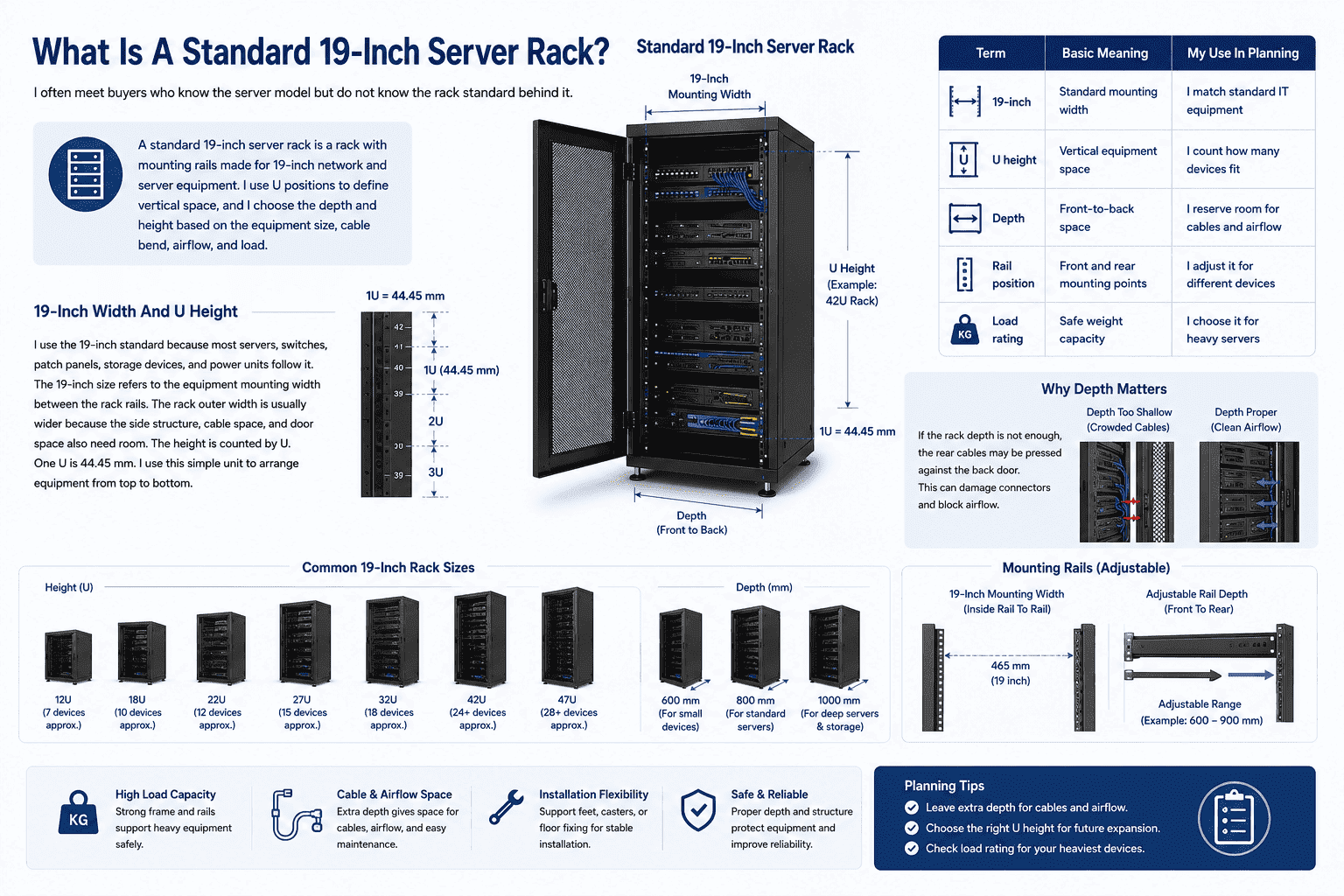
A standard 19-inch server rack is a rack with mounting rails made for 19-inch network and server equipment. I use U positions to define vertical space, and I choose the depth and height based on the equipment size, cable bend, airflow, and load.
19-Inch Width And U Height
I use the 19-inch standard because most servers, switches, patch panels, storage devices, and power units follow it.3 The 19-inch size refers to the equipment mounting width between the rack rails. The rack outer width is usually wider because the side structure, cable space, and door space also need room. The height is counted by U. One U is 44.45 mm.4 I use this simple unit to arrange equipment from top to bottom.
| Term | Basic Meaning | My Use In Planning |
|---|---|---|
| 19-inch | Standard mounting width | I match standard IT equipment |
| U height | Vertical equipment space | I count how many devices fit |
| Depth | Front-to-back space | I reserve room for cables and airflow |
| Rail position | Front and rear mounting points | I adjust it for different devices |
| Load rating | Safe weight capacity | I choose it for heavy servers |
I also pay close attention to rack depth. Many modern servers are long and heavy. Some AI computing devices and storage units need deeper cabinets and stronger rails. If the rack depth is not enough, the rear cables may be pressed against the back door. This can damage connectors and block airflow. I usually leave extra depth for power cables, network cables, airflow, and maintenance hands. I also check whether the rack needs casters, support feet, or floor fixing. These small details decide if the rack is easy to install and safe to use after full loading.
Should I Choose An Open Frame Rack Or A Closed Server Cabinet?
I know this choice can confuse buyers because both types look useful in different ways.
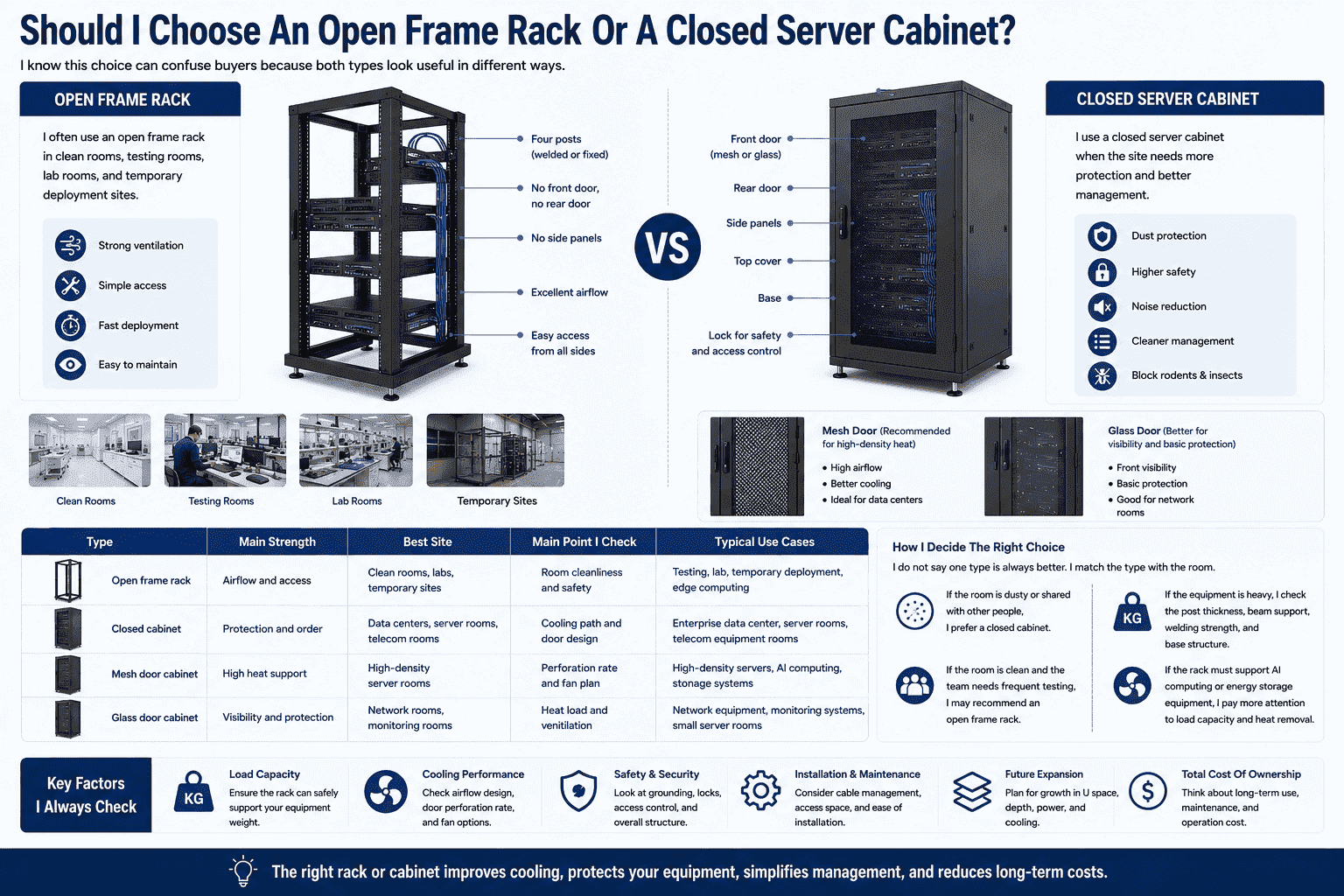
I choose an open frame rack when I need strong ventilation, simple access, and fast temporary deployment. I choose a closed server cabinet when I need dust protection, noise reduction, better safety, door locks, and cleaner data center management.
Open Frame Rack
I often use an open frame rack in clean rooms, testing rooms, lab rooms, and temporary deployment sites. It has four welded or fixed posts. It has no front door, no rear door, and no side panels. The structure is simple. The airflow is very good. Installation and later debugging are also easy because I can reach the equipment from all sides.
Closed Server Cabinet
I use a closed server cabinet when the site needs more protection. It has a front door, rear door, side panels, top cover, and base. The front door can be a glass door or mesh door. A mesh door is better for high-density heat.5 A glass door is better when the client wants front visibility and basic protection. A closed cabinet can reduce dust, noise, rodents, insects, and unwanted access.6
| Type | Main Strength | Best Site | Main Point I Check |
|---|---|---|---|
| Open frame rack | Airflow and access | Clean rooms, labs, temporary sites | Room cleanliness and safety |
| Closed cabinet | Protection and order | Data centers, server rooms, telecom rooms | Cooling path and door design |
| Mesh door cabinet | High heat support | High-density server rooms | Perforation rate and fan plan |
| Glass door cabinet | Visibility and protection | Network rooms, monitoring rooms | Heat load and ventilation |
I do not say one type is always better. I match the type with the room. If the room is dusty or shared with other people, I prefer a closed cabinet. If the room is clean and the team needs frequent testing, I may recommend an open frame rack. If the equipment is heavy, I check the post thickness, beam support, welding strength, and base structure. If the rack must support AI computing or energy storage equipment, I pay more attention to load capacity and heat removal.
What Materials And Structures Make A Rack Strong?
I have learned that strength does not come from appearance. It comes from material, thickness, welding, bending, and coating.
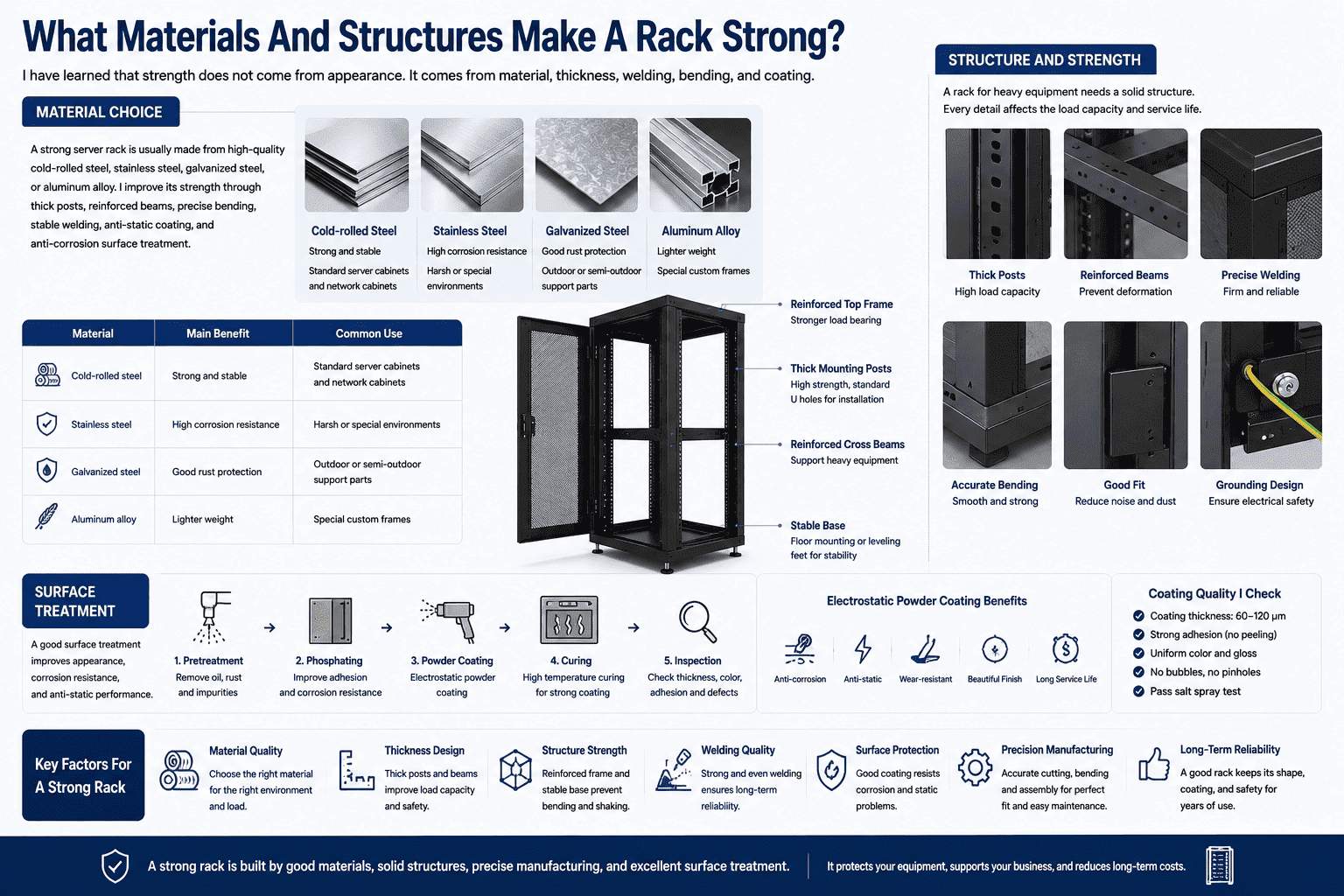
A strong server rack is usually made from high-quality cold-rolled steel, stainless steel, galvanized steel, or aluminum alloy. I improve its strength through thick posts, reinforced beams, precise bending, stable welding, anti-static coating, and anti-corrosion surface treatment.
Material Choice
I usually choose cold-rolled steel for most data center cabinets because it gives strong load capacity, good forming quality, and stable surface finish.7 I use stainless steel or galvanized steel when the site needs higher rust resistance.8 I may use aluminum alloy when the client needs lower weight or special structure. The right material depends on the site, the load, the budget, and the service life target.
| Material | Main Benefit | Common Use |
|---|---|---|
| Cold-rolled steel | Strong and stable | Standard server cabinets and network cabinets |
| Stainless steel | High corrosion resistance | Harsh or special environments |
| Galvanized steel | Good rust protection | Outdoor or semi-outdoor support parts |
| Aluminum alloy | Lighter weight | Special custom frames |
Structure And Surface
I also focus on the internal structure. A rack for heavy equipment needs thick mounting posts and reinforced cross beams. The four posts must hold devices through standard U holes. The equipment can be fixed with screws directly on the posts. If the rack is used for high-density servers, I check whether the structure can carry stacked equipment without bending. I also check the door, side panel, top cover, and base fit. Poor fit can cause noise, vibration, dust entry, and hard maintenance.
Surface treatment is also important. I use electrostatic powder coating because it gives a clean surface and good protection. It also helps resist corrosion and static problems when the process is done well.9 I inspect coating thickness, color, adhesion, and surface defects. These details may look small, but they affect long-term use. A good rack should keep its shape, coating, and safety even after repeated installation and daily maintenance.
How Do Accessories Improve Rack Safety And Daily Use?
I often find that accessories decide whether a rack is easy to use after delivery.
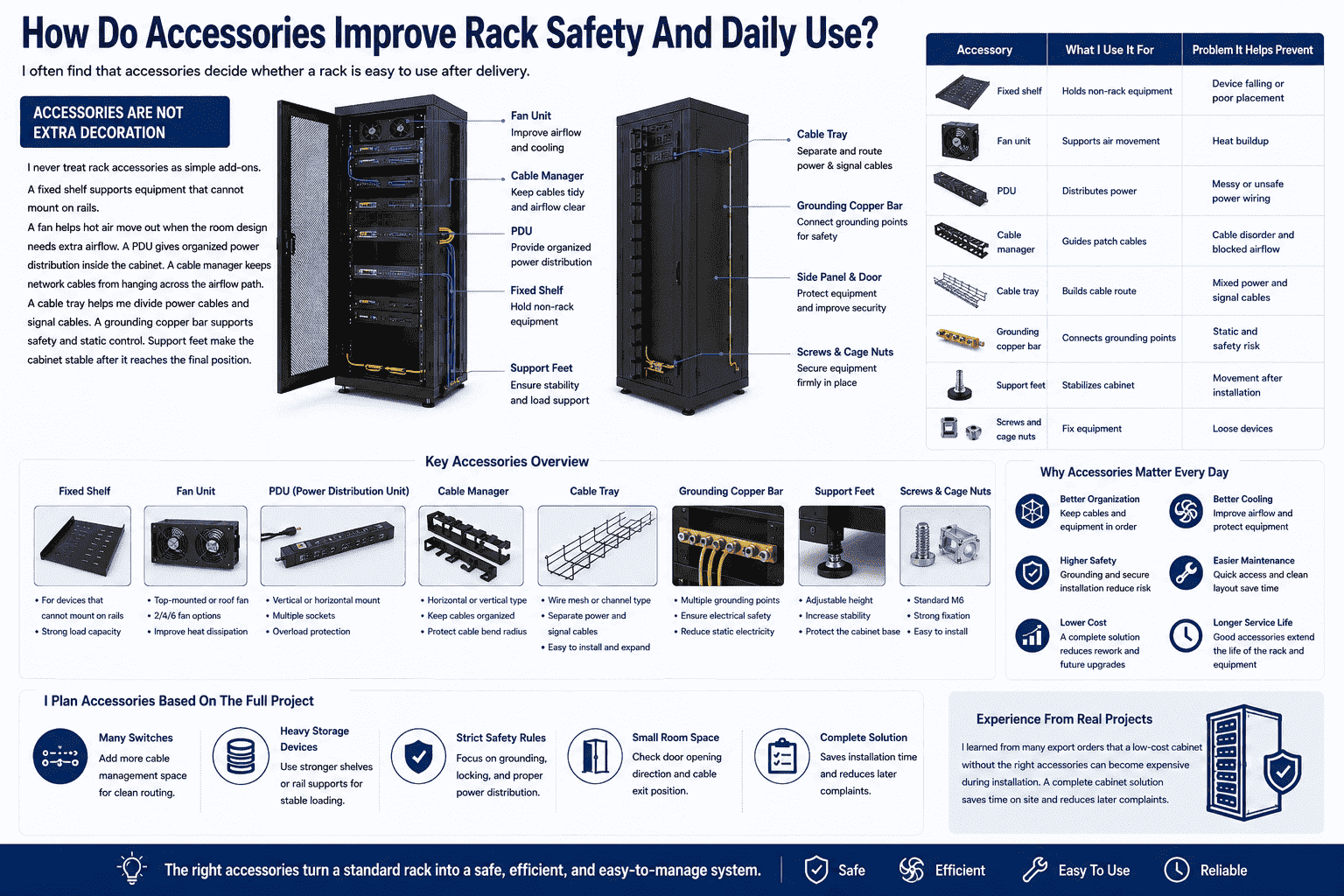
Rack accessories improve daily use by supporting power distribution, cable order, airflow, grounding, equipment placement, and fixing. I usually plan fixed shelves, fans, PDUs, cable managers, cable trays, grounding copper bars, support feet, and screws together with the rack.
Accessories Are Not Extra Decoration
I never treat rack accessories as simple add-ons. A fixed shelf supports equipment that cannot mount on rails. A fan helps hot air move out when the room design needs extra airflow. A PDU gives organized power distribution inside the cabinet. A cable manager keeps network cables from hanging across the airflow path.10 A cable tray helps me divide power cables and signal cables. A grounding copper bar supports safety and static control.11 Support feet make the cabinet stable after it reaches the final position.
| Accessory | What I Use It For | Problem It Helps Prevent |
|---|---|---|
| Fixed shelf | Holds non-rack equipment | Device falling or poor placement |
| Fan unit | Supports air movement | Heat buildup |
| PDU | Distributes power | Messy or unsafe power wiring |
| Cable manager | Guides patch cables | Cable disorder and blocked airflow |
| Cable tray | Builds cable route | Mixed power and signal cables |
| Grounding copper bar | Connects grounding points | Static and safety risk |
| Support feet | Stabilizes cabinet | Movement after installation |
| Screws and cage nuts | Fix equipment | Loose devices |
I also plan accessories based on the full project, not only the cabinet list. If the client uses many switches, I add more cable management space. If the client uses heavy storage devices, I suggest stronger shelves or rail support. If the site has strict safety rules, I pay more attention to grounding and locking. If the cabinet is placed in a small room, I check the door opening direction and cable exit position. I learned from many export orders that a low-cost cabinet without the right accessories can become expensive during installation. A complete cabinet solution saves time on site and reduces later complaints.
How Do I Match A Rack To AI, Storage, And High-Heat Equipment?
I see more clients asking for racks that can support heavier devices and stronger heat loads.
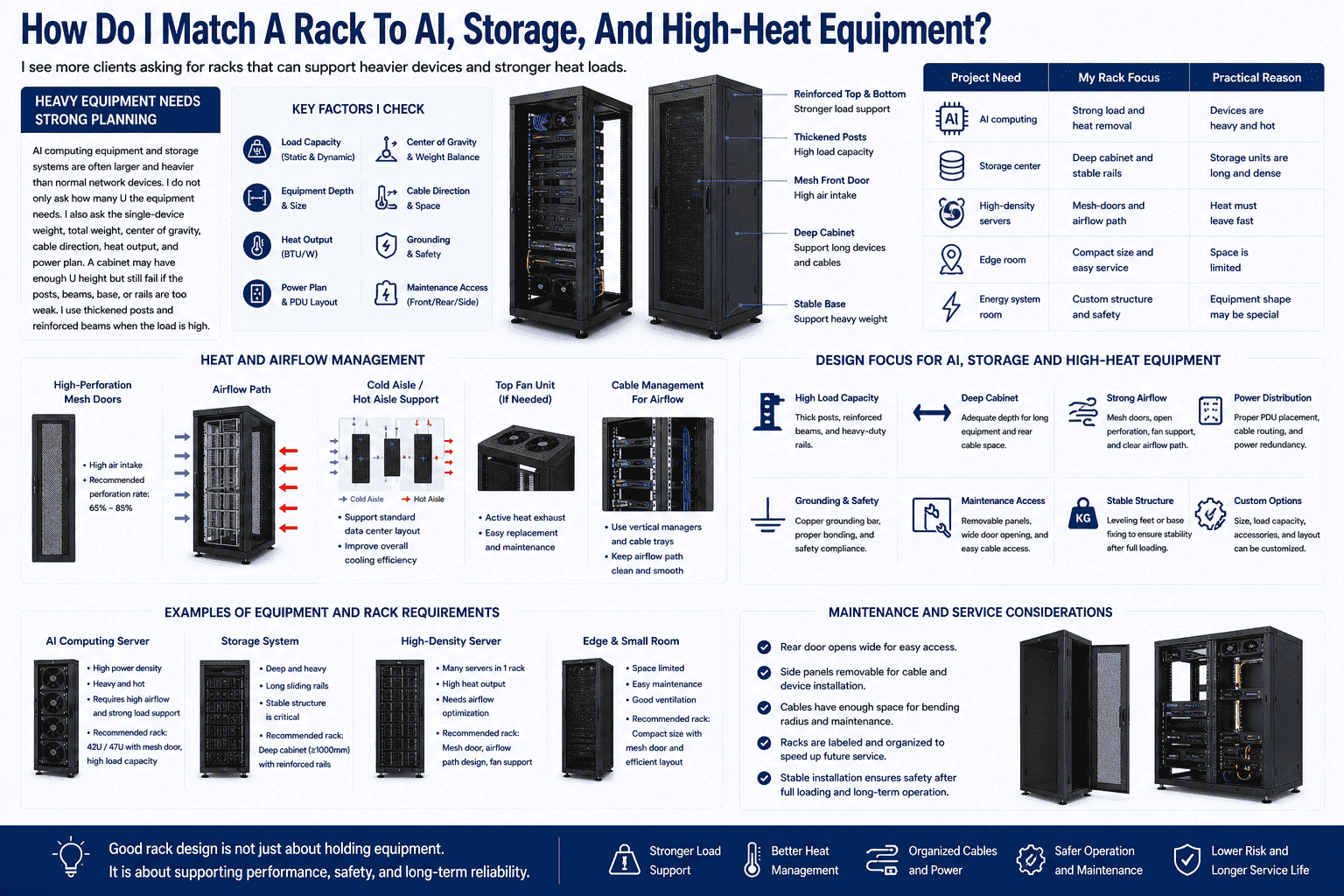
I match racks for AI, storage, and high-heat equipment by checking load capacity, depth, airflow, door type, cable space, power layout, grounding, and maintenance access. I usually use reinforced structures and high-ventilation designs for these projects.
Heavy Equipment Needs Strong Planning
AI computing equipment and storage systems are often larger and heavier than normal network devices.12 I do not only ask how many U the equipment needs. I also ask the single-device weight, total weight, center of gravity, cable direction, heat output, and power plan. A cabinet may have enough U height but still fail if the posts, beams, base, or rails are too weak. I use thickened posts and reinforced beams when the load is high.
| Project Need | My Rack Focus | Practical Reason |
|---|---|---|
| AI computing | Strong load and heat removal | Devices are heavy and hot |
| Storage center | Deep cabinet and stable rails | Storage units are long and dense |
| High-density servers | Mesh doors and airflow path | Heat must leave fast |
| Edge room | Compact size and easy service | Space is limited |
| Energy system room | Custom structure and safety | Equipment shape may be special |
Heat And Airflow
Heat is one of the most important points in these projects. I usually recommend high-perforation mesh doors for high-density cabinets. I also check whether the front air intake and rear hot air exhaust are clear. I avoid blocking rear space with too many cables. I plan cable trays and vertical managers so air can move smoothly. If the cabinet needs fans, I check the top cover and fan unit position. If the room uses cold aisle and hot aisle design, I make sure the cabinet supports that direction.
I also think about maintenance. Heavy and hot equipment needs safe access. The rear door should open well. The side panels should be removable if the site allows it. The cabinet should stand firmly after full loading. I prefer to solve these questions before production because custom sheet metal changes are much easier in the design stage than after the goods reach the site.
Why Do I Support Non-Standard Custom Server Racks?
I know standard racks solve many needs, but I also see many sites that need special sizes and structures.
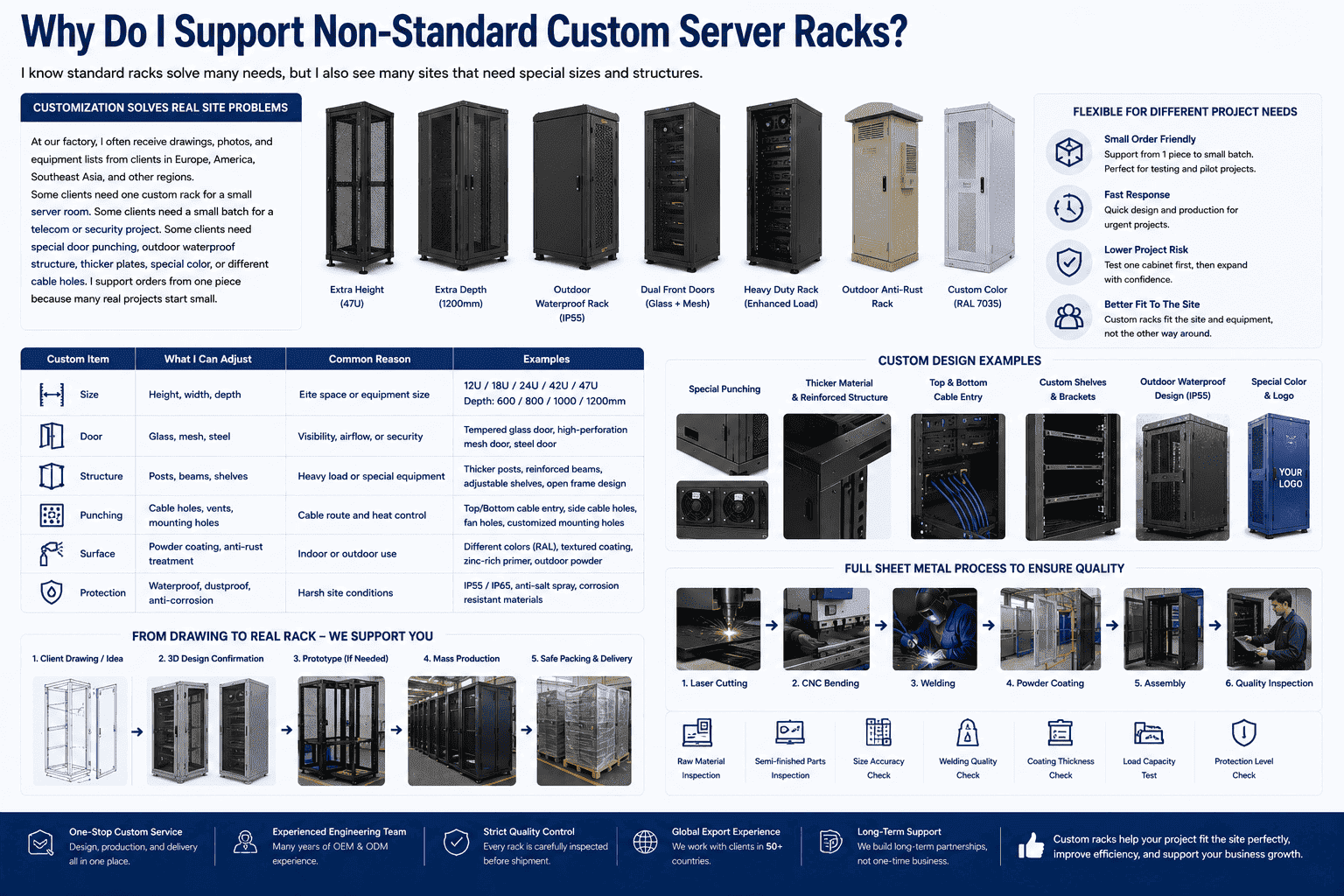
I support non-standard custom server racks because real projects often need special height, depth, door type, punching, load structure, waterproof design, anti-rust treatment, and cable layout. Custom racks help me fit the site instead of forcing the site to fit the rack.
Customization Solves Real Site Problems
At our factory, I often receive drawings, photos, and equipment lists from clients in Europe, America, Southeast Asia, and other regions. Some clients need one custom rack for a small server room. Some clients need a small batch for a telecom or security project. Some clients need special door punching, outdoor waterproof structure, thicker plates, special color, or different cable holes. I support orders from one piece because many real projects start small.
| Custom Item | What I Can Adjust | Common Reason |
|---|---|---|
| Size | Height, width, depth | Site space or equipment size |
| Door | Glass, mesh, steel | Visibility, airflow, or security |
| Structure | Posts, beams, shelves | Heavy load or special equipment |
| Punching | Cable holes, vents, mounting holes | Cable route and heat control |
| Surface | Powder coating, anti-rust treatment | Indoor or outdoor use |
| Protection | Waterproof, dustproof, anti-corrosion | Harsh site conditions |
I also use a full sheet metal process to keep custom work stable. Our production line includes laser cutting, CNC bending, welding, powder coating, and assembly. I check raw materials, semi-finished parts, and finished cabinets. I inspect size accuracy, welding, coating, load capacity, and protection details. This process helps me keep quality stable even when the order quantity is small.
I believe flexible manufacturing is important for overseas buyers. A buyer may not want a full container at the start. A buyer may want to test one cabinet before a larger order. A buyer may need fast production for an urgent project. When I support small orders and non-standard customization, I help the client lower risk and move faster.
Conclusion
I see server racks as the base of safe, clear, and efficient IT rooms. A good rack protects equipment, saves space, and supports future growth.
"19-inch rack - Wikipedia", https://en.wikipedia.org/wiki/19-inch_rack. A reference source on 19-inch racks supports that the 19-inch rack is a standardized mounting frame or enclosure for electronic equipment, including computer and networking hardware; this supports the definition but not any specific product design. Evidence role: definition; source type: encyclopedia. Supports: The source should define a 19-inch rack as a standardized frame or enclosure for mounting electronic and IT equipment.. Scope note: Contextual support only; it verifies the general standard rather than the author's particular rack implementation. ↩
"Best Practices Guide for Energy-Efficient Data Center Design", https://www.energy.gov/sites/default/files/2024-07/best-practice-guide-data-center-design.pdf. Data center infrastructure guidance identifies rack layout and rack-level configuration as factors in airflow management, power distribution, cable routing, equipment access, and operating reliability; this supports the operational relevance of rack choice but does not quantify the effect for every facility. Evidence role: general_support; source type: institution. Supports: The source should show that rack layout and rack-level design are tied to cooling, power distribution, cabling, maintainability, and operational planning.. Scope note: Contextual support only; the effect size depends on room design, equipment density, and operating practices. ↩
"19-inch rack", https://en.wikipedia.org/wiki/19-inch_rack. Technical reference material describes the 19-inch rack as a widely used standard for mounting servers, network equipment, telecommunications equipment, and related devices; this supports the article’s claim of broad compatibility. Evidence role: expert_consensus; source type: encyclopedia. Supports: The source should establish that 19-inch racks are widely used for servers, networking, telecommunications, and related rack-mounted equipment.. Scope note: Contextual support only; individual equipment models still require checking against their manufacturer dimensions. ↩
"Rack unit", https://en.wikipedia.org/wiki/Rack_unit. A technical reference on rack units states that rack-mounted equipment height is measured in units of 1.75 inches, equivalent to 44.45 mm; this directly supports the stated 1U dimension. Evidence role: definition; source type: encyclopedia. Supports: The source should confirm that rack height is measured in rack units and that 1U equals 1.75 inches, or 44.45 mm.. ↩
"Resources - Center of Expertise for Energy Efficiency in Data Centers", https://datacenters.lbl.gov/resources?field_resource_types_tid_=&page=15. Data center thermal-management guidance indicates that perforated rack doors and unobstructed front-to-rear airflow are important for removing heat from densely populated cabinets; this supports the preference for mesh doors under high heat loads. Evidence role: mechanism; source type: research. Supports: The source should explain that perforated or mesh rack doors support front-to-rear airflow and help manage heat in dense server deployments.. Scope note: Contextual support only; adequate cooling also depends on room airflow, equipment fan design, and rack layout. ↩
"Security Guidelines for Storage Infrastructure", https://nvlpubs.nist.gov/nistpubs/SpecialPublications/NIST.SP.800-209.pdf. Information-security and facility-control guidance treats locked physical enclosures and controlled equipment spaces as part of protecting IT assets from unauthorized access and environmental exposure; this supports the cabinet-protection rationale but does not directly measure dust, noise, or pest reduction for a specific cabinet. Evidence role: general_support; source type: government. Supports: The source should support the role of physical enclosures, access control, and environmental controls in protecting IT equipment.. Scope note: Contextual support only; the degree of dust, noise, and pest reduction depends on cabinet sealing, room conditions, and maintenance. ↩
"Effect of Strain Rate on the Formability Prediction of Cold-Rolled ...", https://pmc.ncbi.nlm.nih.gov/articles/PMC12786505/. Materials-engineering references describe cold-rolled steel as having improved surface finish and dimensional control, with mechanical properties suitable for formed sheet-metal structures; this supports its use in rack cabinets but does not prove a specific rack load rating. Evidence role: mechanism; source type: education. Supports: The source should describe cold-rolled steel properties such as improved surface finish, dimensional accuracy, strength, and formability.. Scope note: Contextual support only; actual rack strength depends on gauge, geometry, welding, fasteners, and testing. ↩
"Does Galvanized Steel Rust? Durability & Protection Explained", https://southatlanticllc.com/blog/does-galvanized-steel-rust/. Corrosion-engineering references explain that stainless steel gains corrosion resistance from chromium-rich passive films and galvanized steel from protective zinc coatings; this supports their selection for environments requiring greater rust resistance. Evidence role: mechanism; source type: education. Supports: The source should explain that stainless steel resists corrosion through chromium oxide passivation and galvanized steel through zinc coating protection.. Scope note: Contextual support only; corrosion performance varies with alloy, coating thickness, exposure environment, and maintenance. ↩
"[PDF] Powder Coatings Technology Update - EPA", https://www.epa.gov/sites/default/files/2016-01/documents/powdercoatingstechupdate.pdf. Coatings literature describes electrostatic powder coating as a process that deposits polymer powder onto metal substrates and, after curing, can form a protective barrier against corrosion; this supports the corrosion-protection aspect, while static-control performance requires coating-specific formulation and grounding. Evidence role: mechanism; source type: paper. Supports: The source should support that powder coatings can provide protective surface barriers against corrosion and that electrostatic application is a common deposition method.. Scope note: Contextual support only; anti-static behavior is not inherent to all powder coatings and depends on formulation, application quality, and grounding. ↩
"[PDF] Data Center Airflow Management Retrofit", https://datacenters.lbl.gov/sites/default/files/airflow-doe-femp.pdf. Data center airflow-management guidance notes that poorly routed cables can obstruct air paths in and around racks, while organized cable routing helps maintain cooling airflow; this supports the functional role of cable managers. Evidence role: mechanism; source type: research. Supports: The source should explain that cable clutter can obstruct airflow and that organized cable routing supports cooling efficiency.. Scope note: Contextual support only; the cooling impact varies with rack density, cable volume, and room airflow design. ↩
"section 270526 - Grounding and Bonding - Caltech IMSS", https://www.its.caltech.edu/~jemonaly/work/vdn/Spec/270526.html. Telecommunications grounding and bonding standards describe the use of bonding conductors and busbars to provide reliable grounding paths for equipment racks, supporting electrical safety and electrostatic discharge control. Evidence role: expert_consensus; source type: institution. Supports: The source should support that bonding and grounding conductors or busbars are used to create safe grounding paths and reduce electrical or electrostatic hazards.. Scope note: Contextual support only; compliant grounding requires full-system design, correct conductor sizing, bonding continuity, and local code compliance. ↩
"Heavy Compute: AI Data Centers Have a Weight Problem", https://www.datacenterknowledge.com/build-design/heavy-compute-ai-data-centers-have-a-weight-problem. Research and industry-neutral data center analyses report that AI and high-performance computing servers commonly increase rack-level power density, heat output, and physical loading compared with lower-density network equipment; this supports the need for stronger rack planning. Evidence role: general_support; source type: research. Supports: The source should show that AI or high-performance computing servers can have higher power, thermal, and physical-density requirements than conventional networking equipment.. Scope note: Contextual support only; equipment size and weight vary substantially by server, accelerator, and storage model. ↩
