
Racks and Cabinets: What Is the Real Difference?

I see many projects lose time because one simple word is wrong. I hear “cabinet,” but the site may only need a rack.
Racks and cabinets are not the same product. I define a rack as an open 19-inch mounting frame1. I define a cabinet as a closed equipment enclosure built around that frame, with doors, panels, locks, cooling, cable routes, and protection for long-term use2.
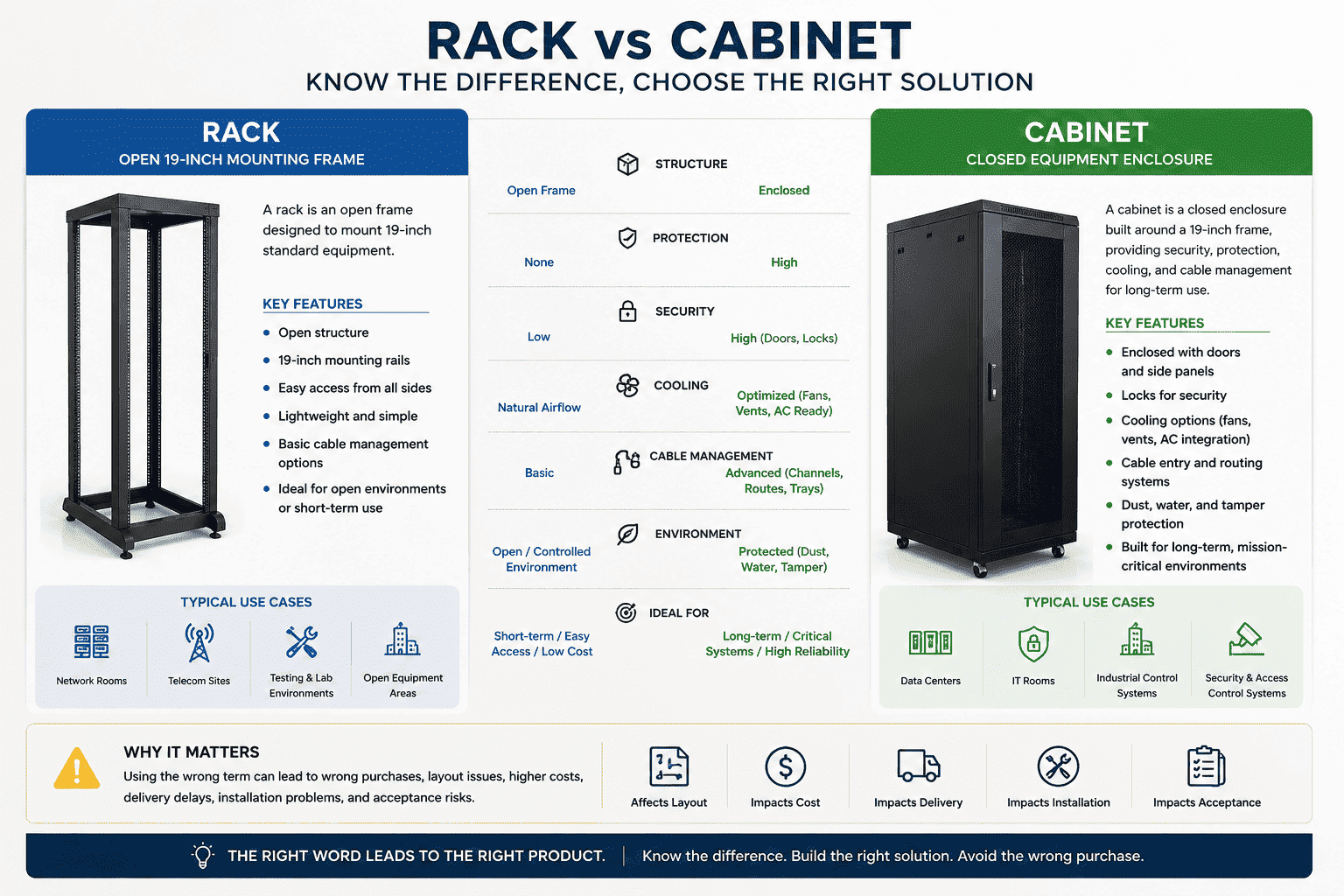
I work with data centers, telecom rooms, weak current projects, IT rooms, and industrial control sites. I often see buyers use one name for two different structures. This small mistake can affect layout, cost, delivery, installation, and acceptance. I will break the difference down in a clear way, because the right word helps me build the right product, and it helps you avoid the wrong purchase.
What Is a Rack in a Data Room?
I call a rack the load-bearing skeleton for IT equipment. I do not call it a full protective cabinet.
A rack is an open mounting frame. I use it to install servers, switches, routers, PDUs, patch panels, and other 19-inch devices3. It usually has no doors, no side panels, no top cover, and no full enclosure.
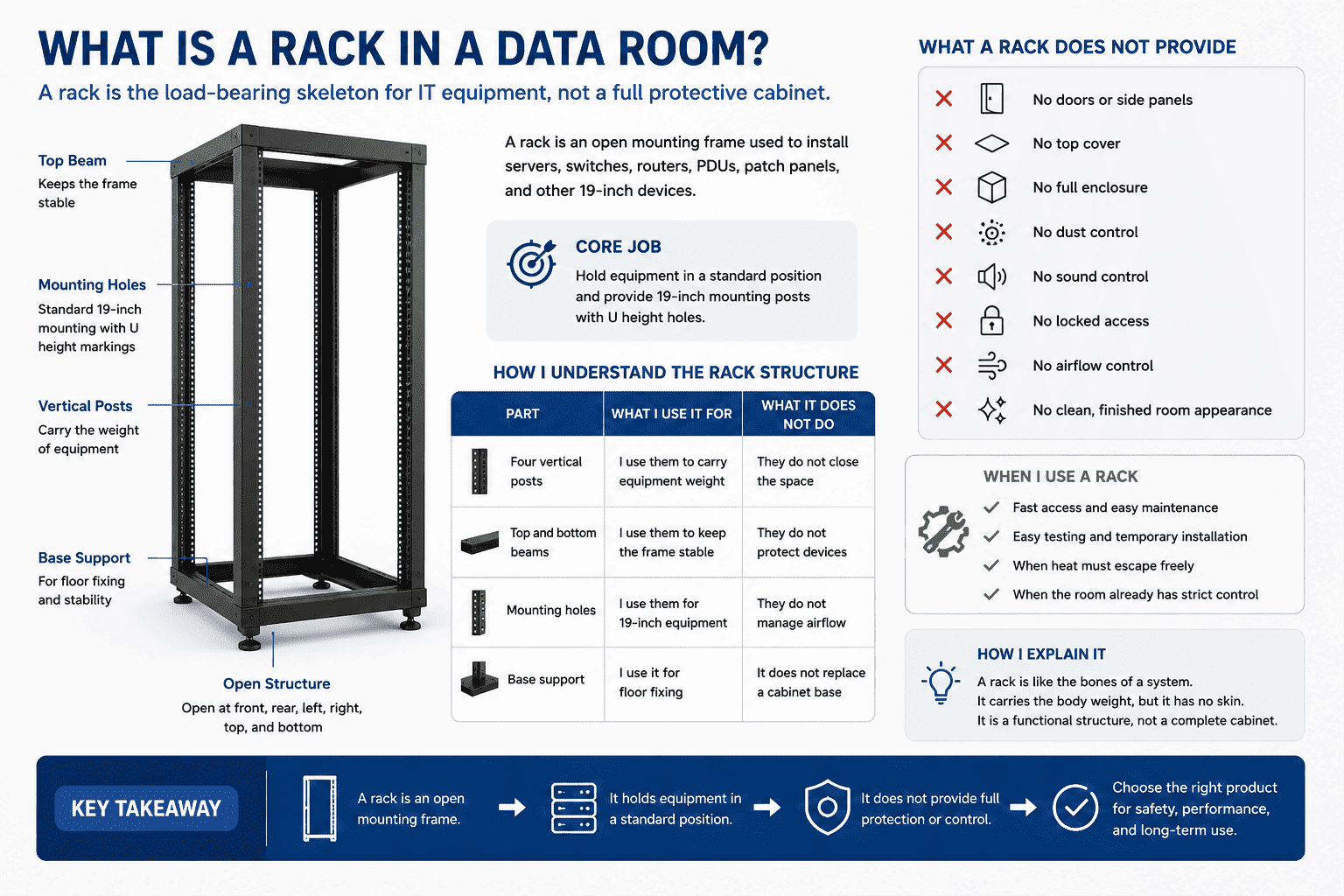
I see a rack as the basic unit of equipment installation. It solves one core job. It holds equipment in a standard position. It gives 19-inch mounting posts. It gives U height holes. It gives a front and rear structure for fixing heavy devices. It does not give full protection. I also do not expect it to give dust control, sound control, locked access, airflow control4, or a clean finished room appearance.
How I understand the rack structure
| Part | What I use it for | What it does not do |
|---|---|---|
| Four vertical posts | I use them to carry equipment weight | They do not close the space |
| Top and bottom beams | I use them to keep the frame stable | They do not protect devices |
| Mounting holes | I use them for 19-inch equipment | They do not manage airflow |
| Base support | I use it for floor fixing | It does not replace a cabinet base |
I often explain it like this. A rack is like the bones of a system. It carries the body weight, but it has no skin. It is open at the front, rear, left, right, top, and bottom. The equipment, cables, and frame are all visible. This is useful when the site needs fast access, easy testing, or temporary installation. It also helps when heat must escape freely and the room itself already has strict control. But I still remind buyers that an open rack is not a full safety product. It is a functional structure, not a complete cabinet.
What Is a Cabinet in an IT Room?
I call a cabinet a complete enclosed equipment product. I build it around the same 19-inch mounting idea, but I add protection.
A cabinet includes an internal rack frame and an outer enclosure. I usually include front and rear doors, side panels, top cover, base, locks, fans, cable holes, cable channels, grounding points, and quick-release parts.
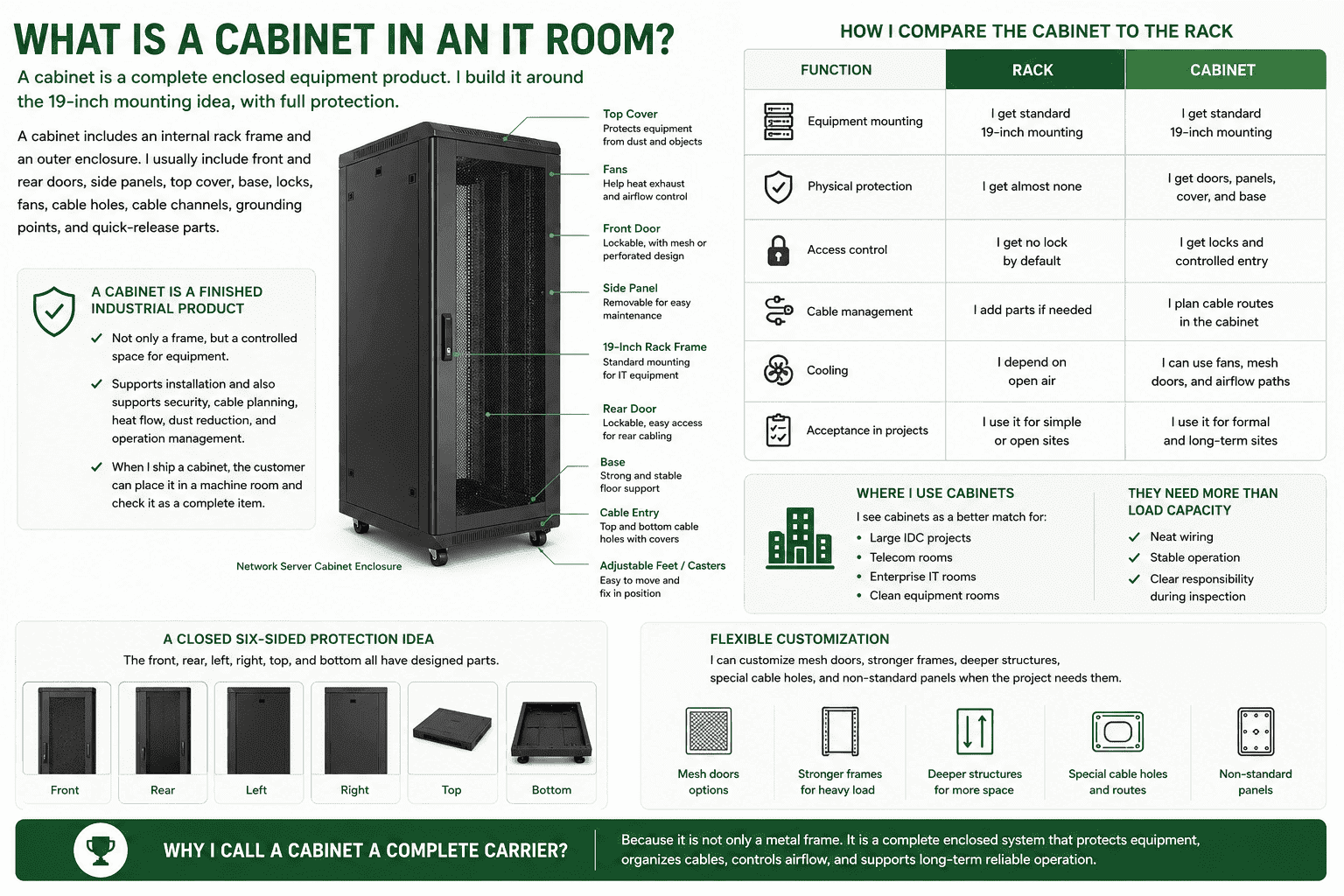
I treat a cabinet as a finished industrial product for direct room use. It is not only a frame. It is a controlled space for equipment. It supports installation, and it also supports security, cable planning, heat flow, dust reduction, and operation management. When I ship a cabinet, the customer can place it in a machine room and check it as a complete item.
How I compare the cabinet to the rack
| Function | Rack | Cabinet |
|---|---|---|
| Equipment mounting | I get standard 19-inch mounting | I get standard 19-inch mounting |
| Physical protection | I get almost none | I get doors, panels, cover, and base |
| Access control | I get no lock by default | I get locks and controlled entry |
| Cable management | I add parts if needed | I plan cable routes in the cabinet |
| Cooling | I depend on open air | I can use fans, mesh doors, and airflow paths |
| Acceptance in projects | I use it for simple or open sites | I use it for formal and long-term sites |
I also see cabinets as a better match for large IDC projects, telecom rooms, enterprise IT rooms, and clean equipment rooms. These projects need more than load capacity. They need neat wiring, stable operation, and clear responsibility during inspection. A cabinet gives a closed six-sided protection idea. The front, rear, left, right, top, and bottom all have designed parts. I can also customize mesh doors, stronger frames, deeper structures, special cable holes, and non-standard panels when the project needs them. This is why I call a cabinet a complete carrier, not only a metal frame.
Why Do Buyers Often Confuse Racks and Cabinets?
I see this confusion because many people use “cabinet” as a general name. The site language becomes simple, but the technical meaning becomes unclear.
Buyers often confuse racks and cabinets because both use the same 19-inch installation standard and similar U heights5. I separate them by structure and function. A rack is open. A cabinet is enclosed and protective.
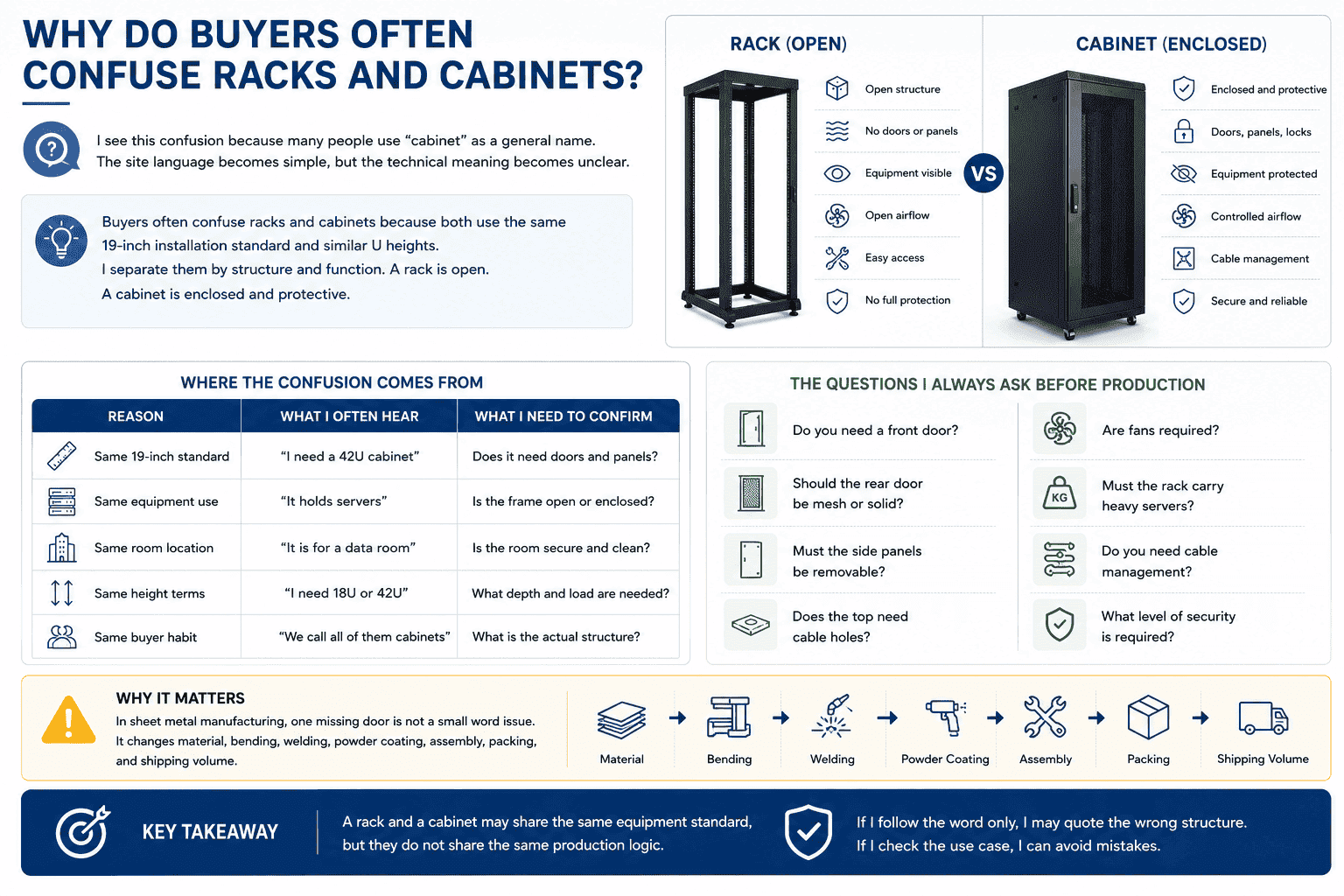
I have handled many overseas inquiries where the first message says “server cabinet,” but the drawing shows an open rack. I have also seen the opposite case. The buyer asks for a rack, but the project needs doors, side panels, locks, fans, and cable management. If I follow the word only, I may quote the wrong structure. If I check the use case, I can avoid mistakes.
Where the confusion comes from
| Reason | What I often hear | What I need to confirm |
|---|---|---|
| Same 19-inch standard | “I need a 42U cabinet” | Does it need doors and panels? |
| Same equipment use | “It holds servers” | Is the frame open or enclosed? |
| Same room location | “It is for a data room” | Is the room secure and clean? |
| Same height terms | “I need 18U or 42U” | What depth and load are needed? |
| Same buyer habit | “We call all of them cabinets” | What is the actual structure? |
I always ask simple questions before production. I ask if the customer needs a front door. I ask if the rear door should be mesh or solid. I ask if side panels must be removable. I ask if the top needs cable holes. I ask if fans are required. I ask if the rack must carry heavy servers. These questions sound basic, but they protect the order. In sheet metal manufacturing, one missing door is not a small word issue. It changes material, bending, welding, powder coating, assembly, packing, and shipping volume.6 A rack and a cabinet may share the same equipment standard, but they do not share the same production logic.
How Should I Choose Between a Rack and a Cabinet?
I choose a rack when the project needs simple mounting. I choose a cabinet when the project needs protection, management, and formal long-term use.
You should choose a rack for open access, testing, simple wiring, and controlled rooms. You should choose a cabinet for security, dust control, cable planning, airflow control, and project acceptance7.
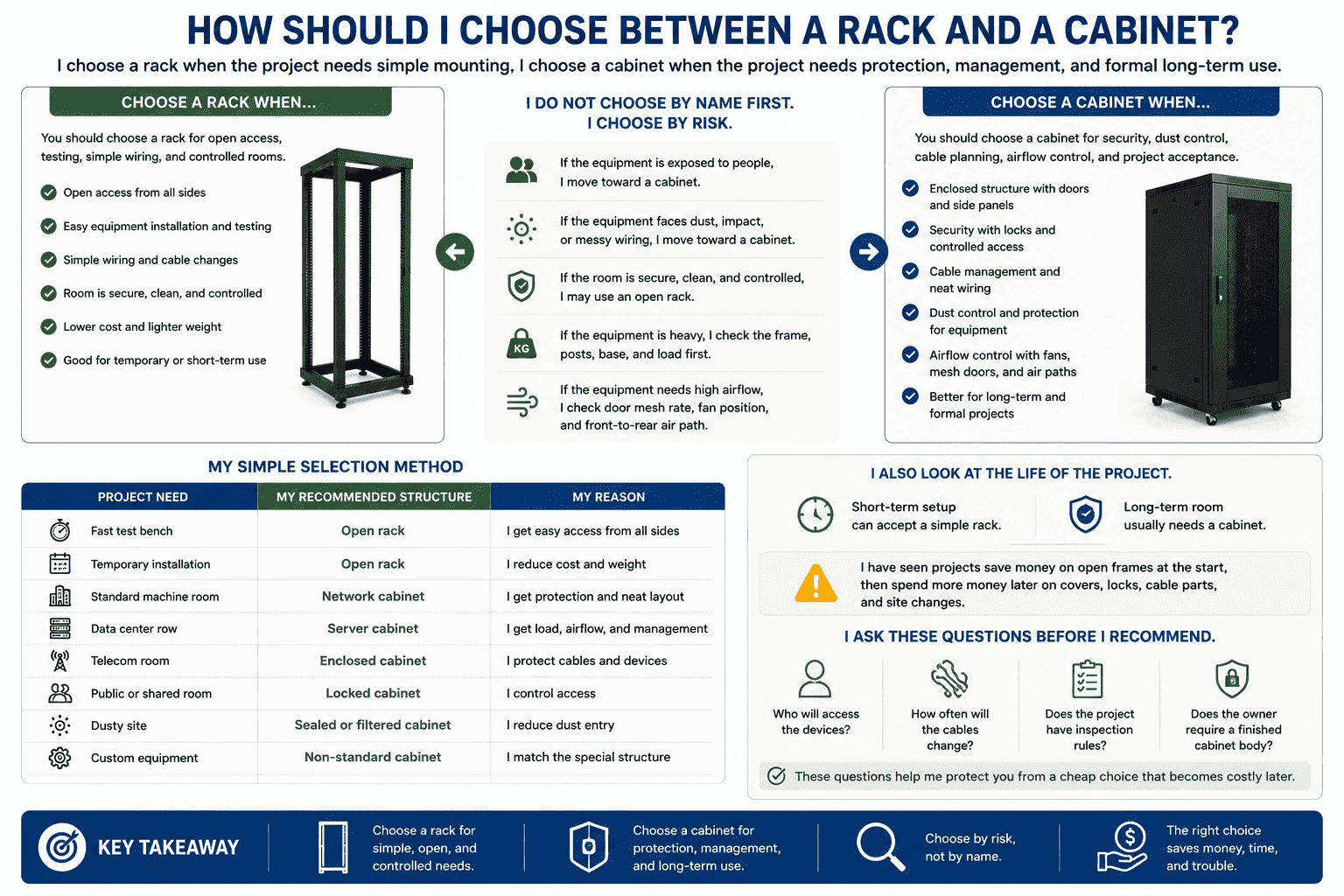
I do not choose by name first. I choose by risk. If the equipment is exposed to people, dust, impact, or messy wiring, I move toward a cabinet. If the equipment sits in a secure technical area with strong room-level control, I may use an open rack. If the equipment is heavy, I check the frame, posts, base, and load first. If the equipment needs high airflow, I check the door mesh rate, fan position, and front-to-rear air path8.
My simple selection method
| Project need | My recommended structure | My reason |
|---|---|---|
| Fast test bench | Open rack | I get easy access from all sides |
| Temporary installation | Open rack | I reduce cost and weight |
| Standard machine room | Network cabinet | I get protection and neat layout |
| Data center row | Server cabinet | I get load, airflow, and management |
| Telecom room | Enclosed cabinet | I protect cables and devices |
| Public or shared room | Locked cabinet | I control access |
| Dusty site | Sealed or filtered cabinet | I reduce dust entry |
| Custom equipment | Non-standard cabinet | I match the special structure |
I also look at the life of the project. A short-term setup can accept a simple rack. A long-term room usually needs a cabinet. I have seen projects save money on open frames at the start, then spend more money later on covers, locks, cable parts, and site changes. I prefer to ask about operation after installation. Who will access the devices? How often will the cables change? Does the project have inspection rules? Does the owner require a finished cabinet body? These questions help me protect the customer from a cheap choice that becomes costly later.
What Standards Should I Check Before I Order?
I check the 19-inch standard, U height, depth, load capacity, airflow, cable entry, door type, panel design, and project rules before I confirm an order.
Racks and cabinets usually follow the same 19-inch equipment standard. I still check height, width, depth, load, mounting hole type, door clearance, cable path, fan layout, and packaging before production.
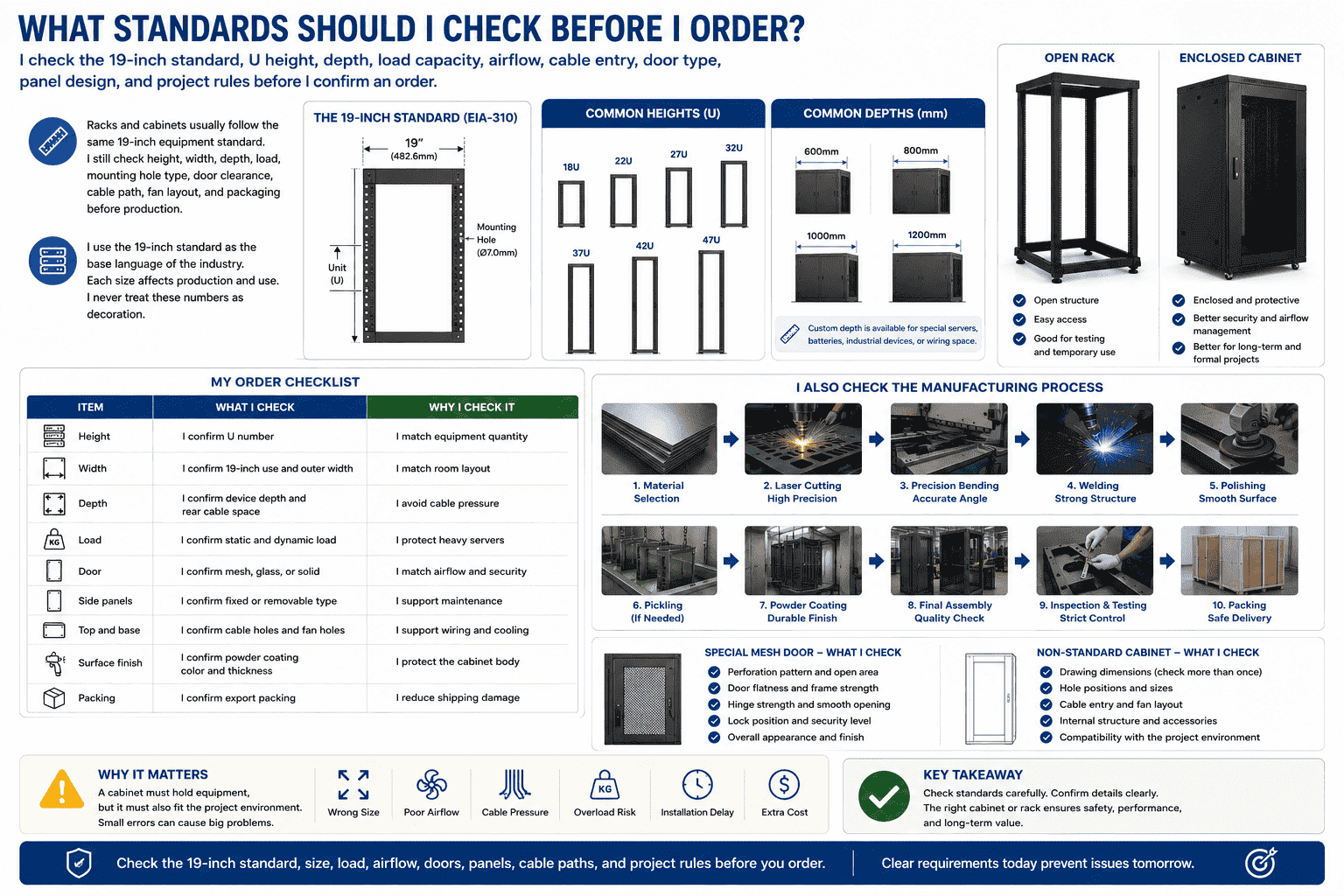
I use the 19-inch standard as the base language of the industry. The height is usually measured in U.9 Common heights include 18U, 22U, 27U, 32U, 37U, 42U, and 47U.10 Depth often includes 600mm, 800mm, 1000mm, and 1200mm.11 Some customers also need custom depth for special servers, batteries, industrial devices, or wiring space. I never treat these numbers as decoration. Each size affects production and use.
My order checklist
| Item | What I check | Why I check it |
|---|---|---|
| Height | I confirm U number | I match equipment quantity |
| Width | I confirm 19-inch use and outer width | I match room layout |
| Depth | I confirm device depth and rear cable space | I avoid cable pressure |
| Load | I confirm static and dynamic load | I protect heavy servers |
| Door | I confirm mesh, glass, or solid | I match airflow and security |
| Side panels | I confirm fixed or removable type | I support maintenance |
| Top and base | I confirm cable holes and fan holes | I support wiring and cooling |
| Surface finish | I confirm powder coating color and thickness | I protect the cabinet body |
| Packing | I confirm export packing | I reduce shipping damage |
I also check the manufacturing process behind the cabinet. My factory starts from material selection. My team uses laser cutting, precision bending, welding, polishing, pickling when needed, powder coating, and final assembly. Each step affects precision and strength. If the cabinet has a special mesh door, I check the perforation pattern, open area, door flatness, hinge strength, and lock position. If the order is a non-standard cabinet, I check the drawing more than once. I care about small holes and small gaps because machine rooms do not forgive rough metal work. A cabinet must hold equipment, but it must also fit the project environment.
How Do Racks and Cabinets Affect Long-Term Operation?
I see racks and cabinets affect daily work after the project is finished. The choice changes maintenance, cooling, wiring, safety, and future expansion.
A rack gives open access and simple installation. A cabinet gives controlled access and better operation order. I choose the structure based on how the room will run every day.
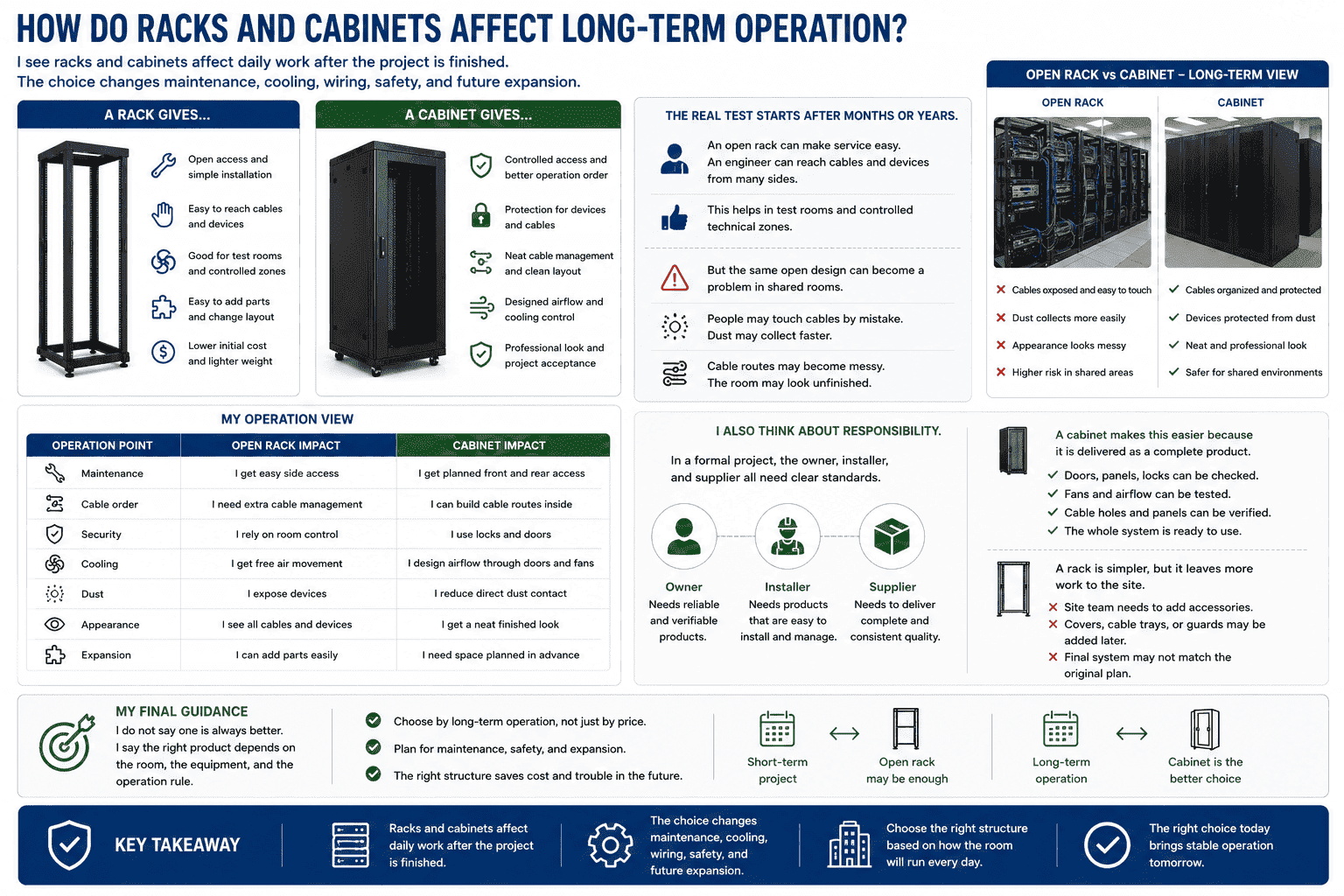
I often tell customers that the purchase is only the first step. The real test starts after the equipment runs for months or years. An open rack can make service easy. An engineer can reach cables and devices from many sides. This helps in test rooms and controlled technical zones. But the same open design can become a problem in shared rooms. People may touch cables by mistake. Dust may collect faster. Cable routes may become messy. The room may look unfinished.
My operation view
| Operation point | Open rack impact | Cabinet impact |
|---|---|---|
| Maintenance | I get easy side access | I get planned front and rear access |
| Cable order | I need extra cable management | I can build cable routes inside |
| Security | I rely on room control | I use locks and doors |
| Cooling | I get free air movement | I design airflow through doors and fans |
| Dust | I expose devices | I reduce direct dust contact |
| Appearance | I see all cables and devices | I get a neat finished look |
| Expansion | I can add parts easily | I need space planned in advance |
I also think about responsibility. In a formal project, the owner, installer, and supplier all need clear standards. A cabinet makes this easier because it is delivered as a complete product. The doors, panels, locks, fans, and cable holes can be checked one by one. A rack is simpler, but it leaves more work to the site. If the site team later adds covers, cable trays, or guards, the final system may not match the original plan. I do not say one is always better. I say the right product depends on the room, the equipment, and the operation rule.
Conclusion
I separate racks and cabinets by structure, function, and project need. I choose the rack for mounting, and I choose the cabinet for complete protection.
"19-inch rack - Wikipedia", https://en.wikipedia.org/wiki/19-inch_rack. The cited source defines the 19-inch rack as a standardized frame or enclosure for mounting electronic equipment, supporting the article’s use of “rack” as a 19-inch mounting structure. Evidence role: definition; source type: encyclopedia. Supports: The source should define the 19-inch rack as a standardized mounting frame for electronic equipment and describe its open-frame or enclosure variants.. ↩
"19-inch rack - Wikipedia", https://en.wikipedia.org/wiki/19-inch_rack. IEC and enclosure standards describe cabinets as equipment structures that house mounted electronic equipment and may incorporate doors, covers, panels, and access provisions, supporting the article’s distinction between a bare rack frame and an enclosed cabinet. Evidence role: definition; source type: institution. Supports: The source should describe equipment cabinets or enclosures as structures that house mounted equipment and provide physical protection and access features.. Scope note: Standards define structural categories and dimensions; they may not require every listed feature, such as fans or locks, in every cabinet. ↩
"19-inch rack - Wikipedia", https://en.wikipedia.org/wiki/19-inch_rack. The cited reference identifies 19-inch racks as a common mounting system for servers, networking devices, patch panels, and related data-center equipment, supporting the article’s examples of rack-mounted devices. Evidence role: general_support; source type: encyclopedia. Supports: The source should show that 19-inch racks are widely used to mount servers, networking equipment, patch panels, and power-distribution equipment.. ↩
"Install In-rack or In-row Cooling - Energy Star", https://www.energystar.gov/products/data_center_equipment/16-more-ways-cut-energy-waste-data-center/install-rack-or-row. Enclosure and data-center design guidance treats physical barriers, ingress protection, access hardware, and directed airflow as enclosure functions, supporting the article’s statement that an open rack frame does not by itself provide dust control, locking, or airflow management. Evidence role: mechanism; source type: institution. Supports: The source should explain that enclosures provide protection through barriers, access control, ingress protection, and managed airflow, while open frames do not provide the same enclosure functions.. Scope note: The support is contextual because the exact performance depends on a cabinet’s design, sealing, door type, and operating environment. ↩
"Rack unit - Wikipedia", https://en.wikipedia.org/wiki/Rack_unit. EIA/ECA-310 and IEC 60297 define the 19-inch equipment practice and rack-unit height conventions, supporting the article’s claim that racks and cabinets often share the same mounting language. Evidence role: definition; source type: institution. Supports: The source should show that 19-inch rack/cabinet systems use standardized mounting widths and rack-unit height increments.. ↩
"How to Design Sheet Metal Enclosures: Tips and Best Practices", https://sendcutsend.com/blog/sheet-metal-enclosures/?srsltid=AfmBOooMqpvJF09mkPArCr14LXChP9u2gcN7d3HsEF_mdlLy9sf3CTr3. Manufacturing literature on sheet-metal enclosures describes how added doors and panels increase component count and require additional forming, joining, finishing, assembly, and packaging steps, providing contextual support for the article’s production-impact claim. Evidence role: mechanism; source type: paper. Supports: The source should explain that sheet-metal enclosures require additional parts and fabrication/finishing processes such as cutting, bending, welding, coating, assembly, and packaging.. Scope note: The source would support the manufacturing mechanism generally, not quantify the exact cost or shipping-volume change for this specific supplier. ↩
"TIA-942 Data Center Standards Overview - 102264AE", https://www.accu-tech.com/hs-fs/hub/54495/file-15894024-pdf/docs/102264ae.pdf. Data-center infrastructure standards such as ANSI/TIA-942 address equipment layout, cabling pathways, environmental control, and physical-security considerations, supporting the article’s view that enclosed cabinets are often selected for managed and formally specified installations. Evidence role: expert_consensus; source type: institution. Supports: The source should show that data-center and telecom-room standards address physical security, cabling organization, airflow, and equipment-room acceptance/design requirements.. Scope note: Such standards support the criteria used for selection but do not prove that a cabinet is always required for every project. ↩
"[PDF] Thermal Guidelines and Temperature Measurements in Data Centers", https://datacenters.lbl.gov/sites/default/files/FINAL%20Thermal%20Guidelines%20and%20Temp%20Measurements%209-15-2020.pdf. ASHRAE data-center thermal guidance describes front-to-rear airflow and hot-aisle/cold-aisle management as central principles for cooling rack-mounted IT equipment, supporting the article’s emphasis on checking the cabinet’s airflow path. Evidence role: mechanism; source type: research. Supports: The source should explain the front-to-rear airflow pattern used by many rack-mounted IT systems and its relevance to data-center cooling design.. ↩
"19-inch rack - Wikipedia", https://en.wikipedia.org/wiki/19-inch_rack. The cited reference defines a rack unit, or U, as the standard vertical increment used for 19-inch rack equipment, supporting the article’s statement that rack and cabinet height is usually expressed in U. Evidence role: definition; source type: encyclopedia. Supports: The source should define U or rack unit as the standard vertical unit used to measure rack-mounted equipment and rack/cabinet height.. ↩
"19-inch rack - Wikipedia", https://en.wikipedia.org/wiki/19-inch_rack. Industry reference material on 19-inch rack systems documents that racks and cabinets are specified by rack-unit height and are available in a range of U sizes, providing contextual support for the article’s list of common heights. Evidence role: general_support; source type: other. Supports: The source should document that 19-inch racks and cabinets are commercially produced in a range of rack-unit heights and that 42U and similar values are common.. Scope note: A neutral source may confirm the use of U-based height ranges but may not verify every listed size as equally common in all markets. ↩
"What Are Standard Server Rack Cabinet Dimensions?", https://electronics.alibaba.com/question/server-rack-cabinet-dimensions-explained. Technical references for 19-inch equipment cabinets describe cabinet depth as a specified dimensional parameter and commonly discuss metric cabinet depths such as 600 mm, 800 mm, 1000 mm, and 1200 mm, supporting the article’s dimensional examples. Evidence role: general_support; source type: institution. Supports: The source should show that rack and cabinet depths are specified dimensionally and that common metric cabinet depths include the values named in the article.. Scope note: The support is contextual because exact depth availability varies by manufacturer, application, and regional practice. ↩
