
Network Rack: Why Does It Matter in a Stable Network System?

A messy network room creates heat, cable stress, and hard repairs. I have seen small wiring mistakes become long service delays.
A network rack is a standard cabinet or frame that holds, fixes, protects, and organizes network equipment.1 It supports switches, routers, patch panels, cable managers, DVRs, optical boxes, small servers, UPS units, and monitoring hosts. It also improves cable routing, airflow, safety, and long-term system stability.2
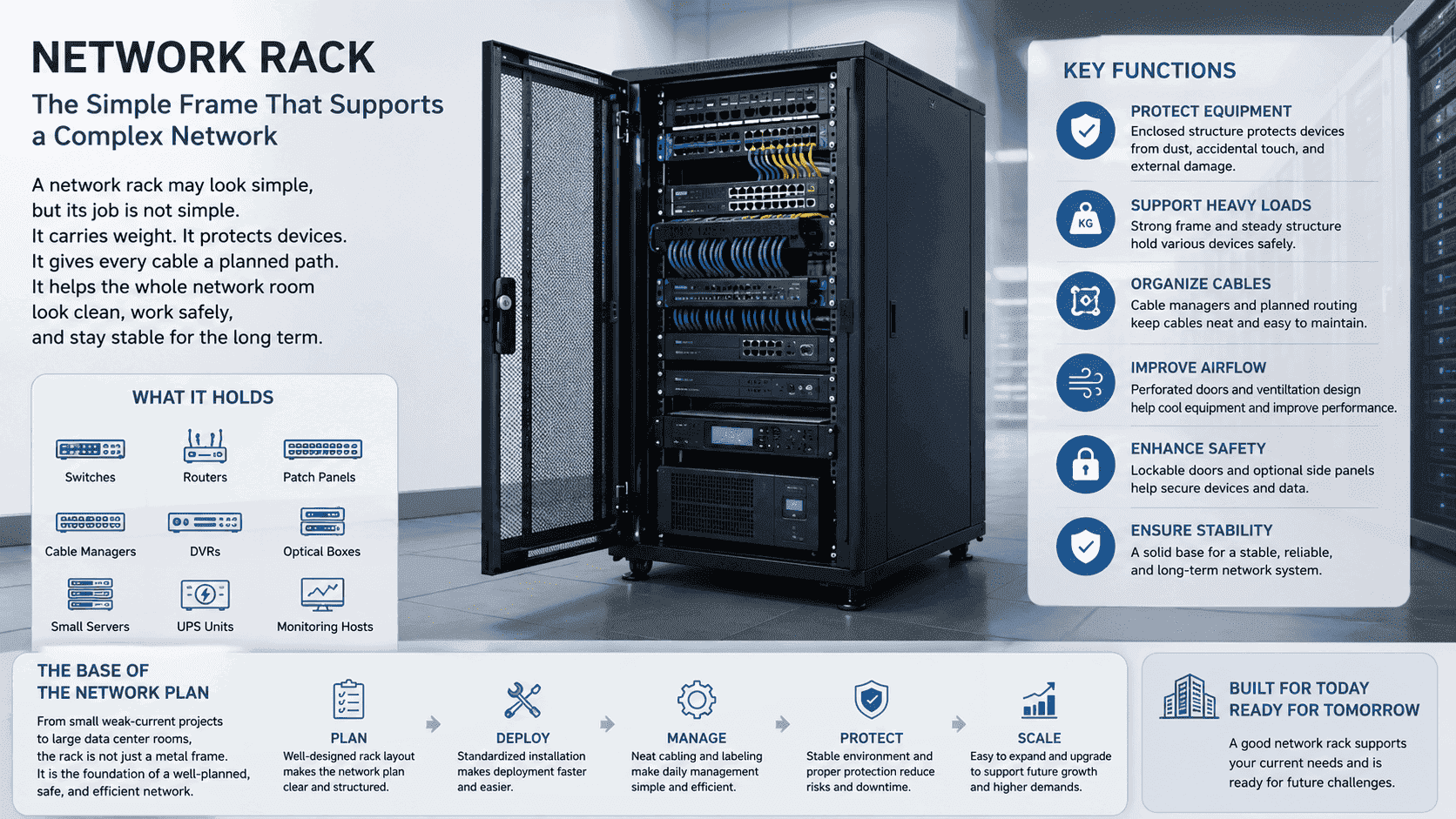
I often say that a network rack looks simple, but its job is not simple. It carries weight. It protects devices. It gives every cable a planned path. It also helps the whole network room look clean and work in a safe way. I have worked with customers from small weak-current projects to large data center rooms. I learned that the rack is not only a metal frame. It is the base of the network plan.
What Is a Network Rack Used For?
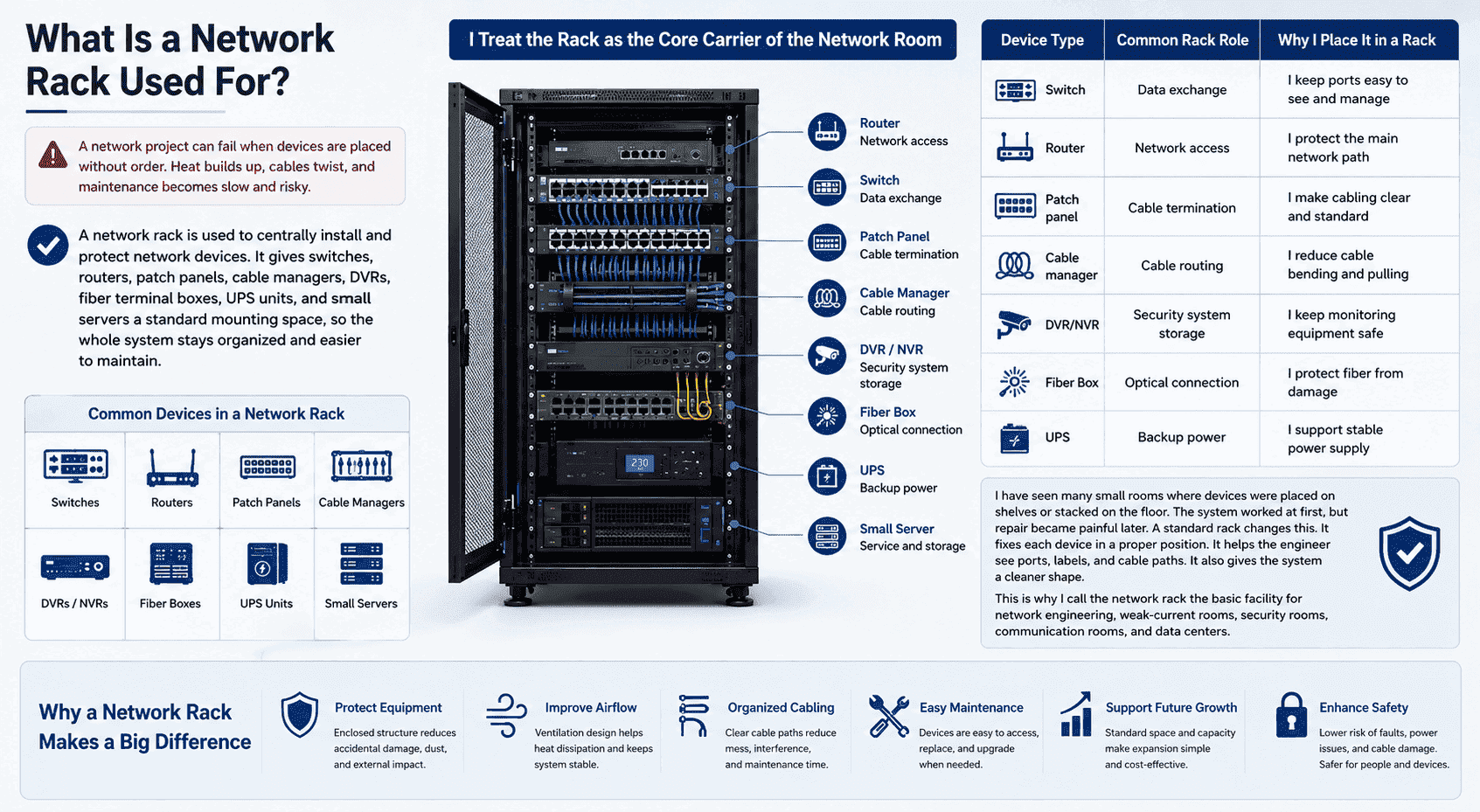
A network project can fail when devices are placed without order. Heat builds up, cables twist, and maintenance becomes slow and risky.3
A network rack is used to centrally install and protect network devices. It gives switches, routers, patch panels, cable managers, DVRs, fiber terminal boxes, UPS units, and small servers a standard mounting space, so the whole system stays organized and easier to maintain.
I Treat the Rack as the Core Carrier of the Network Room
I see the network rack as the core carrier of a structured cabling system. It supports hardware, but it also supports the plan behind the hardware. When I help a customer choose a rack, I do not only ask how many devices they have today. I also ask how many devices they may add later. A rack should give space for equipment, cable flow, airflow, and safe repair work.
| Device Type | Common Rack Role | Why I Place It in a Rack |
|---|---|---|
| Switch | Data exchange | I keep ports easy to see and manage |
| Router | Network access | I protect the main network path |
| Patch panel | Cable termination | I make cabling clear and standard |
| Cable manager | Cable routing | I reduce cable bending and pulling |
| DVR/NVR | Security system storage | I keep monitoring equipment safe |
| Fiber box | Optical connection | I protect fiber from damage |
| UPS | Backup power | I support stable power supply |
I have seen many small rooms where devices were placed on shelves or stacked on the floor. The system worked at first, but repair became painful later. A standard rack changes this. It fixes each device in a proper position. It helps the engineer see ports, labels, and cable paths. It also gives the system a cleaner shape. This is why I call the network rack the basic facility for network engineering, weak-current rooms, security rooms, communication rooms, and data centers.
Why Is the 19-Inch Standard So Important?
A rack without a common standard creates trouble. Devices may not fit, brackets may not align, and the whole installation may waste time.
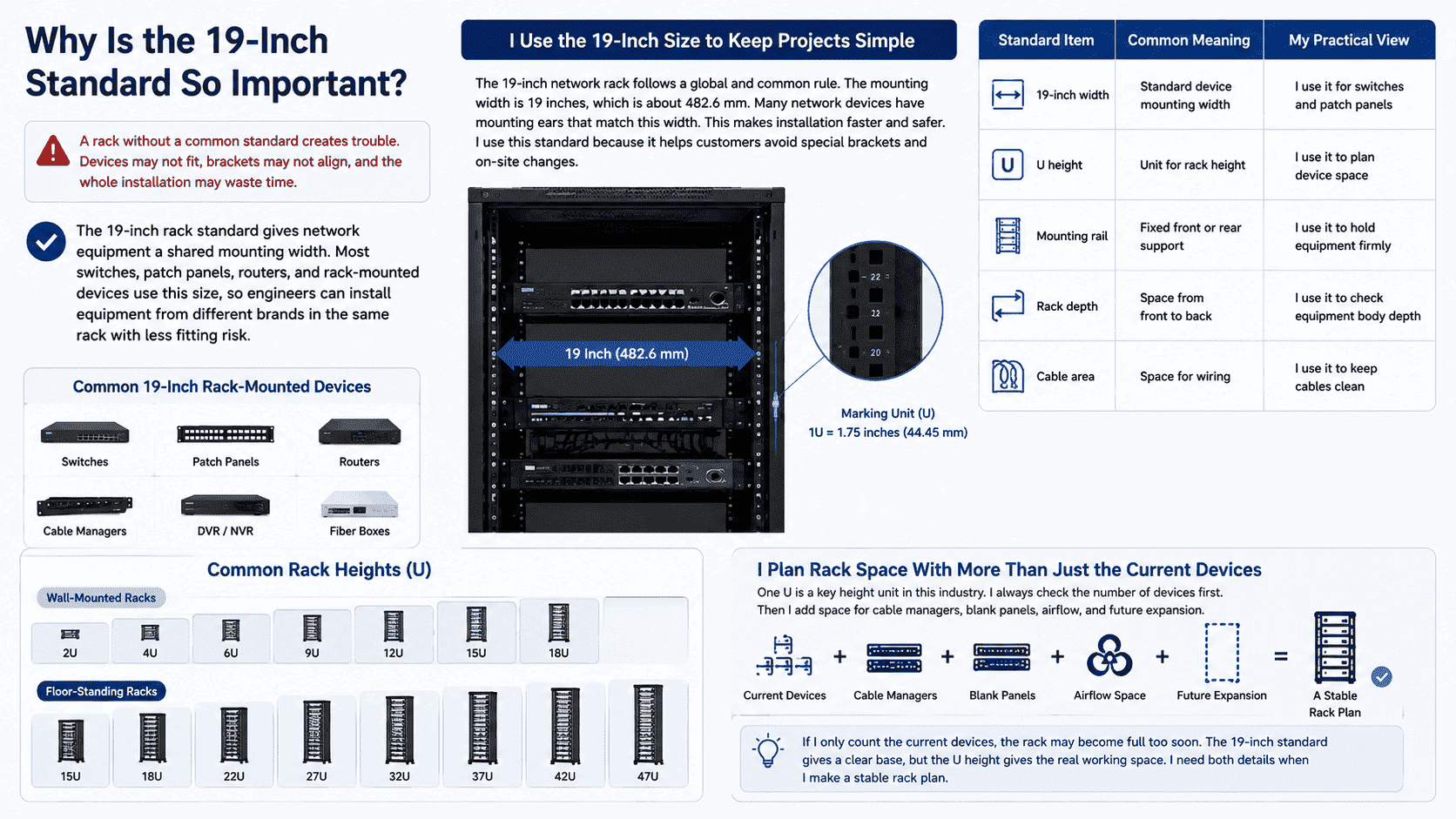
The 19-inch rack standard gives network equipment a shared mounting width.4 Most switches, patch panels, routers, and rack-mounted devices use this size, so engineers can install equipment from different brands in the same rack with less fitting risk.
I Use the 19-Inch Size to Keep Projects Simple
The 19-inch network rack follows a global and common rule. The mounting width is 19 inches, which is about 482.6 mm.5 Many network devices have mounting ears that match this width.6 This makes installation faster and safer. I use this standard because it helps customers avoid special brackets and on-site changes.
| Standard Item | Common Meaning | My Practical View |
|---|---|---|
| 19-inch width | Standard device mounting width | I use it for switches and patch panels |
| U height | Unit for rack height | I use it to plan device space |
| Mounting rail | Fixed front or rear support | I use it to hold equipment firmly |
| Rack depth | Space from front to back | I use it to check equipment body depth |
| Cable area | Space for wiring | I use it to keep cables clean |
One U is a key height unit in this industry.7 A small wall-mounted rack may be 2U, 4U, 6U, 9U, 12U, 15U, or 18U. A floor-standing rack may be 15U, 18U, 22U, 27U, 32U, 37U, 42U, or 47U. I always check the number of devices first. Then I add space for cable managers, blank panels, airflow, and future expansion. If I only count the current devices, the rack may become full too soon. The 19-inch standard gives a clear base, but the U height gives the real working space. I need both details when I make a stable rack plan.
How Do I Choose Between Wall-Mounted and Floor-Standing Network Racks?
A wrong rack type can make a project hard to use. A small space may not fit a floor cabinet, and a heavy system may overload a wall rack.
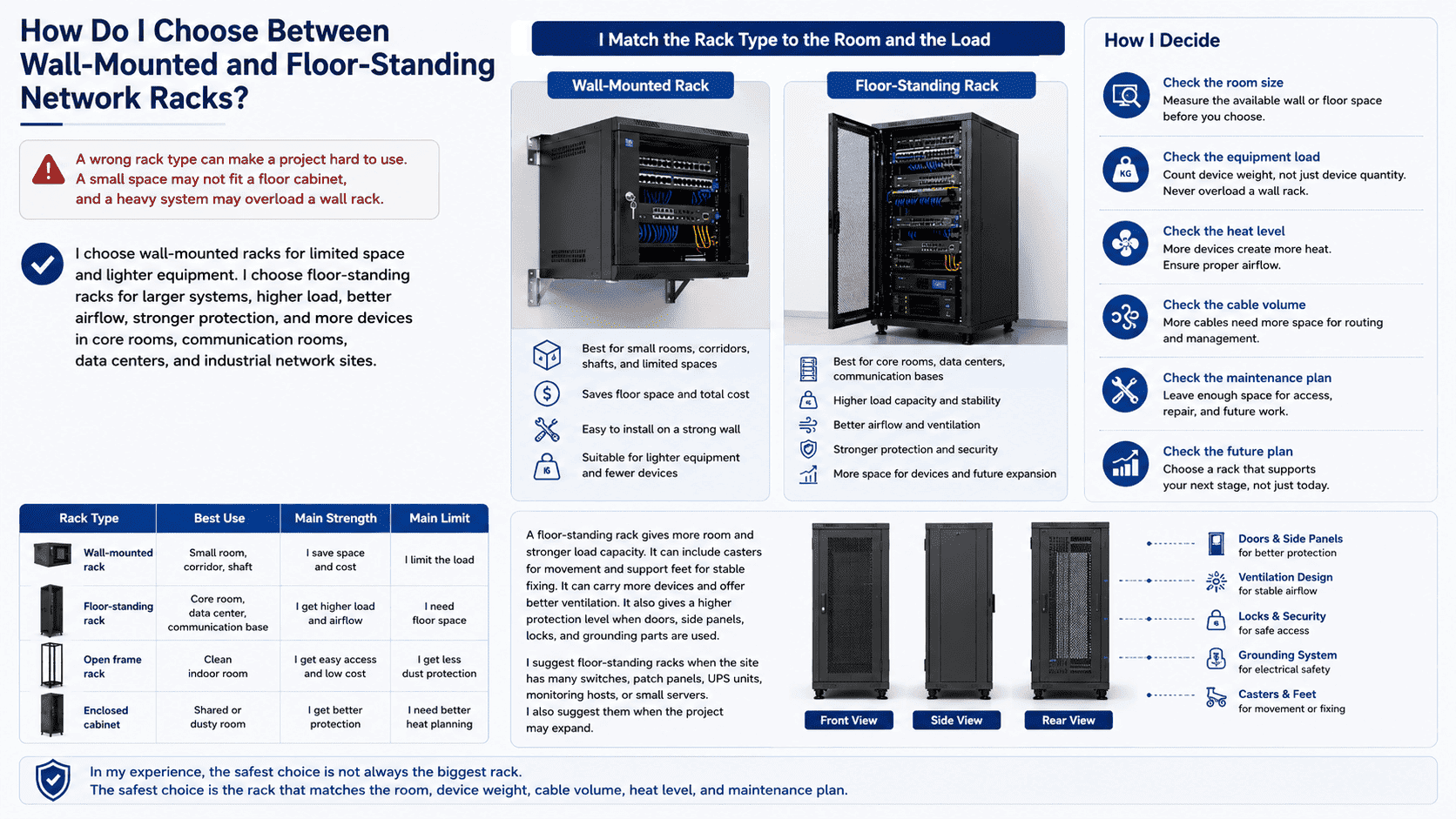
I choose wall-mounted racks for limited space and lighter equipment. I choose floor-standing racks for larger systems, higher load, better airflow, stronger protection, and more devices in core rooms, communication rooms, data centers, and industrial network sites.8
I Match the Rack Type to the Room and the Load
I often start with the site condition. A wall-mounted rack saves floor space. It fits corridors, small machine rooms, weak-current rooms, shafts, and locations where equipment quantity is small. It also has good cost value. It is easy to install when the wall has enough strength. But I never ignore the load. A wall rack should not carry too many heavy devices.
| Rack Type | Best Use | Main Strength | Main Limit |
|---|---|---|---|
| Wall-mounted rack | Small room, corridor, shaft | I save space and cost | I limit the load |
| Floor-standing rack | Core room, data center, communication base | I get higher load and airflow | I need floor space |
| Open frame rack | Clean indoor room | I get easy access and low cost | I get less dust protection |
| Enclosed cabinet | Shared or dusty room | I get better protection | I need better heat planning |
A floor-standing rack gives more room and stronger load capacity. It can include casters for movement and support feet for stable fixing. It can carry more devices and offer better ventilation. It also gives a higher protection level when doors, side panels, locks, and grounding parts are used. I suggest floor-standing racks when the site has many switches, patch panels, UPS units, monitoring hosts, or small servers. I also suggest them when the project may expand. In my experience, the safest choice is not always the biggest rack. The safest choice is the rack that matches the room, device weight, cable volume, heat level, and maintenance plan.
Which Size and Structure Should I Select for My Project?
A rack that is too small becomes crowded fast. A rack that is too shallow may block cables, doors, airflow, or power connections.
I select rack size by checking equipment quantity, U height, device depth, cable space, load weight, airflow demand, and future expansion. Common widths are 600 mm and 800 mm. Common depths include 400 mm, 450 mm, 600 mm, 800 mm, 1000 mm, and 1200 mm.9
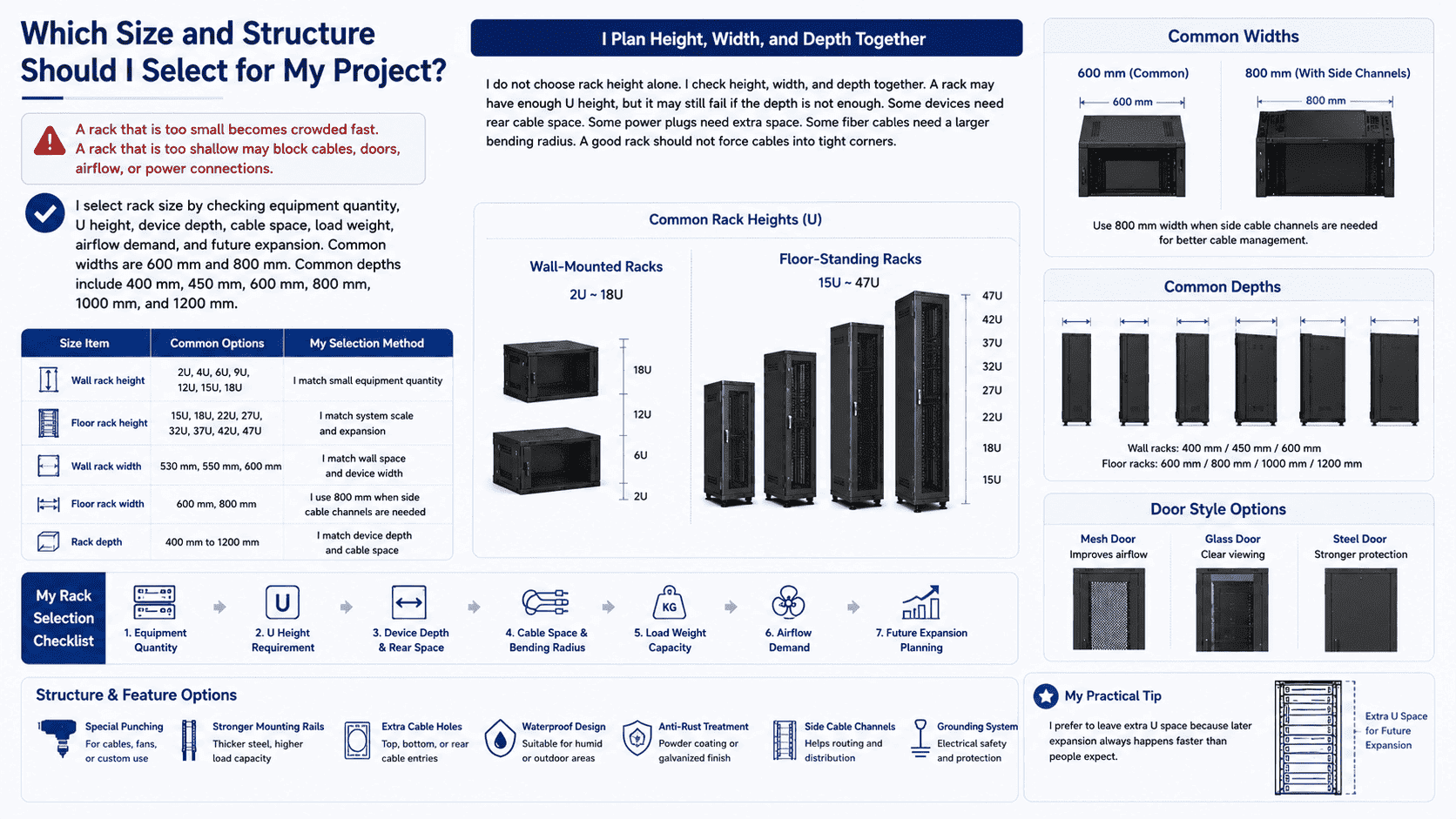
I Plan Height, Width, and Depth Together
I do not choose rack height alone. I check height, width, and depth together. A rack may have enough U height, but it may still fail if the depth is not enough. Some devices need rear cable space. Some power plugs need extra space. Some fiber cables need a larger bending radius.10 A good rack should not force cables into tight corners.
| Size Item | Common Options | My Selection Method |
|---|---|---|
| Wall rack height | 2U, 4U, 6U, 9U, 12U, 15U, 18U | I match small equipment quantity |
| Floor rack height | 15U, 18U, 22U, 27U, 32U, 37U, 42U, 47U | I match system scale and expansion |
| Wall rack width | 530 mm, 550 mm, 600 mm | I match wall space and device width |
| Floor rack width | 600 mm, 800 mm | I use 800 mm when side cable channels are needed |
| Rack depth | 400 mm to 1200 mm | I match device depth and cable space |
For many standard network rooms, 600 mm width is common. For floor-standing cabinets, 800 mm width can be useful when the customer needs side cable channels. Wall-mounted racks often use 400 mm, 450 mm, or 600 mm depth. Floor-standing racks often use 600 mm, 800 mm, 1000 mm, or 1200 mm depth. I also consider door style. A mesh door improves airflow.11 A glass door gives clear viewing. A steel door improves protection. I may also add special punching, stronger mounting rails, extra cable holes, waterproof design, or anti-rust treatment. I prefer to leave extra U space because later expansion always happens faster than people expect.
What Materials and Surface Treatment Make a Network Rack Reliable?
A weak rack may bend, rust, or shake after long use. Poor coating can peel, and poor steel can reduce load safety.
A reliable network rack uses high-strength cold-rolled steel, stainless steel, or galvanized steel when needed. It also needs accurate cutting, CNC bending, strong welding, electrostatic powder coating, strict assembly, and inspection for size, surface, load, and protection level.
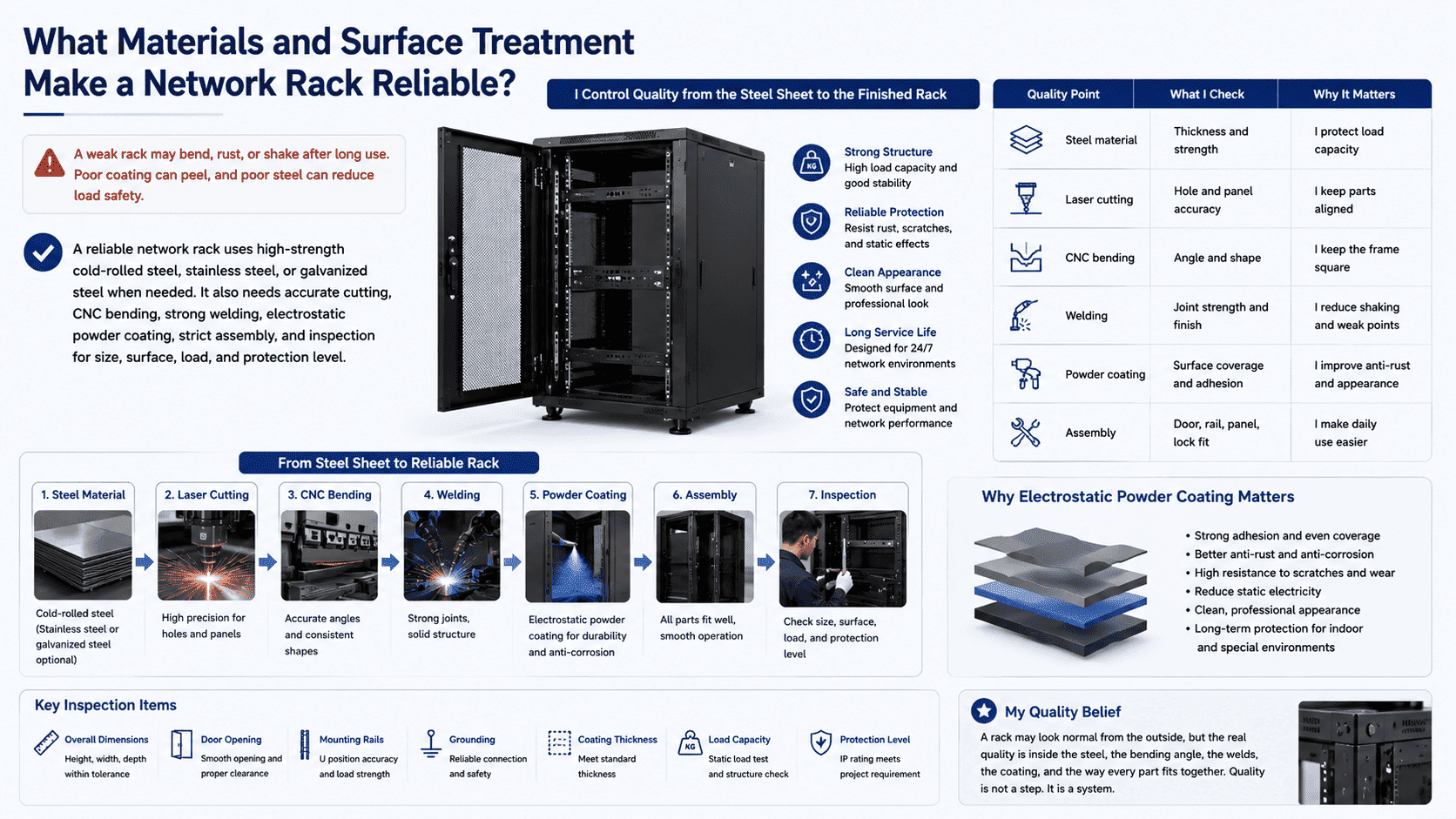
I Control Quality from the Steel Sheet to the Finished Rack
I believe that rack quality starts before assembly. It starts with raw material. In my production work, I use cold-rolled steel for many indoor network racks because it has good strength and a smooth surface.12 I also use stainless steel or galvanized steel for special environments. When a rack needs outdoor use or stronger anti-corrosion ability, the material and surface process must match the site.
| Quality Point | What I Check | Why It Matters |
|---|---|---|
| Steel material | Thickness and strength | I protect load capacity |
| Laser cutting | Hole and panel accuracy | I keep parts aligned |
| CNC bending | Angle and shape | I keep the frame square |
| Welding | Joint strength and finish | I reduce shaking and weak points |
| Powder coating | Surface coverage and adhesion | I improve anti-rust and appearance |
| Assembly | Door, rail, panel, lock fit | I make daily use easier |
Electrostatic powder coating is important because the rack works for many years. A good coating helps resist rust, scratches, and static effects. It also gives a clean appearance. I do not see coating as only a surface detail. I see it as part of the protection system. I also inspect dimensions, door opening, rail position, grounding, coating thickness, and loading structure. If the rack has a reinforced load-bearing design, I check it more carefully. A rack may look normal from the outside, but the real quality is inside the steel, the bending angle, the welds, the coating, and the way every part fits together.
How Does a Network Rack Protect Long-Term Network Stability?
Network devices need more than power and signal. They need clean cable paths, steady support, heat control, and safe access for service.
A network rack protects long-term network stability by organizing devices, reducing cable stress, improving airflow, protecting hardware, supporting maintenance, and giving the whole network system a clear and standard structure for daily operation and future expansion.
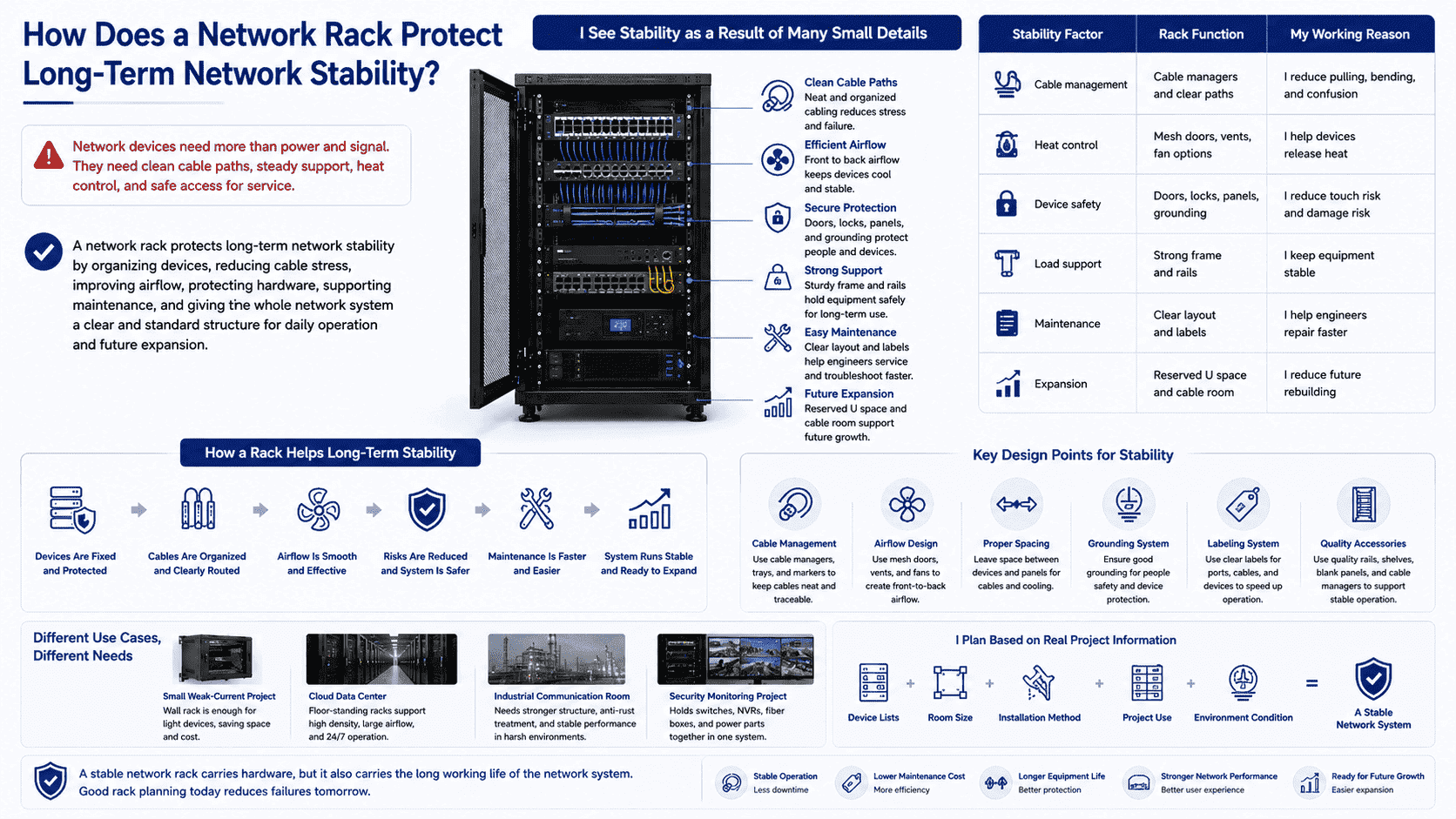
I See Stability as a Result of Many Small Details
I do not think network stability comes from one large device only. I think it comes from many small details working together. A rack helps each detail become controllable. It keeps devices fixed. It keeps cables arranged. It keeps airflow open. It keeps maintenance safer. It also makes fault finding faster when the system has a problem.
| Stability Factor | Rack Function | My Working Reason |
|---|---|---|
| Cable management | Cable managers and clear paths | I reduce pulling, bending, and confusion |
| Heat control | Mesh doors, vents, fan options | I help devices release heat |
| Device safety | Doors, locks, panels, grounding | I reduce touch risk and damage risk |
| Load support | Strong frame and rails | I keep equipment stable |
| Maintenance | Clear layout and labels | I help engineers repair faster |
| Expansion | Reserved U space and cable room | I reduce future rebuilding |
In a small weak-current project, a wall rack may already give enough protection. In a cloud computing data center, a floor-standing rack or cabinet becomes part of a larger system. In an industrial communication room, the rack may need stronger structure, anti-rust treatment, or special ventilation. In a security monitoring project, the rack may hold switches, NVRs, fiber boxes, and power parts together. Each use case has a different weight, heat, and cable layout. I design or choose the rack based on the actual environment. This is why I always ask for device lists, room size, installation method, and project use. A stable network rack carries hardware, but it also carries the long working life of the network system.
Conclusion
I see a network rack as the basic support for safe equipment, clean cabling, good airflow, and long-term network stability.
"19-inch rack - Wikipedia", https://en.wikipedia.org/wiki/19-inch_rack. A neutral reference on 19-inch racks describes them as standardized frames or enclosures for mounting equipment modules, supporting the article’s definition of a network rack as an organizing and protective equipment structure. Evidence role: definition; source type: encyclopedia. Supports: A 19-inch rack is a standardized frame or enclosure used to mount multiple equipment modules.. ↩
"[PDF] COMMUNICATIONS EQUIPMENT ROOM FITTINGS - Ohio.gov", https://dam.assets.ohio.gov/image/upload/ofcc.ohio.gov/OSDM/Files/27_11_00-communications_equipment_room_fittings.pdf. Telecommunications and data-center design guidance treats organized rack layouts, cable management, and airflow control as elements of reliable equipment-room operation. Evidence role: expert_consensus; source type: institution. Supports: Structured equipment placement, cable management, and airflow planning are recognized parts of reliable telecommunications-room and data-center design.. Scope note: The source would support the design rationale generally, not prove that every individual rack installation improves long-term stability. ↩
"[PDF] Best Practices Guide for Energy-Efficient Data Center Design", https://www.energy.gov/sites/default/files/2024-07/best-practice-guide-data-center-design.pdf. Research and technical guidance on data-center airflow management note that cable congestion and poorly planned layouts can impede cooling paths and complicate maintenance access. Evidence role: mechanism; source type: research. Supports: Cable congestion and poor layout can obstruct airflow and make servicing more difficult in equipment rooms or data centers.. Scope note: The evidence is contextual because the degree of heat buildup or maintenance risk depends on equipment density, room cooling, and installation practices. ↩
"Rack unit", https://en.wikipedia.org/wiki/Rack_unit. EIA-310 and IEC 60297 describe the 19-inch rack format as a standardized mechanical mounting system for equipment modules. Evidence role: definition; source type: institution. Supports: The 19-inch rack standard defines a common equipment mounting width used for rack-mounted hardware.. ↩
"19-inch rack - Wikipedia", https://en.wikipedia.org/wiki/19-inch_rack. Standard references for the 19-inch rack identify the nominal rack format as 19 inches, equivalent to approximately 482.6 millimeters. Evidence role: definition; source type: encyclopedia. Supports: The nominal 19-inch rack width corresponds to approximately 482.6 mm.. ↩
"19-inch rack - Wikipedia", https://en.wikipedia.org/wiki/19-inch_rack. Mechanical rack standards describe equipment mounting flanges and rail spacing for 19-inch racks, providing the basis for compatibility among rack-mounted devices. Evidence role: general_support; source type: institution. Supports: Rack-mounted equipment commonly uses front mounting flanges or ears that align with standardized 19-inch rack rails.. Scope note: The source supports the standardized mounting system generally, not the compatibility of every network device model. ↩
"Rack unit - Wikipedia", https://en.wikipedia.org/wiki/Rack_unit. References on rack units define 1U as 1.75 inches, or 44.45 mm, and identify it as the conventional height increment for rack-mounted equipment. Evidence role: definition; source type: encyclopedia. Supports: A rack unit, or U, is the standard unit used to measure rack-mounted equipment height.. ↩
"[PDF] City of Houston - COMMUNICATIONS EQUIPMENT ROOM FITTINGS", https://www.houstontx.gov/hits/dc-standards/271100-COMMUNICATIONS-EQUIPMENT-ROOM-FITTINGS.pdf. Telecommunications-room planning guidance treats rack or cabinet selection as dependent on equipment load, floor or wall space, access requirements, and environmental conditions. Evidence role: expert_consensus; source type: institution. Supports: Rack type selection depends on equipment quantity, load, available space, access, and environmental control requirements.. Scope note: The source would support the selection factors, while exact load limits remain manufacturer- and installation-specific. ↩
"19-inch rack - Wikipedia", https://en.wikipedia.org/wiki/19-inch_rack. Mechanical rack standards and data-center facility references describe 19-inch rack cabinets as available in standardized metric cabinet envelopes, including commonly used 600 mm and 800 mm widths. Evidence role: general_support; source type: institution. Supports: 19-inch rack enclosures are produced in standardized and commonly used cabinet widths and depths, including metric cabinet sizes used in network and data-center rooms.. Scope note: The evidence is contextual because exact cabinet depth offerings are not universal and may differ by manufacturer, region, and application. ↩
"[PDF] ITU-T G-series Recommendations – Supplement 59", https://www.itu.int/rec/dologin_pub.asp?lang=e&id=T-REC-G.Sup59-201802-I!!PDF-E&type=items. Fiber-optic installation standards specify minimum bend radii to limit optical loss and mechanical damage, supporting the need to reserve adequate cable space in racks. Evidence role: mechanism; source type: institution. Supports: Fiber-optic cable performance and durability can be affected by excessive bending, so installation standards specify minimum bend radii.. Scope note: The exact bend radius depends on the fiber type, cable construction, and whether the cable is under tensile load. ↩
"Airflow and Cooling in a Data Center | J. Heat Transfer", https://asmedigitalcollection.asme.org/heattransfer/article/132/7/073001/451420/Airflow-and-Cooling-in-a-Data-Center. Data-center cooling literature describes perforated rack doors as a means of reducing airflow resistance through cabinets and supporting front-to-back equipment cooling. Evidence role: mechanism; source type: research. Supports: Perforated rack doors allow air movement through the cabinet and are used in data-center cooling designs to reduce airflow restriction.. Scope note: The actual cooling effect depends on room airflow design, fan placement, perforation ratio, and equipment heat load. ↩
"Hot rolled vs cold rolled steel: What's the difference?", https://www.malvernpanalytical.com/en/learn/knowledge-center/insights/hot-rolled-vs-cold-rolled-steel-whats-the-difference. Materials-engineering references describe cold-rolled steel as having a smoother surface finish and improved dimensional control compared with hot-rolled steel, with mechanical properties suitable for fabricated structural components. Evidence role: general_support; source type: education. Supports: Cold-rolled steel is associated with improved dimensional accuracy, surface finish, and mechanical properties suitable for fabricated products.. Scope note: The source would support material characteristics generally, not certify the load capacity of a particular rack design. ↩
