
How to setup a data center rack properly and safely?

I have seen one small rack mistake become a big site problem. A tilted rack can hurt servers, cables, airflow, and people very fast.
I set up a data center rack safely by surveying the site first, checking floor load, using a matched steel base, planning hot and cold aisles, fixing the rack firmly, grounding each rack independently, and checking every point before loading equipment.
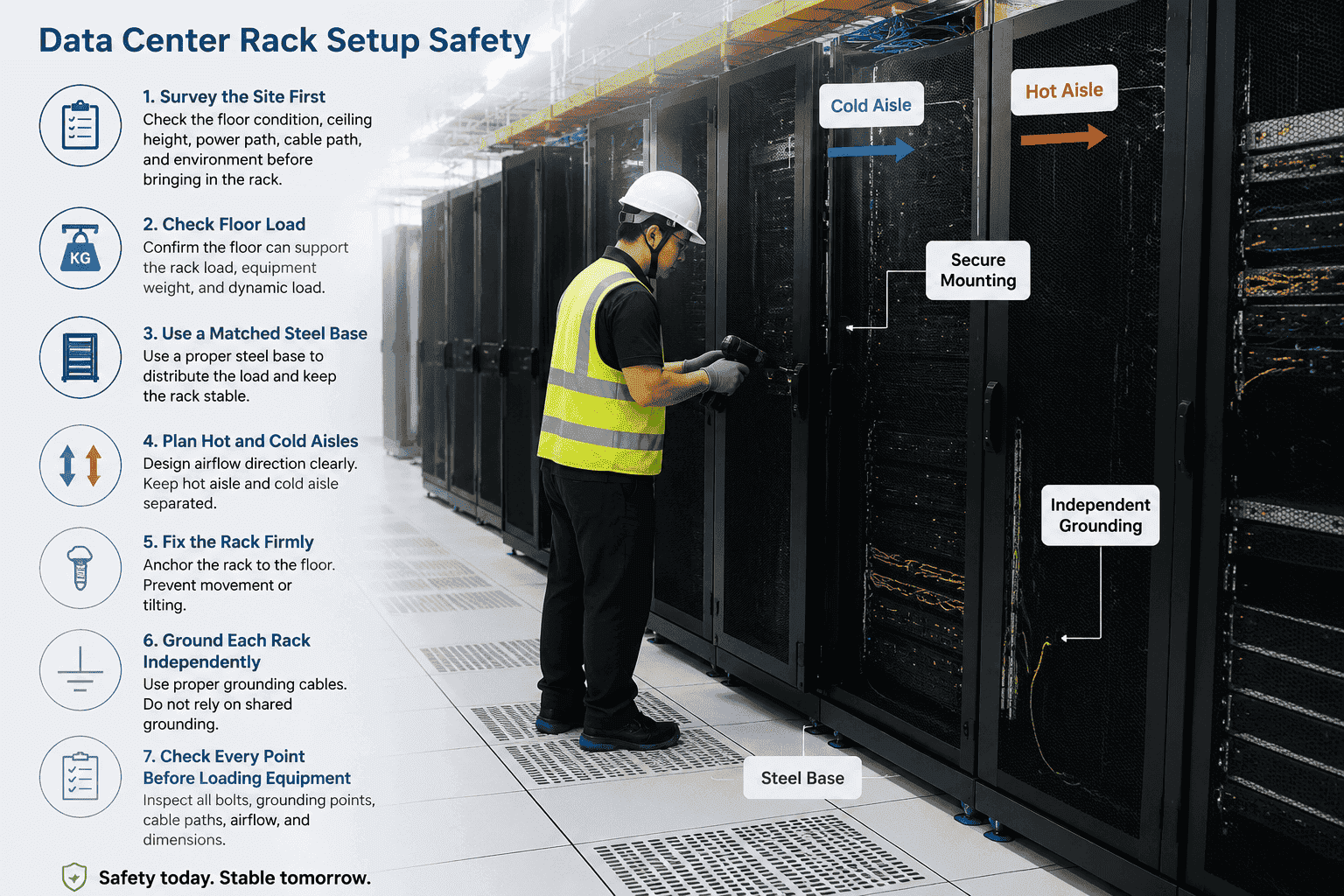
I do not treat rack installation as simple placement work. I treat it as basic infrastructure work. A rack carries servers, switches, storage, UPS terminals, and many valuable systems. If I skip one detail, I may create a risk that appears months later. The rack may loosen. The floor may sink. The cable may rub against metal. The airflow may fail. This is why I always start before the rack reaches the room, not after.
Why should I survey the site before rack installation?
I have seen teams rush into a machine room and start drilling. That is dangerous, because hidden site problems do not forgive fast work.
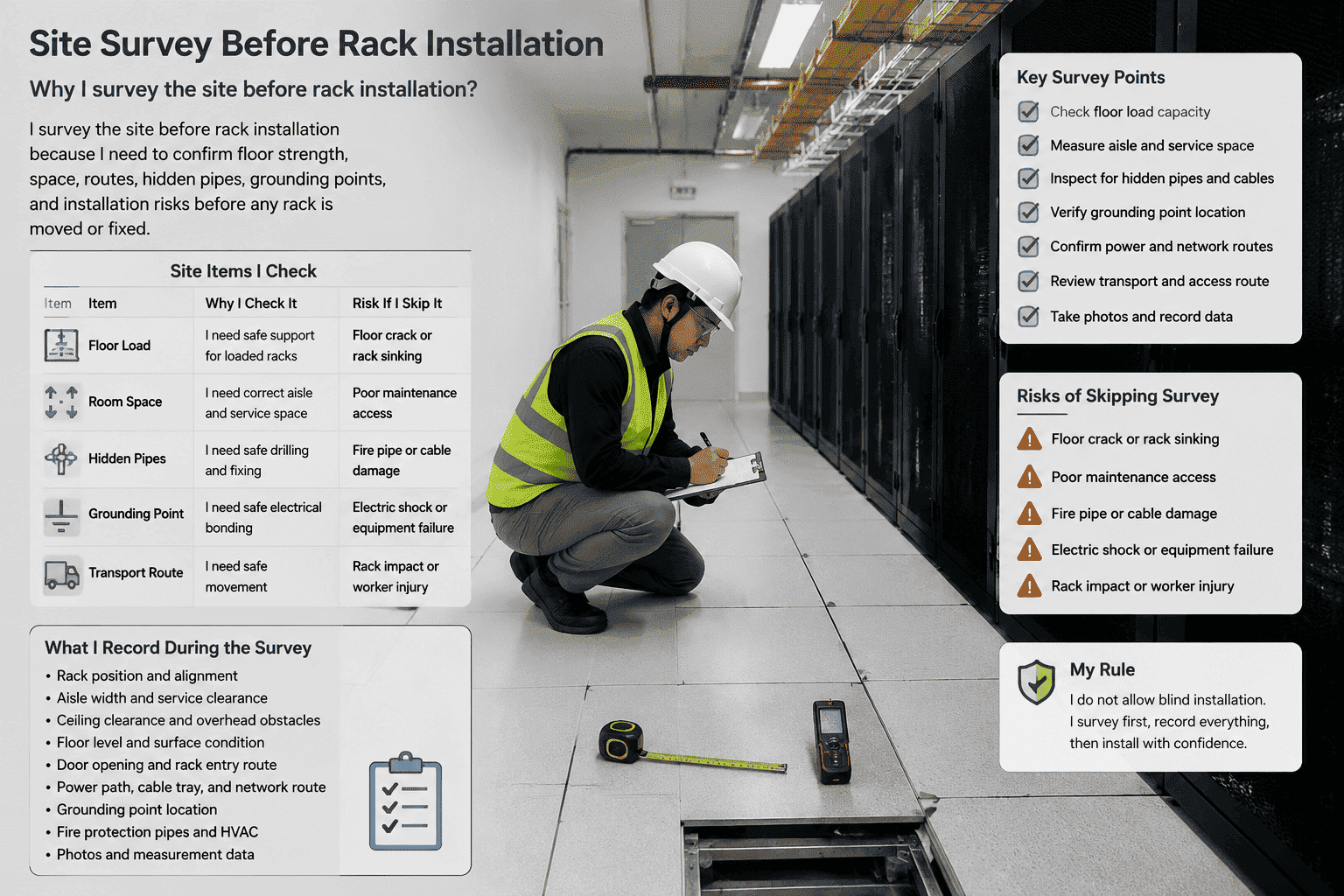
I survey the site before rack installation because I need to confirm floor strength, space, routes, hidden pipes, grounding points, and installation risks1 before any rack is moved or fixed.
I record the site before I touch the rack
I always start with a site survey, because the data center is not an empty room. It is a working system. I measure the rack position, aisle width, ceiling clearance, floor level, door opening, and transport route. I also check whether the rack can enter the room without tilting too much. A fully welded network cabinet or server cabinet can be heavy, and I do not want workers to fight with it at the door.
I keep the survey data as a work record. I have learned this from real projects. If a rack position later conflicts with an air duct, cable tray, or fire pipe, the written record helps the team find the cause. It also keeps the work professional.
| Site item I check | Why I check it | Risk if I skip it |
|---|---|---|
| Floor load | I need safe support for loaded racks | Floor crack or rack sinking |
| Room space | I need correct aisle and service space | Poor maintenance access |
| Hidden pipes | I need safe drilling and fixing | Fire pipe or cable damage |
| Grounding point | I need safe electrical bonding | Electric shock or equipment failure |
| Transport route | I need safe movement | Rack impact or worker injury |
I do not allow blind installation. I ask the team to mark risk points first. This small step saves a lot of trouble later.
How do I confirm floor load and base support?
A rack looks stable when it is empty. A full rack is another story. Heavy servers can turn a weak floor into a hidden accident.
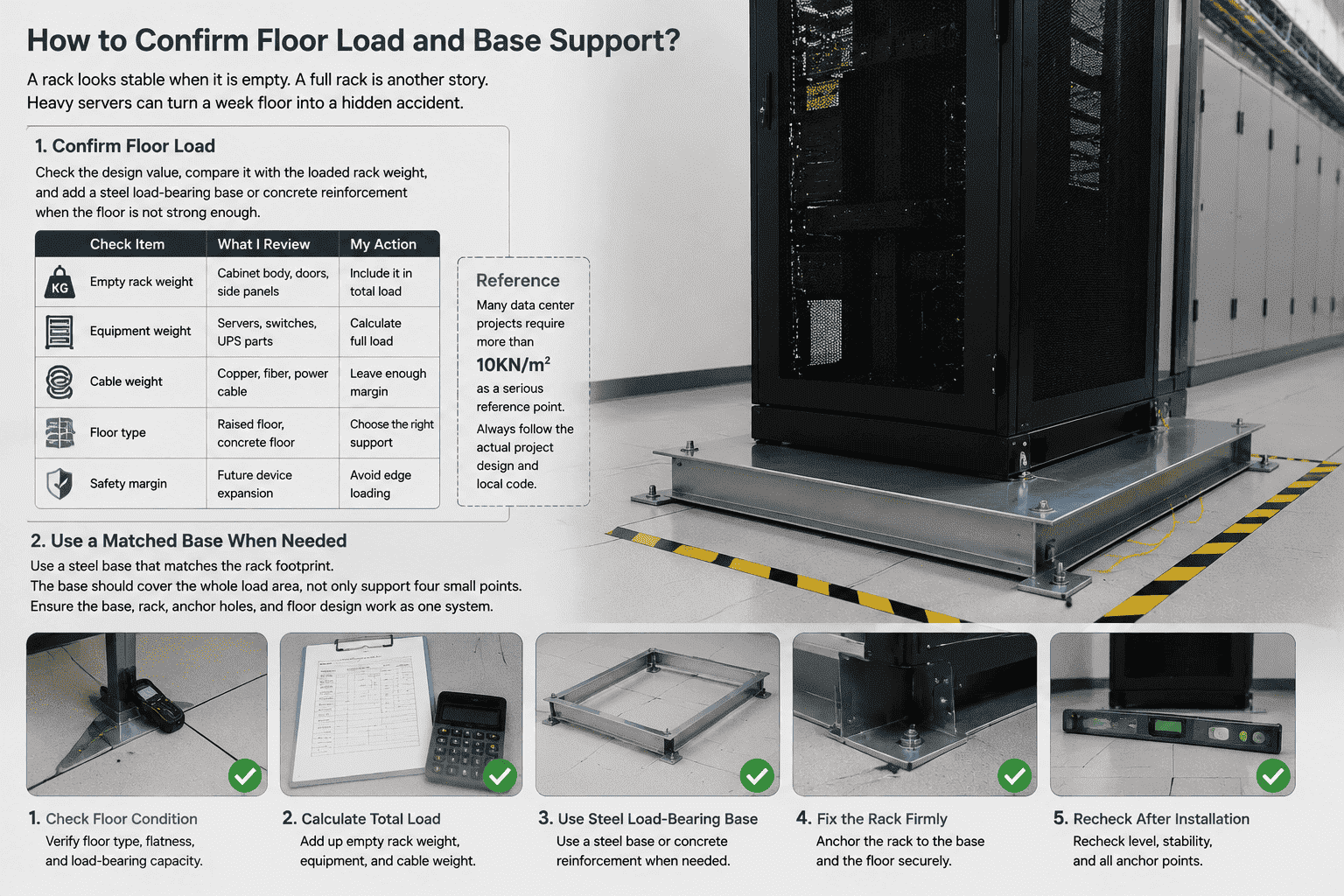
I confirm floor load by checking the design value, comparing it with the loaded rack weight, and adding a steel load-bearing base or concrete reinforcement when the floor is not strong enough.
I never trust the floor by feeling
I always ask for the floor load data before installation. In many data center projects, the main equipment room needs strong bearing capacity. I often use the requirement of more than 10KN/m²2 as a serious reference point, but I still follow the actual project design and local code. I do not guess. I do not judge by stepping on the floor.
A rack may hold servers, storage units, power modules, patch panels, and cable trays. The weight can grow slowly during use.3 The rack may be safe on day one, but it may become risky after more equipment is added. This is why I check future load, not only current load.
| Load factor | What I review | My action |
|---|---|---|
| Empty rack weight | Cabinet body, doors, side panels | I include it in total load |
| Equipment weight | Servers, switches, UPS parts | I calculate full load |
| Cable weight | Copper, fiber, power cable | I leave enough margin |
| Floor type | Raised floor, concrete floor | I choose the right support |
| Safety margin | Future device expansion | I avoid edge loading |
I use a matched base when needed
I do not like installing a heavy rack directly on a weak or uneven surface. I prefer a steel base that matches the rack footprint. The base should cover the whole load area. It should not only support four small points. In some sites, I use a customized steel load-bearing base. In other sites, the contractor may add concrete reinforcement first.
As a cabinet manufacturer, I care about base matching. If the base is smaller than the cabinet, the rack can twist. If the base holes do not match, workers may drill random holes. That is bad practice. I want the base, rack, anchor holes, and floor design to work as one system.
Poor layout makes a good rack perform badly. Bad spacing can block airflow, slow repair work, and create cable stress.
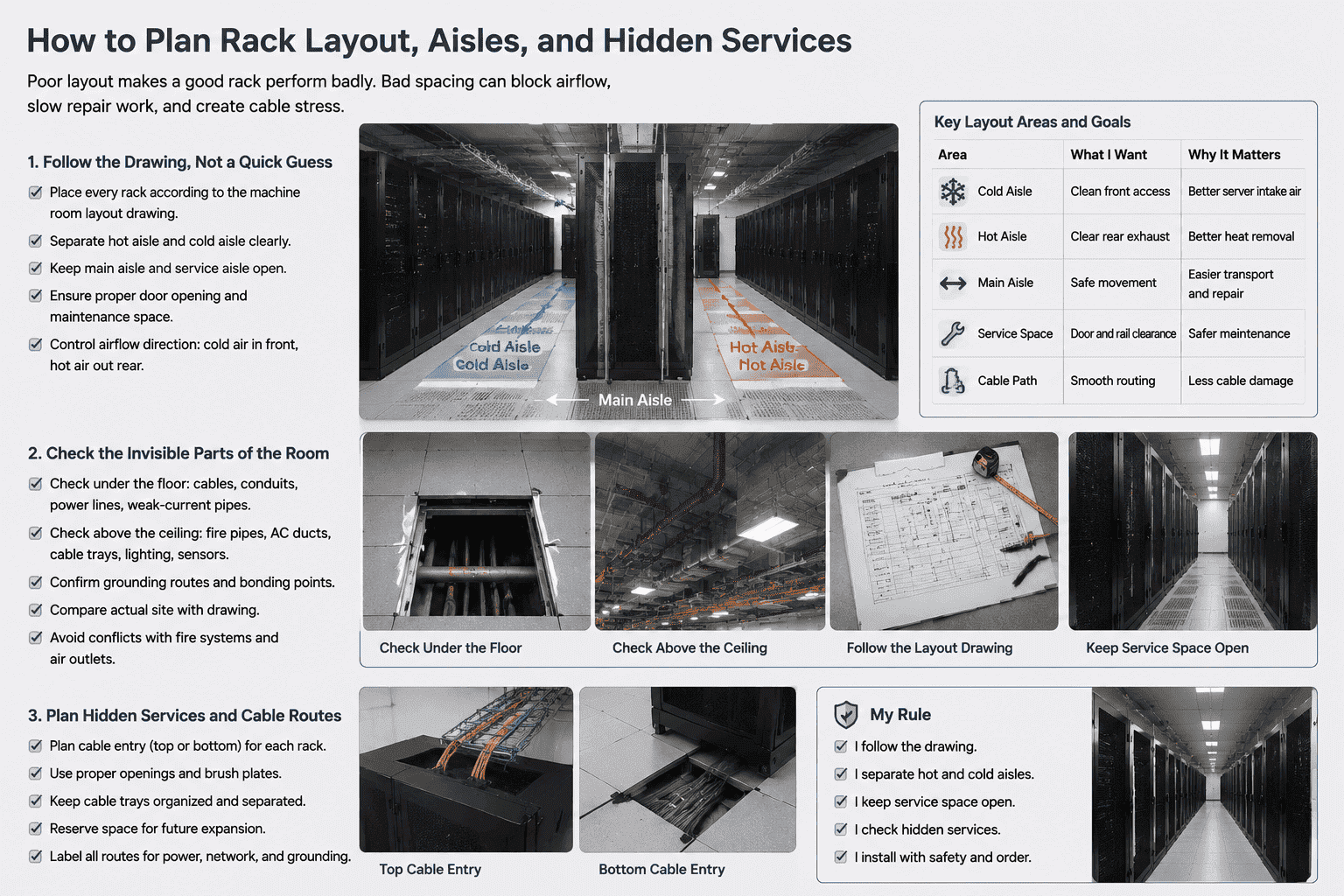
I plan rack layout by following the room drawing, separating hot and cold aisles, keeping service channels open, and checking hidden pipelines before drilling or anchoring.
I follow the drawing, not a quick guess
I place every rack according to the machine room layout drawing. I mark the main aisle, service aisle, hot aisle, and cold aisle before final fixing. I do not let the team move racks freely just because a spot looks convenient. Data center airflow needs order. Cold air should enter the front of the equipment. Hot air should leave from the rear.4 If the rack faces the wrong direction, the cooling system works harder and the servers run hotter.5
I also keep enough maintenance space. A cabinet door must open properly. A technician must pull a server rail out safely. Cable trays must not force cables into sharp bends.
| Layout area | What I want | Why it matters |
|---|---|---|
| Cold aisle | Clean front access | Better server intake air |
| Hot aisle | Clear rear exhaust | Better heat removal |
| Main aisle | Safe movement | Easier transport and repair |
| Service space | Door and rail clearance | Safer maintenance |
| Cable path | Smooth routing | Less cable damage |
I check the invisible parts of the room
Before anchoring, I check what is under the floor and above the ceiling. I look for weak-current pipes, strong-current lines, cable conduits, fire pipes, air-conditioning ducts, and grounding routes. I have seen sites where one careless drill could have hit an important hidden line. That kind of mistake is expensive and dangerous.
I ask the team to open raised floor panels when needed. I also ask them to compare the actual site with the drawing. Drawings can be old. A real room can change after several upgrades. I trust measurement more than memory.
I keep rack positions away from direct conflict with fire systems and air outlets. I also keep cable entry positions clean. If cables enter through the top, I check the top opening and brush plate. If cables enter through the bottom, I check the base and floor opening. I want the rack to fit the room, not fight the room.
How do I control environment and protect workers during installation?
A rack installation site can look calm, but heavy steel and narrow space can injure people quickly if the team works casually.
I control the installation by keeping the room within proper temperature and humidity, assigning enough workers, using protective gear, and banning single-person heavy rack handling.
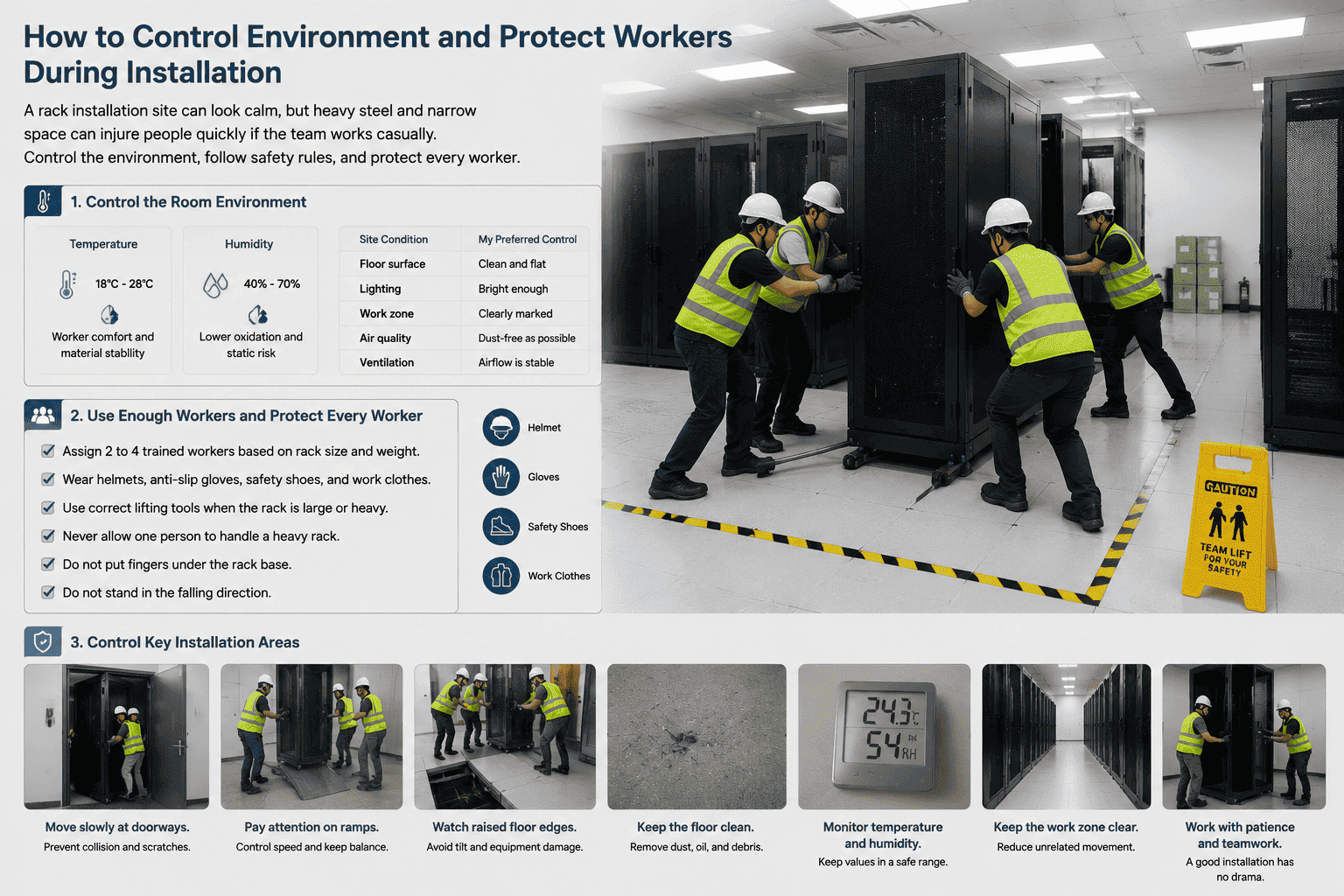
I control the room condition first
I prefer to install racks when the room temperature is between 18°C and 28°C6. I also prefer relative humidity between 40% and 70%7. These values help protect metal parts, coatings, workers, and sensitive equipment. If the room is too wet, metal oxidation risk rises. If the room is too dry, static problems may increase.8 If the room is too hot, workers become tired faster, and tired workers make mistakes.
I also clean the installation zone before work. I remove dust, oil, loose screws, small stones, and raised debris. A rack can slide or tilt when its base meets oil or uneven waste. I want the ground clean and visible.
| Site condition | My preferred control | Reason |
|---|---|---|
| Temperature | 18°C to 28°C | Worker comfort and material stability |
| Humidity | 40% to 70% | Lower oxidation and static risk |
| Floor surface | Clean and flat | Better base contact |
| Lighting | Bright enough | Safer measuring and drilling |
| Work zone | Clearly marked | Less unrelated movement |
I never allow one person to handle a heavy rack
I treat rack installation as heavy work. I usually arrange two to four trained people, based on rack size, weight, and site access. I do not allow one worker to move or stand a rack alone.9 A server cabinet can look manageable, but the center of gravity can change fast when it tilts.
I ask workers to wear helmets, anti-slip gloves, safety shoes, and proper work clothes. I also ask them to use correct lifting tools when the rack is large. No one should put fingers under the rack base. No one should stand in the falling direction.10 These rules sound simple, but simple rules prevent real injuries.
I also slow the work down at doorways, ramps, and raised floor edges. These are the places where racks often hit walls, scratch coatings, bend doors, or lose balance. A good installation does not need drama. It needs patience.
How do I fix, level, and strengthen the rack against vibration?
A rack may stand straight at first, but daily vibration and heavy loading can make weak fixing fail over time.
I fix and level a rack by preparing the base, adjusting verticality, anchoring it correctly, and adding standardized anti-seismic reinforcement for long-term stability.
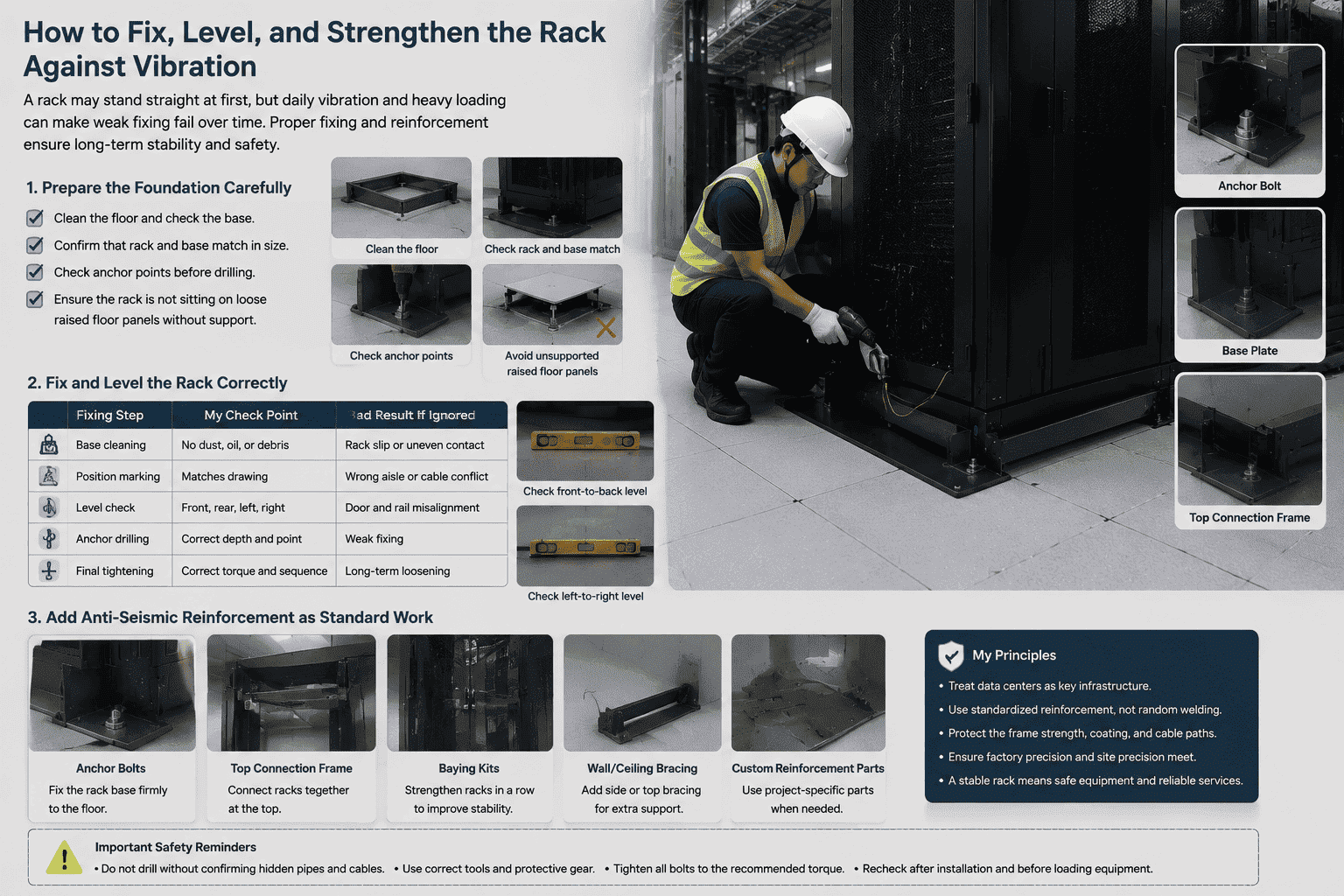
I prepare the foundation carefully
I believe 90% of rack stability comes from foundation treatment. I clean the floor. I check the base. I confirm that the rack and base match in size. I check that the anchor points are correct before drilling. I also confirm that the rack is not sitting on loose raised floor panels without proper support.
After placement, I check front-back and left-right level. I use proper tools, not only eyesight. A small tilt can create stress on cabinet frames, server rails, and doors. The door may not close smoothly. The equipment rails may twist. The fan airflow path may become less clean.
| Fixing step | My check point | Bad result if ignored |
|---|---|---|
| Base cleaning | No dust, oil, or debris | Rack slip or uneven contact |
| Position marking | Matches drawing | Wrong aisle or cable conflict |
| Level check | Front, rear, left, right | Door and rail misalignment |
| Anchor drilling | Correct depth and point | Weak fixing |
| Final tightening | Correct torque and sequence | Long-term loosening |
I add anti-seismic reinforcement as standard work
I treat data centers as key infrastructure. I do not only add anti-seismic fixing in earthquake zones. I add standardized reinforcement because racks face daily vibration, fan vibration, equipment insertion force, cable pulling force, and floor movement.11 These small forces repeat for years.
The anti-seismic solution can include anchor bolts, base plates, top connection frames, baying kits, wall or ceiling bracing, and custom reinforcement parts. The exact design depends on the room and rack structure. I do not use random welding or field modification without review. A bad reinforcement can damage the coating, weaken the frame, or block cable paths.
As a manufacturer, I pay attention to frame strength, hole accuracy, door flatness, and load design before the rack leaves the factory. The installation team must protect that accuracy on site. If the rack is forced into a wrong base, even a well-made cabinet can become a poor system. I always want factory precision and site precision to meet each other.
How do I ground each rack safely and check the final result?
A rack without reliable grounding may still hold equipment, but it may not protect people or devices when an electrical fault appears.
I ground each rack independently, avoid series grounding, connect the rack to the grounding system with proper conductors, and test continuity before equipment is powered on.
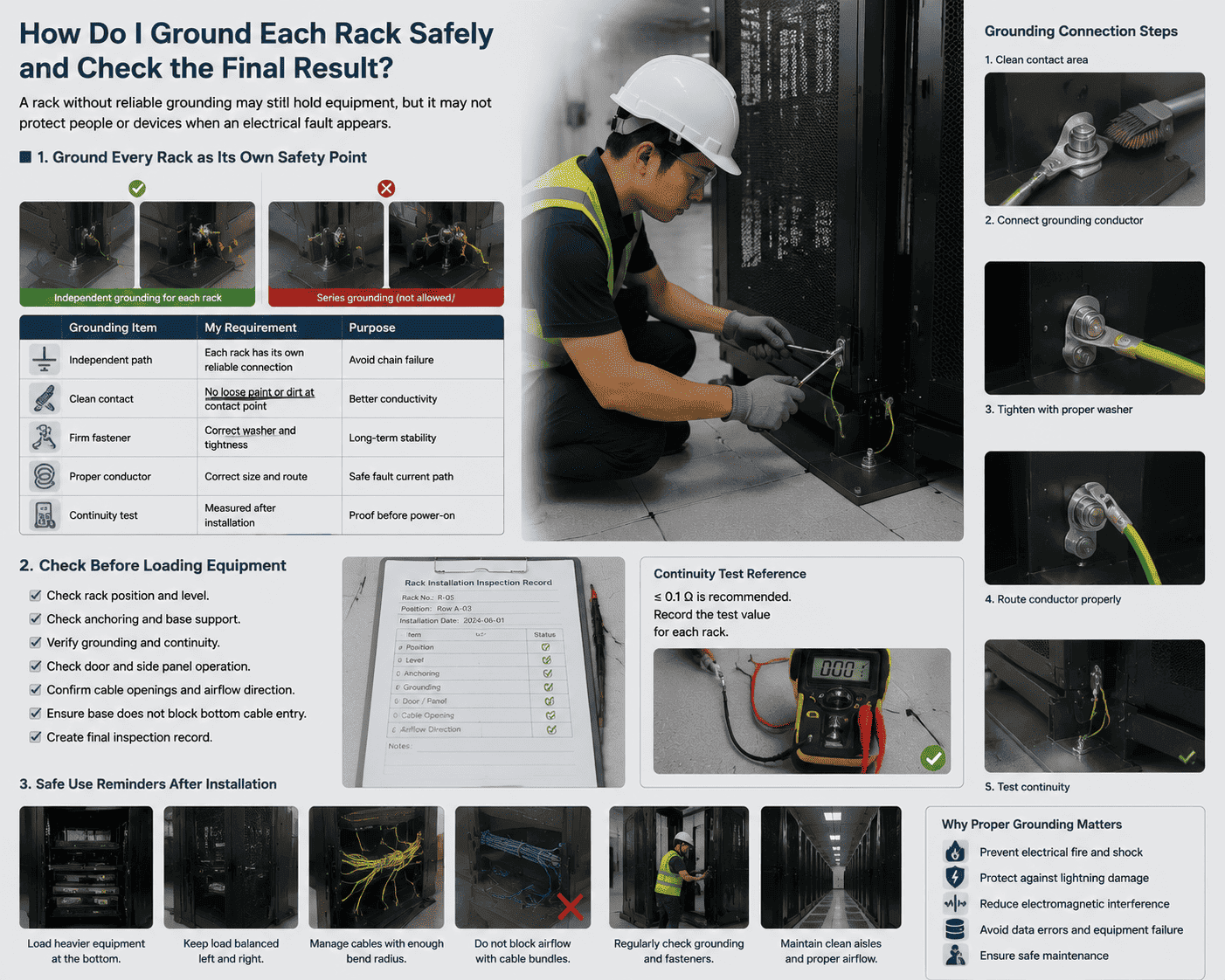
I ground every rack as its own safety point
I never accept casual grounding. Each rack must have reliable independent grounding. I do not connect rack one to rack two, then rack two to rack three, as a simple chain. Series grounding can create weak links. If one connection fails, the next rack may lose protection.12 That risk is not acceptable in a data center.
Poor grounding can cause electrical fire, lightning damage, electromagnetic interference, data errors, and equipment failure. It can also make maintenance work unsafe. I check that the grounding point on the rack is clean, firm, and free of paint under the contact area when required by the design. I also check that grounding conductors are properly sized and protected.
| Grounding item | My requirement | Purpose |
|---|---|---|
| Independent path | Each rack has its own reliable connection | Avoid chain failure |
| Clean contact | No loose paint or dirt at contact point | Better conductivity |
| Firm fastener | Correct washer and tightness | Long-term stability |
| Proper conductor | Correct size and route | Safe fault current path |
| Continuity test | Measured after installation | Proof before power-on |
I check before loading equipment
I do not rush to install servers right after the rack is bolted down. I first check the rack position, level, anchoring, grounding, door operation, side panel fit, cable openings, and airflow direction. I also check whether the base blocks bottom cable entry. If the rack has a mesh door, I check that the door closes well and does not rub the frame. Mesh door opening rate matters for airflow, but door alignment also matters for daily use.
I ask the team to create a final inspection record. The record should include rack number, position, anchor status, grounding status, load limit, and installation date. This record is useful when more equipment is added later.
I also remind the customer that rack safety continues after installation. When technicians add equipment, they should load heavier devices lower in the rack. They should keep the load balanced. They should manage cables with enough bend radius. They should not block airflow with cable bundles. A safe rack setup is not a one-day action. It is a controlled process from site survey to long-term operation.
Conclusion
I set up a data center rack safely when I treat it as infrastructure, not furniture, and I verify every load, fixing, airflow, and grounding detail.
"[PDF] Telecommunications Infrastructure Standard for Data Centers ANSI ...", https://www.ieee802.org/3/hssg/public/nov06/diminico_01_1106.pdf. Data center infrastructure standards and design guides identify floor loading, access space, telecommunications pathways, grounding and bonding, and coordination with building services as pre-installation planning requirements for equipment rooms. Evidence role: expert_consensus; source type: institution. Supports: Data center design guidance treats structural loading, access clearances, pathways, grounding and bonding, and coordination with building services as planning concerns before equipment installation.. Scope note: The source may support the general planning categories rather than this article's exact checklist wording. ↩
"[PDF] Iso Floor for Data Centres - Critical Facilities Solutions", https://www.criticalfacilitiessolutions.co.uk/storage/2024/01/Bergvik_DataCentres_ENG_EDP_lowres.pdf. Published data center design guidance reports that equipment rooms often require high structural floor-loading capacity, with some specifications using values around 10 kN/m² or higher for heavily loaded technical spaces. Evidence role: statistic; source type: institution. Supports: Published data center or building-design guidance gives typical or minimum floor-loading values for computer rooms or equipment rooms, including values around 10 kN/m² where applicable.. Scope note: Floor-load requirements vary by jurisdiction, building structure, rack density, and project design, so the cited value should be treated as a reference point rather than a universal minimum. ↩
"Understanding Data Center Capacity Planning - Device42", https://www.device42.com/data-center-infrastructure-management-guide/data-center-capacity-planning/. Data center capacity-planning literature treats rack population as an evolving operational condition, noting that equipment additions change rack power, cooling demand, and physical loading over time. Evidence role: general_support; source type: research. Supports: Capacity planning literature recognizes that data center racks are populated and modified over time, affecting power, cooling, and weight loads.. Scope note: Such sources usually address capacity growth broadly and may not quantify weight growth for a specific rack installation. ↩
"Move to a Hot Aisle/Cold Aisle Layout | ENERGY STAR", https://www.energystar.gov/products/data_center_equipment/16-more-ways-cut-energy-waste-data-center/move-hot-aislecold-aisle-layout. Thermal-management guidance for data centers describes a common front-to-back server airflow pattern, in which cold supply air is delivered to equipment fronts and heated exhaust air leaves the rear into a hot aisle. Evidence role: mechanism; source type: institution. Supports: Thermal guidelines and energy-efficiency guidance describe front-to-back equipment airflow and the separation of cold supply aisles from hot exhaust aisles.. Scope note: Some specialized equipment uses side-to-side or nonstandard airflow, so the claim is strongest for typical rack-mounted IT equipment. ↩
"Move to a Hot Aisle/Cold Aisle Layout | ENERGY STAR", https://www.energystar.gov/products/data_center_equipment/16-more-ways-cut-energy-waste-data-center/move-hot-aislecold-aisle-layout. Studies of data center air management show that poor separation of hot exhaust and cold supply air can increase recirculation, raise server inlet temperatures, and reduce cooling-system efficiency. Evidence role: mechanism; source type: research. Supports: Research or institutional guidance shows that mixing hot exhaust with cold supply air reduces cooling effectiveness and can raise IT equipment inlet temperatures.. Scope note: The source supports the airflow mechanism generally; actual temperature rise depends on room geometry, cooling design, containment, and equipment load. ↩
"[PDF] Thermal Guidelines and Temperature Measurements in Data Centers", https://datacenters.lbl.gov/sites/default/files/FINAL%20Thermal%20Guidelines%20and%20Temp%20Measurements%209-15-2020.pdf. ASHRAE thermal guidance for data processing environments defines recommended intake-temperature ranges for common IT equipment classes that substantially overlap an 18°C to 28°C operating envelope. Evidence role: expert_consensus; source type: institution. Supports: ASHRAE or comparable thermal guidelines define recommended or allowable temperature ranges for IT equipment environments that overlap the article's range.. Scope note: ASHRAE guidance is framed around IT-equipment intake conditions, not specifically around rack installation labor conditions, and the article's upper value may not exactly match every ASHRAE class. ↩
"Make Humidification Adjustments", https://www.energystar.gov/products/data_center_equipment/16-more-ways-cut-energy-waste-data-center/make-humidification-adjustments. Data center environmental guidelines specify humidity limits for IT spaces and describe humidity control as relevant to equipment reliability, electrostatic discharge risk, and corrosion management. Evidence role: expert_consensus; source type: institution. Supports: Environmental guidance for data centers discusses acceptable humidity ranges and the relationship between humidity, corrosion risk, and electrostatic discharge.. Scope note: Published standards often express humidity limits using dew point and relative-humidity envelopes, so they may support the principle without exactly matching the 40% to 70% range. ↩
"Humidity | NIST - National Institute of Standards and Technology", https://www.nist.gov/programs-projects/humidity. Electrostatic-discharge literature reports that low relative humidity promotes charge accumulation on materials and can increase the likelihood or severity of electrostatic discharge events. Evidence role: mechanism; source type: paper. Supports: Research or ESD standards explain that lower humidity can increase charge accumulation and electrostatic discharge likelihood.. Scope note: The magnitude of ESD risk also depends on flooring, footwear, grounding, materials, and handling procedures. ↩
"OSHA procedures for safe weight limits when manually lifting", http://www.osha.gov/laws-regs/standardinterpretations/2013-06-04-0. Occupational-safety guidance on manual materials handling advises that heavy, bulky, or unstable loads may require team handling or mechanical assistance rather than single-person movement. Evidence role: expert_consensus; source type: government. Supports: Occupational-safety authorities recommend avoiding unsafe single-person manual handling of heavy or awkward loads and using team lifting or mechanical aids where appropriate.. Scope note: The guidance is general to manual handling and may not address data center racks specifically. ↩
"eTool : Construction - Struck-By | Occupational Safety and Health ...", http://www.osha.gov/etools/construction/struck-by. Workplace-safety guidance identifies pinch points, crush zones, and struck-by hazards as recognized risks during the movement and positioning of heavy equipment. Evidence role: general_support; source type: government. Supports: Government workplace-safety guidance identifies pinch points, crush zones, and struck-by hazards as risks when moving heavy objects or equipment.. Scope note: The source will likely support the hazard category rather than the exact rack-specific instructions. ↩
"How to Choose a Seismic-Rated Data Center Rack or Enclosure", https://www.chatsworth.com/en-us/resources/blogs/2026/what-to-look-for-in-a-data-center-rack-or-enclosure-for-seismically-active-environments/. Telecommunications and equipment-rack standards address anchoring, bracing, vibration, and mechanical stability as part of reliable rack installation in technical facilities. Evidence role: expert_consensus; source type: institution. Supports: Equipment-rack standards or seismic installation guidance address anchoring, bracing, vibration, and mechanical stability for telecommunications or data center racks.. Scope note: Seismic and vibration requirements are location- and equipment-dependent, so the source supports the need for engineered reinforcement rather than a single universal reinforcement design. ↩
"Power Strips and Dangerous Daisy Chains - OCWR", https://www.ocwr.gov/publications/fast-facts/power-strips-and-dangerous-daisy-chains/. Telecommunications grounding and bonding standards emphasize reliable bonding of equipment racks to the grounding infrastructure so that continuity is not dependent on an unreliable chain of intermediate rack-to-rack connections. Evidence role: expert_consensus; source type: institution. Supports: Grounding and bonding standards for telecommunications spaces require reliable bonding paths and discourage arrangements where a single failed connection can interrupt downstream bonding.. Scope note: Specific permitted bonding topologies depend on the applicable electrical code and standard edition. ↩
