
How to set up a rack server?

A rack server can fail early when I build the rack in a casual way. Small layout mistakes can cause heat, loose parts, and unstable operation.1
To set up a rack server, I first choose a stable cabinet, keep clear airflow, level the rack, install rails with two people, fix the server safely, arrange power and cables, then test load, cooling, network, and safety before use.
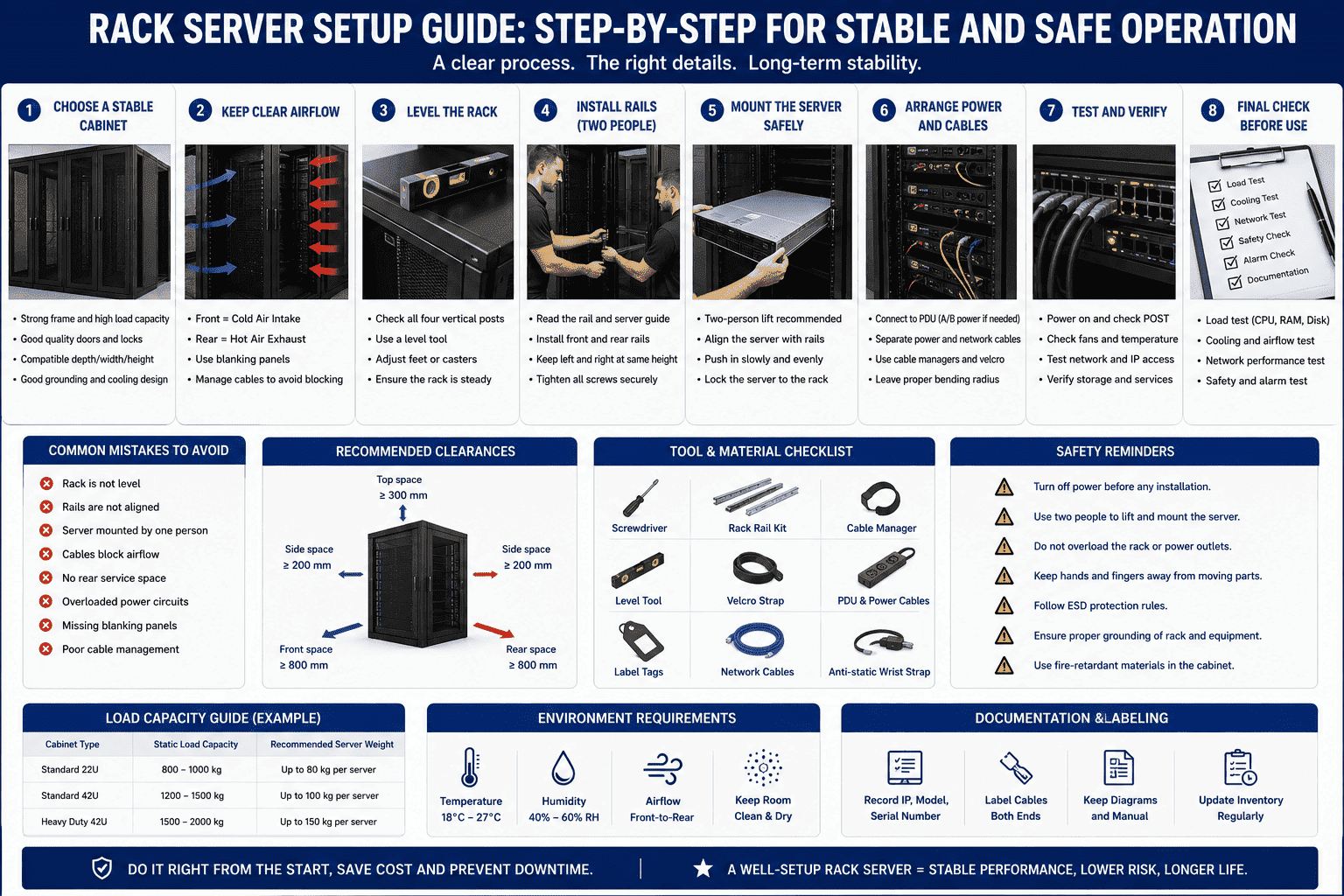
I treat rack server setup as a standard project, not as a simple lifting job. I have seen many faults start from small details. A cabinet was not level. A rail was not aligned. A cable blocked airflow. A rear door had no service space. These problems looked small at first. They later caused heat, slow network speed, hardware alarms, and higher repair cost. When I set up a rack server, I begin with the cabinet, the room, the layout, and the working process. I do this because the server is a precise electronic device. It needs stable support, clean power, good cooling, and a safe running space.2
What should I check before installing a rack server?
A server rack can look ready, but hidden risks may still exist. If I skip checks, I may face bent rails, bad airflow, or power problems.
I check the room, cabinet size, load capacity, server depth, rail type, power needs, network plan, and cooling path before I move the server into the rack.
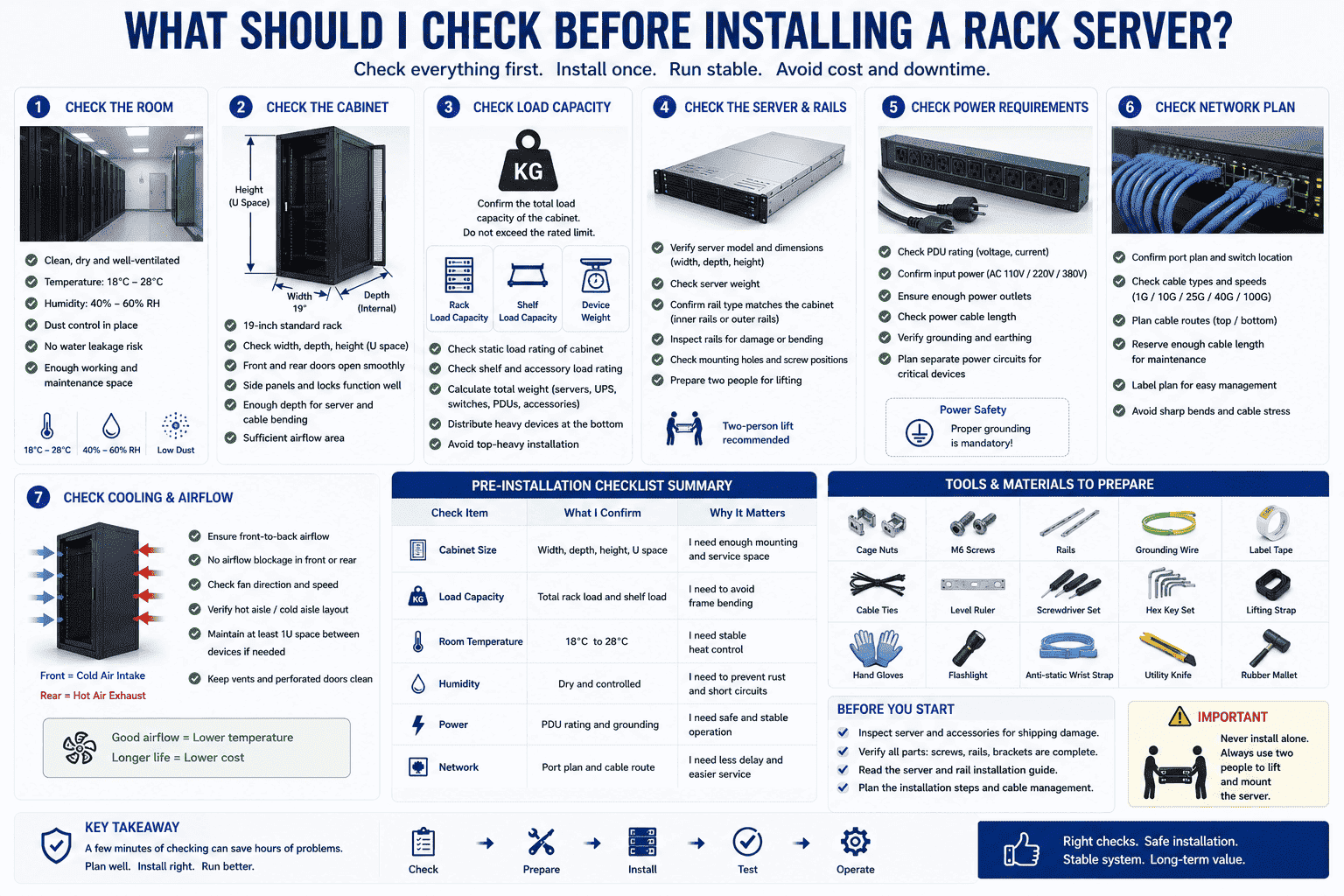
I start with the cabinet because it carries the full weight of the system. I confirm the cabinet is a 19-inch standard rack3 when the server uses standard rack ears and rails. I check the internal depth because many servers are deep, and shallow cabinets can block cable bending space. I also check the load rating. A server cabinet must support the total weight of servers, UPS units, switches, PDUs, and cable managers. I never guess this number.
I also check the room. I prefer a clean and dry machine room. I keep the temperature between 18°C and 28°C.4 I avoid wet spaces because moisture can cause short circuits, rust, and faster aging5. I also check if dust control is good because dust blocks fans and heat sinks6.
| Check item | What I confirm | Why it matters |
|---|---|---|
| Cabinet size | Width, depth, height, U space | I need enough mounting and service space |
| Load capacity | Total rack load and shelf load | I need to avoid frame bending |
| Room temperature | 18°C to 28°C | I need stable heat control |
| Humidity | Dry and controlled | I need to prevent rust and short circuits |
| Power | PDU rating and grounding | I need safe and stable operation |
| Network | Port plan and cable route | I need less delay and easier service |
I also prepare tools before installation. I prepare cage nuts, screws, rails, grounding wire, label tape, cable ties, level ruler, and basic hand tools. I check the server for shipping damage before I lift it. I inspect the rail kits and mounting holes. I do not start work if I see bent rails or missing screws. I ask two people to handle the server because one person can tilt the server and damage the rail or the chassis.
How should I position and level the cabinet?
A rack may shake if I place it on an uneven floor. This small movement can loosen parts, stress cables, and reduce system life.
I place the cabinet on a flat floor, level it, lock the base, keep at least 60 cm front and rear space7, and make sure airflow is not blocked.
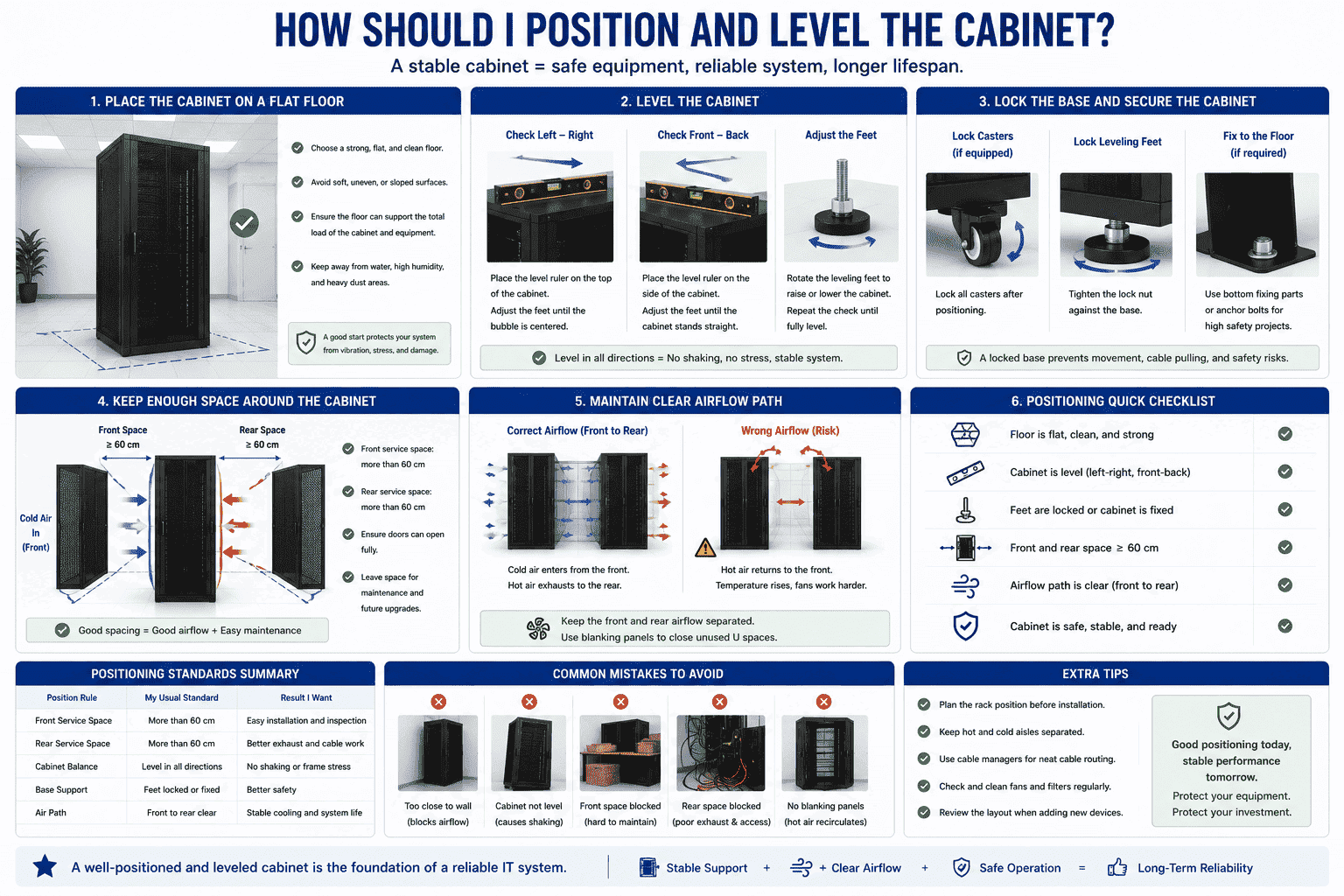
I place the cabinet before I install any heavy device. I use a level ruler to check the left-right and front-back balance. I adjust the feet until the cabinet stands straight. I also lock the casters if the cabinet has wheels. If the project needs stronger safety, I use bottom fixing parts or anchor points. I do this because a loaded cabinet is heavy. A small shift can pull cables, damage rails, or create a safety risk.
I keep enough space around the rack. I keep more than 60 cm at the front and rear. This space allows air to enter and leave the cabinet. It also gives me room for later maintenance. I avoid placing the cabinet against a wall when the rear door needs to open. I also avoid blocking the front door with boxes, power tools, or cable trays.
| Position rule | My usual standard | Result I want |
|---|---|---|
| Front service space | More than 60 cm | Easy installation and inspection |
| Rear service space | More than 60 cm | Better exhaust and cable work |
| Cabinet balance | Level in all directions | No shaking or frame stress |
| Base support | Feet locked or fixed | Better safety |
| Air path | Front to rear clear | Stable cooling |
I also think about hot and cold air. Most rack servers pull cold air from the front and push hot air to the rear.8 I keep this direction clear. I do not mix front and rear airflow. In one past project, I saw a server room where the rear hot air returned to the front side because the cabinet was too close to the wall. The fans worked harder, but the temperature stayed high. I avoid this by planning the rack position before installation. I also use blanking panels when there are empty U spaces. These panels help stop hot air from cycling back to the front.9
How should I mount the server on rails safely?
A server is heavy and easy to tilt during installation. If I lift it alone, I may bend the rail, drop the device, or hurt myself.
I mount rack rails first, align both sides at the same U height, tighten screws, then use two people to slide the server into place smoothly.
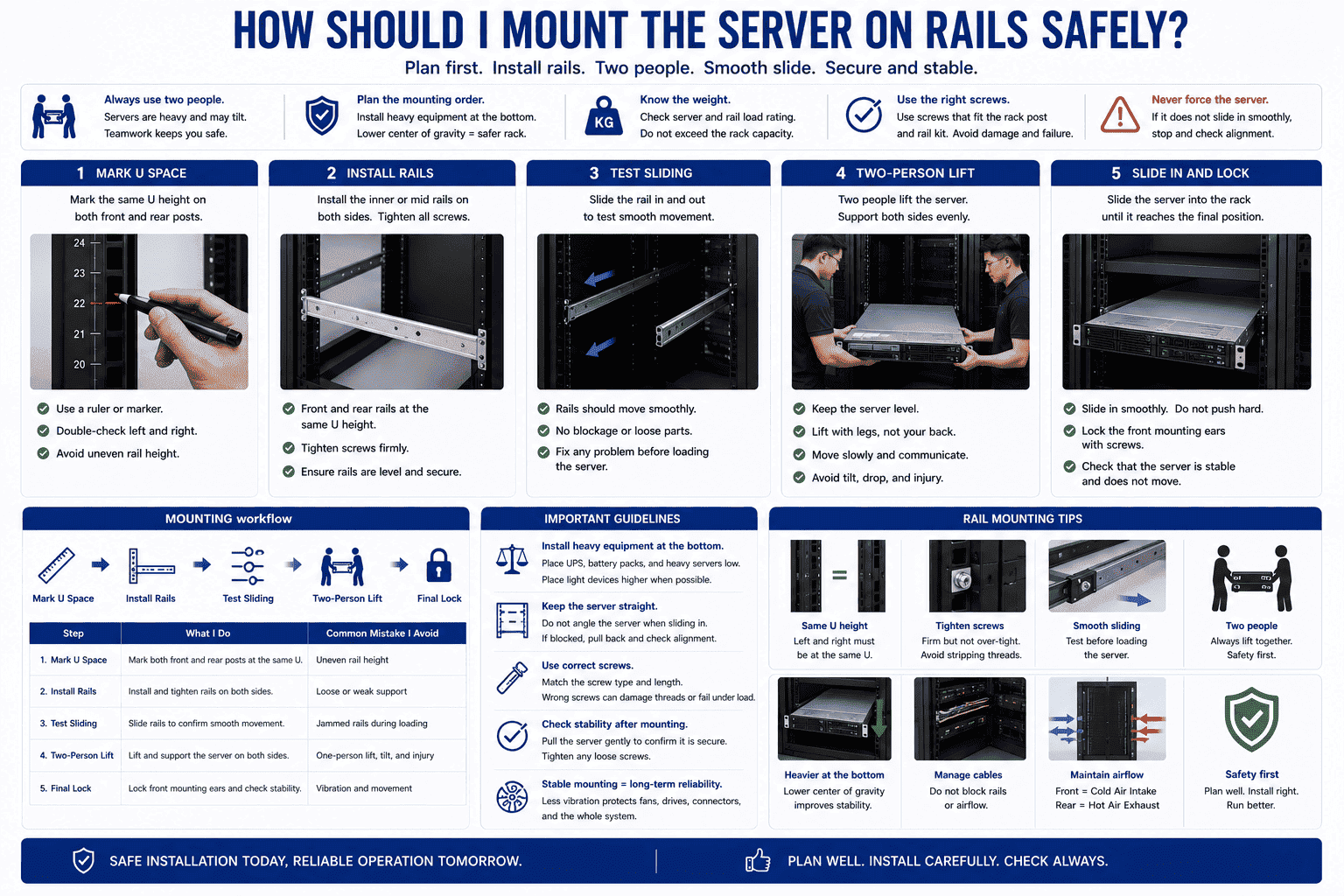
I never treat server mounting as a one-person task. I ask another person to support the opposite side. I also plan the mounting order. I install heavier equipment at the bottom first. UPS units, battery packs, and heavy servers should stay low. This lowers the center of gravity and reduces the chance of the rack tipping forward.10 I place light devices like patch panels or switches higher when the design allows it.
I mark the U positions before I install rails. I make sure the front and rear rail holes match the same U height. If one side is one hole higher or lower, the server can jam during sliding. I tighten the rail screws, but I do not force them into the wrong hole. I test the rail movement before loading the server.
| Step | What I do | Common mistake I avoid |
|---|---|---|
| Mark U space | I mark both front and rear posts | I avoid uneven rail height |
| Install rails | I fix rails on both sides | I avoid loose support |
| Test sliding | I move rails before loading | I avoid jammed rails |
| Two-person lift | I support both sides | I avoid tilt and injury |
| Final lock | I lock the server ears | I avoid vibration movement |
I also keep the server body straight when I slide it in. I do not push hard if the rail feels blocked. I pull the server back and check alignment. I use the screws that match the rack post and rail kit. Wrong screws can damage threads or fail under load. After the server reaches its final position, I fix the front mounting ears. I also confirm that the server does not move when I pull it lightly. This small check helps me find loose screws early. I care about this because vibration and movement can cause long-term problems. Fans, drives, and connectors all need stable support.
How should I plan cables, airflow, and power?
A rack can become messy fast when I connect cables without a plan. Bad cable paths can block fans, pull ports, and slow future repair.
I separate power and data cables, label both ends, keep airflow clear, use proper cable managers, and confirm power load before turning on the server.
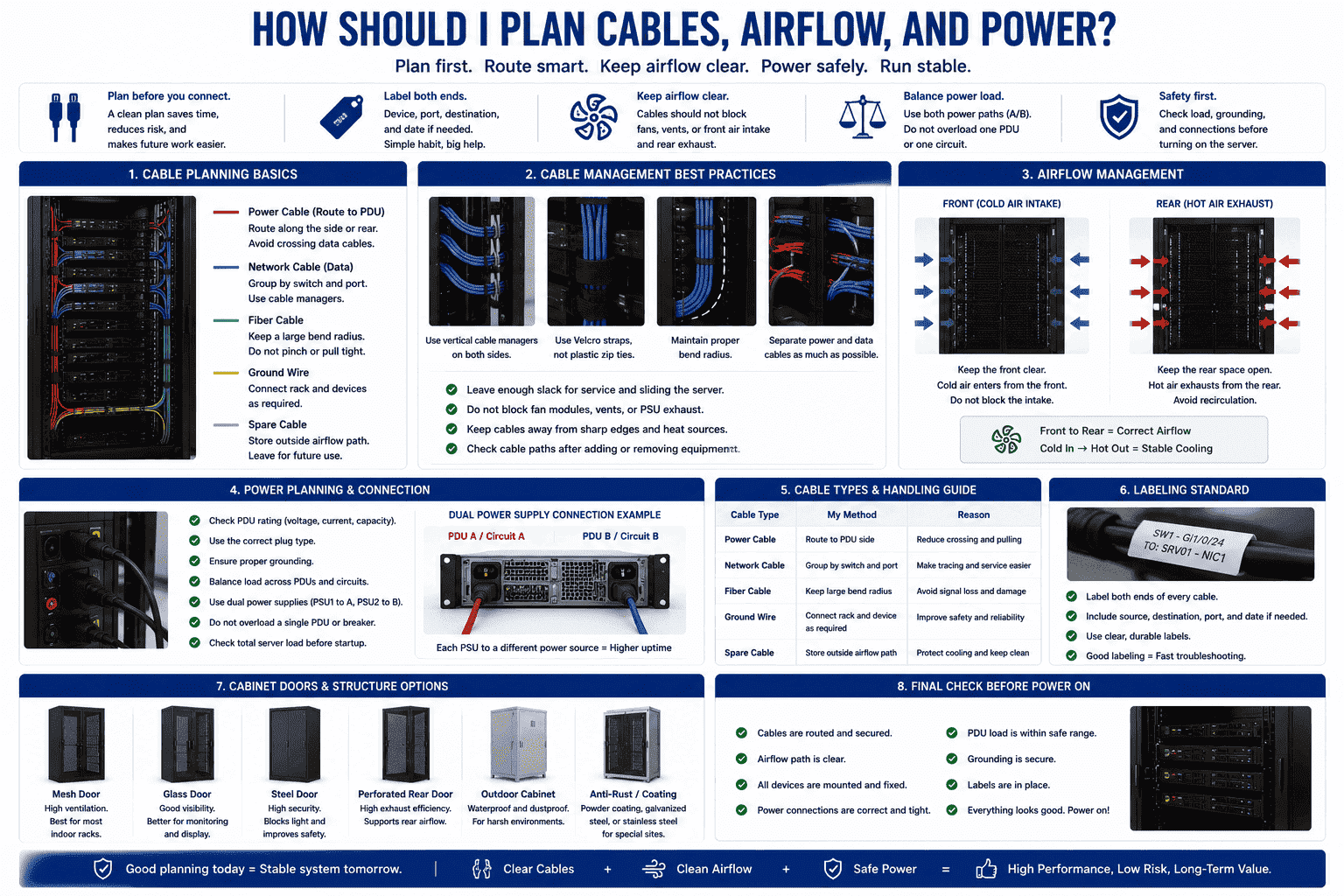
I make a cable plan before I connect the first cable. I decide where power cables run and where data cables run. I avoid mixing them when possible. I use cable managers to guide the cables along the side or rear. I leave enough bend radius for network cables and fiber cables.11 I never pull a cable tight because a tight cable can damage the port or connector when I slide the server for service.
I also label every cable. I label both ends because one label at one end is not enough during repair. I include device name, port number, destination, and date if needed. This simple habit saves time when a network issue happens.
| Cable type | My method | Reason |
|---|---|---|
| Power cable | I route it to the PDU side | I reduce crossing and pulling |
| Network cable | I group it by switch and port | I make tracing easier |
| Fiber cable | I keep a soft bend | I avoid signal loss |
| Ground wire | I connect rack and device as required | I improve safety |
| Spare cable | I store it outside airflow path | I protect cooling |
I also check power before startup. I confirm the PDU rating, plug type, grounding, and expected server load. I do not overload one PDU. I balance power when the server has dual power supplies. If the site has A and B power paths, I connect each PSU to a different path. This improves uptime.12
Airflow is just as important as power. I keep cables away from fan exhaust and front air intake. I also keep rear space open. I check that the cabinet doors match the cooling needs. Mesh doors are useful for many indoor network and server cabinets because they allow air movement. For special sites, I may use a glass door, steel door, waterproof outdoor structure, or anti-rust treatment. I choose the cabinet structure based on the working environment, not only based on appearance.
How should I test the rack server after installation?
A server may power on but still be unsafe. If I skip testing, hidden problems may become data loss, network delay, or sudden downtime.
I test physical stability, power, grounding, temperature, fan speed, network connection, storage health, and cable labels before I hand over the rack.
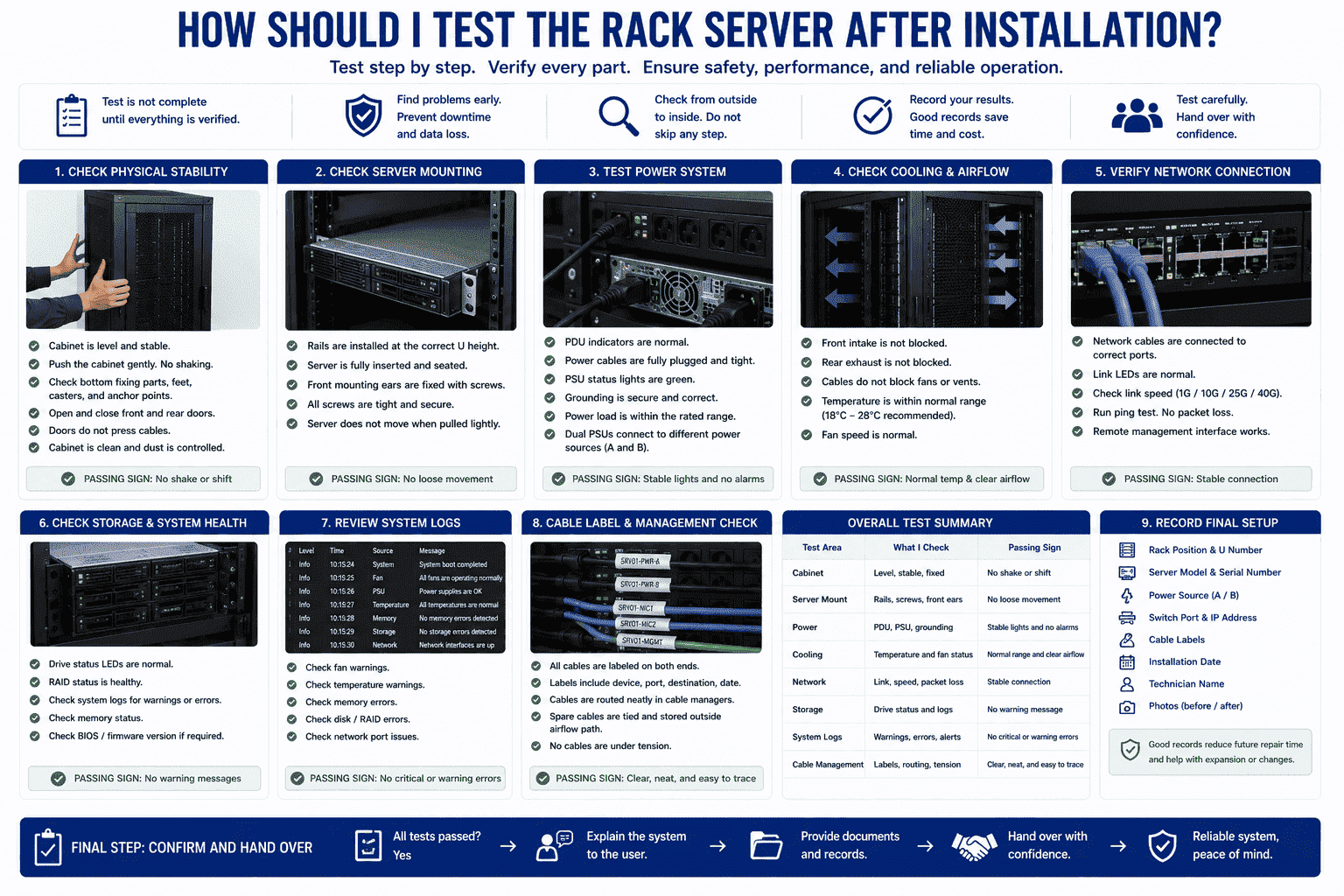
I test the rack from outside to inside. I first check the cabinet. I push it gently to confirm there is no shaking. I check the bottom fixing parts, feet, casters, and anchor points. I open and close the front and rear doors. I make sure doors do not press cables. I also confirm that the server is locked in the rail and the screws are tight.
I then test power. I check PDU indicators, grounding, PSU status lights, and power cable fit. I do not accept loose plugs. I also test startup in a controlled way. I avoid turning on all devices at once if the power design is not confirmed. A staged startup helps me find abnormal load or alarm signals.
| Test area | What I check | Passing sign |
|---|---|---|
| Cabinet | Level, stable, fixed | No shake or shift |
| Server mount | Rails, screws, front ears | No loose movement |
| Power | PDU, PSU, grounding | Stable lights and no alarms |
| Cooling | Temperature and fan status | Normal range and clear airflow |
| Network | Link, speed, packet loss | Stable connection |
| Storage | Drive status and logs | No warning message |
I also check system logs after boot. I look for fan warnings, temperature warnings, memory errors, disk errors, and network port issues. I run a basic network test. I confirm the speed and packet loss. I also check if the server management interface works. Remote management is important because I may need to restart, monitor, or diagnose the server later.
I record the final setup. I write down rack position, U number, server model, serial number, power source, switch port, IP address, and cable labels. I keep photos when the project allows it. Good records reduce future repair time. They also help when I need to add one more server or change the cabinet layout later.
How can I reduce long-term rack server failures?
Many rack failures do not come from one big accident. They come from heat, dust, moisture, poor layout, and missed maintenance over time.
I reduce failures by keeping the room dry, cleaning dust, checking temperature, tightening loose parts, updating records, and reviewing cables after every change.
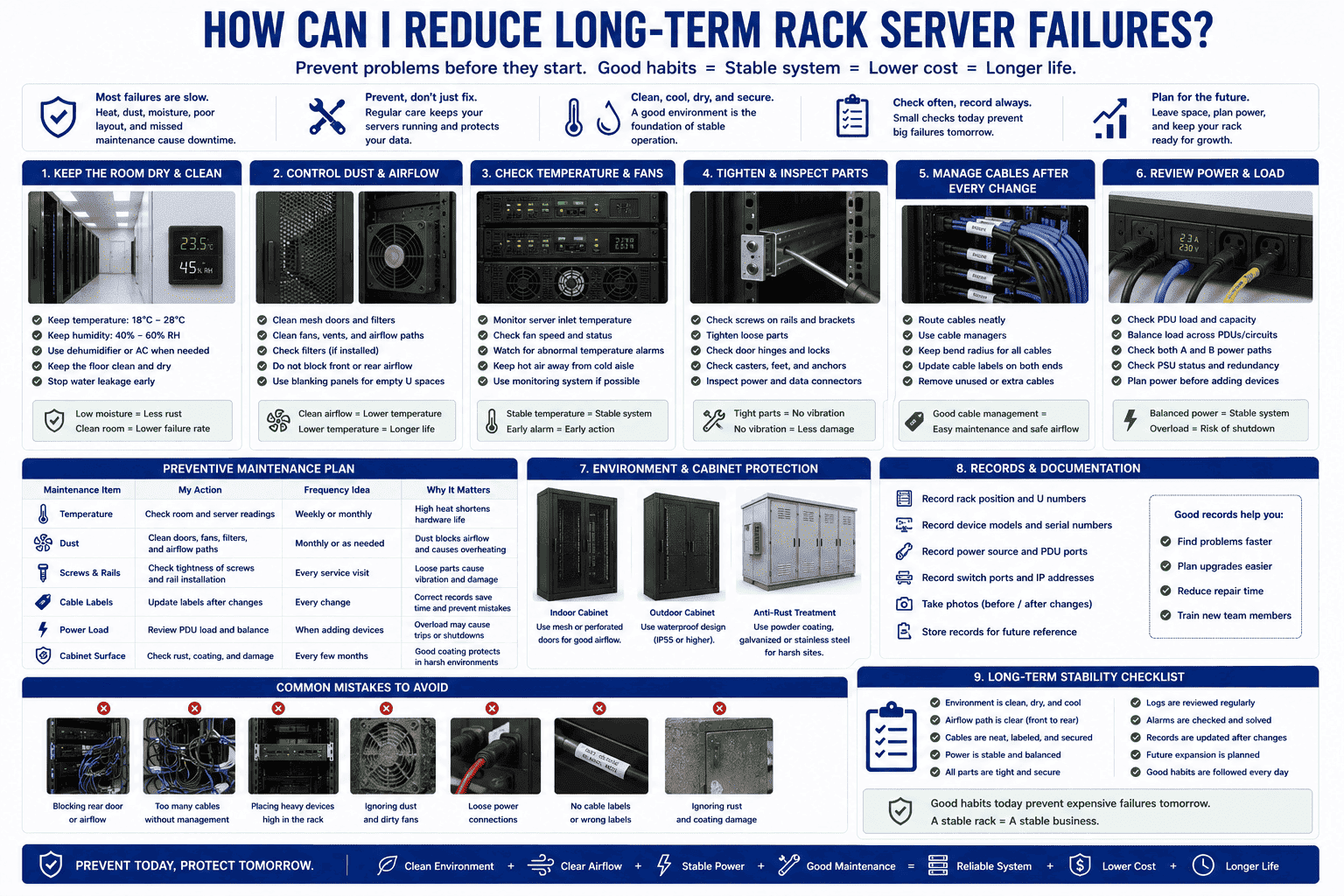
I treat maintenance as part of the setup. A good rack server installation should still be easy to maintain after six months or one year. I leave service space. I label cables. I keep airflow clear. These actions help future work stay safe and fast. I do not fill every empty space without thinking. I leave room for heat control, cable movement, and expansion.
I also inspect the cabinet on a set schedule. I check dust on mesh doors, fans, and filters if the cabinet has them. I check rust signs when the site has high humidity. I check coating damage on the cabinet because exposed metal can rust in harsh rooms. For outdoor or semi-outdoor use, I use waterproof design, anti-corrosion treatment, and better sealing. I choose galvanized steel, stainless steel, or coated cold-rolled steel based on the site.
| Maintenance item | My action | Frequency idea |
|---|---|---|
| Temperature | I check room and server readings | Weekly or monthly |
| Dust | I clean doors and airflow paths | Monthly or as needed |
| Screws and rails | I check tightness | Every service visit |
| Cable labels | I update after changes | Every change |
| Power load | I review PDU load | When adding devices |
| Cabinet surface | I check rust and coating | Every few months |
I also avoid random changes. I do not let people move cables without records. I do not add heavy equipment high in the rack without checking balance. I do not block the rear door with storage items. I do not ignore small alarms because small alarms often come before large failures. In my work with network cabinets and server cabinets, I have learned that stable quality does not only come from the cabinet itself. It also comes from correct setup, correct load, correct environment, and correct daily habits.
Conclusion
I set up a rack server with stable support, clear airflow, safe mounting, planned cables, tested power, and regular maintenance.
"[PDF] Data Center Efficiency and IT Equipment Reliability at Wider ...", https://www.energy.gov/sites/prod/files/2013/12/f5/data_center_efficiency_and_reliabilit_at_wider_operating_ranges.pdf. Data-center thermal and infrastructure guidance identifies airflow management, equipment support, and environmental control as factors that affect the reliable operation of rack-mounted IT equipment. Evidence role: general_support; source type: institution. Supports: A neutral source should support that improper rack layout, airflow obstruction, and mechanical instability are recognized contributors to thermal and operational reliability problems.. Scope note: This would provide contextual support for the general risk relationship rather than direct proof that every small layout mistake causes early server failure. ↩
"Better Buildings, Better Data Centers: Applying Best Practices", https://datacenters.lbl.gov/sites/default/files/Energy%20Exchange%20Data%20Center%20Workshop%20081117.pdf. Data-center infrastructure standards and guidance treat power distribution, environmental control, equipment mounting, and maintainable access space as basic requirements for reliable IT equipment operation. Evidence role: expert_consensus; source type: institution. Supports: A standards or institutional source should support that mechanical support, power quality, cooling, and maintainable space are core requirements for operating rack-mounted IT systems.. Scope note: The source would support the infrastructure principles broadly, not the author's specific installation workflow. ↩
"19-inch rack - Wikipedia", https://en.wikipedia.org/wiki/19-inch_rack. The 19-inch rack is a standardized frame format for mounting electronic equipment, including servers and networking devices, with dimensions formalized in rack-equipment standards. Evidence role: definition; source type: encyclopedia. Supports: A neutral reference should define the 19-inch rack as a standardized mounting frame widely used for servers and networking equipment.. ↩
"Raise the Temperature - Data Center Equipment - Energy Star", https://www.energystar.gov/products/data_center_equipment/5-simple-ways-avoid-energy-waste-your-data-center/raise-temperature. ASHRAE thermal guidance for data-processing environments gives recommended and allowable inlet-air temperature ranges for IT equipment, providing context for maintaining server rooms near this temperature band. Evidence role: expert_consensus; source type: institution. Supports: A recognized thermal guideline should support the recommended inlet-air temperature range for IT equipment in data centers.. Scope note: ASHRAE recommendations vary by equipment class and are usually expressed as inlet-air conditions; they may not exactly prescribe the article's 18°C to 28°C range for every server. ↩
"[PDF] RL/NIST Workshop On - Moisture Measurement and Control for", https://nvlpubs.nist.gov/nistpubs/Legacy/IR/nistir5241.pdf. Research on electronic-equipment reliability shows that elevated humidity can promote corrosion, leakage currents, and other degradation mechanisms that increase the risk of electrical failure. Evidence role: mechanism; source type: research. Supports: A research or institutional source should explain how moisture and humidity promote corrosion, leakage currents, and failure risks in electronic equipment.. ↩
"An Experimental Study on the Thermal Performance of a Heat Sink ...", https://pmc.ncbi.nlm.nih.gov/articles/PMC11396580/. Experimental studies of electronic cooling systems report that dust accumulation on fans, filters, and heat sinks reduces airflow or heat-transfer efficiency, increasing thermal stress on components. Evidence role: mechanism; source type: paper. Supports: A technical paper should support that dust accumulation impairs heat-transfer surfaces and airflow paths in electronic cooling systems.. ↩
"Server Rack Clearance Front/Back? : r/sysadmin - Reddit", https://www.reddit.com/r/sysadmin/comments/2c0b3a/server_rack_clearance_frontback/. Equipment-room and data-center design guidance commonly specifies clearances around rack fronts and rears to allow service access and maintain unobstructed airflow. Evidence role: expert_consensus; source type: institution. Supports: A standards or institutional source should support the need for front and rear rack clearance for access and airflow, ideally including comparable clearance dimensions.. Scope note: The source may support comparable clearance practice without matching the article's exact 60 cm threshold in all jurisdictions or equipment rooms. ↩
"Install In-rack or In-row Cooling - Energy Star", https://www.energystar.gov/products/data_center_equipment/16-more-ways-cut-energy-waste-data-center/install-rack-or-row. Data-center thermal-management guidance describes rack-mounted IT equipment as commonly drawing cool air from the front and exhausting heated air to the rear, which underlies hot-aisle/cold-aisle layouts. Evidence role: mechanism; source type: institution. Supports: A neutral source should confirm that front-to-rear airflow is the common design assumption behind hot-aisle/cold-aisle rack layouts.. Scope note: Some equipment uses side-to-side or nonstandard airflow, so the support is for the common pattern rather than every rack-mounted device. ↩
"data center cooling | Eziblank", https://www.eziblank.com/data-center/data-center-cooling/. Data-center airflow studies and guidance indicate that blanking panels in unused rack spaces reduce air recirculation and bypass paths, improving separation of cold supply air and hot exhaust air. Evidence role: mechanism; source type: research. Supports: A research or institutional source should support that sealing unused rack units with blanking panels limits bypass and recirculated hot air.. ↩
"1926.250 - General requirements for storage. - OSHA", http://www.osha.gov/laws-regs/regulations/standardnumber/1926/1926.250. Safety guidance for storage and equipment systems recognizes that placing heavier loads lower reduces the height of the center of gravity and helps limit overturning risk. Evidence role: mechanism; source type: government. Supports: A safety or engineering source should support that placing heavy loads lower improves stability by lowering the center of gravity and reducing overturning risk.. Scope note: General safety guidance may not be written specifically for server racks, but the stability principle applies to rack loading. ↩
"(PDF) Impact of Fiber bends in fiber optic networks - Academia.edu", https://www.academia.edu/71645702/Impact_of_Fiber_bends_in_fiber_optic_networks. Telecommunications cabling standards and fiber-handling guidance specify minimum bend radii because excessive bending can increase attenuation or physically damage conductors and optical fibers. Evidence role: mechanism; source type: institution. Supports: A cabling standard or institutional source should support that excessive bending can damage cables or increase signal loss, especially in fiber-optic cabling.. ↩
"What is Data Center Redundancy? N, N+1, 2N, 2N+1 - CoreSite", https://www.coresite.com/blog/data-center-redundancy-n-1-vs-2n-1. Data-center availability guidance treats independent A and B power paths for dual-corded IT equipment as a redundancy measure that reduces dependence on a single power-distribution path. Evidence role: expert_consensus; source type: institution. Supports: A data-center availability source should support that redundant power paths for dual-corded equipment reduce single points of failure and improve availability.. Scope note: Redundant feeds improve power-path resilience but do not by themselves guarantee uptime, which also depends on upstream power design, maintenance practices, and equipment condition. ↩
