
Hot vs Cold Aisle Containment for Cooling?

Rising server heat hurts uptime, wastes power, and makes cooling hard. I use aisle containment to separate air and bring control back.
-
Why does aisle containment matter in modern data centers?
Fast growth in AI, cloud computing, and network systems creates more heat.1 I need a clear airflow path because old open rooms waste too much cooling.
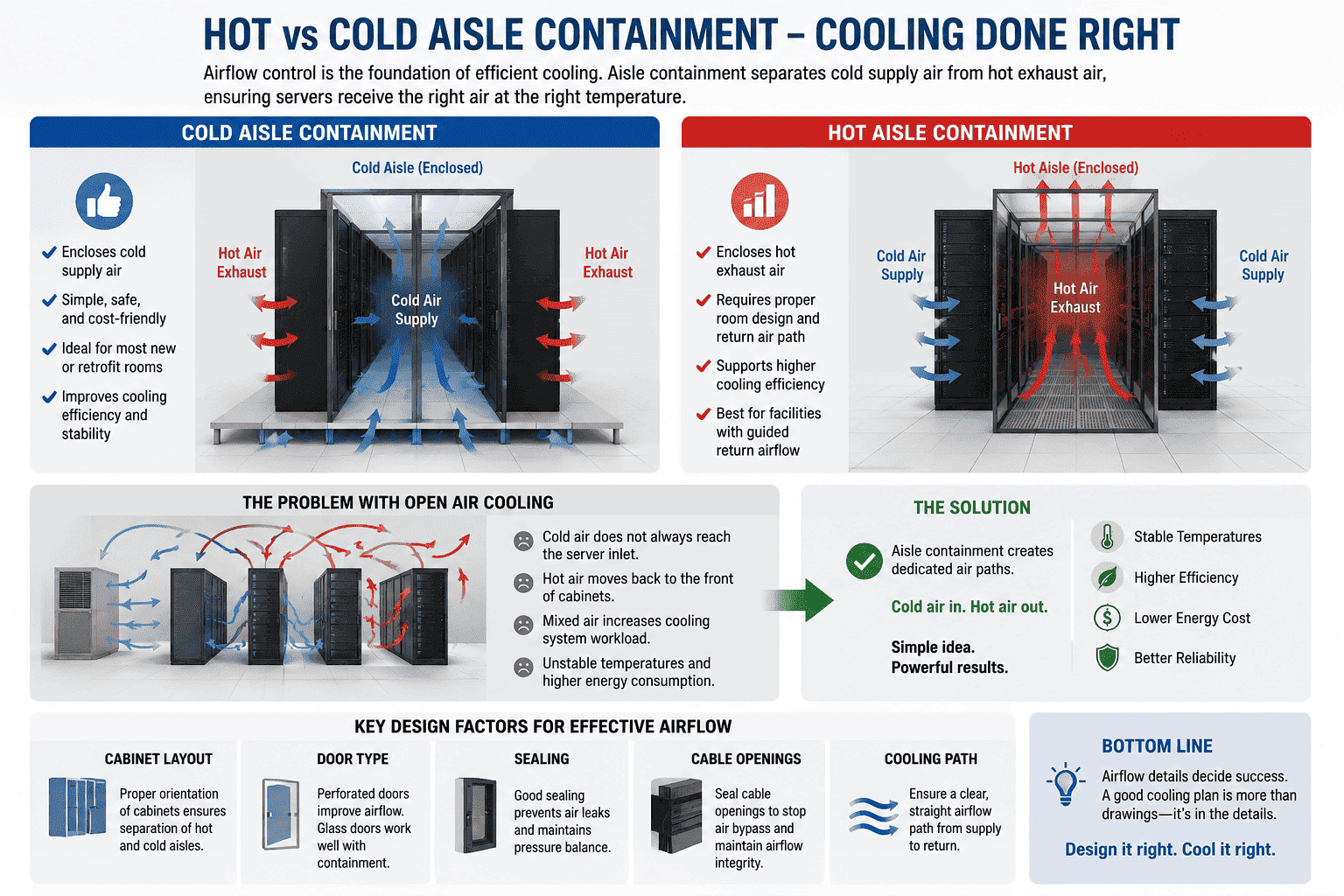
Aisle containment matters because it stops hot and cold air from mixing2. It sends cold air to IT equipment inlets and sends hot air back to cooling units. This improves cooling use, lowers energy waste, helps reduce PUE3, and supports stable long-term equipment operation.
I start with the real problem
I often meet customers who add more servers to an old room. The room once worked well, but the heat load becomes higher each year. The air conditioner still runs, yet some cabinets have hot spots. The reason is often not the cooling power only. The reason is also poor airflow control. Cold air and hot air mix in the same open space. The cooling unit sends air out, but the cold air escapes before it reaches the equipment inlet.
I use simple airflow logic
| Airflow problem | What I see in the room | What containment does |
|---|---|---|
| Cold air loss | Cold air moves to empty room space | It keeps cold air in the cold aisle |
| Hot air return | Hot exhaust reaches equipment front | It keeps hot air away from cold intake |
| Uneven temperature | One cabinet is cool, another is hot | It makes inlet air more stable |
| High energy cost | Cooling units run harder than needed | It improves cooling use |
| Equipment risk | Heat affects server life | It supports stable operation |
I see aisle containment as a basic part of a modern data center, not as a luxury add-on. A data center holds servers, switches, storage, power units, and many cables. These systems need stable temperature and humidity. When airflow is not controlled, the room may look normal, but the cabinet front may not get enough cold air. I prefer to solve this with cabinet layout and physical isolation first. I place cabinets face-to-face and back-to-back. I keep all IT equipment in a front-in and rear-out airflow mode. I use proper mesh doors, blanking panels, top panels, side sealing, and cable sealing. This makes cooling more direct. It also helps the cooling system work with less waste.
What is cold aisle containment and when do I choose it?
Cold aisle containment closes the cold air zone. I choose it when I need a practical, clear, and easy cooling upgrade for new or old rooms.
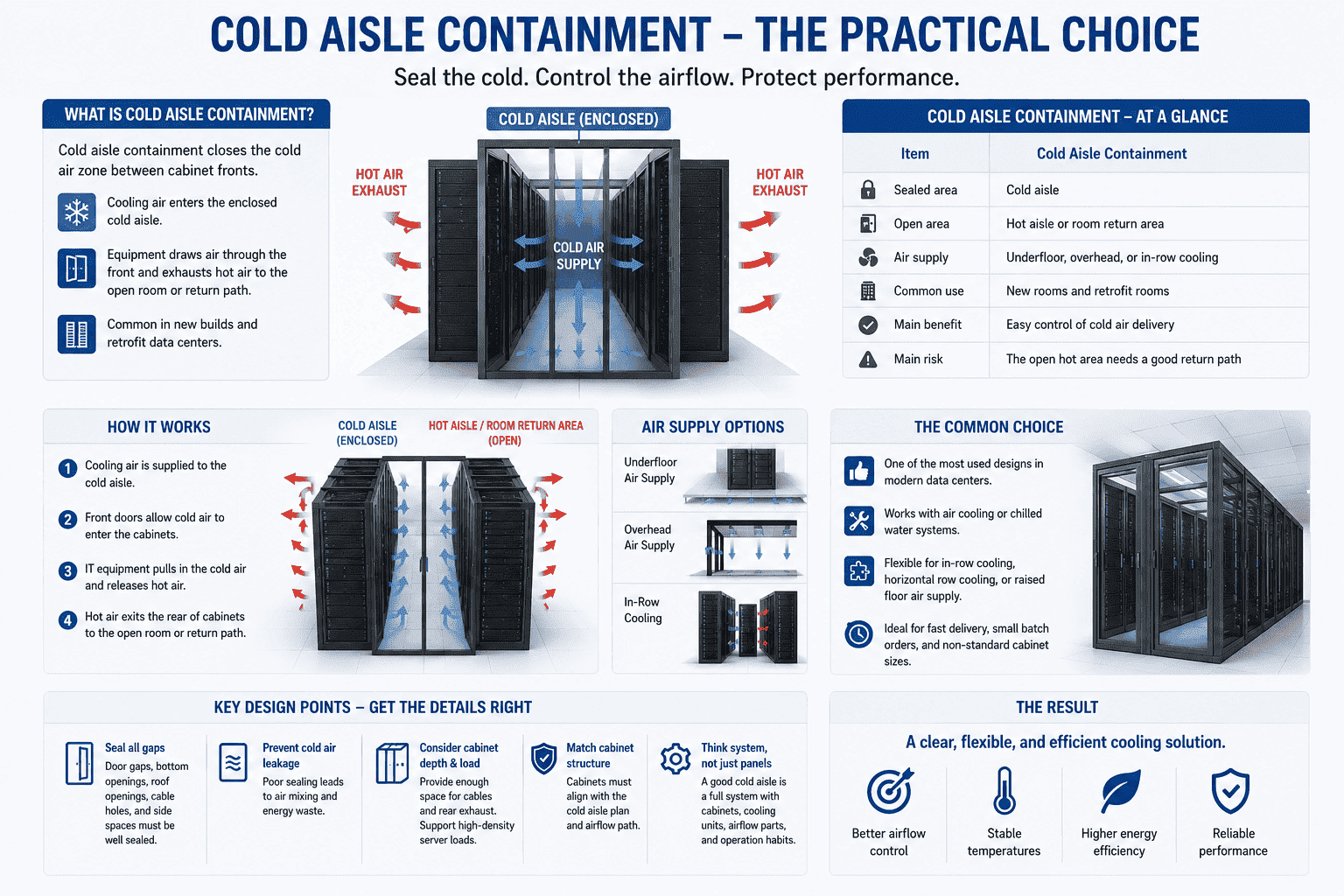
Cold aisle containment seals the space between cabinet fronts. Cooling air enters this closed cold aisle, then equipment draws the air through the front and exhausts hot air to the open room or return path.4 It is common in new builds and retrofit data centers.
I see cold aisle containment as the common choice
Cold aisle containment is one of the most used plans in modern room builds and retrofit projects.5 In this design, the front sides of two cabinet rows face each other. The cold aisle between them is sealed by doors, roof panels, side panels, and other sealing parts. The cooling system sends cold air into this area. The IT equipment takes cold air from the cabinet front. The hot air leaves from the rear of the cabinet into the wider room space or into a return air path.
I compare it in a simple way
| Item | Cold aisle containment |
|---|---|
| Sealed area | Cold aisle |
| Open area | Hot aisle or room return area |
| Air supply | Underfloor, overhead, or in-row cooling |
| Common use | New rooms and retrofit rooms |
| Main benefit | Easy control of cold air delivery |
| Main risk | The open hot area needs a good return path |
I like cold aisle containment because it is clear and flexible. It can work with air cooling or chilled water systems. It can also work with in-row cooling, horizontal row cooling, or raised floor air supply. I often use it when customers need fast delivery, smaller batch orders, or non-standard cabinet sizes. The cabinet structure must match the cold aisle plan. Door gaps, bottom openings, roof openings, cable holes, and side spaces must be sealed well. If these details are poor, cold air leaks out, and the design loses value. I also pay attention to cabinet depth and load capacity. High-density servers need enough space for cables and rear exhaust. A good cold aisle is not only a set of panels. It is a full system with cabinets, cooling units, airflow parts, and operation habits.
What is hot aisle containment and when do I choose it?
Hot air is dangerous when it moves freely. I choose hot aisle containment when I can capture exhaust air and return it directly to cooling units.
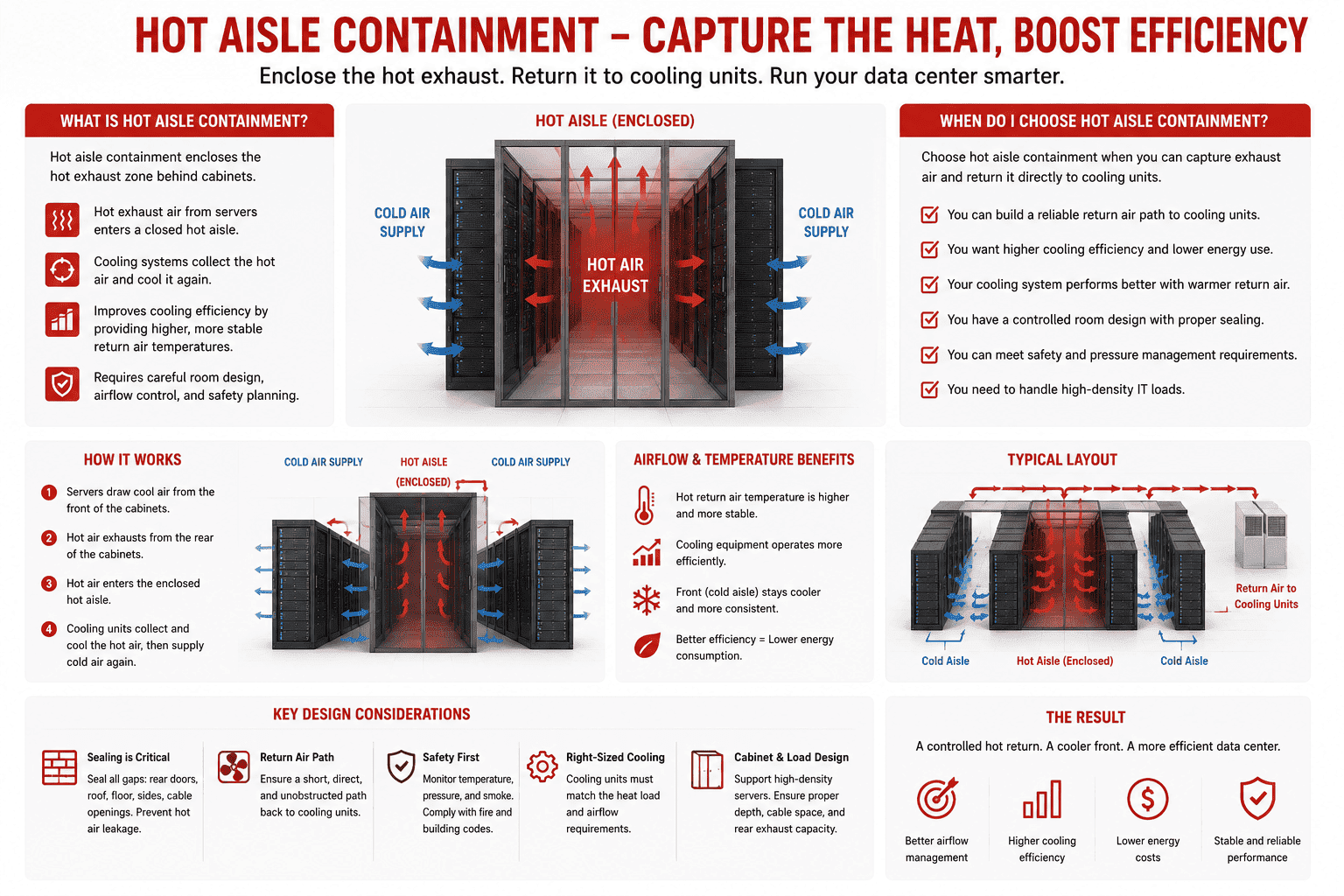
Hot aisle containment encloses the hot exhaust zone behind cabinets. It keeps hot air separate and sends it back to cooling equipment. This method can improve cooling efficiency because return air temperature becomes higher and more stable, but it needs careful room and safety design.
I focus on the hot return path
Hot aisle containment works from the opposite side. It seals the rear side of cabinet rows. The hot exhaust from servers enters a closed hot aisle. The cooling system then collects this hot air and cools it again. This can help the cooling equipment work better because it receives warmer return air.6 Many cooling systems perform well when the return air is hotter and more stable. The hot air does not spread across the room, so the front of the cabinets can stay cooler.
I check the limits before I use it
| Item | Hot aisle containment |
|---|---|
| Sealed area | Hot aisle |
| Open area | Cold supply room or cold area |
| Air return | Direct return to cooling units |
| Common use | Designed data centers with good return path |
| Main benefit | Strong hot air control |
| Main risk | Closed hot aisle can be very hot |
I choose hot aisle containment when the room has a strong plan for air return. The ceiling return, duct return, or cooling unit position must match the hot aisle. I also check worker safety. The hot aisle can become uncomfortable during operation. Access rules, emergency exits, lighting, fire systems, and maintenance space must be clear. I do not treat hot aisle containment as a simple cabinet accessory. It changes how people move in the room and how air moves in the room. It also needs good sealing. Rear doors, top covers, cable trays, and service openings must not create random leaks. When a project has higher density and a planned cooling system, hot aisle containment can be a strong choice. When a room is older and has many unknown air paths, I first review if cold aisle containment is safer and easier.
How do I compare hot aisle and cold aisle containment?
Many buyers ask for the “best” option. I tell them the best option depends on room layout, cooling source, load level, and upgrade plan.
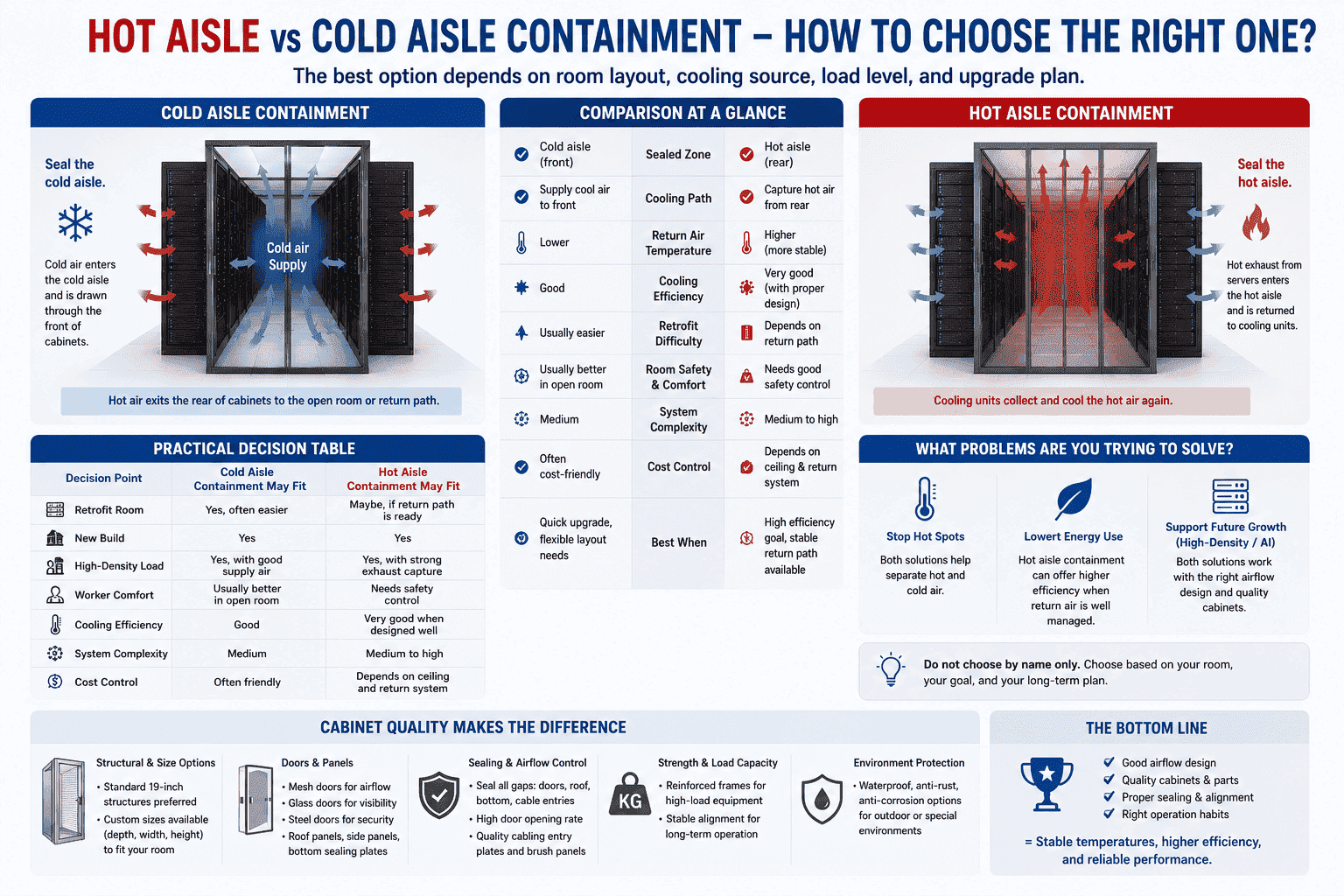
I compare hot and cold aisle containment by sealed zone, cooling path, room safety, retrofit difficulty, and energy target. Cold aisle containment is usually easier to retrofit.7 Hot aisle containment can give strong efficiency when the return air path is well designed.
I do not choose by name only
I first ask what problem the customer wants to solve. Some customers want to stop hot spots. Some customers want to lower energy use. Some customers want a cabinet system that can grow with AI servers and high-density storage. The answer may be different. Cold aisle containment is often easier when the room already has cooling air supply under the floor or in-row units. Hot aisle containment is often better when the room can guide exhaust air directly back to cooling units.
I use a practical decision table
| Decision point | Cold aisle containment may fit | Hot aisle containment may fit |
|---|---|---|
| Retrofit room | Yes, often easier | Maybe, if return path is ready |
| New build | Yes | Yes |
| High-density load | Yes, with good supply air | Yes, with strong exhaust capture |
| Worker comfort | Usually better in open room | Needs safety control |
| Cooling efficiency | Good | Very good when designed well |
| System complexity | Medium | Medium to high |
| Cost control | Often friendly | Depends on ceiling and return system |
I also look at cabinet quality. A poor cabinet can break a good airflow design. I use cabinet rows that can stand straight, connect cleanly, and keep alignment stable. I prefer standard 19-inch structures when possible. I also support custom sizes when the room needs special depth, width, or height. Mesh doors, glass doors, steel doors, roof panels, bottom sealing plates, and cable entry plates all affect airflow. For high-load cabinets, I add reinforced load-bearing structures. For outdoor or special rooms, I add waterproof, anti-rust, and anti-corrosion treatment. I learned that airflow design is not only about cooling machines. It is also about sheet metal accuracy, door opening rate, sealing quality, and long-term cabinet strength. The better these parts are, the easier it is to keep the cooling result stable.
What cabinet layout should I use for aisle containment?
A poor cabinet layout can ruin containment. I always start with face-to-face cold aisles and back-to-back hot aisles before I choose accessories.
The basic layout for aisle containment is face-to-face cabinet fronts and back-to-back cabinet rears. IT equipment should use front-in and rear-out airflow. This creates a cold aisle at the front and a hot aisle at the rear, which makes physical isolation possible.
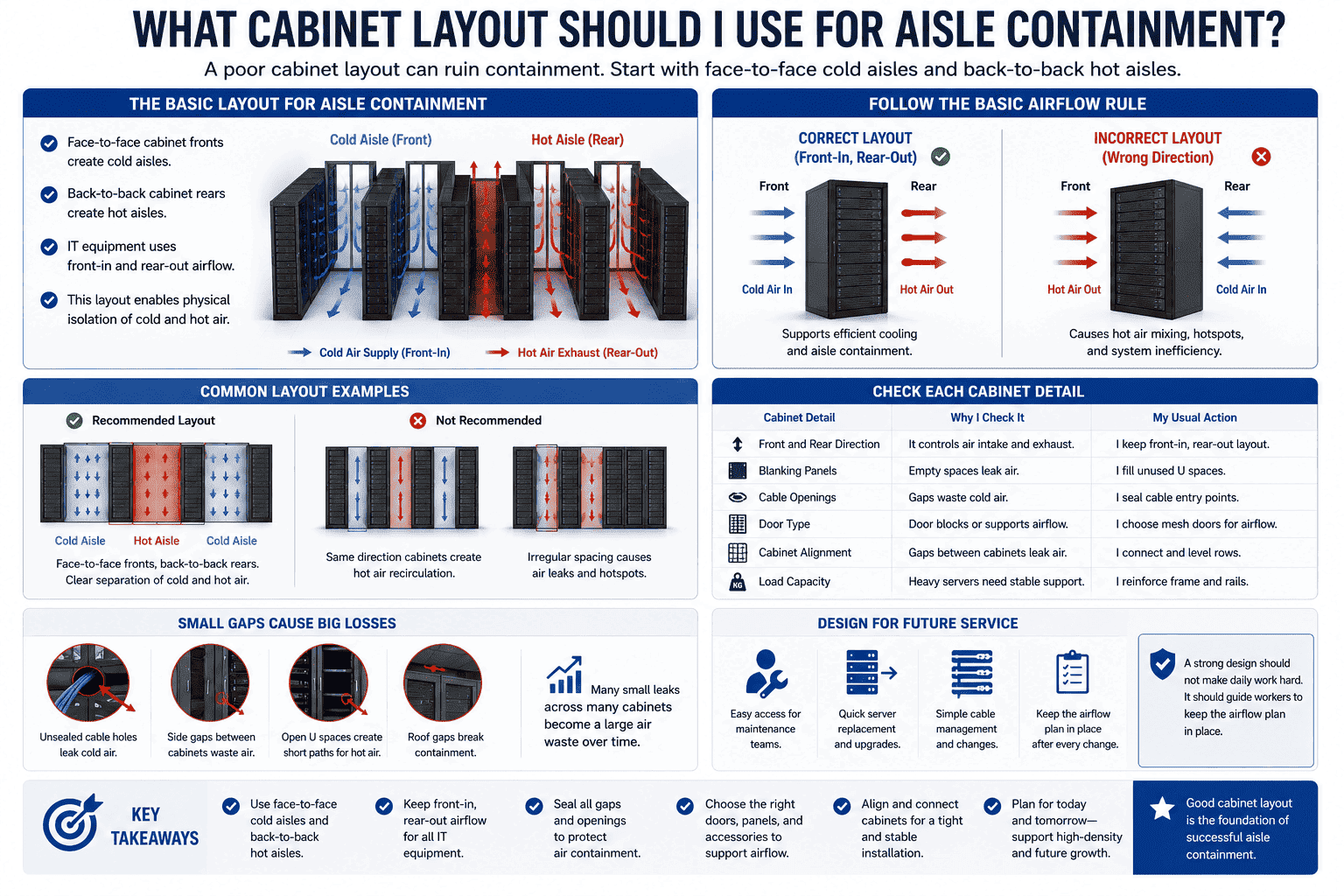
I follow the basic airflow rule
The cabinet layout is the base of hot and cold aisle isolation. I use face-to-face rows for cold aisles. I use back-to-back rows for hot aisles. This supports the normal server cooling path. Most IT equipment takes air from the front and exhausts air from the back.8 If equipment is installed in the wrong direction, it can damage the whole airflow plan. I also check if blank spaces in cabinets are covered. Empty rack units should not become short paths for hot air to move forward.9
I check each cabinet detail
| Cabinet detail | Why I check it | My usual action |
|---|---|---|
| Front and rear direction | It controls air intake and exhaust | I keep front-in, rear-out layout |
| Blanking panels | Empty spaces leak air | I fill unused U spaces |
| Cable openings | Gaps waste cold air | I seal cable entry points |
| Door type | Door blocks or supports airflow | I choose mesh doors for airflow |
| Cabinet alignment | Gaps between cabinets leak air | I connect and level rows |
| Load capacity | Heavy servers need stable support | I reinforce frame and rails |
In my factory work, I often see that small gaps cause big waste over time. A cable hole may look small, but many holes across many cabinets become a large air leak. A cabinet row may look straight from far away, but a small frame mismatch can leave a side gap. I care about these details because containment needs physical control. The cold air must stay where it is needed. The hot air must return in a fixed path. I also design for future service. Maintenance teams need to open doors, replace servers, move cables, and check power units. A strong design should not make daily work hard. It should guide workers to keep the airflow plan in place after every change.
How does aisle containment help reduce energy cost and equipment risk?
Energy waste grows when cooling air has no route. I use containment to reduce random airflow and help equipment run in a stable temperature range.
Aisle containment lowers energy cost by reducing air mixing and improving cooling unit efficiency. It also lowers equipment risk by keeping inlet temperatures stable, reducing hot spots, and supporting constant temperature and humidity control for servers, switches, and storage systems.
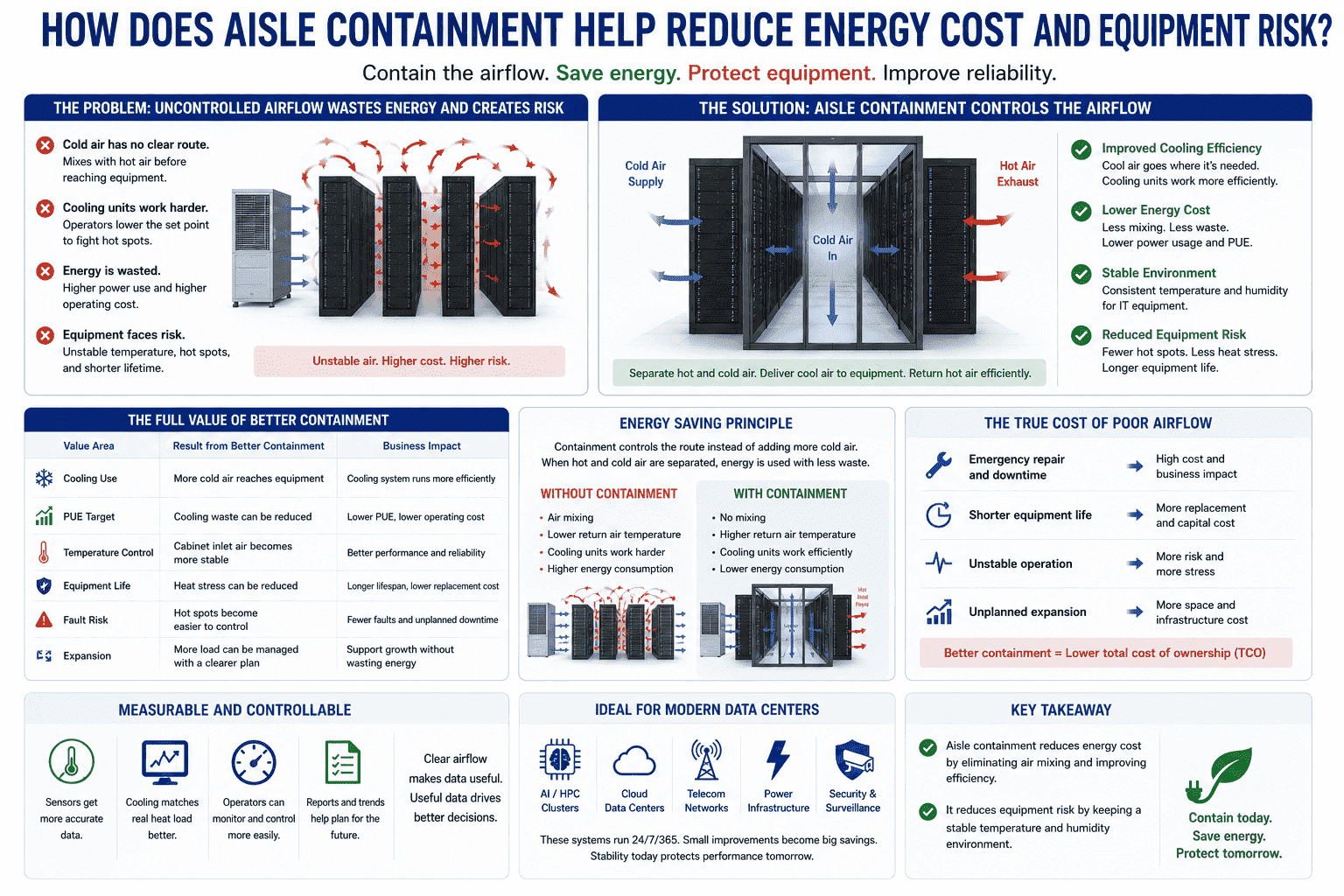
I connect cooling control with long-term cost
Cooling cost is not only the power used today. It is also the cost of unstable operation, emergency repair, shorter equipment life, and room expansion. When cold air does not reach the cabinet front, the cooling unit may run harder. Some operators lower the cooling set point to fight hot spots. This can waste even more energy. Aisle containment gives a better way. It controls the route instead of only adding more cold air.
I look at the full value
| Value area | Result from better containment |
|---|---|
| Cooling use | More cold air reaches equipment |
| PUE target | Cooling waste can be reduced |
| Temperature control | Cabinet inlet air becomes more stable |
| Equipment life | Heat stress can be reduced |
| Fault risk | Hot spots become easier to control |
| Expansion | More load can be managed with a clearer plan |
I do not promise one fixed saving number for every room. Each site has a different load, cooling system, and operation habit. I can say that the principle is reliable. When hot and cold air are separated, the cooling system uses energy with less waste. The operator can also measure and control the room better. Sensors can show more useful data because airflow is not random. This helps the team match cooling to real heat load. In AI, cloud, communication, power, and security projects, this matters a lot. These systems often run all day and all year. A small improvement can become a large saving over time. It can also prevent sudden failure. Stable temperature and humidity protect servers, switches, storage devices, and power systems.10 This is why I treat aisle containment as both an energy solution and a reliability solution.
-
Conclusion
I choose hot or cold aisle containment by airflow path, room limits, and cabinet quality. Good separation makes cooling stable, efficient, and ready for growth.
"How Researchers Are Driving Advances for Data Centers", https://newscenter.lbl.gov/2025/12/16/how-researchers-are-driving-advances-for-data-centers/. Institutional energy analyses report that expanding AI and cloud workloads increase data center electricity demand, which in turn raises the amount of heat that must be removed by cooling systems. Evidence role: general_support; source type: institution. Supports: A neutral source should document that AI, cloud, and networking workloads increase data center electricity use and associated cooling demand.. Scope note: This supports the general relationship between workload growth, power use, and heat rejection, but it may not quantify the heat increase for the specific facilities discussed in the article. ↩
"Move to a Hot Aisle/Cold Aisle Layout | ENERGY STAR", https://www.energystar.gov/products/data_center_equipment/16-more-ways-cut-energy-waste-data-center/move-hot-aislecold-aisle-layout. ASHRAE and data center air-management guidance describe aisle containment as a physical separation strategy that reduces mixing between cold supply air and hot server exhaust air. Evidence role: definition; source type: institution. Supports: A source should define aisle containment as a physical method for separating supply and exhaust air streams in data centers.. ↩
"[PDF] 2024 United States Data Center Energy Usage Report", https://eta-publications.lbl.gov/sites/default/files/2024-12/lbnl-2024-united-states-data-center-energy-usage-report_1.pdf. Energy-efficiency guidance for data centers links improved airflow management, including containment, to reduced cooling energy consumption and therefore potential improvement in PUE. Evidence role: mechanism; source type: institution. Supports: A source should connect airflow management and containment with lower cooling energy use and improved PUE.. Scope note: The effect on PUE is site-dependent and cannot be inferred as a fixed reduction without facility-specific measurements. ↩
"Move to a Hot Aisle/Cold Aisle Layout", https://www.energystar.gov/products/data_center_equipment/16-more-ways-cut-energy-waste-data-center/move-hot-aislecold-aisle-layout. Technical guidance defines cold aisle containment as enclosing the supply-air aisle so that front-intake IT equipment receives conditioned air before exhausting warmed air to the rear or return-air path. Evidence role: definition; source type: institution. Supports: A source should define cold aisle containment and describe the typical airflow path through front-intake, rear-exhaust IT equipment.. ↩
"Move to a Hot Aisle/Cold Aisle Layout | ENERGY STAR", https://www.energystar.gov/products/data_center_equipment/16-more-ways-cut-energy-waste-data-center/move-hot-aislecold-aisle-layout. Data center thermal-management guidance commonly presents cold aisle containment as an established airflow-control method applicable to both new facilities and retrofit projects. Evidence role: expert_consensus; source type: institution. Supports: A source should show that cold aisle containment is a common airflow-management practice for new and existing data centers.. Scope note: This supports common professional use but may not provide a quantified market share. ↩
"Move to a Hot Aisle/Cold Aisle Layout | ENERGY STAR", https://www.energystar.gov/products/data_center_equipment/16-more-ways-cut-energy-waste-data-center/move-hot-aislecold-aisle-layout. Data center cooling studies note that hot aisle containment can deliver warmer and more uniform return air to cooling units, which can improve heat-transfer effectiveness and cooling-system operation under suitable designs. Evidence role: mechanism; source type: research. Supports: A source should explain that separating hot exhaust air can raise return-air temperature and improve the effectiveness or capacity of some cooling systems.. Scope note: The benefit depends on the cooling architecture and control strategy, so the source would not prove improved performance for every installation. ↩
"Hot-Aisle vs. Cold-Aisle Containment for Data Centers ...", https://www.academia.edu/35976033/Hot_Aisle_vs_Cold_Aisle_Containment_for_Data_Centers_Revision_1. Data center design guidance often treats cold aisle containment as a practical retrofit option because it can be added around existing supply-air aisles, while hot aisle containment may require a more deliberate return-air path. Evidence role: expert_consensus; source type: institution. Supports: A source should compare cold and hot aisle containment and explain why cold aisle containment is often simpler in existing rooms.. Scope note: The comparison is conditional; some existing facilities may already have return-air infrastructure that makes hot aisle containment feasible. ↩
"ASHRAE Thermal Guidelines", https://datacenters.lbl.gov/sites/default/files/ASHRAE%20Thermal%20Guidelines_%20SVLG%202015.pdf. Data center thermal guidelines generally assume rack-mounted IT equipment with front-air intake and rear-air exhaust, forming the basis for hot-aisle/cold-aisle layouts. Evidence role: expert_consensus; source type: institution. Supports: A source should document that front-in, rear-out airflow is the typical design basis for rack-mounted data center IT equipment.. Scope note: The source supports the dominant convention, while some network or specialized equipment may use side-to-side or other airflow patterns. ↩
"[PDF] Data Center Airflow Management Retrofit", https://datacenters.lbl.gov/sites/default/files/airflow-doe-femp.pdf. Data center air-management guidance recommends blanking unused rack spaces because open rack units can permit hot exhaust air to recirculate to equipment inlets. Evidence role: mechanism; source type: government. Supports: A source should explain that blanking panels reduce recirculation through unused rack openings and improve separation of supply and exhaust air.. ↩
"ASHRAE Thermal Guidelines", https://datacenters.lbl.gov/sites/default/files/ASHRAE%20Thermal%20Guidelines_%20SVLG%202015.pdf. ASHRAE thermal guidelines for data processing environments specify recommended temperature and humidity ranges for IT equipment, reflecting the role of controlled environmental conditions in reliable operation. Evidence role: expert_consensus; source type: institution. Supports: A source should state recommended temperature and humidity ranges for IT equipment and explain why environmental control matters for reliable operation.. Scope note: The source supports environmental control as a reliability practice, but it does not by itself quantify failure reduction for the specific devices in the article. ↩
