
Fans, Panels & Trays?

-
Why are fans the core part of cabinet cooling?
Heat builds up inside a closed cabinet every day. I use fans because [slow heat can cause lag, shutdowns, and equipment failure](https://www.nist.gov/programs-projects/cardiac-device-reliability)11.
Fans are the main power source of cabinet airflow. I install fans to [speed up air exchange between the inside and outside of the cabinet](https://www.purdue.edu/freeform/me418/wp-content/uploads/sites/30/2024/09/ME-418-Heat-Transfer_Completed.pdf)22. They help push hot air out and bring cooler air into the working space.
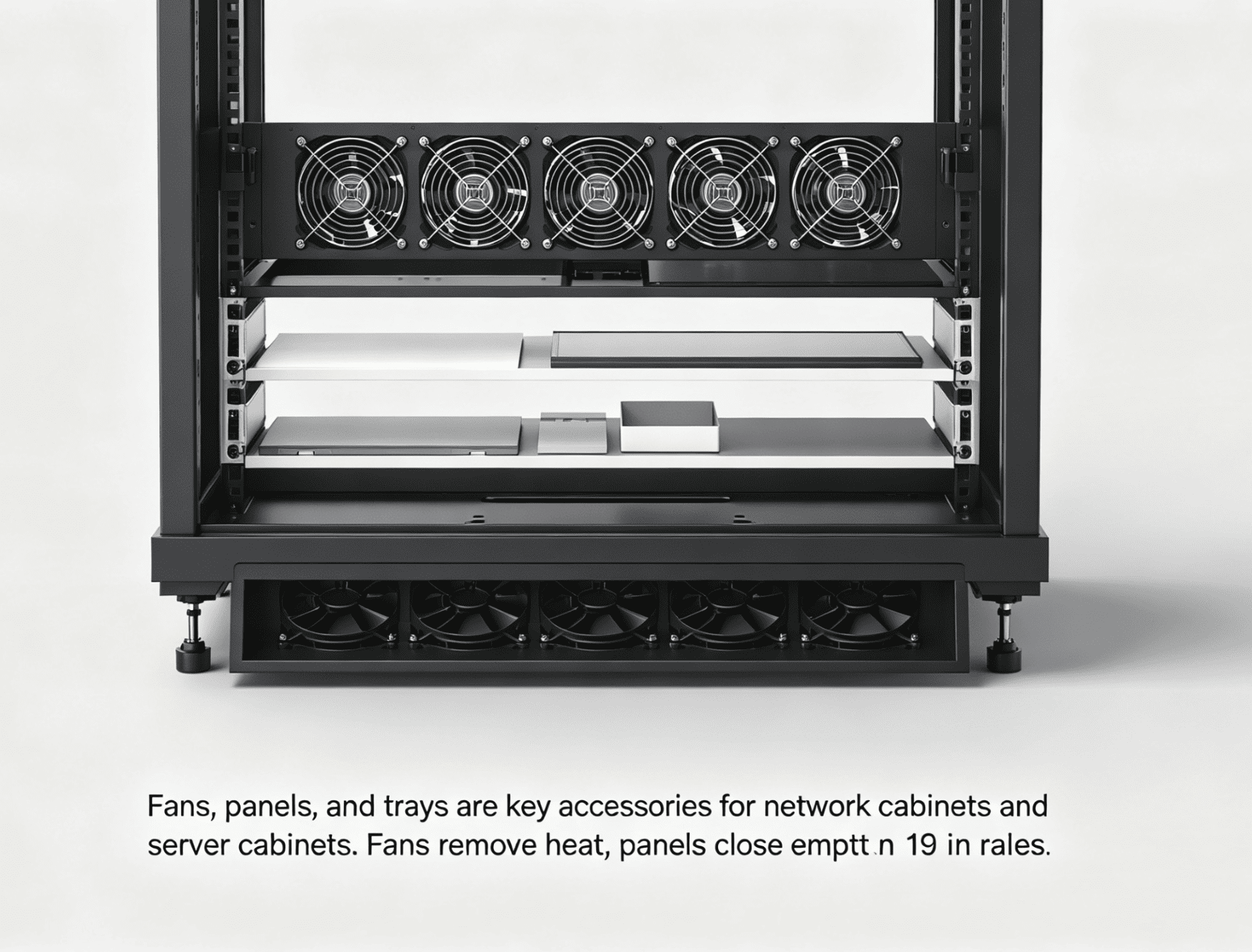
I always start with heat when I design a network cabinet or a server cabinet. [Network switches, routers, servers, power units, and security devices all create heat during operation.](https://www.congress.gov/crs-product/R48646)33 The heat may look small at first. The heat becomes serious when the cabinet runs for many hours in a closed space. I have seen equipment freeze, restart, or slow down when hot air stays inside the cabinet.
I use top fans, rear fans, or 19-inch fan panels based on the cabinet structure. A top fan pulls hot air upward because hot air rises.4 A 19-inch fan panel can help move air across the equipment area. In some server cabinets, I also use temperature-control fan units. These units start or speed up when the inner temperature rises.
| Fan position | How I use it | Main purpose |
|---|---|---|
| Top fan | I install it on the roof of the cabinet | I exhaust rising hot air |
| 19-inch fan panel | I install it on the front or rear mounting rails | I increase direct airflow |
| Rear fan | I use it when back airflow is needed | I move heat away from devices |
| Temperature-control fan | I use it in high-density cabinets | I control cooling by temperature |
I do not treat a fan as only a small electric part. I treat it as the active cooling engine of the whole cabinet. A strong cabinet body still needs moving air. Good steel, good coating, and good structure help, but airflow decides if the equipment can work in a stable temperature range5.
How do I choose the right number of fans for a cabinet?
Too few fans leave heat inside the cabinet. Too many fans may waste cost and power. I choose [fan quantity by cabinet size and equipment density](https://www.nvent.com/sites/default/files/acquiadam_assets/2021-02/Spec-00488.pdf?srsltid=ARcRdnrv4axTScJIPbV7HVhQPQBVpHbipLIUrsEG9PUnOAN7RaHgcEWs)64.
For a small wall-mounted cabinet, I usually choose 1 to 2 fans. For a large floor-standing cabinet, I often choose 4 or more fans. For high-density server cabinets, I add more top fan groups and temperature-control fans.
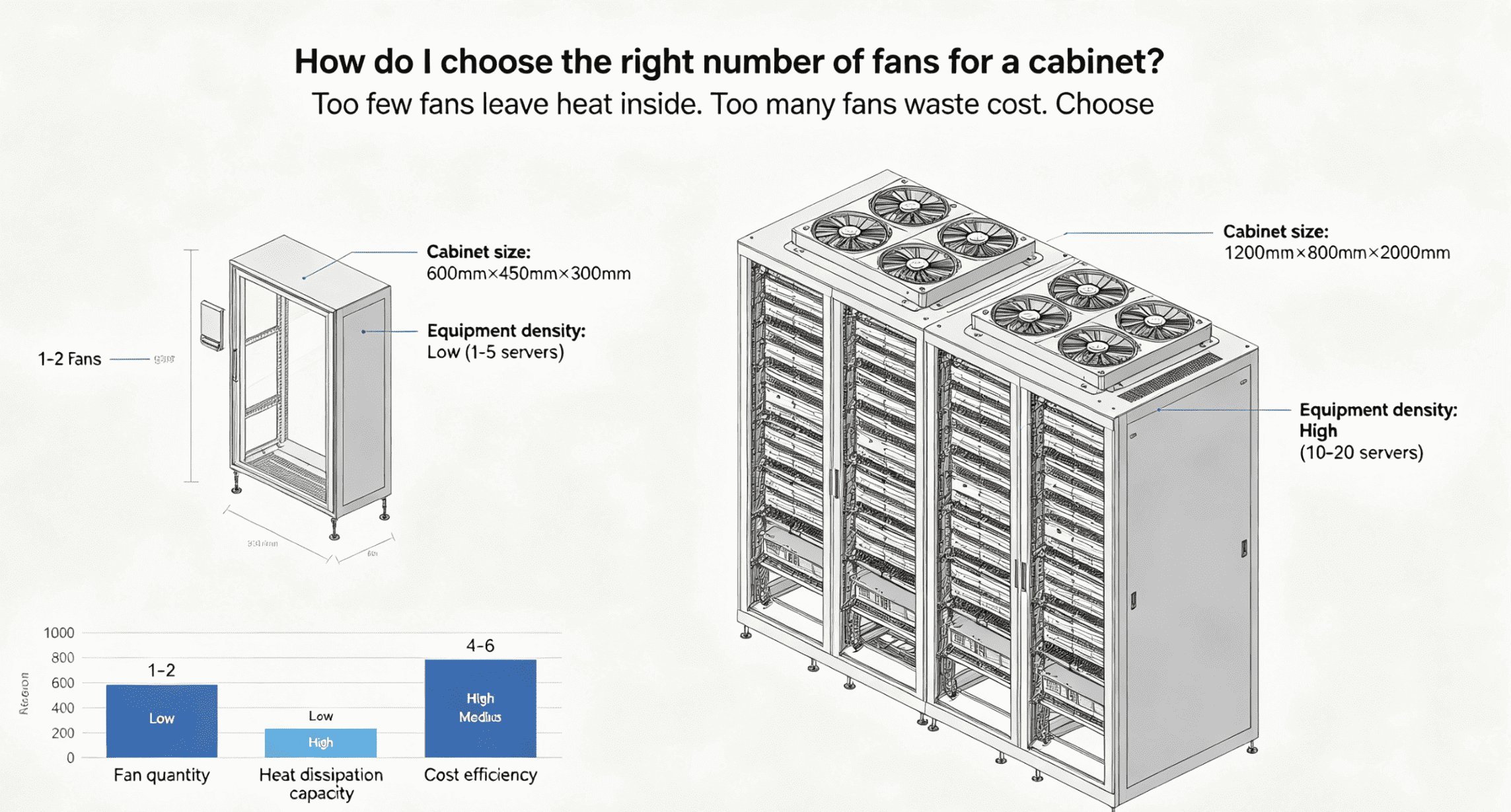
I do not choose fan quantity by habit only. I look at the cabinet height, cabinet depth, door type, cable density, and equipment load. A small wall-mounted cabinet may hold a switch, a router, and a patch panel. This type of cabinet often needs only one or two fans. A large floor-standing cabinet may hold many active devices. This type of cabinet needs stronger exhaust.
A high-density server cabinet is more demanding.7 Servers generate more heat than normal passive parts.5 If the server cabinet has many devices stacked close together, air must move quickly. I often suggest several top fans with temperature control. This helps bring the full cabinet environment down to a safer temperature.
| Cabinet type | My usual fan choice | My reason |
|---|---|---|
| Small wall-mounted cabinet | 1-2 fans | I only need basic exhaust |
| Medium network cabinet | 2-4 fans | I need steady air exchange |
| Large floor-standing cabinet | 4 or more fans | I need higher exhaust volume |
| High-density server cabinet | Multiple top fan groups | I need stronger heat control |
| Outdoor industrial cabinet | Fans plus protection design | I need cooling and environmental safety |
I also check the installation space before I confirm the fan plan. Some cabinets have prepared fan holes on the top. Some cabinets need a 19-inch fan panel. [Some outdoor cabinets need waterproof and dustproof design.](https://en.wikipedia.org/wiki/IP_code)86 In our factory work, I often adjust fan holes, cable holes, and inner layout together. This makes cooling easier and keeps the structure clean.
Why do panels matter after equipment installation?
Empty rack gaps may look harmless, but they can make the cabinet messy. I use panels to make the cabinet cleaner, safer, and easier to manage.
Cabinet panels cover unused rack spaces after equipment installation. I use them to improve appearance, block dust and insects, guide airflow, and hide messy cables or small parts behind the front plane.
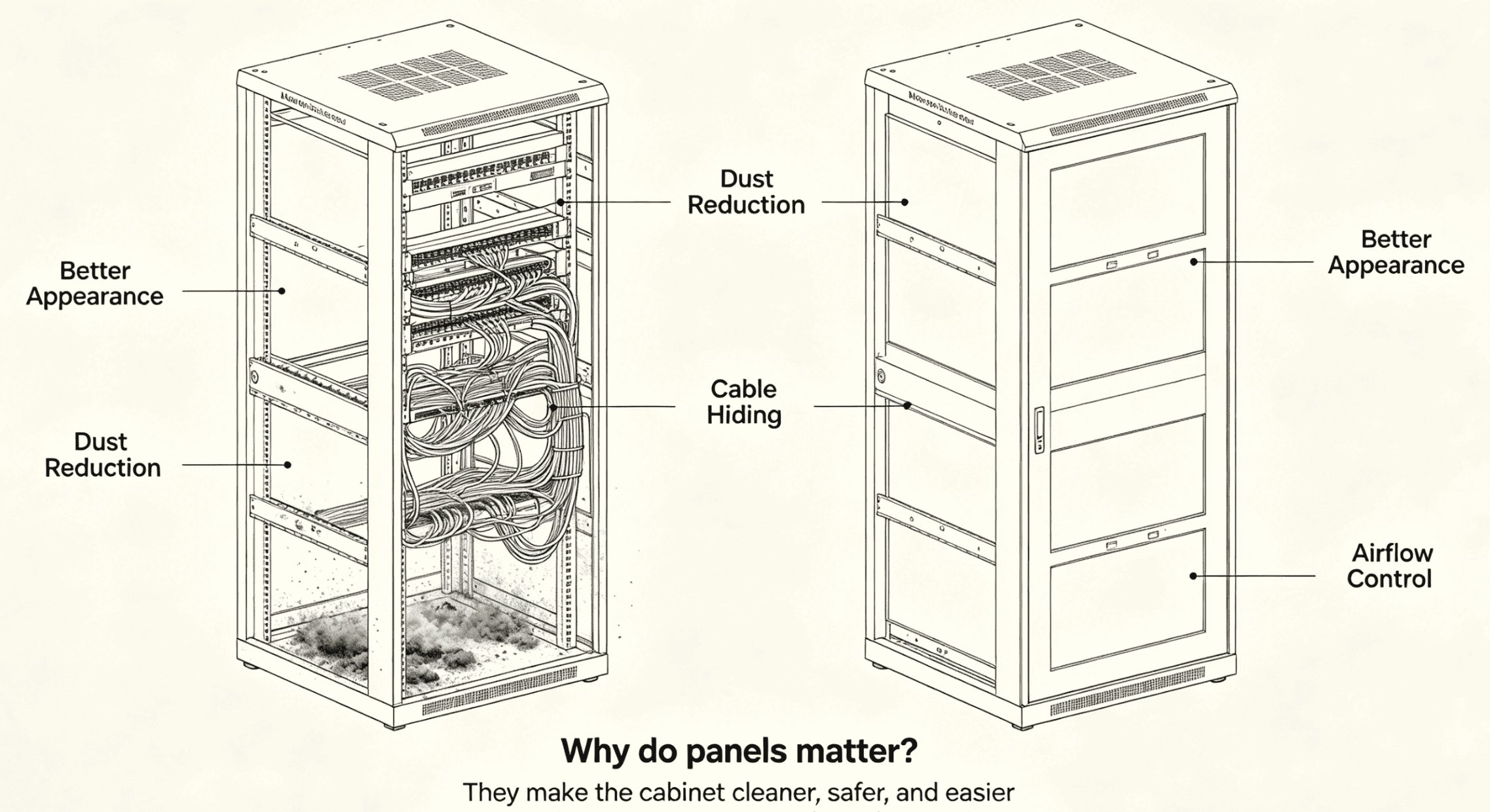
I often see customers think panels are only for appearance. I understand that idea because a panel does make the cabinet look complete. After equipment is installed, many gaps can remain between devices. These gaps expose cables, small devices, power adapters, and empty mounting areas. A front panel hides this messy view. The cabinet then looks more professional in a data room, monitoring room, or office.
But I do not use panels only to “cover ugly spaces.” I use them because they also help protect the cabinet interior. [Empty gaps allow dust to enter more easily.](https://www.akcp.com/2021/07/10/how-blanking-panels-help-managing-the-airflow/)97 In some regions, insects and small debris may also enter the cabinet. A panel can reduce this risk. In a server cabinet, [blank panels can also help control airflow by closing unused front spaces](https://www.energystar.gov/products/data_center_equipment/16-more-ways-cut-energy-waste-data-center/manage-airflow-cooling-efficiency)108. This helps cold air pass through the equipment path instead of escaping through empty rack positions.
| Panel function | What I gain from it |
|---|---|
| Better appearance | I make the cabinet front look complete |
| Dust reduction | I reduce open gaps on the cabinet face |
| Insect blocking | I protect the inside from small pests |
| Cable hiding | I keep the visible area cleaner |
| Airflow control | I reduce wrong airflow paths |
I choose panels as part of cabinet finishing. A cabinet can have strong load capacity and good coating, but the final look still depends on details. I believe panels are one of the simplest ways to improve both appearance and function.
Which panel types and materials should I use?
One panel style cannot solve every cabinet need. I choose different panels for covering, ventilation, fans, and cable entry.
Common cabinet panels include blank panels, vented panels, fan panels, and cable entry panels. I choose screwless or screw-fixed installation. I also choose flame-retardant plastic or painted cold-rolled steel based on project needs.
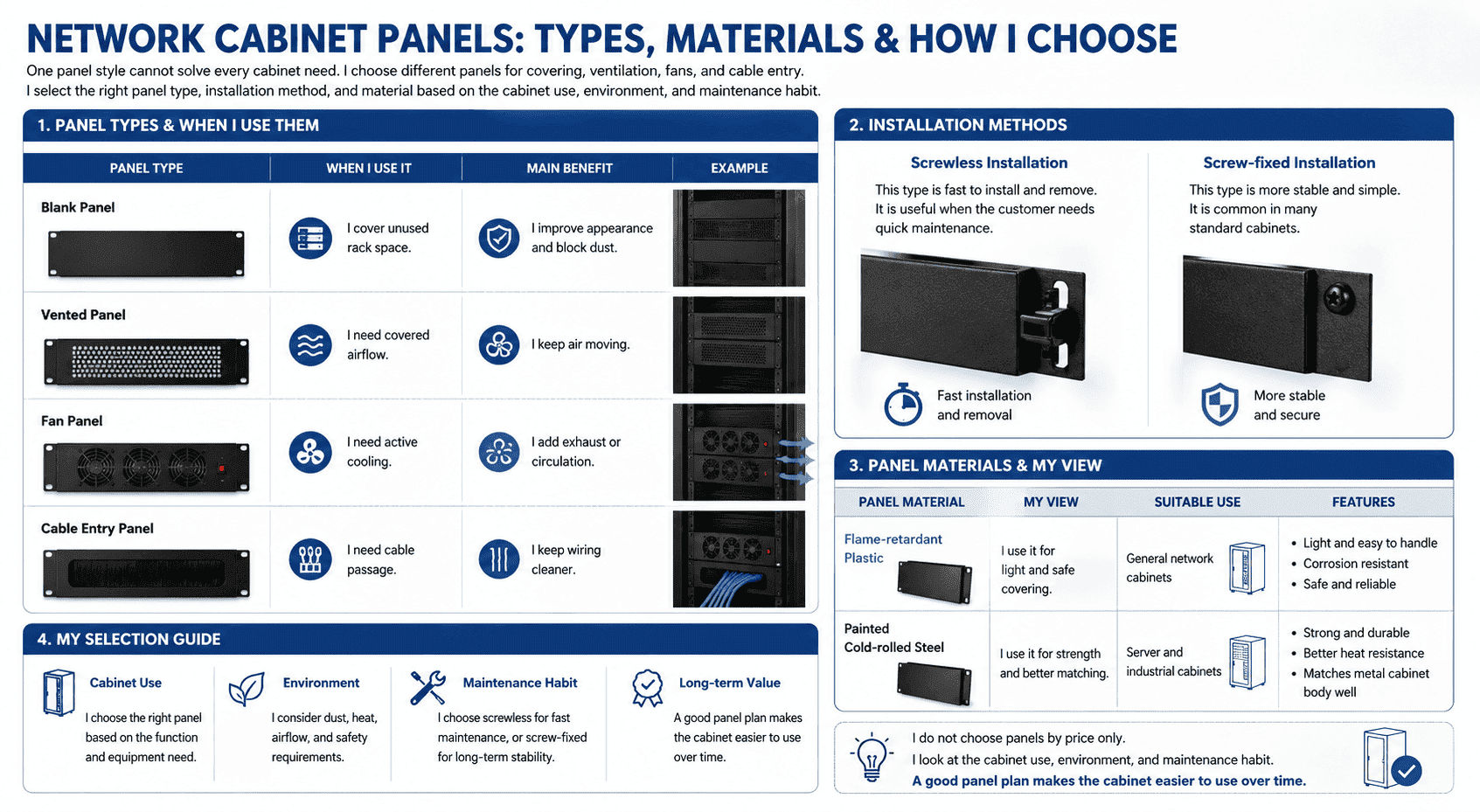
I use several panel types in different cabinet designs. A blank panel is the most basic type. I use it to cover unused rack space. A vented panel has holes or mesh. I use it when I still need airflow through the covered space. A fan panel includes fans. I use it when the cabinet needs extra forced airflow at a 19-inch position. A cable entry panel allows cables to pass in a cleaner way.
I also pay attention to the installation method. Some panels use screwless installation. This type is fast to install and remove. It is useful when the customer needs quick maintenance. Some panels use screws. This type is more stable and simple. It is common in many standard cabinets.
| Panel type | When I use it | Main benefit |
|---|---|---|
| Blank panel | I cover unused rack space | I improve appearance and block dust |
| Vented panel | I need covered airflow | I keep air moving |
| Fan panel | I need active cooling | I add exhaust or circulation |
| Cable entry panel | I need cable passage | I keep wiring cleaner |
I also choose the material by use case. Flame-retardant plastic panels are light and easy to handle.11 Painted cold-rolled steel panels are stronger and match the metal cabinet body well. I often choose steel panels for industrial, server, and heavier project environments. I may use plastic panels when the project needs lighter accessories and easy handling.
| Panel material | My view | Suitable use |
|---|---|---|
| Flame-retardant plastic | I use it for light and safe covering | General network cabinets |
| Painted cold-rolled steel | I use it for strength and better matching | Server and industrial cabinets |
I do not choose panels by price only. I look at the cabinet use, environment, and maintenance habit. A good panel plan makes the cabinet easier to use over time.
How do trays improve cabinet space and equipment safety?
Small and non-standard devices often cannot mount on 19-inch rails. I use trays to support them safely and use cabinet height better.
Cabinet trays, also called shelves or partitions, carry equipment that cannot be directly fixed to the rack.9 I use trays for devices smaller than 19 inches, non-standard equipment, and small units that need stable support.
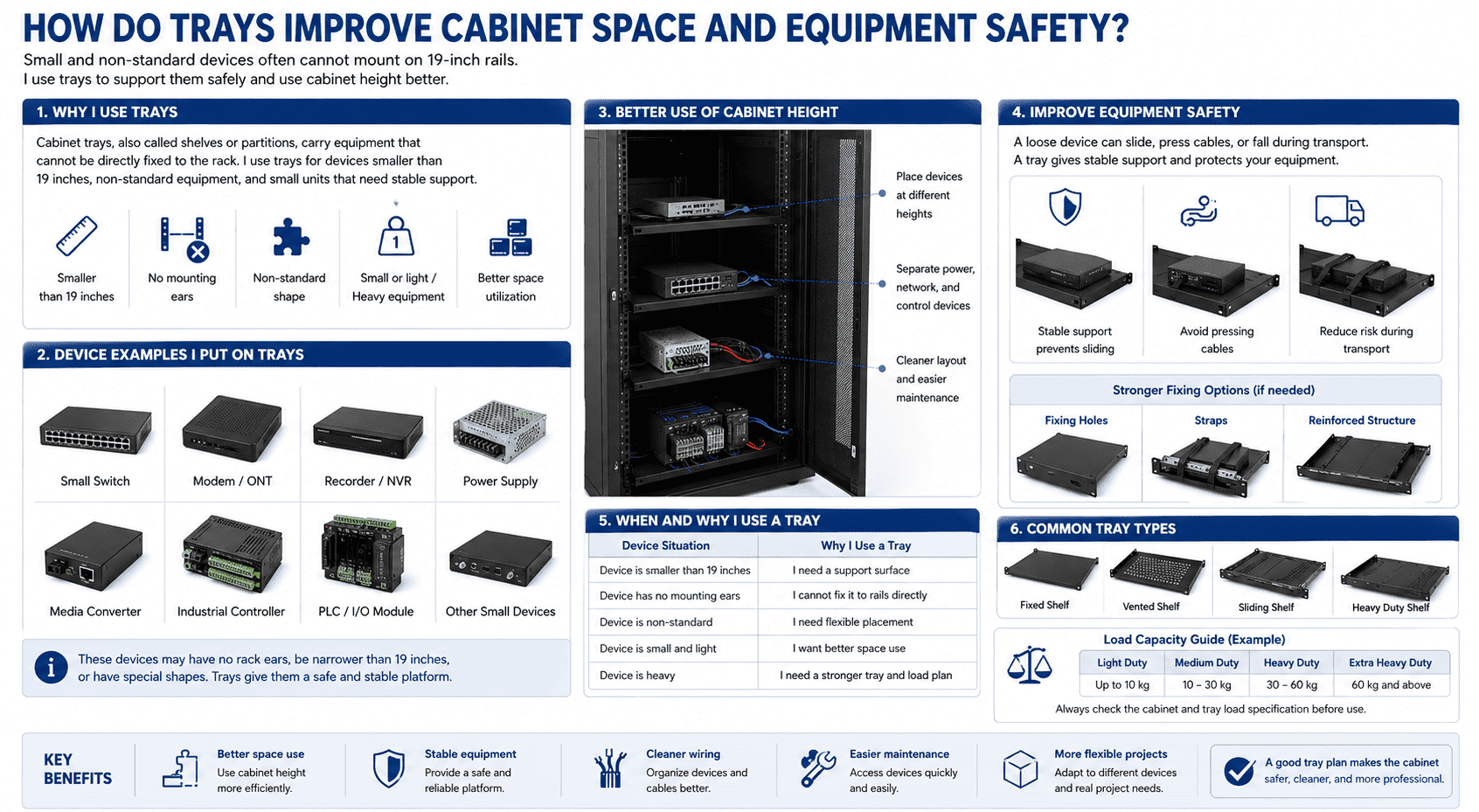
I treat trays as load-bearing accessories. [Many cabinets are designed around 19-inch mounting rails.](https://en.wikipedia.org/wiki/19-inch_rack)1210 Standard devices can mount directly by ears and screws. But real projects are not always standard. A customer may install a small switch, modem, recorder, power supply, converter, industrial controller, or other small device. These devices may have no rack ears. Some devices are narrower than 19 inches. Some devices have special shapes. I use trays to give these devices a safe platform.
A tray also helps me use cabinet height better. Without trays, small devices may sit on the cabinet bottom. This wastes space and makes wiring hard. With trays, I can place devices at different heights. I can separate power devices, network devices, and control devices. The cabinet becomes cleaner and easier to maintain.
| Device situation | Why I use a tray |
|---|---|
| Device is smaller than 19 inches | I need a support surface |
| Device has no mounting ears | I cannot fix it to rails directly |
| Device is non-standard | I need flexible placement |
| Device is small and light | I want better space use |
| Device is heavy | I need a stronger tray and load plan |
I also think about safety. A loose device can slide, press cables, or fall during transport. A tray gives stable support. In some projects, I may add fixing holes, straps, or reinforced structure. This helps protect the device and keeps the cabinet more reliable.
How do I match tray thickness and cabinet load?
A weak tray may bend under equipment weight.11 I choose tray thickness by load, depth, device size, and cabinet height.
Common tray thickness options include 0.8mm, 1.0mm, 1.2mm, 1.5mm, 1.8mm, and 2.0mm. I use thicker trays for heavier equipment, deeper cabinets, and stronger load requirements.
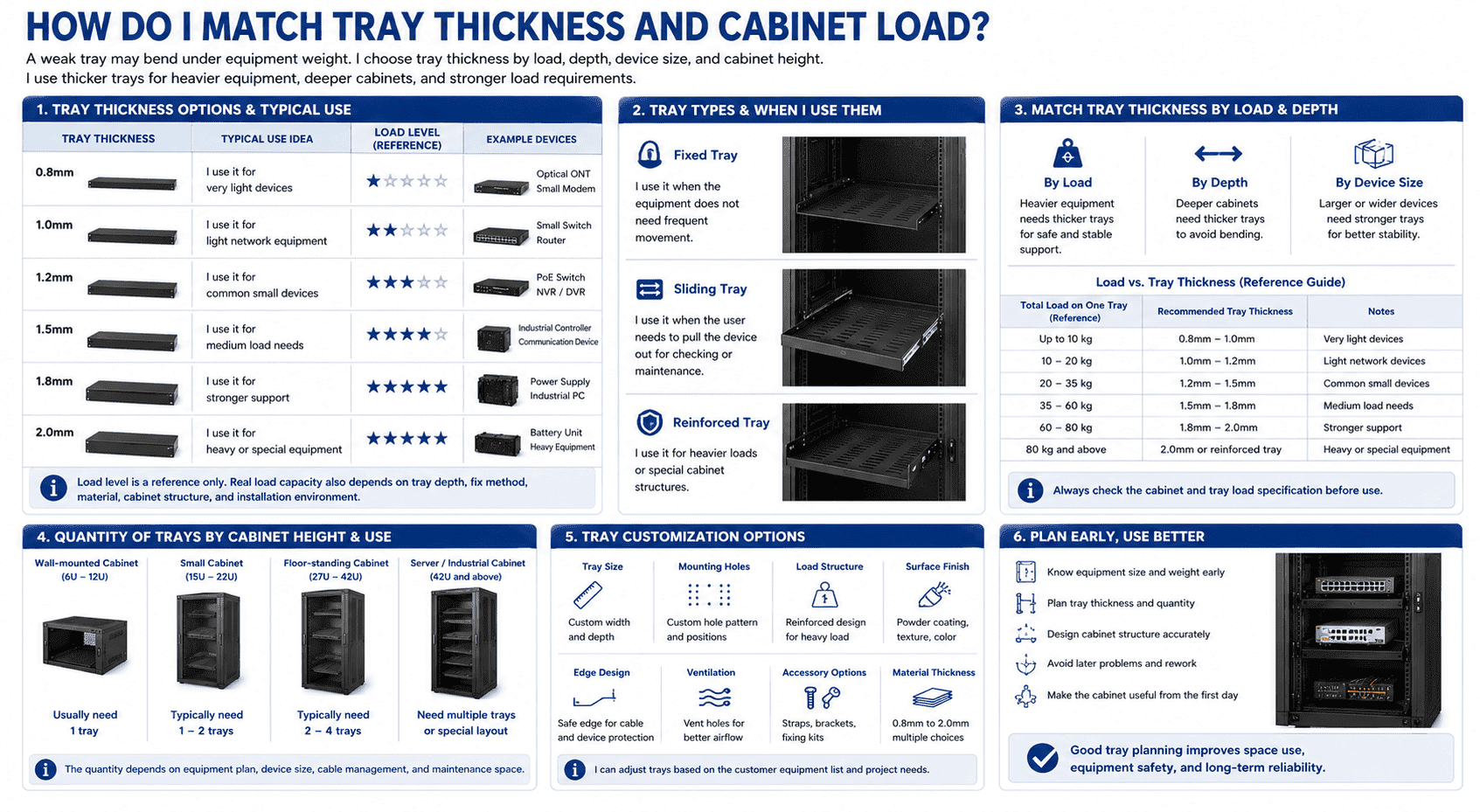
I choose tray thickness with care because the tray carries real weight every day. A thin tray may be enough for light network devices. A thicker tray is better for heavy industrial equipment, power units, and deep cabinets. I do not want the tray to bend after long use. I also do not want equipment to tilt or press against cables.
The tray type also matters. Some trays are fixed trays. I use them when the equipment does not need frequent movement. Some trays are sliding trays. I use them when the user needs to pull the device out for checking or maintenance. Some trays are reinforced trays. I use them for heavier loads or special cabinet structures.
| Tray thickness | My typical use idea |
|---|---|
| 0.8mm | I use it for very light devices |
| 1.0mm | I use it for light network equipment |
| 1.2mm | I use it for common small devices |
| 1.5mm | I use it for medium load needs |
| 1.8mm | I use it for stronger support |
| 2.0mm | I use it for heavy or special equipment |
I also decide the quantity of trays by cabinet height and equipment plan. A small wall-mounted cabinet may need one tray. A floor-standing cabinet may need several trays. A server cabinet or industrial control cabinet may need a special tray layout. In our customization work, I can add trays based on the customer equipment list. I can also adjust tray size, mounting holes, depth, load structure, and surface finish.
I believe tray planning should happen before production when possible. If I know the equipment size and weight early, I can design the cabinet more accurately. This avoids later problems and makes the cabinet more useful from the first day.
How do I combine fans, panels, and trays in one cabinet plan?
A cabinet with many parts can still fail if the parts do not work together. I match fans, panels, and trays as one system.
I combine fans for airflow, panels for gap control, and trays for equipment support. I check heat, dust, wiring, load, and maintenance access before I confirm the final accessory plan.
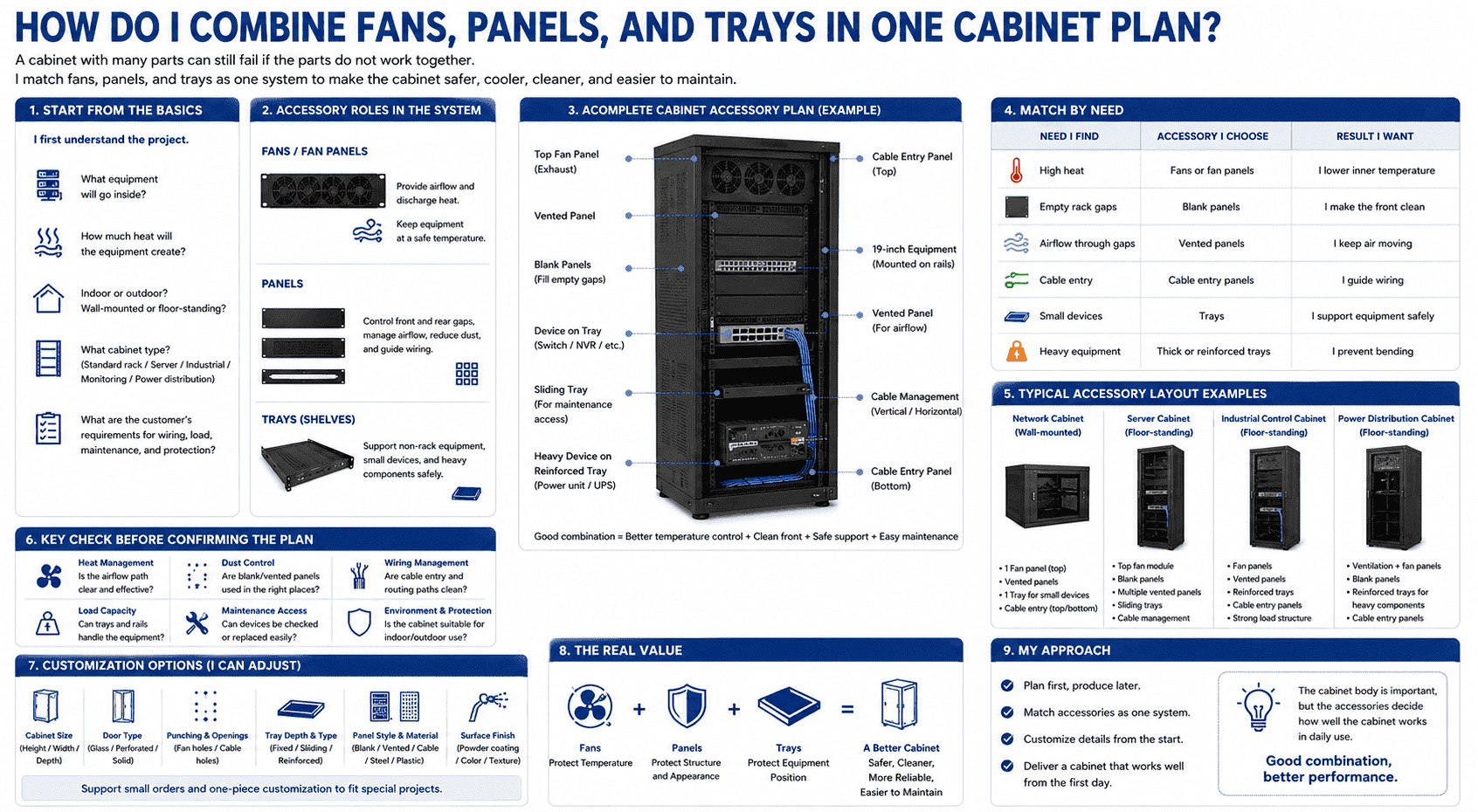
I do not select fans, panels, and trays one by one without a plan. I first ask what equipment will go inside the cabinet. I check if the equipment is active or passive. I check if the cabinet will be indoor, outdoor, wall-mounted, or floor-standing. I check if the customer needs a standard 19-inch rack, a server cabinet, an industrial control cabinet, a monitoring console, or a power distribution cabinet. Each use has a different accessory plan.
If the equipment creates much heat, I increase fans and maybe add vented panels. If the front has many empty gaps, I use blank panels. If cables need a clean path, I use cable entry panels. If the devices cannot mount on rails, I add trays. If the cabinet is outdoor, I also think about waterproof, anti-rust, and protection design.
| Need I find | Accessory I choose | Result I want |
|---|---|---|
| High heat | Fans or fan panels | I lower inner temperature |
| Empty rack gaps | Blank panels | I make the front clean |
| Airflow through gaps | Vented panels | I keep air moving |
| Cable entry | Cable panels | I guide wiring |
| Small devices | Trays | I support equipment safely |
| Heavy equipment | Thick or reinforced trays | I prevent bending |
In my factory work, I can customize these details from the start. I can adjust the cabinet size, door type, punching, fan opening, tray depth, panel style, and coating. I can support small orders and one-piece customization. This is useful when a customer has a special project and cannot use a fixed standard cabinet.
I think this is the real value of flexible cabinet manufacturing. The cabinet body is important, but the accessories decide how well the cabinet works in daily use. Fans protect the temperature. Panels protect the structure and appearance. Trays protect the equipment position. When I combine them well, the cabinet becomes safer, cleaner, and easier to maintain.
Conclusion
I choose fans, panels, and trays early because these small accessories decide cabinet cooling, cleanliness, space use, and equipment safety.
"Cardiac Device Reliability | NIST", https://www.nist.gov/programs-projects/cardiac-device-reliability. Studies of electronic reliability commonly associate higher operating temperature with increased component stress and failure probability, supporting the statement that sustained cabinet heat can contribute to degraded operation or equipment failure. Evidence role: mechanism; source type: paper. Supports: Elevated operating temperatures can increase electronic component failure rates and reduce reliable operation.. Scope note: Such sources usually support the general reliability mechanism rather than proving that every specific cabinet will experience lag, shutdowns, or failure. ↩
"[PDF] ME 418 Lecture 6 and 7 – Heat Transfer", https://www.purdue.edu/freeform/me418/wp-content/uploads/sites/30/2024/09/ME-418-Heat-Transfer_Completed.pdf. Heat-transfer texts describe fans as a source of forced convection, in which mechanically driven airflow increases air movement and heat removal compared with natural convection alone. Evidence role: mechanism; source type: education. Supports: Forced-air ventilation uses fans to move air and increase convective heat transfer or air exchange.. Scope note: This supports the physical mechanism of fan-assisted air exchange, not the performance of a particular cabinet design. ↩
"Data Centers and Their Energy Consumption - Congress.gov", https://www.congress.gov/crs-product/R48646. Energy-efficiency guidance for data-center equipment treats IT power consumption as a heat load that must be removed by cooling systems, supporting the claim that active network and server devices generate heat during operation. Evidence role: mechanism; source type: government. Supports: Electrical and IT equipment consumes power that is dissipated as heat and contributes to cooling load.. Scope note: The source would support the general category of IT equipment heat generation rather than measuring the heat output of each device listed. ↩
"Parcel Theory | National Oceanic and Atmospheric Administration", https://www.noaa.gov/jetstream/upperair/parcel-theory. Physics and heat-transfer references explain that warmer air is less dense and tends to rise by buoyancy, providing the physical basis for placing exhaust openings or fans near the top of an enclosure. Evidence role: mechanism; source type: education. Supports: Warm air becomes less dense than cooler air and rises under buoyancy, forming natural convection.. Scope note: This supports the airflow principle; actual effectiveness still depends on fan capacity, cabinet geometry, and inlet placement. ↩
"Manage Airflow for Cooling Efficiency - Energy Star", https://www.energystar.gov/products/data_center_equipment/16-more-ways-cut-energy-waste-data-center/manage-airflow-cooling-efficiency. ASHRAE and data-center efficiency guidance identify airflow management as a key factor in maintaining acceptable equipment inlet temperatures and avoiding recirculation of heated exhaust air. Evidence role: expert_consensus; source type: institution. Supports: Airflow management affects equipment inlet temperatures and cooling reliability in racks or cabinets.. Scope note: This provides industry-level support for airflow management, not a calculation for the specific cabinet shown in the article. ↩
"[PDF] Heat Dissipation in Electrical Enclosures - nVent", https://www.nvent.com/sites/default/files/acquiadam_assets/2021-02/Spec-00488.pdf?srsltid=ARcRdnrv4axTScJIPbV7HVhQPQBVpHbipLIUrsEG9PUnOAN7RaHgcEWs. Engineering guidance for enclosure cooling calculates required airflow from heat load and permissible temperature rise, supporting the practice of sizing fan capacity according to equipment density and cabinet conditions. Evidence role: mechanism; source type: education. Supports: Required airflow depends on heat load and allowable temperature rise, which are related to equipment density and enclosure size.. Scope note: Such formulas support the sizing principle, but fan quantity also depends on the individual fan rating and cabinet airflow path. ↩
"How Researchers Are Driving Advances for Data Centers", https://newscenter.lbl.gov/2025/12/16/how-researchers-are-driving-advances-for-data-centers/. Data-center thermal-management literature describes high-density racks as requiring more careful airflow and cooling design because greater power density produces greater heat load per cabinet or rack. Evidence role: expert_consensus; source type: research. Supports: Higher rack power density increases cooling and airflow-management demands.. Scope note: The source would support the general relationship between density and cooling demand, not the exact fan configuration recommended here. ↩
"IP code - Wikipedia", https://en.wikipedia.org/wiki/IP_code. IEC 60529 defines IP ratings for degrees of protection provided by enclosures against solid objects, dust, and water, supporting the need to consider dustproof and waterproof design for cabinets exposed to outdoor conditions. Evidence role: definition; source type: institution. Supports: Ingress-protection systems classify enclosure resistance to dust and water entry.. Scope note: The standard defines protection levels but does not prescribe which rating is required for every outdoor installation. ↩
"How Blanking Panels Help Managing the Airflow? - AKCP", https://www.akcp.com/2021/07/10/how-blanking-panels-help-managing-the-airflow/. Enclosure-protection and rack-management guidance treats unsealed openings as potential paths for contaminants and uncontrolled airflow, supporting the use of panels to reduce dust entry through unused rack spaces. Evidence role: general_support; source type: institution. Supports: Closing openings in an enclosure reduces uncontrolled pathways for air, dust, or debris entry.. Scope note: The support is contextual because dust entry depends on room cleanliness, pressure conditions, filtration, and cabinet sealing. ↩
"Manage Airflow for Cooling Efficiency - Energy Star", https://www.energystar.gov/products/data_center_equipment/16-more-ways-cut-energy-waste-data-center/manage-airflow-cooling-efficiency. Data-center airflow-management guidance recommends blanking panels in unused rack positions to reduce bypass and recirculation airflow, supporting the claim that panels help control the intended equipment airflow path. Evidence role: expert_consensus; source type: government. Supports: Blanking panels reduce bypass or recirculation airflow through unused rack spaces.. Scope note: This evidence applies most directly to front-to-back cooled server racks and may be less direct for nonstandard cabinet airflow layouts. ↩
"UL 94", https://en.wikipedia.org/wiki/UL_94. UL 94 classifies plastic materials by their burning behavior, and standard materials data show common engineering plastics have substantially lower density than steel, providing context for describing flame-retardant plastic panels as light covering components. Evidence role: definition; source type: institution. Supports: Flame-retardant plastics are classified by recognized flammability tests such as UL 94, and plastics generally have lower density than steel.. Scope note: This supports the material concept generally; actual safety and handling depend on the specific resin, thickness, rating, and cabinet application. ↩
"19-inch rack - Wikipedia", https://en.wikipedia.org/wiki/19-inch_rack. Rack-mounting standards such as EIA-310 and IEC 60297 define the 19-inch equipment mounting format, supporting the statement that many cabinets are designed around 19-inch mounting rails. Evidence role: definition; source type: institution. Supports: The 19-inch rack format is defined by recognized rack-mounting standards and is used for equipment mounting rails.. Scope note: The standards define the format but do not quantify the market share of cabinets using it. ↩
