
AV Equipment Racks, Shelves & Network Storage Solutions: What Should I Choose?

I see many AV rooms fail because equipment sits everywhere. Cables cross each other. Heat builds up. One small fault can stop the whole system.
Why Do Modern AV Systems Need Dedicated Equipment Racks?
I see modern AV systems becoming heavier, faster, and more connected. If I place these devices without a plan, I create heat, cable stress, and service problems.
I use dedicated AV equipment racks because they give each device a fixed position, a safe load path, clean cable space, and better airflow.1 I also use them to support 4K, 8K, audio, live streaming, security, meeting, and network storage systems.
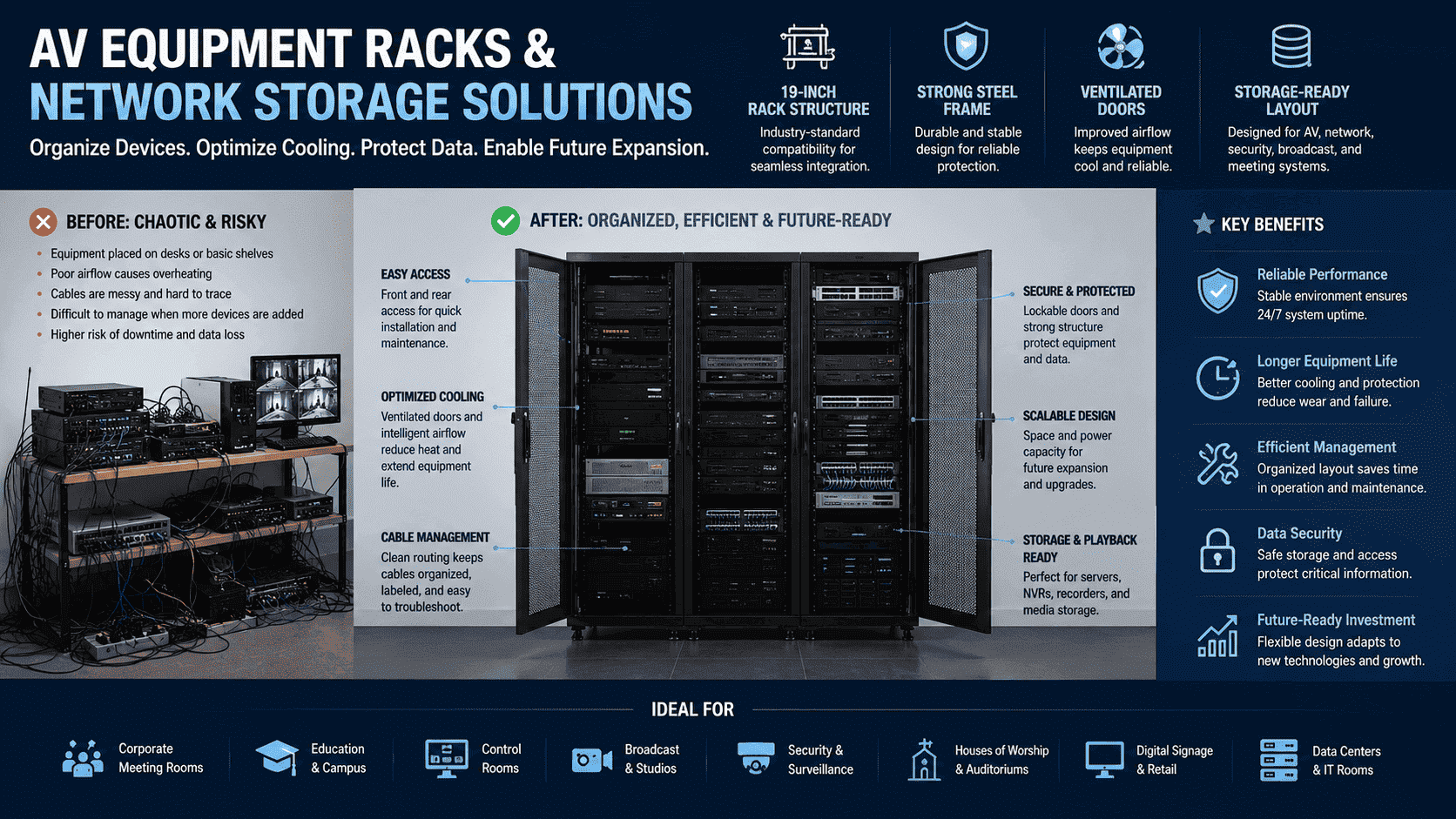
I Look At The Rack As The System Frame
I often explain to customers that an AV system has two sides. One side is the signal. The other side is the physical structure. If the structure is weak, the signal side becomes hard to maintain. I use a dedicated rack to give every unit a planned location. I also keep the front side clear for operation and the rear side clear for wiring.
| AV Problem I Often See | Rack Solution I Use | Result I Expect |
|---|---|---|
| Devices placed on random tables | 19-inch rack mounting2 | Cleaner layout |
| Cables mixed together | Rear cable channels | Easier service |
| Heat trapped around devices | Mesh doors and ventilation | More stable operation |
| Heavy equipment bending shelves | Thick steel shelves and posts | Safer load support |
| No space for new devices | Planned U height | Easier expansion |
I usually match the rack height with the project size. I may use a small wall-mounted cabinet for a classroom or meeting room. I may use 18U, 22U, 32U, 37U, or 42U floor-standing racks for larger systems. I also consider access space before I decide the structure. I want the installer to open the front door, remove side panels, and work from the rear without fighting the cabinet. This small detail saves many hours during service.
How Do AV Racks Improve Cooling And Equipment Safety?
I see heat as one of the main risks in AV rooms. A hot rack can shorten device life, cause signal faults, and make storage devices unstable.3
I improve cooling and safety with perforated doors, proper device spacing, fan options, strong steel panels, stable load-bearing posts, and clear cable routing. I also choose rack depth and ventilation design based on device heat output.
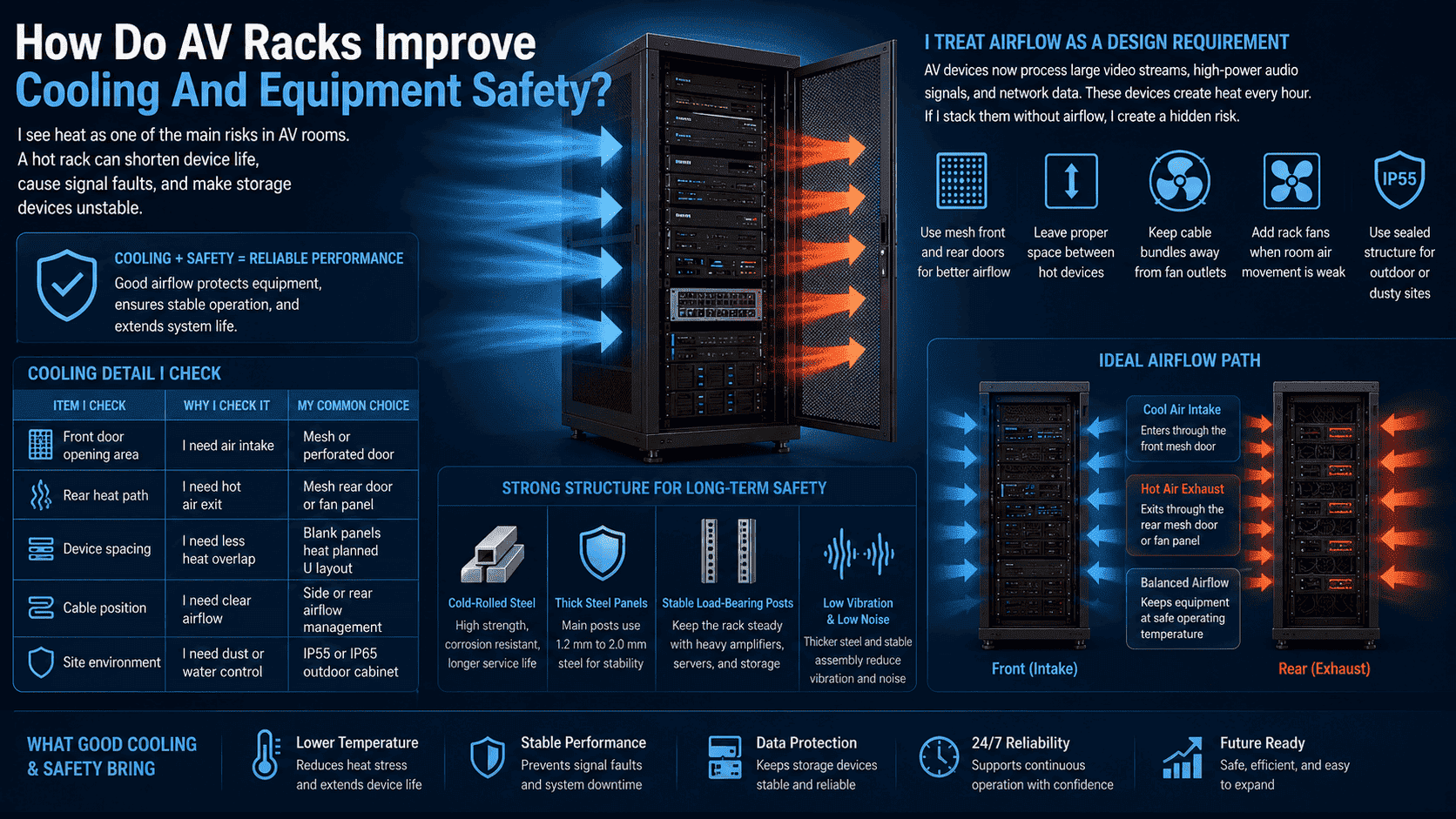
I Treat Airflow As A Design Requirement
I do not treat cooling as an extra feature. I treat it as a basic requirement. AV devices now process large video streams, high-power audio signals, and network data.4 These devices create heat every hour. If I stack them without airflow, I create a hidden risk.
I use mesh front and rear doors when airflow is important.5 I also leave proper space between hot devices when the project allows it. I keep cable bundles away from fan outlets. I also recommend rack fans when the room has weak air movement. For outdoor or dusty sites, I choose a sealed structure with controlled ventilation and higher protection.
| Cooling Detail I Check | Why I Check It | My Common Choice |
|---|---|---|
| Front door opening area | I need air intake | Mesh or perforated door |
| Rear heat path | I need hot air exit | Mesh rear door or fan panel |
| Device spacing | I need less heat overlap | Blank panels and planned U layout |
| Cable position | I need clear airflow | Side or rear cable management |
| Site environment | I need dust or water control | IP55 or IP65 outdoor cabinet6 |
I also care about noise. Some AV rooms sit near meeting spaces, classrooms, or studios. I choose thicker steel and stable assembly to reduce vibration. I also check whether fans need low-noise options. When I build cabinets, I use cold-rolled steel and strong mounting posts. I often use 1.2 mm to 2.0 mm material for main posts, depending on the load and design. A strong frame helps the rack stay stable when heavy amplifiers, servers, and storage arrays are installed.
What Rack Sizes And Structures Should I Consider?
I see many buyers choose a rack by height only. I think this is risky. I need to match height, depth, width, load, cable space, and access method together.
I usually choose wall-mounted racks for small AV systems and floor-standing racks for medium or large rooms.7 I use common 19-inch mounting structures, with 18U, 22U, 32U, 37U, and 42U heights for many AV and network projects.
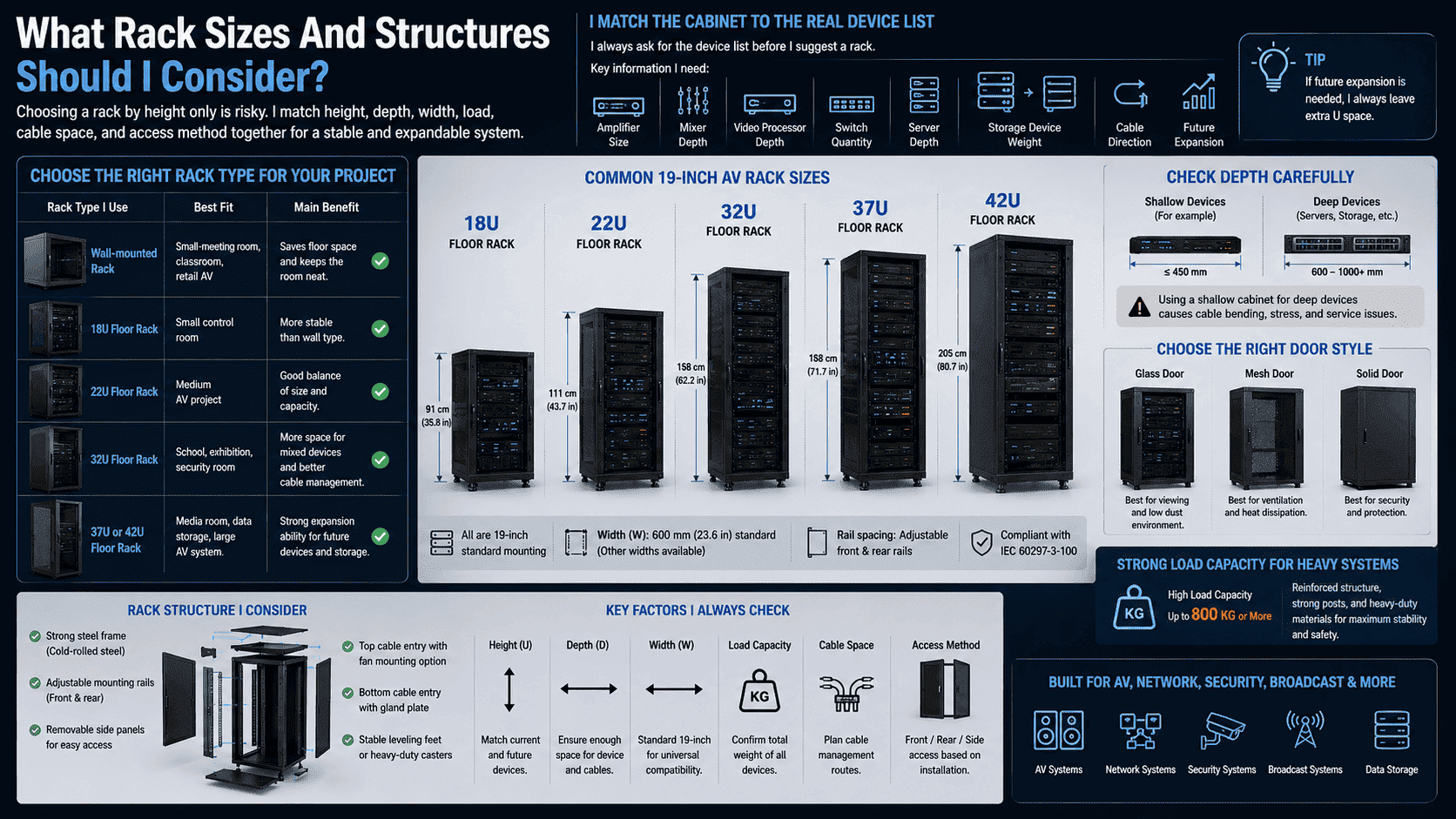
I Match The Cabinet To The Real Device List
I always ask for the device list before I suggest a rack. I want to know the amplifier size, mixer depth, video processor depth, switch quantity, server depth, storage device weight, and cable direction. I also ask whether the customer needs future expansion. If the answer is yes, I leave extra U space.
| Rack Type I Use | Best Fit | Main Benefit |
|---|---|---|
| Wall-mounted rack | Small meeting room, classroom, retail AV | Saves floor space |
| 18U floor rack | Small control room | More stable than wall type |
| 22U floor rack | Medium AV project | Good balance of size and capacity |
| 32U rack | School, exhibition, security room | More space for mixed devices |
| 37U or 42U rack | Media room, data storage, large AV system | Strong expansion ability |
I also check depth carefully. Some AV devices are shallow. Some servers and storage devices are deep and heavy. If I use a shallow cabinet for deep devices, the rear cables bend too much.8 This causes stress and service problems. I also check the door style. I may use glass doors when the site needs viewing and low dust. I may use mesh doors when cooling matters more. I may use solid doors when the project needs protection. For heavy systems, I use a reinforced floor-standing structure. I can design the load to reach 800 kg or more when the project needs it. I prefer to confirm load early because load changes affect posts, shelves, casters, feet, and packaging.
How Do Shelves Support Non-Rack AV Devices?
I often see AV projects include devices that do not have rack ears. If I force these devices into a rack without shelves, I create unsafe support and messy wiring.9
I use fixed shelves, sliding shelves, reinforced shelves, and custom trays for mixers, decoders, mini PCs, recorders, and special AV devices. I match the shelf structure with weight, depth, heat, and service needs.
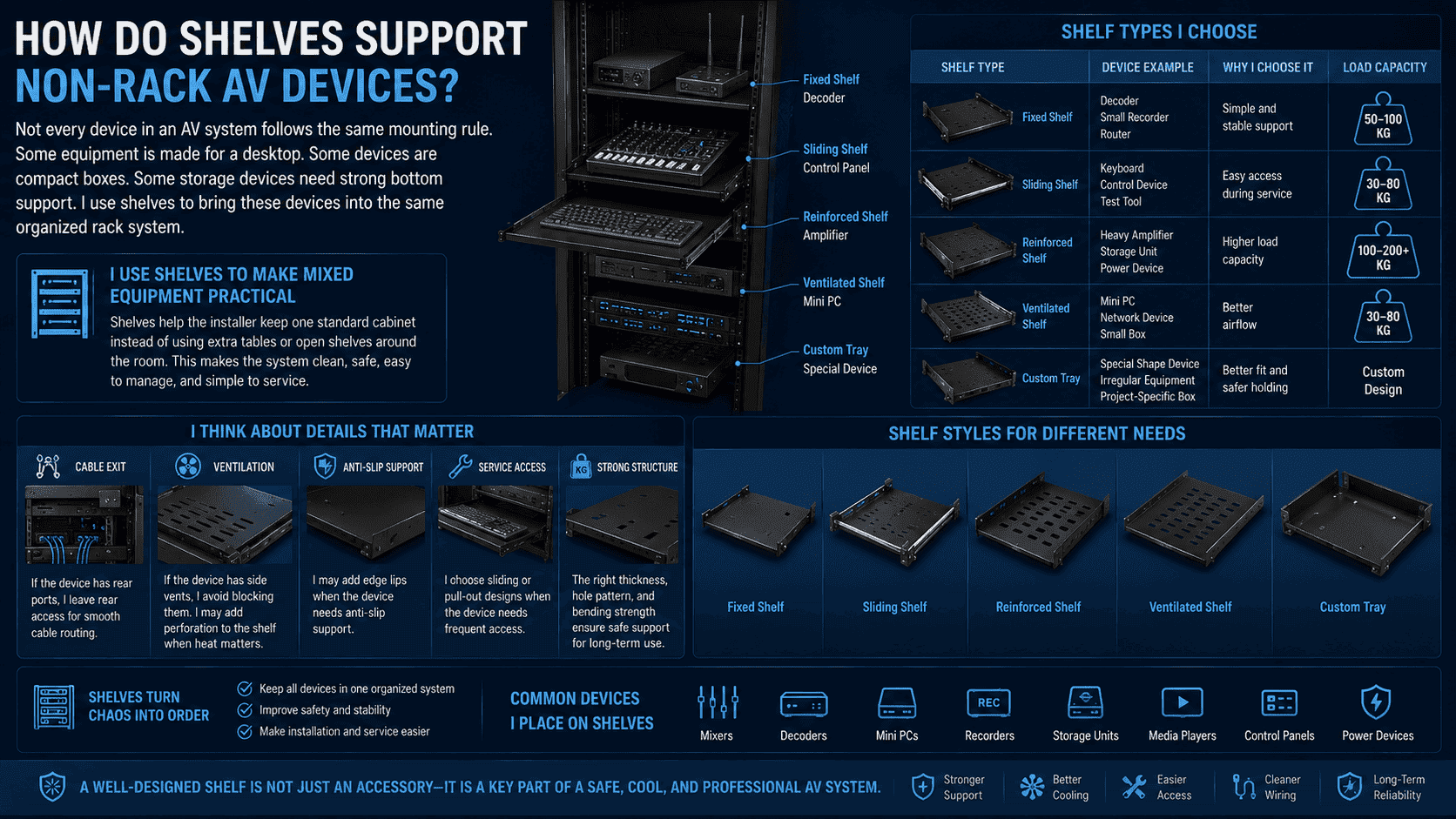
I Use Shelves To Make Mixed Equipment Practical
Not every device in an AV system follows the same mounting rule. Some equipment is made for a desktop. Some devices are compact boxes. Some storage devices need strong bottom support. I use shelves to bring these devices into the same organized rack system. This helps the installer keep one standard cabinet instead of using extra tables or open shelves around the room.
| Shelf Type I Choose | Device Example | Why I Choose It |
|---|---|---|
| Fixed shelf | Decoder, small recorder, router | Simple and stable support |
| Sliding shelf | Keyboard, control device, test tool | Easy access during service |
| Reinforced shelf | Heavy amplifier or storage unit | Higher load capacity |
| Ventilated shelf | Hot small devices | Better airflow |
| Custom tray | Special shape device | Better fit and safer holding |
I also think about cable exit. If the device has rear ports, I leave rear access. If the device has side vents, I avoid blocking them. I may add perforation to the shelf when heat matters. I may add edge lips when the device needs anti-slip support. In my factory work, I see that small sheet metal details change the final user experience. A shelf with the right thickness, hole pattern, and bending strength can turn a messy mixed-equipment project into a clean and serviceable system. This is why I do not treat shelves as accessories only. I treat them as part of the AV storage design.
How Does Network Storage Fit Into AV Rack Solutions?
I see AV data becoming larger every year. 4K and 8K video, live recordings, security footage, and teaching files need stable storage and fast access.10
I fit network storage into AV racks by planning space for NAS, servers, switches, storage arrays, power units, and cooling. I use the rack as the central point for signal transmission, data storage, playback, backup, and archive work.
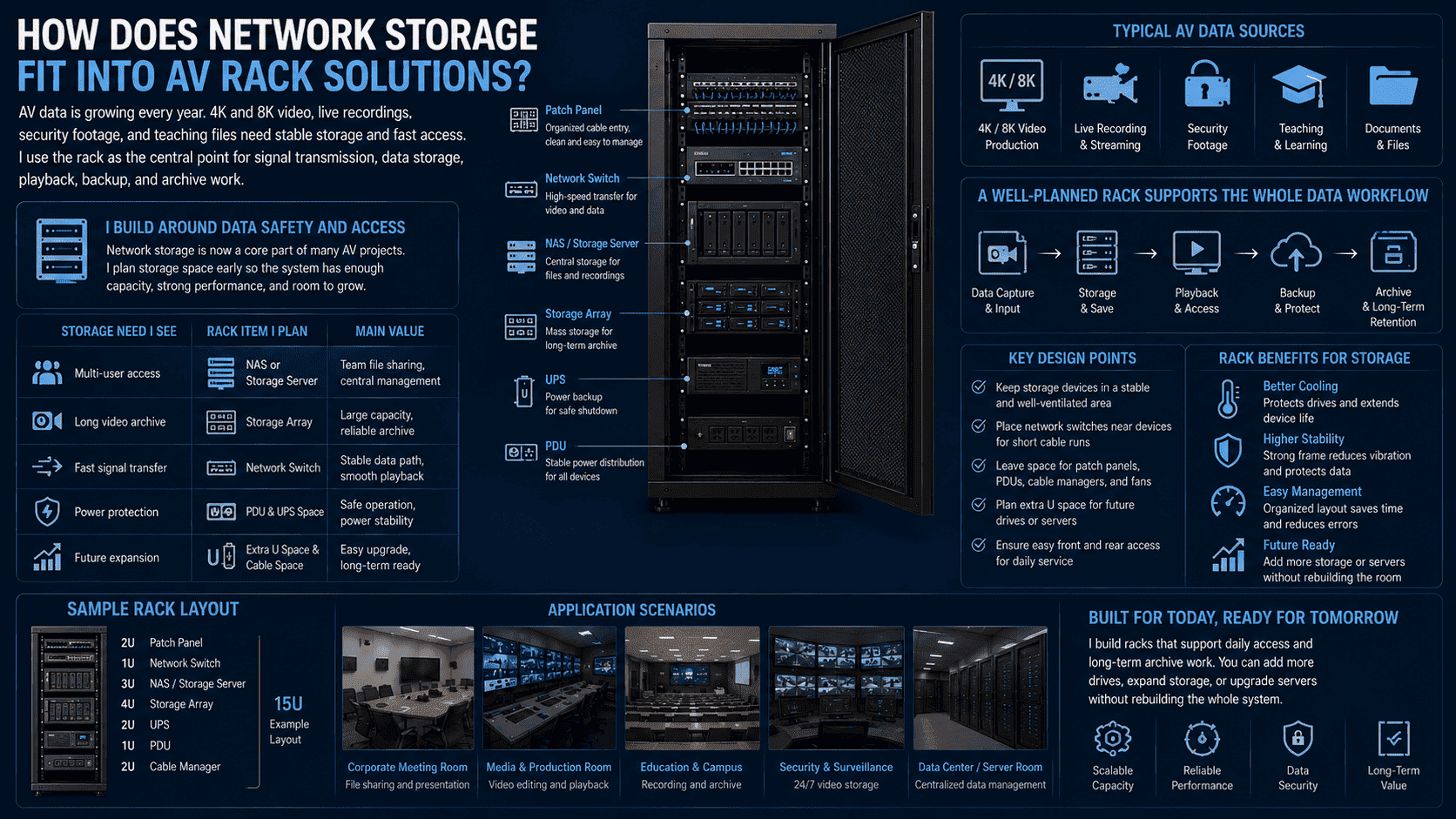
I Build Around Data Safety And Access
I think network storage is now a core part of many AV projects. A meeting room may need shared files. A campus may need recorded classes. A security system may need long-term video storage. A live stream team may need fast access to recorded media. If I do not plan storage space early, the system may run out of capacity and become hard to expand.
| Storage Need I See | Rack Item I Plan | Main Value |
|---|---|---|
| Multi-user access | NAS or storage server | Team sharing |
| Long video archive | Storage array | Larger capacity |
| Fast signal transfer | Network switch | Stable data path |
| Power protection | PDU and UPS space | Safer operation |
| Future expansion | Extra U space and cable space | Easier upgrade |
I also care about vibration and heat when storage devices are used. Hard drives and storage arrays need stable support. They also need clean airflow.11 I place storage devices where service access is easy. I keep network switches close enough for short cable runs. I also leave space for patch panels, power distribution units, and cable managers. In small business meeting rooms, I may keep the layout simple. In media data rooms, I may use larger racks with stronger load capacity and better airflow. I want the rack to support daily access and long-term archive work. I also want the customer to add more drives or servers without rebuilding the whole room.
When Should I Use Outdoor AV And Network Cabinets?
I see many AV and security systems move outside. Parks, campuses, outdoor broadcast points, and monitoring sites all need stronger cabinet protection.
I use outdoor AV and network cabinets when equipment faces rain, dust, sun, wind, or public access risks.12 I choose IP55 or IP65 structures, sealed doors, proper locks, weather protection, and controlled ventilation.
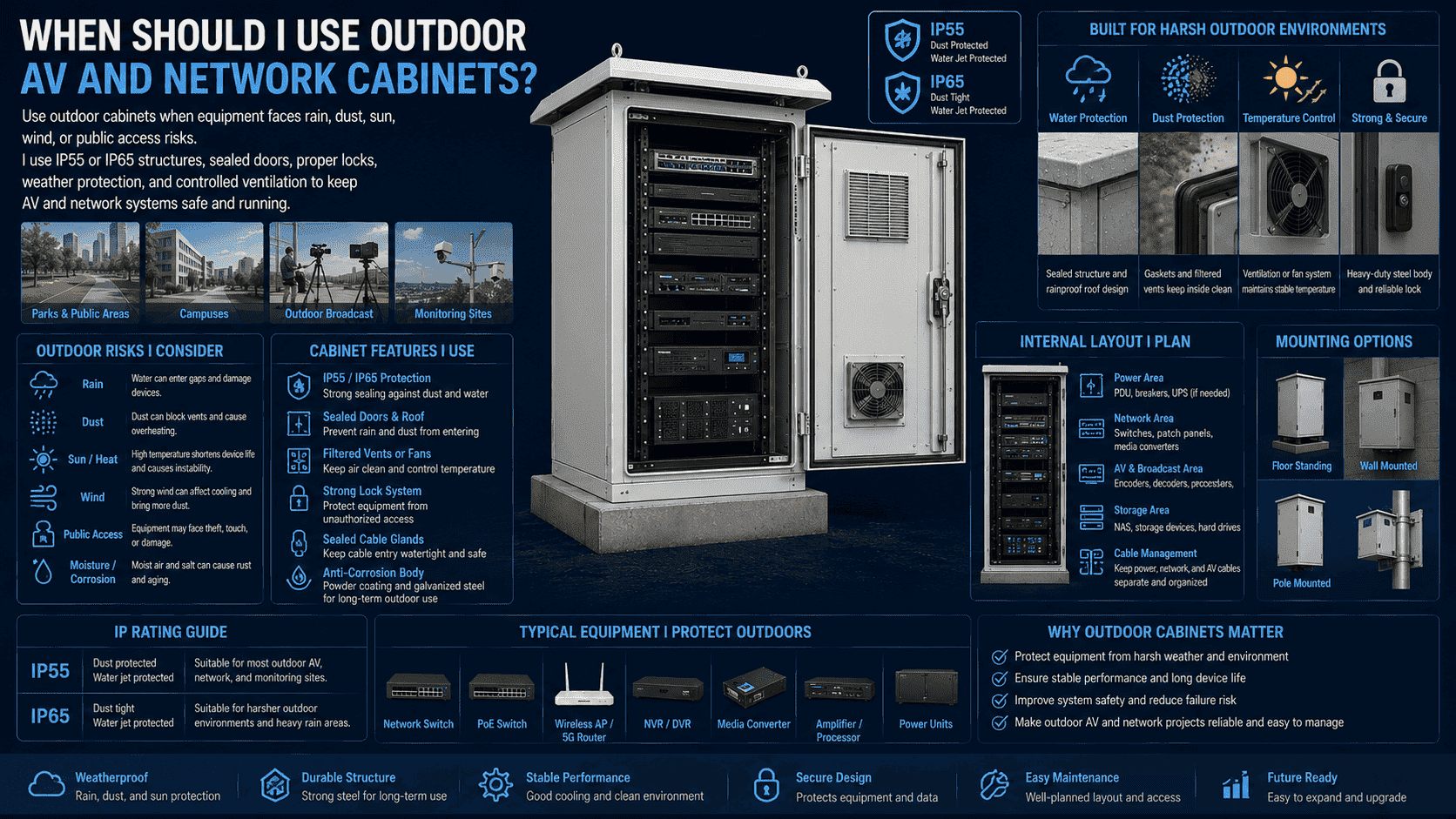
I Design Outdoor Cabinets For The Site Risk
I never use a normal indoor rack outdoors. Outdoor sites add problems that indoor AV rooms do not have. Rain can enter gaps. Dust can block vents. Sun can heat the cabinet. People may touch or damage exposed equipment. I use outdoor cabinets to protect AV, network, broadcast, and monitoring devices in these conditions.
| Outdoor Risk I Consider | Cabinet Feature I Use | Purpose |
|---|---|---|
| Rain | Sealed door and roof design | Water protection |
| Dust | Gasket and filtered vents | Cleaner inside space |
| Heat | Ventilation or fan system | Temperature control |
| Public access | Strong lock and steel body | Security |
| Cable entry | Sealed cable glands | Safer wiring |
I often use IP55 or IP65 protection levels for outdoor cabinets. I choose the level based on the environment. A campus monitoring point may need dust and rain protection. A harsher outdoor site may need stronger sealing. I also check how the cabinet will be mounted. Some cabinets stand on the ground. Some cabinets mount on a wall or pole. I also plan the internal layout so that power, network, storage, and AV devices stay separate enough for safe maintenance. Outdoor cabinets need careful sheet metal production. The bending, welding, sealing, surface treatment, and powder coating all matter. I use these details to keep the cabinet stable for long-term outdoor use.
What Should I Check Before Ordering Custom AV Racks?
I see custom rack projects fail when buyers only send a rough size. I need more information to build a rack that really fits the system.
I check device lists, load weight, rack height, depth, ventilation, cable entry, door style, storage needs, indoor or outdoor use, surface finish, packaging, and delivery standards before I confirm a custom AV rack order.
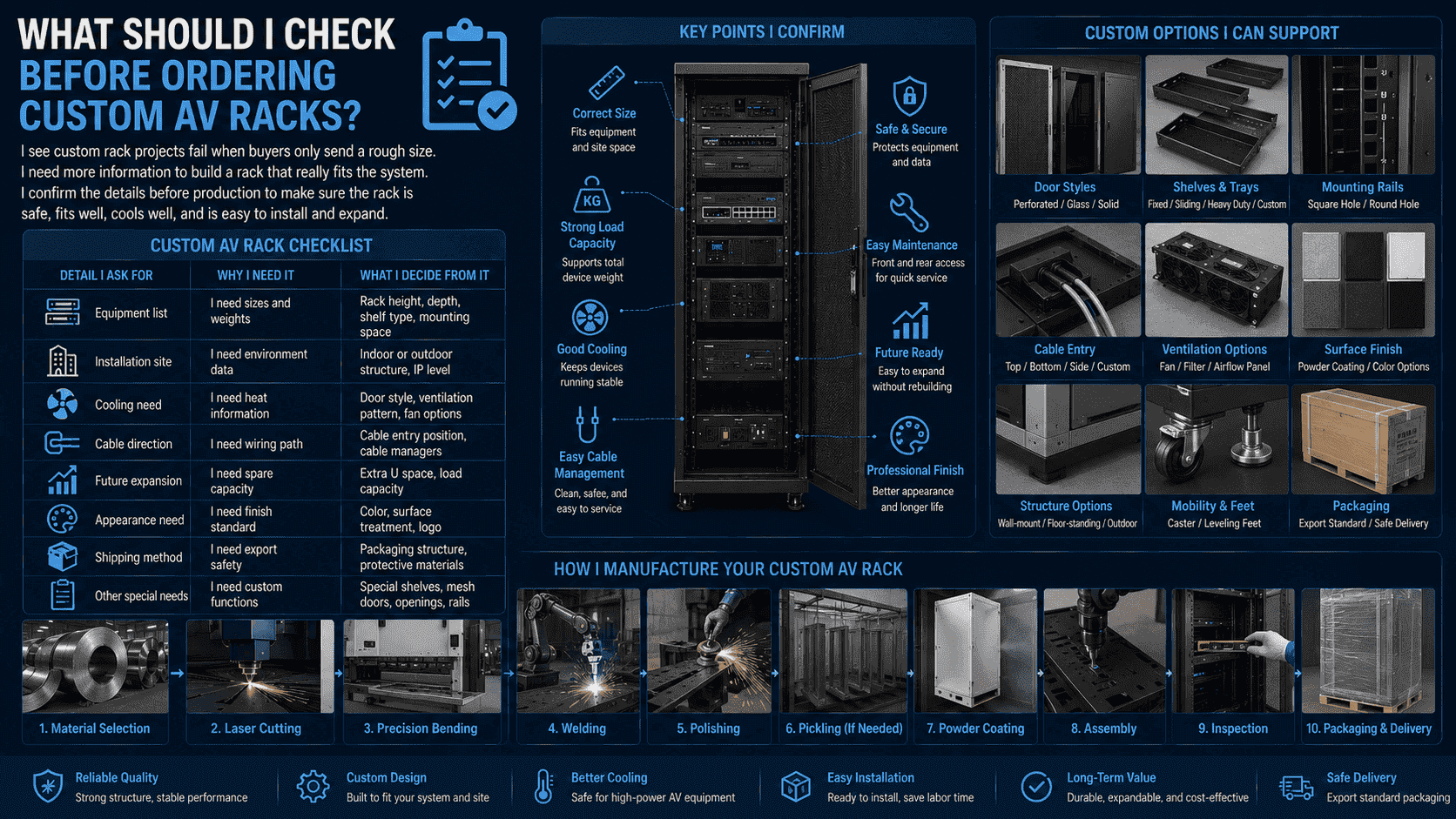
I Confirm The Details Before Production
I believe custom racks need clear information before cutting steel. A small missing detail can affect the final installation. If the rack is too shallow, cables may not fit. If the load is too high for the selected shelf, the shelf may bend. If the ventilation is weak, hot devices may fail. I use a simple checklist to avoid these problems.
| Detail I Ask For | Why I Need It | What I Decide From It |
|---|---|---|
| Equipment list | I need sizes and weights | Rack height and depth |
| Installation site | I need environment data | Indoor or outdoor structure |
| Cooling need | I need heat information | Door and fan design |
| Cable direction | I need wiring path | Cable entry and managers |
| Future expansion | I need spare capacity | Extra U space |
| Appearance need | I need finish standard | Color and surface treatment |
| Shipping method | I need export safety | Packaging structure |
In my manufacturing work, I start with material selection. I then move to laser cutting, precision bending, welding, polishing, pickling when needed, powder coating, and final assembly. I care about each step because racks must support expensive devices. I also care about consistency when customers order in batches. For non-standard cabinets, I check drawings and sample requirements carefully. I can also support special mesh door designs, special shelves, modified mounting rails, and custom cable openings. I want the finished cabinet to arrive ready for installation, not ready for more correction on site.
Conclusion
I choose AV racks, shelves, and network storage cabinets to make systems cleaner, cooler, safer, and easier to expand.
"Data Center and Server Room Standards - The University of Kansas", https://services.ku.edu/TDClient/818/Portal/KB/PrintArticle?ID=21009. A technical standard or institutional guide to 19-inch equipment racks supports the use of racks as standardized structures for mounting equipment, routing cables, and planning ventilation; the source supports the general engineering rationale rather than proving outcomes for every AV installation. Evidence role: general_support; source type: institution. Supports: Equipment racks provide standardized mounting positions and can support organized cabling, structural mounting, and airflow planning.. Scope note: Contextual support; rack benefits depend on correct sizing, installation, and equipment layout. ↩
"19-inch rack - Wikipedia", https://en.wikipedia.org/wiki/19-inch_rack. The cited reference defines the 19-inch rack as a standardized equipment mounting system and explains its use for electronic and computing hardware; this supports the terminology and format but not any specific product design. Evidence role: definition; source type: encyclopedia. Supports: The 19-inch rack is a standardized frame or enclosure system used to mount electronic equipment modules.. Scope note: Definition-level support only. ↩
"[PDF] Chapter 2. Reliability Overview", https://parts.jpl.nasa.gov/mmic/2.PDF. Research and thermal-management guidance on electronic equipment show that operating temperature is a significant reliability factor for electronic components and storage devices; the evidence is drawn mainly from computing and data-center contexts, so its application to AV racks is contextual. Evidence role: mechanism; source type: research. Supports: Higher operating temperatures can affect electronic component reliability and storage-device operation.. Scope note: Contextual support from electronics and data-center literature rather than AV-only testing. ↩
"8K resolution", https://en.wikipedia.org/wiki/8K_resolution. Technical standards and institutional materials on digital video data rates support the statement that 4K and 8K AV workflows involve large data streams and network throughput requirements; they do not directly measure heat output from every AV device. Evidence role: general_support; source type: institution. Supports: High-resolution video and networked AV workflows require substantial data throughput, especially for 4K and 8K formats.. Scope note: Supports the data-load context, not the thermal behavior of all devices. ↩
"Manage Airflow for Cooling Efficiency - Energy Star", https://www.energystar.gov/products/data_center_equipment/16-more-ways-cut-energy-waste-data-center/manage-airflow-cooling-efficiency. Thermal-management literature for equipment cabinets and data-center racks supports the use of perforated doors to reduce airflow impedance and improve ventilation paths; the evidence is contextual because airflow performance depends on fan placement, open area, and room cooling. Evidence role: mechanism; source type: research. Supports: Perforated or mesh doors reduce airflow restriction and can help front-to-rear ventilation in equipment racks.. Scope note: Contextual support; actual performance depends on rack geometry and environmental conditions. ↩
"IP code - Wikipedia", https://en.wikipedia.org/wiki/IP_code. IEC 60529 defines IP ratings such as IP55 and IP65 as classifications for enclosure protection against solid particles and water ingress; the rating describes enclosure resistance under test conditions rather than guaranteeing suitability for every outdoor site. Evidence role: definition; source type: institution. Supports: IP55 and IP65 are ingress-protection classifications defined by IEC 60529 for degrees of protection against dust and water.. Scope note: The rating does not account for all environmental factors, such as UV exposure, corrosion, vandalism, or internal heat. ↩
"Wall Mounted vs Floor Standing", https://navepoint.com/blog/wall-mounted-vs-floor-standing/?srsltid=AfmBOorvd4oe4SIZybxtcLYjCRegN2sdqUrDRgnKe7jyA6-s1yhumNe1. Educational or institutional rack-selection guidance supports choosing rack form factor according to equipment load, quantity, access, and available space; it provides general design support rather than a universal threshold between small and large AV systems. Evidence role: general_support; source type: education. Supports: Rack selection commonly considers equipment quantity, load, floor space, and access, with wall-mounted cabinets used for smaller loads and floor-standing racks for larger systems.. Scope note: Contextual support; the correct choice depends on actual load rating, mounting surface, and service access. ↩
"Section 27 1116 - Communications Cabinets, Racks, Frames ...", https://networkspec.caltech.edu/documents/18477/271116-2021-Racks.pdf. Cabling standards and installation guidance identify minimum bend-radius and strain-relief requirements for network and signal cables, supporting the need for sufficient rear cabinet depth; the evidence applies most directly to structured cabling and is extended here to mixed AV cabling. Evidence role: mechanism; source type: institution. Supports: Cable-installation standards and guidance specify bend-radius and strain-relief considerations that require adequate cabinet clearance.. Scope note: Contextual support; exact bend limits vary by cable type and manufacturer specification. ↩
"Install Non-Rackmount Gear - Lowell Manufacturing", https://www.lowellmfg.com/install-non-rackmount-gear/. Rack installation guidance supports using shelves or trays for equipment that is not designed for direct rack mounting, because support surfaces and cable access affect safety and serviceability; this is general installation guidance rather than proof of failure in a specific AV system. Evidence role: general_support; source type: institution. Supports: Devices that lack rack ears or rackmount hardware should be supported by shelves, trays, or other rated mounting accessories.. Scope note: Contextual support; safety depends on shelf rating, device weight, fastening, and cable routing. ↩
"How to Choose a Memory Card for Shooting 4K Video - Kingston ...", https://www.kingston.com/en/blog/personal-storage/choose-storage-4k. Technical references on 4K and 8K video bitrates and surveillance recording storage requirements support the statement that such media workloads demand substantial capacity and access speed; the exact requirement varies with codec, frame rate, compression, retention time, and number of streams. Evidence role: statistic; source type: institution. Supports: High-resolution and continuous video recording can require substantial storage capacity and throughput.. Scope note: The support is conditional because storage demand depends heavily on encoding and retention settings. ↩
"Hard Drive Disk Vibration | UW Department of Mechanical Engineering", https://www.me.washington.edu/research/faculty/ishen/hdd_vibration. Studies of hard-disk reliability and storage-system operation identify temperature management and vibration as relevant factors for drive performance and reliability; the evidence is strongest for disk drives and storage servers, not for every type of AV storage device. Evidence role: mechanism; source type: paper. Supports: Temperature and vibration are recognized factors in hard-drive and storage-system operation and reliability.. Scope note: Directly relevant to hard drives and storage arrays; less applicable to solid-state-only systems. ↩
"Outdoor Electrical Enclosure: Weatherproof Solutions - Bud Industries", https://www.budind.com/outdoor/. Enclosure standards and outdoor electrical-installation guidance support selecting protective cabinets when equipment is exposed to weather, dust, and physical access risks; these standards classify protection levels but do not by themselves validate a complete AV cabinet design. Evidence role: expert_consensus; source type: institution. Supports: Outdoor electrical or electronic enclosures are selected to protect equipment from environmental ingress and physical exposure.. Scope note: Contextual support; complete outdoor suitability also depends on cooling, corrosion resistance, mounting, and maintenance. ↩
