
A Guide to Server Rack Sizes at Today’s Data Centers

A wrong rack size can stop a whole data room plan. I have seen equipment fit the rails, then fail at the door.
Server rack size means the rack height, width, and depth used to install standard IT equipment.1 I usually check U height, 19-inch mounting width, usable depth, load capacity, airflow, cable space, and future expansion before I confirm a rack for any data center.
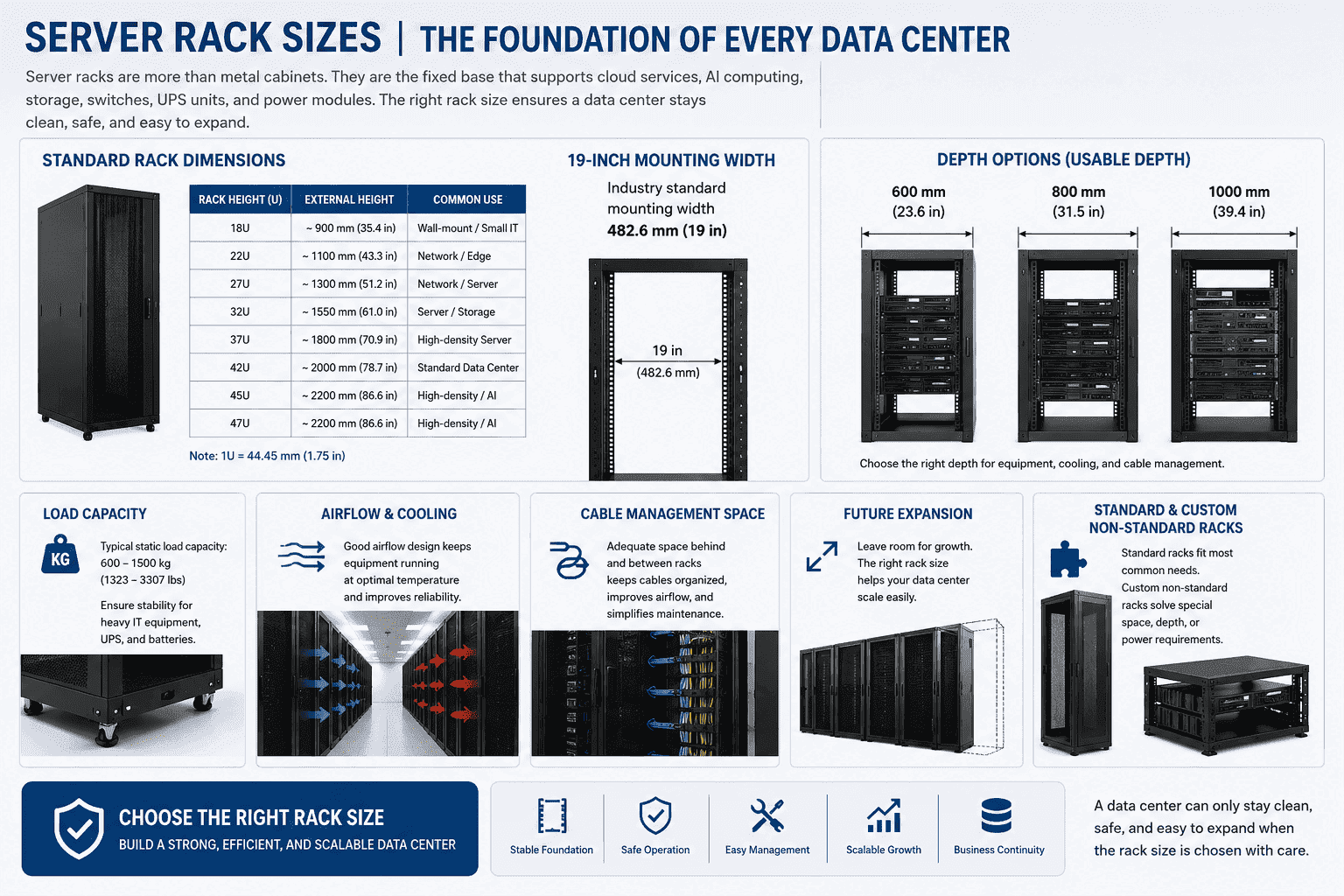
I see server racks as more than metal cabinets. I see them as the fixed base of a data center. Cloud service, AI computing, storage, switches, UPS units, and power modules all need one stable frame. If the frame is wrong, the whole room becomes harder to manage. I have worked with standard racks and many custom non-standard racks for overseas projects. I have learned one simple lesson. A data center can only stay clean, safe, and easy to expand when the rack size is chosen with care.
What Does Server Rack Size Mean in Modern Data Centers?
Rack size looks simple at first. I have seen many buyers focus on height only. The real risk starts when depth, cable space, and airflow are ignored.
Server rack size means the full rack specification used for IT deployment. I read it through three main parts: height in U, 19-inch mounting width, and rack depth. I also check load, cooling, cabling, and service space.
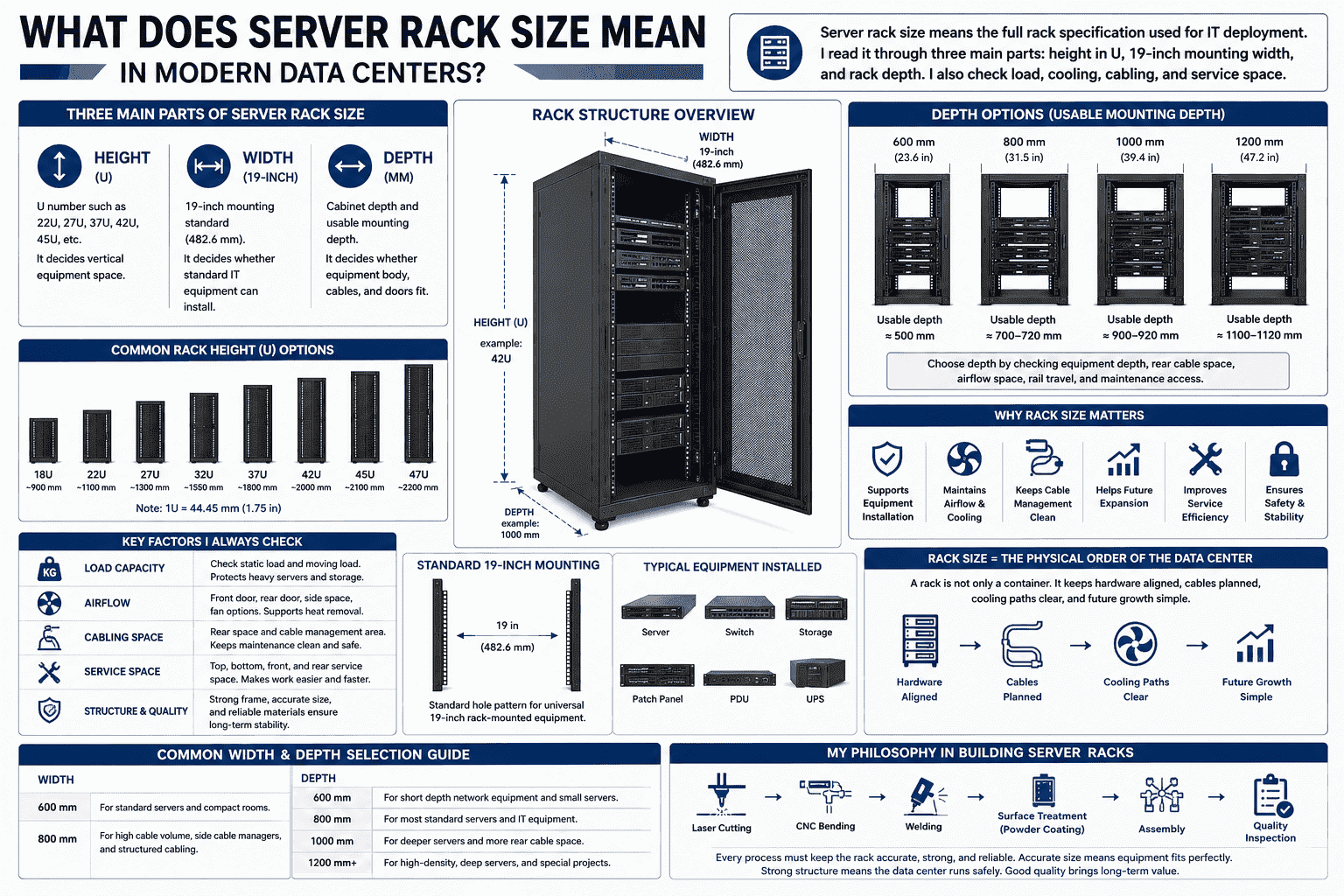
I treat rack size as a complete system. I do not treat it as one number on a drawing. A rack must support equipment installation, room order, power layout, cooling path, and future growth. In modern data centers, most equipment follows a rack-mounted design2. Servers, switches, routers, patch panels, storage units, and UPS modules all depend on the rack standard.
Main parts of server rack size
| Size Part | What I Check | Why It Matters |
|---|---|---|
| Height | U number, such as 22U, 27U, 37U, 42U, 45U | It decides vertical equipment space |
| Width | 19-inch mounting standard | It decides whether standard IT equipment can install |
| Depth | Cabinet depth and usable mounting depth | It decides whether equipment body, cables, and doors fit |
| Load | Static load and moving load | It protects heavy servers and storage devices |
| Airflow | Front door, rear door, side space, fan options | It supports heat removal |
| Cabling | Rear space and cable management area | It keeps maintenance clean and safe |
I often tell customers that a rack is not only a container. It is the physical order of the data center. It keeps hardware aligned. It keeps cables planned. It keeps cooling paths clear. It also makes later expansion easier. When I design or produce a cabinet, I think about laser cutting, bending, welding, surface treatment, and final assembly. Each process must keep the rack accurate. If the size is not accurate, the equipment will not sit correctly. If the structure is weak, the data center will carry hidden risk.
Why Is the 19-Inch Rack Standard So Important?
A data center becomes costly when every device needs a different frame. I have seen projects slow down because old cabinets did not match new servers.
The 19-inch rack standard is important because it lets global IT equipment share one mounting system.3 I can install standard servers, switches, UPS modules, and network devices from many brands in the same rack when they follow this standard.
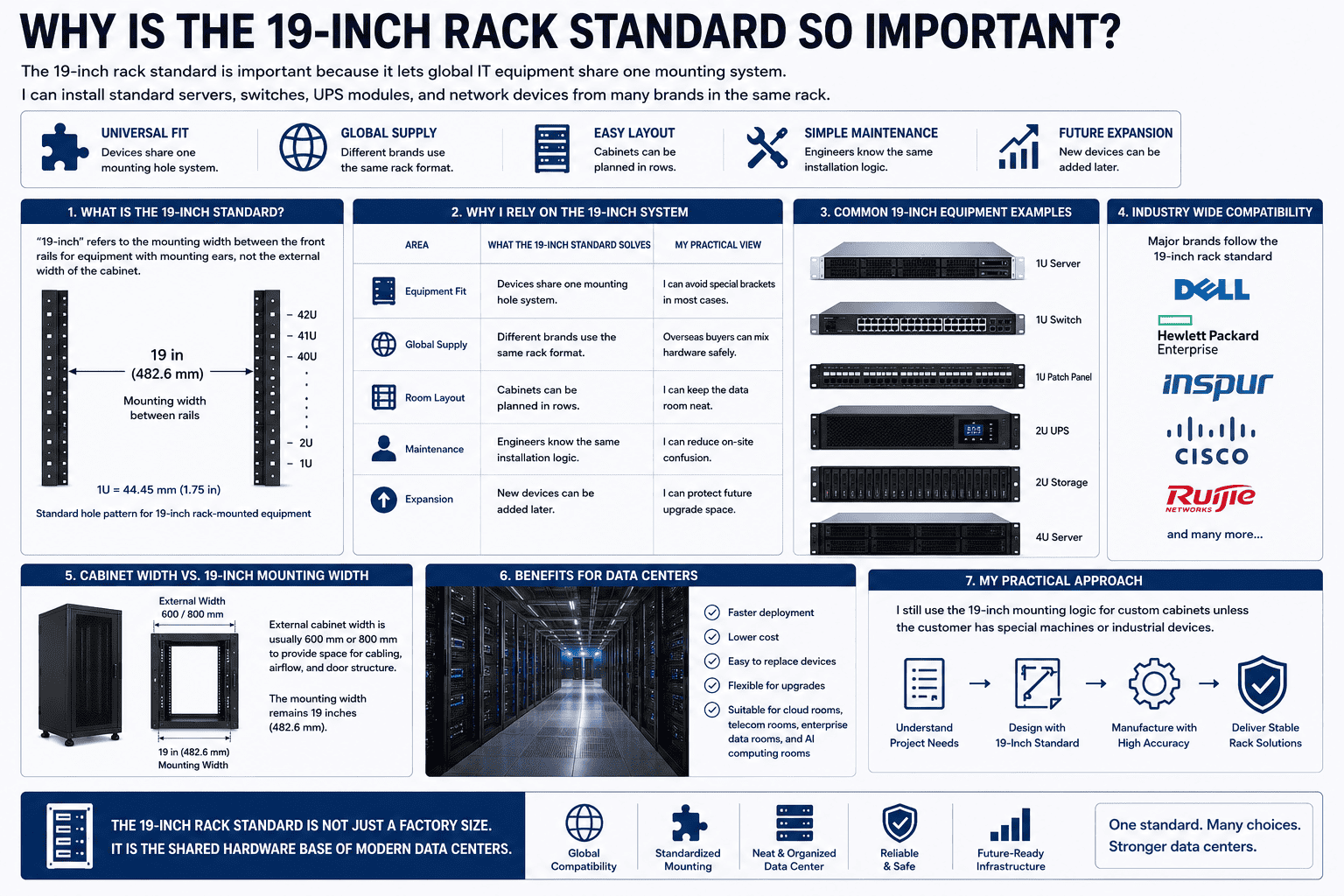
I see the 19-inch standard as the common language of data center hardware. The name does not mean the full outside width of the cabinet. It means the mounting width between the rack rails for equipment with mounting ears.4 This standard allows equipment from Dell, HP, Inspur, Cisco, Ruijie, and many other brands to fit into the same rack system when the device follows the 19-inch form.
Why I rely on the 19-inch system
| Area | What the 19-Inch Standard Solves | My Practical View |
|---|---|---|
| Equipment fit | Devices share one mounting hole system | I can avoid special brackets in most cases |
| Global supply | Different brands use the same rack format | Overseas buyers can mix hardware safely |
| Room layout | Cabinets can be planned in rows | I can keep the data room neat |
| Maintenance | Engineers know the same installation logic | I can reduce on-site confusion |
| Expansion | New devices can be added later | I can protect future upgrade space |
I have produced many standard server cabinets for export. The projects are different, but the basic rule is often the same. The rack must accept standard 19-inch equipment. This saves time during installation. This also reduces mistakes during later replacement. A customer may buy servers this year and switches next year. The brand may change. The rack should still work. This is why the 19-inch rack is not just a factory size. It is the shared hardware base of cloud rooms, telecom rooms, enterprise data rooms, and AI computing rooms. When I custom-build a cabinet, I still use the 19-inch mounting logic unless the customer has a special machine or industrial device. This keeps the solution more open and easier to maintain.
How Do I Read Rack Height in U Units?
Rack height can look confusing when I first see 1U, 2U, and 42U. A wrong U plan can waste space or block expansion later.
I read server rack height in U units. One U equals 44.45 mm.5 A 42U rack gives 42 vertical units for rack-mounted equipment. I always reserve space for cable managers, power units, airflow, and future equipment.
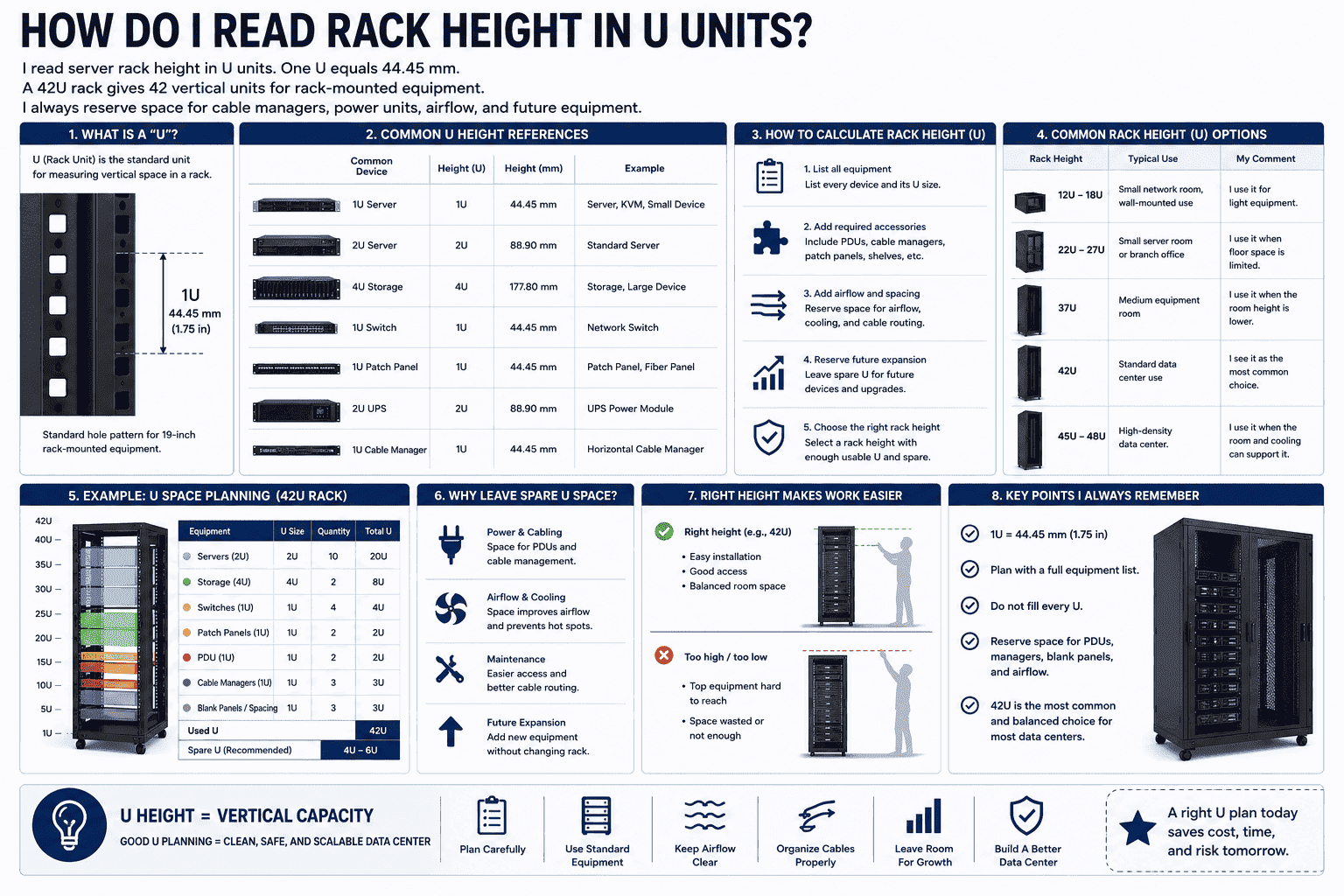
I use U height to plan vertical space. Every rack-mounted device takes one or more U positions. A 1U server takes 44.45 mm of height. A 2U server takes 88.9 mm. A 4U storage unit takes more space. The cabinet height must match the equipment list and the future expansion plan.
Common U height examples
| Rack Height | Typical Use | My Comment |
|---|---|---|
| 12U to 18U | Small network room, wall-mounted use | I use it for light equipment |
| 22U to 27U | Small server room or branch office | I use it when floor space is limited |
| 37U | Medium equipment room | I use it when the room height is lower |
| 42U | Standard data center use | I see it as the most common choice |
| 45U to 48U | High-density data center | I use it when the room and cooling can support it |
I do not fill every U space without thinking. I need to leave room for power distribution units, cable managers, blanking panels, and airflow control. In one project story, I once saw a customer count only server height. The customer forgot the UPS module and patch panel. The rack looked large on paper, but the real usable space became tight. After that, I always ask for a full equipment list before I confirm height.
Height also affects daily work. If a rack is too high, top equipment becomes harder to install and maintain. If a rack is too low, the room may waste floor area. For most new standard data centers, I often see 42U as a good balance6. It gives enough vertical space. It also works well with standard room height, aisle layout, cooling design, and common equipment plans.
How Do Width and Depth Affect Server Installation?
Width is often easy to understand. Depth is where many mistakes happen. I have seen doors fail to close after a deep server was installed.
Rack width and depth affect equipment fit, cable space, airflow, and maintenance. I check the 19-inch rail width, outside cabinet width, cabinet depth, usable mounting depth, rear cable space, and door clearance before production.
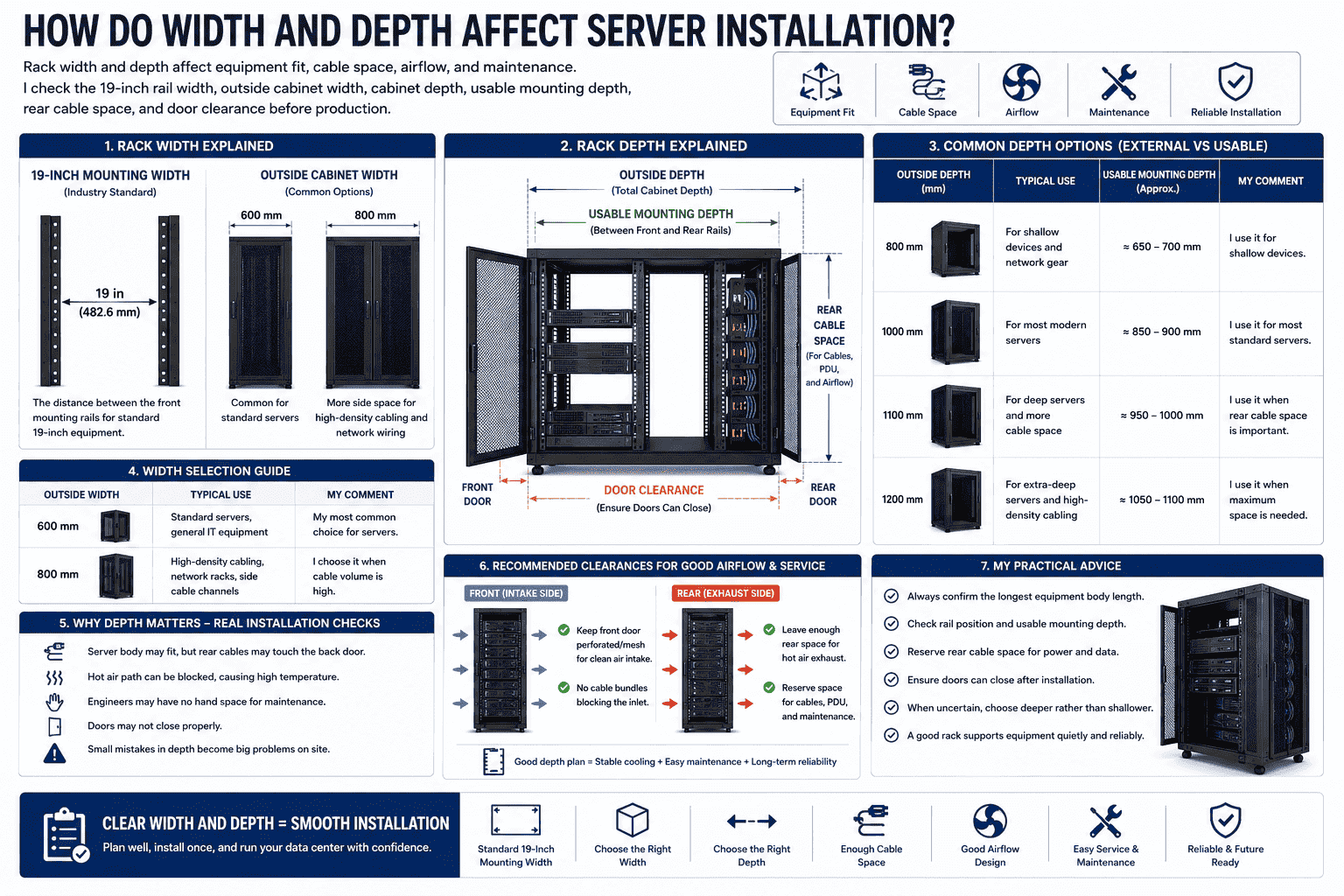
I see width and depth as the two areas where drawings must be clear. The 19-inch mounting width is the global installation standard. The outside width of the cabinet is often 600 mm or 800 mm.7 A 600 mm wide cabinet is common for standard servers. An 800 mm wide cabinet gives more side space for high-density cabling, network wiring, and special cable channels.
Depth is the part I check with extra care. A cabinet may be 1000 mm deep, but the usable mounting depth is not always 1000 mm. The front door, rear door, vertical rails, cable space, and PDU space all reduce the true usable area.8
Width and depth checks
| Dimension | Common Option | What I Confirm |
|---|---|---|
| Outside width | 600 mm | I use it for most standard server racks |
| Outside width | 800 mm | I use it for heavy cabling or network racks |
| Outside depth | 800 mm | I use it for shallow devices |
| Outside depth | 1000 mm | I use it for most modern servers |
| Outside depth | 1100 mm or 1200 mm | I use it for deep servers and more cable space |
| Usable depth | Depends on rail position | I check the maximum equipment body length |
I usually recommend a deeper rack when the project is not fully fixed. I prefer deep rather than shallow. A shallow rack can create serious problems. The server body may fit between the rails, but the rear cable plug may touch the back door. The hot air path may become blocked. The engineer may have no hand space for maintenance. The door may not close. These problems are small at the buying stage, but they are big at the installation stage.
A good depth plan protects cooling and service work. The front side needs clean air intake. The rear side needs hot air exhaust and cable space.9 The rack should not fight the equipment. The rack should support the equipment quietly.
Why Is 42U 600x1000 mm So Common Today?
Many buyers ask for the safest standard size. I understand this need. A data center project needs a size that works for most equipment.
The 42U 600x1000 mm rack is common because it fits most standard 19-inch servers and data center equipment.10 I often use it for new server rooms, cloud rooms, and computing rooms because it balances height, depth, space use, and cost.
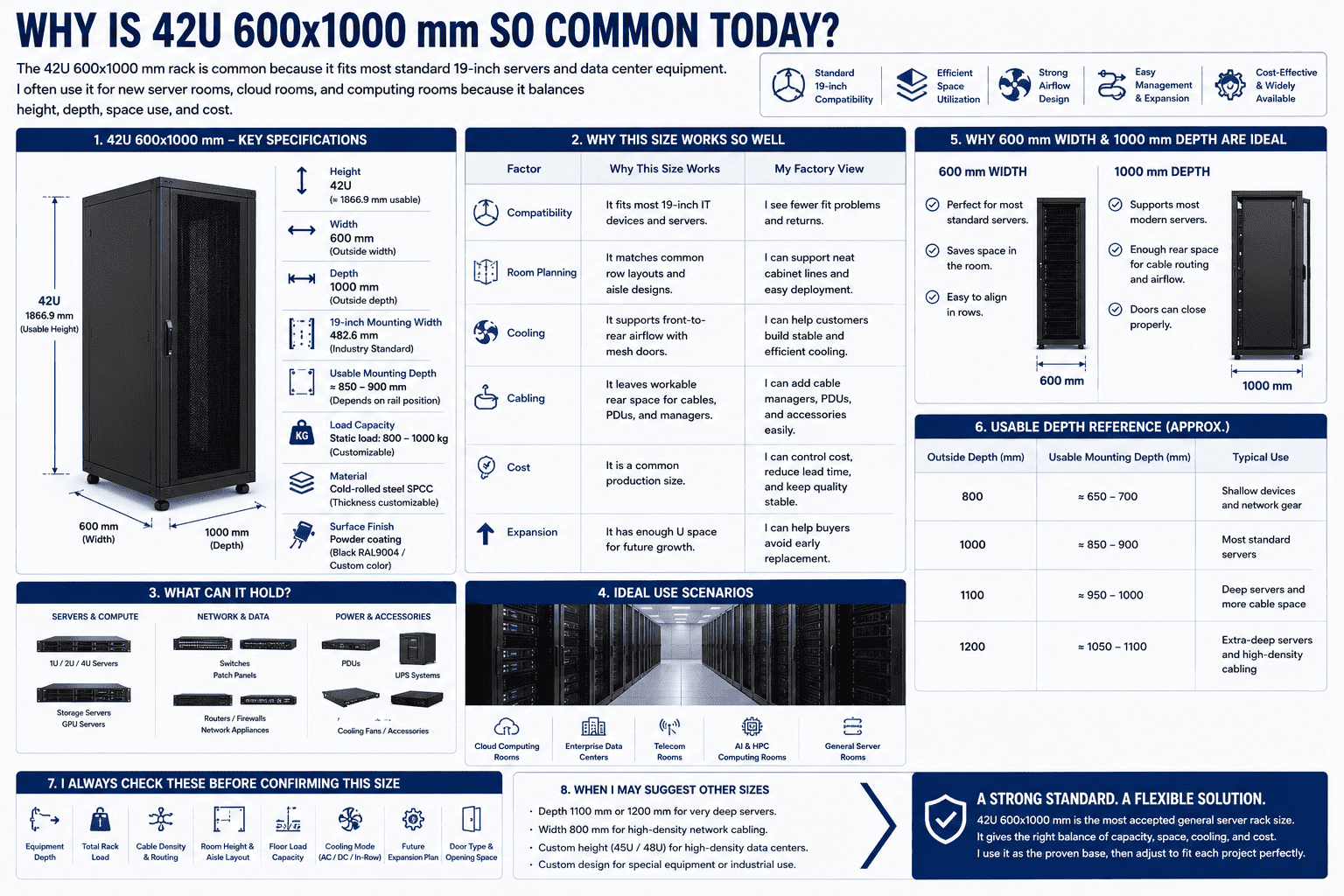
I see 42U 600x1000 mm as the most accepted general server cabinet size in many modern projects. It is not the only correct size, but it is often the safest starting point. The 42U height gives strong vertical capacity. The 600 mm width matches standard server use. The 1000 mm depth supports most common servers and leaves space for rear cabling and airflow.
Why I often recommend 42U 600x1000 mm
| Factor | Why This Size Works | My Factory View |
|---|---|---|
| Compatibility | It fits most 19-inch IT devices | I see fewer fit problems |
| Room planning | It matches common row layouts | I can support neat cabinet lines |
| Cooling | It supports front-to-rear airflow | I can use mesh doors for better heat release |
| Cabling | It leaves workable rear space | I can add cable managers and PDUs |
| Cost | It is a common production size | I can control cost and lead time |
| Expansion | It has enough U space for later growth | I can help buyers avoid early replacement |
In my production work, I see this size used in cloud computing rooms, enterprise data centers, telecom rooms, and general server rooms. It can support different server brands as long as the devices follow the standard 19-inch installation format. It can also hold switches, patch panels, PDUs, monitoring devices, and cooling accessories.
I still do not use 42U 600x1000 mm blindly. I always ask about device depth, rack load, cabling density, room height, floor load, and cooling mode. If the servers are very deep, I may suggest 1100 mm or 1200 mm depth. If the project has many network cables, I may suggest 800 mm width. If the customer needs custom doors, special perforation, stronger frame, or non-standard mounting points, I adjust the structure. The standard size is a strong base. The real choice must still follow the project.
How Do I Choose the Right Server Rack Size for a Data Center?
A rack may look correct in a catalog. It may still fail in a real room. I choose rack size from equipment, cooling, load, and future growth.
I choose server rack size by checking the equipment list, U height, device depth, weight, cable volume, airflow direction, room layout, floor load, power plan, and expansion needs. I also confirm whether a standard rack or a custom rack is better.
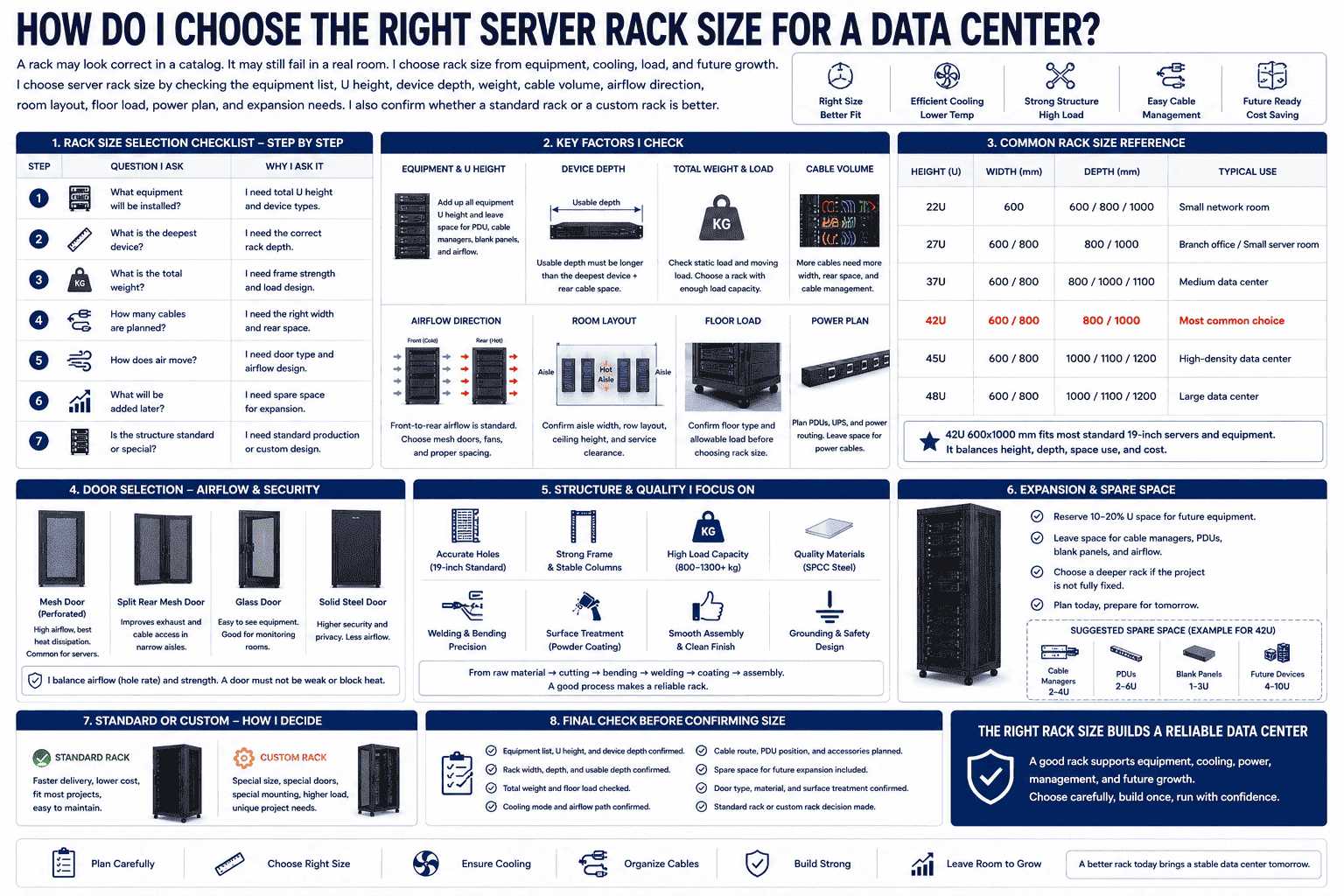
I use a simple order when I help a customer choose a rack. I first ask for the equipment list. I need model names, quantity, U height, device depth, and weight. I then check the room plan. I need aisle width, ceiling height, air conditioning mode, floor type, and cable route. After that, I check service space. Engineers need space to install, remove, and maintain equipment.
My rack size selection checklist
| Step | Question I Ask | Why I Ask It |
|---|---|---|
| 1 | What equipment will be installed? | I need total U height and device types |
| 2 | What is the deepest device? | I need correct rack depth |
| 3 | What is the total weight? | I need frame strength and load design |
| 4 | How many cables are planned? | I need width and rear space |
| 5 | How does air move? | I need door type and airflow design |
| 6 | What will be added later? | I need spare space for expansion |
| 7 | Is the structure standard or special? | I need standard production or custom design |
I also pay attention to doors. A server cabinet often needs mesh front and rear doors. Mesh doors support better airflow.11 The hole rate and door strength both matter. I manufacture custom mesh doors for many projects, so I know that airflow and strength must be balanced. A door cannot be weak just because it has more holes. A door also cannot block heat because it looks stronger.
I also check the frame and surface treatment. A rack must keep shape after cutting, bending, welding, polishing, pickling, powder coating, and assembly. A good rack should have accurate holes, stable columns, strong load capacity, clean coating, and smooth installation. I believe a rack is reliable only when the process is controlled from raw material to finished cabinet.
For data centers that expect fast growth, I leave spare space. I do not plan only for today. Computing power is growing fast because cloud service, data work, and AI systems need more hardware. A rack chosen today should not block tomorrow. This is why I often choose a deeper cabinet, a stronger frame, better cable space, and a standard mounting system when the budget allows it.
What Mistakes Should I Avoid When Buying Server Racks?
A low-price rack can become expensive later. I have seen buyers pay twice because the cabinet depth or load was wrong.
I avoid five common rack mistakes: choosing shallow depth, ignoring usable mounting depth, underestimating weight, forgetting cable and airflow space, and buying a rack without future expansion room. I also avoid unclear custom drawings.
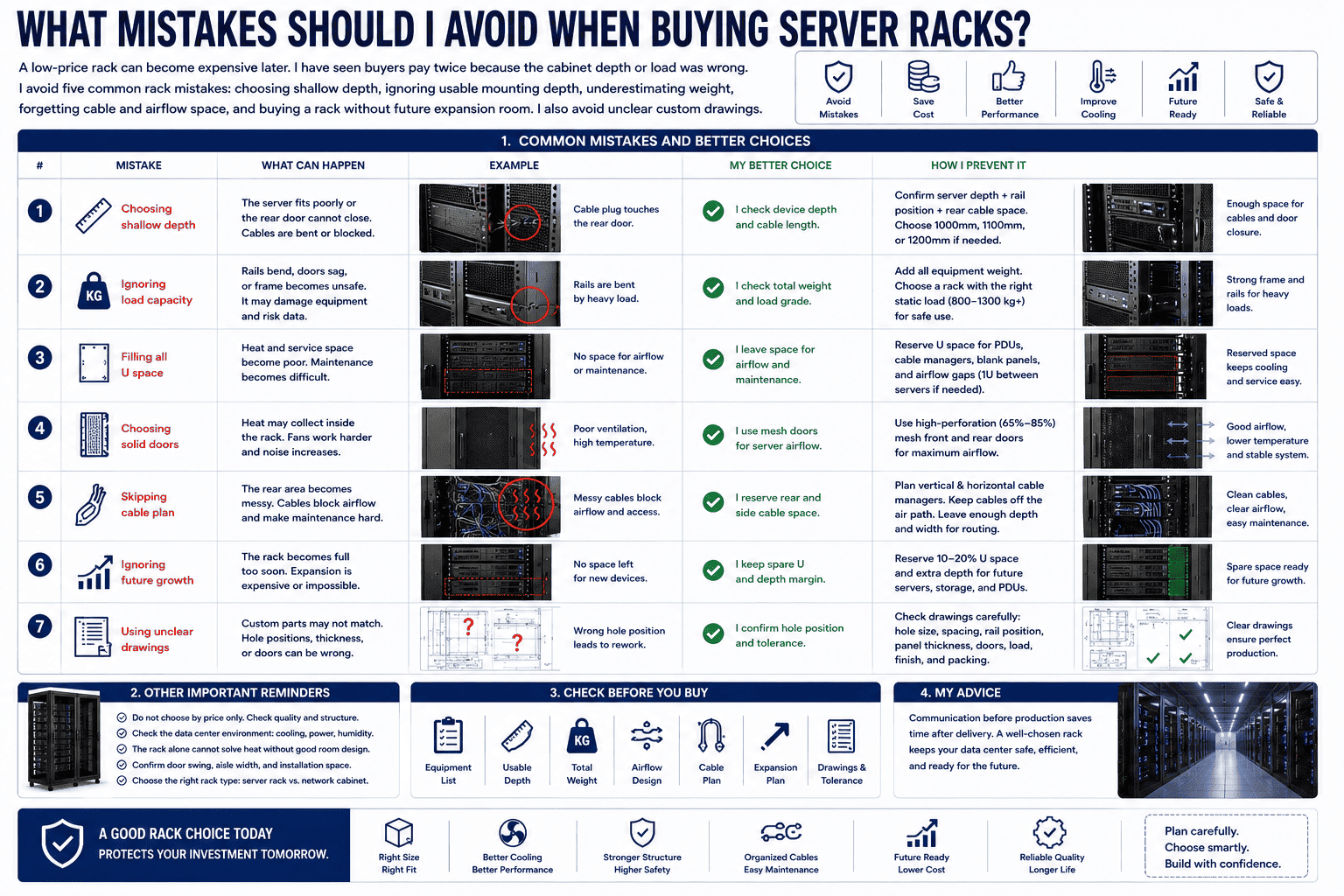
I have seen the same mistakes repeat in different markets. The first mistake is choosing by outside size only. A buyer sees 1000 mm depth and thinks every deep server will fit. The real question is usable rail depth and rear cable space. The second mistake is ignoring the rear door. A device may enter the rack, but the cable plug may push against the door.
Common mistakes and better choices
| Mistake | What Can Happen | My Better Choice |
|---|---|---|
| Choosing shallow depth | The server fits poorly or the door cannot close | I check device depth and cable length |
| Ignoring load | Rails bend or frame becomes unsafe | I check total weight and load grade |
| Filling all U space | Heat and service space become poor | I leave space for airflow and maintenance |
| Choosing solid doors | Heat may collect inside the rack | I use mesh doors for server airflow |
| Skipping cable plan | The rear area becomes messy | I reserve rear and side cable space |
| Ignoring future growth | The rack becomes full too soon | I keep spare U and depth margin |
| Using unclear drawings | Custom parts may not match | I confirm hole position and tolerance |
The third mistake is treating all racks as the same. A network cabinet and a server cabinet may look similar, but they are not always used in the same way. A server rack often needs stronger load, deeper body, better airflow, and more stable rails. A network cabinet may need more cable space and side management. The fourth mistake is choosing a rack without checking the data center environment. A high-density rack needs good cooling and power planning. The rack alone cannot solve heat if the room airflow is poor.
I also pay attention to custom projects. Non-standard cabinets need clear drawings. I need mounting hole size, hole spacing, panel thickness, door design, rail position, load target, surface color, and packing needs. I can produce complex custom racks and special mesh doors, but I still need exact project information. Good communication before production saves time after delivery.
Conclusion
I choose server rack size by matching U height, 19-inch width, depth, load, cooling, cabling, and expansion, because the rack decides data center order.
"19-inch rack - Wikipedia", https://en.wikipedia.org/wiki/19-inch_rack. The EIA-310 and IEC 60297 rack standards define the dimensional interface used for 19-inch rack equipment, including rack-unit height and mounting geometry, supporting the treatment of rack size as a height, width, and depth specification. Evidence role: definition; source type: institution. Supports: A standards source should define the dimensional framework for rack-mounted equipment, including rack-unit height and 19-inch mounting geometry.. Scope note: These standards support the dimensional definition but do not by themselves address every operational factor listed later in the article, such as airflow or expansion planning. ↩
"Rack unit - Wikipedia", https://en.wikipedia.org/wiki/Rack_unit. Reference descriptions of 19-inch racks identify servers, network switches, telecommunications equipment, storage devices, and power-related hardware as common rack-mounted equipment, giving general support to the claim that rack mounting is the dominant data-center format. Evidence role: general_support; source type: encyclopedia. Supports: A neutral reference should show that 19-inch racks are widely used for servers, networking equipment, storage, and other data-center devices.. Scope note: Such sources usually describe common use rather than providing a measured market share for 'most' equipment. ↩
"19-inch rack", https://en.wikipedia.org/wiki/19-inch_rack. The IEC 60297 and EIA-310 specifications standardize the mechanical dimensions and mounting patterns for 19-inch rack equipment, providing the basis for interoperable installation across compliant devices. Evidence role: expert_consensus; source type: institution. Supports: A standards source should support that 19-inch rack dimensions and mounting-hole patterns create a common mechanical interface for equipment.. ↩
"19-inch rack - Wikipedia", https://en.wikipedia.org/wiki/19-inch_rack. Rack standards such as EIA-310 specify the 19-inch equipment mounting interface through defined flange, aperture, and mounting-hole dimensions, distinguishing the standardized mounting interface from the cabinet's external width. Evidence role: definition; source type: institution. Supports: A standards source should clarify that the 19-inch designation describes the standardized mounting interface for equipment with flanges or ears, not total cabinet width.. Scope note: The exact rail-to-rail spacing and front-panel width are separate dimensions within the standard, so the citation should be used to clarify the concept rather than oversimplify it. ↩
"19-inch rack", https://en.wikipedia.org/wiki/19-inch_rack. The rack unit used in 19-inch rack systems is defined as 1.75 inches, equivalent to 44.45 mm, which supports the article's conversion of 1U to metric height. Evidence role: definition; source type: institution. Supports: A standards or reference source should confirm that one rack unit equals 1.75 inches, or 44.45 mm.. ↩
"19-inch rack - Wikipedia", https://en.wikipedia.org/wiki/19-inch_rack. General technical references describe 42U as a common full-height 19-inch rack configuration, supporting the article's view that it is a widely used capacity point in data-center planning. Evidence role: general_support; source type: encyclopedia. Supports: A neutral reference should support that 42U is a common or standard full-height rack configuration.. Scope note: This supports common usage but does not prove that 42U is optimal for every room height, aisle layout, or cooling design. ↩
"19-inch rack - Wikipedia", https://en.wikipedia.org/wiki/19-inch_rack. Technical descriptions of 19-inch rack enclosures note that metric cabinets commonly provide the standardized 19-inch mounting interface within external widths such as 600 mm or 800 mm. Evidence role: general_support; source type: encyclopedia. Supports: A technical reference should show that metric rack cabinets commonly use external widths such as 600 mm and 800 mm while retaining a 19-inch internal mounting interface.. Scope note: The source may document common sizes rather than a mandatory global standard for cabinet outside width. ↩
"Server Rack Sizes: Key Dimensions Affecting Deployment and ...", https://attom.tech/server-rack-sizes-key-dimensions-affecting-deployment-and-compatibility/. Data-center infrastructure guidance distinguishes overall cabinet dimensions from usable equipment and service clearances, noting that rails, doors, cable-management hardware, and power distribution can occupy part of the enclosure depth. Evidence role: mechanism; source type: institution. Supports: A data-center infrastructure guide should explain that rack components and cable-management space reduce the internal space available for equipment.. Scope note: The exact amount of lost usable space varies by rack design, rail position, PDU placement, and cable bend-radius requirements. ↩
"Move to a Hot Aisle/Cold Aisle Layout | ENERGY STAR", https://www.energystar.gov/products/data_center_equipment/16-more-ways-cut-energy-waste-data-center/move-hot-aislecold-aisle-layout. ASHRAE data-center thermal guidance and hot-aisle/cold-aisle design principles describe IT equipment airflow as commonly moving from front intake to rear exhaust, supporting the need to preserve front cooling access and rear exhaust and cabling space. Evidence role: mechanism; source type: institution. Supports: A thermal-management source should support that data-center IT equipment commonly uses front-to-rear airflow and that rack layout should preserve intake and exhaust paths.. Scope note: Some specialized equipment uses side-to-side or nonstandard airflow, so this support applies to common server-rack deployments rather than all hardware. ↩
"42U Server Racks & Cabinets, price ⚡️ - Sysracks", https://sysracks.com/catalog/racks-by-size/42u/?srsltid=AfmBOorusWQG19Xr5yqILs7TvV4jzXhyUXwARsAsSa8EjETJQSZzieCQ. Data-center rack references identify 42U as a common full-height rack configuration and describe 19-inch mounting as the standard interface for servers and network equipment, giving contextual support for the use of 42U 600 mm by 1000 mm cabinets as a common general-purpose choice. Evidence role: general_support; source type: institution. Supports: A data-center design or standards-oriented source should support that 42U full-height racks and 19-inch mounting interfaces are widely used, and that 600 mm by 1000 mm cabinets are a common deployment size.. Scope note: Neutral sources may support the component facts—42U racks, 19-inch compatibility, and common cabinet depths—more directly than the exact statement that 600x1000 mm fits 'most' equipment. ↩
"Move to a Hot Aisle/Cold Aisle Layout", https://www.energystar.gov/products/data_center_equipment/16-more-ways-cut-energy-waste-data-center/move-hot-aislecold-aisle-layout. Data-center airflow studies and thermal-management guidance indicate that perforated rack doors with adequate open area reduce airflow restriction compared with solid doors, supporting the use of mesh doors for server cooling paths. Evidence role: mechanism; source type: research. Supports: A cooling study or institutional guide should show that perforated rack doors reduce airflow resistance and support front-to-rear equipment cooling.. Scope note: Improved airflow depends on perforation ratio, fan capacity, aisle pressure, equipment layout, and room-level cooling design. ↩
