
19″ Vertical Wall Mount Server Enclosure 6U (20″x35″): Is It the Right Fit for Narrow IT Spaces?

Small IT spaces create real pressure. Equipment needs protection, cables need order, and heat needs a path. A wrong cabinet makes every service visit harder.
-
Why Does the 19″ Standard Matter for a Vertical Server Enclosure?
Non-standard mounting creates delay fast. Devices do not line up, screws do not fit, and a simple job becomes rework. I have seen this waste both time and budget.
The 19″ standard matters because most rack servers, switches, routers, UPS units, PDU units, and accessories are designed for a 482.6mm mounting width1. A vertical enclosure keeps this standard, so global IT equipment can fit with less modification and faster installation.
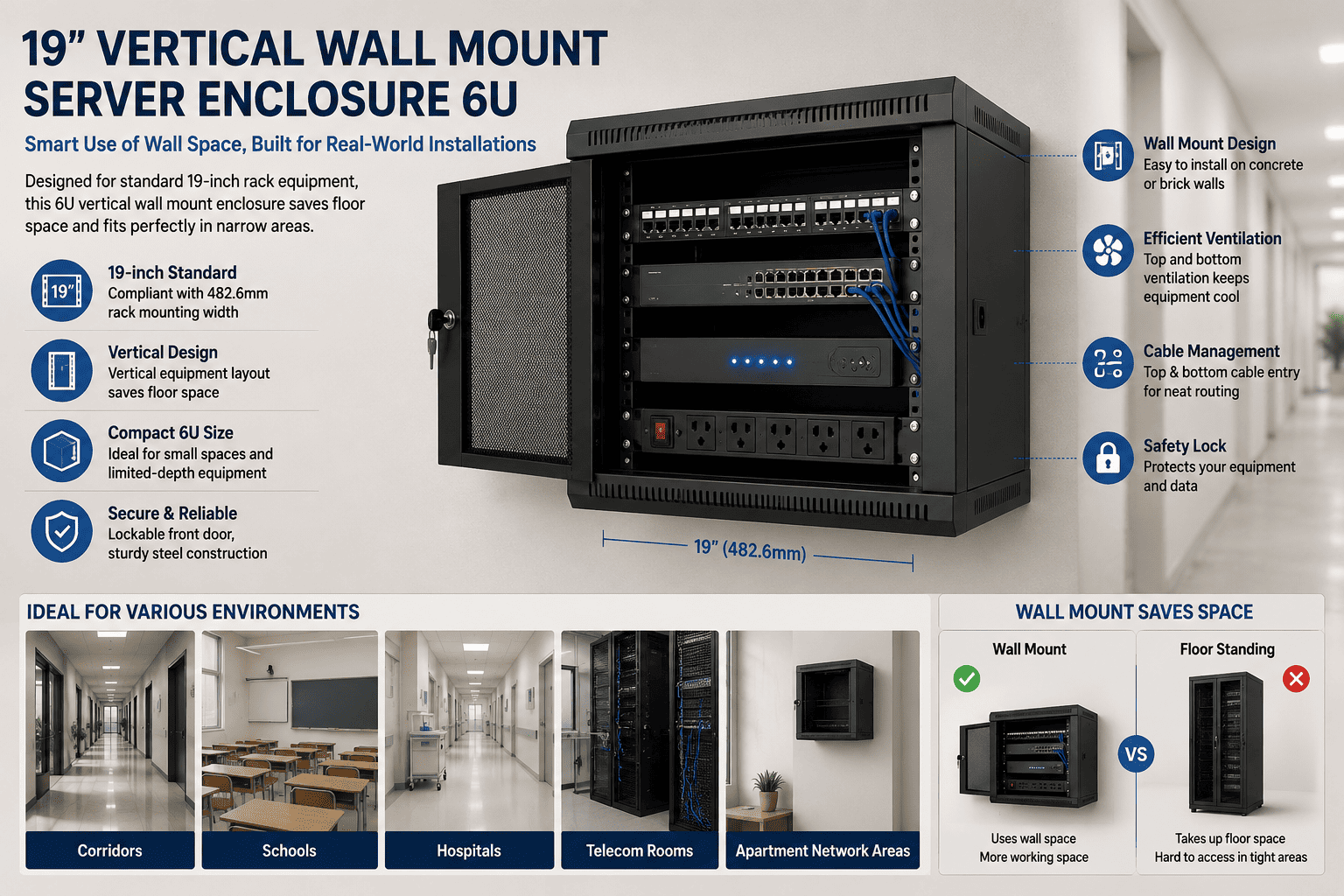
I treat the 19″ size as the basic language of IT hardware installation. When I say 19″, I do not mean the full outside width of the cabinet. I mean the internal mounting width, which is 482.6mm. This width matches the mounting ears and fixed holes of standard rack-mounted devices. This point is important because a vertical cabinet is not useful if it only saves space but breaks compatibility. A good 19″ vertical wall mount server enclosure should still support standard equipment. It should let the installer mount switches, routers, compact servers, patch panels, power units, and other rack parts with normal rack screws.
| Item I Check | Why It Matters | What I Expect |
|---|---|---|
| 19″ mounting width | It decides equipment fit | 482.6mm internal rack width |
| Rack hole alignment | It affects fast installation | Standard rack hole spacing2 |
| Device ear support | It affects safe fixing | Compatible with common rack ears |
| Accessory fit | It affects system build | Supports PDU, patch panel, cable parts |
I also look at the total cabinet structure. The cabinet must be strong enough to hold the load in a vertical direction. The mounting rail cannot be weak. The wall bracket cannot be thin. The screw points need enough strength. In my factory work, I always care about sheet metal thickness, bending accuracy, welding strength, and surface treatment. These small manufacturing details decide whether the cabinet can stay stable after years of use.
How Does Vertical Mounting Save Space in Real Projects?
Narrow sites create hard choices. I cannot always add a rack room. I cannot always move a wall. I need the cabinet to fit the site.
Vertical mounting saves space by placing rack equipment upright against a wall or in a slim cabinet body. It avoids the deep horizontal sliding style of a normal rack, so it works better in narrow walkways, shafts, and small network corners.
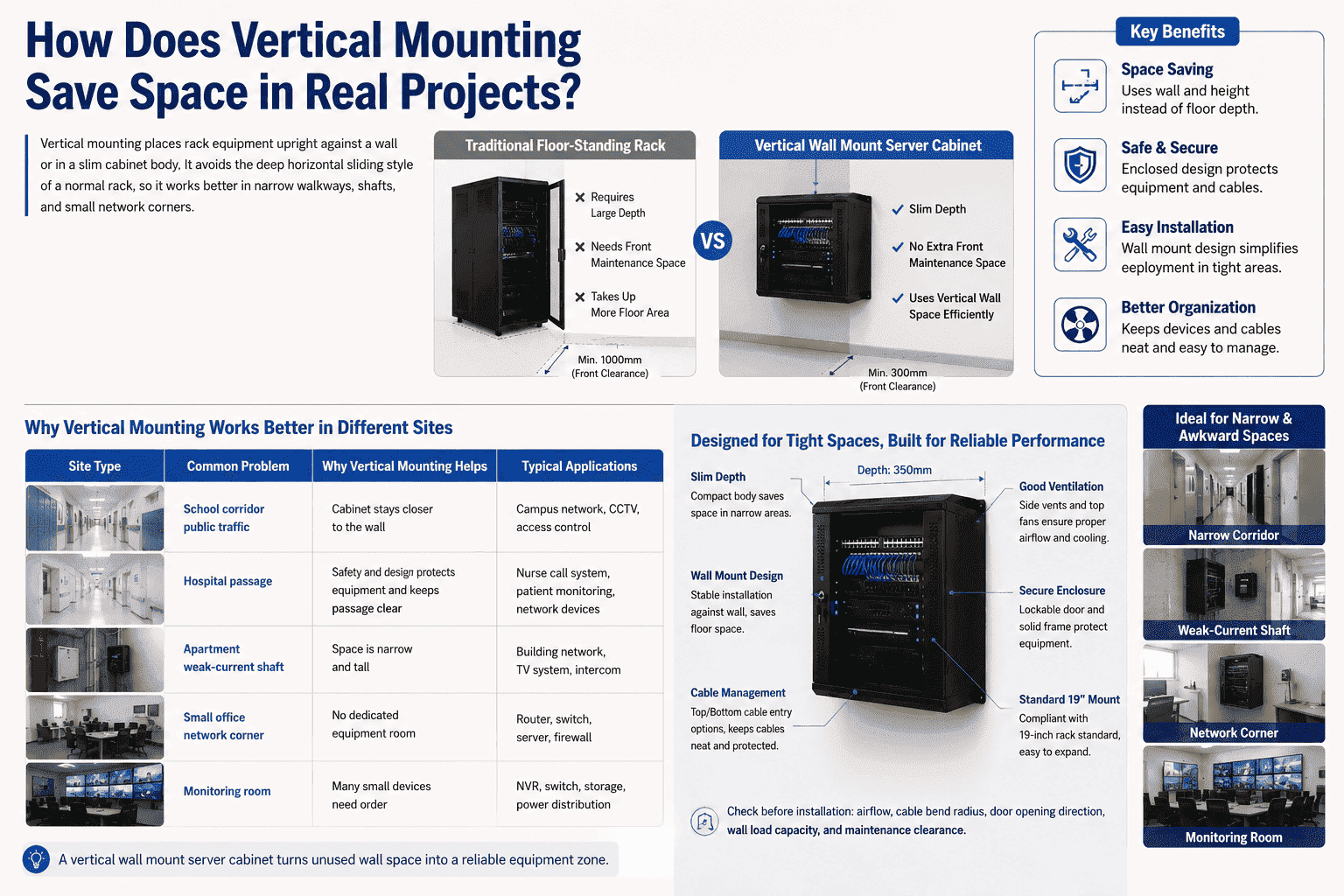
I see the main value of vertical mounting in small and awkward spaces. A standard network cabinet needs depth because equipment slides in from the front. The installer also needs space in front of the cabinet. In a narrow corridor or a school hallway, this depth can be a problem.3 A vertical server enclosure changes that layout. The equipment is fixed in a vertical direction, like it is hanging inside the cabinet. The cabinet can be much easier to place near a wall.
| Site Type | Common Problem | Why Vertical Mounting Helps |
|---|---|---|
| School corridor | Limited width and public traffic | Cabinet stays closer to the wall |
| Hospital passage | Safety and clear access are needed | Enclosed design protects equipment |
| Apartment weak-current shaft | Space is narrow and tall | Vertical layout uses height better |
| Small office network corner | No dedicated equipment room | Wall mount keeps floor area open |
| Monitoring room | Many small devices need order | 6U size supports grouped equipment |
I also like this structure because it makes small spaces more useful. Many sites have unused vertical wall space. The floor is busy, but the wall is empty. A vertical cabinet turns that empty wall into an equipment zone. This is useful for CCTV systems, access control systems, communication devices, and small business network systems. I still need to check airflow, cable bend radius, door opening direction, and load capacity. Space saving should not hurt serviceability. A compact cabinet still needs a clear maintenance path.
What Equipment Can I Install in a 6U Vertical Wall Mount Enclosure?
Wrong equipment selection causes heat, cable, and load problems. A 6U cabinet is compact, so I must plan every unit before I build or buy it.
A 6U vertical wall mount enclosure can hold standard 19″ rack devices such as switches, routers, patch panels, compact servers, PDUs, and small UPS units. The final fit depends on device depth, weight, heat output, cable space, and door clearance.4
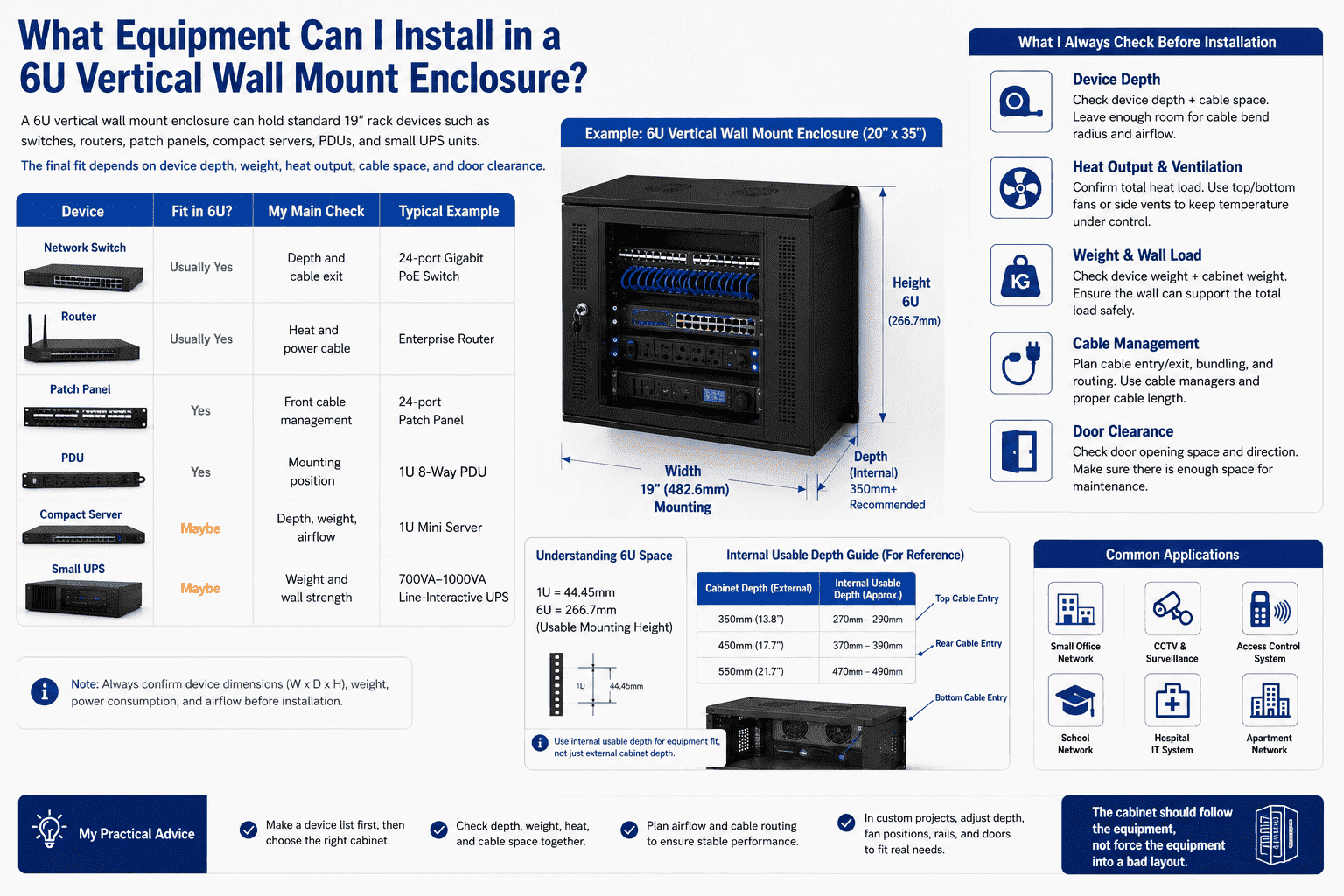
I do not look at “6U” as only a height number. I look at it as a limited space plan. One rack unit is 44.45mm5, so 6U gives a fixed mounting height. That space can be enough for a small network system, but it must be used carefully. I usually ask what devices will be installed first. A switch and patch panel may fit easily. A deeper server may need a deeper enclosure. A UPS may bring more weight, so the wall mount design must be checked with care.
| Device | Fit in 6U? | My Main Check |
|---|---|---|
| Network switch | Usually yes | Depth and cable exit |
| Router | Usually yes | Heat and power cable |
| Patch panel | Yes | Front cable management |
| PDU | Yes | Mounting position |
| Compact server | Maybe | Depth, weight, airflow |
| Small UPS | Maybe | Weight and wall strength |
I also pay attention to the “20″x35″” style size description. Many customers use outside dimensions to judge cabinet fit. I use outside dimensions for site placement, but I use internal mounting depth for equipment fit. Both numbers matter. A cabinet can look large outside but still fail if the internal usable depth is not enough. In custom projects, I often adjust depth, cable holes, fan positions, door style, and mounting rails to fit the real device list. This is one reason non-standard cabinet production is valuable. The cabinet should follow the equipment, not force the equipment into a bad layout.
Why Are Cooling and Ventilation Still Important in a Small Wall Cabinet?
Small cabinets heat up fast. I have seen equipment fail not because of bad electronics, but because hot air had no clean way out.
Cooling matters because vertical wall mount enclosures hold active IT devices in a smaller closed body. Good mesh doors, vents, fans, and cable layout help hot air escape and help equipment run more safely for long periods.
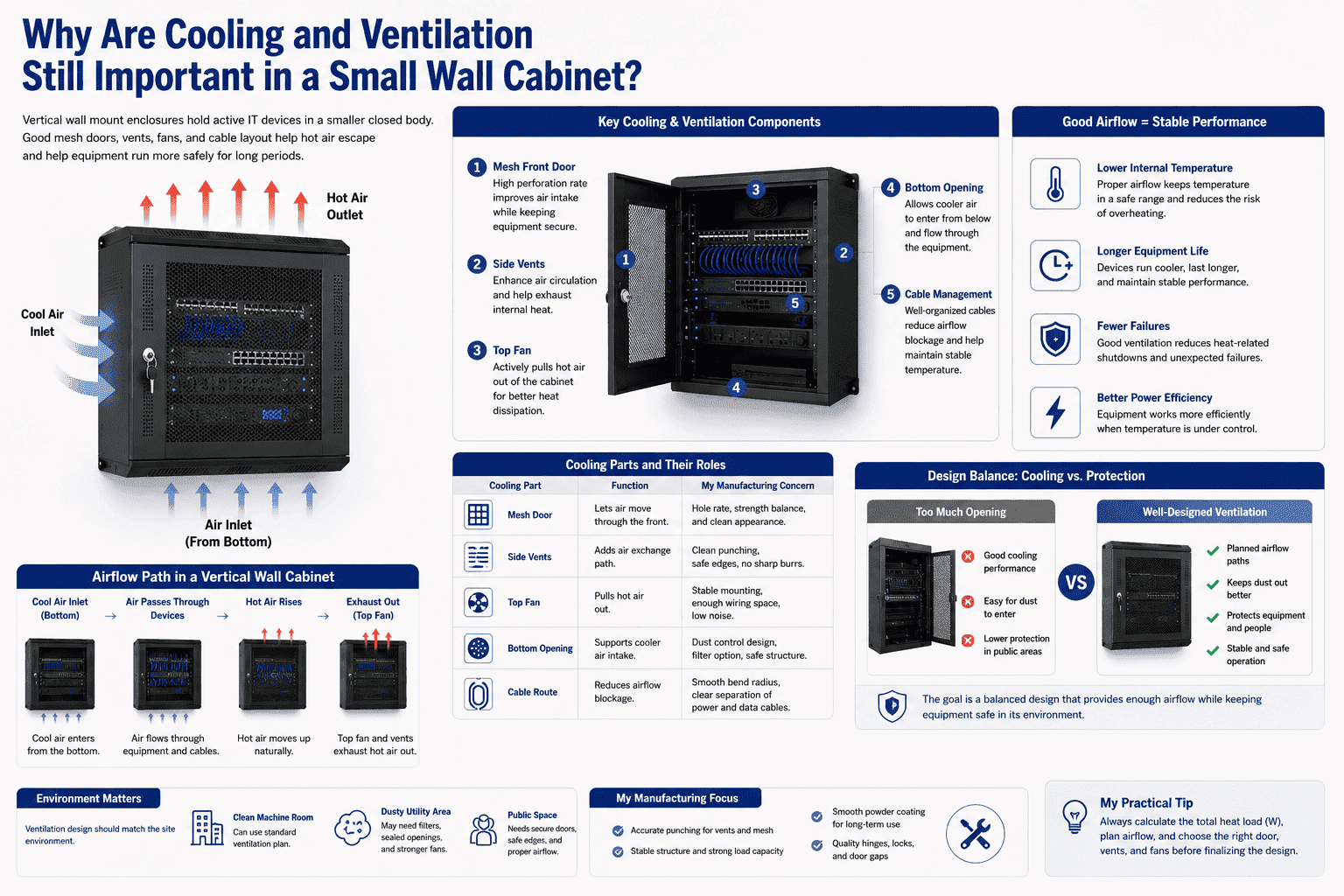
A vertical wall mount cabinet is compact, but compact does not mean simple. Every switch, router, server, and power device releases heat.6 If the cabinet is sealed without enough airflow, the inside temperature can rise quickly.7 I always check the heat load before I decide the door and ventilation design. A perforated door or mesh door can improve air exchange.8 Top and bottom vents can support natural airflow.9 Fans can help when the device heat output is higher.
| Cooling Part | Function | My Manufacturing Concern |
|---|---|---|
| Mesh door | Lets air move through the front | Hole rate and strength balance |
| Side vents | Adds air exchange path | Clean punching and safe edges |
| Top fan | Pulls hot air out | Stable mounting and wiring space |
| Bottom opening | Supports cooler air intake | Dust control and protection |
| Cable route | Reduces airflow blockage | Smooth bend and clear separation |
I also think about dust and safety. A fully open structure may cool well, but it may not protect equipment enough in public spaces. A closed cabinet gives better protection, but it needs planned ventilation. This balance is important in schools, hospitals, residential buildings, and commercial corridors. I often recommend a cabinet design based on the environment. A clean machine room can use a different ventilation plan than a dusty utility area. In production, I focus on accurate punching, stable door gaps, smooth powder coating, and strong hinges. These details help the cabinet keep both airflow and protection.
What Should I Check Before Choosing Wall Mount or Floor Standing Design?
A cabinet can look suitable in a catalog and still fail after installation. The wall may be weak, the load may be high, or the service space may be too small.
I choose wall mount design when the wall is strong, the equipment is not too heavy, and floor space must stay clear. I choose floor standing design when the load is higher, access is easier from the ground, or the wall cannot safely carry the cabinet.
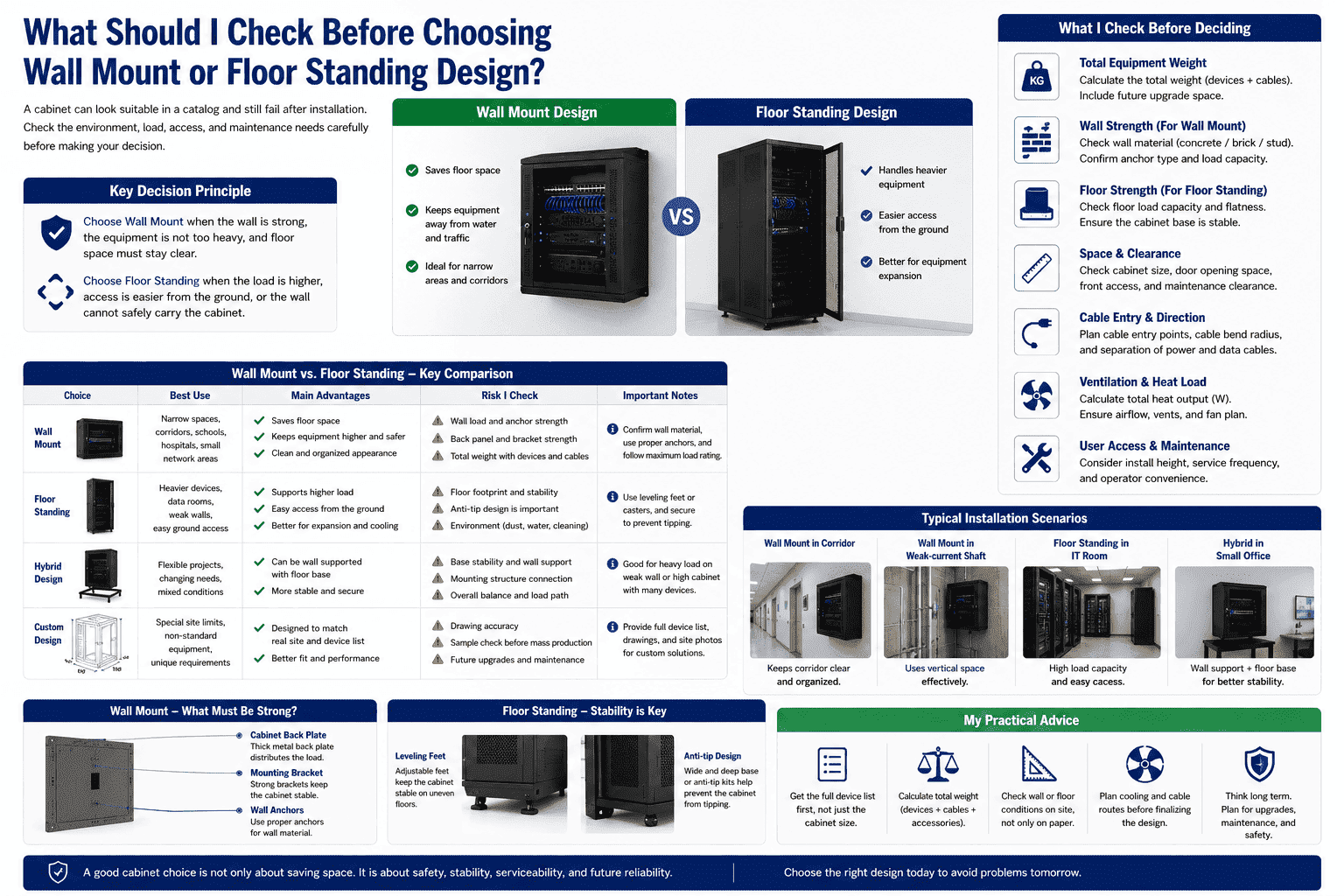
A 19″ vertical server enclosure can be wall mounted or floor standing, depending on the project. I do not decide this by appearance. I decide it by load, wall strength, user access, and maintenance habit. Wall mount design is useful when the floor area is limited. It also keeps the cabinet away from water, cleaning tools, and ground-level traffic. But it requires strong wall fixing. The wall, anchors, cabinet back plate, and mounting bracket must work together.
| Choice | Best Use | Risk I Check |
|---|---|---|
| Wall mount | Narrow spaces and clear floor needs | Wall load and anchor strength |
| Floor standing | Heavier devices or weaker walls | Floor footprint and anti-tip design |
| Hybrid design | Flexible project use | Stable base and wall support |
| Custom design | Special site limits | Drawing accuracy and sample check |
I have seen customers choose wall mount design because it looks neat. But after they add a UPS, several switches, and extra cables, the weight becomes much higher than expected. This is why I ask for the full equipment list early. I also ask for device weight, device depth, cable direction, and install height. In custom cabinet production, I can strengthen the back panel, add reinforcing ribs, change the bracket, or design a small base. These changes are not decoration. They are safety decisions. A good cabinet should not only fit on day one. It should also remain stable after repeated door opening, cable changes, and device upgrades.
How Does Custom Sheet Metal Manufacturing Improve a Vertical Server Cabinet?
A standard cabinet may fit many projects, but it may not fit every site. A small difference in depth, door, or hole position can decide success.
Custom sheet metal manufacturing improves a vertical server cabinet by matching the cabinet structure to the equipment and site. It can adjust depth, mounting rails, mesh doors, cable entries, locks, fan holes, load support, and surface finish.
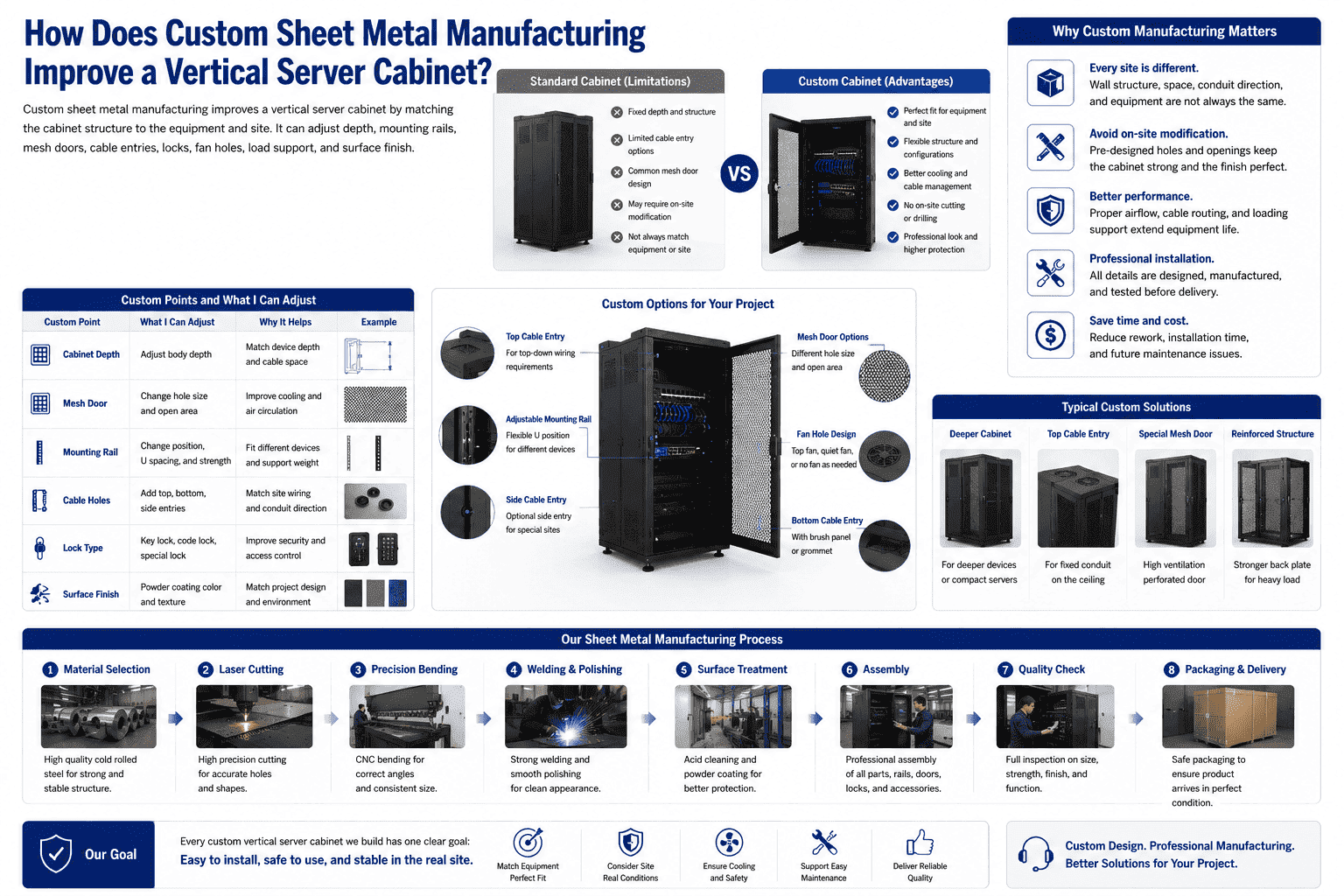
I see custom manufacturing as a practical tool, not a luxury. Many overseas projects need standard 19″ compatibility, but they also need special cabinet details. One customer may need a special perforated door. Another may need a deeper body for a compact server. Another may need cable entry from the top because the site conduit is already fixed. If the cabinet is standard only, the installer may cut holes on site. That is not ideal. It can damage coating, reduce protection, and make the cabinet look poor.
| Custom Point | What I Can Adjust | Why It Helps |
|---|---|---|
| Cabinet depth | Match device depth | Avoid cable pressure |
| Mesh door | Change hole size and open area | Improve cooling |
| Mounting rail | Change position and strength | Fit different devices |
| Cable holes | Add top, bottom, or side entries | Match site wiring |
| Lock type | Use key lock or special lock | Improve access control |
| Surface finish | Powder coating color and texture | Match project needs |
In my own production work, I care about the full process. I start from material selection. I use laser cutting for accurate parts. I use precision bending to keep shape. I use welding and polishing to keep the cabinet strong and clean. I use acid cleaning and powder coating to improve surface quality. I also care about final assembly because a cabinet is not only steel panels. It includes doors, hinges, locks, rails, screws, fans, grounding parts, and packaging. Every step affects the final result. When I produce non-standard vertical server cabinets or custom mesh doors, I try to keep one goal clear. The cabinet must be easy to install, safe to use, and stable in the real site.
Why Is a 19″ Vertical Server Enclosure Useful for Global IT Projects?
Global projects need fewer surprises. If the cabinet design is hard to understand or hard to install, the cost moves from factory to site.
A 19″ vertical server enclosure is useful for global IT projects because it follows the common rack standard, supports modular deployment, saves space, and fits many low-space network scenes. It helps international buyers plan equipment, cables, cooling, and protection in one cabinet.
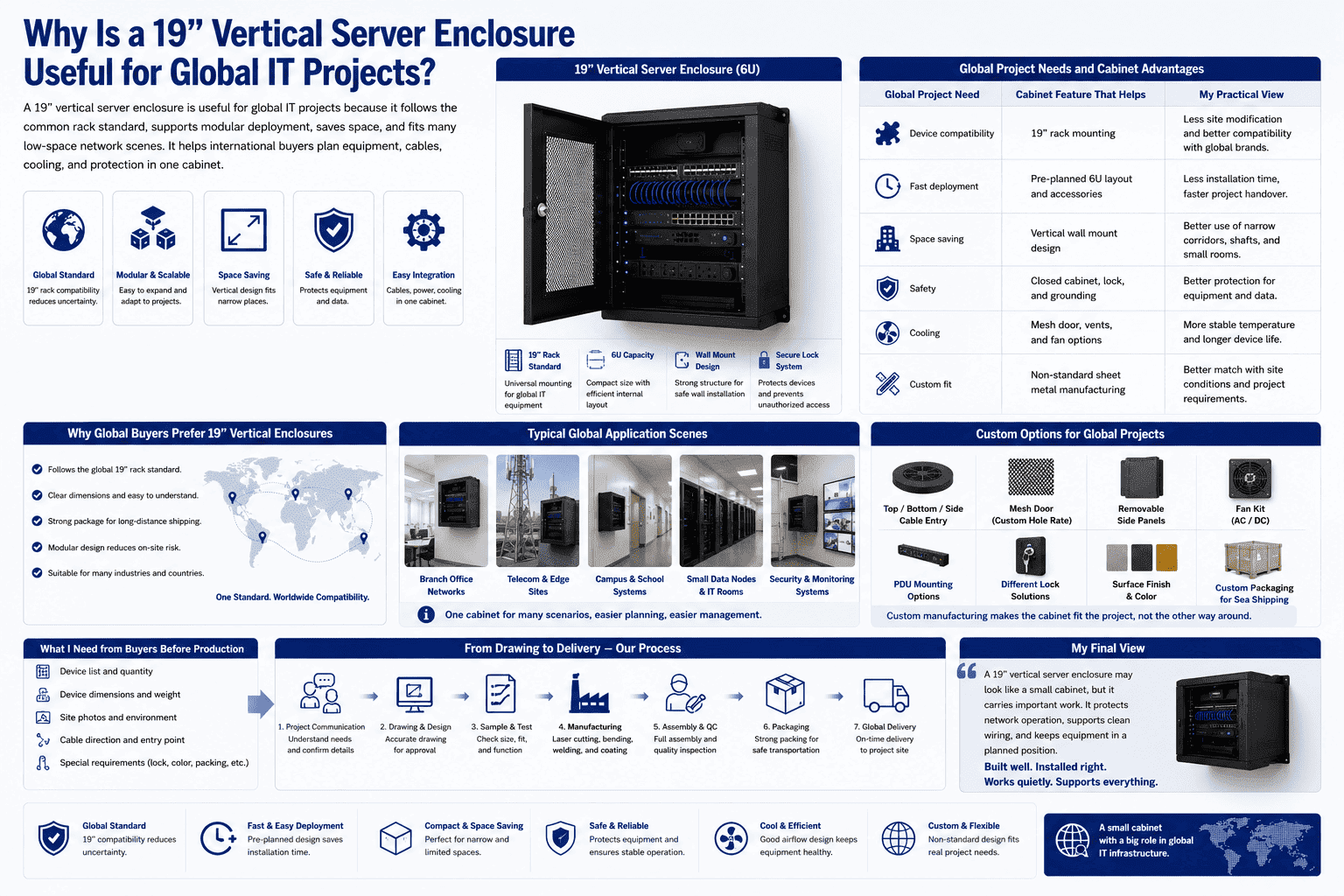
I often think about overseas buyers when I design or produce a cabinet. A product may travel a long distance before it reaches the installation site. The buyer needs clear dimensions, strong packaging, stable structure, and simple installation. The 19″ standard helps because global IT equipment makers already design around it. This reduces uncertainty. A 6U vertical wall mount cabinet can become a repeatable solution for branch offices, telecom points, campus systems, small data nodes, and security networks.
| Global Project Need | Cabinet Feature That Helps | My Practical View |
|---|---|---|
| Device compatibility | 19″ rack mounting | Less site change |
| Fast deployment | Pre-planned 6U layout | Less installation time |
| Space saving | Vertical wall design | Better use of narrow sites |
| Safety | Closed cabinet and lock | Better equipment protection |
| Cooling | Mesh and fan options | More stable operation |
| Custom fit | Non-standard sheet metal design | Better site matching |
I also know that different countries and projects may have different habits. Some installers prefer front access. Some need top cable entry. Some want removable side panels. Some need special packing for long sea shipping. This is why I value communication before production. I ask for drawings, device lists, site photos, and cable direction when possible. These details help me avoid guesswork. The vertical wall mount server enclosure looks like a small cabinet, but it carries important work. It protects network operation, supports clean wiring, and keeps equipment in a planned position. When it is built well, it becomes a quiet part of the digital system. It does not draw attention, but it keeps the system easier to manage.
Conclusion
I choose a 19″ vertical wall mount 6U enclosure when standard rack compatibility, narrow-space installation, safe protection, clean wiring, and custom manufacturing all matter together.
"19-inch rack - Wikipedia", https://en.wikipedia.org/wiki/19-inch_rack. The EIA/ECA-310 and IEC 60297 rack standards define the 19-inch rack mounting convention, including the 482.6 mm nominal mounting width, supporting the compatibility basis for rack-mounted IT equipment; these standards do not by themselves quantify the market share of devices using the format. Evidence role: definition; source type: institution. Supports: The 19-inch rack standard defines a 482.6 mm mounting width used for rack-compatible equipment.. Scope note: The source would support the dimensional standard, not directly prove that most devices in every product category use it. ↩
"19-inch rack - Wikipedia", https://en.wikipedia.org/wiki/19-inch_rack. Rack-mount standards such as EIA/ECA-310 specify the mounting-flange hole pattern and related dimensional tolerances, supporting the claim that hole alignment is part of standardized rack installation. Evidence role: definition; source type: institution. Supports: Rack standards define mounting-hole spacing and flange dimensions for 19-inch racks.. ↩
"Chapter 3: Protruding objects - Access-Board.gov", https://www.access-board.gov/ada/guides/chapter-3-protruding-objects/. Accessibility and building-code guidance sets minimum clear widths and limits on protruding objects in circulation routes, providing context for why deep wall-mounted equipment can be problematic in corridors; the guidance does not evaluate vertical server enclosures specifically. Evidence role: general_support; source type: government. Supports: Corridors and accessible routes are subject to minimum clear-width and protruding-object limits, making equipment depth relevant in narrow passageways.. Scope note: This would be contextual support for corridor-clearance concerns rather than a direct test of the cabinet design. ↩
"[PDF] Best Practices Guide for Energy-Efficient Data Center Design", https://www.energy.gov/sites/default/files/2024-07/best-practice-guide-data-center-design.pdf. Data-center and telecommunications infrastructure guidance identifies equipment dimensions, structural loading, cable management, airflow, and service access as planning factors for rack installations, supporting the article’s list of fit constraints; such guidance is general and must be applied to the specific enclosure and device list. Evidence role: expert_consensus; source type: institution. Supports: Rack and data-center planning guidance treats dimensions, loading, airflow, cabling, and access clearances as relevant equipment-installation factors.. Scope note: The source would support the general design criteria, not verify fit for a particular 6U cabinet. ↩
"Rack unit", https://en.wikipedia.org/wiki/Rack_unit. A rack unit is conventionally defined as 1.75 inches, or 44.45 mm, which supports the article’s conversion of 6U into a fixed rack-mounting height. Evidence role: definition; source type: encyclopedia. Supports: One rack unit, or 1U, is defined as 1.75 inches, equivalent to 44.45 mm.. ↩
"Data Centers and Their Energy Consumption - Congress.gov", https://www.congress.gov/crs-product/R48646. ASHRAE data-center thermal guidance treats IT equipment power consumption as a heat load that must be removed by the cooling and ventilation system, supporting the statement that active network and power devices release heat during operation. Evidence role: mechanism; source type: institution. Supports: Electrical power consumed by IT equipment is largely dissipated as heat, creating a cooling requirement.. ↩
"[PDF] Data Center Airflow Management Retrofit", https://datacenters.lbl.gov/sites/default/files/airflow-doe-femp.pdf. Research and ASHRAE guidance on data-center airflow management show that restricted airflow, recirculation, and inadequate heat removal can increase IT equipment temperatures, supporting the concern that a sealed cabinet may heat up quickly. Evidence role: mechanism; source type: research. Supports: Restricted airflow and inadequate heat removal can raise equipment inlet or enclosure temperatures.. ↩
"[PDF] quantifying air flow rate through a server in an operational data", https://mavmatrix.uta.edu/context/mechaerospace_theses/article/1223/type/native/viewcontent. Studies of rack airflow and data-center cooling indicate that perforated or high-open-area rack doors reduce airflow restriction and can improve air exchange through equipment cabinets; the effect depends on fan placement, open-area ratio, and room airflow conditions. Evidence role: mechanism; source type: research. Supports: Open-area door designs reduce airflow resistance and can improve ventilation through equipment enclosures.. Scope note: The support is conditional because a specific door design must be evaluated with its actual perforation pattern and airflow path. ↩
"Natural Ventilation | Department of Energy", https://www.energy.gov/energysaver/natural-ventilation. Natural-ventilation literature describes the stack effect, in which warmer air exits through higher openings while cooler air enters through lower openings, supporting the use of top and bottom vents as a passive airflow path; actual performance depends on heat load, vent area, and ambient conditions. Evidence role: mechanism; source type: research. Supports: Vertical separation between low and high openings can promote buoyancy-driven airflow.. Scope note: This supports the airflow mechanism generally, not the ventilation capacity of a specific enclosure. ↩
