
Exploring Data Center Rack Density: What Does It Really Mean?

-
What Is Data Center Rack Density?
Many people still think rack density means how many devices can fit inside a cabinet. That view creates problems because a full rack can still be poorly designed. If I ignore heat, power, airflow, and load capacity, the cabinet becomes a risk instead of an asset.
Data center rack density is the combined measurement of IT equipment load, power consumption, heat output, and vertical rack space usage inside one cabinet. I usually evaluate it by kW per rack, U-space utilization, cable organization, cooling demand, and whether the cabinet can safely support continuous operation.
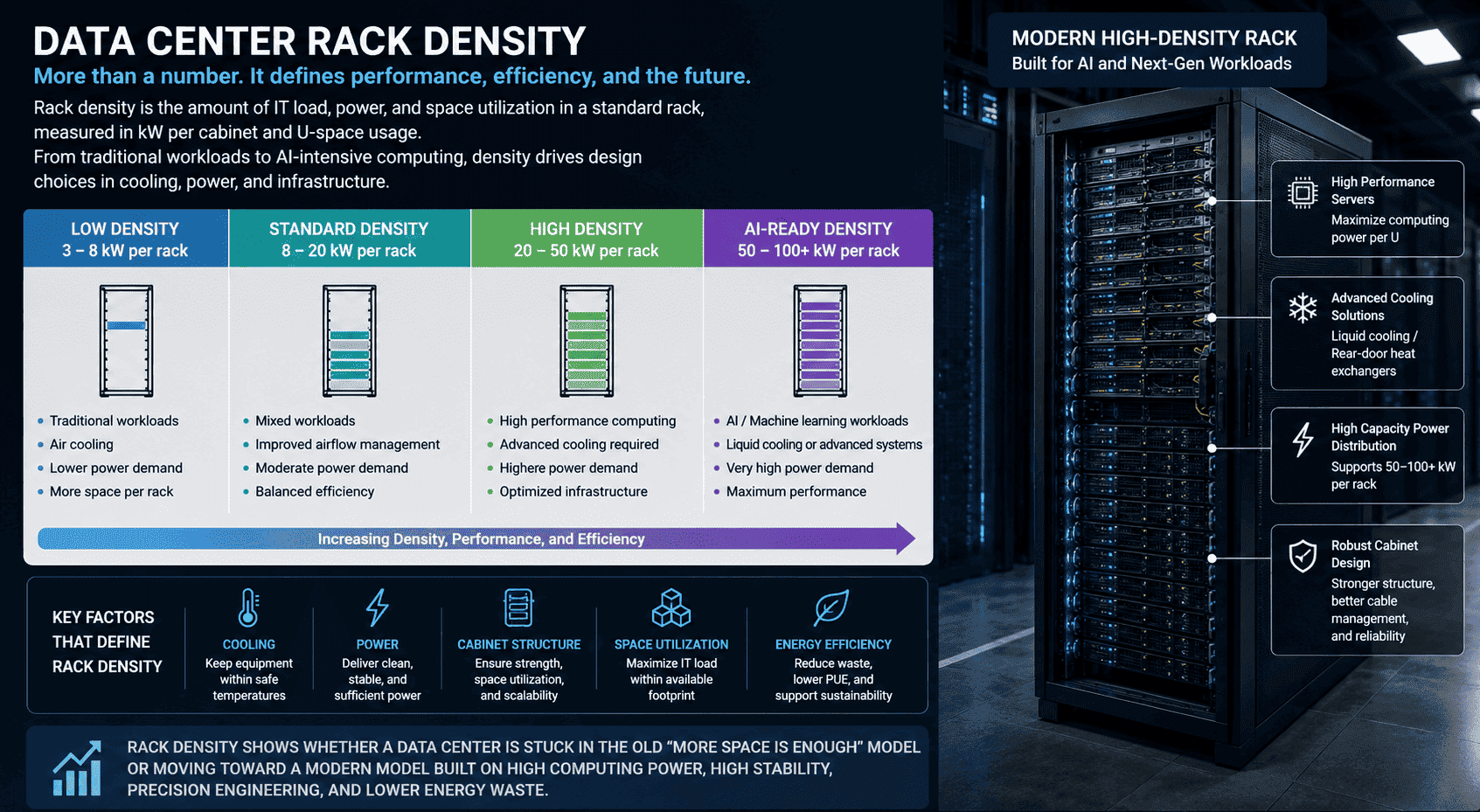
The core meaning of rack density
In a standard data center, the common cabinet format is a 19-inch 42U server rack1. The “U” is the vertical mounting unit. One U equals 1.75 inches2, so a 42U rack gives a fixed vertical space for servers, switches, storage, PDUs, cable managers, and airflow accessories.
However, I never judge a rack only by how many U positions are filled. A cabinet with 90% U-space usage can still be inefficient if the airflow is blocked. A cabinet with 70% U-space usage can be more stable if its power, cable path, and cooling are planned correctly.
The goal is not to fill every empty space. The goal is to deploy IT equipment safely under stable power and cooling conditions.
Common rack density ranges
I usually classify data center rack density by power load per cabinet:
| Rack density level | Typical power per rack | Common use case | Main challenge |
|---|---|---|---|
| Low density | 3–8 kW/rack | Small server rooms, monitoring rooms, campus networks | Space may be underused |
| Medium density | 10–20 kW/rack | Commercial IDC rooms, enterprise server rooms | Stable cooling and power |
| High density | 20–50 kW/rack | Cloud data centers, colocation, cluster servers | Heat and current load |
| Ultra-high density | 50–100 kW/rack | AI GPU clusters, HPC, supercomputing | Precision cooling and redundancy |
Why density is not only “more servers”
When I walk through a machine room, I look at more than the front of the rack. I look at the rear cable space, door perforation, side panel rigidity, frame thickness, grounding path, PDU position, and airflow path. These details decide whether the rack can support higher computing density.
A low-density setup often uses switches, routers, and light network devices. The heat output is limited. The design can be simpler. A high-density rack is very different. It may hold several rack-mounted servers, GPU servers, storage arrays, and dual power circuits. The heat rises fast. The current load becomes serious. The cabinet must stay stable under weight, vibration, cable pull, and long-term operation.
For me, data center rack density is really a maturity indicator. It reflects the full level of facility design, cabinet manufacturing precision, power planning, thermal control, and operational discipline.
Why Does Data Center Rack Density Matter for Modern Computing?
Modern computing has changed the rules. A traditional server room could survive with basic racks and simple cooling. AI, cloud platforms, and big data cannot. If I design for yesterday’s density, tomorrow’s equipment will overload the room before the business can scale.
Data center rack density matters because it decides how much computing power a facility can deliver in limited space while staying stable, safe, and energy efficient. Higher density improves space utilization and operational efficiency3, but it also demands stronger cabinets, better airflow, reliable power distribution, and more accurate thermal management.
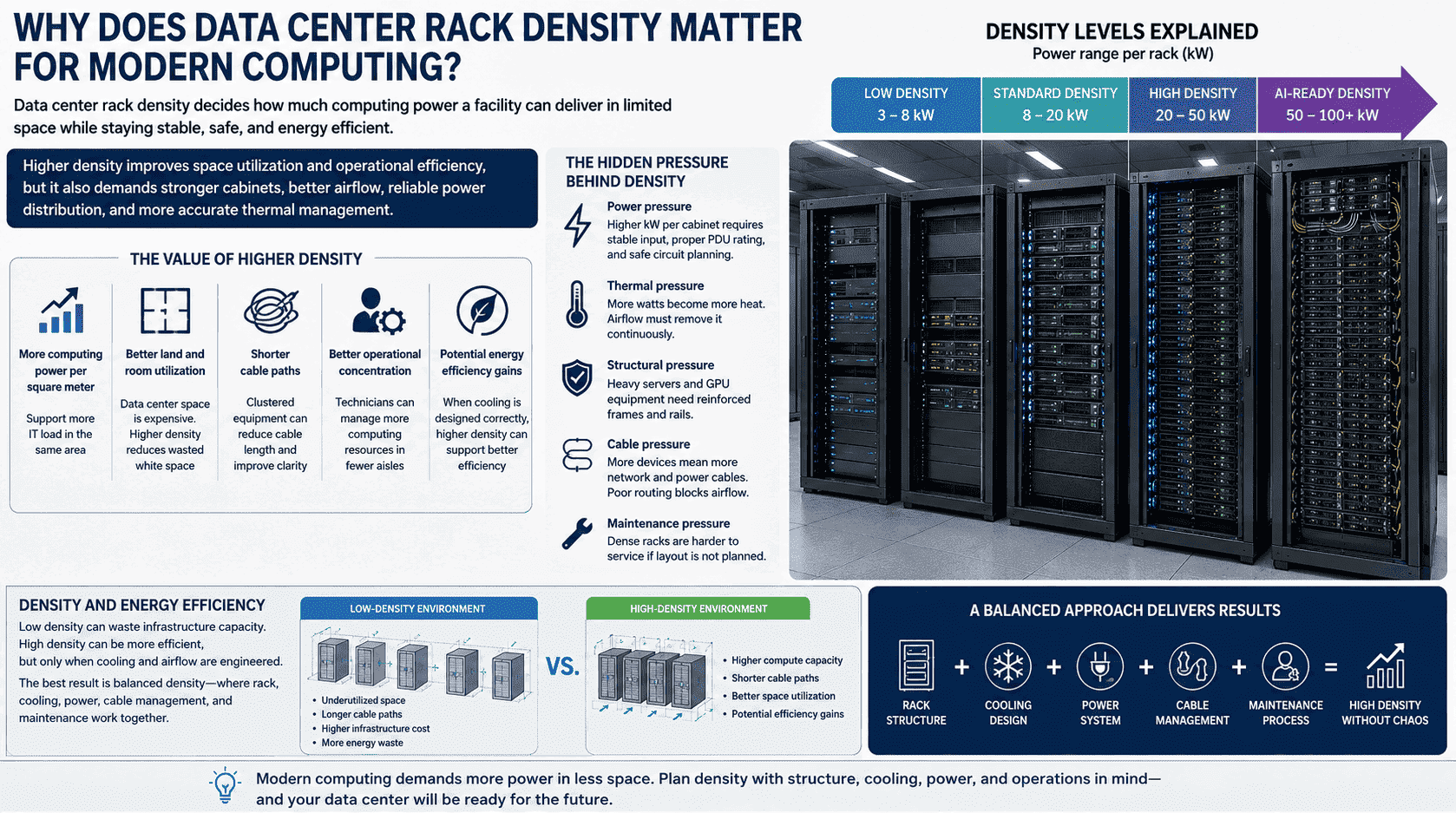
Density has become a structural shift
The data center industry is moving through a structural change. In the past, many projects followed a simple idea: install enough racks, keep costs low, and leave room for future equipment. That worked when equipment power levels were lower and compute demand grew more slowly.
Now the market is different. Cloud platforms need more servers in less space. AI workloads need GPU clusters. Cross-border data centers need stable uptime under heavy traffic. Enterprise users want faster deployment and lower operating cost. These demands push the industry toward higher data center rack density.4
The value of higher density
I think high-density deployment creates value in five clear ways:
-
More computing power per square meter
A dense rack supports more IT load in the same floor area. -
Better land and room utilization
Data center space is expensive. Higher density reduces wasted white space. -
Shorter cable paths
Clustered equipment can reduce cable length and improve maintenance clarity. -
Better operational concentration
Technicians can manage more computing resources in fewer aisles. -
Potential energy efficiency gains
When cooling is designed correctly, higher density can support better airflow control and reduced waste.
The hidden pressure behind density
Higher density also increases risk. I have seen projects where the customer wanted to add more servers into a standard cabinet, but the original cabinet was not designed for that load. The rack looked normal from the outside, but the frame strength, ventilation rate, and PDU layout were not enough.
High rack density creates pressure in several areas:
- Power pressure: Higher kW per cabinet requires stable input, proper PDU rating, and safe circuit planning.
- Thermal pressure: More watts become more heat. Airflow must remove it continuously.
- Structural pressure: Heavy servers and GPU equipment need reinforced frames and rails.
- Cable pressure: More devices mean more network and power cables. Poor routing blocks airflow.
- Maintenance pressure: Dense racks are harder to service if layout is not planned.
Density and energy efficiency
I also connect rack density with energy performance. A low-density room may look safe because each cabinet has low heat. However, it can waste floor space, cooling volume, lighting, cable trays, and infrastructure capacity. A high-density room can be more efficient, but only when cooling and airflow are engineered.
This is why I do not recommend chasing density blindly. The best result is balanced density. The rack, room cooling, power system, cable management, and maintenance process must match. When they match, high density delivers computing power without chaos.
How Do I Measure Data Center Rack Density in kW per Rack and U Space?
Measurement is where many design mistakes begin. If I only count cabinets, I miss the real load. If I only count servers, I miss the power and heat. A data center can look organized but still be unbalanced inside each cabinet.
I measure data center rack density by looking at power load per rack, U-space utilization, equipment weight, airflow demand, PDU capacity, and cooling method. The most common metric is kW per cabinet, but a complete assessment also includes whether the 42U vertical space is used safely and serviceably.
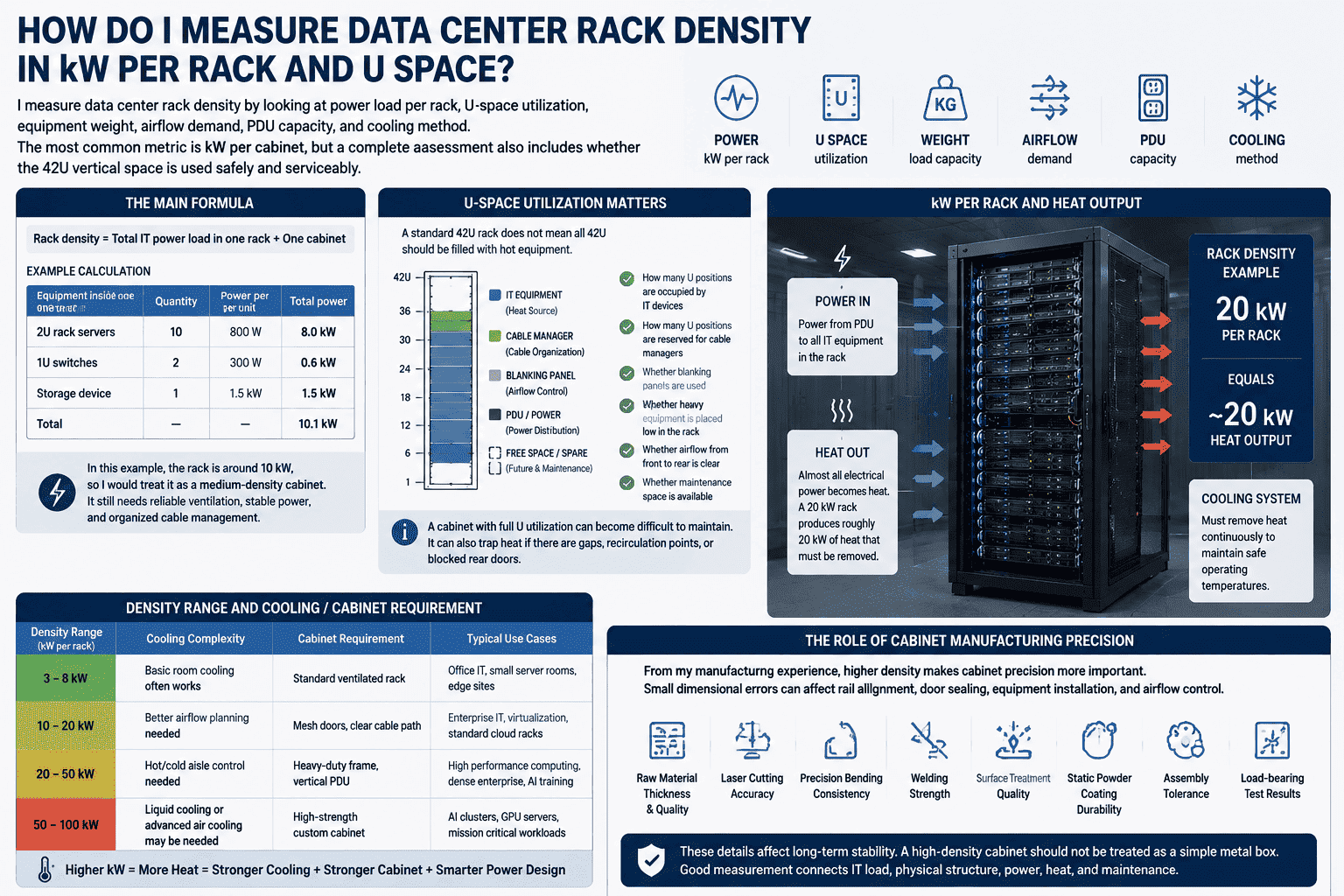
The main formula
The simplest way to calculate rack power density is:
Rack density = Total IT power load in one rack ÷ One cabinet
For example:
| Equipment inside one rack | Quantity | Power per unit | Total power |
|---|---|---|---|
| 2U rack servers | 10 | 800 W | 8 kW |
| 1U switches | 2 | 300 W | 0.6 kW |
| Storage device | 1 | 1.5 kW | 1.5 kW |
| Total | — | — | 10.1 kW |
In this example, the rack is around 10 kW, so I would treat it as a medium-density cabinet. It may not need the same design as an AI rack, but it still needs reliable ventilation, stable power, and organized cable management.
U-space utilization matters
A standard 42U rack does not mean all 42U should be filled with hot equipment. I usually check:
- How many U positions are occupied by IT devices
- How many U positions are reserved for cable managers
- Whether blanking panels are used
- Whether heavy equipment is placed low in the rack
- Whether airflow from front to rear is clear
- Whether maintenance space is available
A cabinet with full U utilization can become difficult to maintain. It can also trap heat if there are gaps, recirculation points, or blocked rear doors.5
kW per rack and heat output
Power and heat are closely linked. Almost all electrical power consumed by IT equipment becomes heat.6 So a 20 kW rack produces roughly 20 kW of heat that must be removed.7 That is why density cannot be separated from cooling.
Here is a practical way I think about it:
| Density range | Cooling complexity | Cabinet requirement |
|---|---|---|
| 3–8 kW | Basic room cooling often works | Standard ventilated rack |
| 10–20 kW | Better airflow planning needed | Mesh doors, clear cable path |
| 20–50 kW | Hot/cold aisle control needed | Heavy-duty frame, vertical PDU |
| 50–100 kW | Liquid cooling or advanced air cooling may be needed8 | High-strength custom cabinet |
The role of cabinet manufacturing precision
From my manufacturing experience, higher density makes cabinet precision more important. Small dimensional errors can affect rail alignment, door sealing, equipment installation, and airflow control. A high-density cabinet should not be treated as a simple metal box.
I pay attention to:
- Raw material thickness and quality
- Laser cutting accuracy
- Precision bending consistency
- Welding strength
- Surface treatment quality
- Static powder coating durability
- Assembly tolerance
- Load-bearing test results
These details affect long-term stability. If a rack supports heavy servers for years, the frame must resist deformation. If it uses perforated mesh doors, the open area ratio must support airflow. If it uses vertical PDUs, the rear space must allow safe cable routing.
Good measurement is not only a spreadsheet task. It is a design discipline that connects IT load, physical structure, power, heat, and maintenance.
Which Data Center Rack Density Level Fits Different Scenarios?
A density level that works well in one facility can fail in another. I always ask about the application first. A campus equipment room does not need the same cabinet design as an AI computing center. Overdesign wastes money, but underdesign creates downtime risk.
The right data center rack density depends on the workload, power demand, cooling capacity, uptime requirement, and future expansion plan. Low-density racks fit light network rooms. Medium-density racks fit enterprise and IDC rooms. High-density racks fit cloud and colocation facilities. Ultra-high-density racks fit AI GPU and supercomputing environments.
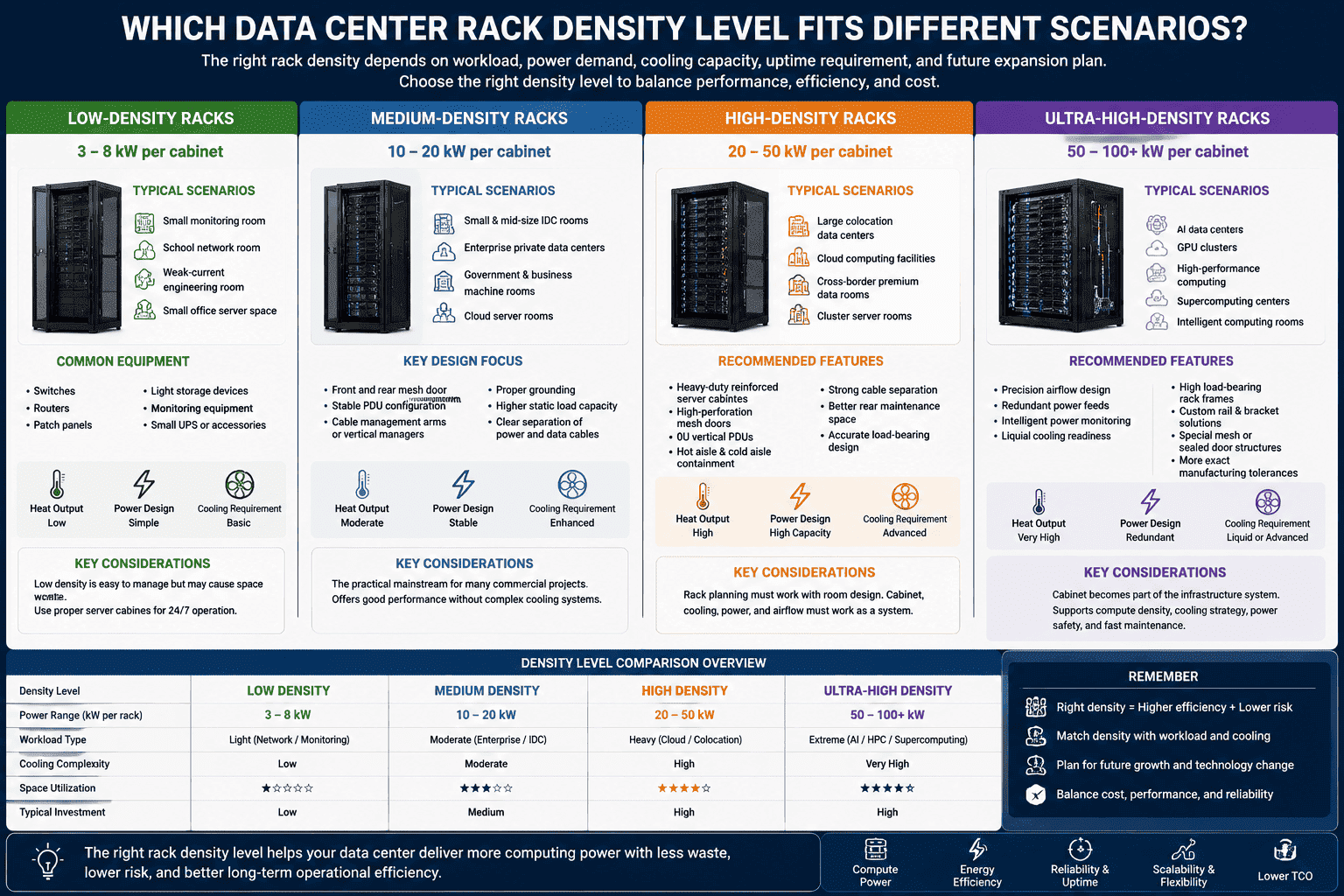
Low-density racks: 3–8 kW per cabinet
Low-density racks are common in small monitoring rooms, school network rooms, weak-current engineering rooms, and small office server spaces. These cabinets often hold:
- Switches
- Routers
- Patch panels
- Light storage devices
- Monitoring equipment
- Small UPS or accessories
The heat output is usually lower. The power design is simpler. The cabinet does not always need advanced airflow accessories. Still, I recommend using a proper server cabinet instead of a light-duty enclosure if the equipment must run 24/7.
Low density has one common problem: space waste. A room may have many racks with low equipment load. The facility pays for floor space, cooling, and cable routes without using much compute capacity. For small projects, this may be acceptable. For commercial facilities, it becomes expensive.
Medium-density racks: 10–20 kW per cabinet
Medium density is common in small and mid-size IDC rooms, enterprise private data centers, government and business machine rooms, and cloud server rooms. These racks can hold multiple rack-mounted servers and operate continuously.
At this level, I focus on:
- Front and rear mesh door ventilation
- Stable PDU configuration
- Cable management arms or vertical cable managers
- Proper grounding
- Higher static load capacity
- Clear separation of power and data cables
Medium-density racks are often the practical mainstream for many commercial projects. They offer enough computing power without moving directly into complex high-density cooling systems.
High-density racks: 20–50 kW per cabinet
High-density racks fit large colocation data centers, cloud computing facilities, cross-border premium data rooms, and cluster server rooms. These cabinets support intensive equipment deployment. The power draw increases. Heat output becomes serious. Current fluctuation may also increase.
For this range, I usually recommend:
- Heavy-duty reinforced server cabinets
- High-perforation mesh doors
- 0U vertical PDUs
- Hot aisle and cold aisle containment9
- Strong cable separation
- Better rear maintenance space
- Accurate load-bearing design
High-density rack planning must involve the room design. A strong cabinet cannot solve weak cooling. A powerful cooling system cannot solve blocked airflow inside the cabinet. The whole chain must work together.
Ultra-high-density racks: 50–100 kW per cabinet
Ultra-high density is mainly used for AI data centers, GPU clusters, high-performance computing, supercomputing centers, and intelligent computing rooms. These facilities use high-performance GPU servers, and their power and heat rise dramatically.
At this stage, standard assumptions often fail. I look for:
- Precision airflow design
- Redundant power feeds
- Intelligent power monitoring
- Liquid cooling readiness
- High load-bearing rack frames
- Custom rail and bracket solutions
- Special mesh door or sealed door structures
- More exact manufacturing tolerances
AI workloads are pushing rack design into a new era. The cabinet is no longer a passive frame. It becomes part of the infrastructure system. It must support compute density, cooling strategy, power safety, and fast maintenance.
How Should Cabinets Be Designed for High Data Center Rack Density?
High density exposes every weak point in a cabinet. A thin frame, poor mesh door, bad cable path, or weak PDU layout may not matter in a light-duty room. In a high-density environment, those weaknesses can cause heat buildup, service delays, or equipment risk.
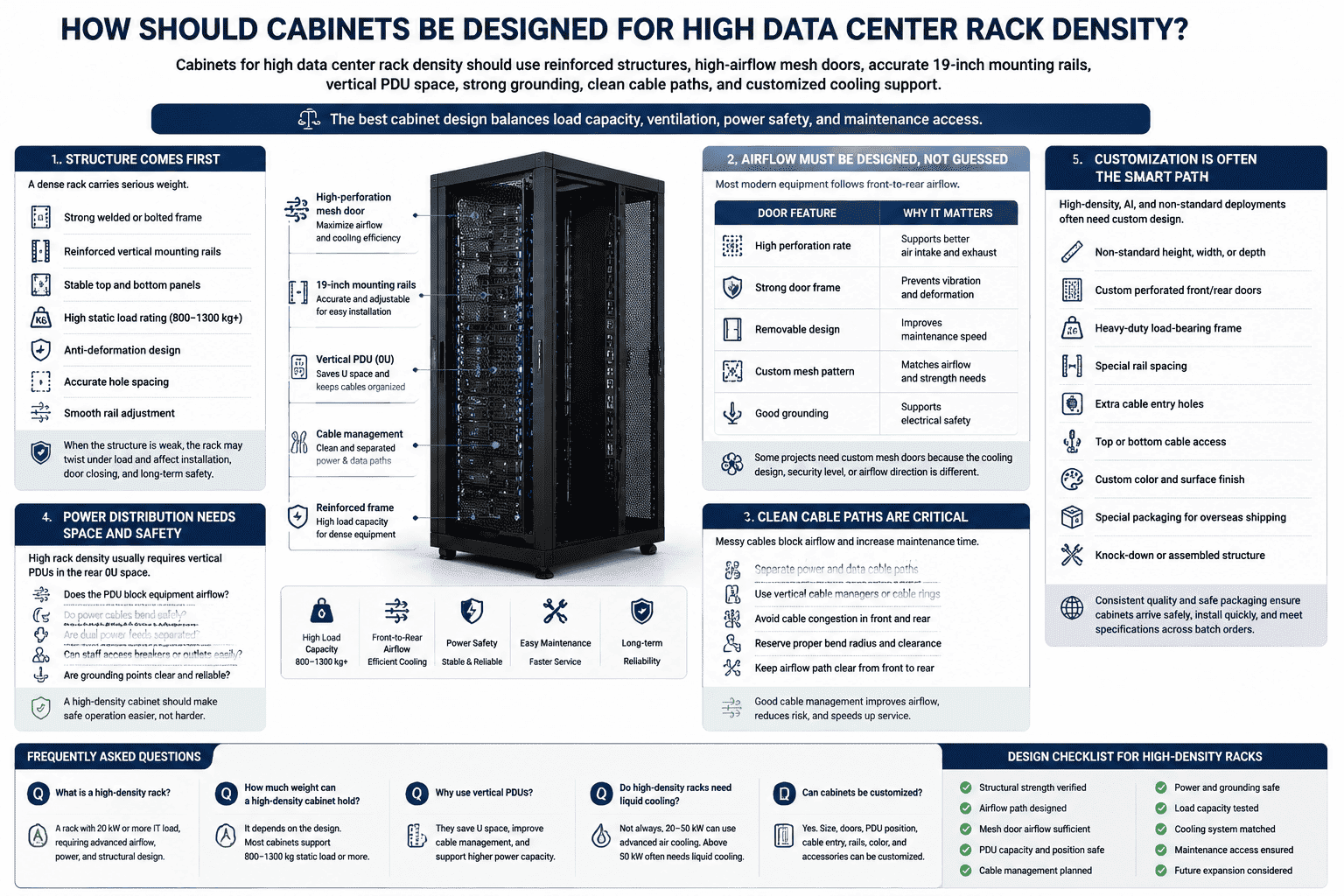
Cabinets for high data center rack density should use reinforced structures, high-airflow mesh doors, accurate 19-inch mounting rails, vertical PDU space, strong grounding, clean cable paths, and customized cooling support. The best cabinet design balances load capacity, ventilation, power safety, and maintenance access.
Structure comes first
A dense rack carries serious weight. Servers, GPU systems, storage arrays, rails, PDUs, and cables all add load. I prefer a reinforced frame when the cabinet is used for high-density or ultra-high-density deployment.
Key structural points include:
- Strong welded or bolted frame
- Reinforced vertical mounting rails
- Stable top and bottom panels
- High static load rating
- Anti-deformation design
- Accurate hole spacing
- Smooth rail adjustment
When the structure is weak, the rack may twist slightly under load. That small movement can affect equipment installation, door closing, and long-term safety.
Airflow must be designed, not guessed
High-density racks need a clean airflow path. Most modern equipment follows front-to-rear airflow.10 The front door must allow enough cold air to enter. The rear door must allow hot air to leave without pressure buildup.
For mesh doors, I care about:
| Door feature | Why it matters |
|---|---|
| High perforation rate | Supports better air intake and exhaust |
| Strong door frame | Prevents vibration and deformation |
| Removable design | Improves maintenance speed |
| Custom mesh pattern | Matches airflow and strength needs |
| Good grounding | Supports electrical safety |
Some projects also need custom mesh doors because the cooling design, security level, or airflow direction is different. This is where non-standard cabinet manufacturing becomes valuable.
Power distribution needs space and safety
High rack density usually requires vertical PDUs, often installed in the rear 0U space. This saves U space and keeps power cables organized. However, the cabinet must provide enough rear clearance.
I usually check:
- Whether the PDU blocks equipment airflow
- Whether power cables bend safely
- Whether dual power feeds are separated
- Whether maintenance staff can access breakers or outlets
- Whether grounding points are clear and reliable
A high-density cabinet should make safe operation easier. It should not force technicians to fight with cables every time they replace a server.
Customization is often the smart path
Standard server racks work well for many mainstream projects. However, high-density, AI, and non-standard deployments often need custom design. I have worked on cabinet projects where the customer needed special depth, special mesh doors, reinforced mounting, different PDU positions, or unique cable entry points. These details looked small at first, but they made installation much smoother.
Common custom options include:
- Non-standard height, width, or depth
- Custom perforated front and rear doors
- Heavy-duty load-bearing frame
- Special rail spacing
- Extra cable entry holes
- Top or bottom cable access
- Custom color and surface finish
- Special packaging for overseas shipping
- Knock-down or assembled structure
For global customers, I also think packaging and repeatable production quality matter. A cabinet must arrive safely, install quickly, and match the agreed specifications across batch orders. High density leaves little room for inconsistent manufacturing.
Frequently Asked Questions
What is a good data center rack density?
A good rack density depends on the facility. I consider 3–8 kW low density, 10–20 kW mainstream commercial density, 20–50 kW high density, and 50–100 kW ultra-high density for AI or HPC. The best level is the one your cooling, power, and cabinet structure can support safely.
Is higher rack density always better?
Higher rack density is not always better. It improves space utilization and computing output, but it also increases heat, power demand, structural load, and maintenance complexity. I recommend increasing density only when the cabinet, cooling system, power distribution, and operation team are ready.
How does rack density affect cooling?
Rack density directly affects cooling because almost all IT power becomes heat. A 20 kW rack produces about 20 kW of heat. Higher-density racks need better airflow, hot and cold aisle control, high-perforation doors, blanking panels, and sometimes liquid cooling.
Why are 42U racks common in data centers?
A 42U rack is common because it balances equipment capacity, room height, installation convenience, and maintenance access. It supports standard 19-inch rack-mounted equipment and allows flexible planning for servers, switches, PDUs, cable managers, and airflow accessories.
When should I choose a custom server cabinet?
I choose a custom server cabinet when standard racks cannot meet load, airflow, size, cable, PDU, or installation requirements. Custom cabinets are especially useful for high-density racks, AI GPU servers, non-standard equipment, special mesh doors, and overseas batch projects with strict specifications.
Conclusion
Data center rack density is now a core indicator of data center capability, not just a count of devices inside a cabinet. I evaluate it through kW per rack, U-space usage, cooling demand, power safety, structural strength, and maintenance access. Low-density rooms need simplicity. High-density and AI rooms need precision. If you are planning standard server racks, custom non-standard cabinets, or high-airflow mesh doors for overseas projects, I can help you turn density requirements into manufacturable cabinet solutions.
"19-inch rack", https://en.wikipedia.org/wiki/19-inch_rack. Reference material on 19-inch racks describes the standardized rack format and the use of rack units to specify vertical mounting space, including common full-height configurations such as 42U; this supports the dimensional context but not the prevalence of 42U in every data center. Evidence role: definition; source type: encyclopedia. Supports: The standardized 19-inch rack format and the use of rack units such as 42U to describe vertical rack capacity.. Scope note: Defines the format and contextualizes common use, but does not prove that all or most data centers use 42U racks. ↩
"Rack unit - Wikipedia", https://en.wikipedia.org/wiki/Rack_unit. Technical reference sources define one rack unit, or 1U, as 1.75 inches of vertical mounting height in a standard equipment rack. Evidence role: definition; source type: encyclopedia. Supports: The standard measurement of one rack unit as 1.75 inches.. ↩
"2024 United States Data Center Energy Usage Report", https://eta-publications.lbl.gov/sites/default/files/2024-12/lbnl-2024-united-states-data-center-energy-usage-report_1.pdf. Research and technical guidance on data-center efficiency indicate that higher IT load per unit area can improve space utilization and infrastructure consolidation when matched with appropriate cooling and power systems; the evidence is conditional and does not imply that density alone guarantees efficiency. Evidence role: general_support; source type: research. Supports: Higher density can improve data center space utilization and may support operational efficiency when facility power and cooling are properly designed.. Scope note: Contextual and conditional support; benefits depend on facility design and operations. ↩
"Density choices for AI training are increasingly complex", https://journal.uptimeinstitute.com/density-choices-for-ai-training-are-increasingly-complex/. Industry and institutional reporting associates growth in cloud services and AI workloads with increasing rack power densities and more demanding power and cooling requirements; the evidence supports the general trend rather than proving each listed demand driver independently. Evidence role: expert_consensus; source type: institution. Supports: Industry reports link growth in cloud and AI workloads with rising rack power densities and greater pressure on facility design.. Scope note: Contextual support for a broad industry movement, not direct evidence for every demand category named in the article. ↩
"Manage Airflow for Cooling Efficiency - Energy Star", https://www.energystar.gov/products/data_center_equipment/16-more-ways-cut-energy-waste-data-center/manage-airflow-cooling-efficiency. Public data-center efficiency guidance explains that bypass airflow, hot-air recirculation, and unsealed rack openings can degrade cooling performance and create localized thermal problems; this supports the airflow mechanism but only indirectly addresses maintenance difficulty. Evidence role: mechanism; source type: government. Supports: Airflow gaps, recirculation, and blocked exhaust paths can reduce cooling effectiveness and increase localized heat buildup in server racks.. Scope note: Directly supports the thermal mechanism; maintainability is contextual rather than directly proven. ↩
"2024 United States Data Center Energy Usage Report", https://eta-publications.lbl.gov/sites/default/files/2024-12/lbnl-2024-united-states-data-center-energy-usage-report_1.pdf. Engineering treatments of data-center thermal loads explain that electrical power consumed by IT equipment is dissipated predominantly as heat within the room, so IT power draw is a primary input to cooling-load estimation. Evidence role: mechanism; source type: education. Supports: Electrical energy consumed by IT equipment is largely dissipated as heat, forming the basis for data-center cooling-load calculations.. ↩
"Install In-rack or In-row Cooling", https://www.energystar.gov/products/data_center_equipment/16-more-ways-cut-energy-waste-data-center/install-rack-or-row. Data-center thermal-design references treat IT electrical load as approximately equivalent to the heat load that must be removed, so a 20 kW rack is modeled as producing roughly 20 kW of heat. Evidence role: mechanism; source type: education. Supports: For practical data-center cooling calculations, rack electrical power draw is approximately equal to the heat load that cooling systems must remove.. ↩
"Integrated Design Principles | AI Data Center Energy ...", https://www.ashrae.org/technical-resources/ai-data-center-framework/integrated-design-principles. Research and technical guidance on high-density AI and HPC facilities describe liquid cooling and advanced air-management methods as responses to rack loads in the tens of kilowatts and above; the evidence supports the need as conditional on facility design, server architecture, and allowable temperatures. Evidence role: expert_consensus; source type: research. Supports: Very high rack power densities in AI or HPC environments often require liquid cooling or other advanced cooling approaches beyond conventional room air cooling.. Scope note: Contextual support; not every 50–100 kW rack will use the same cooling technology. ↩
"Move to a Hot Aisle/Cold Aisle Layout", https://www.energystar.gov/products/data_center_equipment/16-more-ways-cut-energy-waste-data-center/move-hot-aislecold-aisle-layout. Government and technical guidance on data-center airflow management identifies hot-aisle and cold-aisle containment as methods for limiting supply/exhaust air mixing and improving cooling control; the sources generally do not assign a single universal rack-kW threshold for their use. Evidence role: expert_consensus; source type: government. Supports: Hot-aisle and cold-aisle containment reduce mixing of supply and exhaust air and are widely used to improve cooling effectiveness in higher-density data centers.. Scope note: Supports containment as a recognized cooling strategy, not the exact density range at which it becomes mandatory. ↩
"Manage Airflow for Cooling Efficiency - Energy Star", https://www.energystar.gov/products/data_center_equipment/16-more-ways-cut-energy-waste-data-center/manage-airflow-cooling-efficiency. Data-center thermal-management guidance commonly assumes front-to-rear airflow for rack-mounted IT equipment and aligns this convention with hot-aisle/cold-aisle layouts; the evidence describes the prevailing design convention and does not exclude equipment with alternative airflow paths. Evidence role: general_support; source type: institution. Supports: Front-to-rear airflow is the dominant airflow pattern assumed in modern rack-based data center cooling layouts.. Scope note: Supports the general convention, while allowing exceptions for specialized equipment. ↩
