
What is a network cabinet?

Loose network devices create heat, dust, cable mess, and service risk. I have seen small rooms become hard to manage fast.
A network cabinet is a standard metal rack enclosure used to install, protect, organize, power, and cool network equipment1. It usually uses a 19-inch mounting width and U-based height2. It can be wall-mounted or floor-standing for server rooms, data centers, telecom rooms, and security systems.
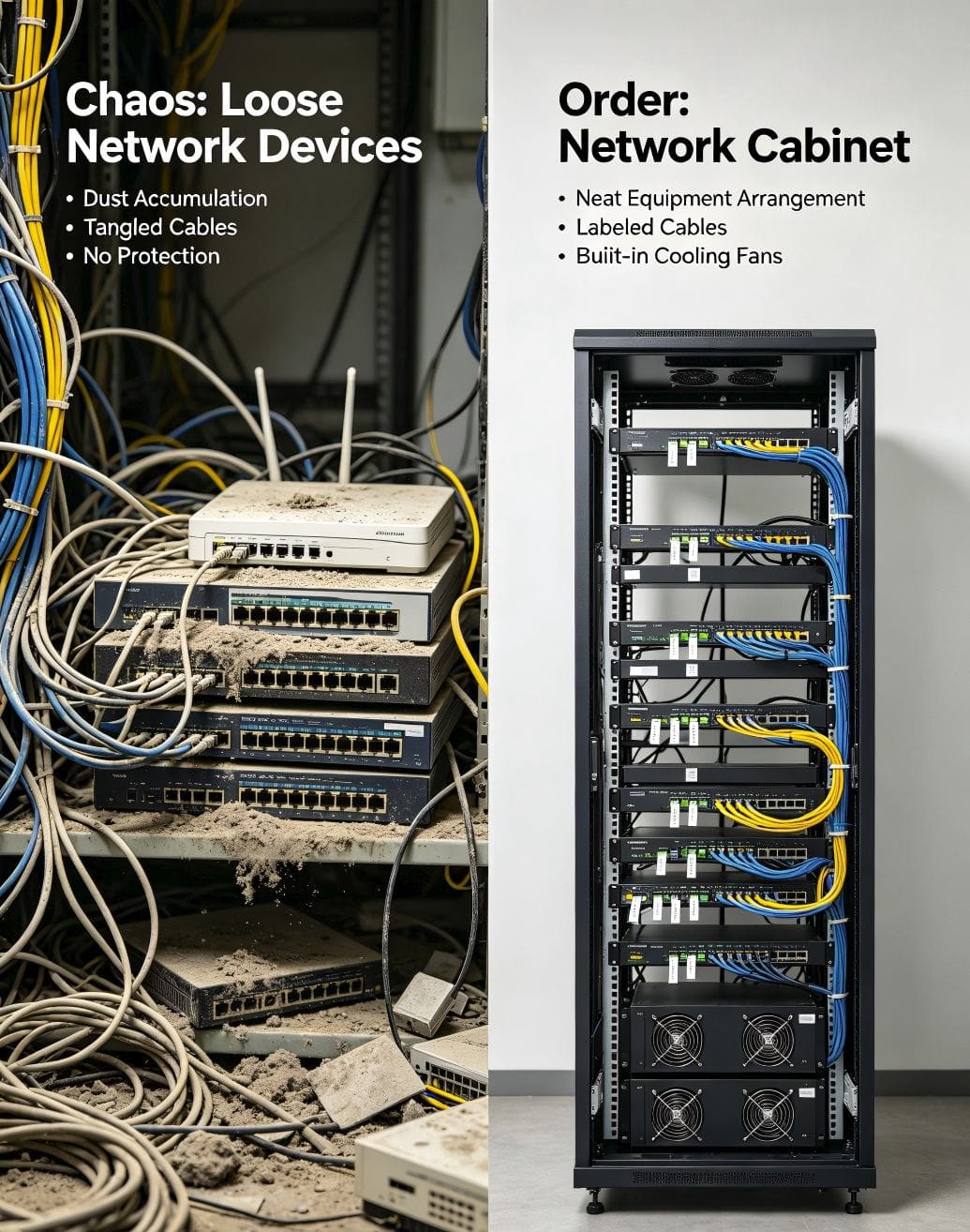
I often describe a network cabinet as the “home” of network equipment. It gives each device a fixed position. It keeps cables in order. It helps air move through the equipment.3 It also protects the whole system from daily damage. I manufacture network cabinets, server cabinets, wall-mounted cabinets, and related sheet metal products, so I see one thing again and again. A good cabinet does not only hold equipment. It also saves time during installation, repair, and future upgrades. I will explain the main parts, uses, sizes, materials, and accessories in a simple way, because one wrong cabinet choice can affect the whole project.
What equipment does a network cabinet hold?
Network equipment often looks simple at first. I have seen one switch become ten devices, and I have seen cables block every repair point.
A network cabinet holds standard network devices such as switches, routers, NVRs, patch panels, PDU power strips, shelves, cable managers, cooling fans, and other 19-inch rack-mounted equipment.
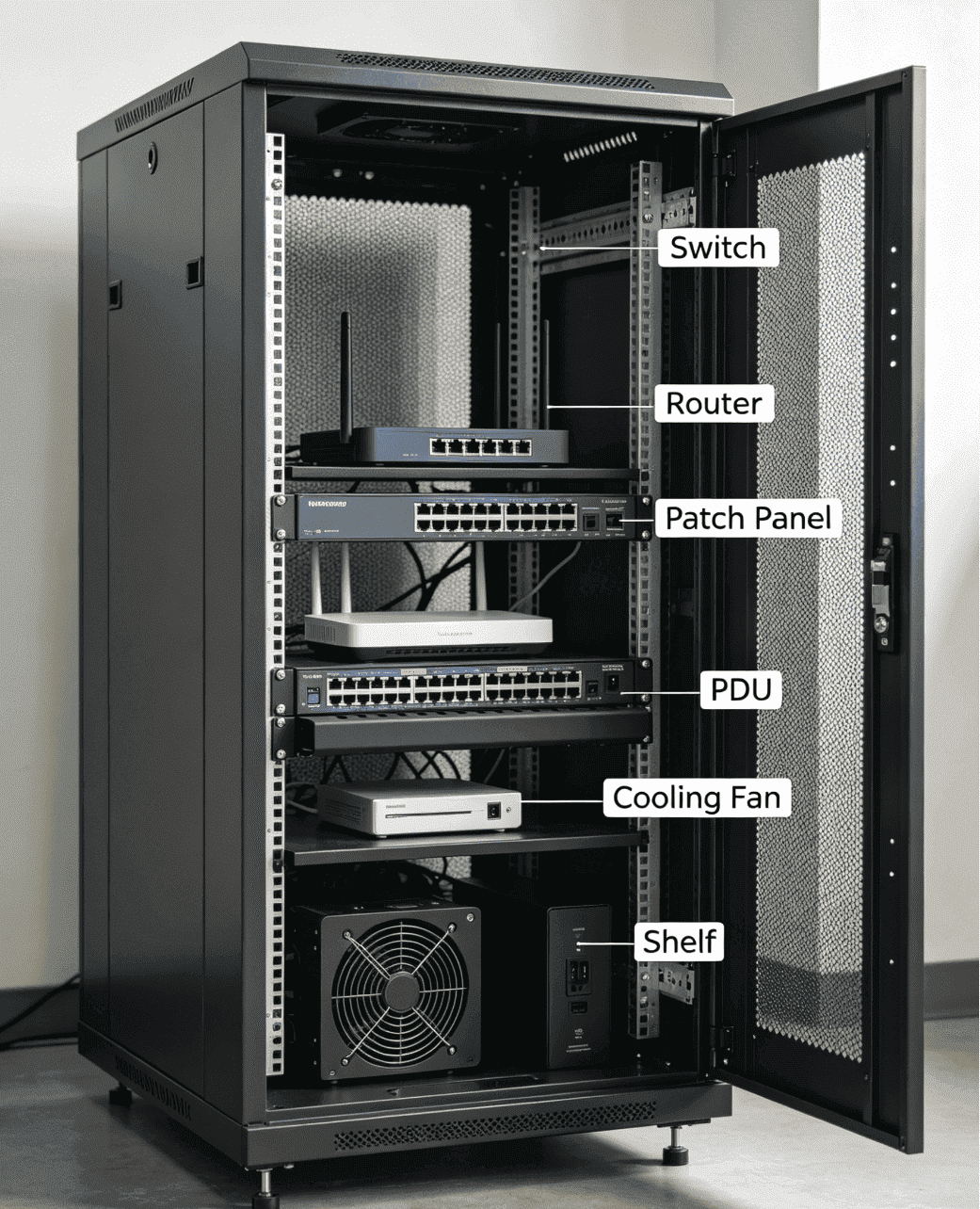
Common devices inside the cabinet
I usually see network cabinets used for equipment that needs a fixed place and safe wiring. A switch connects network lines. A router controls network access. A hard disk video recorder stores security camera video. A patch panel helps installers manage network cables.4 A PDU supplies power to devices. A fan system removes hot air from the cabinet. A shelf supports non-rack-mounted devices, such as small modems, mini PCs, or special control boxes.
| Equipment | Main function | Why I place it in a cabinet |
|---|---|---|
| Switch | Connects network devices | I keep it fixed and easy to service |
| Router | Manages network access | I protect it from dust and touch |
| NVR | Stores camera video | I keep cables and power stable |
| Patch panel | Organizes cables | I make line testing easier |
| PDU | Supplies power | I reduce loose power plugs |
| Cooling fan | Moves hot air | I lower heat risk |
| Shelf | Holds small devices | I support non-standard equipment |
Why fixed installation matters
I treat fixed installation as a basic safety rule. When equipment lies on a desk or floor, cables get pulled. Power plugs loosen. Dust builds up faster.5 Service staff also lose time when they cannot trace a line. A cabinet solves these small issues before they become large failures. I like cabinets with adjustable mounting rails because different projects need different depth positions. I also prefer clear cable paths. A clean path helps airflow and reduces pressure on connectors. In my production work, I often customize punching, shelves, and cable entry positions because each project has a different device mix.
Why does a network cabinet use 19-inch width and U height?
Wrong cabinet size wastes space and blocks equipment installation. I have seen buyers measure the outer cabinet and forget the mounting standard.
A standard network cabinet usually uses a 19-inch installation width. Its height is measured in U. One U equals 44.45 mm6. This standard helps devices from different brands fit the same cabinet.7
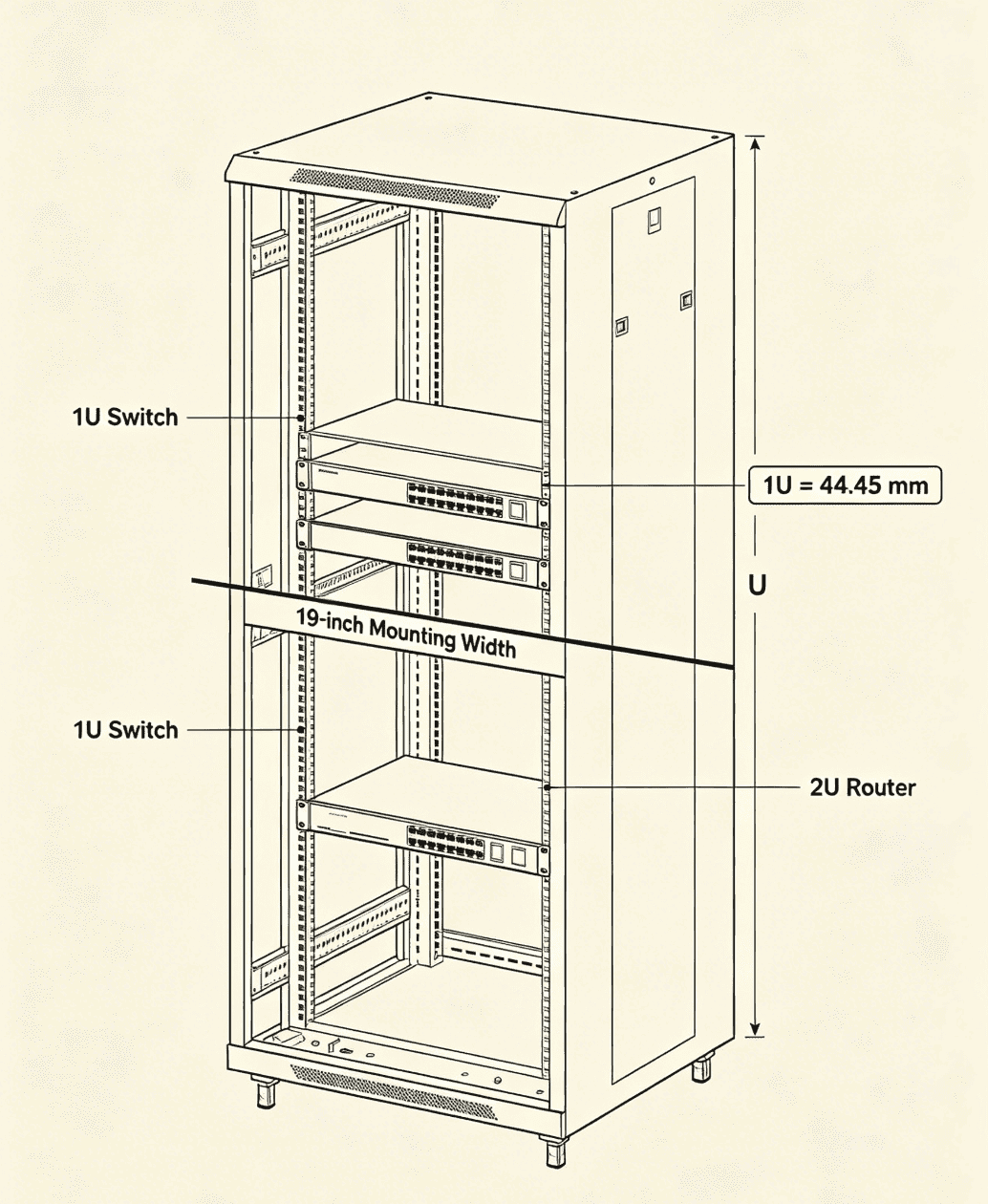
The meaning of 19-inch mounting width
I explain the 19-inch standard in a direct way. The cabinet body may be wider than 19 inches, but the equipment mounting width inside is 19 inches. Most switches, patch panels, PDU brackets, and rack devices follow this standard. This shared standard makes project planning much easier. I can supply a cabinet, and the customer can install equipment from many brands without redesigning the rack structure.
| Size term | What it means | My practical note |
|---|---|---|
| 19-inch width | Standard mounting width | I use it for most network devices |
| U height | Vertical rack unit | I use it to calculate capacity |
| 1U | 44.45 mm | I leave space for airflow if needed |
| Cabinet depth | Front-to-back space | I check device depth and cable bend |
| Outer width | Total cabinet width | I check room space and door access |
How I use U height in real projects
I use U height to plan device quantity. A 1U switch takes one unit. A 2U device takes two units. A 4U NVR takes four units. I also keep some spare U space for future expansion. I do not like filling every U from top to bottom. Heat needs room to move. Cables also need room to turn. In small weak-current rooms, I may suggest a wall-mounted cabinet with 6U, 9U, or 12U. In larger machine rooms, I may suggest a floor-standing cabinet with 18U, 22U, 32U, 42U, or more. I also check depth. A cabinet can have enough U height but still fail if the device is too deep. This is why I always ask for equipment dimensions before production, especially for non-standard projects.
Where is a network cabinet used?
A network system can fail in many places, not only in data centers. I have seen small monitoring rooms need the same order as large rooms.
A network cabinet is used in machine rooms, weak-current rooms, data centers, enterprise server rooms, telecom rooms, community monitoring rooms, buildings, campuses, hospitals, factories, and power or energy facilities.
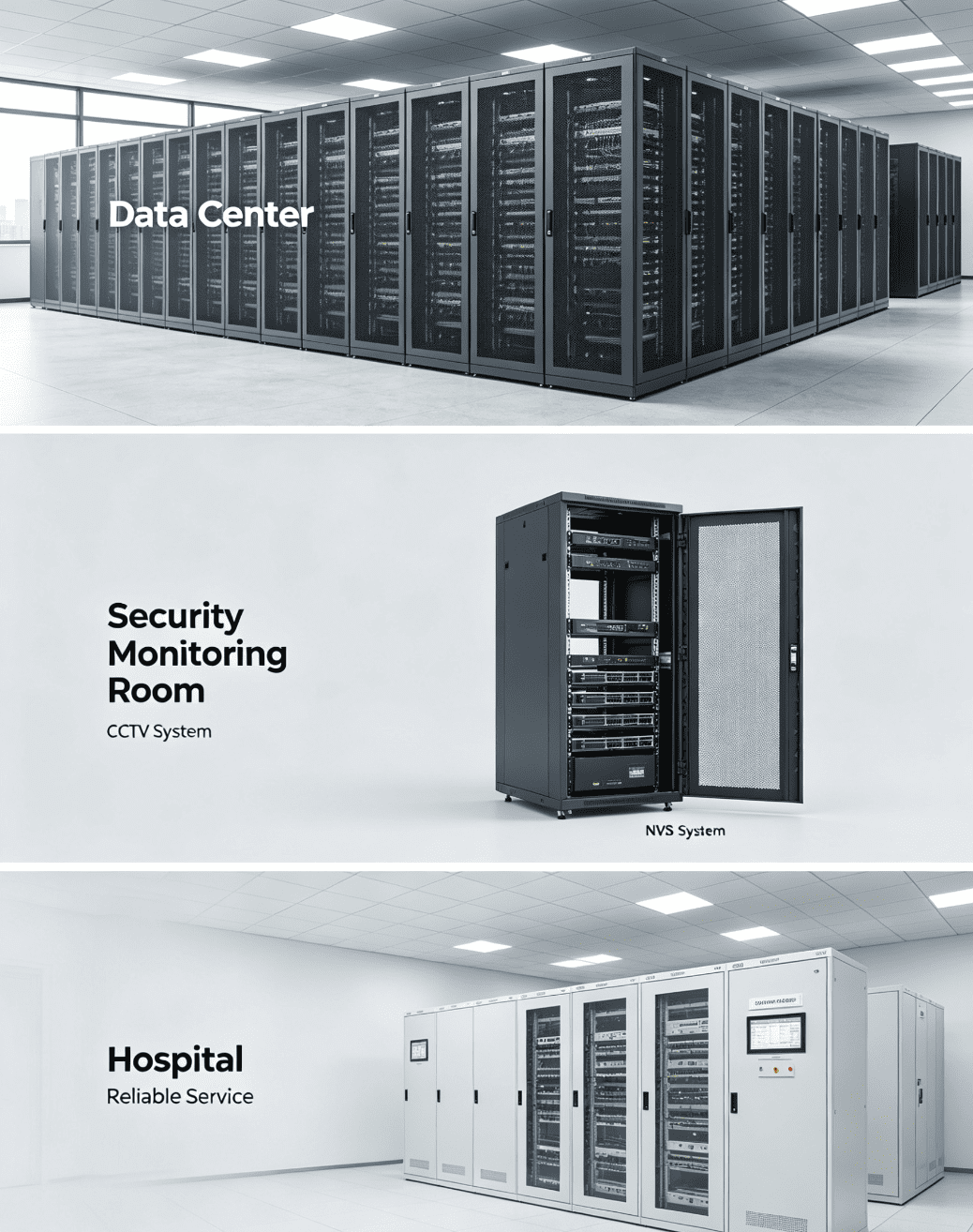
Common application places
I see network cabinets in many environments. Each place has a different need. A data center cares about load capacity, airflow, and cable routing. A security monitoring room cares about NVRs, camera lines, and easy maintenance. A hospital cares about stable operation and clean installation. A campus cares about many cable points across buildings. A factory may need stronger structure and better dust control. A power or energy site may need anti-rust treatment or outdoor protection.
| Place | Main concern | Cabinet focus |
|---|---|---|
| Data center | Heat and load | I focus on mesh doors and strong frame |
| Weak-current room | Cable order | I focus on patch panels and cable managers |
| Enterprise room | Stable network | I focus on simple maintenance |
| Monitoring room | Video storage | I focus on shelves and power layout |
| Hospital | Reliable service | I focus on clean wiring and safety |
| Campus | Many network points | I focus on clear labeling space |
| Factory | Dust and impact | I focus on stronger metal structure |
Why the environment changes the design
I do not choose one cabinet for every place. I first think about the room. I check if the room is dry. I check if the cabinet needs to stand on the floor or hang on the wall. I check if the door needs glass for viewing or mesh for airflow. I check if cables enter from the top or bottom. I also check if the cabinet needs wheels for movement or feet for fixed support. In overseas projects, I often see different building habits. Some customers need small-batch custom cabinets for old buildings. Some customers need special punching because the cable path already exists. This is why flexible customization matters. A cabinet should match the site, not force the site to match the cabinet.
What materials and processes make a network cabinet reliable?
A weak cabinet may look fine on the first day. I have seen thin frames bend after heavy devices were installed.
A reliable network cabinet is usually made from quality cold-rolled steel sheets. The main processes include cutting, CNC bending, welding, surface treatment, powder coating, and final assembly with strict inspection.
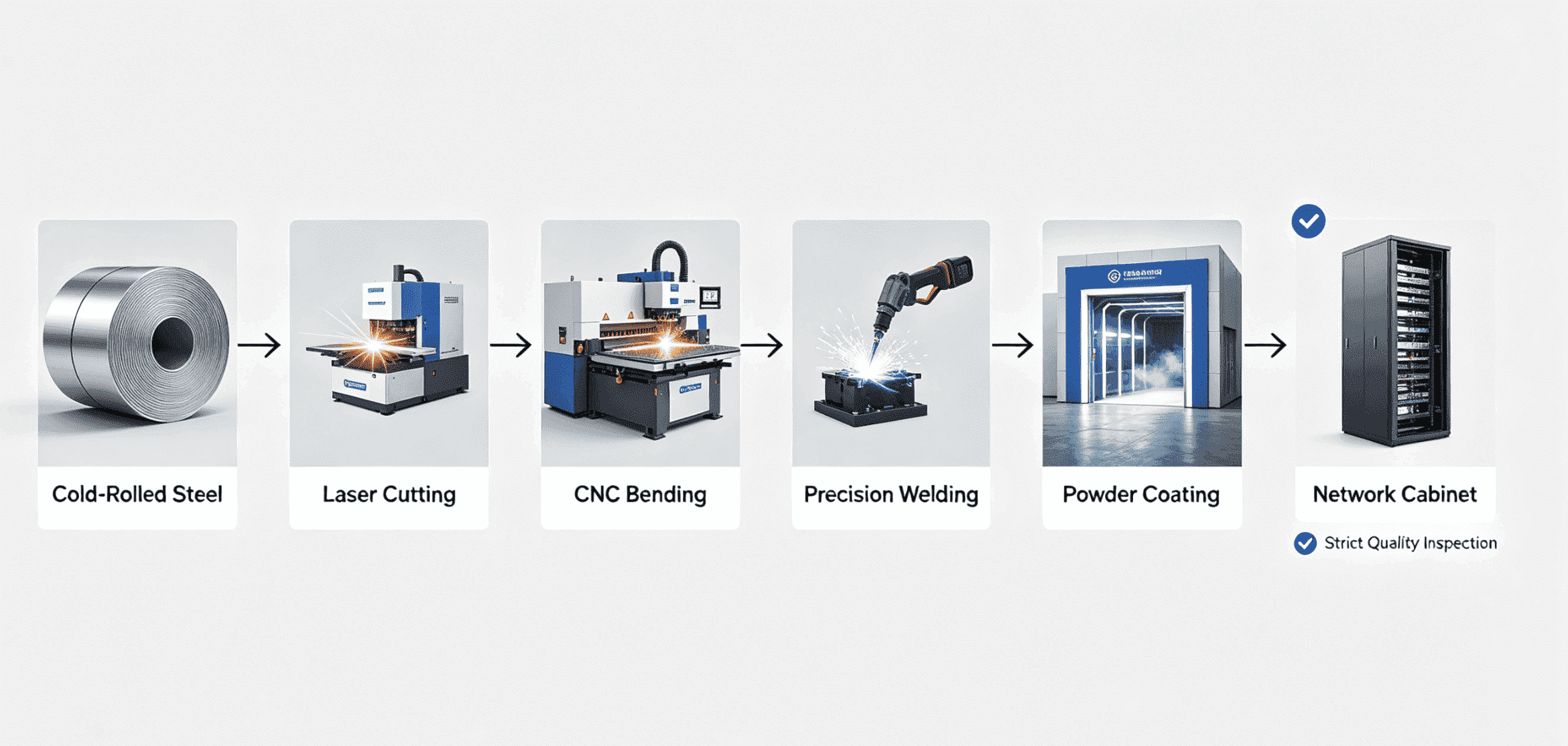
Main materials I use
I usually use high-quality cold-rolled steel for indoor network cabinets. It has a smooth surface and good forming performance.8 I also use galvanized steel or stainless steel when the project needs better anti-rust performance9. For outdoor cabinets, I pay more attention to waterproof design, sealing, coating, and drainage. Good material is the base of stable quality. If the raw material is poor, the cabinet may deform, rust, or fail load tests faster.
| Material | Common use | My reason for choosing it |
|---|---|---|
| Cold-rolled steel | Indoor cabinets | I get good shape and stable strength |
| Galvanized steel | Anti-rust needs | I improve corrosion resistance |
| Stainless steel | harsh sites | I improve long-term durability |
| Powder coating | Surface finish | I protect the cabinet and improve appearance |
| Sealing parts | Outdoor design | I reduce water and dust entry |
How the production process affects quality
I believe production control decides the real quality of the cabinet. Laser cutting gives accurate openings. CNC bending keeps the frame size stable. Precision welding gives the cabinet strength. Powder coating protects the surface and gives a clean finish.10 Assembly decides if the door, side panels, rails, locks, and fans work well together. I also check dimensions, welding points, coating thickness, load capacity, and protection needs. My factory follows ISO9001 quality control, so I do not treat inspection as a final quick look. I treat it as a full-process habit. I check raw materials first. I check semi-finished parts during production. I check finished cabinets before delivery. This process helps me keep quality stable, even for small orders and custom sizes.
What parts form a complete network cabinet?
An incomplete cabinet can cause trouble during installation. I have seen projects delayed because one door, rail, or cable hole was missing.
A complete network cabinet usually includes a frame, front door, rear door, left and right side panels, top cover, bottom cover, mounting rails, cable entry holes, fans, wheels, and locks.
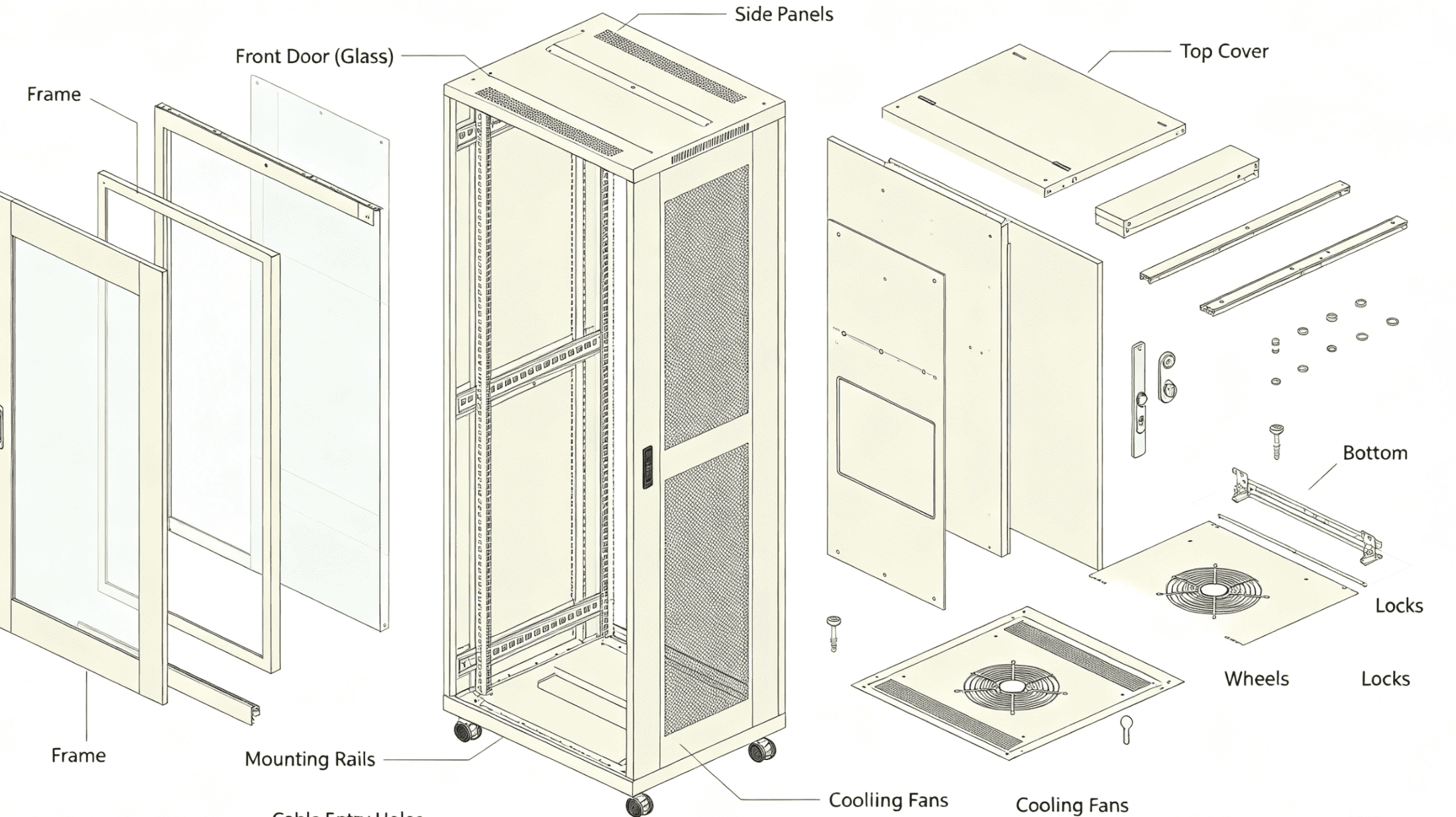
Main cabinet structure
I see the cabinet frame as the skeleton. The frame supports the equipment and keeps the cabinet square. The front door protects the front side and controls access. The rear door helps maintenance and ventilation. The left and right side panels are often removable sealed steel panels. The top cover and bottom cover protect the cabinet and leave cable entry points. The four vertical mounting rails have U holes for equipment installation. The bottom often has four casters so the cabinet can move during installation.
| Part | Function | My design note |
|---|---|---|
| Frame | Main support | I make it strong and accurate |
| Front door | Access and protection | I offer glass or mesh options |
| Rear door | Service and airflow | I match it to heat needs |
| Side panels | Protection and access | I make them removable when needed |
| Top cover | Cable entry and fan position | I reserve holes based on project |
| Bottom cover | Cable entry and support | I keep cable paths clean |
| Mounting rails | Equipment fixing | I use U holes for adjustment |
| Casters | Movement | I use them for easy placement |
Door and panel choices
I often ask one question before I suggest a door. Does the customer need to see the equipment, or does the customer need more airflow? A glass door is useful when the operator wants to view indicator lights without opening the cabinet. A mesh door is better when heat removal is more important. A steel door gives better sealing and stronger protection. For side panels, I often use removable steel panels. This makes wiring and repair easier. For the top and bottom, I leave cable holes because different rooms route cables in different ways. I can also add brushes, covers, or special punching. These small details decide if the installer feels the cabinet is easy or painful to use.
Which accessories improve a network cabinet?
A cabinet without accessories is only a metal box. I have seen good accessories turn a messy rack into a clean system.
Useful network cabinet accessories include shelves, PDU power strips, cooling fans, cable managers, cable lacing bars, blanking panels, mounting screws, grounding kits, locks, and brush cable entries.
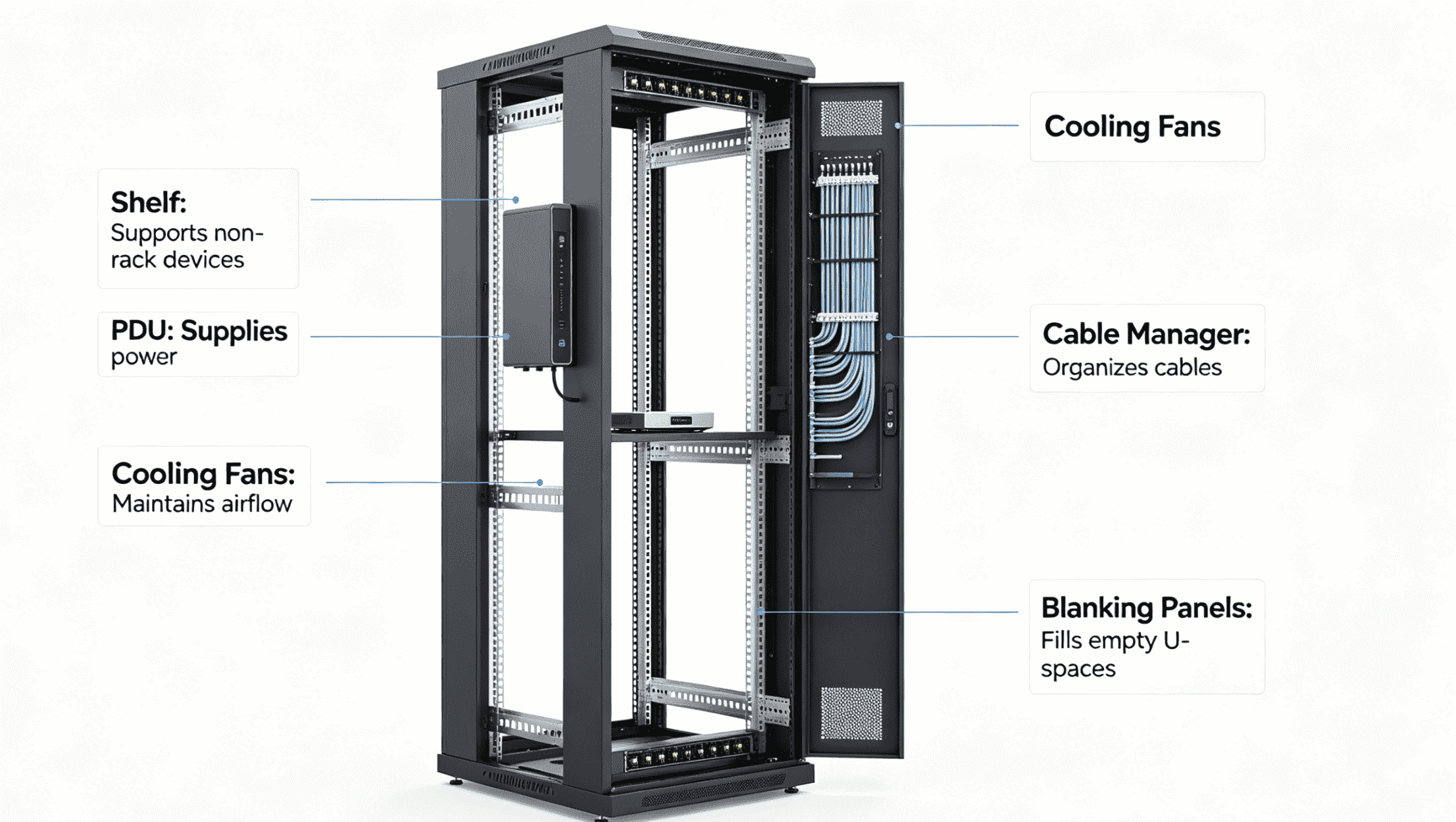
Important accessories I often provide
I use shelves for devices that cannot be mounted directly on rails. I use PDUs to distribute power in a safer and cleaner way. I use cooling fans to move hot air out from the cabinet. I use cable managers to route network cables. I use cable lacing bars to hold cable bundles at the back. I use blanking panels to cover empty U spaces and improve airflow control11. I use screws and cage nuts for equipment mounting. I use grounding parts when the project requires better electrical safety12.
| Accessory | Use | My practical advice |
|---|---|---|
| Shelf | Supports non-rack devices | I check weight before choosing |
| PDU | Supplies power | I match plug type and voltage |
| Fan | Removes heat | I choose quantity by heat load |
| Cable manager | Guides cables | I prevent cable bending damage |
| Lacing bar | Fixes cable bundles | I keep rear wiring neat |
| Blanking panel | Covers empty space | I improve airflow and appearance |
| Grounding kit | Improves safety | I use it for stable protection |
Why accessories should be planned early
I prefer to plan accessories before production, not after delivery. This saves cost and time. If the cabinet needs fans, I reserve fan holes and power positions. If the cabinet needs many cables, I add cable managers and cable entry openings. If the cabinet needs heavy equipment, I choose stronger shelves and reinforced rails. If the cabinet needs a clean front view, I use blanking panels. If the project is overseas, I ask about plug standards, voltage, cable direction, and room layout. These questions look small, but they stop many later problems. In my experience, a cabinet works best when the frame, doors, rails, and accessories are designed together. A complete solution is better than buying separate parts in a hurry.
How do I choose between a wall-mounted and a floor-standing network cabinet?
A cabinet can be the right type or the wrong type before any device is installed. I have seen heavy equipment placed in small wall cabinets.
I choose a wall-mounted network cabinet for small systems and limited floor space. I choose a floor-standing cabinet for more devices, heavier loads, better expansion, and easier cable management.
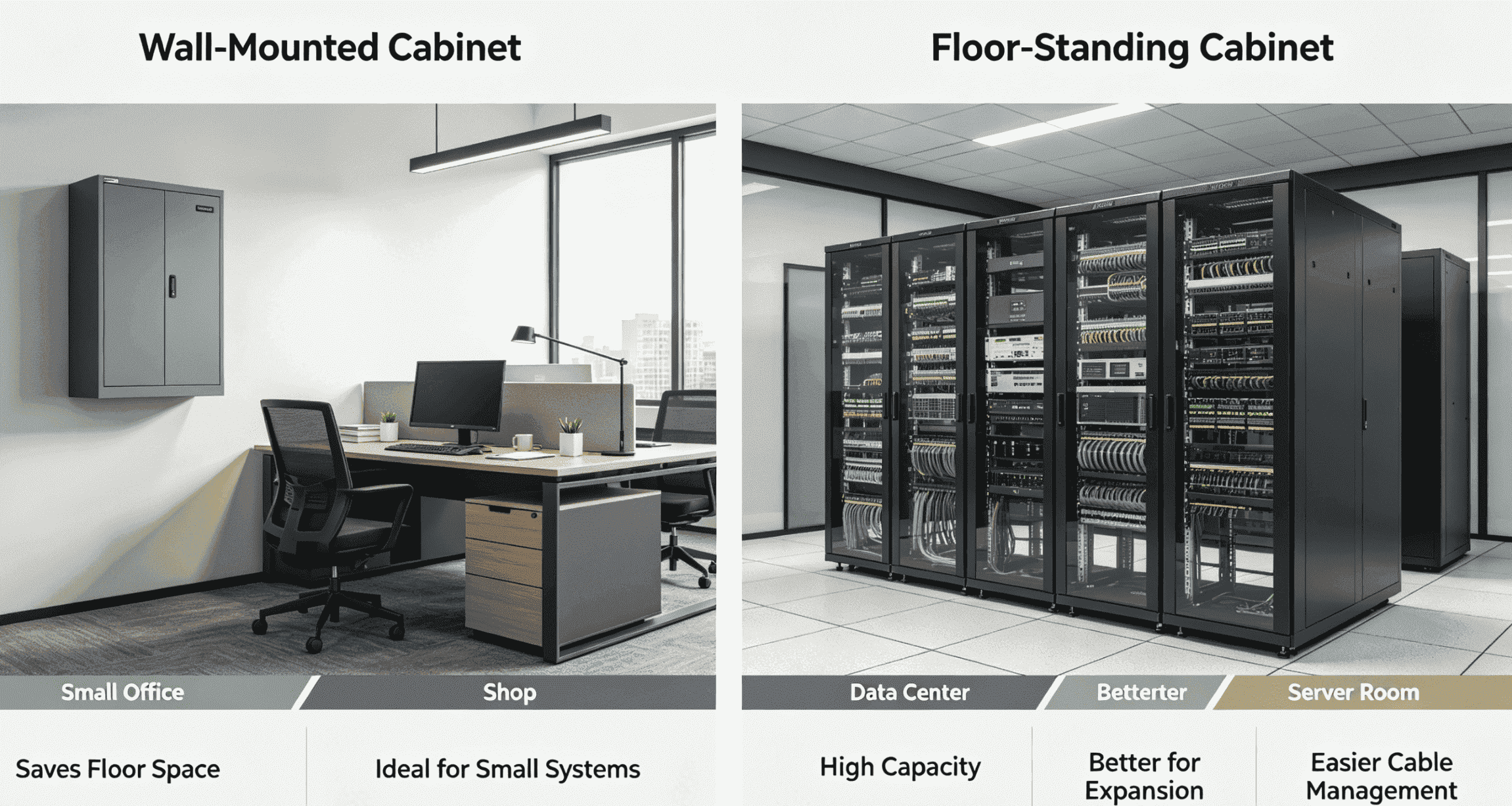
Basic selection rules
I use wall-mounted cabinets for small offices, shops, monitoring points, and weak-current corners. These cabinets save floor space. They are good for small switches, patch panels, routers, and light NVR systems. I use floor-standing cabinets for larger machine rooms, data centers, telecom rooms, and enterprise networks. They provide more height, more depth, stronger load capacity, and better service access.
| Cabinet type | Best use | My main concern |
|---|---|---|
| Wall-mounted cabinet | Small systems | I check wall strength and device weight |
| Floor-standing cabinet | Larger systems | I check load, depth, and airflow |
| Open frame | Clean indoor room | I check dust and access control |
| Outdoor cabinet | Outdoor or harsh sites | I check waterproof and anti-rust needs |
What I check before I give a recommendation
I first check the device list. I count the U space. I add spare space for future needs. I check device depth and cable bending space. I check total weight. I check heat output. I check whether the room has enough floor space. I also check whether the wall can carry the cabinet weight if the customer wants a wall-mounted type. For outdoor or industrial places, I ask about rain, dust, sunlight, salt air, and temperature. I can customize size, door type, punching, load structure, waterproof design, and anti-rust treatment. This is important because many real projects do not fit a standard catalog model. I support one-piece orders and small batches, so I can help customers test a custom design before large use.
Conclusion
A network cabinet organizes, protects, powers, and cools network equipment. I choose its size, structure, material, and accessories based on the real site.
"19-inch rack - Wikipedia", https://en.wikipedia.org/wiki/19-inch_rack. The cited reference defines 19-inch rack enclosures as standardized structures used to mount electronic, telecommunications, and computer-network equipment, supporting the article's general definition of a network cabinet. Evidence role: definition; source type: encyclopedia. Supports: A neutral reference should define rack cabinets or 19-inch racks as standardized enclosures for mounting telecommunications, networking, and computing equipment.. ↩
"19-inch rack - Wikipedia", https://en.wikipedia.org/wiki/19-inch_rack. The EIA/ECA-310 and IEC 60297 rack standards define the dimensional conventions for 19-inch equipment mounting and rack-unit spacing, supporting the stated cabinet sizing convention. Evidence role: definition; source type: institution. Supports: A standards or institutional source should document the 19-inch rack format and use of rack units for vertical spacing.. ↩
"Thermal Guidelines and Temperature Measurements in Data ...", https://datacenters.lbl.gov/sites/default/files/FINAL%20Thermal%20Guidelines%20and%20Temp%20Measurements%209-15-2020.pdf. ASHRAE thermal guidance for data-processing environments identifies rack airflow paths, perforated enclosures, and recirculation control as factors in cooling IT equipment, supporting the article's claim that cabinet design can assist airflow. Evidence role: mechanism; source type: institution. Supports: A thermal-management source should explain that rack layout, perforated doors, and airflow paths affect cooling of IT equipment.. Scope note: The source supports the general airflow mechanism, while actual cooling performance depends on room HVAC design, equipment heat load, and cabinet configuration. ↩
"What is a Patch Panel? (cable management) - YouTube",
. Educational cabling references describe patch panels as termination points that organize network cable runs and provide structured connection points, supporting the article's statement about cable management. Evidence role: definition; source type: education. Supports: An educational cabling source should define patch panels as termination and organization points for network cables.. ↩"[PDF] Gaseous and Particulate Contamination Guidelines for Data Centers", https://datacenters.lbl.gov/sites/default/files/ASHRAE_Contamination_Whitepaper_30_July_2009.pdf. ASHRAE guidance on data-center contamination identifies airborne particulate matter as a reliability concern for information-technology equipment, supporting the article's treatment of dust control as an operational issue. Evidence role: mechanism; source type: institution. Supports: A data-center environmental source should identify dust or particulate contamination as a risk factor for IT equipment reliability.. Scope note: The source supports dust as a general equipment-risk factor, but it may not directly compare dust accumulation on floor-placed equipment versus cabinet-mounted equipment. ↩
"Rack unit - Wikipedia", https://en.wikipedia.org/wiki/Rack_unit. A rack unit is defined as 1.75 inches, equivalent to 44.45 millimeters, supporting the article's stated conversion for U height. Evidence role: definition; source type: encyclopedia. Supports: A neutral reference should confirm that 1U is 1.75 inches, or 44.45 millimeters.. ↩
"19-inch rack - Wikipedia", https://en.wikipedia.org/wiki/19-inch_rack. The 19-inch rack standard specifies common mounting dimensions for rack equipment and enclosures, supporting the claim that compliant devices from different manufacturers can be installed in the same rack system. Evidence role: mechanism; source type: institution. Supports: A standards source should show that common rack dimensions allow compliant equipment and enclosures to be mechanically compatible.. Scope note: The standard supports dimensional compatibility, but it does not guarantee that every device will fit when depth, airflow, cabling, or weight requirements differ. ↩
"Effect of Strain Rate on the Formability Prediction of Cold-Rolled ...", https://pmc.ncbi.nlm.nih.gov/articles/PMC12786505/. Materials-engineering references commonly note that cold-rolled steel has a smoother surface finish and improved dimensional control, with grades available for forming applications, supporting the article's material description. Evidence role: general_support; source type: education. Supports: A materials-engineering source should describe cold-rolled steel as having improved surface finish and dimensional/forming qualities compared with hot-rolled material.. Scope note: The source supports typical cold-rolled steel properties; exact forming performance depends on steel grade, thickness, and heat treatment. ↩
"Revealing the Corrosion Resistance of 316 L Stainless Steel by an ...", https://pmc.ncbi.nlm.nih.gov/articles/PMC9920300/. Materials references explain that galvanized steel gains corrosion protection from a zinc coating and stainless steel from chromium-based passivation, supporting the article's statement that these materials are used for improved anti-rust performance. Evidence role: mechanism; source type: education. Supports: A materials source should explain that galvanizing protects steel through zinc coating and that stainless steel resists corrosion through chromium-rich passive films.. Scope note: The source supports the corrosion-resistance mechanisms generally; service life still depends on alloy grade, coating thickness, humidity, pollutants, and installation environment. ↩
"Accelerated Corrosion Tests in Quality Labels for Powder Coatings ...", https://pmc.ncbi.nlm.nih.gov/articles/PMC8585214/. Coatings research describes powder coatings as polymeric barrier finishes that can protect metal substrates from environmental exposure and provide a uniform surface appearance, supporting the article's statement about surface protection and finish. Evidence role: mechanism; source type: paper. Supports: A coating study should show that powder coatings can act as protective barrier layers on metal substrates and provide a durable surface finish.. Scope note: The source supports the general protective function; actual corrosion resistance depends on pretreatment, coating thickness, curing quality, and exposure conditions. ↩
"Blanking Panels and ASHRAE: Data Centre Best Practices - Eziblank", https://www.eziblank.com/the-importance-of-blanking-panels-in-data-centers-ashrae-best-practices/. Data-center cooling research and guidance identify blanking panels as a way to close unused rack spaces and reduce hot-air recirculation or bypass airflow, supporting the article's claim about improved airflow control. Evidence role: mechanism; source type: research. Supports: A data-center cooling source should explain that blanking panels reduce bypass or recirculated airflow through unused rack openings.. Scope note: The source supports rack-level airflow control; the magnitude of improvement depends on aisle containment, equipment layout, fan operation, and room cooling design. ↩
"eTool : Construction - Electrical Incidents - Grounding", http://www.osha.gov/etools/construction/electrical-incidents/grounding. Electrical-safety guidance describes equipment grounding or protective earthing as a means to provide a safe fault-current path and reduce electric-shock hazards, supporting the article's statement that grounding parts are used for electrical safety. Evidence role: expert_consensus; source type: government. Supports: A safety or electrical-code source should state that grounding or protective earthing helps reduce electric-shock risk and supports safe fault-current paths.. Scope note: The source supports grounding principles generally; correct safety performance depends on code-compliant design, installation, bonding continuity, and inspection. ↩
